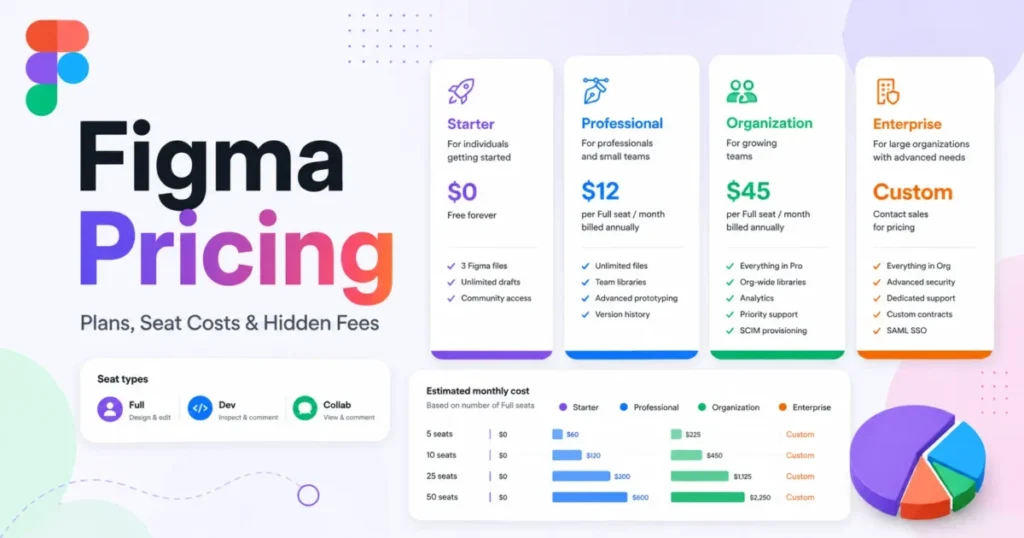
Most diagramming budgets get set from a starting price nobody ends up paying. Published entry rates run from a Figma Collab seat at the low end to Whimsical Pro at the high end.
The deciding factor is not which tool is cheapest. It is which free tier or entry plan collapses first once someone builds a real architecture diagram.
Lucidchart earns the top position for a buyer searching for the best diagramming software without a narrower constraint, because its documented scope covers business flowcharts, UML, ERD, network maps, cloud architecture, and data-driven generation inside one editor. Miro is the stronger pick when the diagram is one artifact inside a workshop, and draw.io wins outright on cost and file ownership.
The sections that follow run from cheapest to most expensive, and each product heading carries its overall rank. If your shortlist is more about shared canvases than notation, our roundup of team collaboration tools covers that adjacent set.
In This Article (18 sections)
Quick Verdict: Best Diagramming Software by Use Case
| Use case | Best pick | Why it fits |
|---|---|---|
| Broadest structured coverage for mixed business and technical work | Lucidchart | One editor spans flowcharts, UML, ERD, network, and cloud architecture with data-driven generation |
| Workshops, voting, and async collaboration on one canvas | Miro | Diagramming sits inside a facilitation surface with timer, voting, and visitor editing |
| Zero license cost with files you keep control of | draw.io | The core editor is free and stores diagrams on your device or your chosen cloud |
| Microsoft-standardized enterprise IT and engineering | Microsoft Visio | Plan 1 covers web diagramming; Plan 2 adds desktop, offline, and BPMN 2.0 |
| Template- and data-generated business diagrams | SmartDraw | Org charts, cloud architecture, ERDs, and UML class diagrams generate from structured data |
| Widest catalog of drawing types on a desktop license | EdrawMax | Vendor-documented coverage of more than 210 drawing types |
| Diagrams that live inside a shared visual workspace | Creately | Unlimited canvases with structured data and AI diagrams, subject to item caps |
| Fast flowcharts, mind maps, and wireframes for product teams | Whimsical | Predictive shapes and automatic mind-map layouts favor speed over notation depth |
| Teams already standardized on Figma | FigJam | A low-cost Collab seat covers FigJam and Figma Slides without a full design seat |
| Simple collaborative diagrams on flat per-user pricing | Cacoo | One published per-user rate, comments, video chat, and paid-tier revision history |
Two of those rows are the ones buyers get wrong most often. Picking Miro or FigJam for architecture work usually means rebuilding the same diagram in a structured editor six months later, and picking Lucidchart or Visio for a brainstorming workshop means paying for notation nobody in the room uses.
What Each Tool Actually Covers
This matrix is an editorial assessment of documented feature scope, not a test result. The category-fit and notation-coverage columns are judgments built from each vendor’s own feature documentation; the free-tier and constraint columns carry verified published limits.
| Tool | Category fit | Technical notation coverage | Free or trial tier | Constraint to check first |
|---|---|---|---|---|
| Lucidchart | Structured editor | Yes: UML, ERD, network, cloud, Mermaid | Free plan | three editable documents, 60 shapes each |
| Miro | Collaboration canvas | Limited: templates and AI diagram generation | Free plan | Only the three most recent boards stay editable |
| draw.io | Structured editor | Yes: large technical shape libraries | Free core editor | No standalone mobile app-store application |
| Microsoft Visio | Structured editor | Yes: UML class, ERD, network, cloud; BPMN 2.0 on Plan 2 | Not verified | Desktop and offline work sits on Plan 2 |
| SmartDraw | Structured editor | Yes: org charts, cloud, ERD, UML class | Not verified | Browser only, with no offline editing |
| EdrawMax | Structured editor | Yes: more than 210 drawing types | Free trial | Trial caps of 60 or 120 shapes and two pages |
| Creately | Hybrid workspace | Yes: premium shape libraries and AI diagrams | Free plan | 45 items per canvas on Free |
| Whimsical | Hybrid, product-team | Limited: flowcharts, mind maps, wireframes | Free plan | three collaborative boards on Free |
| FigJam | Collaboration canvas | Limited: shapes and connectors | Starter plan | three FigJam files on Starter |
| Cacoo | Hybrid | Limited: diagrams, wireframes, workflows | Free plan | 6 sheets, PNG-only export, no version history |
Source: each vendor’s official pricing and feature documentation pages, all checked 2026-08-17 and linked in the individual product sections below.
Lucidchart, draw.io, Visio, SmartDraw, and EdrawMax compete directly with each other. Miro and FigJam compete with each other rather than with that group, and Creately, Whimsical, and Cacoo sit between the two camps, which is why a feature-count comparison across all ten produces a misleading ranking.
How We Evaluated the Best Diagramming Software
These rankings are built from verified official pricing pages, vendor product documentation, help-center articles, and current feature pages. Pricing, plan limits, and platform constraints were checked on 2026-08-17.
Each tool was assessed against the same buyer-focused criteria: diagram-type coverage, technical notation depth, collaboration model, free-tier usefulness, plan gates, platform and offline support, and cost at team scale.
Greater weight was given to factors that change a purchase: the first limit a team hits, which plan opens the capability they came for, billing basis, and seat economics. Brand familiarity, marketing presentation, and affiliate relationships carried no weight in the order.
Where a figure could not be confirmed from a current official page, it was left out rather than estimated, and introductory prices are labeled separately from standard prices.
How We Chose the Shortlist
Ten products qualified. Inclusion required all four of the following, based on official sources:
- An active product with a reachable official domain and current diagramming capability.
- At least one verified official feature or documentation page.
- Verified public pricing, or a verified free status.
- At least one product-specific limitation or plan gate published by the vendor.
Products were excluded when current official evidence could not support price, feature, and limitation together, or when the primary job was something other than diagramming.
Which Type of Diagramming Tool Do You Actually Need?
The ten tools split into two jobs that look similar in a feature grid and behave nothing alike in practice. Getting this branch right removes half the shortlist before pricing enters the conversation.
Structured diagram editors exist to produce a correct artifact. Shape libraries carry notation meaning, connectors stay attached through layout changes, and containers, swimlanes, and layers keep a large diagram readable as it grows.
Lucidchart, draw.io, Microsoft Visio, SmartDraw, and EdrawMax sit here. Lucid documents data-driven org charts, ERDs generated from SQL, UML sequence diagrams from markup, cloud architecture generated from AWS, Azure, and Google Cloud data, and Mermaid support, which is the deepest verified structured-generation set in this group.
Collaboration canvases exist to hold a conversation. The diagram is one object among sticky notes, votes, and comments, and the value is that fifteen people can work on it at once during a live session.
Miro and FigJam sit here. Miro’s own pricing page documents AI diagram generation, templates, more than 250 integrations on Free, and facilitation features such as timer and voting, and Figma lists FigJam diagramming tools alongside AI summarize, generate, and sort functions, voting, and open sessions.
Creately, Whimsical, and Cacoo straddle both. Creately publishes unlimited canvases with premium shape libraries, AI diagrams, and structured data; Whimsical advertises flowcharts with predictive shapes, mind maps with automatic layouts, wireframes, and multiplayer editing; Cacoo is positioned for diagrams, brainstorming, wireframes, and workflows with comments and video chat.
The practical test is what happens to the artifact after the meeting. If the diagram becomes documentation that someone updates in six months, buy a structured editor and add a canvas later.
If the diagram is a thinking aid that gets photographed, summarized, and abandoned, a canvas is the cheaper and faster choice. Teams that need both usually run one of each rather than forcing a single tool to do both jobs badly, and our guide to small business collaboration software covers the canvas half of that stack.
Free and Zero-License Picks
Only one product in this ranking gives you a full technical editor without a license line, and it is not a stripped free tier of a paid suite.
draw.io: Best for zero-license technical diagramming with your own storage

- Best for:
- Developers, solution architects, students, and privacy-conscious teams that want serious technical diagrams without a recurring seat cost.
- Avoid if:
- You need a standalone iOS or Android application from an app store.
- Starting price:
- No licence cost. The core diagramming application is documented as free to use and free to self-deploy.
- Practical tier:
- The free core editor. Nothing about the diagramming itself is paywalled.
- Free plan:
- Yes, and it is the whole product rather than a sample of it.
- First limit that bites:
- Mobile. draw.io publishes no standalone app-store application, and points mobile users to the web app instead.
- Better than Lucidchart:
- No document ceiling, no shape ceiling, and no renewal to defend at budget time.
- Worse than Miro:
- No facilitation layer, so no voting, timer, or visitor-editing controls for a live session.
- Setup difficulty:
- Low for one person, medium for a team, because real-time collaboration depends on which shared storage provider you connect.
- Hidden costs:
- None in the core editor. Separate paid Atlassian integrations exist and were not priced from an official source here, so treat them as a distinct decision.
- Evidence status:
- Confirmed against draw.io’s own About page, its features documentation, and its mobile-install article.
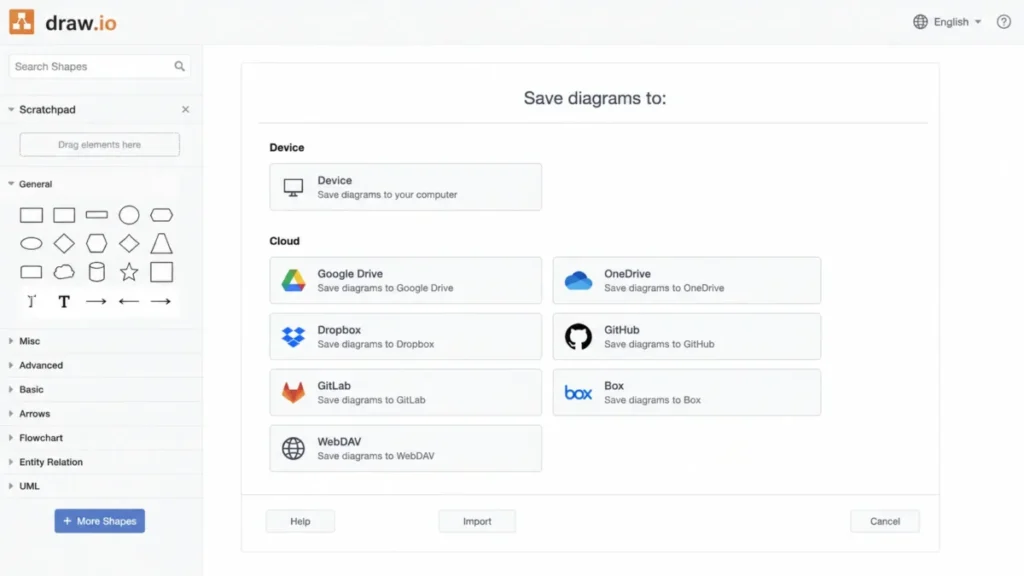
The differentiator is not the price. It is that the free application stores diagrams on your device or in the cloud storage you choose rather than on draw.io’s servers, which removes an entire class of security-review questions before procurement starts.
Feature depth holds up against paid competitors. The documentation covers drag-and-drop shapes, connectors, tables, swimlanes, large technical shape libraries, templates, AI-assisted diagram generation, and real-time collaboration through supported shared-storage providers.
That last clause is the trade-off worth reading twice. Collaboration is inherited from Google Drive, OneDrive, or a similar provider rather than owned by draw.io, so the multiplayer experience is only as good as the storage layer behind it.
| Pros | Cons |
|---|---|
| Core editor is documented as free to use and free to self-deploy, so there is no seat cost to renew | No standalone iOS or Android app-store application |
| Free app keeps diagram files on your device or your chosen cloud, not on vendor servers | Real-time collaboration depends on the shared storage provider you connect |
| Technical shape libraries, tables, swimlanes, and connectors match paid structured editors | No built-in workshop facilitation such as voting or session timers |
| Self-deployable, which suits regulated environments and air-gapped review | Paid Atlassian integrations sit outside the free core and are priced separately |
Source: draw.io’s official about page for the diagramming application, its feature overview documentation, and its mobile install article.
- Verdict:
- Choose draw.io if the diagram must be technically correct, the file must stay under your control, and nobody on the team needs to edit it from a phone.
The Lowest Published Per-Seat Rates
Three products publish the lowest entry rates in this ranking, and each one buys a very different thing. One is a Microsoft-ecosystem licence, one is a workspace subscription, and one is a seat type inside a design platform.
Microsoft Visio: Best for Microsoft-standardized enterprise diagramming
- Best for:
- Enterprise IT, architecture, operations, and process teams already standardized on Microsoft 365 and expected to produce diagrams in a house format.
- Avoid if:
- You need desktop, offline, BPMN 2.0, engineering diagrams, or AutoCAD support and expect them at the lower Plan 1 rate.
- Starting price:
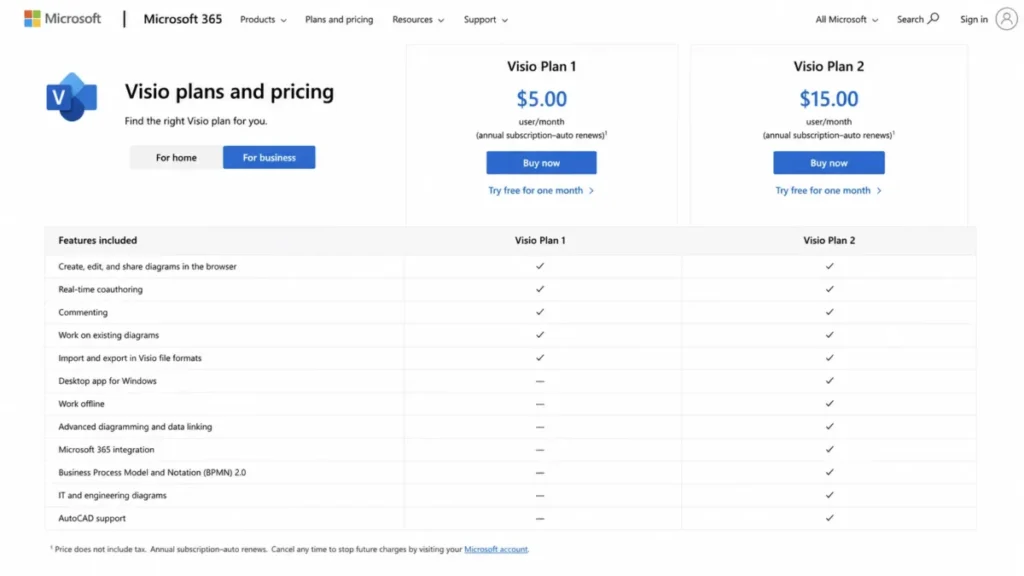
- $5 per user per month, paid yearly, for Visio Plan 1.
- Practical tier:
- Plan 2 at $15 per user per month, paid yearly, for any team that needs desktop or offline work.
- Free plan:
- Not verified from the official plan comparison used here.
- First limit that bites:
- The plan split. Plan 1 is web and Teams only.
- Better than SmartDraw:
- Offline desktop work exists at all, on Plan 2.
- Worse than draw.io:
- Every capability carries a per-user licence, including the ones draw.io gives away.
- Setup difficulty:
- Medium in a managed Microsoft tenant, high outside one, because entitlement and admin assignment come before anyone draws a shape.
- Hidden costs:
- The Plan 1 to Plan 2 jump is a three-times increase in the per-user rate, not an add-on.
- Evidence status:
- Taken from Microsoft’s own Visio plans and pricing comparison, which lists both tiers and the capability split between them.
The $5 headline is the most misread number in this category. Microsoft documents Plan 1 as covering cross-functional flowcharts, mind maps, detailed network diagrams, cloud architecture diagrams, ERDs, UML class diagrams, grids, layers, containers, shape data, and Power BI integration, which is a genuinely deep web tier.
What Plan 1 does not carry is the desktop application with offline and local-file support, BPMN 2.0, advanced engineering diagrams, AutoCAD support, and the richer data functionality. Those sit on Plan 2 at $15 per user per month.
For an architecture team, that turns a $5 comparison into a $15 one before the first diagram exists.
| Pros | Cons |
|---|---|
| Plan 1 at $5 per user per month already covers ERD, UML class, network, and cloud architecture diagrams | Desktop and offline editing require Plan 2 at three times the Plan 1 rate |
| Shape data, grids, layers, and containers support large standardized diagrams | BPMN 2.0, engineering diagrams, and AutoCAD support are Plan 2 capabilities |
| Power BI integration connects diagrams to existing Microsoft reporting | Value drops sharply for teams not already inside Microsoft 365 |
| Familiar file format reduces interoperability friction with existing enterprise diagram libraries | Licence assignment and tenant admin work precede any diagramming |
Source: Microsoft’s official Visio plans and pricing comparison.
- Verdict:
- Choose Visio if your organization already runs Microsoft 365 and someone can answer, before purchase, whether the team needs Plan 2 capability; budget from $15 rather than $5 if the answer is yes.
Creately: Best for diagrams that live inside a shared workspace

- Best for:
- Process, product, HR, and operations teams that want diagramming attached to shared workspaces and structured data rather than isolated files.
- Avoid if:
- Older third-party articles convinced you the lower tiers carry effectively unlimited objects.
- Starting price:
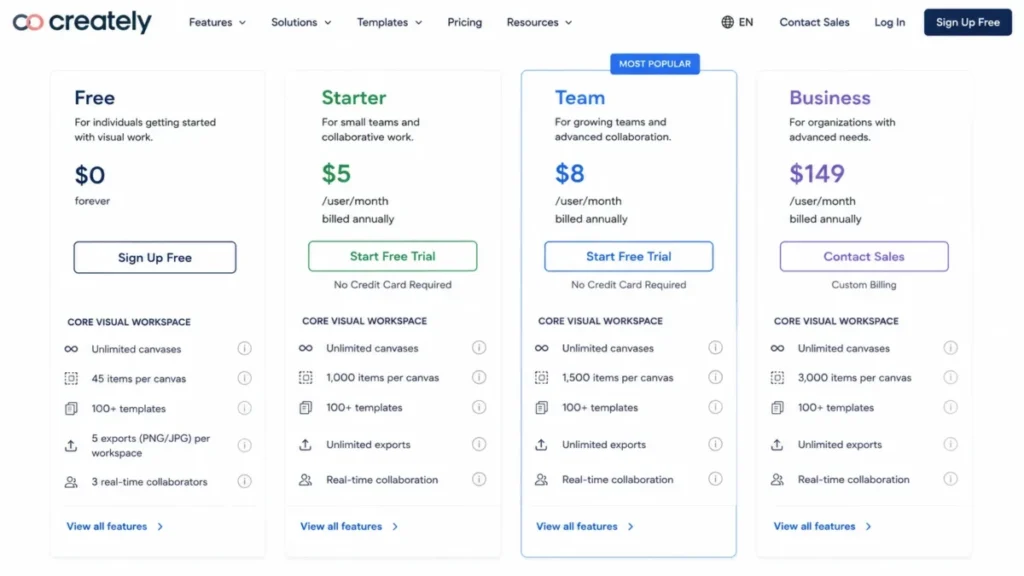
- $0 on Free; Starter and Team are listed together at $8 per month, or $5 per month billed annually.
- Practical tier:
- Team, because Free’s item ceiling stops a real process map early.
- Free plan:
- Yes, with 45 items per canvas.
- First limit that bites:
- Items per canvas. Creately publishes 45 on Free, 1,000 on Starter, 1,500 on Team, and 3,000 in the Business plan card.
- Better than Whimsical:
- Premium shape libraries, unlimited imports, and AI diagrams appear as low as the Starter tier.
- Worse than Lucidchart:
- Object ceilings apply at every tier, where Lucidchart’s shape cap only binds on Free.
- Setup difficulty:
- Medium. Workspace structure and permissions need a decision before the team scales past a handful of canvases.
- Hidden costs:
- Business jumps to $149 per month, or $89 per month billed annually, which is a different order of spend from the Starter and Team rate.
- Evidence status:
- Prices taken from Creately’s official business-diagram landing page, because the main plans page did not render its numeric fields reliably; limits taken from the plan cards themselves.
Creately publishes unlimited canvases at every tier, which reads generously until you find the per-canvas item counts underneath. A 45-item ceiling on Free is roughly one medium flowchart, not a workspace.
The Starter tier is where the product becomes usable: premium shape libraries, unlimited imports, common export formats, premium templates, AI diagrams, and 30-day version history. Team adds advanced collaboration and multiple named users on top of that.
For a large end-to-end process map, the ceiling to size against is 1,000 items per canvas on Starter and 1,500 on Team. Both are materially lower than some older third-party descriptions of this product.
| Pros | Cons |
|---|---|
| Unlimited canvases at every tier, including Free | 45 items per canvas on Free stops a real process map quickly |
| Starter already includes premium shapes, AI diagrams, and 30-day version history | Item ceilings apply at every tier, not only the free one |
| Structured data and shared workspaces suit recurring operational documentation | Business pricing is a large step up from the Starter and Team rate |
| Common export formats and unlimited imports from the Starter tier upward | The main plans page did not render prices reliably at the checked date |
Source: Creately’s official plans and limits page and its business diagram software page, both checked 2026-08-17.
- Verdict:
- Choose Creately if diagrams are an ongoing operational asset rather than one-off files, and size the tier against your largest single canvas rather than your canvas count.
FigJam: Best for teams already standardized on Figma

- Best for:
- Product, UX, and engineering teams inside Figma that need collaborative process maps without buying every collaborator a design seat.
- Avoid if:
- You want a standalone diagramming subscription independent of Figma’s plan-and-seat model, or you are on Starter and need more than three FigJam files.
- Starting price:
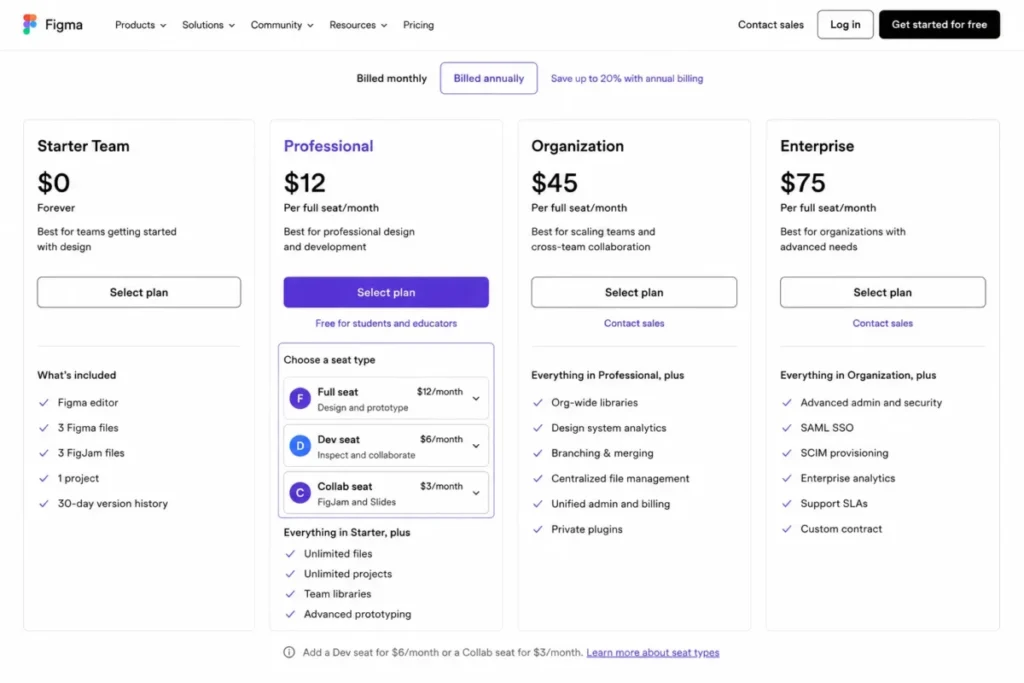
- $3 per month for a Professional Collab seat in the pricing state checked here.
- Practical tier:
- Professional with Collab seats for the people who only facilitate and diagram.
- Free plan:
- Starter, limited to three FigJam files per team.
- First limit that bites:
- File count on Starter, at three FigJam files.
- Better than Miro:
- Collaborators who already live in Figma stay in one tool and one permission model.
- Worse than Lucidchart:
- Shapes and connectors cover process mapping, not UML, ERD, or cloud architecture notation.
- Setup difficulty:
- Low inside an existing Figma organization, medium if Figma has to be introduced first.
- Hidden costs:
- Seat type, not sticker price, drives the bill; Full and Dev seats cost more than Collab seats and also include FigJam.
- Evidence status:
- Seat pricing and FigJam capabilities from Figma’s official pricing page, file limits from the Starter plan help article, seat scope from Figma’s billing guide.
FigJam is priced like a seat, not a product, and that is the whole buying insight. Figma’s billing documentation states that what you pay depends on plan plus seat type, and that a Collab seat grants FigJam and Figma Slides access.
The mistake buyers make is putting occasional contributors on Full seats so they can join a workshop. On the pricing state checked here, a Collab seat displays at $3 per month, which is the cheapest published per-person rate anywhere in this ranking.
| Pros | Cons |
|---|---|
| Collab seat displayed at $3 per month covers both FigJam and Figma Slides | Starter is capped at three FigJam files per team |
| Diagramming, AI summarize and sort, voting, and open sessions in one surface | No verified UML, ERD, or cloud architecture notation support |
| Zero new permission model for teams already running Figma | Pricing is only comprehensible through Figma’s plan-and-seat structure |
| Design handoff and process mapping stay in the same workspace | The pricing page exposes a monthly and annual selector, so the cadence must be confirmed at purchase |
Source: Figma’s official pricing and seat comparison and Starter plan overview. Also the guide to billing at Figma, all checked 2026-08-17. Our Figma review covers the wider platform.
- Verdict:
- Choose FigJam if Figma is already the design system of record and most collaborators need to comment, vote, and map processes rather than design.
The Mid-Band Per-Seat Rates
This is the crowded band, and it contains both the strongest all-round pick and the two most different collaboration models in the ranking. Four products publish an entry rate within a dollar or two of each other, so the gap between them is capability, not price.
Lucidchart: Best for structured technical and business diagrams in one editor

- Best for:
- Engineering, IT, operations, and process teams that need UML, ERD, cloud architecture, and business flowcharts from the same editor, with data-driven generation where source systems exist.
- Avoid if:
- You plan to stay on Free and routinely need more than three editable documents or more than 60 shapes in one diagram.
- Starting price:
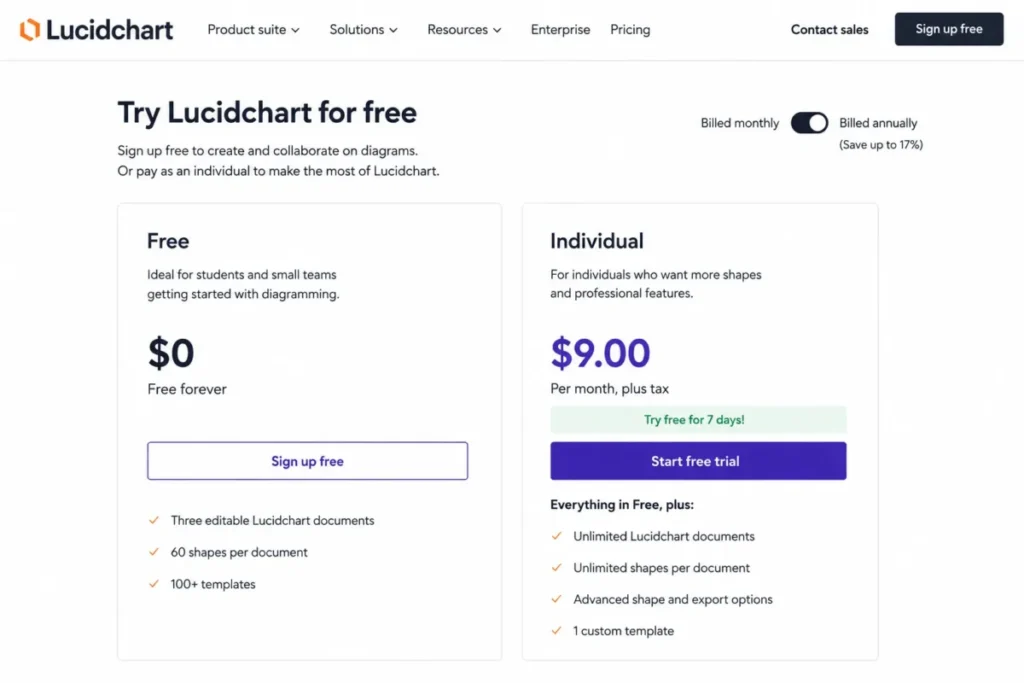
- $0 on Free; Individual is $9.00 per month plus tax after a seven-day trial.
- Practical tier:
- Individual for a solo diagrammer. Team pricing was not confirmed from a current official page in this evidence set, so size a team budget directly with Lucid.
- Free plan:
- Yes, and it is permanent, which is a different thing from the seven-day Individual trial that sits next to it.
- First limit that bites:
- Shapes. A 60-shape ceiling per document is roughly one mid-size architecture diagram.
- Better than draw.io:
- Data-driven generation, assisted layout, and premium template and shape libraries that draw.io does not match out of the box.
- Worse than Miro:
- Live facilitation. Lucid is built to produce an artifact, not to run a room.
- Setup difficulty:
- Low to start, medium once data-driven generation is wired to a real source such as a SQL schema or a cloud account.
- Hidden costs:
- Premium templates and shape libraries are paid-plan benefits, so the Free tier understates what the product does.
- Evidence status:
- Free-tier limits and the Individual rate come from Lucid’s own trial and plan page; the capability list comes from Lucid’s intelligent diagramming product page.
Two facts on Lucid’s own pages get conflated constantly, and getting them apart changes how you trial the product. There is a permanent Free plan with three editable Lucidchart documents, 60 shapes per document, and 100 basic templates. A separate seven-day trial leads into Individual at $9.00 per month plus tax.
If you evaluate on Free, you are evaluating a deliberately narrow surface. If you evaluate on the trial, you have one week.
The reason Lucidchart holds the top position is breadth that no other single product in this ranking matches on verified evidence. Lucid documents data-driven org charts, ERDs generated from SQL, UML sequence diagrams built from markup, cloud architecture generated from AWS, Azure, and Google Cloud data, Mermaid support, advanced shape libraries, containers, swimlanes, and layers.
That combination matters most to a team whose diagrams have a source of truth somewhere else. Regenerating an ERD from the schema is a maintenance workflow; redrawing it by hand is a project that quietly stops happening after the second sprint.
The 60-shape free ceiling is the constraint to plan around. A mid-size network diagram with its connections, labels, and a legend passes 60 objects faster than most buyers expect, which is why the free tier reads as a preview rather than a workspace.
| Pros | Cons |
|---|---|
| One editor covers flowcharts, UML, ERD, network, and cloud architecture without switching products | Free is capped at three editable documents and 60 shapes per document |
| ERDs from SQL, UML from markup, and cloud architecture from AWS, Azure, and Google Cloud data | Premium templates and shape libraries are a paid-plan benefit |
| Mermaid support keeps diagram-as-code workflows inside the same tool | Team pricing was not confirmed from a current official page in this research |
| Containers, swimlanes, and layers keep large diagrams readable as they grow | Live workshop facilitation is weaker than a canvas-first competitor |
Source: Lucid’s official Lucidchart trial and plan page and its intelligent diagramming product page.
- Verdict:
- Choose Lucidchart if one team has to produce both a swimlane process map and a cloud architecture diagram this quarter, and confirm Team pricing with Lucid before you build the budget.
Miro: Best for workshop-led diagramming and async collaboration

- Best for:
- Distributed product, design, engineering, and operations teams whose diagrams start as a live session and end as a shared artifact.
- Avoid if:
- You expect a generous permanent free workspace, because only the three most recent boards stay editable on Free.
- Starting price:
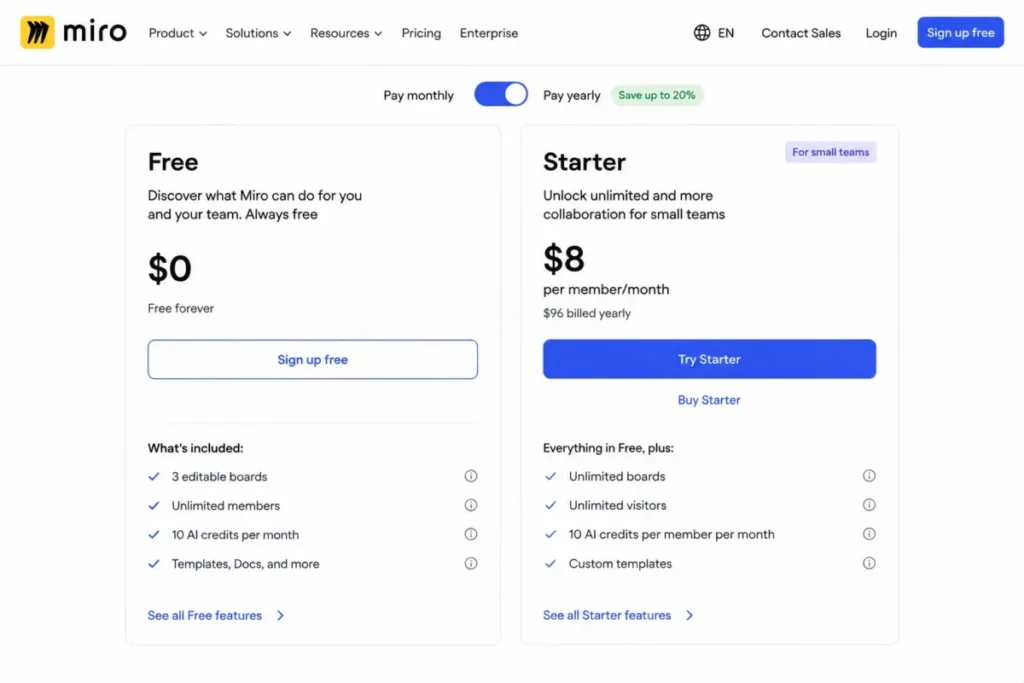
- $8 per member per month, billed yearly, on Starter.
- Practical tier:
- Starter for any recurring collaborative work, because the Free editing rule makes long-lived boards unreliable.
- Free plan:
- Yes, with unlimited boards to create and share but only the three most recent editable, and 10 AI credits per month.
- First limit that bites:
- The three-editable-board rule, which turns older boards into read-only artifacts without warning.
- Better than Lucidchart:
- Facilitation. Timer, voting, and visitor editing exist as first-class features on Starter.
- Worse than Microsoft Visio:
- Formal notation depth for UML, ERD, and engineering diagrams.
- Setup difficulty:
- Low to draw, medium to govern, because board sprawl and permissions become the real administrative work.
- Hidden costs:
- Every permanent member is a paid seat, so a diagram-only contributor costs the same as a daily facilitator.
- Evidence status:
- Plan pricing, free-tier board behavior, AI credits, and Starter feature list all come from Miro’s own pricing page.
Miro’s pricing page documents diagram generation with AI, templates, and more than 250 integrations available on Free. Starter adds private boards, visitor editing, high-resolution export, timer, and voting, along with 25 AI credits per member per month and 500 MCP calls per day.
That last pair of numbers is worth reading as capacity rather than a checkbox. AI diagram generation on Free is 10 credits per month, which is a demo allowance, not a workflow.
The board rule is the item that reshapes a trial. Free lets you create unlimited boards, but only the three most recent remain editable, so a team that runs weekly sessions will find month-old boards frozen exactly when someone asks to update the process map.
| Pros | Cons |
|---|---|
| Timer, voting, and visitor editing make live diagramming sessions workable on Starter | Only the three most recent boards stay editable on Free |
| AI diagram generation, templates, and more than 250 integrations available from the free tier | 10 AI credits per month on Free is a demo allowance rather than a workflow |
| Private boards and high-resolution export arrive at the $8 per member Starter rate | Formal UML, ERD, and engineering notation is thinner than a structured editor |
| 500 MCP calls per day on Starter supports programmatic board workflows | Every permanent member is a paid seat, including occasional contributors |
Source: Miro’s official pricing and plan comparison, checked 2026-08-17. Our Miro review covers the wider board workflow.
- Verdict:
- Choose Miro if diagrams are the output of meetings rather than the input to documentation, and treat the Starter rate as the real entry price for any team that meets more than once a month.
SmartDraw: Best for template- and data-generated business diagrams

- Best for:
- Operations, facilities, enterprise IT, architecture, and business-process teams that want diagrams generated from systems they already run.
- Avoid if:
- Anyone on the team has to edit diagrams without an internet connection.
- Starting price:
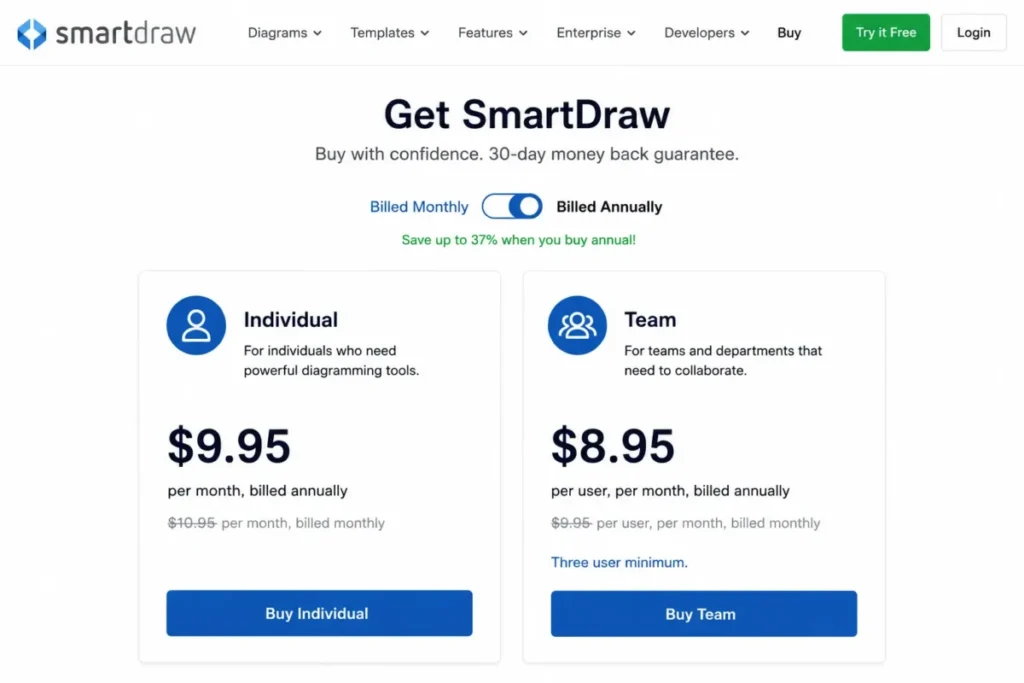
- $9.95 per month billed annually for Individual, shown against a $10.95 comparison price.
- Practical tier:
- Team at $8.95 per user per month billed annually, which carries admin controls, a shared Team Folder, document retention, and premium support.
- Free plan:
- Not verified from the official purchase page used here.
- First limit that bites:
- Connectivity. SmartDraw states plainly that it does not work offline.
- Better than EdrawMax:
- Generation from live enterprise systems including Entra ID, AWS, Azure, GitHub, and Jira rather than template libraries alone.
- Worse than Microsoft Visio:
- No offline desktop mode at any tier, where Visio Plan 2 has one.
- Setup difficulty:
- Medium. The value comes from connecting data sources, which is an integration task rather than a drawing task.
- Hidden costs:
- Team carries a three-user minimum, and both lower rates are introductory prices for new customers rather than permanent list prices.
- Evidence status:
- Prices, billing basis, and the seat minimum come from SmartDraw’s official purchase page; the offline statement and integration list come from the official SmartDraw FAQ.
The generation story is the reason to shortlist SmartDraw. Its own FAQ documents automatic creation of org charts, cloud architecture diagrams, ERDs, UML class diagrams, and other visuals from structured data, plus integrations with Microsoft 365, Google Workspace, Jira, Confluence, Azure, AWS, and GitHub.
The disqualifier is equally plain. SmartDraw states that it does not work offline and runs in a browser with an internet connection, and that its desktop launcher opens the web application rather than a local program.
Read the pricing the same way. The $9.95 and $8.95 figures are introductory prices for new customers, displayed next to $10.95 comparison prices.
A renewal budget built from the lower number is a budget built on the wrong line.
| Pros | Cons |
|---|---|
| Org charts, ERDs, UML class diagrams, and cloud architecture generate from structured data | No offline editing at any tier, confirmed in the official FAQ |
| Integrations span Microsoft 365, Google Workspace, Jira, Confluence, Azure, AWS, and GitHub | Team requires a minimum of three users |
| Team adds admin controls, a shared Team Folder, and document retention and control | The $9.95 and $8.95 rates are introductory prices for new customers only |
| Annual billing with published per-user rates makes finance approval straightforward | The desktop launcher opens the browser application rather than a local program |
Source: SmartDraw’s official purchase and pricing page and the official SmartDraw FAQ, both checked 2026-08-17.
- Verdict:
- Choose SmartDraw if your diagrams should be generated from Entra ID, a cloud account, or a repository rather than drawn by hand, and rule it out immediately if offline editing is a requirement.
Cacoo: Best for straightforward collaborative diagrams at a flat per-user rate
- Best for:
- Small and midsize teams that want shared diagrams, comments, and revision history without a platform migration.
- Avoid if:
- You need more than six sheets, exports beyond PNG, or any version history on the free tier.
- Starting price:
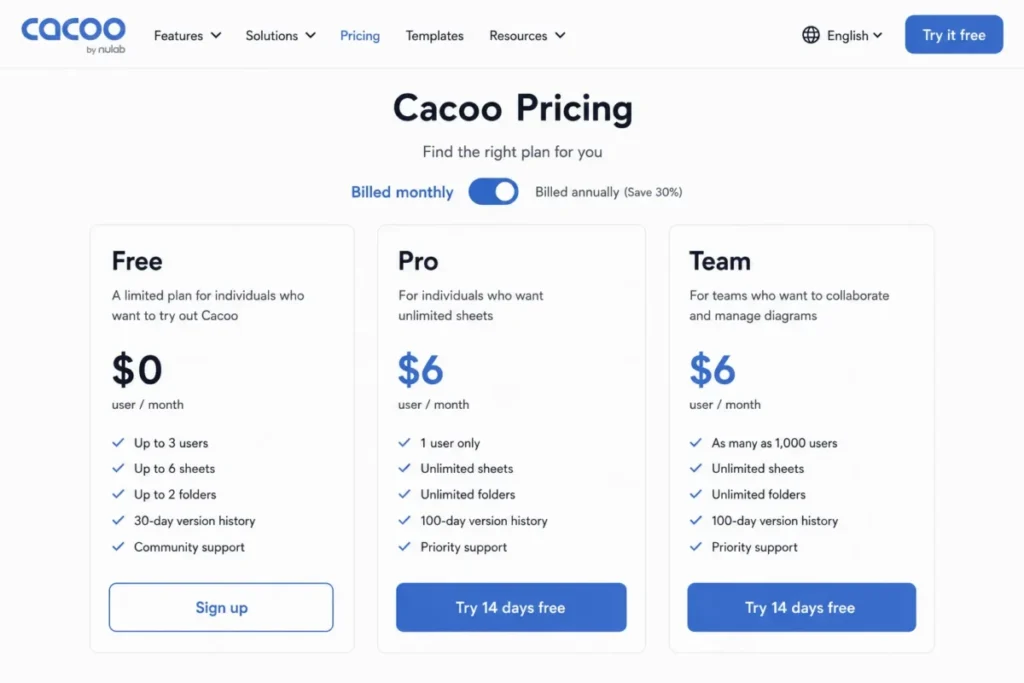
- $6 per user per month billed monthly, on both Pro and Team.
- Practical tier:
- Team, because Pro is presented for a single user while Team supports up to 1,000 and adds team capabilities.
- Free plan:
- Yes, with six sheets, one shared folder, PNG-only export, no version history, up to 50 activity entries per diagram, and video chat for three members.
- First limit that bites:
- Export. PNG-only output blocks handoff into documentation or print workflows.
- Better than Whimsical:
- A single published per-user rate rather than per-editor billing that scales with contributor count.
- Worse than Lucidchart:
- Technical notation depth and data-driven generation.
- Setup difficulty:
- Low. Folder structure and sharing are the only real decisions.
- Hidden costs:
- Annual billing is offered with a stated 17% saving, but the exact annual per-user amount was not confirmed from the monthly state checked here.
- Evidence status:
- Prices and feature highlights from Nulab’s Cacoo pricing page, free and team limits corroborated by Nulab’s own Help Center article.
Two plans at the same displayed monthly rate confuses buyers, and the answer is user scope rather than features. The plan cards present Pro for one user and Team for up to 1,000, with team capabilities such as training and password-protected diagrams attached to the latter.
Nulab also positions Cacoo for enterprise security with SAML, provisioning, and private-server options, which is unusual at this price point and worth checking if procurement has an identity requirement.
| Pros | Cons |
|---|---|
| One published rate of $6 per user per month on both Pro and Team | Free is limited to six sheets and one shared folder |
| Team supports up to 1,000 users with password-protected diagrams and training | Free exports to PNG only, with no version history |
| SAML, provisioning, and private-server options documented for enterprise buyers | Video chat on Free is capped at three members per chat |
| Comments, video chat, and paid-tier revision history in one simple product | Diagram activity on Free is capped at 50 entries |
Source: Nulab’s official Cacoo pricing page, the Cacoo product page, and the Cacoo multi-user plans Help Center article, all checked 2026-08-17.
- Verdict:
- Choose Cacoo if the requirement is shared diagrams with comments and history at a predictable per-user rate, and skip the free tier entirely because its export and history limits make it a demo rather than a workspace.
The Highest Per-Seat Rate, and the Flat Annual Licence
Two products break the per-seat pattern that dominates this category. One sells a yearly licence rather than a seat, and the other charges per editor at the highest published rate in the ranking.
EdrawMax: Best for the widest catalog of drawing types on one licence

- Best for:
- Individual professionals and small teams that draw many different diagram types and prefer a yearly licence to a per-seat subscription.
- Avoid if:
- You intend to validate a large multi-page project on the free trial.
- Starting price:
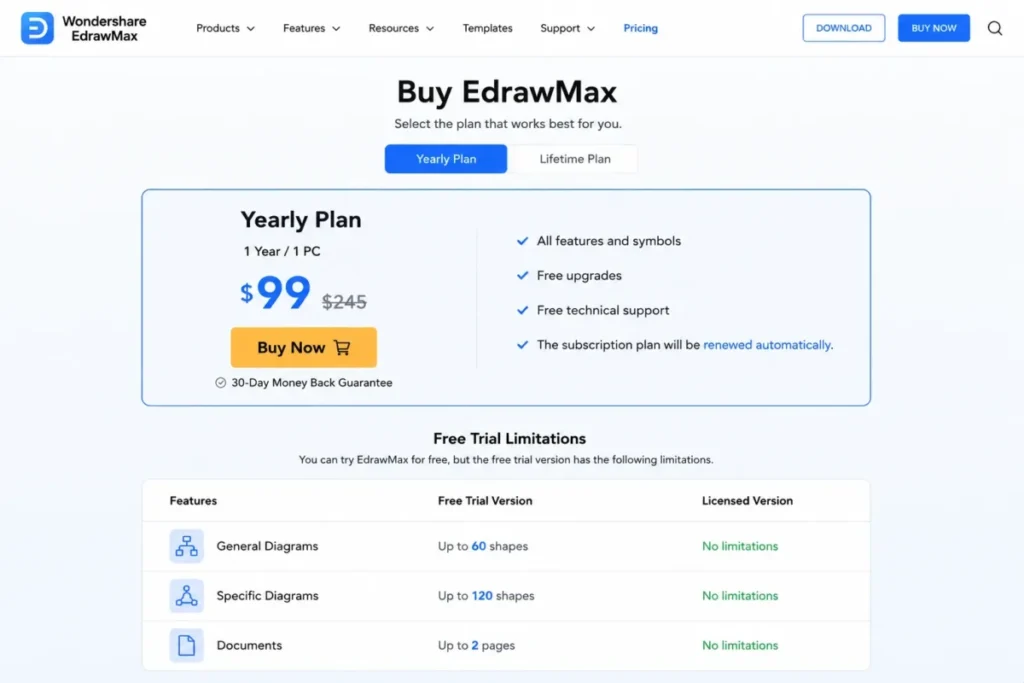
- $99 for the Yearly Plan, displayed against a higher comparison price, and it renews automatically unless cancelled.
- Practical tier:
- The Yearly Plan, since the free trial is capped too tightly for real work.
- Free plan:
- A free trial rather than a durable free tier.
- First limit that bites:
- Trial caps. General diagrams stop at 60 shapes, specific diagrams at 120 shapes, flow animation at two lines, and documents at two pages.
- Better than Cacoo:
- Breadth. Wondershare documents EdrawMax as covering more than 210 drawing types.
- Worse than Lucidchart:
- Verified data-driven generation from live systems such as SQL schemas or cloud accounts.
- Setup difficulty:
- Low. Desktop and online access with a template-first workflow.
- Hidden costs:
- Automatic renewal is the one to diary. An optional assets add-on exists, but its numeric rate did not render reliably on the checked page and is not quoted here.
- Evidence status:
- Plan price, renewal wording, product breadth, and the trial caps all come from the official EdrawMax pricing page.
Breadth is the reason this product survives against cheaper subscriptions. A team that needs floor plans, org charts, network diagrams, and fishbone diagrams from one licence has fewer options than the category’s marketing suggests.
The trial is where evaluations go wrong. A two-page ceiling and a 60-shape ceiling on general diagrams mean the trial cannot carry the exact scenario most buyers want to test, so plan the evaluation around a deliberately small diagram or budget for the licence up front.
| Pros | Cons |
|---|---|
| Marketed as covering more than 210 drawing types on a single licence | Free trial caps general diagrams at 60 shapes and documents at two pages |
| A $99 yearly rate replaces per-seat billing for a single user | The yearly plan renews automatically unless it is cancelled |
| Desktop and online access from the same licence | No verified data-driven generation from live systems |
| Template-first workflow shortens time to a first usable diagram | An optional assets add-on rate did not render reliably on the checked page |
Source: Wondershare’s official EdrawMax pricing page.
- Verdict:
- Choose EdrawMax if diagram-type variety matters more than live collaboration, and set a calendar reminder before the automatic renewal date.
Whimsical: Best for fast product-team flowcharts, mind maps, and wireframes

- Best for:
- Product managers, designers, and startup teams that value speed of construction over notation depth.
- Avoid if:
- You need more than three collaborative boards on Free, or SAML SSO and SCIM without moving to Business.
- Starting price:
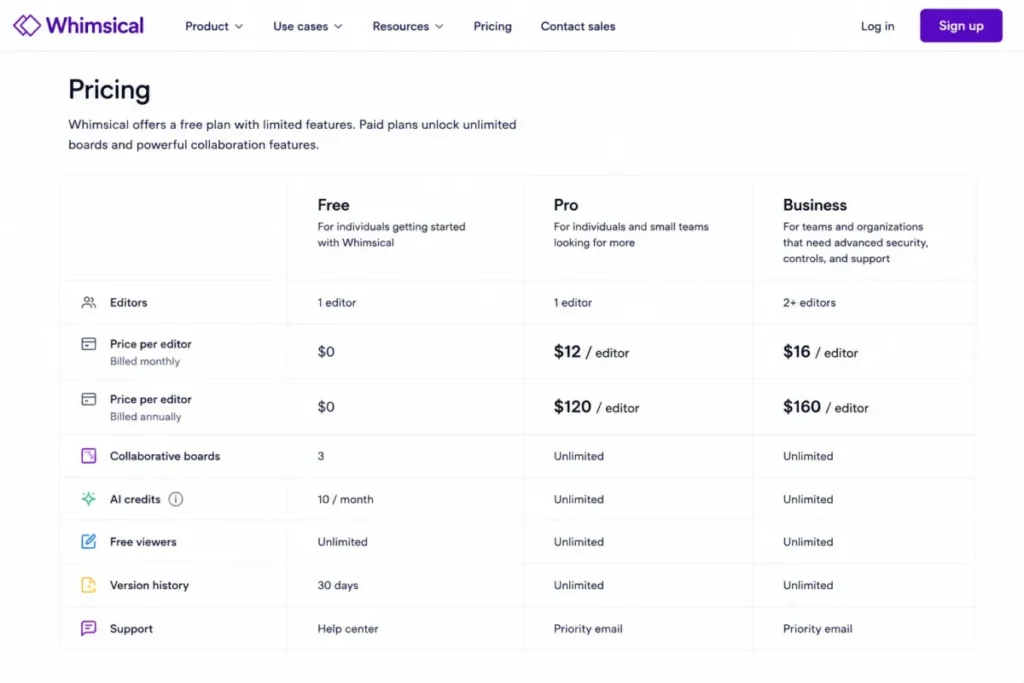
- $12 per editor billed monthly, or $120 per editor billed annually, on Pro.
- Practical tier:
- Pro for most teams; Business at $24 monthly or $240 annually per editor is the identity-and-admin tier.
- Free plan:
- Yes, with unlimited private files but only three collaborative boards and 10 AI credits.
- First limit that bites:
- Shared boards. Three is one project, not a team workspace.
- Better than Cacoo:
- Flowcharts with predictive shapes, mind maps with automatic layouts, wireframes, and AI diagram generation in one canvas.
- Worse than Microsoft Visio:
- Formal engineering and enterprise notation, which Whimsical does not claim.
- Setup difficulty:
- Low. The product is built so a first flowchart takes minutes.
- Hidden costs:
- Billing is per editor, so contributor count drives the invoice more than usage does.
- Evidence status:
- Prices, free-tier limits, and the SAML and SCIM gate come from Whimsical’s own billing documentation; capabilities come from its diagrams product page.
Whimsical advertises flowcharts with predictive shapes on an infinite canvas, mind maps with automatic layouts, AI-assisted diagram generation, multiplayer editing, templates, comments, and version history. For a product team sketching a signup flow, that combination beats a heavier structured editor on time-to-first-diagram.
The upgrade triggers are unusually clean. Passing three collaborative boards moves you to Pro, and an identity requirement for SAML SSO or SCIM moves you to Business, so the plan decision follows team maturity rather than feature browsing.
Wireframing is the capability that pulls product teams here rather than to a structured editor, and it overlaps with the design tooling most product teams already run.
| Pros | Cons |
|---|---|
| Predictive shapes and automatic mind-map layouts cut construction time on simple diagrams | Free allows only three collaborative boards |
| Unlimited private files on Free, which suits solo drafting before a team rollout | SAML SSO and SCIM are Business-plan capabilities at $24 per editor monthly |
| Flowcharts, mind maps, and wireframes share one canvas and one file model | 10 AI credits on Free is an evaluation allowance |
| Version history and multiplayer editing are documented on the product itself | Per-editor billing makes contributor count the main cost driver |
Source: Whimsical’s official pricing and discounts documentation and its diagrams product page.
- Verdict:
- Choose Whimsical if the diagram’s job is to make a product decision this week, and move to Business the moment identity management enters the conversation.
Best Diagramming Software Compared
The ranked view puts the price bands back into overall order, which is how the shortlist should be read once budget is no longer the first filter.
Structured diagram editors.
| Tool, in ranked order | Category | Starting price | Free tier ceiling | Standout capability | Main constraint |
|---|---|---|---|---|---|
| Lucidchart | Structured editor | $9.00 per month plus tax, Individual | three editable documents, 60 shapes each | ERDs from SQL, UML from markup, cloud architecture from AWS, Azure, and Google Cloud data | Free tier is a preview, not a workspace |
| draw.io | Structured editor | $0 for the core editor | No published core document or shape ceiling | Files stay on your device or your chosen cloud | No standalone mobile app |
| Microsoft Visio | Structured editor | $5 per user per month, paid yearly, Plan 1 | Not verified here | Plan 2 adds desktop, offline, BPMN 2.0, and AutoCAD support | Capability split between two tiers |
| SmartDraw | Structured editor | $9.95 per month billed annually, Individual | Not verified here | Diagrams generated from Entra ID, AWS, Azure, GitHub, and Jira | Browser only, with no offline editing |
| EdrawMax | Structured editor | $99 for the Yearly Plan | Trial only: 60 or 120 shapes, two pages | More than 210 drawing types on one licence | Automatic renewal unless cancelled |
Practical-tier sources: Lucidchart and Microsoft Visio. Also SmartDraw, EdrawMax and the draw.io documentation.
Collaboration canvases and hybrids.
| Tool, continuing the ranked order | Category | Starting price | Free tier ceiling | Standout capability | Main constraint |
|---|---|---|---|---|---|
| Miro | Collaboration canvas | $8 per member per month, billed yearly | three most recent boards editable, 10 AI credits | Timer, voting, visitor editing, and 500 MCP calls per day on Starter | Older boards freeze on Free |
| Creately | Hybrid workspace | $8 per month, or $5 billed annually | 45 items per canvas | Unlimited canvases with premium shapes and AI diagrams | Item ceilings apply at every tier |
| Whimsical | Hybrid, product-team | $12 per editor per month | three collaborative boards, 10 AI credits | Predictive shapes and automatic mind-map layouts | SAML SSO and SCIM sit on Business |
| FigJam | Collaboration canvas | $3 per month, Professional Collab seat | three FigJam files on Starter | Cheapest published per-person rate in this ranking | Priced through Figma’s seat model |
| Cacoo | Hybrid | $6 per user per month, billed monthly | 6 sheets, PNG-only export | Team scope to as many as 1,000 users at one flat rate | No version history on Free |
Source: official pricing for Miro, Creately, Whimsical, FigJam and Cacoo, all checked 2026-08-17.
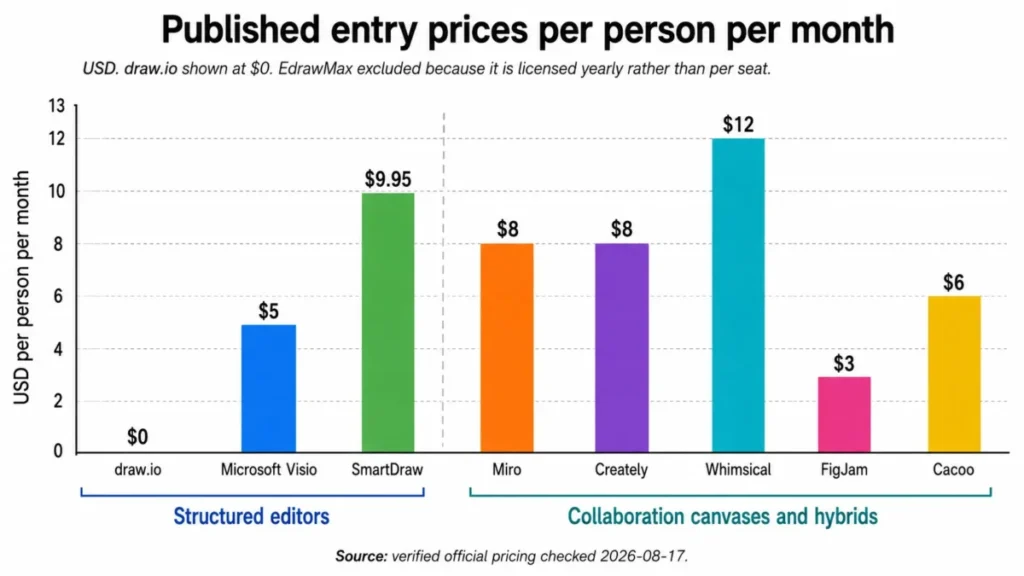
Read that table by constraint rather than by price. The four cheapest entries in this ranking carry the four tightest published ceilings, and the two products with no published ceiling at all are draw.io and, on paid tiers, Lucidchart.
Pricing Comparison: Starting Price vs Practical Tier
Starting price and practical tier diverge most where the entry plan is deliberately narrow. Three products in this list publish an entry rate that no working team will stay on.
Structured diagram editors.
| Tool | Starting price | Practical tier | Free plan or trial | Cost detail to check before buying |
|---|---|---|---|---|
| Lucidchart | $9.00 per month plus tax, Individual, after a seven-day trial | Individual for one person; team pricing not confirmed here | Permanent Free plan at $0 | Premium templates and shape libraries are a paid benefit |
| draw.io | $0 | The free core editor | Free core editor | Paid Atlassian integrations are priced separately |
| Microsoft Visio | $5 per user per month, paid yearly | Plan 2 at $15 per user per month for desktop or offline work | Not verified here | The Plan 1 to Plan 2 step is a three-times increase |
| SmartDraw | $9.95 per month billed annually, against a $10.95 comparison price | Team at $8.95 per user per month billed annually | Not verified here | Introductory pricing for new customers, plus a three-user minimum |
| EdrawMax | $99 for the Yearly Plan, against a higher comparison price | The Yearly Plan | Free trial with shape and page caps | Automatic renewal unless cancelled |
Source: official pricing for Lucidchart, Microsoft Visio, SmartDraw and EdrawMax. The draw.io documentation records the free core editor.
Collaboration canvases and hybrids.
| Tool | Starting price | Practical tier | Free plan or trial | Cost detail to check before buying |
|---|---|---|---|---|
| Miro | $8 per member per month, billed yearly | Starter | Free plan with three editable boards | Every permanent member is a paid seat |
| Creately | $8 per month, or $5 per month billed annually | Team | Free plan at $0 | Business jumps to $149 per month, or $89 billed annually |
| Whimsical | $12 per editor per month, or $120 per editor per year | Pro | Free plan with three collaborative boards | Business is $24 monthly or $240 annually per editor |
| FigJam | $3 per month for a Professional Collab seat | Professional with Collab seats | Starter with three FigJam files | Full and Dev seats cost more and also include FigJam |
| Cacoo | $6 per user per month, billed monthly | Team | Free plan with six sheets | Annual billing carries a stated 17% saving, amount unconfirmed |
Practical-tier sources: Miro and Creately. Also Whimsical, FigJam and Cacoo, checked 2026-08-17.
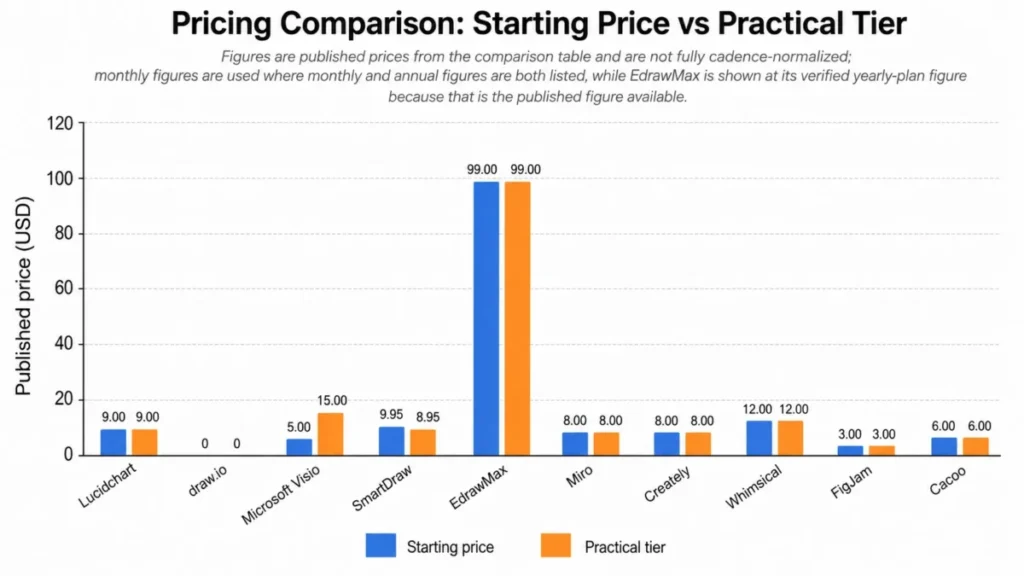
The cheapest plan is rarely the right comparison point. For Visio the honest comparison is $15 rather than $5 whenever desktop work is in scope.
For SmartDraw the honest comparison is the renewal rather than the introductory rate.
Lucidchart is the awkward case in this ranking. Its Individual rate is published and verified, but a current official team price was not confirmed here, so a multi-seat budget has to be quoted directly rather than estimated from $9.00.
Miro is the opposite case, with per-member rates published across every tier; our Miro pricing breakdown walks through how those tiers behave as a workspace grows.
What Five Seats Actually Cost
Per-seat pricing compounds quietly, and starting prices hide the shape of it. Each row below is our arithmetic on a published rate, not a vendor quote, and states its own assumption.
Billed as an annual total.
| Tool and plan | Billing basis | Cost at 5 seats | Assumption |
|---|---|---|---|
| Microsoft Visio Plan 1 | $5 per user per month, paid yearly | $300 per year | Five users across 12 months, excluding tax |
| Miro Starter | $8 per member per month, billed yearly | $480 per year | All five members are paid members for a full year |
| SmartDraw Team | $8.95 per user per month, billed annually | $537 per year | Introductory rate for new customers; the three-user minimum is met |
| Whimsical Pro | $120 per editor per year | $600 per year | Every collaborator is a billed editor |
Source: official pricing for Microsoft Visio, Miro, SmartDraw and Whimsical, all checked 2026-08-17. Totals are our own calculation from those published rates.
Billed monthly, or carrying no licence at all.
| Tool and plan | Billing basis | Cost at 5 seats | Assumption |
|---|---|---|---|
| draw.io core editor | Free | No licence cost | No licence applies to the core editor |
| FigJam, Professional Collab seat | $3 per seat per month as displayed | $15 per month | Not annualized, because the page exposes a monthly and annual selector |
| Cacoo Team | $6 per user per month, billed monthly | $30 per month | Monthly billing only; the annual per-user amount was not confirmed |
Source: official pricing for FigJam and Cacoo, plus the draw.io documentation.
Source: official pricing for Microsoft Visio and Cacoo. Also Miro, SmartDraw, Whimsical and FigJam.Totals are our own calculation.
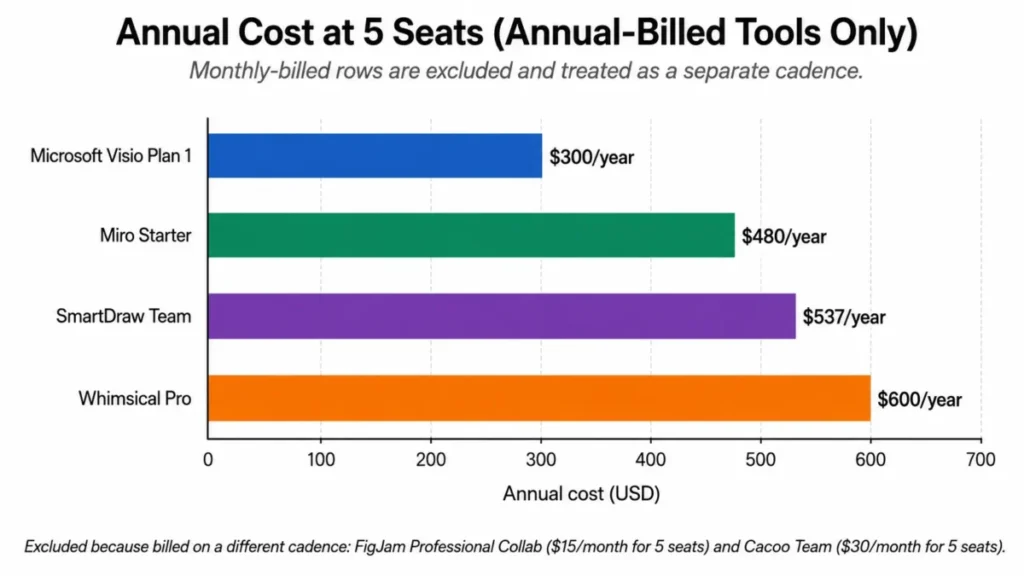
The formulas are deliberately dull so you can check them. Using Miro’s published Starter rate, 5 members multiplied by $8 multiplied by 12 months gives $480 a year.
Whimsical is the outlier that surprises people. Five editors at $120 per editor per year reach $600 a year, double the same five seats on Visio Plan 1.
FigJam sits at the other end because seat type, not headcount, drives the invoice, and our Figma pricing guide sets out how Full, Dev, and Collab seats are billed across plans.
Lucidchart, Creately, and EdrawMax are missing from this table on purpose. Their published rates are not stated on a per-seat basis in the sources used here, so a seat scenario would invent a billing basis none of them published.
Free Plans: Where the Limits Actually Hit
Every free tier in this category is a different shape, and the published ceilings decide how far an evaluation can go before it stops being representative.
| Tool | Published free or trial ceiling | What that ceiling means in practice |
|---|---|---|
| Lucidchart | Three editable documents, 60 shapes per document, 100 basic templates | Roughly one mid-size architecture diagram before the shape cap binds |
| Miro | Unlimited boards to create and share, only the three most recent editable, 10 AI credits per month | Weekly sessions freeze month-old boards exactly when someone needs to update them |
| draw.io | Free core editor with no published core document or shape ceiling | The free product is the full product, so an evaluation is representative |
| Microsoft Visio | Not verified from the official plan comparison used here | Treat evaluation as a paid-tier exercise unless Microsoft confirms otherwise |
| SmartDraw | Not verified from the official purchase page used here | Plan the evaluation around the paid tiers and the connectivity requirement |
| EdrawMax | Trial caps: 60 shapes on general diagrams, 120 on specific diagrams, two pages, flow animation on two lines | A multi-page project cannot be validated on the trial at all |
| Creately | 45 items per canvas | One medium flowchart, not a workspace |
| Whimsical | Unlimited private files, three collaborative boards, 10 AI credits | Solo drafting works well; team rollout hits the board cap immediately |
| FigJam | Three FigJam files per team on Starter | Fine for a pilot, restrictive for a department |
| Cacoo | Six sheets, one shared folder, PNG-only export, no version history, 50 activity entries, video chat for three members | PNG-only export blocks handoff into documentation |
Source: free-tier limits documented by Lucidchart, Miro, draw.io and EdrawMax. Also Creately, Whimsical, Figma and Nulab, checked 2026-08-17.
The pattern across those rows is that shape, item, and board ceilings bind long before storage or user counts do. Only draw.io publishes a free tier that can carry a real evaluation from start to finish, and it is the one product here with no paid tier gating the editor itself.
If the trial has to prove that the tool handles your largest diagram, three products can do it: draw.io on the free editor, and Lucidchart or Miro on a paid tier bought for one month. A comparison of free collaboration tools covers the wider free-tier question across adjacent categories.
Feature Gate Comparison
Plan gates decide the real price more often than the headline rate does. The table lists only gates confirmed on official pages.
| Tool | Capability behind a gate | Tier that opens it | Trigger that forces the upgrade |
|---|---|---|---|
| Lucidchart | Premium templates and premium shape libraries | Paid plan | A fourth editable document, or a diagram past 60 shapes |
| Miro | Private boards, visitor editing, high-resolution export, timer, voting, 25 AI credits per member per month, 500 MCP calls per day | Starter | A fourth board that has to stay editable |
| draw.io | Nothing in the core editor; separate Atlassian integrations are paid | Not applicable | A requirement for the paid Atlassian integrations |
| Microsoft Visio | Desktop app with offline and local-file support, BPMN 2.0, engineering diagrams, AutoCAD support, richer data functionality | Plan 2 | Any offline, BPMN 2.0, or AutoCAD requirement |
| SmartDraw | Admin controls, shared Team Folder, document retention and control, account consolidation, premium support | Team | A third user, or a shared team library |
| EdrawMax | Diagrams past the trial ceilings of 60 or 120 shapes and two pages | Yearly Plan | Any multi-page or large single diagram |
| Creately | Premium shapes, unlimited imports, common exports, premium templates, AI diagrams, 30-day version history, and higher item ceilings | Starter, then Team, then Business | A canvas passing 45, 1,000, or 1,500 items |
| Whimsical | SAML SSO and SCIM | Business | An identity or user-provisioning requirement |
| FigJam | FigJam and Figma Slides access | A Collab, Full, or Dev seat on a paid plan | A fourth FigJam file on Starter |
| Cacoo | Version history, broader export formats, more sheets and folders | Pro or Team | A seventh sheet, or an export that is not PNG |
Source: the official pricing and documentation pages cited in each product section, all checked 2026-08-17.
AI is the gate most often compared as a checkbox, and it should be compared as an allowance. Miro publishes 10 AI credits per month on Free and 25 per member per month on Starter.
Whimsical publishes 10 AI credits on Free. Those two are the only AI allowances quantified from official pages in this research.
For the other products, treat AI diagram generation as present but unquantified. Lucid, draw.io, Creately, and Figma all document AI-assisted diagramming, but none of their pages used here published a usage allowance to compare.
Platform and Offline Support
Offline and mobile support is where a shortlist gets cut fastest, because these are binary requirements rather than preferences.
| Tool | Offline editing | Native mobile app | Evidence basis |
|---|---|---|---|
| draw.io | Documented offline options for the web, mobile, and desktop contexts | No standalone app-store application | draw.io mobile-install documentation |
| Microsoft Visio | Plan 2 only, through the desktop app with local-file support | Not verified here | Microsoft plan comparison |
| SmartDraw | None. The product requires an internet-connected browser | Not verified here | Official SmartDraw FAQ |
| Lucidchart | Not verified here | Not verified here | Not covered by the official pages used |
| Miro | Not verified here | Not verified here | Not covered by the official pricing page used |
| EdrawMax | Desktop and online access documented; offline behavior not verified | Not verified here | Official EdrawMax pricing page |
| Creately | Not verified here | Not verified here | Not covered by the official pages used |
| Whimsical | Not verified here | Not verified here | Not covered by the official pages used |
| FigJam | Not verified here | Not verified here | Not covered by the official pages used |
| Cacoo | Not verified here | Not verified here | Not covered by the official pages used |
Source: the draw.io mobile documentation, checked 2026-08-17. Also the Microsoft Visio plan comparison and the official SmartDraw FAQ, both checked 2026-08-17.
Three rows in that table are decisions rather than data. SmartDraw is disqualified outright for field teams and secure facilities, Visio is viable offline only at the Plan 2 rate, and draw.io is the offline-capable option that will not give anyone a native mobile app.
The blank rows are honest gaps rather than negatives. A vendor whose official pages did not address offline behavior has not been marked as lacking it, and buyers with a hard offline requirement should put that question in writing before signing.
Setup and Migration Difficulty
Setup effort tracks how much of the product is configuration rather than drawing. None of these tools needs a project plan, but three of them need an owner.
| Tool | Setup difficulty | Why |
|---|---|---|
| Whimsical | Low | Predictive shapes and templates get a first flowchart out in minutes |
| Cacoo | Low | Folder structure and sharing are the only meaningful decisions |
| EdrawMax | Low | Template-first desktop and online workflow with no tenant configuration |
| draw.io | Low for one person, medium for a team | Collaboration depends on which shared storage provider gets connected |
| FigJam | Low inside Figma, medium otherwise | Seat assignment matters more than configuration for existing Figma orgs |
| Lucidchart | Low to start, medium at depth | Data-driven generation has to be wired to a SQL schema or a cloud account |
| Miro | Low to draw, medium to govern | Board sprawl and permissions become the real administrative work |
| Creately | Medium | Workspace structure and permissions need a decision before scale |
| SmartDraw | Medium | Value depends on connecting Entra ID, cloud accounts, or repositories |
| Microsoft Visio | Medium in a managed tenant, high outside one | Entitlement and admin assignment precede any diagramming |
Migration between these products is the topic with the least verified evidence in this research, so treat it as an open question rather than a solved one. Object-by-object fidelity, attachment handling, and failure recovery were not documented across all ten products on the official pages used here.
The practical mitigation is to export a representative diagram from your current tool and import it into the finalist before purchase.
How to Choose the Right Diagramming Software
Work through these in order. Each step removes products, which is faster than scoring all ten on every dimension.
Every product here except EdrawMax is bought as a subscription, so the usual what SaaS software is considerations around seats, renewal, and data portability apply before the drawing features do.
- Decide whether the artifact outlives the meeting. A diagram that becomes documentation needs a structured editor; a diagram that supports a conversation needs a canvas. This single question removes half the list.
- Name the notation you genuinely need. UML, ERD, BPMN 2.0, network, or cloud architecture each have verified homes here, and BPMN 2.0 in particular sits only on Visio Plan 2 among the products researched.
- Size your largest single diagram, not your diagram count. Creately caps items per canvas, Lucidchart caps shapes per document on Free, and EdrawMax caps trial pages, so the biggest artifact decides the tier.
- Check the offline and mobile requirement before pricing. SmartDraw rules itself out for offline work, and draw.io rules itself out for native mobile, regardless of budget.
- Count billed people, not licences. Whimsical bills per editor, Miro bills every permanent member, SmartDraw enforces a three-user minimum, and Figma bills by seat type, so headcount shape changes the ranking.
- Confirm the billing cadence and the standard price. SmartDraw’s lower rates are introductory, EdrawMax renews automatically, and Figma’s page exposes a monthly and annual selector that must be resolved at checkout.
- Test with your real diagram on the tier you would buy. A free tier with a 45-item or 60-shape ceiling cannot answer the question you came with.
Common Mistakes When Choosing Diagramming Software
- Budgeting from the starting price. A Visio budget built on $5 breaks the moment someone needs the desktop app, and the honest number is $15 per user per month.
- Treating a free trial as a free plan. EdrawMax’s trial caps shapes and pages, so it validates the interface rather than the workload.
- Comparing AI as a yes or no. Ten credits a month is a demo; 25 per member per month is a light workflow, and most vendors publish no allowance at all.
- Ignoring the export format. Cacoo’s free tier exports PNG only, which quietly blocks handoff into print and documentation pipelines.
- Buying a canvas for architecture work. Miro and FigJam document shapes, connectors, and AI generation, not UML, ERD, or engineering notation.
- Assuming older third-party limits still hold. Creately’s published item ceilings are materially lower than some older third-party descriptions, and current plan cards are the only reliable source.
- Skipping the identity requirement. Whimsical gates SAML SSO and SCIM to Business, so a security review late in the cycle can double the per-editor rate.
Final Verdict
Lucidchart is the pick for a buyer who typed a broad diagramming query and has no single overriding constraint. Its verified scope spans business flowcharts, UML, ERD, network diagrams, cloud architecture, Mermaid, and data-driven generation from SQL and cloud accounts.
The Individual rate of $9.00 per month plus tax is accessible enough to trial properly.
Choose Miro instead if diagrams are produced in live sessions and the facilitation features carry as much weight as the artifact. Choose draw.io if licence cost is a real constraint, or if the security review will ask where diagram files are stored.
Choose Microsoft Visio if the organization already runs Microsoft 365 and can answer the plan question before purchase.
Choose SmartDraw if diagrams should be generated from Entra ID, AWS, Azure, GitHub, or Jira, provided nobody needs to work offline.
Choose EdrawMax for breadth of drawing types on a yearly licence, and Creately when diagrams belong inside a shared operational workspace. Choose Whimsical when speed beats notation depth, FigJam when Figma is already the system of record, and Cacoo when the requirement is simple shared diagrams at one flat per-user rate.
Each ranking reason above is a cohort judgement rather than a score: the workflow the tool serves, the plan gate that limits it, and the disqualifier that removes it for a given team. Because the winner by scenario changes with cohort, the official documented evidence matters more than any headline rate.
The one recommendation that applies to every buyer here is procedural. Rebuild your largest existing diagram on the tier you intend to buy, because every ceiling in this ranking is expressed in shapes, items, boards, sheets, or files, and none is visible until you cross it.
FAQ
What is the best diagramming software in 2026?
Lucidchart is the strongest all-round pick, because one editor covers business flowcharts, UML, ERD, network diagrams, and cloud architecture, with ERDs generated from SQL and cloud architecture generated from AWS, Azure, and Google Cloud data. Miro is the better choice for workshop-led work, and draw.io is the better choice when licence cost or file ownership is the deciding factor.
What is the best free alternative to Microsoft Visio?
The strongest free Visio alternative is draw.io, whose core diagramming application is free to use and free to self-deploy, with large technical shape libraries, tables, swimlanes, and connectors. Its free app keeps diagrams on your device or in the cloud storage you choose, and the trade-off is that no standalone iOS or Android app-store application exists.
Is Lucidchart or Miro better for diagramming?
Choose Lucidchart if the diagram is an artifact that people will update later, since it supports UML, ERD, cloud architecture, and Mermaid alongside data-driven generation. Choose Miro if the diagram comes out of a live session, since Starter adds voting, a timer, visitor editing, and high-resolution export for the facilitation half of the job.
Is draw.io free, or is there a hidden subscription?
Yes, for the core product. draw.io documents that its core diagramming application is free to use and free to self-deploy under an Apache 2.0 licence, with no document or shape ceiling published for that editor. Separate paid Atlassian integrations exist and are priced independently, so a third-party comparison showing a paid starting price is describing those integrations rather than the editor.
Which diagramming software works offline?
Microsoft Visio Plan 2 carries the desktop app with offline and local-file support. draw.io documents offline options across its web, mobile, and desktop contexts. SmartDraw is the clear exclusion, because it states that it does not work offline.
What is the cheapest diagramming software for a team?
The cheapest option carries no licence at all: the draw.io core editor is documented as free to use, if it meets the requirement.
Among paid options, Figma Professional displays $3 per month for a Collab seat.
Microsoft Visio Plan 1 works out at $300 per year for five users on a paid-yearly basis.
Whimsical Pro is the most expensive per person at $120 per editor per year.
Which diagramming tool is best for UML and ERD?
Lucidchart and Microsoft Visio both document UML and ERD support directly, with Lucid adding ERDs generated from SQL and UML sequence diagrams built from markup. Visio Plan 1 lists UML class diagrams and ERDs alongside network and cloud architecture diagrams, and SmartDraw documents ERD and UML class diagram generation from structured data.
How much does diagramming software cost in 2026?
Published entry rates start with the draw.io core editor at no licence cost and reach $12 per editor per month for Whimsical Pro. Team totals matter more than entry rates.
Five seats cost $300 per year on Visio Plan 1. The same five seats cost $480 per year on Miro Starter, and $600 per year on Whimsical Pro.
Do I need a paid plan, or will a free tier be enough?
No, unless your diagrams are small and few. Lucidchart Free allows three editable documents at 60 shapes each, and Miro Free keeps only the three most recent boards editable.
Creately Free caps a canvas at 45 items, and Cacoo Free allows six sheets with PNG-only export. draw.io is the exception, since its free core editor publishes no equivalent ceiling.
How should I shortlist diagramming software for my team?
Shortlist and evaluate each diagramming product against the same five buyer inputs: your workflow, your team size, the technical depth of the notation you need, your collaboration model, and your budget. Match those to the ranked picks above, then rebuild your largest existing diagram on the tier you would actually buy before you commit.