Most shortlists for the best UI/UX design software start with brand popularity. That ordering hides the decision that drives cost, which is whether the tool matches the artifact your team has to ship.
A wireframe for a discovery workshop, a production design system wired to React, a sensor-driven car dashboard prototype, and a live marketing website are four different jobs. Ten tools were ranked here against those endpoints, using official pricing pages and vendor documentation checked on 2026-08-13.
Entry pricing in this category spans a free cloud tier and several paid per-editor tiers, and the billing unit changes between them, so the gap between an advertised tier and a workable one is where most budgets break.
In This Article (17 sections)
Quick verdict: best UI/UX design tool by use case
| Use case | Best pick | Why it fits |
|---|---|---|
| Cross-functional product design and handoff | Figma | One workspace covers multiplayer editing, shared libraries, variables, and developer inspection |
| Mac-standardized design teams | Sketch | Native macOS editor with unlimited free viewers and developer handoff included |
| Free plan and open-source control | Penpot | The cloud Professional tier is free per user, and the product documents design tokens and Inspect |
| Design that ships as a live website | Framer | Pages, CMS, hosting, and publishing sit inside the design file |
| Prototypes built on production React components | UXPin | Merge keeps coded components synchronized from a Git repository |
Source: official pages for Figma plans and pricing, Sketch subscription plans, Penpot plan tiers. Also Framer plan limits, UXPin seat pricing. All checked 2026-08-13.
| Use case | Best pick | Why it fits |
|---|---|---|
| Logic-heavy enterprise prototypes and specifications | Axure RP | Conditional logic, unlimited reviewers, and documented team-project hosting |
| Sensor, automotive, and hardware interaction fidelity | ProtoPie | Documented tilt, compass, sound, and proximity triggers |
| Fast low-fidelity discovery wireframes | Balsamiq | Deliberately rough output plus unlimited reviewers on every plan |
| AI-assisted first-draft screens | Uizard | Pro adds 500 AI generations per month and component-level code handoff |
| Data-driven prototypes and UX specifications | Justinmind | Professional adds data simulation, user flows, and HTML export |
Source: official pages for Axure RP editions, ProtoPie plan tiers, Balsamiq editor plans. Also Uizard subscription tiers, Justinmind editor plans. All checked 2026-08-13.
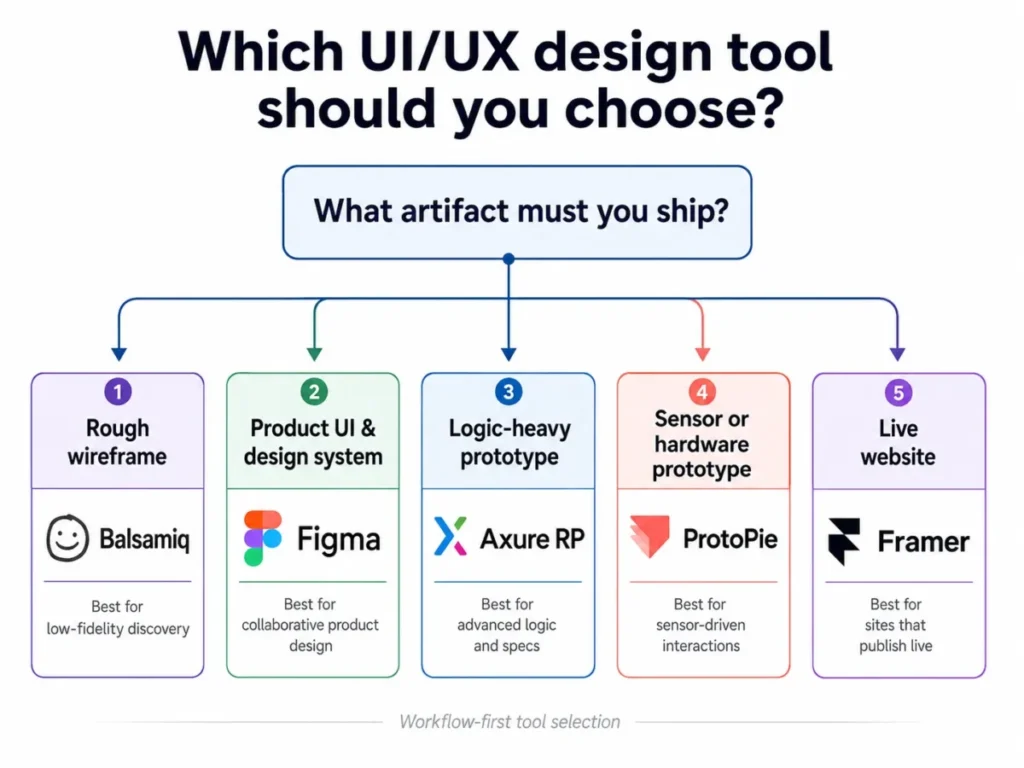
Three of those picks are free to start, and only one of them stays free at team scale. That distinction drives the cost section further down.
How we evaluated the best UI/UX design tools in 2026
These rankings are built from official pricing pages, vendor help centers, product documentation, and attributed third-party review patterns. Plan prices and plan limits were checked on 2026-08-13.
Each tool was assessed against the same buyer-focused criteria: workflow endpoint, prototyping fidelity, collaboration model, developer handoff output, design-system depth, plan gates, platform constraints, and administrative controls.
Greater weight went to factors that change a purchase decision, including the cheapest genuinely usable tier, the first limit a growing team hits, the cost of adding editors, and the artifact engineering receives at handoff. Brand popularity and affiliate relationships carry no ranking weight.
Claims that reliable evidence did not support were excluded from the ranking. Standard list prices are separated from any temporary rate, and each price is tied to the billing cadence shown on the vendor page.
Workflow endpoint coverage matrix
Each ranking reason below is tied to a buyer cohort rather than to a feature count, and the winner by scenario changes with the artifact you ship. Ranked lists imply that ten products compete for one job. These ten do not, and the matrix below is an editorial capability assessment built from documented feature scope rather than a vendor feature count.
| Tool | Low-fi wireframing | Production UI design | Advanced interaction logic | Design-to-code output | Publishes a live site |
|---|---|---|---|---|---|
| Figma | Yes | Yes | Conditional | Inspection and Dev Mode | Limited |
| Sketch | Yes | Yes | Limited | Inspection | No |
| Penpot | Yes | Yes | Limited | Inspect with tokens | No |
| Framer | Limited | Yes | Conditional | Published pages | Yes |
| UXPin | Limited | Yes | Yes | Coded React components | No |
Source: official pages for Figma Starter plan limits, Sketch Mac App Store notes, the Penpot user guide. Also Framer bandwidth guidance, UXPin Merge documentation. All checked 2026-08-13.
| Tool | Low-fi wireframing | Production UI design | Advanced interaction logic | Design-to-code output | Publishes a live site |
|---|---|---|---|---|---|
| Axure RP | Yes | Conditional | Yes | Specifications | No |
| ProtoPie | No | Limited | Yes | Interaction spec | No |
| Balsamiq | Yes | No | No | Image and PDF export | No |
| Uizard | Yes | Limited | Limited | Component snippets | No |
| Justinmind | Yes | Yes | Yes | HTML export | No |
Source: official pages for Axure team project documentation, ProtoPie interaction triggers, Balsamiq Cloud project guidance. Also Uizard export documentation, Justinmind feature documentation. All checked 2026-08-13.
Every row also carries a plan gate or a disqualifier, because a capability that sits one tier higher is not available to the cohort buying the entry tier. Figma, Sketch, and Penpot are direct competitors for the same product-design job. Framer, UXPin, Axure RP, ProtoPie, Balsamiq, Uizard, and Justinmind mostly compete with a phase of the work rather than with each other, which is why a single ranking number would mislead.
Design tools also sit inside a wider delivery stack, so a shortlist usually runs alongside decisions about project management software and free collaboration tools.
Budget tiers: what each tool costs before scale changes the math
Entry pricing splits this category into three bands, and the band a tool sits in usually predicts which limit arrives first.
| Band | Tools | Entry position | The limit that ends the band |
|---|---|---|---|
| Free or near free | Penpot, Uizard, Justinmind | Penpot Professional, Uizard Free, and Justinmind Free carry no license cost | Team-member cap, AI generation cap, single-project cap |
| Lower per-editor band | Framer, Sketch, Figma, Uizard Pro, Justinmind Standard, Balsamiq | Entry tiers in the low double digits per editor | Editor charges, bandwidth, project caps |
| Higher per-editor band | UXPin, Axure RP, ProtoPie | Entry tiers in the high twenties per seat and above | Feature gates that sit one tier higher again |
Source: official pages for Penpot Professional and Unlimited, Uizard plan comparison, Justinmind plan comparison. Also Framer site plans, Sketch editor plans, Figma seat pricing. Also Balsamiq plan comparison, UXPin plan comparison, Axure RP purchase options. Also ProtoPie plan comparison. All checked 2026-08-13.
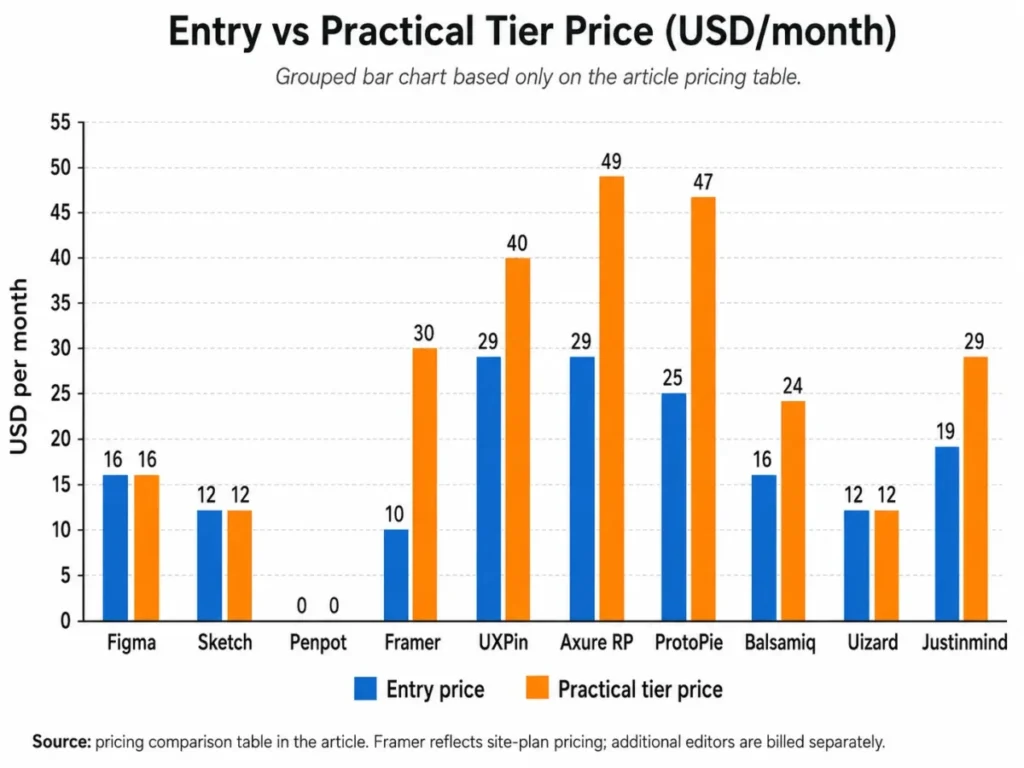
The free band is the one buyers misread most often. Penpot Professional carries no license cost at all, while Uizard Free and Justinmind Free are evaluation tiers that stop being workable once a second project or a fifth screen appears.
The 10 best UI/UX design tools in 2026
1. Figma for cross-functional product teams
- Best for:
- the cross-functional product cohort that needs design, prototyping, libraries, and developer inspection in one workspace.
- Avoid if:
- the design budget assumes the free Starter plan can carry a real team workflow.
- Starting price:
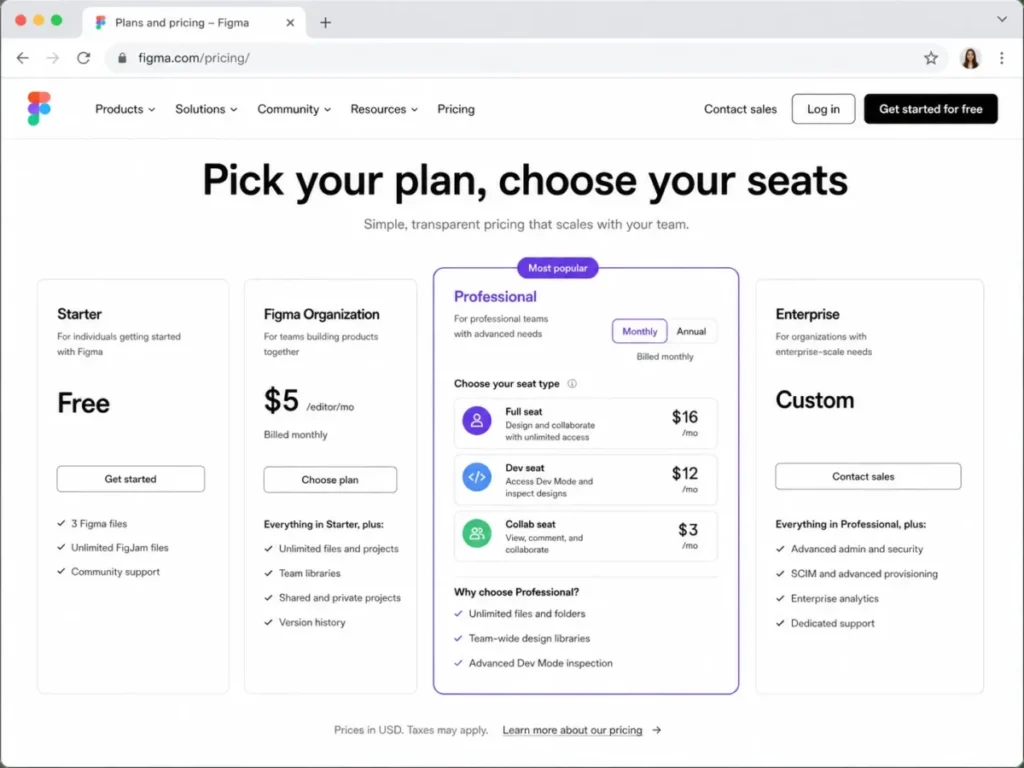
- Starter is free, and the Professional Full seat is displayed at $16 monthly. Dev and Collab seats are priced separately on the same page.
- Practical tier:
- Professional, because team libraries and Dev Mode are the two features a handoff workflow depends on.
- Free plan:
- yes, with 3 combined Figma Design and Figma Sites files, 3 FigJam files, 3 Slides files, and one folder.
- First limit that bites:
- the 3-file team ceiling on Starter, which a single product surface consumes in a week.
- Better than Sketch:
- editing runs in the browser, so a Windows engineer or PM can open the same file.
- Worse than Axure RP:
- conditional logic exists but stops short of the data-driven specification work Axure was built for.
- Setup difficulty:
- low for designers, medium once shared libraries and variable modes need governance.
- Hidden costs:
- seat types are priced separately, so a large engineering audience is a real line item rather than a rounding error.
- Evidence status:
- plan limits are documented in the Starter plan overview; seat pricing is displayed on the plans page, where the monthly and annual toggles showed the same seat rate in the captured view.
User sentiment: third-party review patterns consistently praise collaboration and design systems while flagging performance on very large files.
Starter is not a smaller version of the paid product. According to the Figma Starter plan documentation, checked 2026-08-13, Starter has no team libraries, no Dev Mode, only one folder, and 30 days of version history.
Strip those four away and what remains is a drafting tool, not a design system. That is the upgrade trigger: the moment a second designer needs a shared component set, Professional stops being optional.
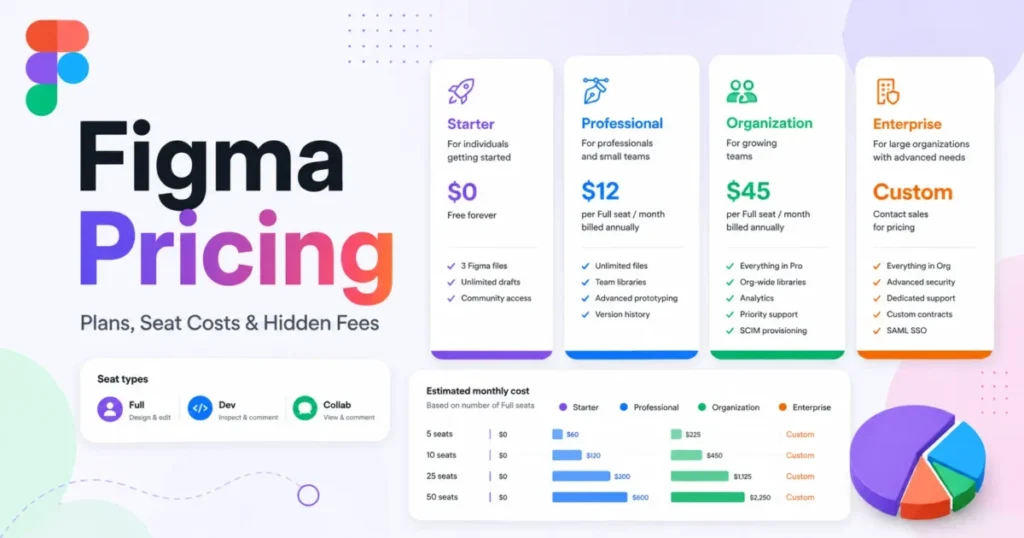
The Figma plan and seat comparison, checked 2026-08-13, prices the paid workflow that removes those exclusions. It splits editors, engineers, and reviewers into Full, Dev, and Collab seats. Our deeper Figma review and the standalone Figma pricing guide break the seat types down further.
The renewal question worth answering before year two is simple. If engineering never opens Dev Mode, you are paying for a handoff workflow the team replaced with screenshots in Slack.
| Pros | Cons |
|---|---|
| Browser editing removes the operating-system constraint for reviewers and engineers | The free tier caps combined design and site files at 3, which ends team use quickly |
| Team libraries support a real design system rather than a component folder | Dev Mode inspection is gated behind a paid plan |
| Dev seats let engineering read files without buying full editor seats | Seat-type pricing makes a large reviewer audience a budget line rather than a free extra |
| Advanced prototyping adds variables and conditional logic inside the same file | Very large files draw recurring performance complaints in third-party review patterns |
Source: official pages for Figma Starter limits. All checked 2026-08-13.
- Verdict:
- the strongest default for a cross-functional product team, provided the budget starts at Professional rather than Starter.
2. Sketch for Mac-standardized design teams

- Best for:
- design teams already standardized on macOS that value a native editor and free stakeholder review.
- Avoid if:
- any designer who must edit files runs Windows or Linux.
- Starting price:
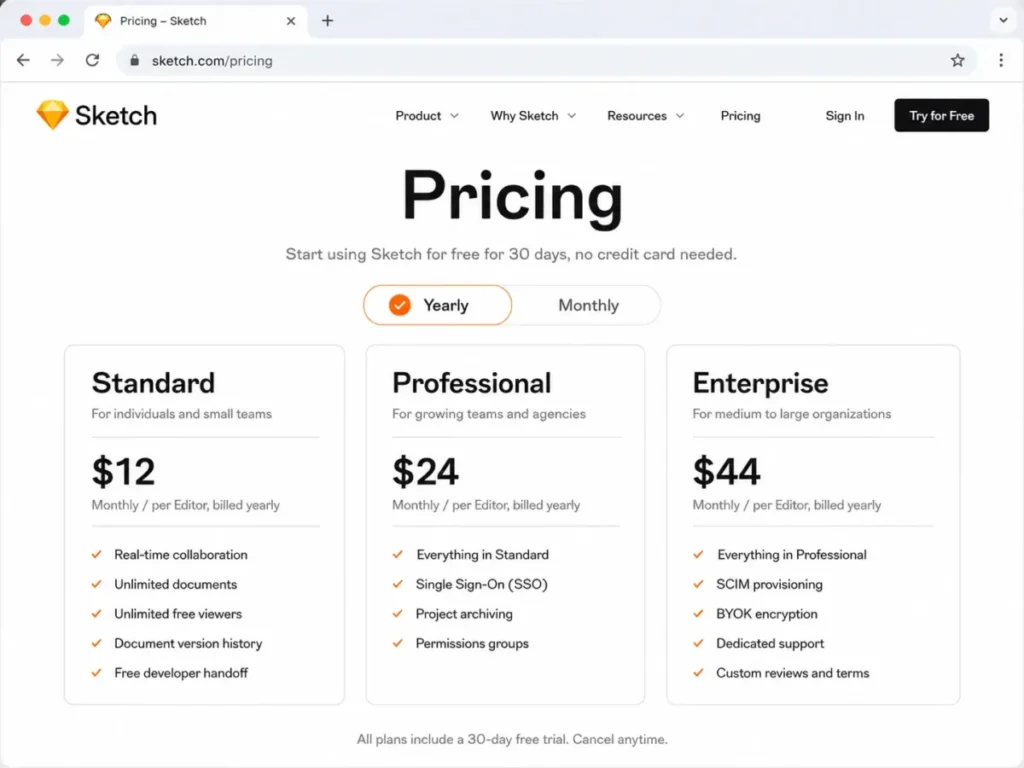
- Standard is $12 monthly per editor on yearly billing, and the plan page lists two higher tiers above it.
- Practical tier:
- Standard covers collaboration and handoff; Professional and Enterprise buy administrative depth rather than design capability.
- Free plan:
- no, though viewers are unlimited and free on paid Workspaces.
- First limit that bites:
- the operating system itself, because full design editing lives in the native Mac application.
- Better than Penpot:
- storage and Workspace administration are more generous on a paid plan.
- Worse than Figma:
- an all-Mac editing requirement narrows who can join a file.
- Setup difficulty:
- low, since a Workspace maps neatly onto an existing Mac fleet.
- Hidden costs:
- a one-time Mac-only license is sold per seat and excludes collaborative features and online document sharing.
- Evidence status:
- subscription prices are shown as yearly billing on the plans page; distribution restrictions come from Sketch support documentation.
User sentiment: reviewers describe a capable native workflow while repeatedly naming macOS exclusivity as the constraint for mixed-OS teams.
There is a second constraint most roundups skip. The Sketch Mac App Store documentation, checked 2026-08-13, states that the App Store build does not support third-party plugins.
That same page adds that the build cannot import .fig files and does not support the MCP Server.
A team that buys through the App Store because procurement prefers it can therefore lose the Figma import path and the plugin ecosystem in the same purchase. Download the build from the vendor site instead, and that specific trap disappears.
The Sketch plan comparison, checked 2026-08-13, lists real-time collaboration, unlimited documents, unlimited free viewers, version history, and developer handoff on Standard.
| Pros | Cons |
|---|---|
| Unlimited free viewers keep stakeholder review off the editor bill | Full design editing requires macOS, which excludes Windows and Linux editors |
| Native editing supports offline work that browser-first tools cannot match | The Mac App Store build blocks third-party plugins and .fig import |
| A one-time Mac-only license exists for buyers who reject subscriptions | The one-time license excludes collaborative features and online document sharing |
| 50GB of storage per editor on paid plans is generous for asset-heavy files | Administrative controls sit on the higher tiers rather than on Standard |
Source: official pages for Sketch plan inclusions. All checked 2026-08-13.
- Verdict:
- the stronger choice when every editing seat is already a Mac, and the wrong choice the moment procurement adds a Windows laptop.
3. Penpot for open-source and self-hosted design

- Best for:
- the engineering-adjacent cohort inside the documented team-member cap that wants design tokens and inspectable output without a license line.
- Avoid if:
- compliance requires version history longer than a week on the free cloud tier.
- Starting price:
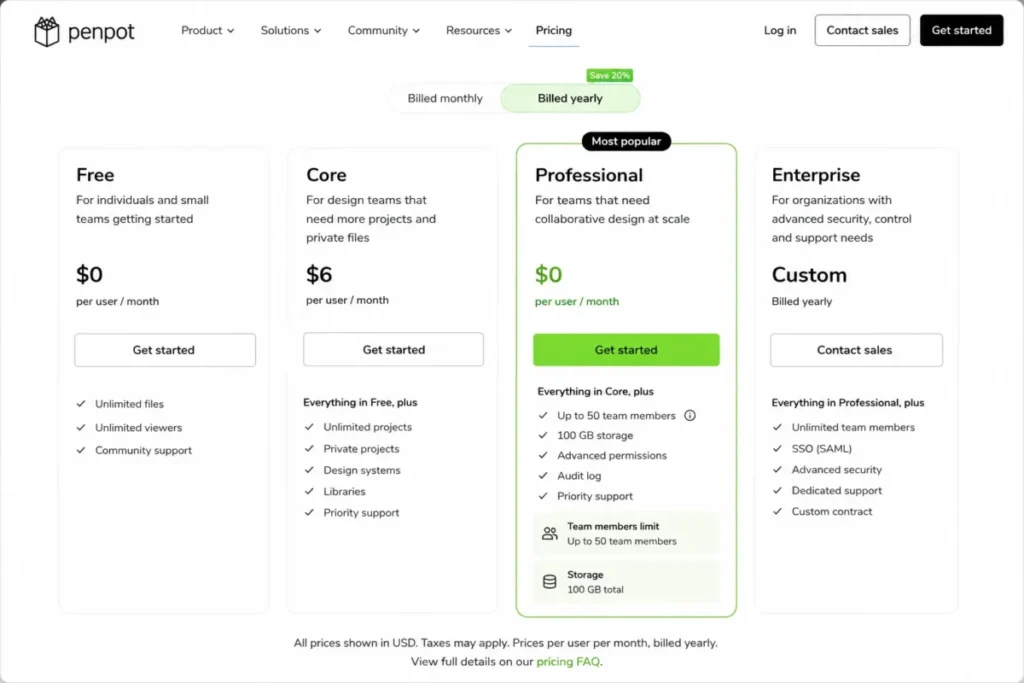
- Professional is $0 monthly per user, and a paid cloud tier sits above it with longer retention.
- Practical tier:
- Professional for teams inside the member cap, Unlimited once history retention or headcount grows.
- Free plan:
- yes, and it is a working tier rather than a trial.
- First limit that bites:
- the 8-member cap on Professional, which a designer, two engineers, a PM, and a couple of contributors reach quickly, though viewers are unlimited.
- Better than Figma:
- the license cost at five editors is zero rather than a recurring seat bill.
- Worse than Figma:
- the ecosystem of plugins, templates, and hiring familiarity is far smaller.
- Setup difficulty:
- low on cloud, high if the team runs its own deployment.
- Hidden costs:
- none on the license line, though self-hosting moves the cost into infrastructure and administration time.
- Evidence status:
- tier limits are published on the pricing page; capability scope comes from the product user guide.
User sentiment: the third-party review sample is small compared with the incumbents, so sentiment should be treated as directional rather than as proof.
The Penpot pricing page, checked 2026-08-13, sets Professional at $0 monthly per user with up to 8 team members and 10GB of storage.
That same tier lists unlimited design files, seven days of autosaved versions, and seven days of deleted-file recovery.
Seven days is the number to weigh. A design decision reversed three weeks later cannot be recovered from history on that tier, so teams with audit or client-approval obligations should budget for the paid cloud tier.
Capability is not the trade-off it once was. The Penpot user guide, checked 2026-08-13, documents flexible layouts, reusable components, variants, design tokens, Inspect with production-ready code, interactive prototyping, and shared libraries.
| Pros | Cons |
|---|---|
| A zero-cost cloud tier removes the seat bill entirely for teams inside the cap | Professional caps the team at 8 members and 10GB of storage |
| Design tokens and Inspect target the same engineering handoff as paid rivals | Autosaved version history and deleted-file recovery both stop at seven days |
| Open source and self-hosting give control that no closed rival offers | Self-hosting transfers cost and risk to internal infrastructure and admin time |
| Unlimited design files apply within the storage allowance | Community size, plugin depth, and hiring familiarity trail the incumbents |
Source: official pages for Penpot plan limits. All checked 2026-08-13.
- Verdict:
- the rational pick for budget-sensitive or open-source-first teams that fit inside the member cap and can live with a seven-day history window.
4. Framer for design that ships as a live website
- Best for:
- design, growth, and marketing teams whose deliverable is a published site rather than a prototype link.
- Avoid if:
- the output is a product interface that engineering will rebuild in its own codebase.
- Starting price:
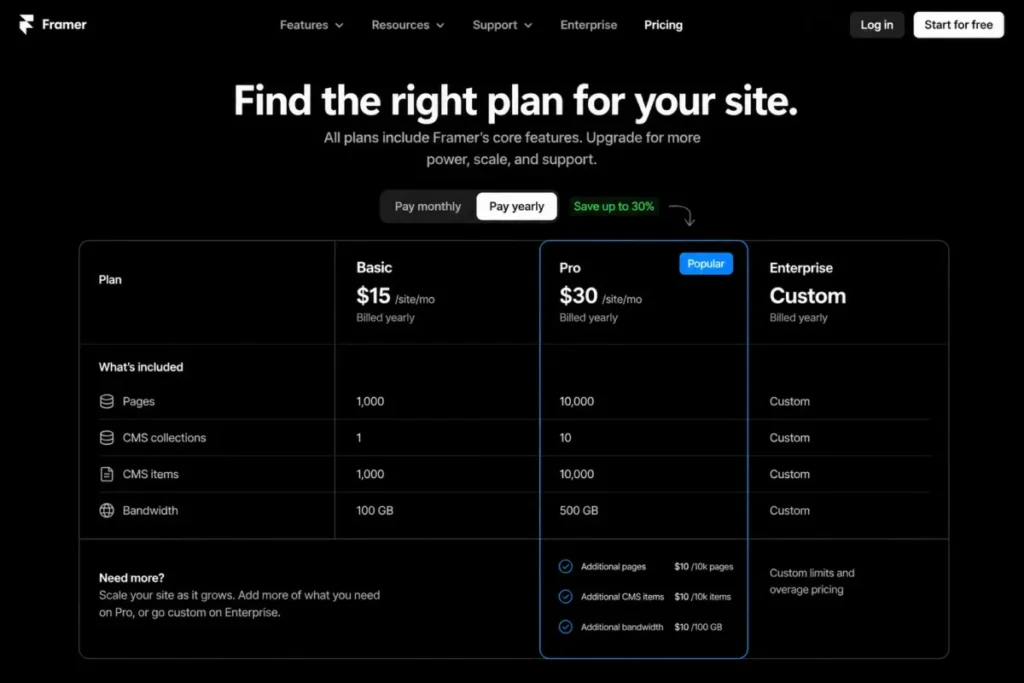
- Basic is displayed at $10 monthly on yearly billing, and a higher site plan sits above it.
- Practical tier:
- Pro, because the flexible usage model and larger allowances only start there.
- Free plan:
- yes, with 1GB of bandwidth, which suits evaluation rather than a live site.
- First limit that bites:
- monthly bandwidth, followed closely by the count of additional editors.
- Better than Figma:
- the design file is the deployed site, which removes an entire rebuild step.
- Worse than UXPin:
- it does not connect to an existing production component library.
- Setup difficulty:
- low to publish, medium once CMS structure and domains are involved.
- Hidden costs:
- additional editors and content editors are charged per person per month, and usage expansions are priced per increment.
- Evidence status:
- plan allowances and add-on prices are published on the pricing page; overage behavior comes from the bandwidth help article.
User sentiment: feedback is broadly positive, with recurring complaints about editor cost and pricing structure in recent reviews.
The headline price is the least useful number here. The Framer plan comparison, checked 2026-08-13, gives Basic 30 pages, 2 CMS collections, 1,000 CMS items, and 50GB of monthly bandwidth.
The higher site plan raises those allowances and then charges per increment for extra pages, CMS collections, CMS items, and bandwidth.
Then there is what happens after the allowance runs out. According to Framer bandwidth documentation, checked 2026-08-13, the first month over the limit triggers a notification and the second month prompts an upgrade.
Continued overage can result in an automatic upgrade or an overage fee, and usage resets on the first of each month.
That sequence turns a successful campaign into an unplanned bill. A site expecting traffic spikes should budget the next tier up before the spike, not after it.
| Pros | Cons |
|---|---|
| The design file publishes as the production site, removing a handoff rebuild | Bandwidth overage can trigger an automatic upgrade or an overage fee |
| CMS collections and items are included rather than sold as a separate product | Additional editors are charged per person on top of the site plan |
| Pro allows pay-as-you-use expansion instead of forcing an enterprise contract | Basic caps pages at 30, which a content-heavy site passes fast |
| Free and Basic tiers make evaluation cheap for a single marketing site | It does not synchronize with a production component library |
- Verdict:
- the clearer fit when the workflow ends at a published URL, provided the budget models editors and bandwidth rather than the Basic headline alone.
5. UXPin for code-backed design systems

- Best for:
- technical product organizations that want prototypes built from the same React components engineering ships.
- Avoid if:
- the design system lives only in a design file and no coded library exists yet.
- Starting price:
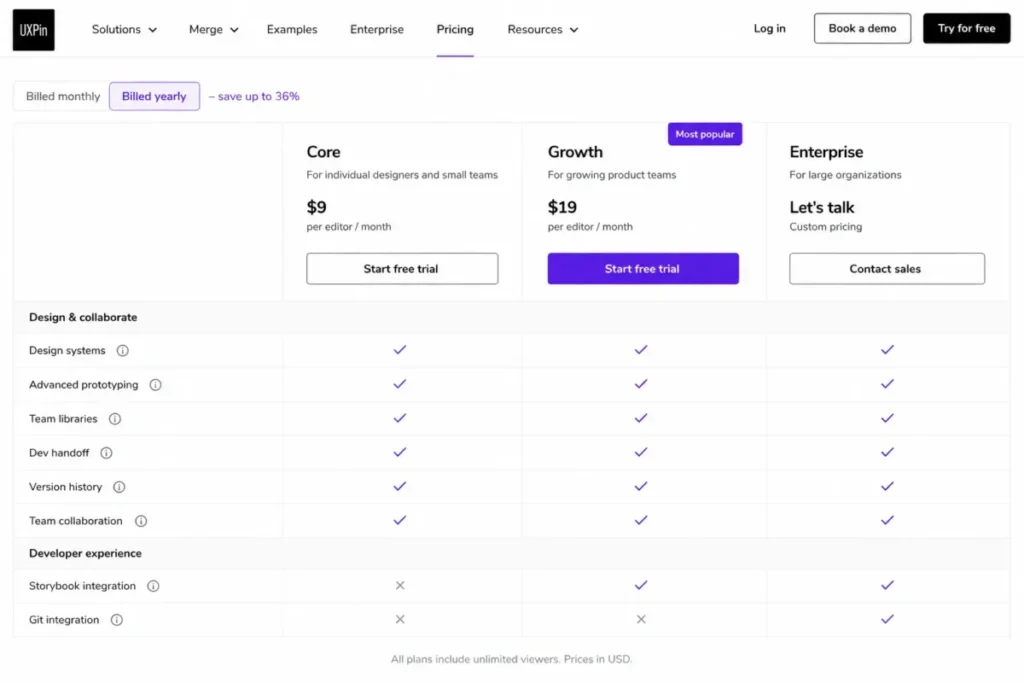
- Core is displayed at $29 monthly per seat on annual billing, and the monthly-billing rate is higher.
- Practical tier:
- Growth for most teams, because Storybook integration and 30-day version history sit there.
- Free plan:
- a free tier exists with 2 prototypes, which functions as an evaluation path.
- First limit that bites:
- the 7-day version history on Core, followed by the Storybook gate.
- Better than Figma:
- a prototype can render real coded components rather than a visual approximation of them.
- Worse than Figma:
- the editor demands more technical setup and a smaller talent pool knows it.
- Setup difficulty:
- high, because the value depends on a repository, a build config, and engineering participation.
- Hidden costs:
- AI credit top-ups are priced separately, and the strongest library workflow sits on the Enterprise tier.
- Evidence status:
- tier prices, credits, and gates come from the pricing page; the component synchronization mechanism comes from Merge documentation.
User sentiment: reviewers frame the technical depth as both the main advantage and the main learning cost.
The buying question here is not UXPin against Figma. It is which UXPin tier unlocks the architecture the engineering team already has.
The UXPin plan comparison, checked 2026-08-13, places Storybook integration, single sign-on with two-factor authentication, and a longer version-history window on the Growth tier.
Custom coded libraries connected from Git or Storybook are described on the same page as an Enterprise capability.
That gap matters because the headline feature is the one behind the highest gate. UXPin Merge documentation, checked 2026-08-13, describes importing and keeping coded React components synchronized from a Git repository so prototypes match production components.
A team evaluating on Core will therefore test a version of the product that does not include the reason it was shortlisted.
| Pros | Cons |
|---|---|
| Merge synchronizes coded React components so prototypes match production behavior | Custom coded libraries from Git or Storybook are described as Enterprise-only |
| Growth adds Storybook integration, single sign-on, and two-factor authentication | Core retains only a seven-day version-history window |
| Built-in coded libraries cover several mainstream component sets before any custom work | Setup requires engineering time, a repository, and a working build configuration |
| Annual billing lowers the displayed seat rate against the monthly rate | AI credits are metered and top-ups are billed separately |
- Verdict:
- worth the technical overhead when production components are the deliverable, and hard to justify when the design system is still only a component library in a design file.
6. Axure RP for logic-heavy enterprise prototypes

- Best for:
- UX specialists and business analysts modeling conditional, data-driven, or specification-heavy workflows.
- Avoid if:
- the team expects two designers to edit the same page at the same moment.
- Starting price:
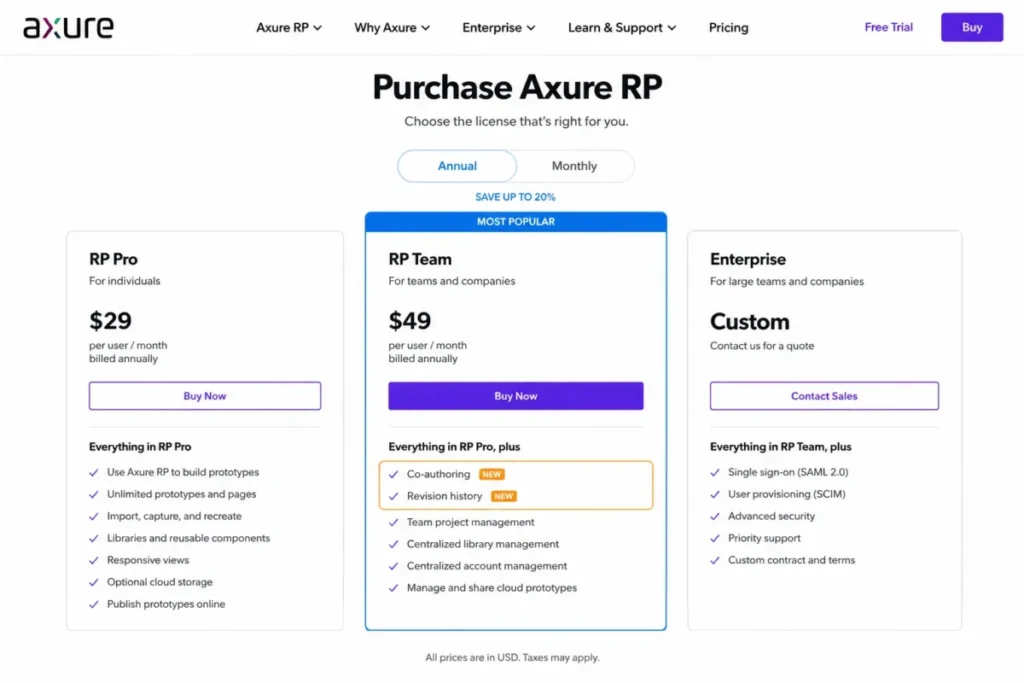
- Axure RP Pro is displayed at $29 monthly per user, with Annual selected as the default state, and RP Team sits above it.
- Practical tier:
- RP Team, because co-authoring, revision history, and team-project hosting all sit there.
- Free plan:
- no, and the purchase page lists no free edition.
- First limit that bites:
- the collaboration model rather than a numeric cap.
- Better than ProtoPie:
- conditional logic and documentation output are stronger for specification work.
- Worse than Figma:
- the editing model is not same-page multiplayer.
- Setup difficulty:
- high, since the interaction model rewards training rather than exploration.
- Hidden costs:
- enterprise security and on-premises options move the purchase into a quoted contract.
- Evidence status:
- edition pricing and inclusions come from the purchase page; the collaboration mechanism comes from team project documentation.
User sentiment: reviewers praise complex interactive prototyping and repeatedly name the learning curve as the cost.
Generic collaboration checkmarks hide the mechanism that changes daily work. Axure team project documentation, checked 2026-08-13, describes a central cloud copy with local copies per teammate.
That page states that a page checked out for editing cannot be edited by anyone else until it is checked back in.
That is version control applied to design, and it is a feature for regulated or specification-heavy work. It is also a genuine friction point for a team that assumed live multiplayer editing.
The Axure RP purchase page, checked 2026-08-13, lists unlimited prototypes, unlimited reviewers, and unlimited cloud projects on Pro.
Team adds co-authoring, revision history, and team-project hosting, while Enterprise adds single sign-on plus private or on-premises deployment.
| Pros | Cons |
|---|---|
| Conditional logic supports prototypes that behave like the real application | Team projects lock a checked-out page against edits by other teammates |
| Unlimited reviewers and cloud projects remove per-viewer budgeting | Team or Enterprise licensing is required before team projects work at all |
| Revision history on Team gives a defensible audit trail for regulated work | The learning curve is a recurring theme in third-party review patterns |
| On-premises and single sign-on options exist for restricted environments | Visual design polish is weaker than the mainstream UI editors |
- Verdict:
- the stronger fit for specification-heavy enterprise UX, and a poor fit for a small team that wants two designers inside one page at once.
7. ProtoPie for sensor-driven and hardware interaction

- Best for:
- automotive, IoT, aviation, and mobile teams whose prototypes must respond to device sensors.
- Avoid if:
- the deliverable is a static screen set that a mainstream editor already handles.
- Starting price:
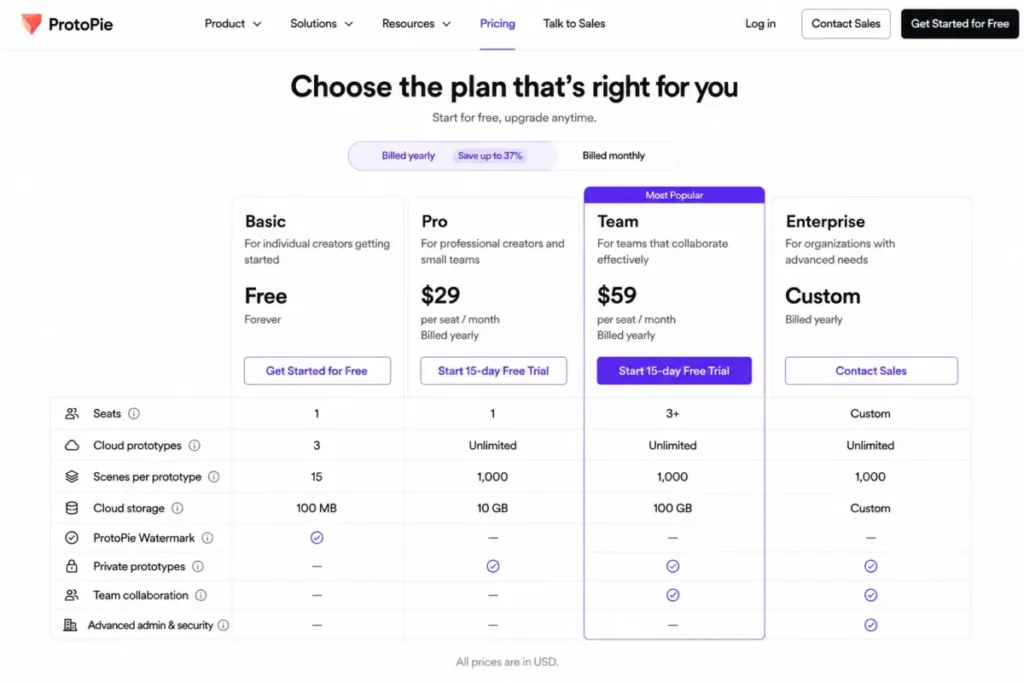
- Free covers 2 prototypes, and Basic is displayed at $25 monthly for one seat. The plans page exposes both Yearly and Monthly controls, so confirm the cadence at checkout.
- Practical tier:
- Pro, because seats, cloud prototypes, and team libraries all open there.
- Free plan:
- yes, capped at 2 prototypes and 8 scenes per prototype.
- First limit that bites:
- the single seat on Basic, which blocks a second editor before any usage cap does.
- Better than Axure RP:
- sensor and hardware behavior is documented rather than approximated.
- Worse than Figma:
- it is not a general-purpose canvas for producing screen designs.
- Setup difficulty:
- medium, with a steeper climb once hardware or device testing enters.
- Hidden costs:
- private-server and custom hardware integration sit inside the Enterprise conversation.
- Evidence status:
- seat, prototype, scene, and storage caps come from the plans page; trigger scope comes from the interaction documentation.
User sentiment: reviewers value high-fidelity interactions and device testing while noting the learning curve.
Realism here is a documented capability, not a marketing adjective. The ProtoPie interaction trigger documentation, checked 2026-08-13, lists sensor triggers including tilt, compass, sound, proximity, and voice command alongside standard touch and mouse triggers.
No mainstream UI editor in this list matches that, which is exactly why ProtoPie earns a slot despite being unsuitable for everyday screen production.
The ProtoPie plan comparison, checked 2026-08-13, sets Basic at one seat, 20 cloud prototypes, 10 scenes per prototype, and 500MB of cloud storage, while Pro moves to unlimited prototypes and 5GB of team storage.
| Pros | Cons |
|---|---|
| Documented sensor triggers cover tilt, compass, sound, and proximity | Basic is restricted to a single seat, so a second editor forces the Pro tier |
| Unlimited prototypes and team storage arrive at the Pro tier | Scenes per prototype are capped on the free and Basic tiers |
| Hardware integration paths exist for automotive and IoT programs | Custom hardware integration and a private server are Enterprise-gated |
| Interaction fidelity removes the guesswork from motion and sensor specs | It is not a replacement for a general-purpose UI design canvas |
- Verdict:
- a specialist purchase that pays for itself when interaction realism is the deliverable, and an expensive mismatch when it is not.
8. Balsamiq for low-fidelity discovery wireframes

- Best for:
- product managers, founders, and consultants running discovery workshops before visual design begins.
- Avoid if:
- the same tool is expected to produce the final high-fidelity interface.
- Starting price:
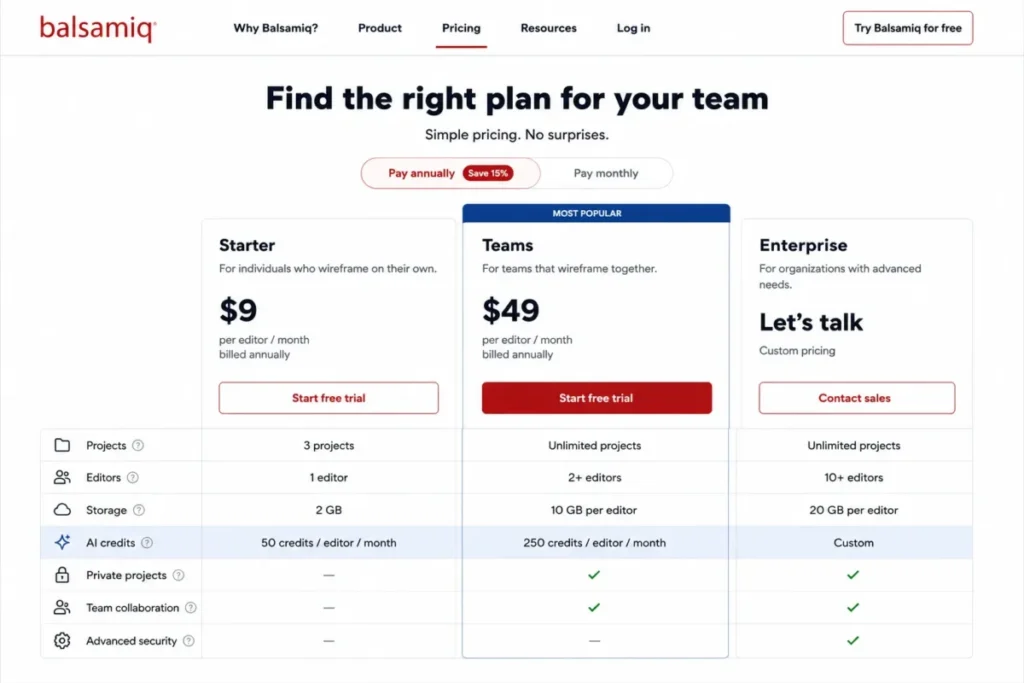
- Starter is $16 monthly per editor, billed annually.
- Practical tier:
- the Teams tier, once the project count passes 10.
- Free plan:
- no, though a 14-day trial is offered without a card.
- First limit that bites:
- the 10-project cap on Starter, which agency and consulting work reaches fastest.
- Better than Figma:
- deliberately rough output keeps stakeholder feedback on structure instead of color.
- Worse than Figma:
- it produces no production-ready UI and no design system.
- Setup difficulty:
- low, and that is the point of the product.
- Hidden costs:
- AI credit top-ups are sold separately once the monthly allowance runs out.
- Evidence status:
- prices, project caps, and credit allowances are published on the plan comparison page.
User sentiment: review patterns strongly support the low-fidelity niche rather than positioning it as a rival to full UI editors.
Low fidelity is a strategy, not a shortfall. The Balsamiq plan comparison, checked 2026-08-13, lists Starter at $16 monthly per editor with up to 10 projects.
The same tier lists 500 monthly AI credits per editor, unlimited reviewers, reusable UI components, Slack integration, and export to PDF or image.
Unlimited reviewers on every tier is the quiet advantage for consultants. Stakeholders can comment without consuming an editor seat, which is where wireframing budgets normally leak.
Balsamiq Cloud project documentation, checked 2026-08-13, describes projects as collections of boards on a Space, with the number of projects bounded by the subscription.
| Pros | Cons |
|---|---|
| Unlimited reviewers on every plan keeps stakeholder feedback off the seat bill | Starter caps the account at 10 projects, which agency work passes quickly |
| Rough output keeps early reviews focused on flow rather than visual polish | It produces no production-ready UI and no design-system layer |
| Reusable UI components speed repeat workshop patterns | AI credits are metered per editor and top-ups cost extra |
| Export to PDF or image fits stakeholder documents rather than developer handoff | There is no free tier, only a time-limited trial |
Source: official pages for Balsamiq plan limits. All checked 2026-08-13.
- Verdict:
- the right tool for the two weeks before visual design starts, and the wrong tool for everything after that.
9. Uizard for AI-assisted early ideation

- Best for:
- founders and non-specialists who need a credible first draft of a screen set quickly.
- Avoid if:
- the plan is to export a whole application as production source code.
- Starting price:
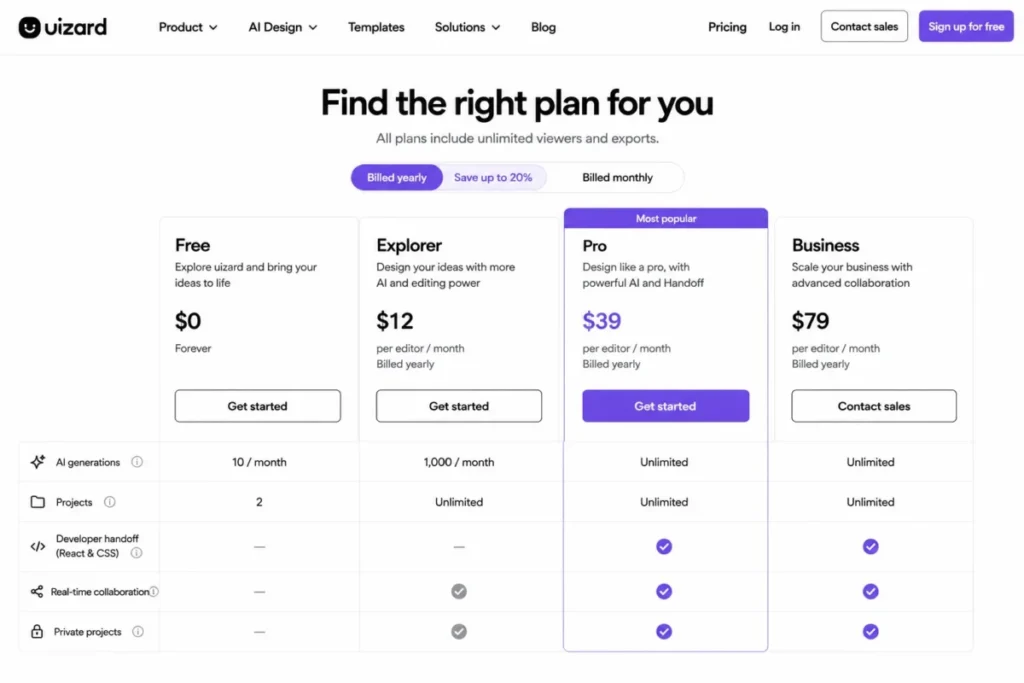
- Free carries no license cost, and Pro is $12 monthly, billed annually.
- Practical tier:
- Pro, since developer handoff and a workable generation allowance both start there.
- Free plan:
- yes, with 2 projects, 5 screens per project, and 3 AI generations per month.
- First limit that bites:
- the 3 monthly generations on Free, which one afternoon of ideation exhausts.
- Better than Balsamiq:
- output is closer to a real interface than a wireframe.
- Worse than Figma:
- customization depth and design-system control are far shallower.
- Setup difficulty:
- low, which is the core selling point.
- Hidden costs:
- none material at the Pro tier, though Business is required for custom brand kits.
- Evidence status:
- quotas and gates come from the pricing page; export behavior comes from the support documentation.
User sentiment: reviewers emphasize speed and accessibility while noting limits on advanced customization and code handoff.
The most expensive misreading in this category is treating component handoff as full code export. Uizard export documentation, checked 2026-08-13, states that project screens export as JPG, PNG, SVG, or PDF.
The same page states that CSS and React code can be inspected for only one component at a time, and that exporting an entire project to HTML or JavaScript is not possible.
Budget for a rebuild, not a shortcut. Uizard shortens the distance to a shared visual idea; it does not shorten the engineering sprint.
The Uizard plan comparison, checked 2026-08-13, sets Free at 2 projects with 3 AI generations per month and 10 pre-made templates.
Pro at $12 monthly raises that to 100 projects and 500 AI generations per month, and adds React and CSS developer handoff.
| Pros | Cons |
|---|---|
| Pro raises AI generation allowance sharply for a low displayed monthly rate | Whole-project export to HTML or JavaScript is documented as not possible |
| Component-level CSS and React inspection gives engineering a usable starting point | Code is exposed one selected component at a time rather than per screen |
| Free tier is enough to judge output quality before any spend | The free tier caps screens per project and monthly generations tightly |
| Low learning curve suits founders and non-design specialists | Design-system depth and customization trail every mainstream editor here |
- Verdict:
- a fast way to get from a blank page to a reviewable concept, and not a substitute for a design system or a code export path.
10. Justinmind for data-driven prototypes and specifications
- Best for:
- UX teams that need variables, simulated data, user flows, and specification output in one tool.
- Avoid if:
- the free tier is expected to carry more than a single project.
- Starting price:
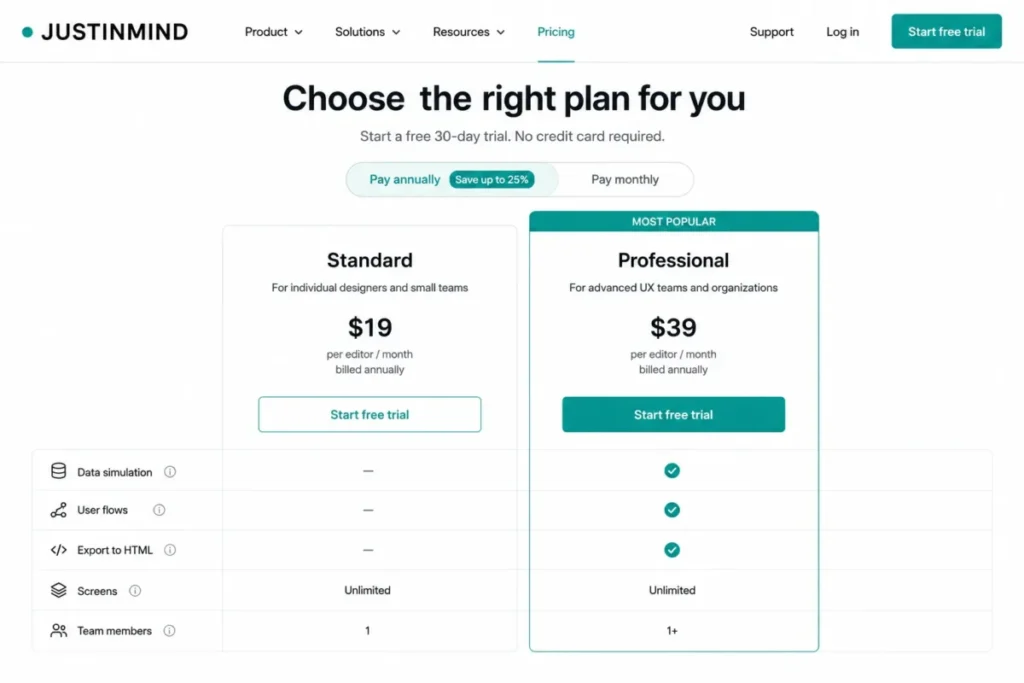
- Free carries no license cost, and Standard is $19 monthly per editor, with Professional and Enterprise tiers above it.
- Practical tier:
- Professional, because the differentiating capabilities are gated there rather than on Standard.
- Free plan:
- yes, with unlimited screens but only 1 project.
- First limit that bites:
- the single-project cap on Free, then the Standard feature gate.
- Better than Uizard:
- prototypes can simulate real data and export to HTML.
- Worse than Figma:
- collaborative design polish and ecosystem depth are weaker.
- Setup difficulty:
- medium, rising with the complexity of the data model being simulated.
- Hidden costs:
- requirements management and single sign-on move the purchase to the Enterprise tier.
- Evidence status:
- plan gates and prices come from the pricing page; capability scope comes from the feature documentation.
User sentiment: reviewers praise fast functional prototyping while criticizing free-tier limits and parts of the interface.
The single step between Standard and Professional is the decision, not the entry price. The Justinmind plan comparison, checked 2026-08-13, places variables, shared UI libraries, local projects, and unlimited projects on Standard at $19 monthly per editor.
The same page puts data simulation, user flows, export to HTML, user-testing integration, and custom branding on the Professional tier.
Enterprise adds SAML single sign-on, document export, requirements management, and Jira and Azure DevOps integration. Justinmind feature documentation, checked 2026-08-13, describes the broader scope, including data lists, business logic rules, and interactive HTML export.
If realistic data flows or an HTML prototype are decision-critical, Standard is a false economy.
| Pros | Cons |
|---|---|
| Data simulation and business logic support prototypes that behave like real software | The free tier allows only 1 project despite unlimited screens |
| Interactive HTML export produces an artifact that lives outside the tool | Data simulation, user flows, and HTML export all require the Professional tier |
| User flows and requirements linking support specification-heavy delivery | SAML single sign-on and requirements management require the Enterprise tier |
| Standard already unlocks variables, shared libraries, and unlimited projects | Interface criticism appears consistently in negative third-party feedback |
Source: official pages for Justinmind plan gates. All checked 2026-08-13.
- Verdict:
- the stronger pick when a prototype must behave like the real product, provided the budget starts at Professional.
Pricing comparison: starting price versus practical tier
Entry prices in this category rarely describe the plan a working team ends up on. The table below pairs each starting price with the tier that removes the first blocking limit.
| Tool | Starting price as displayed | Practical tier | First limit that forces the upgrade |
|---|---|---|---|
| Figma | Professional Full seat at $16 monthly | Professional | 3 team files and no Dev Mode on Starter |
| Sketch | Standard at $12 monthly per editor | Standard | macOS-only editing, not a numeric cap |
| Penpot | Professional at $0 monthly per user | Professional | 8 team members and a seven-day history window |
| Framer | Basic at $10 monthly on yearly billing | Pro | Bandwidth, pages, and additional editors |
| UXPin | Core at $29 monthly per seat | Growth | Seven-day history and the Storybook gate |
Source: official pages for Figma seat rates, Sketch yearly billing, Penpot tier limits. Also Framer plan allowances, UXPin billing options. All checked 2026-08-13.
| Tool | Starting price as displayed | Practical tier | Five-editor monthly cost | First limit that forces the upgrade |
|---|---|---|---|---|
| Axure RP | Axure RP Pro at $29 monthly per user | RP Team | Team projects require Team or Enterprise | |
| ProtoPie | Basic at $25 monthly for one seat | Pro | One seat on Basic | |
| Balsamiq | Starter at $16 monthly per editor | Teams | 10 projects | |
| Uizard | Pro at $12 monthly | Pro | 3 AI generations per month on Free | |
| Justinmind | Standard at $19 monthly per editor | Professional | 1 project on Free, then feature gates |
Source: official pages for Axure RP editions and pricing, ProtoPie seat limits, Balsamiq annual billing. Also Uizard annual rates, Justinmind tier pricing. All checked 2026-08-13.
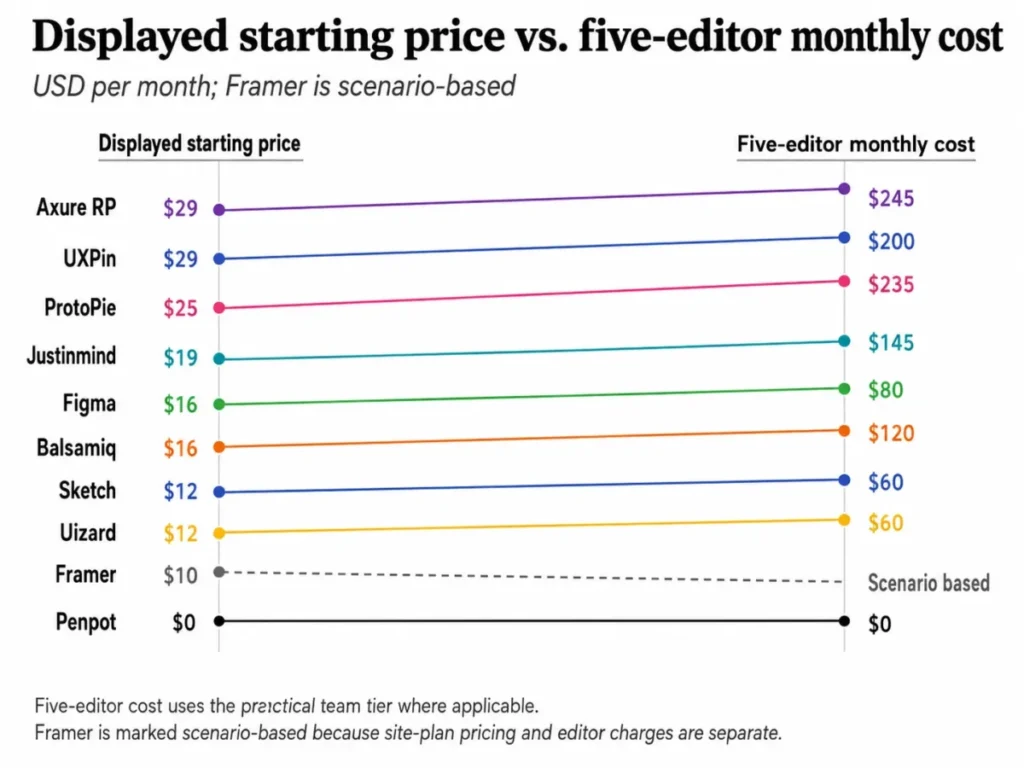
Five editors is where these pricing models separate, and the arithmetic is worth showing. Each figure below is a calculation result rather than a published plan price.
Five Sketch Standard editors work out at 5 x 12, which is 60 dollars per month and 720 dollars per year on the yearly rate.
Five Balsamiq Starter editors work out at 5 x 16, which is 80 dollars per month and 960 dollars per year on annual billing.
Five Uizard Pro creators work out at 5 x 12, which is 60 dollars per month and 720 dollars per year on annual billing. The plan page displays that rate without restating the seat unit, so confirm the per-creator basis at checkout.
Five Justinmind Standard editors work out at 5 x 19, which is 95 dollars per month at the published monthly rate.
Five Penpot Professional users work out at 5 x 0, which is no license cost at all while the team stays inside the 8-member cap.
Storage and history limits still apply on that free tier, so the saving is real but it buys a shorter recovery window.
Framer resists a single team price on purpose. A realistic estimate is the site plan, plus a charge for each additional editor and content editor, plus any page, CMS, or bandwidth expansion the site consumes, so the honest answer is a formula rather than a number.
Feature gate comparison
Feature gates decide more purchases than feature lists do. Each row below names the capability most likely to be missing from the tier a buyer first considers.
| Tool | Entry-tier gap that matters | Tier that removes it | Administration gate |
|---|---|---|---|
| Figma | No Dev Mode and no team libraries on Starter | Professional | Single sign-on and advanced security above Starter |
| Sketch | Administrative depth is thin on Standard | Professional or Enterprise | Higher tiers, plus a Private Cloud option |
| Penpot | 7-day version history and 8-member cap | Unlimited or Enterprise | Enterprise cloud and self-hosted editions |
| Framer | Fixed allowances and no usage flexibility on Basic | Pro | Enterprise for custom limits and hosting |
| UXPin | No Storybook integration on Core | Growth | Single sign-on and two-factor from Growth |
Source: official pages for Figma Starter exclusions, Sketch plan tiers, Penpot retention limits. Also Framer limit models, UXPin feature gates. All checked 2026-08-13.
| Tool | Entry-tier gap that matters | Tier that removes it | Administration gate |
|---|---|---|---|
| Axure RP | No team projects or co-authoring on Pro | RP Team | Enterprise for single sign-on and on-premises |
| ProtoPie | One seat and capped scenes on Basic | Pro | Enterprise for private server and custom hardware |
| Balsamiq | 10-project cap and 500 AI credits on Starter | Teams | Enterprise for SAML and regional data storage |
| Uizard | No developer handoff on Free | Pro | Business and Enterprise for brand kits and scale |
| Justinmind | No data simulation or HTML export on Standard | Professional | Enterprise for SAML single sign-on |
Source: official pages for Axure edition inclusions, ProtoPie tier limits, Balsamiq tier features. Also Uizard handoff availability, Justinmind plan gates. All checked 2026-08-13.
Two patterns repeat across the category. Collaboration is usually included early, while the artifact engineering needs is usually gated one tier above the plan a buyer first prices.
Developer handoff, compared by what it produces
Handoff is treated as one feature in most roundups. It is at least five different outputs, and the difference decides how much rebuild work sits on the other side of the design review.
| Tool | What handoff produces | Where it is gated | Practical consequence for engineering |
|---|---|---|---|
| Figma | Inspection and Dev Mode against the design file | Paid plans | Engineers read specs in place, then build in their own stack |
| Penpot | Inspect with production-oriented code and design tokens | Documented as product capability, not a plan gate | Token export reduces manual translation of design values |
| UXPin | Coded React components synchronized from a repository | Custom libraries on Enterprise | The prototype and the product share the same component source |
Source: official pages for Figma plan capabilities, Penpot Inspect and tokens, UXPin Merge synchronization. All checked 2026-08-13.
| Tool | What handoff produces | Where it is gated | Practical consequence for engineering |
|---|---|---|---|
| Uizard | CSS or React for one selected component at a time | Pro and above | Useful as a starting snippet, not as an application export |
| Justinmind | Interactive HTML plus dimensions, assets, and CSS | HTML export on Professional | A runnable artifact for testing, still rebuilt for production |
| Framer | A published site rather than a specification | Included with the site plan | No rebuild for marketing pages, no reuse for product code |
Source: official pages for Uizard export limits, Justinmind export options, Framer publishing plans. All checked 2026-08-13.
Only one of those six removes the rebuild step, and it removes it for websites rather than for product interfaces. Everything else shortens the specification conversation without shortening the build.
A short glossary helps here, because vendors use these terms interchangeably and they mean different things to a budget. Inspection exposes values from a design file, and design tokens carry those values into code as named variables.
Component synchronization means the design tool renders the same code the product runs. HTML export produces a standalone artifact, while publishing deploys the design itself as the live page.
Teams that need to understand the underlying interfaces can start with this explainer on what an API does.
Design-system depth and the plan gates around it
A design system is where most of these tools stop being interchangeable. The capability ladder runs from styles, to reusable components, to variants, to tokens, to synchronized production components.
Figma covers shared libraries, variables with multiple modes, and conditional prototyping on paid plans, which is enough for most product organizations. Penpot documents components, variants, and design tokens as product capabilities, and its plan page gates members, storage, and retention rather than these features, which is the reason it competes above its price.
UXPin is the only tool here that closes the last gap, and it charges for it. Storybook integration begins on Growth, while connecting a custom coded library from Git or Storybook is described as an Enterprise capability, so the design-system decision and the contract decision arrive together.
Balsamiq and Uizard sit at the other end of the ladder by design. Reusable UI components exist in both, but neither carries tokens or a synchronized component source, and neither pretends otherwise.
Setup, migration, and the switching risk nobody prices
| Tool | Setup difficulty | Main setup driver | Documented migration note |
|---|---|---|---|
| Figma | Low to medium | Library and variable governance rather than the editor | Supports importing several external file formats |
| Sketch | Low | Existing Mac fleet maps onto a Workspace | The Mac App Store build cannot import .fig files |
| Penpot | Low on cloud, high self-hosted | Infrastructure ownership | Object-level fidelity when moving in was not verified |
| Framer | Low to medium | CMS structure and domain configuration | Output is a site, so there is no design-file export path |
| UXPin | High | Repository access and build configuration | Component sync depends on engineering availability |
Source: official pages for Figma plan documentation, the Sketch App Store build notes, Penpot deployment tiers. Also Framer plan structure, UXPin Merge setup. All checked 2026-08-13.
| Tool | Setup difficulty | Main setup driver | Documented migration note |
|---|---|---|---|
| Axure RP | High | Interaction model and team-project workflow | Team projects require Team or Enterprise licensing |
| ProtoPie | Medium | Device and hardware test setup | Prototype and scene caps apply on lower tiers |
| Balsamiq | Low | Almost none by design | Projects import and export as .bmpr files |
| Uizard | Low | Prompt quality rather than configuration | Screens export as images or PDF, not as source code |
| Justinmind | Medium | Data model behind the simulated prototype | HTML export exists on Professional |
Source: official pages for Axure team-project requirements, ProtoPie plan caps, Balsamiq project handling. Also Uizard project export, Justinmind plan capabilities. All checked 2026-08-13.
Object-level migration fidelity is the gap in every roundup, this one included. Import and export paths are documented, but whether components, variants, prototype logic, comments, and version history survive a move is not something the vendor pages establish, so treat any promise of a clean switch as unverified until a pilot file proves it.
Run that pilot before the contract. Move one real screen set, then check components, interaction states, comments, and shared library links individually.
Enterprise controls and administration
| Tool | Documented administrative controls | Tier where they appear |
|---|---|---|
| Figma | Single sign-on and advanced security settings above the free Starter plan | Paid plans |
| Sketch | Workspace administration, plus a Private Cloud option | Higher tiers |
| Penpot | Self-hosted and enterprise editions with longer retention | Enterprise |
| Framer | Custom limits and hosting arrangements | Enterprise |
| UXPin | Single sign-on with two-factor authentication | Growth and Enterprise |
Source: official pages for the Figma Starter overview, Sketch plan structure, Penpot enterprise editions. Also Framer enterprise plans, UXPin security features. All checked 2026-08-13.
| Tool | Documented administrative controls | Tier where they appear |
|---|---|---|
| Axure RP | User management, single sign-on, private or on-premises | Enterprise |
| ProtoPie | Private server and custom hardware integration | Enterprise |
| Balsamiq | SAML single sign-on and regional data storage | Enterprise |
| Uizard | Custom brand kits and larger generation allowances | Business and Enterprise |
| Justinmind | SAML single sign-on and requirements management | Enterprise |
Source: official pages for Axure enterprise options, ProtoPie enterprise tiers, Balsamiq enterprise controls. Also Uizard higher tiers, Justinmind enterprise gates. All checked 2026-08-13.
Blank spaces in a security table are the honest outcome when a vendor page does not publish a control. Ask for the answer in writing during procurement rather than inferring it from a marketing page.
The buyer risk ledger
Every purchase in this category carries four risks that a feature comparison will not surface. Naming them early is cheaper than discovering them at renewal.
Adoption risk shows up wherever the tool asks the team to change how it works rather than what it uses. UXPin and Axure RP carry the most of it, because one expects engineering to maintain a component pipeline and the other expects designers to accept a check-out workflow.
The mitigation is the same in both cases. Pilot with the person who has to change their habit, not with the person who chose the tool.
Budget risk is concentrated in the tools whose cost scales with something other than headcount. Framer is the clearest example, because pages, CMS records, bandwidth, and editors each move independently of the plan price.
Penpot inverts that risk without removing it. The license line stays flat, and the exposure moves into storage, retention, and the administration time that self-hosting consumes.
Workflow risk is the gap between the artifact a tool produces and the artifact the next team needs. Uizard and Balsamiq both sit here by design, since neither produces a design system or an application codebase, and both are excellent inside the phase they were built for.
Justinmind and ProtoPie face a narrower version of the same problem. Their output is convincing enough that stakeholders sometimes mistake a prototype for a build estimate.
Renewal risk is the quiet one. A team that bought a paid tier for a specific capability, whether that is Dev Mode, Storybook, team projects, or HTML export, should be able to name who used it in the last quarter.
If nobody can, the honest move at renewal is to drop a tier rather than negotiate a discount on capability the team never adopted.
How to choose the right UI/UX design tool
- Name the artifact you must ship. A wireframe, a design system, a functional prototype, a specification, and a live website point at different products in this list.
- Count the people who must edit rather than view. Viewer policy is generous almost everywhere, and editor count is what the invoice tracks.
- Check the operating systems in the room. This single constraint removes Sketch for mixed-OS teams before any feature comparison starts.
- Decide what engineering receives. Inspection, tokens, synchronized components, HTML, or a deployed page are five different answers with five different rebuild costs.
- Find the first limit your workflow hits. File counts, member caps, project caps, scene caps, seat caps, and bandwidth all appear at different points.
- Price the tier above the one you want. Every tool here gates at least one decision-critical capability one step up.
- Confirm the administrative controls in writing before procurement, especially single sign-on, data residency, and retention.
Common mistakes when choosing UI/UX design software
- Budgeting from the entry price. The practical tier is usually one step up, and for Justinmind and UXPin the gap is where the differentiating capability lives.
- Treating a free plan as a small paid plan. Figma Starter removes Dev Mode and team libraries, which changes the workflow rather than shrinking it.
- Reading collaboration as one feature. Axure team projects lock a checked-out page, which is a different daily rhythm from same-page multiplayer editing.
- Assuming AI handoff equals code export. Uizard documents component-level inspection and states that whole-project export to HTML or JavaScript is not possible.
- Ignoring usage that scales with success. Framer bandwidth overage can trigger an automatic upgrade or an overage fee rather than a quiet slowdown.
- Choosing a specialist for general work. ProtoPie and Balsamiq are strong at one phase and deliberately weak outside it.
- Skipping the migration pilot. Import paths exist, but object-level fidelity across components, logic, and history is not something a pricing page establishes.
Switching and staying: when a move is worth the disruption
Switch when the artifact changes. A team that starts shipping marketing pages should look at Framer, and a team whose design system moves into code should evaluate UXPin against its existing stack rather than against Figma alone.
Stay when only the price changed. Moving from a paid tool to a free one saves a per-editor licence line that is smaller than a month of lost design velocity for most product teams.
Delay when the design system is mid-rebuild. Migrating components, variants, and tokens during an active redesign multiplies both risks, and neither vendor documentation nor this article can promise the objects survive intact.
The 30 and 90 day adoption check
Set two checkpoints before the first invoice rather than after it. They convert a subjective sense that the tool is working into something a finance conversation can use.
At thirty days, the design file should be the place decisions get recorded rather than a parallel copy of a document that lives somewhere else. If reviewers are still commenting in chat threads, the collaboration model has not landed and no feature will fix that.
At ninety days, three things should be true. The component library should be reused rather than rebuilt per screen, engineering should open the handoff surface without being asked, and the plan limit that triggered the upgrade should no longer be the thing slowing anyone down.
A failure at thirty days is usually a process problem and is worth fixing inside the tool. A failure at ninety days is a fit problem, and that is the point where switching costs less than persisting.
Two questions belong in every renewal conversation. Did engineering open the handoff surface you paid for, and did the plan limit you upgraded for stop being the bottleneck?
Final verdict
Figma is the strongest default for a cross-functional product team that needs collaborative design, prototyping, shared libraries, and developer inspection in one workspace, provided the budget starts at Professional rather than Starter. That recommendation is about breadth, not superiority in every dimension.
Choose Penpot if license cost dominates and the team fits inside the 8 members and seven-day history window published on the Penpot plan page. Choose Sketch if every editing seat is a Mac and offline work matters.
Choose Framer if the deliverable is a published site and the budget models editors and bandwidth. Choose UXPin if production React components are the point and Enterprise pricing is acceptable.
Choose Axure RP for conditional, specification-heavy enterprise prototypes, and ProtoPie when sensors or hardware are involved. Choose Balsamiq for discovery-stage wireframes, Uizard for fast AI-assisted concepts, and Justinmind Professional when a prototype must run on realistic data.
For adjacent tooling decisions, the same buyer lens applies to our roundup of the best AI prototyping tools and to team collaboration platforms that sit alongside a design workspace.
Teams that run discovery on a shared canvas before opening a design file should also read the Miro whiteboard review.
FAQ
What is the best UI/UX design tool in 2026?
Figma is the strongest general-purpose choice for cross-functional product teams because one paid workspace covers multiplayer editing, shared libraries, variables, conditional prototyping, and developer inspection. Specialist work changes the answer: Framer for published sites, UXPin for code-backed systems, Axure RP for logic-heavy prototypes, and ProtoPie for sensor-driven interaction.
What is the best free UI/UX design tool?
Penpot Professional is the only tier here that stays genuinely free at team scale, at $0 monthly per user for up to 8 team members with 10GB of storage.
The trade-off is seven days of autosaved version history and seven days of deleted-file recovery, which is short for teams with client-approval or audit obligations.
Is Penpot a real alternative to Figma?
For capability, yes on paper. Penpot documentation covers flexible layouts, reusable components, variants, design tokens, Inspect with production-oriented code, prototyping, and libraries, which maps closely onto the mainstream product-design workflow.
The gaps are ecosystem size, plugin depth, hiring familiarity, and the 8-member cap on the free cloud tier rather than missing core features.
Is Sketch only available on Mac?
Full design editing runs in the native macOS application, while unlimited free viewers and developer handoff are available to teammates who are not editing. A Windows or Linux teammate can therefore review but cannot edit, which rules Sketch out for mixed-OS editing teams.
Which design tool is best for developer handoff?
It depends on the artifact engineering needs. Figma Dev Mode and Penpot Inspect expose specifications and tokens against the design file, UXPin Merge synchronizes real React components from a repository, Justinmind Professional exports interactive HTML, and Framer publishes the design as a live site.
Can Uizard export my whole app as production React code?
No. Uizard documentation states that screens export as JPG, PNG, SVG, or PDF, that CSS and React code can be inspected one component at a time, and that exporting an entire project to HTML or JavaScript is not possible.
Which UI/UX tools support self-hosting or on-premises deployment?
Penpot publishes self-hosted enterprise editions, Axure RP lists private or on-premises deployment on its Enterprise edition, and ProtoPie offers a private server at the Enterprise tier. Sketch lists a Private Cloud option on its plan page.
Which design tools support SSO or SAML?
UXPin lists single sign-on with two-factor authentication from the Growth tier, Balsamiq lists SAML single sign-on on Enterprise, Justinmind lists SAML single sign-on on Enterprise, and Axure RP lists user management with single sign-on on Enterprise. Figma documentation notes that single sign-on and advanced security settings are unavailable on the free Starter plan.
Should a five-person team pay for Figma or use Penpot?
Five Figma Professional full seats are billed at the displayed Full seat rate on the Figma plan page.
Five Penpot Professional user seats cost $0 and stay inside the documented 8-member cap.
Pick Penpot if the license line is the constraint and a seven-day history window is acceptable, and pick Figma if plugin ecosystem, Dev Mode, and hiring familiarity matter more than the saving.
Framer or Figma for a website project?
Framer if the site is the deliverable, because the design file publishes as the live page and CMS collections, hosting, and domains are included in the plan. Figma if the site will be rebuilt by engineering in another stack, since Framer output does not become reusable product code.
What to verify before you buy
Choose one primary UI/UX design or prototyping tool for the workflow you actually ship, then verify its plan before purchase. Open the vendor plan page and confirm the tier, the limits that apply to your team size, and the collaboration model.
Confirm the handoff workflow last, because that is the step engineering inherits. A shortlist is finished when you can name the plan, the first limit, the collaboration model, and the handoff artifact for the one tool you intend to buy.