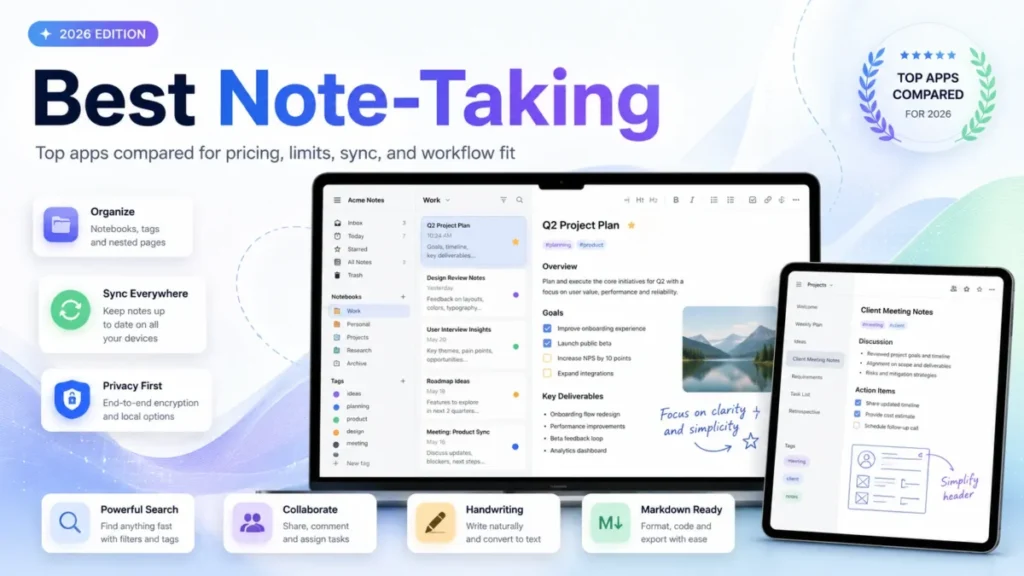
Most note-taking decisions fail quietly: a student picks the app with the nicest icon, and a freelancer picks whatever a blog called the best overall. Eighteen months later, both are stuck migrating a few hundred notes out of a free plan that stopped being free the day it hit a hard cap.
The real decision points are smaller than which app has the most features: what happens when your free plan hits its ceiling, whether sync is bundled or separate, and how hard it is to get your notes back out. For most individuals and mixed-device households, Microsoft OneNote is the safest start: its core app is free across five major platforms with no documented note-count ceiling.
Obsidian is the better pick for plain local files you control forever; Notion is the better pick once notes need to live inside shared team databases.
This ranking is built from official pricing pages, help-center documentation, and app-store listings checked on August 7, 2026, with every price and limit linked to its source and every evidence gap labeled, not guessed.
In This Article (9 sections)
Quick Verdict: Best Note-Taking App by Use Case
| Use case | Best pick | Why it fits |
|---|---|---|
| Best overall for mixed-device users | Microsoft OneNote | Free core app across five major platforms, no documented note-count ceiling |
| Best for local files and long-term ownership | Obsidian | Notes stay as plain Markdown files you control, with sync as an optional add-on |
| Best for teams and structured knowledge | Notion | Notes connect to shared databases, pages, and permissions, not just flat notes |
| Best for the Apple ecosystem | Apple Notes | Native scanning, handwriting, and audio capture with iCloud collaboration |
| Best free quick-capture tool | Google Keep | Instant lists, voice notes, and reminders with no separate paid tier |
| Best open-source Evernote alternative | Joplin | Free, offline-first, Markdown-based, with a documented Evernote import path |
| Best for polished client documents | Craft | Block-based documents built to be shared, exported, and presented |
| Best focused Markdown writer for Apple | Bear | A distraction-light editor with tags, themes, and Pro-gated sync |
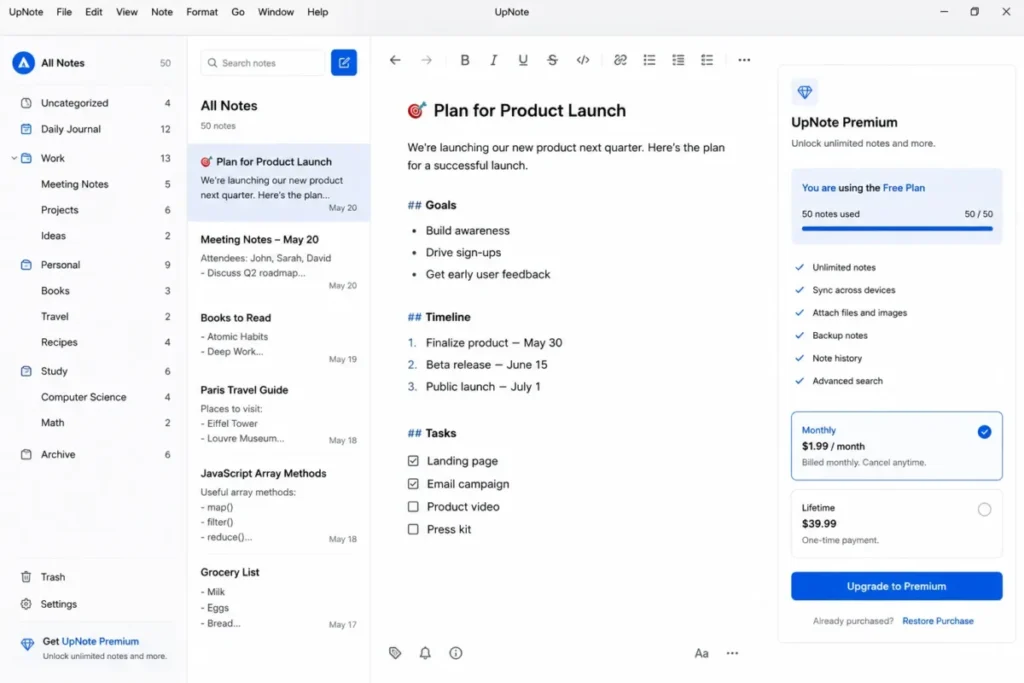
| Best low-cost cross-platform value | UpNote | $1.99/ |
| Best for an existing Evernote library | Evernote | Avoiding a migration can outweigh a restrictive Free plan for entrenched users |
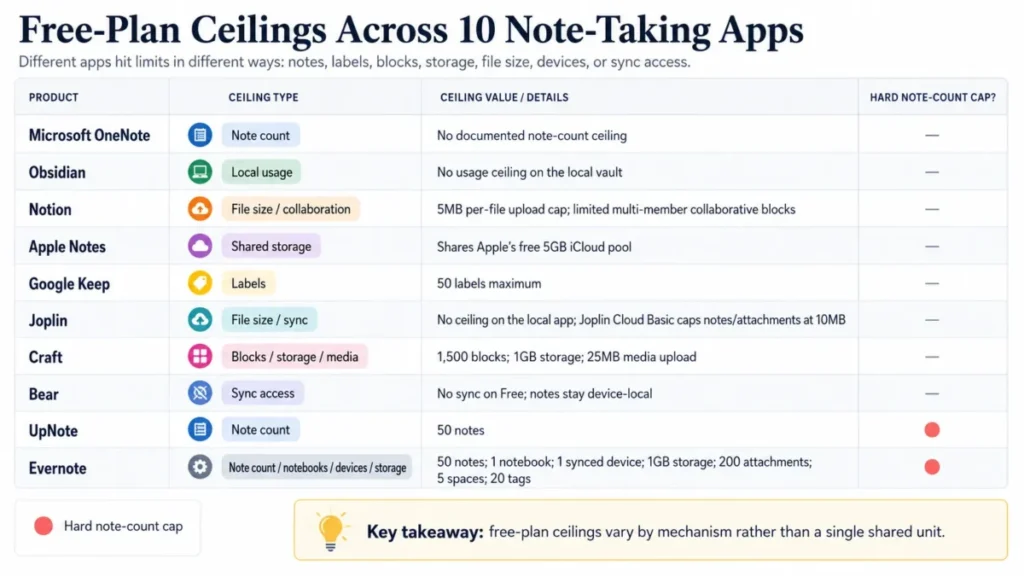
Free-plan availability is not the same as free-plan usefulness. Evernote and UpNote both offer real free tiers, but both cap out at 50 notes. Google Keep’s ceiling is 50 labels rather than notes, and Notion’s Free plan is capped by a 5MB per-file upload limit instead of a note count. Google Keep organization documentation; Notion pricing; UpNote.
How We Chose and Ranked These Tools
These rankings are based on verified pricing, official product documentation, help-center guidance, current feature pages, and labeled third-party evidence. Pricing and plan limits were checked on August 7, 2026.
Each tool was assessed against the same buyer-focused criteria: platform coverage, capture flexibility, organization and retrieval, synchronization and collaboration model, data ownership, migration and export support, free-tier usefulness, and documented limitations.
Greater weight was given to factors that affect a real purchase decision: whether the free tier is usable long-term, what triggers an upgrade, and how much lock-in a buyer takes on. Brand popularity and promotional presentation did not influence the ranking order.
Claims that could not be verified from official sources were excluded rather than estimated. Temporary promotions, such as Craft’s SUMMER26 offer, are labeled separately from standard list pricing and checked on the publication date.
Best Note-Taking Software Compared
| Product | Platforms | Starting price | Free plan | Sync model | Standout feature |
|---|---|---|---|---|---|
| Microsoft OneNote | Windows, macOS, web, iOS, Android | Free | Free core app, no note-count ceiling documented | Built-in cloud sync; Windows can also store local notebooks | Freeform ink, drawing, and multimedia capture |
| Obsidian | Windows, macOS, Linux, iOS, Android | Free | Unlimited local vault | Optional paid Sync ($5/ | Plain Markdown files with backlinks |
| Notion | Windows, macOS, web, iOS, Android | Free | $0/member, 5MB file cap | Built-in cloud sync | Notes linked to shared databases |
| Apple Notes | iPhone, iPad, Mac, web (iCloud) | Free | Free app, shares 5GB iCloud pool | iCloud sync and collaboration | Native scanning, handwriting, audio |
| Google Keep | Web, Android, iOS | Free | Free, 50-label ceiling | Built-in Google account sync | Fastest capture-to-save flow |
| Joplin | Windows, macOS, Linux, iOS, Android | Free | Unlimited local notes | Self-chosen target: Joplin Cloud, Nextcloud, Dropbox, OneDrive, WebDAV | End-to-end encryption support |
| Craft | Windows, macOS, iOS, iPadOS, web | Free | 1,500 blocks, 1GB storage | Built-in cloud sync | Presentation-ready block documents |
| Bear | Mac, iPhone, iPad, web (beta) | Free | Free writing, no sync | iCloud sync on Bear Pro only | Focused Markdown-style editor |
| UpNote | Windows, macOS, Linux, iOS, Android | Free | 50 notes | Built-in automatic sync | Lifetime purchase option |
| Evernote | Windows, macOS, web, iOS, Android | Free | 50 notes, 1 notebook, 1 device | Built-in cloud sync (1 device on Free) | Mature clipping, tasks, and Spaces |
Sources: Microsoft OneNote version comparison, Obsidian pricing, Notion pricing, and Apple Notes App Store listing. Also: Google Keep Play Store listing, Joplin documentation, and Craft pricing. Also: Bear Pro pricing, UpNote, and Evernote plan comparison; checked August 7, 2026.
The 10 Best Note-Taking Apps in 2026
1. Microsoft OneNote: Best for Mixed-Device Households
- Best for:
- Windows, Android, and mixed-device users who want a mature freeform notebook without paying for the core app. Avoid if: your top priority is one-click whole-notebook export from a work or school OneDrive account, or from SharePoint. Starting price: Free, per official pricing. Practical tier: Still free for core note-taking; select premium features require an eligible Microsoft 365 subscription, per Microsoft’s version comparison.
- Free plan:
- No note or notebook ceiling documented in the reviewed support pages. First limit that bites: Whole-notebook web export is built for personal OneDrive notebooks. It does not cover OneDrive work or school accounts, or SharePoint notebooks. Better than Evernote: No note-count ceiling on the free tier, and it runs natively on five major platforms at $0. Worse than Obsidian: Notebooks live inside Microsoft’s cloud and notebook model rather than as plain files, so moving them elsewhere takes more work.
- Setup difficulty:
- Low. Hidden costs: None for core use. Choosing Windows-only local notebooks avoids the cloud entirely, but it also drops iOS and Android access to that notebook. Evidence status: Documentation-verified against Microsoft’s own support pages, checked August 7, 2026.
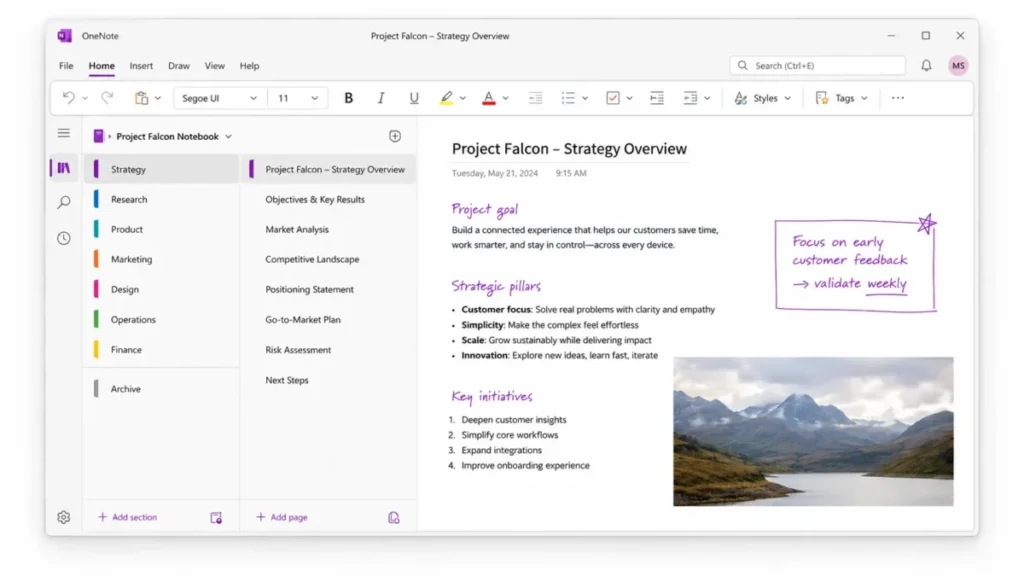
OneNote earns the top spot because it removes the two costs that usually break a “free” note app: price and platform lock-in. The core application is free on every supported version, and it covers Windows, macOS, the web, iOS, and Android without asking for a subscription first.
The real caution sits in Microsoft’s own export documentation: whole-notebook export through OneNote for the web is scoped to eligible personal OneDrive notebooks. A notebook stored under a work or school OneDrive account, or SharePoint, is excluded from that path. An employee who built years of notes inside a company account should test a small export before assuming the whole notebook will come out cleanly.
For most individuals and small households, that caveat rarely applies. The bigger practical win is that Windows desktop OneNote can also keep notebooks entirely local, which is useful for anyone who wants a cloud-free option without leaving the app.
| Pros | Cons |
|---|---|
| Free across five major platforms with no note-count ceiling documented | Whole-notebook export is materially weaker for work, school, and SharePoint accounts |
| Freeform capture: typed text, ink, drawings, and embedded files in one page | Some premium features sit behind an eligible Microsoft 365 subscription |
| Windows desktop can store notebooks locally, avoiding the cloud entirely | Notebooks are tied to Microsoft’s cloud/ |
| Sharing and collaboration built into the free tier | Local-only notebooks lose iOS and Android access to that notebook |
- Verdict:
- Choose OneNote if you want a free, freeform notebook that follows you across a Windows/Android or mixed-device life, and verify export scope early if the notebook lives in a work or school account.
2. Obsidian: Best for Local-First Linked Knowledge

- Best for:
- researchers, writers, and developers who want plain Markdown files, backlinks, and long-term ownership over their notes. Avoid if: you expect turnkey cloud collaboration and multi-device sync with zero setup decisions. Starting price: Free core application, per official pricing. Practical tier: Core stays free indefinitely; Obsidian Sync pricing is $5 per user per month, or $4 per user per month billed annually, for hands-off multi-device sync.
- Free plan:
- No usage limit documented for the local vault itself. First limit that bites: Obsidian Sync is end-to-end encrypted. Losing the Sync encryption password makes the encrypted remote copy unrecoverable, though the local vault stays intact. Better than Notion: Notes are ordinary local Markdown files, so there is no proprietary database format holding your content hostage. Worse than OneNote: There is no free, no-configuration official sync path; you either self-manage syncing or pay for Obsidian Sync.
- Setup difficulty:
- Medium. Deciding on a sync strategy and any plugins takes more up-front thought than a cloud-first app. Hidden costs: Obsidian Sync at $4 to $5 per user per month if you want the official service; Obsidian Publish is a separate paid add-on for anyone who wants to host notes publicly. Evidence status: Documentation-verified against Obsidian’s pricing and security pages, checked August 7, 2026.
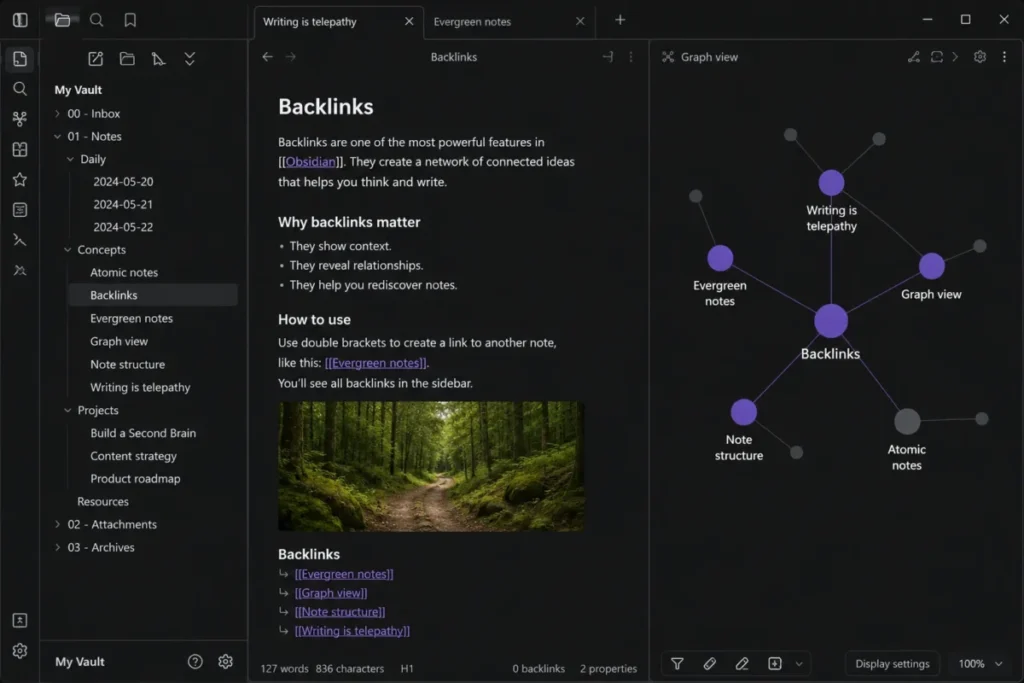
Obsidian is the strongest pick in this list for anyone who treats “what happens to these notes after the subscription stops” as a real question. According to Obsidian’s pricing page, the core application is free and stores notes as local Markdown files, so a canceled subscription or a shuttered company never locks a user out of their own writing.
That ownership model has one real cost: Obsidian does not include a free, built-in path to sync a vault across a phone and a laptop without configuration. Official Sync solves that for $4 to $5 per user per month, and it uses end-to-end encryption, which cuts both ways. Obsidian’s Sync security documentation is explicit that if you lose the encryption password, the encrypted copy on Obsidian’s servers cannot be recovered, even though your local files remain fine.
For a reader comparing this to Notion or OneNote, the tradeoff is direct: Obsidian trades built-in convenience for file-level control, and the buyer has to decide which one matters more for their own workflow.
| Pros | Cons |
|---|---|
| Core app is free with no usage cap on the local vault | No free, official multi-device sync; Sync costs $4 to $5/user/ |
| Notes are plain Markdown files, minimizing vendor lock-in | Losing the Sync encryption password makes the encrypted remote copy unrecoverable |
| Backlinks and internal links support a real linked-knowledge workflow | Setup requires more upfront decisions than a cloud-first note app |
| Works fully offline by default | Plugin ecosystem adds power but also adds configuration overhead |
- Verdict:
- Choose Obsidian if file ownership and offline-first Markdown matter more to you than out-of-the-box sync, and budget for Sync or a self-managed alternative if you need multiple devices.
3. Notion: Best for Collaborative Structured Notes

- Best for:
- a small product, operations, or project team that wants notes tied to shared databases, pages, and permissions. Avoid if: you mainly want an instant personal scratchpad or plan to upload large media files on a free plan. Starting price: Free, $0 per member per month, per official pricing. Practical tier: A paid workspace tier becomes relevant once a team outgrows the Free plan’s 5MB per-file upload cap or its collaborative-block limits for multi-member workspaces. A specific current paid dollar amount was not included in this package because locale-based price rendering created ambiguity. Confirm the number on Notion’s pricing page before budgeting.
- Free plan:
- $0 per member, a 5MB per-file upload cap, and limited collaborative blocks once a workspace has multiple members. First limit that bites: the 5MB per-file upload cap on Free, which arrives fast for anyone attaching images, PDFs, or recordings to notes. Better than Google Keep: notes connect to shared databases and pages instead of staying flat, isolated notes. Worse than OneNote for personal capture: more structural setup is required before a single-person notebook feels natural.
- Setup difficulty:
- Medium to high, since databases and page structure take real planning for a team to use well. Hidden costs: imports run on desktop or web, not mobile, and enterprise administrators can restrict what a member is allowed to export. Evidence status: Documentation-verified against Notion’s pricing and import/export help pages, checked August 7, 2026.
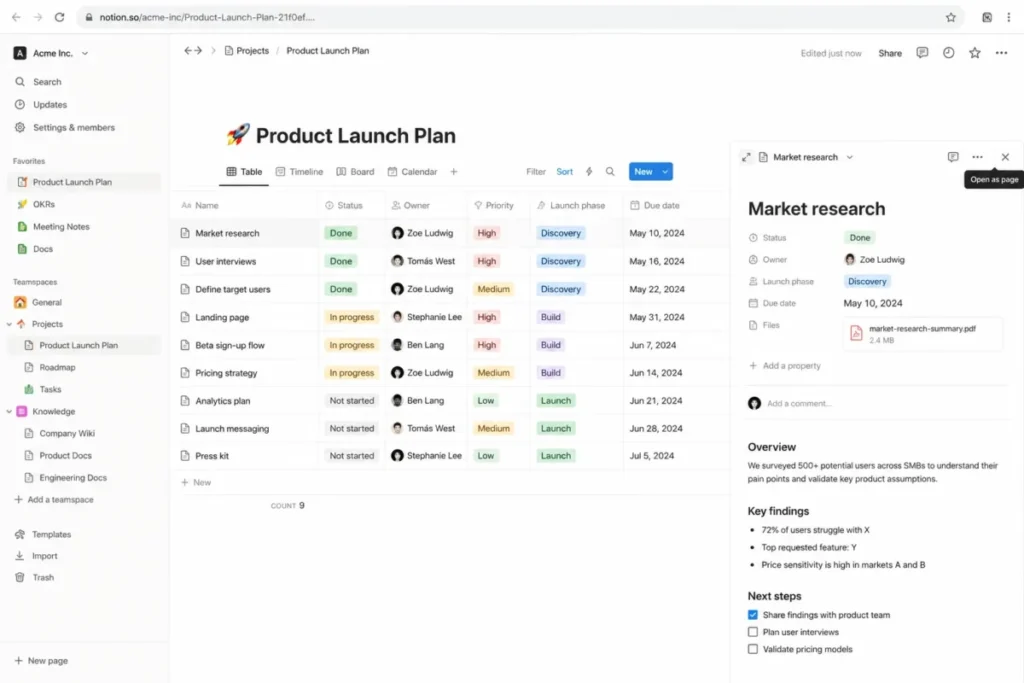
Notion earns its rank-three spot because it does something none of the top two do: it turns notes into structured objects that a team can build workflows around. Notion’s pricing page confirms the Free plan costs $0 per member and documents a 5MB per-file upload ceiling along with limited collaborative capacity for workspaces with more than one member.
That structure has a real cost for a solo user who just wants to jot something down. A single-person notebook in Notion takes more setup than the same task in OneNote or Apple Notes, because pages, blocks, and optional databases are the unit of organization instead of a flat notebook.
Migration is a related consideration. According to Notion’s import documentation, Evernote imports start on desktop or web, not mobile. An Evernote notebook maps to a Notion page while individual notes become database items, a structural transformation rather than a like-for-like copy.
| Pros | Cons |
|---|---|
| Databases connect notes to projects and shared workspace context | Free plan caps file uploads at 5MB per file |
| Real-time collaboration with guests and workspace permissions | Multi-member workspaces face collaborative-block limits on Free |
| Structured pages support project and team knowledge, not just scratch notes | Import runs on desktop and web only, not mobile |
| Documented Evernote import path for notebooks and notes | Enterprise admins can restrict export, and current paid pricing needs a direct check |
- Verdict:
- Choose Notion if notes need to become shared team knowledge tied to projects and databases, and check the current paid tier price directly before a multi-member rollout.
Teams weighing Notion against a plainer alternative can also review Notion’s own alternatives coverage or the site’s full Notion review for a deeper look at its workspace model.
4. Apple Notes: Best for the Apple Ecosystem

- Best for:
- an all-Apple student, creator, or household that wants fast capture, scans, handwriting, and audio without a subscription. Avoid if: your team is mixed Windows and Android and needs equal native support across devices. Starting price: Free (the Notes app itself carries no separate price), per official pricing. Practical tier: Free is fully usable; the real cost lever is iCloud storage once scans, audio, and attachments accumulate.
- Free plan:
- Notes shares Apple’s free 5GB iCloud pool with photos, backups, and other iCloud data. First limit that bites: the shared 5GB free iCloud allowance, which fills quickly for anyone who scans documents or records audio notes regularly. Better than Bear: document scanning and audio recording with transcription on supported devices are built in at no extra cost, not gated behind a paid tier. Worse than Joplin: collaboration and sync depend on an Apple Account with Notes enabled in iCloud, which effectively excludes non-Apple collaborators.
- Setup difficulty:
- Low. Hidden costs: iCloud+ storage tiers, starting at $0.99 per month for 50GB in the US, once photos, scans, and audio outgrow the free 5GB. Evidence status: Documentation-verified against Apple’s App Store listing and support pages, checked August 7, 2026.
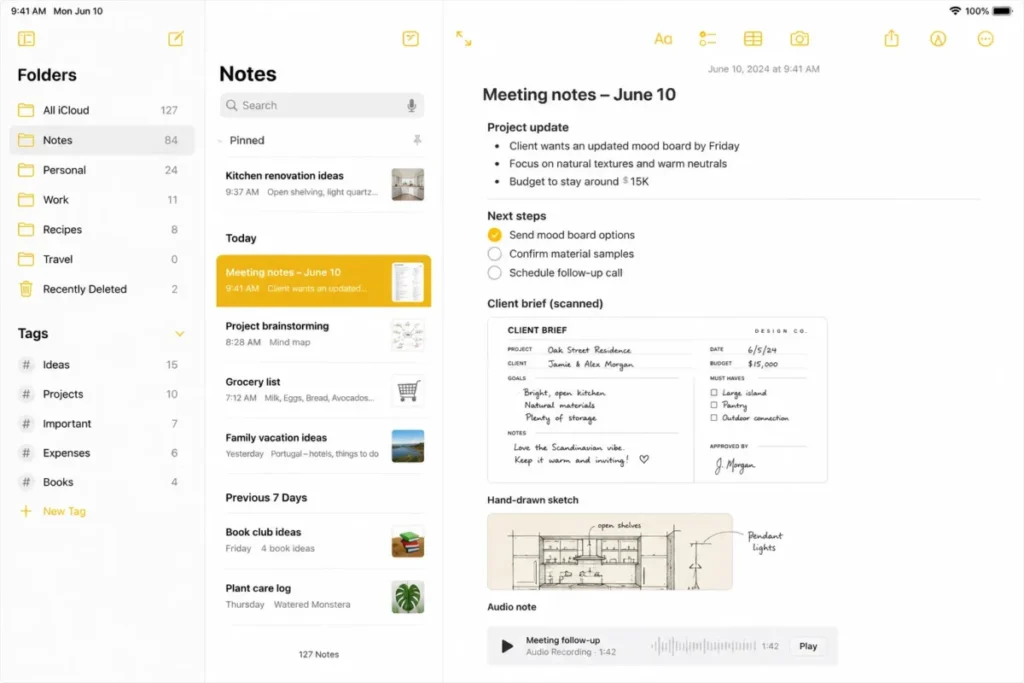
Apple Notes has the lowest capture friction on this list for anyone already inside Apple’s ecosystem. Its App Store listing confirms text, checklists, document scanning, handwriting, sketches, and audio recording with transcription on supported devices, all inside the free app.
The tradeoff shows up in two places. Collaboration needs an Apple Account with Notes enabled in iCloud on every participant’s side, so a mixed-platform team hits a wall immediately.
Apple’s iCloud storage pricing, checked August 7, 2026, shows the free tier is a shared 5GB pool across all iCloud data. 50GB of iCloud+ storage starts at $0.99 per month in the US once that free pool runs out.
For a single-person, all-Apple workflow, that combination is close to frictionless. For anyone collaborating outside Apple’s ecosystem, it becomes a genuine blocker rather than a minor inconvenience.
| Pros | Cons |
|---|---|
| Free app with scanning, handwriting, sketches, and audio built in | Collaboration requires every participant to use Apple Account and iCloud |
| Tags and folders keep mixed-media notes organized | Free iCloud storage (5GB) is shared across all iCloud data, not just Notes |
| iCloud sync and collaboration work without extra configuration for Apple users | iCloud+ storage becomes a real recurring cost for scan- or audio-heavy users |
| Audio transcription available on supported devices at no extra cost | Effectively unusable as a shared system for non-Apple collaborators |
- Verdict:
- Choose Apple Notes if every device and every collaborator is already on Apple hardware, and budget for iCloud+ storage once scans and audio notes accumulate.
5. Google Keep: Best for Quick Capture

- Best for:
- a Google-centric individual or tiny team that wants instant lists, voice notes, and reminders. Avoid if: you need deep hierarchy, databases, complex permissions, or more than 50 labels. Starting price: Free, per official pricing. Practical tier: Free is the only tier; no separate paid consumer Keep subscription is documented on Keep’s Play Store listing.
- Free plan:
- Notes, checklists, photos, and voice notes are unlimited in the reviewed documentation, but organization is capped at 50 labels. First limit that bites: the 50-label ceiling, which becomes real once a personal taxonomy grows past casual use. Better than Evernote’s free tier: no note-count, notebook-count, or single-device restriction documented on Keep. Worse than Notion: no databases, no permission model, and labels, colors, and pins on a shared note stay personal organization, not shared structure.
- Setup difficulty:
- Low. Hidden costs: none documented. Evidence status: Documentation-verified against Google’s Play Store listing and Keep help center, checked August 7, 2026.
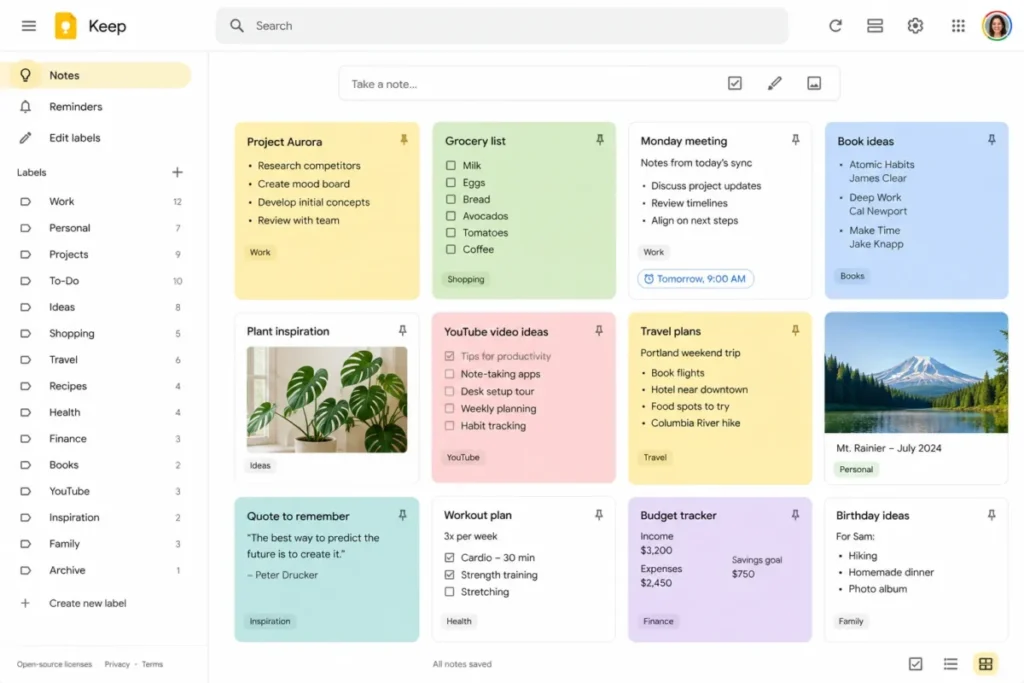
Google Keep is designed to be the fastest thing on this list between having a thought and saving it. Its Play Store listing documents text notes, checklists, photos, voice notes, labels, colors, pins, and search, all inside a free app with no separate consumer subscription tier.
The organizational ceiling is the tradeoff for that speed. Google’s own Keep documentation caps labels at 50. It also specifies that labels, colors, and pins applied to a shared note remain personal organization metadata rather than something collaborators share.
That makes Keep the right layer for capture and reminders, and the wrong layer once a household or small team needs shared taxonomy, permissions, or anything resembling a database.
| Pros | Cons |
|---|---|
| Free with no separate paid tier, fastest capture-to-save workflow in this list | Hard ceiling of 50 labels for organization |
| Photos, voice notes, and checklists in one lightweight interface | No databases, hierarchy, or permission model for shared work |
| Collaborators can be added directly to a note or list | Labels, colors, and pins on shared notes stay personal, not shared |
| Search works across notes without extra configuration | Not a serious option for deep personal knowledge management |
- Verdict:
- Choose Google Keep for fast personal capture and shared shopping or task lists, and move to a structured tool once your taxonomy needs pass roughly 50 labels.
6. Joplin: Best Open-Source Evernote Alternative
- Best for:
- a privacy-conscious or technical user who wants open source, Markdown, offline-first notes, and a documented Evernote migration path. Avoid if: you want zero-configuration sync or expect a perfectly preserved copy of legacy Evernote formatting. Starting price: Free (core application is free and open source), per official pricing. Practical tier: Core stays free; Joplin Cloud plans exist for managed sync but are priced in EUR on the reviewed page, so no USD figure is verified here.
- Free plan:
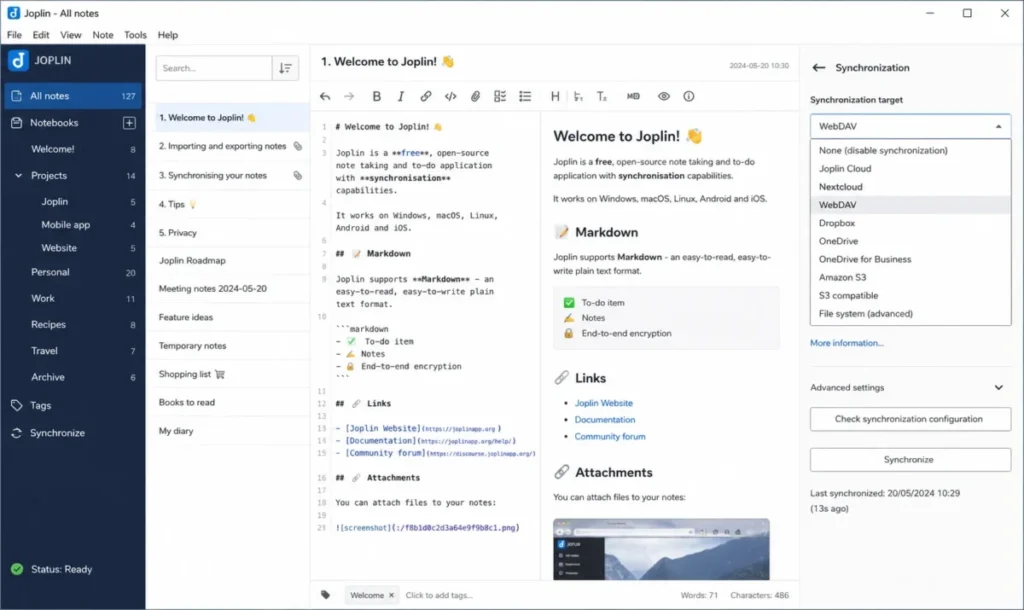
- The local Markdown app has no documented usage limit; sync targets include Joplin Cloud, Nextcloud, Dropbox, OneDrive, and WebDAV. First limit that bites: the documented Joplin Cloud Basic plan caps individual notes or attachments at 10MB. Better than Obsidian: built-in end-to-end encryption support and a documented Evernote ENEX import path ship in the free core app. Worse than UpNote: sync requires choosing and configuring a target rather than a single built-in toggle.
- Setup difficulty:
- Medium. Hidden costs: Joplin Cloud pricing is displayed in EUR rather than USD in the reviewed source, so US buyers should confirm current dollar pricing directly before choosing it over a self-hosted sync target. Evidence status: Documentation-verified against Joplin’s help and pricing pages, checked August 7, 2026.
Joplin is the strongest fit on this list for someone leaving Evernote who wants control rather than another closed platform. Joplin’s documentation confirms the core app is free and open source, works offline-first, and supports multiple synchronization targets alongside end-to-end encryption.
Migration fidelity is the honest limitation here. Joplin’s import and export documentation states that moving from Evernote’s ENEX format may not preserve recognition data, colors, font sizes and faces, or every link between notes when the mapping is ambiguous. That is a real, named caveat rather than a guess, and it argues for piloting one notebook before deleting anything from the source system.
Cost-wise, Joplin’s own infrastructure, Joplin Cloud, is priced in euros on the page reviewed for this article. A US buyer comparing it to UpNote or Bear’s dollar pricing needs to check the current USD equivalent directly rather than assume parity.
| Pros | Cons |
|---|---|
| Free, open-source core app with no usage ceiling documented | Sync requires choosing and configuring a target, unlike a single-toggle competitor |
| Multiple sync targets: Joplin Cloud, Nextcloud, Dropbox, OneDrive, WebDAV | Joplin Cloud pricing is shown in EUR, not USD, in the reviewed source |
| End-to-end encryption support built into the core app | Evernote ENEX import may not preserve recognition data, colors, or every internal link |
| Documented Evernote migration path via ENEX import | Joplin Cloud Basic caps individual notes/ |
- Verdict:
- Choose Joplin if you want a free, open-source, Markdown-based system with real sync flexibility, and pilot an Evernote import on one notebook before trusting it with your full library.
7. Craft: Best for Polished Documents

- Best for:
- a solo consultant, designer, or creative professional who wants notes that can become visually polished, shareable documents. Avoid if: you are a heavy free user likely to exceed the Free plan’s block or storage ceiling, or you might mistake a limited-time promotion for the standard price. Starting price: Free (1,500 blocks, 1GB storage, 25MB media upload at research time), per official pricing. Practical tier: Craft’s Help Center pricing lists Plus at $10 per month, or $96 per year, which works out to roughly $8 per month billed annually.
- Free plan:
- 1,500 blocks, 1GB storage, and a 25MB per-file media upload limit. First limit that bites: the 25MB media upload cap, which arrives fast for anyone embedding video or large images. Better than Bear: cross-platform coverage plus version history and multiple export formats out of the box. Worse than Obsidian: content lives inside Craft’s own document model rather than as plain local files.
- Setup difficulty:
- Low to medium. Hidden costs: a media-heavy Free workspace hits its block and storage ceiling quickly; a SUMMER26 promotional price seen on Craft’s marketing page is separate from, and should not be confused with, the $10/month or $96/year standard Plus price. Evidence status: Documentation-verified against Craft’s marketing and Help Center pricing pages, checked August 7, 2026.
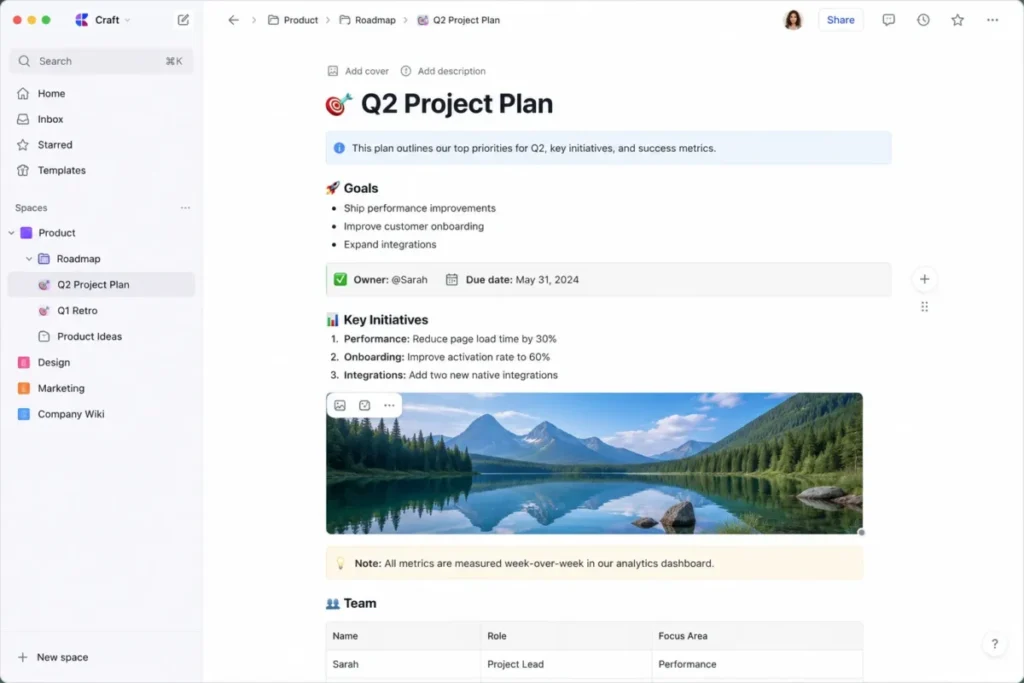
Craft is the pick for anyone who wants notes to eventually look like something they can hand to a client. According to Craft’s Help Center, standard Plus pricing is $10 per month or $96 per year, roughly $8 per month on the annual plan.
A separate concern surfaced during research: Craft’s marketing pricing page displayed a SUMMER26 promotional price alongside the Free plan’s limits. That promotion should not be read as Craft’s standard price; the Help Center figure above is the one to budget from, since promotions expire and marketing pages update faster than help documentation.
On export, Craft’s documentation confirms a document, folder, or full space can be exported to several formats, with some platform-specific differences. That gives a Free-plan user a real way out if the block and storage ceiling becomes limiting.
| Pros | Cons |
|---|---|
| Block-based documents built for sharing and presentation, not just private notes | Free plan caps out at 1,500 blocks, 1GB storage, and 25MB media uploads |
| Version history and multiple export formats, including Markdown/ | Standard Plus price ($10/mo or $96/ |
| Cross-device sync across Windows, macOS, iOS, iPadOS, and web | Content lives in Craft’s own model rather than plain local files |
| Custom domains available on Plus for shared documents | Media-heavy workspaces hit the Free ceiling faster than text-only ones |
- Verdict:
- Choose Craft if the end product needs to look presentation-ready, and budget from the $10/month or $96/year standard price rather than any promotional banner you see first.
8. Bear: Best Focused Markdown App for Apple Users

- Best for:
- an Apple-first writer who wants a focused Markdown-style editor, tags, and a distraction-light interface. Avoid if: you are Windows- or Android-first, or you expect free multi-device sync. Starting price: Free core writing app, per official pricing. Practical tier: Bear’s Pro FAQ lists Pro at $2.99 per month or $29.99 per year, roughly $2.50 per month on the annual plan, with a seven-day trial.
- Free plan:
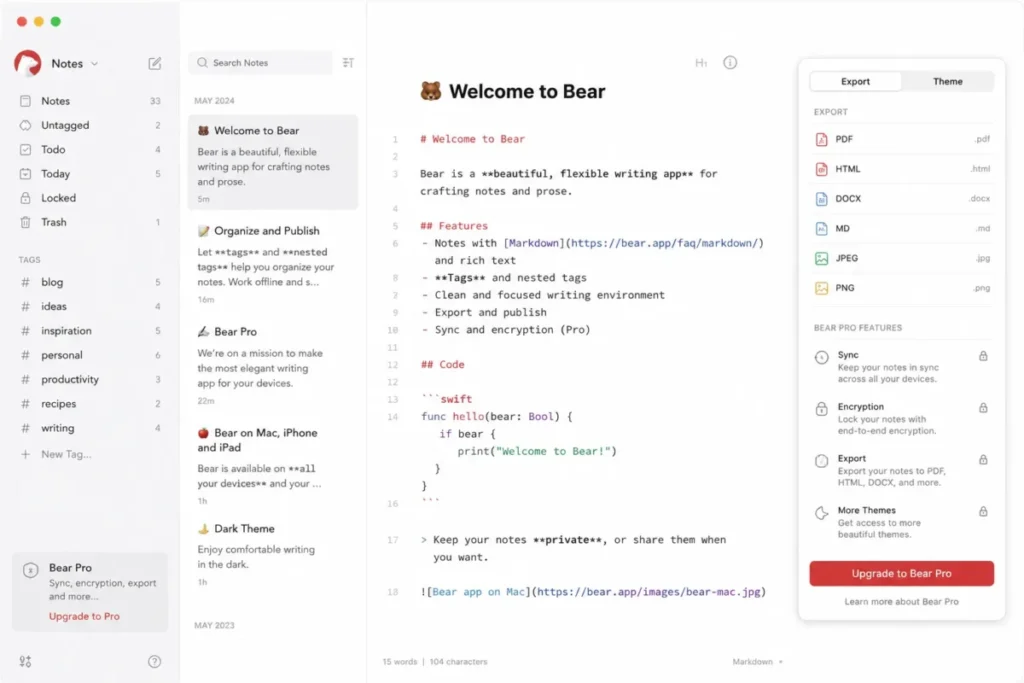
- Writing and tagging without iCloud sync, encryption, or advanced export. First limit that bites: sync is a Pro-only feature, and even on Pro, attachments must stay under 250MB and notes over 500,000 characters will not sync. Better than Apple Notes for writers: a Markdown-oriented editor with themes built specifically for long-form writing rather than quick capture. Worse than OneNote: no free path to multi-device sync at all.
- Setup difficulty:
- Low. Hidden costs: Pro is required for sync, encryption, and advanced exports; Bear Web remains a public beta rather than full native-app parity. Evidence status: Documentation-verified against Bear’s own FAQ and pricing pages, checked August 7, 2026.
Bear is built for one job: writing in a focused, Markdown-style editor without the notebook overhead of OneNote or the database overhead of Notion. According to Bear’s own FAQ, Pro costs $2.99 per month or $29.99 per year, and that annual price works out to about $2.50 per month, a real discount over paying monthly.
The catch is that sync itself sits behind that Pro paywall. Bear’s sync troubleshooting documentation also specifies hard technical ceilings even once you are on Pro: attachments must be under 250MB, and a note over 500,000 characters will not sync.
Bear’s own platform documentation, checked August 7, 2026, describes Bear Web as extending access beyond native Apple apps while remaining a public beta rather than a finished, fully equivalent product. That status matters for anyone counting on it for daily cross-platform use.
| Pros | Cons |
|---|---|
| Focused Markdown-style editor built specifically for long-form writing | Free plan has no sync at all; multi-device use requires Bear Pro |
| Bear Pro annual price (~$2.50/ | Synced notes are capped at 500,000 characters; attachments must stay under 250MB |
| Tags, themes, and encryption available on Pro | Bear Web remains a public beta, not full native-app parity |
| Seven-day trial available before committing to Pro | Windows and Android users get web-beta access only, not a native app |
- Verdict:
- Choose Bear if you are an Apple-first writer who wants a focused Markdown editor, and budget for Pro from day one if you need it on more than one device.
9. UpNote: Best Low-Cost Cross-Platform Option

- Best for:
- a cost-sensitive personal user who wants Windows, macOS, Linux, iOS, and Android coverage plus a low monthly price or a one-time lifetime purchase. Avoid if: you expect a large permanent free library, or you need documented enterprise administration and compliance controls. Starting price: Free, capped at 50 notes, per official pricing. Practical tier: UpNote’s pricing page lists Premium at $1.99 per month or $39.99 as a one-time lifetime purchase.
- Free plan:
- 50 notes. First limit that bites: the 50-note ceiling, which most active users reach quickly. Better than Bear: genuine cross-platform coverage, including Windows and Linux, not just Apple devices. Worse than OneNote: no documented free, unlimited tier; the note cap forces an upgrade decision early.
- Setup difficulty:
- Low. Hidden costs: attachments and export are Premium-only features, so a Free-plan user cannot get their notes out in bulk before upgrading. Evidence status: Vendor-documented pricing and platform coverage from UpNote’s own site, checked August 7, 2026.
UpNote is the value pick on this list once a buyer accepts they will pay something eventually. UpNote’s own site documents a 50-note Free ceiling and Premium pricing at $1.99 per month or $39.99 as a lifetime purchase.
That lifetime option is worth doing the math on. At $1.99 per month, $39.99 buys roughly 20.1 months of Premium before the lifetime purchase pays for itself, a calculation any buyer can verify by dividing $39.99 by $1.99.
Anyone confident they will use UpNote for two years or more comes out ahead buying lifetime. Anyone unsure should start monthly.
The tradeoff for that low price is documentation depth. The reviewed official page is strong on consumer pricing and platform coverage but light on enterprise administration, compliance, and large-library migration detail, so a buyer with those specific needs should confirm them directly before standardizing a team on UpNote.
| Pros | Cons |
|---|---|
| Genuine cross-platform coverage: Windows, macOS, Linux, iOS, Android | Free plan caps out at only 50 notes |
| Premium is inexpensive at $1.99/ | Attachments and export are locked behind Premium |
| Lifetime purchase breaks even against monthly in about 20.1 months | Documentation is thin on enterprise administration and large-library migration |
| Straightforward automatic sync across devices | No large permanent free tier for a growing personal library |
- Verdict:
- Choose UpNote if you want low-cost cross-platform coverage and are willing to pay $1.99/month or a one-time $39.99 once you outgrow 50 notes.
10. Evernote: Best for Established Evernote Workflows

- Best for:
- an existing Evernote user with a mature note library, where avoiding a migration is worth more than starting fresh elsewhere. Avoid if: you are a new user hoping to build a large library for free. Starting price: Free, with Starter, Advanced, and Enterprise plans above it, per official pricing. Practical tier: current US Starter and Advanced dollar pricing was not surfaced on Evernote’s plan comparison page reviewed for this article; confirm the live number there before budgeting rather than trusting an older figure found elsewhere.
- Free plan:
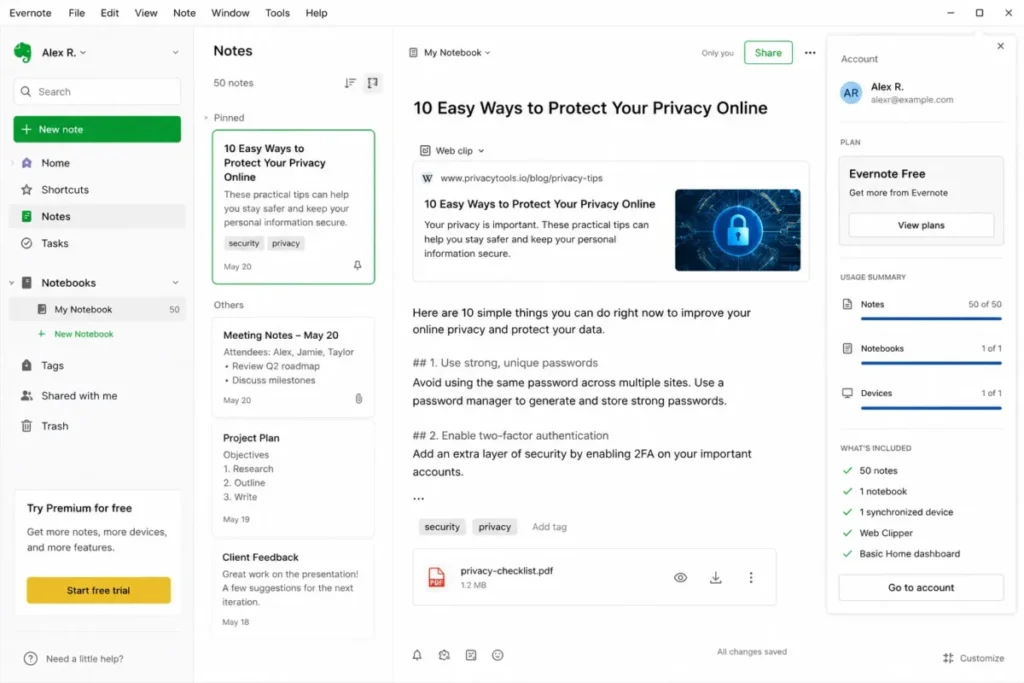
- capped at 50 notes, 1 notebook, 1 synchronized device, 1GB storage, 200 attachments, 5 spaces, and 20 tags. First limit that bites: the one-synchronized-device restriction, which breaks the basic multi-device promise most buyers expect from a notes app. Better than Joplin: clipping, attachments, tasks, and Spaces work out of the box with no sync configuration required. Worse than UpNote and OneNote on the free tier: a single synced device is a harder restriction than either competitor’s free plan.
- Setup difficulty:
- Low to start; medium once you have to consolidate notes to stay inside Free limits. Hidden costs: exceeding any one Free ceiling forces a choice between consolidating usage or upgrading, and the current paid price should be reconfirmed directly since it was not verified in the reviewed source. Evidence status: Vendor-documented plan names and limits, checked August 7, 2026; current paid USD pricing not verified.
Evernote earns its spot at the bottom of this list not because the product is weak, but because its Free plan is a poor entry point for a new user in 2026. Evernote’s own plan comparison confirms Free, Starter, Advanced, and Enterprise tiers exist. Evernote’s help documentation sets the Free ceiling at 50 notes, one notebook, one synchronized device, 1GB storage, 200 attachments, five spaces, and 20 tags.
That one-device restriction is the sharpest limit on this entire list. A note app that cannot sync between a phone and a laptop on its free tier is a hard sell against OneNote or UpNote, both of which sync across devices without that restriction.
For someone who already has years of notes in Evernote, none of that changes the calculus much: the switching cost of leaving a mature library often outweighs a restrictive Free plan that a paying user never has to think about. That is a genuinely different buyer than someone starting from zero, and this ranking treats them as such.
| Pros | Cons |
|---|---|
| Mature feature set: clipping, tasks, Spaces, tags, and attachments | Free plan is capped at 50 notes, 1 notebook, and 1 synchronized device |
| Documented consolidate-or-upgrade path when a limit is hit | Current US paid Starter/ |
| Strong fit for entrenched users with an existing library | New users hit Free limits fast compared with OneNote or UpNote |
| Search and attachment handling remain broad even on lower tiers | 1GB storage and 200-attachment cap on Free are tight for active use |
- Verdict:
- Choose Evernote if you already have a working library there and switching costs outweigh the Free plan’s limits; otherwise, start with OneNote, UpNote, or Joplin instead.
Free-Tier Ceilings and Real Upgrade Triggers
A “free plan” label hides more than it reveals until you know exactly what it caps. Every app in this list is free to start, but the mechanism that eventually forces a decision is different for each one, and mixing them up leads to bad comparisons.
| Product | Free-tier ceiling | What happens at the limit | Practical paid trigger |
|---|---|---|---|
| Microsoft OneNote | No note-count ceiling documented | Not applicable in the reviewed evidence | Only select premium extras via Microsoft 365 |
| Obsidian | No usage ceiling on the local vault | Not applicable; Sync is opt-in, not forced | Wanting official multi-device sync ($4-5/ |
| Notion | 5MB per-file upload cap; limited multi-member collaborative blocks | New large uploads or heavy collaborative use are restricted | Media-heavy or multi-member team workflows |
| Apple Notes | Shares Apple’s free 5GB iCloud pool | New iCloud data, including notes with large attachments, stops syncing until space frees up | iCloud+ storage from $0.99/ |
| Google Keep | 50 labels maximum | New labels beyond 50 cannot be created | No paid tier exists; consolidate labels instead |
| Joplin | No ceiling on the local app; Joplin Cloud Basic caps notes/ | Oversized notes or attachments fail to sync on Joplin Cloud Basic | Choosing a managed Joplin Cloud plan or self-hosted sync |
| Craft | 1,500 blocks, 1GB storage, 25MB media upload | New blocks or oversized media uploads are blocked | Craft Plus at $10/ |
| Bear | No sync at all on Free | Notes stay device-local; no cross-device access | Bear Pro at $2.99/ |
| UpNote | 50 notes | New notes cannot be created past the cap | UpNote Premium at $1.99/ |
| Evernote | 50 notes, 1 notebook, 1 synced device, 1GB storage, 200 attachments, 5 spaces, 20 tags | Any one ceiling blocks new usage until you consolidate or upgrade | Evernote Starter or Advanced (current US price not verified here) |
Two ceilings deserve a second look before you budget. Bear’s Free plan has no note-count cap at all, but it also has no sync, so the real constraint is device-local isolation rather than a number.
Evernote is the only app here where a single ceiling breach, like adding a second synced device, can block you even if you are nowhere near the note-count or storage limits.
Feature Gates by Plan
| Product | Native multi-device sync | Full export | Attachments | Encryption | Collaboration |
|---|---|---|---|---|---|
| OneNote | Free (built-in) | By plan/ | Free | Not documented in reviewed sources | Free |
| Obsidian | Paid (Sync, $4-5/ | Free (plain files) | Free (local) | Paid (Sync is end-to-end encrypted) | Not native; via Sync/ |
| Notion | Free | By plan/ | Free, 5MB cap | Not documented in reviewed sources | Free, with multi-member limits |
| Apple Notes | Free (iCloud) | Not fully verified for bulk export | Free, iCloud-storage limited | Not documented in reviewed sources | Free (iCloud) |
| Google Keep | Free | Not fully verified for bulk export | Free | Not documented in reviewed sources | Free |
| Joplin | Free (self-chosen target) | Free | Free | Free (E2EE supported) | Limited; not a core focus |
| Craft | Free | Free (multiple formats) | Free, 25MB cap on Free | Not documented in reviewed sources | Free, custom domains on Plus |
| Bear | Paid (Pro only) | Paid (Pro for advanced formats) | Paid (Pro; <250MB) | Paid (Pro) | Not a core feature |
| UpNote | Free | Paid (Premium) | Paid (Premium) | Not documented in reviewed sources | Not a core focus |
| Evernote | Free, 1 device only | By plan | Free, 200-attachment cap | Not documented in reviewed sources | By plan |
The cheapest plan is rarely the one that gives most buyers what they need. For Bear, that plan is Pro, because Free has no sync at all.
For Notion, it is whichever paid tier removes the 5MB file cap. For Obsidian, it depends on whether you are willing to self-manage sync instead of paying for the official service.
Sources for the Feature Gates by Plan table: the same product-specific pricing and documentation pages cited earlier in each product’s own section; checked August 7, 2026. Cells marked “not documented in reviewed sources” reflect a gap in the official pages reviewed for this article rather than a confirmed absence of the feature.
Sync, Privacy, and Data Ownership
Synchronization is not a single feature. It is a spectrum from “notes are plain files you fully control” to “notes only exist inside one company’s cloud,” and where an app sits on that spectrum should matter as much as its price.
Obsidian sits closest to the ownership end. Its pricing page confirms the core model stores notes as local files, with Sync and Publish offered as optional paid services layered on top rather than required for the app to function.
Joplin sits close behind it. Joplin’s documentation confirms an offline-first model with a choice of sync targets, including self-hosted options like Nextcloud and WebDAV, plus end-to-end encryption support in the free core app.
At the other end, Apple Notes and Google Keep tie your notes to a single account ecosystem by design. Apple Notes collaboration requires an Apple Account with Notes enabled in iCloud for every participant.
Google Keep, per Google’s own Play Store listing, exists entirely inside a Google Account, with no documented standalone export ecosystem of its own in the reviewed source. Neither model is wrong for a buyer already committed to that ecosystem, but both are a real constraint for anyone who is not.
Notion and OneNote land in the middle: both sync through the vendor’s own cloud by default, and both offer some path out through export. Notion’s export documentation notes permission and representation boundaries. OneNote’s local-notebook option on Windows is the one path in this list that avoids the cloud entirely while staying inside a mainstream app.
Data Ownership and Sync Model
| Product | Storage model | Official sync | Encryption | Account dependency |
|---|---|---|---|---|
| OneNote | Cloud notebook (Windows can also go local) | Free, built-in | Not documented in reviewed sources | Microsoft account for cloud notebooks |
| Obsidian | Local Markdown files | Paid add-on (Sync) | Sync is end-to-end encrypted | None required for local-only use |
| Notion | Vendor cloud workspace | Free, built-in | Not documented in reviewed sources | Notion workspace account |
| Apple Notes | iCloud-linked | Free, built-in | Not documented in reviewed sources | Apple Account required for sync/ |
| Google Keep | Google account-linked | Free, built-in | Not documented in reviewed sources | Google Account required |
| Joplin | Local files, self-chosen sync target | Free (choice of targets) | Free (E2EE supported) | None required for local-only use |
| Craft | Vendor cloud documents | Free, built-in | Not documented in reviewed sources | Craft account |
| Bear | Local, iCloud on Pro | Paid (Pro) | Paid (Pro) | Apple Account for Pro sync |
| UpNote | Vendor cloud sync | Free, built-in | Not documented in reviewed sources | UpNote account |
| Evernote | Vendor cloud, 1 device on Free | Free (1 device); more on paid | Not documented in reviewed sources | Evernote account |
If privacy and long-term data control are the deciding factor, Obsidian and Joplin are the two products on this list built around that priority from the ground up, not as an afterthought. Everyone else is a reasonable choice once you accept that your notes will live primarily inside one vendor’s account system.
Sources for the Data Ownership and Sync Model table: the same product-specific pricing, security, and documentation pages cited throughout this article; checked August 7, 2026.
Migration and Switching Risk
Importing a competitor’s export file is not the same as migrating without loss, and the gap between those two things is where most switching regret happens.
OneNote’s export story splits sharply by account type. Microsoft’s export documentation confirms whole-notebook web export works for eligible personal OneDrive notebooks. It explicitly does not cover OneDrive work or school accounts or SharePoint notebooks, which pushes anyone in a company account toward slower, manual export methods.
Notion’s Evernote import, per Notion’s own import guide, maps an Evernote notebook to a Notion page and each note to a database item, a structural transformation rather than a copy. Notion’s broader import/export documentation also flags that some database views are not preserved as independent views on export, and that enterprise administrators can restrict what a workspace member is allowed to export at all.
Joplin has the most explicit migration-fidelity warning in this list. Joplin’s import and export documentation states plainly that its Evernote ENEX import may not preserve recognition data, colors, font sizes and faces, or every link between notes when a mapping is ambiguous. That is not a reason to avoid Joplin; it is a reason to pilot one representative notebook and compare it against the source before deleting anything.
Craft’s export path, described in its Help Center, supports a document, folder, or full space exported to formats including Markdown, TextBundle, PDF, and Word, with some platform-specific differences. That gives Craft users a genuine way out if they later switch tools.
Apple Notes and Google Keep are the two products in this list with the least-verified bulk migration story. Neither the Apple Notes App Store listing nor Google’s Keep documentation reviewed for this article confirms a complete, documented bulk export-and-reimport workflow, so anyone planning a large-scale move off either app should verify a real export path directly before committing.
Setup and Migration Difficulty
| Product | Setup difficulty | Migration risk into the app | Why |
|---|---|---|---|
| OneNote | Low | Low for personal accounts; higher for work/ | Free-form setup, but export scope depends on account type |
| Obsidian | Medium | Low; plain Markdown files are broadly portable | Sync/ |
| Notion | Medium to high | Medium; Evernote import restructures content into pages/ | Database and page structure need planning before team rollout |
| Apple Notes | Low | Not fully verified for bulk export/ | Fast native capture, but bulk migration evidence is thin |
| Google Keep | Low | Not fully verified for bulk export/ | Minimal setup, but no documented deep migration workflow |
| Joplin | Medium | Medium; ENEX import works but with named fidelity gaps | Choosing and configuring a sync target adds setup time |
| Craft | Low to medium | Low to medium; multiple export formats documented | Space/ |
| Bear | Low | Not fully verified for bulk export/ | Minimal setup; migration depth tied to Pro export features |
| UpNote | Low | Not fully verified for large-library migration | Simple setup; migration evidence is thinner than for larger platforms |
| Evernote | Low to start, medium once consolidating | Not fully verified for current bulk export | Free-tier limits force early consolidation decisions |
The pattern across every migration path here is the same: pilot before you commit. Export one real notebook, check formatting, attachments, and links against the source, and only then move the rest.
Sources for the Setup and Migration Difficulty table: the same product-specific import, export, and migration documentation pages cited earlier in this section; checked August 7, 2026.
Which Note-Taking App Should You Choose?
Treat this section as a workflow: work through the questions below, match your answers to a buyer cohort, then check the disqualifier listed for each product before you commit. The goal is not one best overall app; it is a winner by scenario, with a distinct ranking reason behind each pick above.
How to Choose the Right Note-Taking App
Work through these questions in order before picking a tool:
- Which devices do you use daily, and does the app cover all of them natively?
- Do you need real-time collaboration, or is this mostly a personal notebook?
- How much do you care about owning your notes as plain files versus accepting a vendor’s cloud format?
- What is the first free-tier ceiling you are likely to hit: a note count, a label count, a file size, or a storage pool?
- Is sync included free, or is it a separate paid add-on you need to budget for?
- If you are switching from an existing app, what does that app’s own documentation say about export fidelity?
- What is the total cost once you add the storage, sync, or attachment tier you will realistically need?
Match your answers against the Quick Verdict table above: a mixed-device household without strong ownership needs points to OneNote, a researcher who wants file-level control points to Obsidian, and a team that needs shared structure points to Notion.
Common Mistakes When Choosing Note-Taking Software
Most switching regret traces back to one of these seven mistakes.
Judging by the sticker price alone. A $0 label on Evernote or UpNote hides a 50-note ceiling that a moderately active user reaches within weeks.
Ignoring the sync model. Bear and Obsidian both look free until you try to sync a second device, at which point Bear requires Pro and Obsidian requires either Sync or a self-managed alternative.
Assuming “import supported” means “lossless migration.” Joplin’s own documentation names specific formatting and link losses on Evernote import; treat every import as a transformation to verify, not a guarantee.
Overlooking account-type export restrictions. OneNote’s whole-notebook export works differently for personal OneDrive accounts than for work, school, or SharePoint accounts, a detail that only matters the day you try to leave.
Confusing a promotion with the standard price. Craft’s marketing page has shown a limited-time SUMMER26 offer alongside its Free plan; the $10/month or $96/year Help Center figure is the number to budget from.
Picking a platform without checking every collaborator’s ecosystem. Apple Notes collaboration requires every participant to be on an Apple Account with iCloud Notes enabled, which quietly excludes anyone outside that ecosystem.
Treating storage and app cost as the same line item. Apple Notes itself is free, but iCloud+ storage becomes a real recurring cost once scans and audio notes accumulate past the free 5GB pool.
Final Verdict
For most individuals and mixed-device households, Microsoft OneNote is the strongest default. It is free across five major platforms, has no documented note-count ceiling, and offers a local-notebook option on Windows for anyone who wants to skip the cloud entirely. Confirm export scope early if your notebook lives inside a work, school, or SharePoint account.
Choose Obsidian instead if long-term file ownership matters more than out-of-the-box convenience; the Obsidian Sync cost noted earlier is the price of adding multi-device convenience back in. Choose Notion if notes need to become shared team knowledge tied to databases and projects, not a personal scratchpad.
Choose Apple Notes only when every device and collaborator is genuinely on Apple hardware. Choose Google Keep for fast personal capture and nothing deeper.
Choose Joplin if open-source control and a documented Evernote migration path outweigh a bit of sync configuration. Choose Craft when the output needs to look presentation-ready.
Choose Bear if you are an Apple-first writer who will pay for Pro from day one. Choose UpNote if you want the lowest realistic cost across five platforms.
Stay with Evernote only if you already have a working library there. A new user starting from zero has stronger free-tier options elsewhere on this list.
Frequently Asked Questions
What is the best note-taking app overall in 2026?
Microsoft OneNote is the strongest overall pick because its core app is free across Windows, macOS, web, iOS, and Android with no documented note-count ceiling. It fits most mixed-device users better than a single-ecosystem or paid-sync alternative.
What is the best free note-taking app?
It depends on what “free” needs to survive. OneNote has no note-count ceiling in its documentation, Google Keep is free with a 50-label limit, and Obsidian’s local vault is free indefinitely, though multi-device sync is a paid add-on.
What is the cheapest note-taking app once I outgrow a free plan?
Bear Pro’s annual price works out to about $2.50 per month, and UpNote Premium is $1.99 per month or a $39.99 lifetime purchase. Yes, if you are on Apple hardware and want a focused writing app, Bear Pro’s annual plan is the cheaper route; otherwise UpNote’s lifetime option is worth the math.
Is Obsidian better than Notion for notes?
No, unless your priority is local file ownership over shared team structure. Obsidian stores notes as plain Markdown files with no vendor lock-in, while Notion connects notes to shared databases and pages, which is the better fit for a small team.
Is Apple Notes good outside the Apple ecosystem?
No, unless every collaborator is also on Apple hardware. Apple Notes collaboration requires an Apple Account with Notes enabled in iCloud on every participant’s side, which effectively excludes Windows and Android users from shared notes.
Which note-taking app is best for students?
OneNote and Apple Notes both fit student workflows well: OneNote for free, freeform, cross-platform notebooks with handwriting support, and Apple Notes for an all-Apple student who wants fast scanning and audio capture built in.
Which note-taking app is best for a small team?
Notion is the strongest fit for a small team because notes connect to shared databases, pages, and permissions rather than staying as flat, isolated notes. Confirm the current paid tier price directly, since it was not verified in the reviewed source for this article.
How much does note-taking software cost?
Costs range from $0 to roughly $10 per month depending on the app and tier. OneNote, Obsidian’s core app, Google Keep, and Joplin’s core app are free with no subscription required, while paid tiers like Craft Plus ($10/month), Bear Pro ($2.99/month), and UpNote Premium ($1.99/month) enable sync, export, or larger free-plan ceilings.
What is the best Evernote alternative in 2026?
Joplin is the closest open-source Evernote alternative, with a documented ENEX import path and no forced subscription. OneNote and UpNote are also strong alternatives for anyone who wants free-tier limits that are less restrictive than Evernote’s 50-note, one-device Free plan.
Which note-taking app keeps my data most private and portable?
Obsidian and Joplin lead this list on data ownership. Yes, if you want notes stored as plain local files with optional end-to-end encrypted sync, both fit; Apple Notes and Google Keep, by contrast, tie your notes to a single vendor account by design.