

Is Helpjuice worth it in 2026? Helpjuice is a dedicated knowledge base platform for customer-facing help centers and internal documentation, priced at $249–$799/month (flat-rate). It excels in search quality and deep customization.
Best for mid-market teams (30–500+ users); not ideal for small teams or those needing approval workflows. Top alternatives include Document360 (dev docs), Zendesk Guide (suite users), and Confluence (Atlassian shops).
Quick Decision Box
| Your Situation | Recommendation |
|---|---|
| 30–100+ users, need SSO, prioritize search quality | ✅Buy – Helpjuice’s flat pricing + AI search is strong value |
| 10–30 users, no SSO, want dedicated KB | 🔍Shortlist – Compare to Document360, KnowledgeOwl |
| Under 10 users or tight budget | ⚠️Avoid – $249/mo floor is expensive; try Notion, ProProfs |
| Already on Zendesk/Freshdesk suite | 🔍Shortlist – Evaluate native Guide vs. standalone KB |
| Need multi-stage approval workflows | ⚠️Shortlist with caution – Helpjuice lacks native approvals |
Who This Helpjuice Review Is For
This Helpjuice review is designed for support leaders evaluating knowledge base software to reduce ticket volume and enable self-service. It’s also for IT/Ops managers assessing security, SSO, and governance requirements for a documentation platform, and knowledge managers comparing Helpjuice to alternatives.
If you only read one section: Skip to Pricing + Real-World Cost Scenarios to understand when flat-rate pricing works for or against you.
What’s New in 2026
What buyers care about in knowledge base software has shifted. Here’s what’s driving decisions in 2026:
- AI search is table stakes. Semantic, typo-tolerant search is expected. The differentiator is accuracy and citation quality.
- Governance matters more. As KB content scales, teams need verification workflows, ownership models, and audit trails.
- Security scrutiny is earlier. IT teams now ask about SSO, SOC 2, and data residency before shortlisting—not after.
- Integration depth over breadth. Teams care less about “500+ integrations” and more about deep helpdesk and Slack connectivity.
- Flat pricing is back. Per-seat models can balloon at scale. Flat-rate pricing (like Helpjuice) is gaining favor for 50+ user teams.

Methodology + Evaluation Framework
How This Helpjuice Review Was Conducted
This review is based on publicly available sources, not hands-on product testing. Data was gathered from:
- Vendor sources: Helpjuice official site and pricing page (January 2026)
- User review aggregation: G2 Helpjuice reviews (patterns from verified users)
- Competitive landscape: SelectHub Helpjuice alternatives
- API documentation: Helpjuice ReadTheDocs
Weighted Scorecard (Evaluation Rubric)
| Criterion | Weight | What Good Looks Like | What to Test | Red Flags |
|---|---|---|---|---|
| Search Quality | 25% | Typo-tolerant, semantic, <1s, relevant top results | 10 queries with typos/vague terms | Zero-result >15%, irrelevant #1 |
| Information Architecture | 15% | Flexible categories, tagging, clean nav | Build 50+ article taxonomy | Rigid structure, no tagging |
| Permissions & Governance | 15% | Roles, groups, private/public, audit | Create group, restrict category | No group access, no audit |
| Analytics | 15% | Search analytics, failed searches, export | Export reports, check granularity | No failed-search, no export |
| Integrations/API | 10% | REST API, native connectors, SSO | Test API, embed widget, SSO | Limited API, SSO paywalled |
| Authoring UX | 10% | WYSIWYG, collab, templates, fast | Create article <10 min, co-edit | Clunky editor, slow save |
| Total Cost of Ownership | 10% | Predictable, no hidden fees, migration help | 3-year cost projection | Per-feature upsells |
What Cannot Be Verified Without a Demo
- Search relevance with your specific content
- SSO/SAML compatibility with your identity provider
- Real performance under your article volume
- Analytics depth for your use case
- Support responsiveness
Disclosure
This review is not sponsored or affiliated with Helpjuice. No affiliate links. No hands-on testing—validate claims in your trial.
What Is Helpjuice?
Helpjuice is a SaaS knowledge base platform for creating and publishing documentation for external customers (help center) and internal teams (wiki). Since 2011, it has positioned itself as a “knowledge base that actually gets used,” emphasizing search quality and customization.
Positioning: KB-First vs. Helpdesk Bundle vs. Internal Wiki
| Type | Description | Helpjuice Fit |
|---|---|---|
| KB-first platform | Dedicated tool, not bundled with ticketing | ✅ Primary positioning |
| Helpdesk KB (Zendesk Guide, Freshdesk) | KB as feature within support suite | ⚠️ Helpjuice is standalone; integrates via API |
| Internal wiki (Confluence, Notion) | General-purpose docs for teams | ✅ Supported, but overkill if no public KB needed |
Teams using Zendesk should evaluate whether their native KB meets needs before adding a standalone tool.
Use-Case Fit Matrix
| Use Case | Helpjuice Fit | Notes |
|---|---|---|
| Customer-facing help center | ✅ Strong | Primary strength—search, branding, self-service |
| Internal knowledge base (50+ users) | ✅ Strong | SSO, groups, flat pricing works well |
| Developer/API documentation | ⚠️ Medium | Lacks versioning and code-first features vs Document360 |
| Small team internal wiki (<15 users) | ❌ Weak | $249/mo is expensive; use Notion or Slite |
| Regulated content with approval workflows | ❌ Weak | No native multi-stage approvals |
For developer documentation requiring versioning and code-first workflows, Document360 is a stronger choice.
Key Entities in This Review
Knowledge base software, self-service portal, help center, internal documentation, ticket deflection, search analytics, SSO/SAML, REST API, content governance, information architecture.

Helpjuice Features: What Matters in Real Deployments
Content Creation and Editing
What it is: WYSIWYG editor with rich text, images, videos, code blocks. AI Writer (on AI-tier plans) generates drafts. Real-time collaboration and version history included.
Why it matters: Low authoring friction = more content created and maintained. AI Writer accelerates bootstrapping but requires human review.
What to validate:
- Create an article in <10 minutes with your formatting needs.
- Test co-editing—does it save in real-time?
- Rollback a version, confirm history is intact.
Information Architecture
What it is: Hierarchical categories, tagging, customizable navigation, multilingual support (vendor states 40+ languages via AI translation—verify in demo).
Why it matters: Poor taxonomy kills findability regardless of search quality.
What to validate:
- Build taxonomy with 3 levels, 50+ articles.
- Test user pathfinding: can a new user find an answer in <30 seconds?
- Confirm tagging works for cross-cutting topics.
Search Experience
What it is: Vendor claims typo-tolerant, AI-powered semantic search (AI-tier plans). Embeddable AI chatbot (Swifty) with citations.
Why it matters: Search is the primary user behavior in KBs. Poor search = frustrated users = more tickets.
What to validate (Search QA Playbook):
| Query Type | Example Queries | Pass Criteria |
|---|---|---|
| Exact match | “reset password” | Top result is correct article |
| Typo | “pasword reset”, “rest pasword” | Correct article in top 3 |
| Vague | “can’t log in”, “account problem” | Relevant results, not zero |
| Acronym | “SSO”, “API”, “SLA” | Correct expansion or match |
| Long-tail | “how do I change my billing address” | Relevant result |
| Edge case | Random string, emoji | Graceful zero-result message |
Target: <10% zero-result rate on your top 20 customer queries.
Branding and Customization
What it is: Full CSS/HTML theme control, custom domains, embeddable widgets, Chrome extension. Vendor offers white-glove design assistance.
Why it matters: For customer-facing portals, branding builds trust. Generic help centers signal low investment in CX.
What to validate:
- Change logo, colors, layout without developer help.
- Embed search widget in your app or site.
- Confirm custom domain setup (help.yourcompany.com).
Analytics and Reporting
What it is: Article views, search analytics (top queries, zero-result searches), user engagement.
Why it matters: Analytics reveal missing content, failing searches, and user behavior.
What to validate:
- Export search analytics—is it granular enough?
- Check if failed searches are tracked and actionable.
- Ask if API provides analytics data for BI integration.
Gap: No native ticket-deflection dashboards or A/B testing. Correlate KB usage with helpdesk data manually.
Permissions, Roles, and Governance
What it is: Admin, Author, Viewer roles. User groups for segmented access. Private vs public content. SSO/SAML on higher tiers.
Why it matters: Governance controls who creates, edits, publishes, and views content.
What to validate:
- Create user group with access to only one category.
- Confirm private articles are invisible to public.
- Test role restrictions (can a Viewer edit?).
Gap: No native multi-stage approval workflows. If you require formal sign-offs, manage externally.
Integrations and API
Helpjuice offers native integrations with Slack, Zendesk, Freshdesk, and Intercom. It provides a REST API (v3) documented on ReadTheDocs, plus Zapier support and a Chrome extension.
What to validate:
- Confirm specific integrations you need are functional.
- Test API endpoints for user, article, category management.
- If using Zapier, check trigger/action availability.
Helpjuice Review: Pricing & Real-World Cost Scenarios
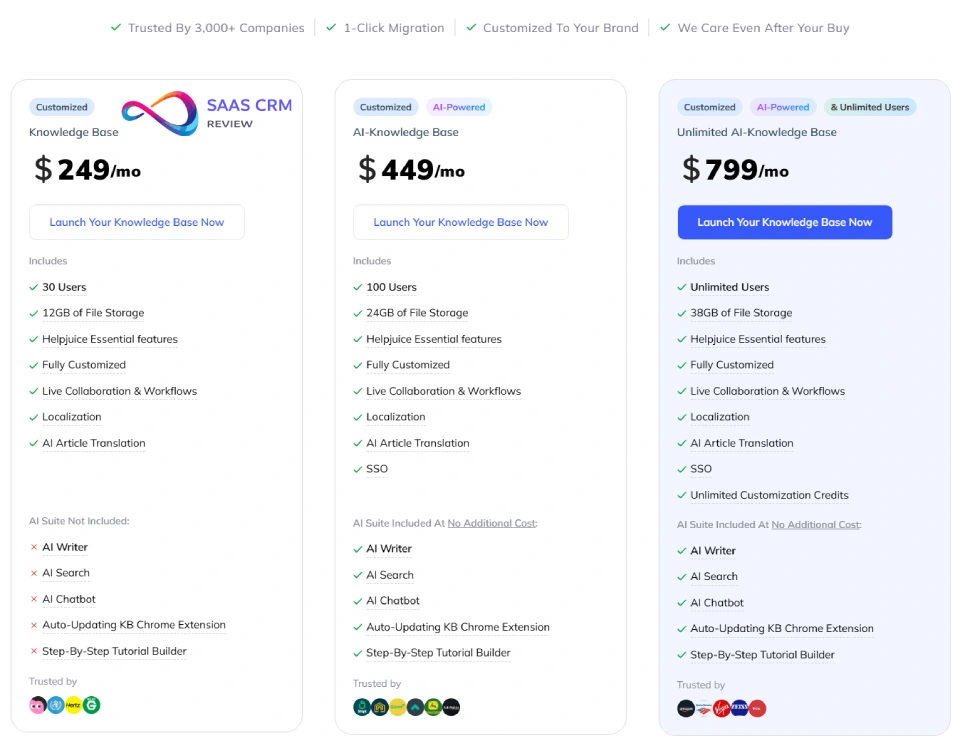
Helpjuice uses flat-rate pricing—not per-user or per-article.
Official Pricing (January 2026)
| Plan | Monthly Cost | Users | Key Features |
|---|---|---|---|
| Knowledge Base | $249/mo | Up to 30 | Editor, 12GB storage, localization, custom design |
| AI-Knowledge Base | $449/mo | Up to 100 | + AI Writer, AI Search, AI Chatbot, SSO, 24GB |
| Unlimited AI-KB | $799/mo | Unlimited | + 38GB storage, unlimited customization credits |
Free trial: 14 days, full access, no credit card.
Source: Helpjuice pricing page, January 2026.
Total Cost of Ownership (TCO) Framework
| Cost Component | Typical Range | Notes |
|---|---|---|
| Software license | $249–$799/mo | Based on plan |
| Migration | $0–$5,000 | Complex migrations may need external help |
| Content creation | 20–100 hours | Initial authoring; ongoing maintenance |
| Training | 2–8 hours/author | Editor and admin training |
| Integration setup | 5–20 hours | SSO, helpdesk, Slack, API |
| Governance overhead | Ongoing | Review cadence, ownership, audit |
3-year TCO (50 users, AI plan):
- License: $449 × 36 = $16,164
- Migration + setup: ~$3,000
- Training: ~$1,000
- Total: ~$20,000 ($555/mo effective)
Break-Even: Flat-Rate vs. Per-Seat
| Team Size | Helpjuice (flat) | Per-seat @ $15/user | Winner |
|---|---|---|---|
| 10 users | $249/mo ($24.90/user) | $150/mo | Per-seat |
| 30 users | $249/mo ($8.30/user) | $450/mo | Helpjuice |
| 50 users | $449/mo ($8.98/user) | $750/mo | Helpjuice |
| 100 users | $449/mo ($4.49/user) | $1,500/mo | Helpjuice |
Takeaway: Helpjuice becomes cost-effective at ~25+ users.
Hidden Cost Drivers
- SSO requirement: Forces upgrade to $449/mo tier.
- Author vs viewer split: Some competitors offer free viewer seats.
- Storage limits: Heavy media may require upgrade.
- Custom development: Extensive branding/API work needs dev resources.
Scenario A: Small Support Team (5–10 users)
Plan: Knowledge Base ($249/mo)
Analysis: $25–$50/user/month. Evaluate per-seat alternatives like Document360 or KnowledgeOwl.
Scenario B: Scaling SaaS Support (50–80 users)
Plan: AI-Knowledge Base ($449/mo)
Analysis: ~$6/user/month—excellent value. Per-user pricing would cost $750–$1,200/mo. This is Helpjuice’s sweet spot.
Scenario C: Internal KB (200+ employees)
Plan: Unlimited AI-KB ($799/mo)
Analysis: ~$4/user/month—extremely competitive vs Confluence at scale.
Helpjuice Review: Pros & Cons from Verified User Feedback
Patterns from G2 Helpjuice reviews.
Top 3 Praise Patterns
| Pattern | What Users Say | What This Means |
|---|---|---|
| Search quality | “Finds what I need even with typos.” | Lower zero-result rates, faster agent response |
| Customization | “Full branding control without devs.” | Help center looks on-brand, builds trust |
| Support responsiveness | “Fast help, migration assistance included.” | Lower implementation risk |
Top 3 Complaint Patterns
| Pattern | What Users Say | Who Feels This | Validate |
|---|---|---|---|
| Price floor | “$249/mo is steep for small teams.” | Startups, <15 users | Per-user cost vs alternatives |
| No approval workflows | “We manage sign-offs externally.” | Regulated industries | Ask about roadmap/workarounds |
| Analytics depth | “Wish I could tie to tickets.” | Data-driven leads | Test export, API access |
Demo Validation Checklist
- [ ] Upload 50+ messy articles, test 10 search queries with typos
- [ ] Confirm SSO works with your IdP (Okta, Azure AD, Google)
- [ ] Export analytics: top searches, failed searches, article performance
- [ ] Create group with restricted category access
- [ ] Ask migration scope and turnaround for your content volume
- [ ] If approvals needed: what workarounds exist? Roadmap?
User Experience (UX) Assessment
Agent/Author UX
Micro-case: Agent needs to find “billing refund” article during a call.
- Good UX: Types “refund” in Chrome extension → top results in <3 seconds → pastes link.
- Bad UX: Poor taxonomy or outdated content → search fails → agent escalates.
Authoring:
- Most authors create formatted article in 5–10 minutes.
- AI Writer generates drafts but requires editing.
- Real-time co-editing works; lacks inline commenting.
Reader/Customer UX
Micro-case: Customer searches “cancel subscription” at 2 AM.
- Good: Instant results, clear instructions, mobile-friendly.
- Bad: Zero results, broken links, outdated info.
UX Pitfalls
- Bad taxonomy kills search. Even great search fails with mislabeled content.
- Outdated content erodes trust. Establish review cadence (see Governance).
- Over-reliance on AI chatbot. If Swifty hallucinates, users lose confidence. Test edge cases.
Security, SSO, and Admin Controls
RFP/Security Questions Checklist (10 Questions)
Use these when evaluating Helpjuice (or any KB vendor):
- Is SSO/SAML supported? Which identity providers are tested (Okta, Azure AD, Google)?
- Do you have a current SOC 2 Type II report? Can we review it?
- Is data encrypted at rest and in transit? What encryption standards?
- Where is data hosted? Do you offer data residency options?
- What audit logging is available? Can we export admin activity logs?
- How are permissions structured? Can we restrict access by category/group?
- Do you have a Data Processing Agreement (DPA) for GDPR compliance?
- What is your uptime SLA? Where can we monitor status?
- How is content backed up? What’s the recovery process?
- What happens to our data if we cancel? Export options?
Helpjuice Security Summary
| Requirement | Status | Action |
|---|---|---|
| SSO/SAML | $449/mo+ tiers | Test with your IdP in trial |
| SOC 2 | Vendor mentions | Request current Type II report |
| GDPR | Vendor claims | Request DPA |
| Encryption | Vendor claims TLS + at-rest | Confirm specifics |
| Uptime SLA | 99.9% claimed | Verify in contract |
| Audit logs | Version history | Confirm admin audit via API |
Implementation & Migration Playbook
Migration Checklist (4 Phases)
Phase 1: Content Audit (Week 1)
- [ ] Inventory existing docs (wiki, drives, Notion, Confluence, tickets)
- [ ] Identify ROT (redundant, outdated, trivial) for archival
- [ ] Map content owners per topic
Phase 2: Information Architecture (Week 2)
- [ ] Define category structure (max 3 levels)
- [ ] Establish tagging conventions (10–20 tags)
- [ ] Plan homepage and navigation
Phase 3: Migration Execution (Week 3)
- [ ] Export from source (Markdown, HTML)
- [ ] Leverage Helpjuice migration assistance (verify scope)
- [ ] Set up URL redirects (old → new)
Phase 4: Go-Live (Week 4)
- [ ] Configure roles, groups, permissions
- [ ] Integrate SSO, helpdesk, Slack
- [ ] Finalize branding and domain
- [ ] Internal launch → public launch
SEO Redirect Strategy (Public KB Migration)
- Map old URLs to new: Redirect spreadsheet
- 301 redirects: Preserve SEO value
- Canonical tags: Correct canonicals on new articles
- Noindex staging: Keep staging hidden until go-live
- Monitor 404s: Track broken links post-migration
Governance Model
“KBs fail because of governance, not software.”
| Element | Recommendation |
|---|---|
| Owner per category | One person accountable for accuracy |
| Review cadence | 30/60/90 days depending on volatility |
| Definition of done | Criteria before publish-ready |
| Content lifecycle | Draft → Review → Publish → Scheduled Review → Archive |
| Escalation path | Who decides when content is disputed? |
30-Minute Demo Test Script
- Import 20 articles with varied formatting
- Run 10 search queries (5 with typos)
- Create user group restricted to one category
- Test version history and rollback
- Export analytics (top searches, zero-result)
- Customize theme (homepage, logo)
- Test SSO with your IdP
- Embed search widget in test page
- Set up redirect from test old URL
- Simulate approval workflow (what workaround exists?)
Best Helpjuice Alternatives (2026)
Best Choice For X (Answer Engine Snippets)
- Best for 30–100 users needing SSO + AI search: Helpjuice ($449/mo)
- Best for internal KB with 200+ users: Helpjuice Unlimited ($799/mo) or Confluence
- Best alternative for developer docs: Document360
- Best for Zendesk-native teams: Zendesk Guide
- Best budget internal wiki: Notion or Slite
Comparison Table: Helpjuice vs Top Alternatives
| Tool | Best For | Key Advantage | Drawback | Pricing |
|---|---|---|---|---|
| Document360 | Dev docs, SaaS | Per-project, versioning | Less branding control | ~$149/mo+ |
| Zendesk Guide | Zendesk users | Native suite integration | Locked to Zendesk | Per-agent |
| Confluence | Atlassian shops | Jira integration, plugins | Weaker search | ~$6/user |
| Notion | Flexible wiki | Versatile, cheap | Weak public KB | ~$10/user |
| Guru | Sales enablement | Browser extension, verification | Pricey at scale | ~$15/user |
| Slite | Internal docs | Simple, AI search | No public KB | ~$8/user |
| Freshdesk | Freshworks users | Suite value | KB less deep | Per-agent |
| Tettra | Slack-native teams | Q&A capture | Limited customization | ~$8.33/user |
| Nuclino | Lightweight wiki | Fast, simple | Basic analytics | ~$5/user |
Deep Comparison: Helpjuice vs Document360
If you’re choosing between Helpjuice and Document360, the decision comes down to use case:
Choose Document360 if:
- You publish developer/API docs with versioning and code samples
- You prefer per-project pricing (predictable regardless of users)
- You need category-level permissions and content workflows
Choose Helpjuice if:
- Search quality and typo tolerance are top priorities
- You want white-glove design customization
- Flat pricing works for 30+ users
Deep Comparison: Helpjuice vs Zendesk Guide
For teams already using Zendesk, the native Guide option may be sufficient. See our Zendesk vs Intercom comparison for broader support platform context.
Choose Zendesk Guide if:
- You’re deeply invested in Zendesk Suite (tickets, chat, Answer Bot)
- You need unified reporting across support + self-service
- IT prefers single-vendor stack
Choose Helpjuice if:
- You want more branding control and customization
- You’re not using Zendesk, or willing to integrate via API
- Search experience is higher priority than helpdesk integration
Other Alternatives Worth Considering
For teams prioritizing sales enablement and in-context knowledge delivery, Guru offers strong browser extension capabilities. For Slack-native teams, Tettra specializes in Q&A capture. Lightweight internal wikis should consider Nuclino.
Shortlisting Strategy
- Shortlist 3 tools based on primary use case
- Run 1-week trials with real content
- Use 30-minute test script to validate critical capabilities
- Score each using weighted scorecard
- Decide on TCO + fit, not feature lists
Helpjuice Review: FAQs
What is Helpjuice and who is it for?
Helpjuice is knowledge base software for help centers and internal wikis. Best for SaaS companies and support teams (30+ users) prioritizing search quality. Verify fit for your team size in a trial.
How much does Helpjuice cost per month?
$249/month (30 users), $449/month (100 users + AI + SSO), or $799/month (unlimited). All flat-rate. Source: Helpjuice pricing page, January 2026.
Does Helpjuice offer a free trial?
Yes. 14-day free trial with full access. No credit card required.
What are the biggest pros and cons of Helpjuice?
Pros: Excellent search, deep customization, AI tools, responsive support.
Cons: $249/mo minimum (expensive for small teams), no native approval workflows, SSO requires $449/mo tier.
Is Helpjuice good for an internal knowledge base?
Yes, for 30+ users needing SSO and strong search. For smaller teams, Notion or Slite may offer better value.
Is Helpjuice good for a customer-facing help center?
Yes. Primary strength—search, branding, self-service, multilingual. Validate search quality with your content in trial.
Does Helpjuice support SSO/SAML?
SSO is on $449/mo+ tiers. Vendor mentions Okta, Azure AD, Google Workspace compatibility—test with your IdP.
What are the best Helpjuice alternatives in 2026?
Document360 (dev docs), Zendesk Guide (Zendesk users), Confluence (Atlassian), Notion (flexible wiki), and Guru (sales enablement). For teams needing omnichannel support with KB, consider Freshdesk or Intercom.
Helpjuice vs Document360: which is better?
Helpjuice for search quality and branding. Document360 for versioning, dev docs, per-project pricing.
Helpjuice vs Zendesk Guide: which should I choose?
Zendesk Guide if on Zendesk Suite. Helpjuice if you want standalone KB with better customization.
Does Helpjuice have an API?
Yes. REST API v3 for users, articles, categories. Documentation available on ReadTheDocs.
Can I migrate from Notion or Confluence to Helpjuice?
Yes. Export as Markdown/HTML, import to Helpjuice. Vendor offers migration assistance—confirm scope for your volume.
Key Takeaways
- Helpjuice is best for 30–500+ users who prioritize search quality, branding, and flat-rate predictability.
- Flat pricing breaks even at ~25 users—below that, per-seat tools may be cheaper.
- SSO requires $449/mo tier—budget accordingly if enterprise security is mandatory.
- No native approval workflows—manage sign-offs externally if compliance requires.
- Validate search with your content—upload messy articles and test typo queries in trial.
Final Verdict: Should You Choose Helpjuice in 2026?
Quick answer: Helpjuice is a strong choice for mid-market teams (30–500+ users) prioritizing search, branding, and flat pricing. Not ideal for small teams, those needing approvals, or organizations locked into helpdesk suites.
Best Fit
- 30+ users needing customer help center or internal KB
- Teams where search quality and typo tolerance are critical
- Organizations wanting predictable flat-rate costs at scale
Not a Fit
- Teams under 15 users—$249/mo is expensive per-user
- Regulated industries requiring multi-stage content approvals
- Organizations on Zendesk Suite wanting native integration
Next Steps
- Book a demo at helpjuice.com if 30+ users and you prioritize search/customization.
- Shortlist alternatives (Document360, Notion, Zendesk Guide) if smaller or need ecosystem integration.
- Run a real trial: Upload actual content, test search, validate SSO, use the 30-minute demo script.
About the author

I’m Macedona, an independent reviewer covering SaaS platforms, CRM systems, and AI tools. My work focuses on hands-on testing, structured feature analysis, pricing evaluation, and real-world business use cases.
All reviews are created using transparent comparison criteria and are updated regularly to reflect changes in features, pricing, and performance.





