
The fastest way to overpay for one of the best AI video generators, now a core category of AI tools for content creation, is to budget from the sticker price. Most of these tools bill in credits or video minutes, and the number on the pricing page rarely tells you how many usable clips you actually get each month.
In This Article (29 sections)
That gap is where buyers get burned. A $29 plan that looks cheap can run out of minutes in week two, gate 4K export behind a higher tier, or charge $1,000 a year for the branded avatar you assumed was included.
This guide ranks the 10 best AI video generators for 2026, the generative AI tools that turn text and footage into finished clips, around real workflow fit and total cost, not feature-list length. Every price here was checked against the official pricing page on July 9, 2026 and re-verified on September 17, 2026, and every plan gate is tied to a buyer consequence: credit burn, minute caps, watermark rules, SCORM and SSO access, custom avatar add-ons, and what “unlimited” does not actually mean.
For most creative teams making short cinematic clips and ads, Runway is the safest starting point. If you produce presenter-led training or onboarding video, Synthesia and Colossyan are the stronger fit.
Marketing teams that need avatar spokespeople in many languages should look at HeyGen, and content teams repurposing recorded footage should look at Descript.
Key Takeaways
- The unit that decides this category is a second of finished video, not a monthly price. It costs about $0.03 a second on avatar platforms and $0.12 to $1.30 a second on generative models.
- Runway remains the safest default for cinematic clips, and it is one of only four tools here that publish enough for you to price a clip before you make it.
- getimg.ai is the only tool in this guide that reaches Google Veo 3.1, Sora 2 Pro, Kling O3 and Seedance 2.5 from a single subscription, billed per second at rates from 10 to 700 credits.
- Training teams should shortlist Colossyan, HeyGen Business and Synthesia Enterprise, and should know that Colossyan now caps SCORM at five exports a month and charges $30 a month for each extra editor.
- The headline price is rarely the production price: 1080p starts a tier above entry on Descript, and watermark removal starts a tier above free on Runway.
- VEED and Kapwing publish credit allowances without publishing what a credit buys, so neither can be forecast against a real content calendar.
Quick Verdict: Best AI Video Generators by Use Case
Pick by the job you are hiring the tool to do, then confirm the plan gate before you buy.
| Use case | Best pick | Why it fits |
|---|---|---|
| Best overall for creative teams | Runway | Frontier-style prompt and image-to-video with transparent per-second credit examples |
| Best for enterprise training video | Synthesia | Presenter avatars, brand governance, SCORM and SSO on Enterprise |
| Best for multilingual avatar marketing | HeyGen | 175+ languages on paid plans, 4K on Pro, SCORM and LMS on Business |
| Best for editing recorded footage | Descript | Text-based editing, AI clips, and captions in one timeline |
| Best for blog and script repurposing | Pictory | Script-to-video and URL-to-video with stock media |
| Best for many models in one place | invideo Agent | Access to 200+ image and video models from one subscription |
| Best browser-based social video | VEED | Subtitles, dubbing, avatars, and a model playground in the browser |
| Best for SCORM training at scale | Colossyan | NEO2 avatars, SCORM export, 120+ languages, data residency |
| Best for many video models on one bill | getimg.ai | 28 video models on one credit balance, priced per second |
| Best lightweight AI workspace | Kapwing | Collaborative browser editor with AI generation and subtitles |
Runway is the only product here I would call a safe default across creative use cases. Every other pick wins a specific lane, and choosing outside that lane is where teams churn within a quarter.
The Three Video Lanes: Match the Tool to the Job
Before comparing prices, decide which of three jobs you are buying for. Most SERP lists mix these together, and that is why so many buyers pick a cinematic model for a training-video problem it was never built to solve.
The first lane is prompt-to-video and cinematic generation. You describe a scene or feed an image, and the model renders new footage.
Runway and the model aggregators (invideo Agent, getimg.ai, VEED) live here. This lane is priced in credits per few seconds, so it is the most expensive per finished minute and the hardest to budget.
The second lane is avatar and training generation. A digital presenter reads a script you type, which is ideal for onboarding, compliance, and localized explainers.
Synthesia, HeyGen, and Colossyan lead this lane. It is priced in video minutes per year or month, and the buyer risks are minute caps, editor-seat limits, and SCORM or SSO locked to the top tier.
The third lane is editing and repurposing. You start from recorded footage, a blog post, or a script (often drafted in an AI chatbot) and turn it into finished clips.
Descript, Pictory, and Kapwing sit here. This lane is the cheapest entry point, but free tiers usually carry watermarks or minute ceilings that make them trial tiers, not production tiers.
| Lane | What you start from | Best picks | Priced in | Biggest buyer risk |
|---|---|---|---|---|
| Cinematic generation | A text prompt or image | Runway, invideo Agent, getimg.ai, VEED | Credits per few seconds | Credit burn per clip |
| Avatar and training | A typed script | Synthesia, HeyGen, Colossyan | Video minutes | Minute caps, SCORM and SSO gates |
| Editing and repurposing | Footage, a blog, or a script | Descript, Pictory, Kapwing | Media minutes or AI credits | Watermarks and export limits on free tiers |
If you cannot name your lane in one sentence, you are not ready to compare pricing yet. The wrong lane is a more expensive mistake than the wrong plan inside the right lane.
How We Chose the Best AI Video Generators
We evaluated these 10 tools based on a detailed analysis of official product documentation, feature specifications, pricing pages, and verified customer sentiment. Pricing was first checked on July 9, 2026 and every plan in this guide was read again on September 17, 2026. Four entries changed enough to rewrite: invideo replaced its per-minute rates with a per-model card, Colossyan started charging $30 a month per additional editor and capped SCORM at five exports a month, and VEED now publishes the plan prices it previously kept off the static page. The roster also changed. Lumen5 left this guide and getimg.ai took its place, because a template tool that gates 1080p behind a $59 plan no longer earns a slot in a list about generating video.
We did not rank tools by brand popularity or affiliate payout.
This is documentation-based research with one exception, and the exception is labelled where it appears. Every claim about the other nine tools comes from vendor documentation rather than a personal trial. For getimg.ai we bought a paid seat and generated a clip, so the credit cost, the render time and the output resolution in that section are measured numbers rather than published ones. Nothing here claims a comparative quality test, because one run on one tool is not a test of output quality and we will not present it as one.
Where a claim comes from a product page or help center, it is treated as official evidence. Where it comes from G2 or Capterra, it is treated as paraphrased sentiment only.
Ranking weighed five things a buyer has to defend after purchase: real cost per finished output, plan gates that block core work, admin and compliance readiness (SCORM, SSO, data residency), localization depth, and honest limitations that change the decision. A tool that ranks well on visual quality but hides its practical cost behind credits was marked down for budget risk.
AI video pricing and model access change quickly. invideo’s own pricing page states that model and agent prices are subject to change, so re-check any figure here against the official page before you commit a budget.
Best AI Video Generators Compared
Here is the shortlist view before the full reviews, so you can narrow to two or three tools first.
| Rank | Tool | Best for | Entry price (checked Sep 17, 2026) | Free plan | Key limitation |
|---|---|---|---|---|---|
| 1 | Runway | Cinematic prompt-to-video | $15/mo, or $12/mo billed annually | Yes | Credits burn fast on premium models |
| 2 | Synthesia | Enterprise avatar training | $29/mo, or $18/mo billed yearly | Yes (Basic) | Minutes, seats, and SCORM are plan-gated |
| 3 | HeyGen | Multilingual avatar marketing | $29/mo (Creator) | Yes | SSO, SCORM, and LMS need Business |
| 4 | Descript | AI-assisted editing | From $16/mo | Yes | Not a standalone cinematic generator |
| 5 | Pictory | Script and blog repurposing | $25/mo billed annually | Trial | Unused minutes do not roll over, and editors 2 and 3 cost $30 a month each |
| 6 | invideo Agent | Access to many AI models | $9/seat/mo (Basic), billed annually | Yes | Model prices change; credits do not roll over |
| 7 | VEED | Browser-based social video | $10/user/mo billed annually, or $20 monthly | Yes | AI credits, not minutes, set the real ceiling |
| 8 | getimg.ai | Many video models on one credit meter | $10/mo, or $8/mo billed annually | No | Credit cost per second swings 70x by model |
| 9 | Colossyan | SCORM training at scale | $59/mo on annual (Professional) | Yes | Custom avatars and extra editors both cost more |
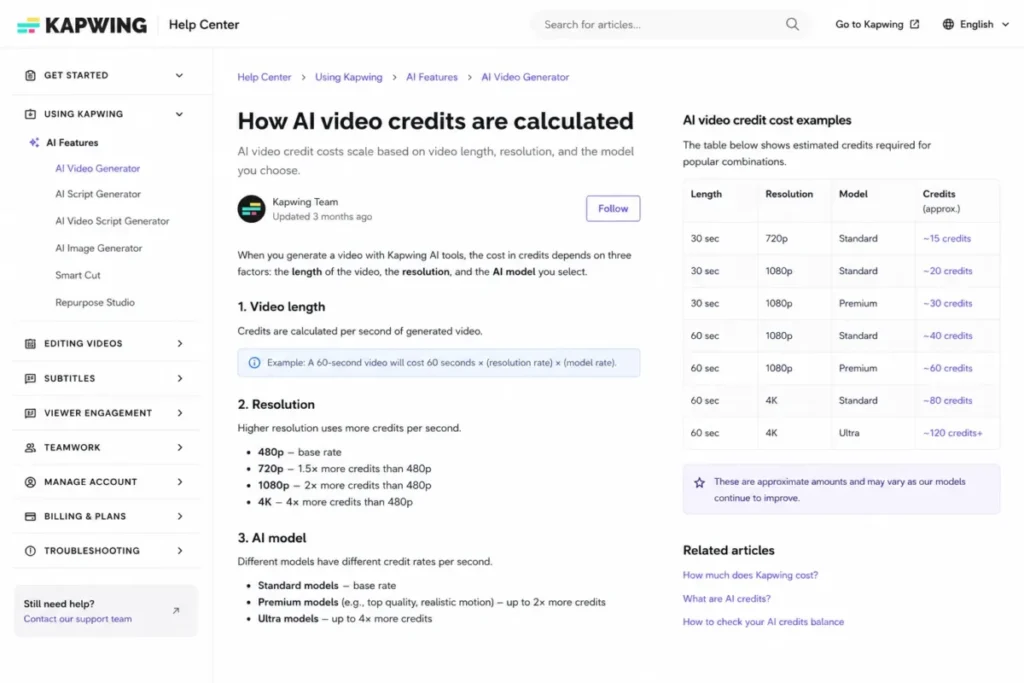
| 10 | Kapwing | Lightweight AI workspace | $16/mo billed annually (Pro) | Yes | AI video can cost 20+ credits per clip |
The cheapest plan is rarely the right comparison point. For each tool below, I flag the first tier that gives you production-ready output so you compare like for like, not headline for headline.
1. Runway: Best AI Video Generator Overall for Cinematic Clips

- Best for:
- small creative teams producing cinematic short clips, concept videos, and AI-assisted ads.
- Not best for:
- learning-and-development teams that need SCORM-native training or long avatar-led compliance videos.
Runway, covered in depth in our Runway ML review, is a prompt-to-video and image-to-video platform for teams that want frontier-style generation without a research budget. It earned the top rank by pairing Gen-4.5 and current models with the clearest per-second credit math here.
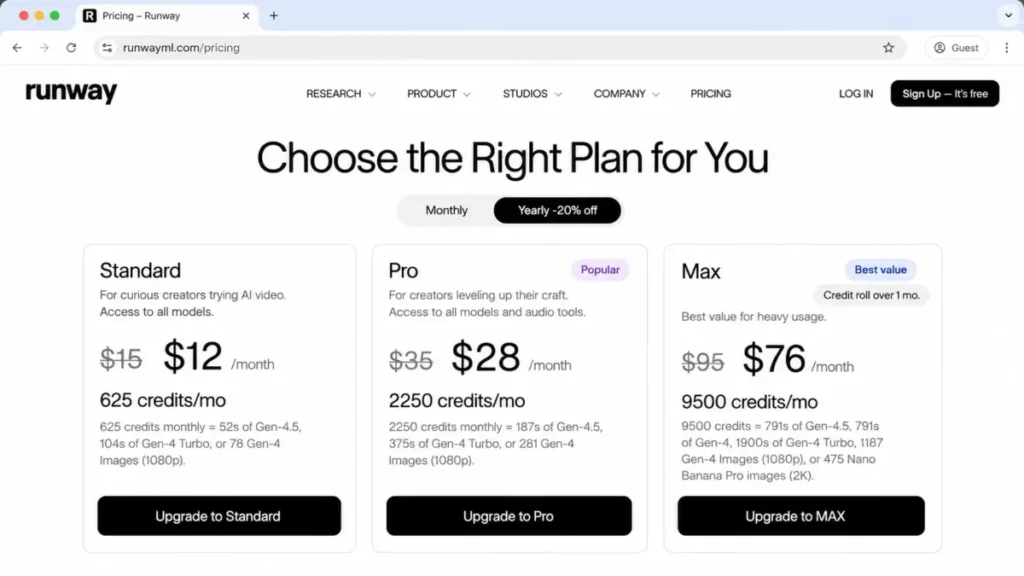
Pricing starts with a free tier, then Standard at $15 a month, or $12 a month billed annually, with 625 credits a month, as the Runway ML pricing breakdown lays out. Pricing checked July 2026 and re-verified September 17, 2026.
The practical tier for brand work is Standard, because it removes the watermark and opens every model. Pro at $35 (or $28 annually) adds 2,250 credits and custom voices, and Max at $95 (or $76 annually) adds 9,500 credits plus one-month credit rollover, the only rollover in the group.
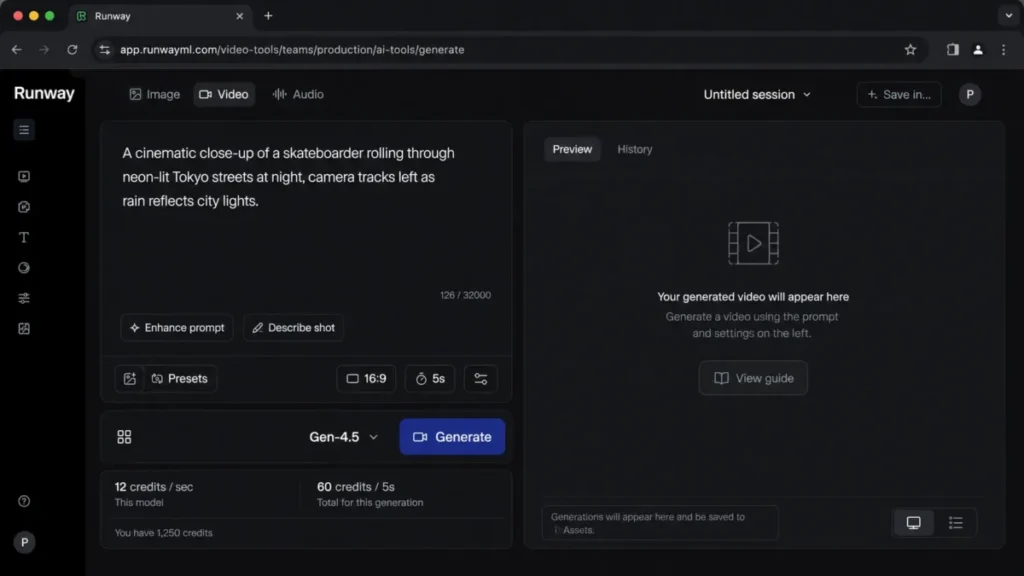
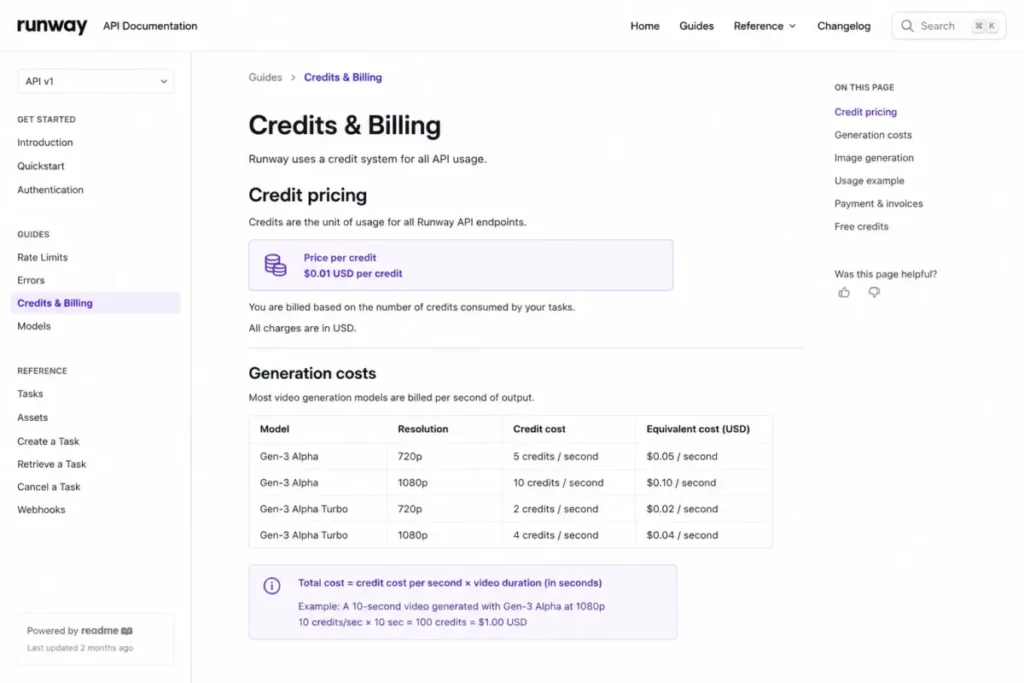
The strongest reason to choose Runway is budget predictability, because the pricing page prices generations by the second and names the rate: Gen-4.5 costs 12 credits for every second of video. On Max, where 9,500 credits cost $95, that is about $0.12 a second. On Standard, where 625 credits cost $15, the same second costs about $0.29. The main trade-off is that premium models burn credits fast on short clips, so a heavy month can exhaust Standard credits.
Against HeyGen or Synthesia, Runway is better at original footage but weaker at scripted presenter video.
| Pros | Cons |
|---|---|
| Watermark removed on the $15 Standard tier | Premium models consume credits quickly |
| Transparent per-second credit examples for budgeting | No SCORM or native LMS export |
| One-month credit rollover on the Max plan | Short clip durations suit ads, not long training |
- Verdict:
- Choose Runway if you generate original cinematic clips and want to budget by credits. Skip it if your core job is scripted training video.
2. Synthesia: Best AI Video Generator for Enterprise Avatar Training

- Best for:
- revenue enablement, HR, and L&D teams making repeatable presenter-led videos with brand governance.
- Not best for:
- creators who need cinematic generated scenes rather than avatar-led explainers.
Synthesia is an avatar platform where a digital presenter reads a script you type. It earned second place as the strongest fit for regulated training and internal video, where consistency matters more than visual novelty.
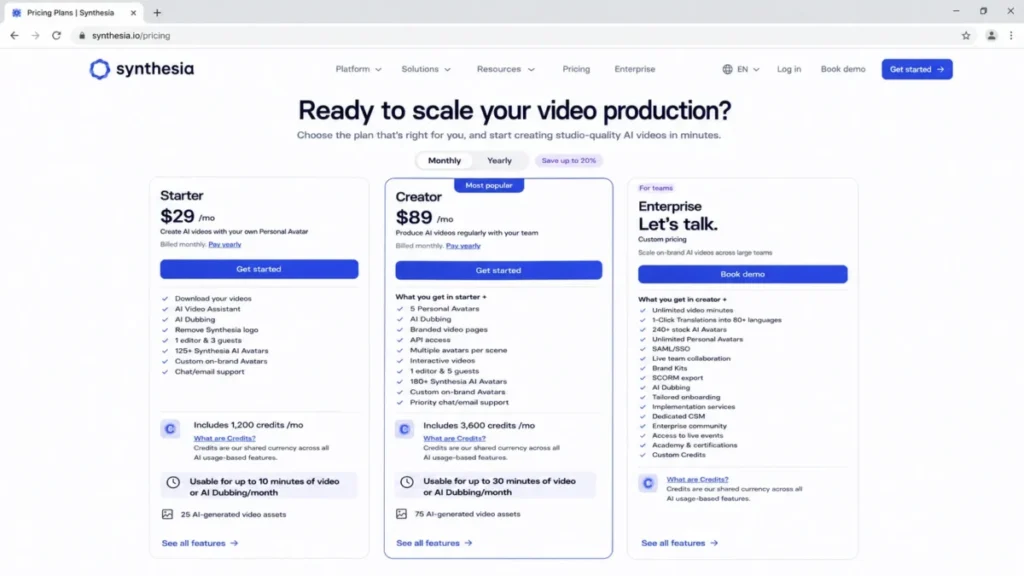
Pricing starts with a free Basic plan, then Starter at $29 a month, or $18 billed yearly. Creator is $89 a month, or $64 billed yearly, and Enterprise is custom, checked July 2026 and re-verified September 17, 2026.
Starter includes 1 editor, 3 guests, 125+ avatars, and 120 video minutes per year, an evaluation allowance, not production. Synthesia now expresses those allowances in credits as well: 1,200 a month on Basic, 14,500 a year on Starter and 44,000 a year on Creator, where a video minute costs roughly 121 credits and a minute of dubbing costs about 25.
Creator adds 5 personal avatars, API access, and multiple avatars per scene. SCORM export, SAML and SSO, Brand Kits, unlimited minutes, and a dedicated CSM are Enterprise-only, so the features training teams need sit behind a custom quote.
The strongest reason to choose Synthesia is governance: brand control, translations, and admin oversight suit a team that has to defend consistency. One underrated detail sits in its FAQ: when you edit a finished video, Synthesia charges only for the seconds that changed, so a three-second fix on a one-minute video costs three seconds. The main trade-off is that video minutes and enterprise features are heavily plan-gated, so the real budget is usually Enterprise, not Starter, and unused minutes expire, which the same FAQ states outright.
Against Colossyan, Synthesia has broader avatar polish but a higher effective price for SCORM.
| Pros | Cons |
|---|---|
| Strong brand governance and admin controls | 120 minutes per year on Starter is thin |
| 1-click translations for localized training | SCORM and SSO are Enterprise-only |
| API access from the Creator tier | Real cost for training teams is a custom quote |
- Verdict:
- Choose Synthesia if you need governed, presenter-led training at scale. Skip it if your minutes fit in Starter and you never need SCORM.
3. HeyGen: Best AI Video Generator for Multilingual Avatar Marketing

- Best for:
- small marketing teams making avatar-led social, sales, and localized video in many languages.
- Not best for:
- teams that mainly need timeline editing or original cinematic generation.
HeyGen is an avatar platform with a marketing tilt, built around custom digital twins and localization. It ranks third because it turns one script into avatar video across 175+ languages on paid plans.
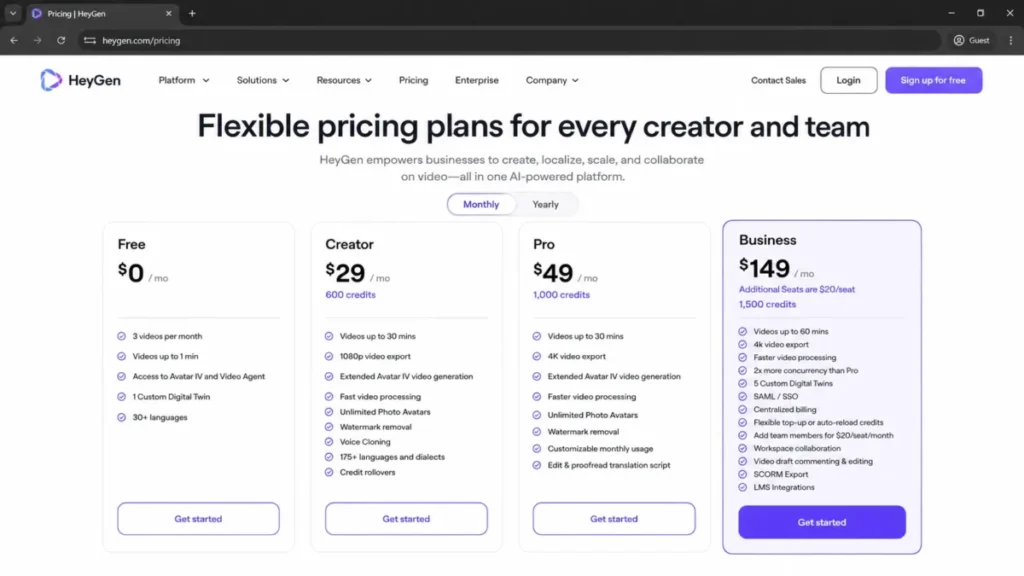
Pricing starts with a free plan, then Creator at $29 a month and Pro at $49 a month. Business is $149 a month plus $20 per seat per month, and Enterprise is custom, checked July 2026 and re-verified September 17, 2026.
Free gives 3 videos a month up to 1 minute, Creator adds 600 credits and 1080p export, and Pro adds 1,000 credits and 4K.
Business is the real team tier: 1,500 credits, 60-minute videos, SSO, SCORM, LMS integrations, and team collaboration, with each extra seat billed at $20 a month. So a marketing team that wants both 4K and SSO is choosing between two different tiers.
The strongest reason to choose HeyGen is language reach with a clean avatar workflow. The main trade-off is that collaboration, SSO, SCORM, and LMS all sit on the $149 Business plan, so small teams pay a step-up to reach admin basics.
Its API pricing is also separate from the subscription.
| Pros | Cons |
|---|---|
| 175+ languages on paid plans | SSO, SCORM, and LMS require Business |
| 4K export available on Pro | Seats add $20 each per month on Business |
| Custom digital twins for spokespeople | Free plan capped at 3 one-minute videos |
- Verdict:
- Choose HeyGen if multilingual avatar marketing is the core job. Skip it if you need admin controls but cannot justify the Business tier.
4. Descript: Best AI Video Editor for Podcast and YouTube Footage

- Best for:
- podcasters, YouTubers, and content teams turning recorded media into polished clips.
- Not best for:
- buyers who want standalone cinematic text-to-video as the main workflow.
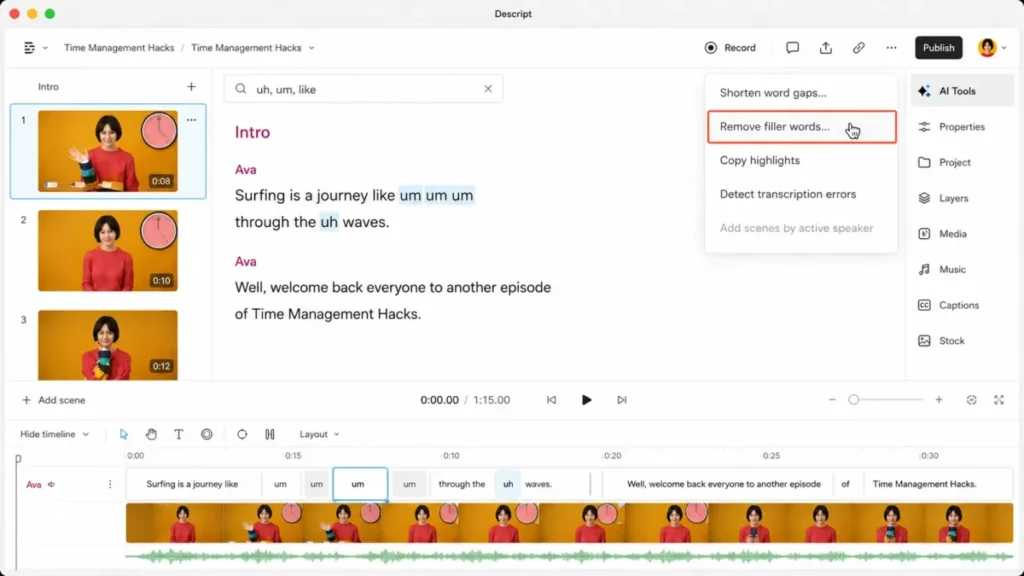
Descript is an editor first and an AI generator second. You edit video by editing a transcript, which is why it ranks fourth for teams whose raw material is recordings rather than prompts.
Pricing starts free, then Hobbyist at $16 a month billed annually ($24 monthly), Creator at $24 ($35 monthly) and Business at $50 ($65 monthly), with Enterprise custom. Pricing checked September 17, 2026.
Plan value is governed by media hours and AI credits, and the pricing page labels both per person per month rather than as a shared workspace pool: 10 hours and 400 credits on Hobbyist, 30 hours and 800 credits on Creator, 40 hours and 1,500 credits on Business. The gate that catches teams is resolution, because 4K export starts on Creator, not on the $16 entry plan.
The feature set covers text-based editing, a screen recorder, AI clips, captions, AI speech, avatars, and automatic multicam. You can also generate video from a script with AI visuals, but that lives inside an editing workflow, not a dedicated model studio.
The strongest reason to choose Descript is speed on footage, because cutting a filler word is as easy as deleting text. The main trade-off is that its generation is a feature of an editor, so it will not replace Runway for cinematic scenes.
Against Pictory, Descript is stronger for polishing footage, while Pictory is stronger at turning a blog or script into a new video.
| Pros | Cons |
|---|---|
| Text-based editing removes timeline friction | AI generation is secondary to editing |
| AI clips and captions speed up repurposing | 4K export starts on the $24 Creator plan, not the $16 entry plan |
| Screen recorder and multicam built in | Not a cinematic generator like Runway |
- Verdict:
- Choose Descript if your source is recordings and you want editing without a timeline. Skip it if you need prompt-to-video as the output.
5. Pictory: Best AI Video Maker for Turning Blog Posts Into Video

- Best for:
- solo marketers and small teams turning scripts, URLs, and webinars into short marketing videos.
- Not best for:
- teams needing cinematic prompt generation or deep avatar realism as the primary workflow.
Pictory turns text you already have, a script, a blog URL, or a long recording, into a short video with stock footage and voiceover. It ranks fifth because it is a fast content-repurposing engine, not a frontier generator.
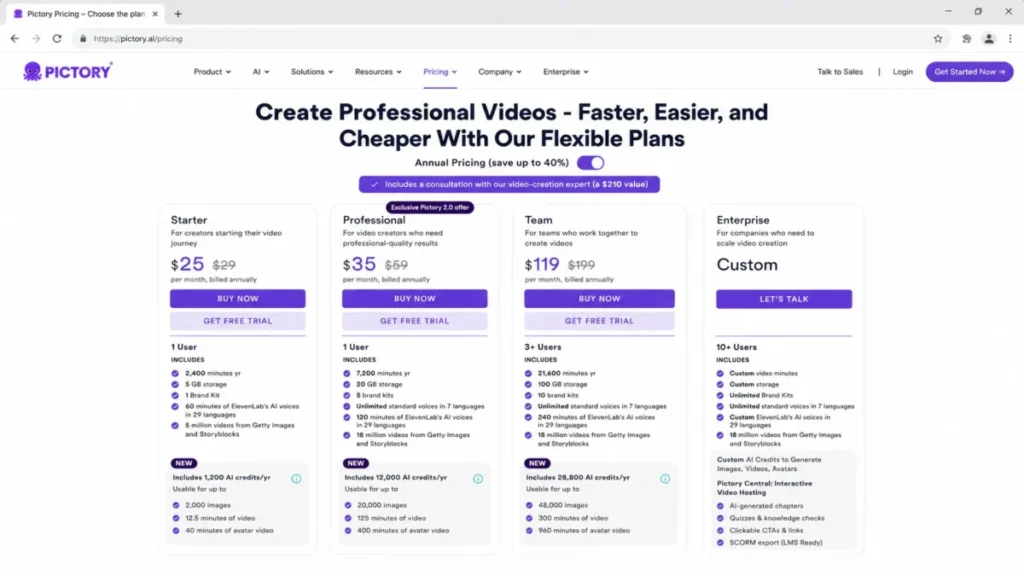
Pricing on the official page shows an annual and a monthly view. Starter is $25 a month billed annually (or $29 in the monthly table), Professional is $35 billed annually (or $59 monthly), and Team is $119 billed annually (or $199 monthly), checked July 2026 and re-verified September 17, 2026.
In the monthly table, Starter includes 200 video minutes a month, Professional 600, and Team 1,800 with 3+ users.
Two caveats change the budget. Unused minutes do not roll over, and projects are permanently deleted after cancellation unless you download them first, so an uneven calendar wastes capacity.
The strongest reason to choose Pictory is turning owned content into video without filming. The main trade-off is that quota resets monthly with no rollover, and extra minutes require an in-app purchase.
Against VEED, Pictory offers deeper script-to-video controls from owned text, while VEED is the stronger browser tool once the footage already exists.
| Pros | Cons |
|---|---|
| Script-to-video and URL-to-video in minutes | Unused video minutes do not roll over |
| Stock media and ElevenLabs voices included | Projects deleted after cancellation unless downloaded |
| Brand kits and team workspace on Team | Custom avatars and cloning sit above Starter |
- Verdict:
- Choose Pictory if you repurpose blogs and scripts on a steady cadence. Skip it if your output is lumpy and you would lose unused minutes.
6. invideo Agent: Best AI Video Generator for Multi-Scene Films and Campaign Variants

- Best for:
- filmmakers, brand studios, agencies, and performance teams producing multi-scene or multi-version work, where the same characters, products, and visual rules have to survive across every shot, episode, market, and cutdown.
- Not best for:
- one-off clips, and any budget that needs a fixed, forecastable cost per finished minute.
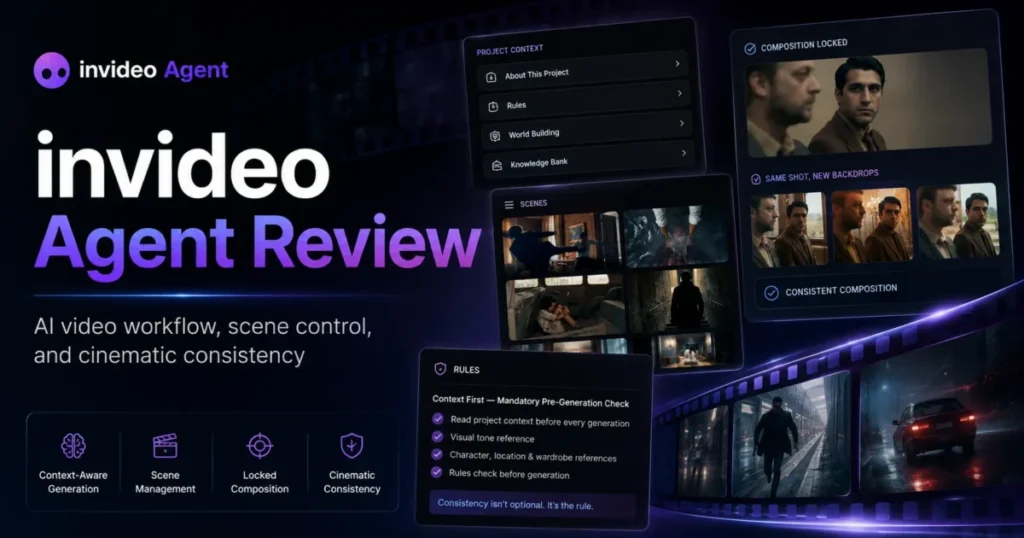
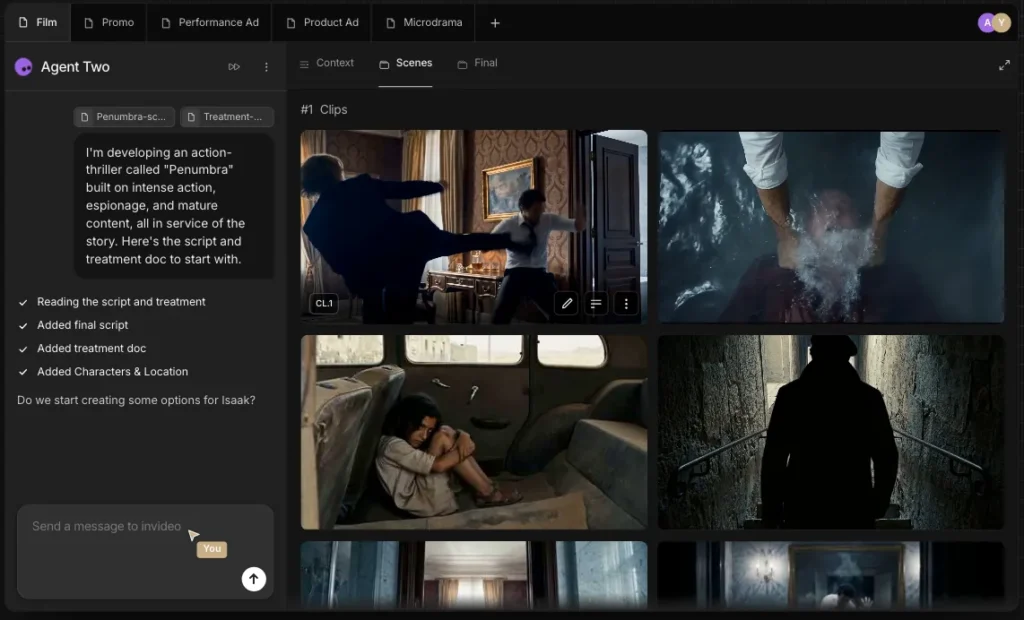
invideo Agent is a production agent you direct, not a generator you prompt. You bring the objective, audience, brand, references, and taste, and the agent turns that direction into scripts, storyboards, shots, assets, and edits. The practical difference shows up in the instructions you give it: “keep the product identical in every shot” and “use the visual language from our brand book” are directions, not prompts, and they are the kind of thing the tool is built to hold onto.
Two structures carry that. Every project has a Context, the shared source of truth for what stays constant: characters, products, locations, brand guidelines, approved assets, locked designs, tone, and prior decisions. Inside it you create a Brief for each deliverable. For a film, the world is the Context and each scene is a Brief. For a brand, the brand book is the Context and each campaign film gets its own Brief. For an episodic series, the show is the Context and each episode is a Brief.
That architecture is the whole argument for the tool. A team running fifteen campaign variations from one creative system briefs the system once, not fifteen times.
You can also staff it like a crew. invideo lets you define expert agents with specific roles: a script agent, a storyboard artist agent, a director of photography agent, a casting agent that holds character identity, an editor agent, a VFX agent, a campaign manager agent coordinating versions. They share project knowledge with each other, so a VFX agent brought in late receives the project information without anyone re-explaining the film. Standing rules go into Playbooks: approval stages, preferred models, brand restrictions, which assets stay locked, and how campaign variations get produced.
The input handling is where invideo Agent separates itself from every other tool on this list. Creative direction rarely arrives as a clean text prompt, and the agent takes scripts, PDFs, treatments, brand books, decks, product photography, footage, rough cuts, YouTube links, and Drive folders as project material. You can hand it a rough cut and ask which planned shots are present, which are missing, where continuity broke, and where new footage could be inserted. A performance team can hand it a high-performing ad, have it break down the structure, then rebuild the creative around a different product or market.
For close work there are Notebooks, a hands-on workspace where you go model by model and prompt by prompt on a single asset, with frame-level annotations, character sheets, product references, and locked reference collections. Work done manually stays in the project Context.
One caveat on finishing, and it decides whether this is an all-in-one. invideo’s newer material describes Slate, a conversational editing workspace with a professional timeline inside the agent, where you can ask for three shorter versions or swap in another approved take. invideo’s own FAQ page, last updated July 27, 2026, still describes the agent as a production asset generator rather than an editing timeline, with final assembly happening in your editor. Confirm Slate access on the specific plan you are buying before you assume you can finish in the same tab.
On quality, invideo cites Physion Labs’ Physion-Arc 1.0, an independent human evaluation of seven AI video agents across 100 cinematic prompts and 700 videos scored on 16 metrics, where Agent One placed first overall and first on 12 of 16 metrics, ahead of Runway, Luma, MiniMax, and Kling. Treat that as vendor-cited: the evaluation is third-party, the selection of it is not, and the full scorecard was not published in the material I was given.
Now the number that decides the budget: you pay for attempts, not for output. Everything runs on credits, and invideo rebuilt the way it sells them during 2026. The pricing page I checked on September 17, 2026 lists three named plans billed per seat: Basic at $9 with 190 credits a month, Pro at $30 with 1,000, and Ultra at $80 with 3,000. The per-minute quality-tier rates this guide carried in August, 2 credits a minute on stock media and 80 or 160 a minute on the frontier models, are no longer on that page. In their place is a per-model rate card quoted in five-second blocks: about 30 credits for five seconds of Seedance 2.0 Fast at 720p, about 38 for Seedance 2.0 at 1080p, and about 50 for Seedance 2.5 at 1080p, with the two 1080p models locked out of Basic entirely. A rejected take still costs exactly what an approved one costs, so three discarded attempts at Seedance 2.5 before a keeper turn a 50-credit clip into 200.
Two levers hold that down, and invideo publishes both. Always Ask mode makes you approve every prompt before it spends a credit, and storyboarding first gives you the cheapest preview of a shot before you pay to generate it.
Downloads and exports consume no credits, which inverts the export gate most tools on this list use. The charge lands entirely on generation.
Plan structure is where the fit narrows, and it narrows less than it did. Multiplayer editing now runs to 5 seats on Basic, 10 on Pro and 20 on Ultra, storage runs 10, 30 and 80 GB, and the full timeline with colour, audio and 3D is included on every tier, with invideo stating plainly that timeline editing consumes no credits. That splits the product in two for budgeting purposes: the editor is a flat cost, and every generated second is variable. Monthly plan credits still reset at renewal rather than carrying forward, so an uneven campaign calendar wastes the generative half of the plan while the editing half costs the same either way.
What breaks first here is forecasting, not quality. Individual steps can take 10 to 15 minutes because the agent runs processes in parallel, and invideo’s own pricing page states that model and agent prices are subject to change, so a cost model built on today’s per-minute rates is a snapshot rather than a contract.
I would not sign off on invideo Agent without a two-week credit burn log. Count attempts per approved minute rather than minutes delivered, because that ratio is the entire budget.
For the full plan-gate, seat, and export breakdown, see my invideo Agent review.
| Pros | Cons |
|---|---|
| Project Context holds characters, products, brand rules, and locked assets across every deliverable | Rejected takes cost the same as approved ones, so iteration drives the bill |
| Briefs let one creative system produce many versions without re-briefing the tool | Seedance at 1080p is locked out of the $9 Basic plan entirely |
| Expert agents share project knowledge, so a specialist added late needs no re-explanation | Individual steps can take 10 to 15 minutes because processes run in parallel |
| Reads rough cuts, brand books, decks, and existing ads as project material, not just text prompts | Monthly plan credits reset at renewal with no rollover |
| Always Ask mode gates every credit spend behind your approval | Finishing depends on Slate access, and invideo’s FAQ still calls the agent an asset generator |
| Downloads, exports and the full editing timeline use no credits | Model and agent pricing may change, which weakens long-term cost forecasting |
- Verdict:
- Choose invideo Agent if your work is multi-scene or multi-version and continuity is the thing that keeps breaking, whether that is a character across an episode or a product across forty ad variants. Skip it if the work is one-off, or if finance needs one fixed number per finished video.
7. VEED: Best Browser-Based AI Video Generator for Social Clips and Subtitles

- Best for:
- social media teams making talking-head clips, subtitles, and dubbed videos in the browser.
- Not best for:
- buyers who need transparent, model-by-model credit forecasting from a static pricing page.
VEED is a browser-based editor and AI workspace aimed at fast social output. It ranks seventh because it covers a wide production workflow, subtitles, dubbing, avatars, text-to-speech, and a model playground, without a desktop install.
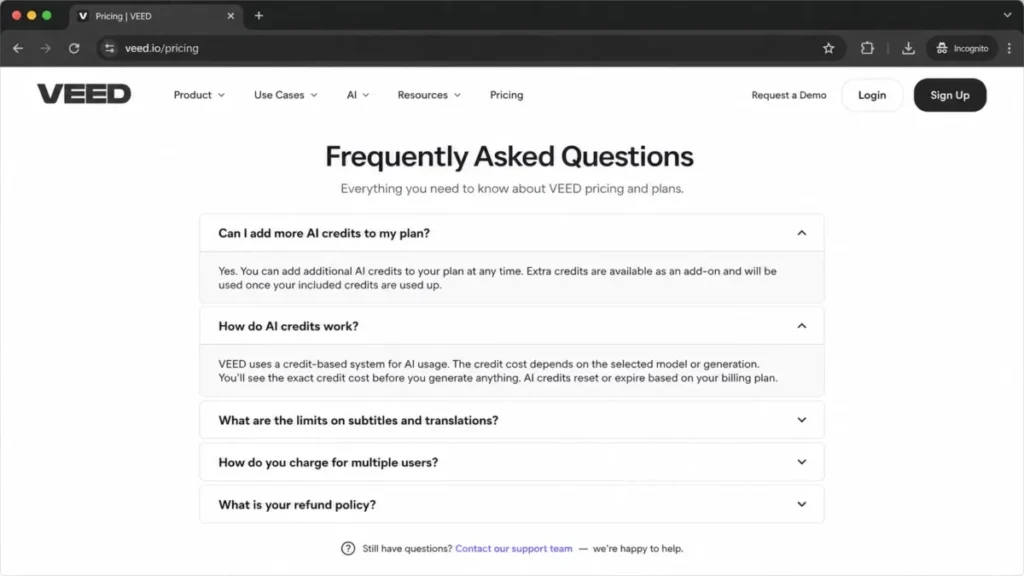
Pricing starts free, and the paid tiers are now published in dollars. Creator is $20 a month, or $10 a user a month billed yearly at $116, with 500 AI credits a month. Pro is $44, or $21 billed yearly at $257, with 2,500 credits. Studio is $70, or $35 billed yearly at $414, with 15,000 credits. Enterprise is custom. Pricing checked September 17, 2026. Note the size of that annual gap: paying yearly cuts every tier by about 51 percent, the steepest annual discount of any tool in this guide.
The pricing FAQ does confirm the mechanics that shape cost: AI credits, subtitle and translation limits, multiple-user charging, and add-on credits when you run out. Its AI playground also reaches models such as Sora, Veo, Kling, and Seedance, so heavy generation will draw on credits the same way an aggregator does.
The strongest reason to choose VEED is accessibility, because a marketer can caption, dub, and publish from one browser tab. The trade-off has moved: the plan price is now published, but the credit conversion is not. VEED describes 500 credits as roughly 125 AI videos without saying how long an AI video is or which model makes it, so you cannot price a clip the way you can on Runway or getimg.ai.
Against Kapwing, VEED leans into subtitles and dubbing, while Kapwing leans into collaborative editing.
| Pros | Cons |
|---|---|
| Subtitles, dubbing, and avatars in the browser | Credits convert to “AI videos” with no stated clip length or model |
| Model playground for Sora, Veo, and Kling | Monthly billing costs about twice the annual rate |
| No desktop install for the team | Multi-user and add-on credits raise real cost |
- Verdict:
- Choose VEED if browser-based subtitling and dubbing is the core job. Skip it if you need to forecast the cost of one generated clip before you make it.
8. getimg.ai: Best AI Video Generator for Veo, Sora and Kling on One Plan

- Best for:
- small creative and marketing teams that want Google Veo, Sora, Kling, Seedance and Wan behind one subscription, and want to see the price of a clip before they generate it.
- Not best for:
- training teams, anyone who needs SCORM, SSO or dubbing, and anyone who cannot start paying before they have tested the output.
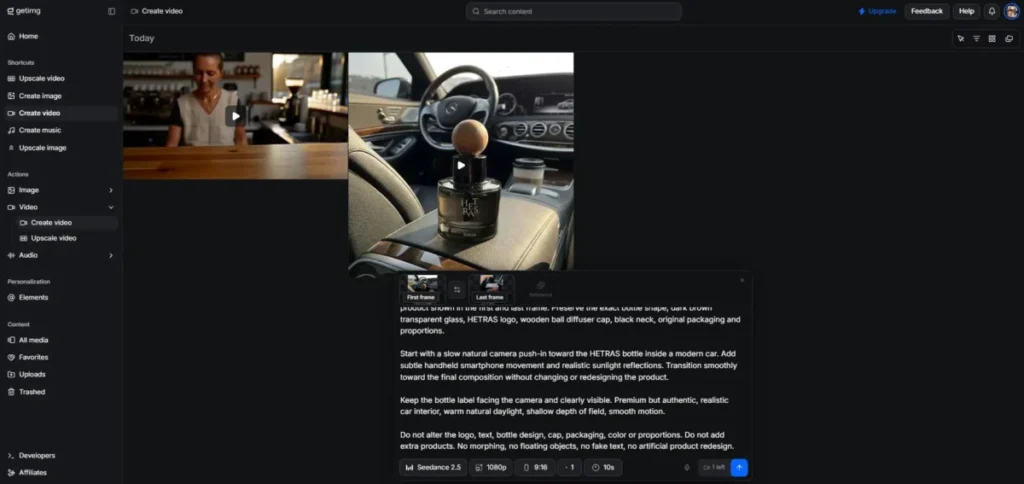
getimg.ai, examined in full in our getimg.ai review, is a multi-model studio from Webrockets, a Polish company. The video side puts 28 generation models behind one picker, from Google Veo 3.1 and Sora 2 Pro at the top to older Seedance builds at the bottom, and bills all of them from a single monthly credit balance shared with its image, music, speech and upscaling tools. I placed it eighth because it wins the one thing this guide ranks hardest on, published cost per finished output, and loses on almost everything an admin cares about.
Pricing has no free tier. Entry is $10 a month, or $8 a month billed yearly at $96, for 3,000 credits. Core is $30 a seat, or $25 billed yearly at $300, for 15,000. Plus is $65 a seat, or $55 billed yearly at $660, for 35,000. Ultra is $175 a seat, or $150 billed yearly at $1,800, for 100,000. Entry is the only tier that is gated by catalogue rather than volume: it reaches 9 of the video models and not Google Veo, and top-up credits are sold only on Plus and Ultra. Prices checked September 17, 2026.
The number that decides the budget. Credits are charged per second of output, and the rate is set by the model and the resolution you pick. That makes getimg.ai the only tool in this guide, other than Runway, whose cost you can calculate before you press generate. The spread is enormous: the cheapest usable path is Seedance 1.0 Pro Fast at 720p for 10 credits a second, and the most expensive is Sora 2 Pro at 1080p for 700, a gap of 70 times inside one subscription.
| Model | Resolution | Credits per second | Cost of a 5-second clip on the $65 Plus plan | Shortest clip the app allows |
|---|---|---|---|---|
| Seedance 1.0 Pro Fast | 720p | 10 | 50 credits, about $0.09 | 4 seconds |
| Wan 3.0 | 480p | 25 | 125 credits, about $0.23 | 4 seconds |
| Wan 3.0 | 1080p | 100 | 500 credits, about $0.93 | 4 seconds |
| Kling 3.0 Turbo | 720p | 100 | 500 credits, about $0.93 | 4 seconds |
| Auto mode | Chosen by the vendor | 120 | 600 credits, about $1.11 | 5 seconds |
| Kling 3.0 Pro | 1080p | 140 | 700 credits, about $1.30 | 4 seconds |
| Gemini Omni Flash 1.1 | 4K | 330 | 1,650 credits, about $3.06 | 4 seconds |
| Seedance 2.5 | 1080p | 540 | 2,700 credits, about $5.01 | 4 seconds |
| Google Veo 3.1 | 1080p | 400 | Not offered. The only length is 8 seconds, at 3,200 credits or about $5.94 | 8 seconds |
| Sora 2 Pro | 1080p | 700 | Not offered. The shortest is 4 seconds, at 2,800 credits or about $5.20 | 4 seconds |
Rates read from the model picker in the getimg.ai studio on September 17, 2026, and converted at the Plus rate of 35,000 credits for $65. See the getimg.ai pricing page for the plan credits used in that conversion.
What one clip actually cost me. I ran the default path on a paid Plus account: Auto mode, 16:9, five seconds, one prompt for a slow dolly shot along a cafe counter. The balance moved from 9,240 credits to 8,640, so the clip cost exactly 600 credits, which matches 120 credits a second. It returned a 2,560 by 1,440 file lasting 5.17 seconds, and it took 5 minutes 41 seconds to render, inside the 3 to 7 minutes the product page promises. On the $10 Entry plan that single clip is a fifth of the month.
The capacity table on the pricing page is not the capacity you get. Every “N videos” figure there is computed at a five-second clip on the cheapest model in that family. For three families the app has no five-second option at all, so those numbers cannot be reached. Google Veo is the clearest case: the pricing page promises 7 videos on the 15,000-credit Core plan, but Veo 3.1 generates only 8-second clips at 400 credits a second, so 15,000 credits buy 4. The same arithmetic understates Sora and MiniMax.
Auto mode is the second trap, and it is the mode the product page advertises with the line about picking the right model for every clip. At 120 credits a second it is more expensive than 20 of the 28 video models, including Kling 3.0 Turbo and Sora 2 at 100. A buyer who never opens the model picker pays a premium for the privilege.
What it does well is worth saying plainly. Commercial rights are ticked on all four plans, the credit pool is shared with image generation, music, speech and upscaling rather than split into separate products, and the catalogue moves fast: Wan 3.0, MiniMax H3 Max and Grok Imagine Video 1.5 all arrived in the first two weeks of September 2026. getimg.ai also sells the same models through a separate pay-as-you-go API at published per-second rates, though that catalogue lists 16 video models and leaves out Veo, Sora and the Seedance 2.x line the studio sells.
The limitations are structural, not cosmetic. There is no free plan anywhere, so evaluation costs money. There is no SCORM, no published SSO, no data residency statement, no dubbing and no translation workflow, which rules it out of every use case in the L&D section below. The Privacy Policy was last updated in 2022 and says nothing about whether uploads train models. And against invideo Agent, which sells the same Seedance 2.5 at 1080p, getimg.ai costs about three times more per second.
I would buy it for one job: a creative team that wants to test five frontier models against the same brief this week without opening five accounts. For a repeatable monthly output, price the specific model first, because the plan page will not do it for you.
| Pros | Cons |
|---|---|
| Credit cost is published per second, per model and per resolution | No free plan, so evaluation starts with a card |
| 28 video models on one balance, including Veo 3.1, Sora 2 Pro and Kling O3 | Auto mode, the advertised default, costs more than 20 of the 28 models |
| Commercial rights on every paid plan | The “N videos” figures on the pricing page cannot be reached on three model families |
| One credit pool also covers image, music, speech and upscaling | No SCORM, no published SSO, no data residency and no dubbing |
| Catalogue refreshed monthly, with three new video models in September 2026 | Privacy Policy dates from 2022 and is silent on training |
| Top-up credits available on Plus and Ultra | About three times the per-second cost of invideo Agent on the same Seedance 2.5 model |
- Verdict:
- Choose getimg.ai if you want to put several frontier video models against the same brief on one bill and you are willing to price each model yourself. Skip it if you need a free trial, a training workflow, or a forecastable cost per finished minute.
9. Colossyan: Best AI Video Generator for SCORM Training Courses

- Best for:
- L&D teams building avatar-led training, compliance, onboarding, and localized course video.
- Not best for:
- solo creators looking for the cheapest tool for casual social clips.
Colossyan is an avatar platform for learning teams. It ranks eighth but is the strongest pick for training, because SCORM export and LMS compatibility are core, not afterthoughts.
Pricing starts with a genuinely free Starter plan carrying 20 NEO minutes a month, then Professional at $59 a month on the annual plan plus $30 a month for each additional member, with Enterprise custom. Annual buyers receive the whole year of minutes on purchase. Pricing checked September 17, 2026.
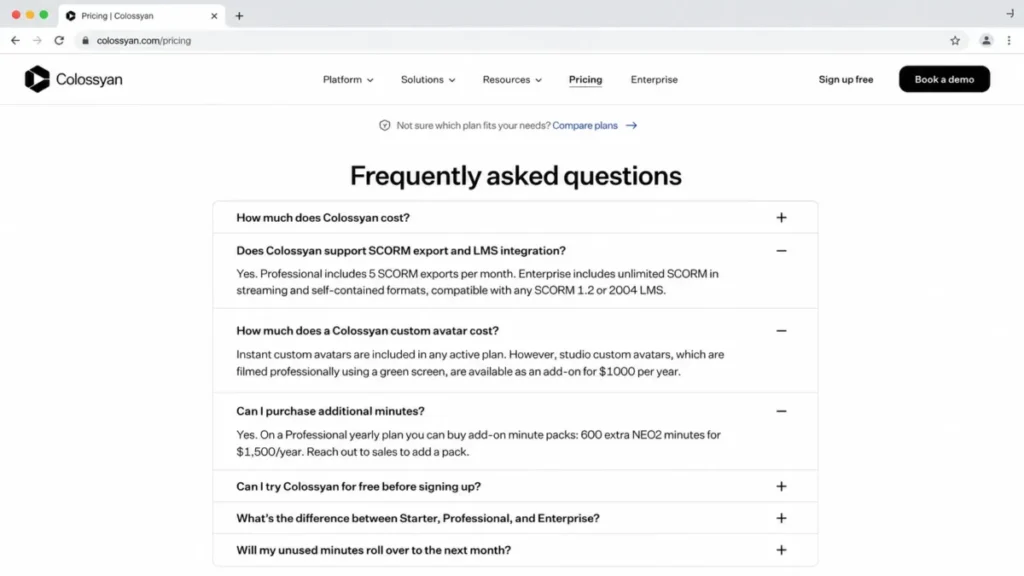
The gates are training-specific, and two of them tightened this year. Professional adds 10 NEO2 minutes a month, AI image generation, and SCORM export capped at 5 exports a month in streaming format only. It scales to 3 editors, but the second and third cost $30 a month each. Enterprise opens unlimited minutes, unlimited SCORM in both streaming and self-contained formats, SSO, data residency and a dedicated CSM.
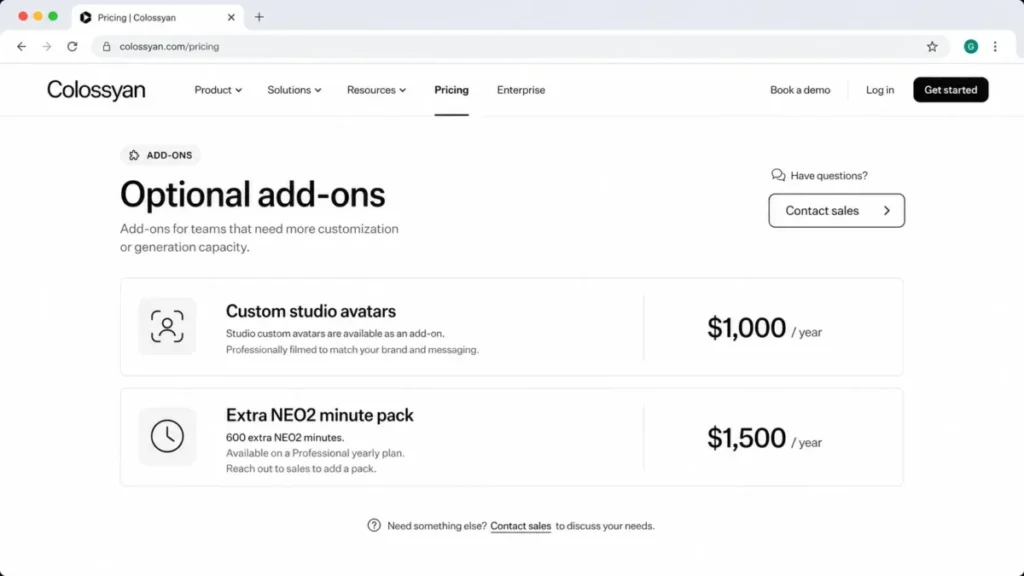
The hidden costs are where budgets slip. A studio custom avatar costs $1,000 a year, an extra 600 NEO2 minutes costs $1,500 a year, and unused minutes do not roll over, so a branded, high-volume training program can cost far more than the $59 headline.
The strongest reason to choose Colossyan is that a training team can publish straight into an LMS, with SOC 2 and GDPR options on Enterprise. The main trade-off is add-on cost for custom avatars and extra minutes.
Against Synthesia, Colossyan still reaches SCORM at a lower base tier, Professional rather than Enterprise, but five exports a month is a pilot allowance rather than a production one. Count your courses before you treat $59 as the price of SCORM.
| Pros | Cons |
|---|---|
| SCORM export from the Professional tier, capped at 5 exports a month | Custom studio avatar costs $1,000 per year |
| 120+ languages for localized courses | Extra 600 NEO2 minutes cost $1,500 per year |
| Data residency and SOC 2 Type II on Enterprise, and no AI training on customer content | Unused minutes do not roll over |
- Verdict:
- Choose Colossyan if SCORM training and localization are non-negotiable. Skip it if you only need short social clips.
10. Kapwing: Best Lightweight AI Video Maker for Small Teams

- Best for:
- small content teams editing, subtitling, clipping, and generating quick AI videos in a browser.
- Not best for:
- teams needing enterprise avatar and LMS workflows or the highest-fidelity cinematic control.
Kapwing is a collaborative browser workspace that blends editing with light AI generation. It ranks tenth as a generalist: handy for a small team that wants one flexible tool, not a specialist engine.
Pricing offers free tools, then Pro at $16 a month billed annually ($192 a year, or $24 month to month) and Business at $50 billed annually ($600 a year, or $64 month to month), both charged per member. Pro carries 1,000 AI credits a month and Business 4,000. Pricing checked July 2026 and re-verified September 17, 2026.
The cost driver is credits, not seats. Kapwing’s help center states that AI credit use varies by generation type, and that an AI video can cost 20+ credits depending on length, resolution, and model. Put that against the 1,000 credits on Pro and the ceiling is fewer than 50 AI videos a month, before a single minute of the subtitling and dubbing those same credits also pay for.
Paid plans have no free trial and no refunds after upgrade, so evaluate on the free tools before you commit a card.
The strongest reason to choose Kapwing is flexible collaboration, with editing, subtitles, and generation in one shared browser project. The main trade-off is that AI credits scale with output quality, so a team leaning on 4K will spend quickly.
Against VEED, Kapwing is stronger on collaborative editing, while VEED is stronger on dubbing at scale.
| Pros | Cons |
|---|---|
| Collaborative browser editing and generation | AI video can cost 20+ credits per clip |
| Pro is affordable at $16 a month annually | No free trial on paid plans |
| Subtitles, voiceover, and music in one place | No refunds after upgrade |
- Verdict:
- Choose Kapwing if you want one lightweight tool for editing and light generation. Skip it if you need enterprise avatar or LMS workflows.
Pricing and Usage Limits Compared
Two of these tools bill in credits, four bill in video minutes, and the rest mix a subscription with an AI-credit pool. Comparing headline prices across those models is how buyers pick the wrong tool, so this matrix normalizes on the thing that actually runs out.
| Tool | Free plan | Entry tier and price | Billed in | Rollover of unused capacity |
|---|---|---|---|---|
| Runway | Yes, limited credits | Standard, $15/mo or $12/mo annual | Credits (625/mo on Standard) | Yes, one month, Max plan only |
| Synthesia | Yes, Basic | Starter, $29/mo or $18/mo yearly | Video minutes (120/yr on Starter) | No, stated in the pricing FAQ |
| HeyGen | Yes, 3 videos/mo | Creator, $29/mo | Credits (600 on Creator) | Not publicly confirmed |
| Descript | Yes | Hobbyist, $16/mo annual ($24 monthly) | Media hours + AI credits, per person | Not publicly confirmed |
| Pictory | Trial | Starter, $25/mo annual ($29 monthly) | Video minutes (200/mo on Starter) | No, resets monthly |
| invideo Agent | Yes | Basic, $9/seat/mo billed annually | Subscription credits (190/seat/mo on Basic) | No, plan credits reset at renewal |
| VEED | Yes | Creator, $10/user/mo annual ($20 monthly) | Plan + AI credits (500/mo on Creator) | Not publicly confirmed |
| getimg.ai | No free plan | Entry, $10/mo or $8/mo annual | Credits charged per second of output (3,000/mo on Entry) | No, credits reset monthly |
| Colossyan | Yes | Professional, $59/mo annual | Video minutes (NEO2) | No, unused minutes expire |
| Kapwing | Yes | Pro, $16/mo annual ($24 monthly) | Subscription + AI credits (1,000/mo on Pro) | Not publicly confirmed |
Plan names, prices and allowances read from each vendor’s pricing page on September 17, 2026, including the Runway plan list and the Synthesia plan list.
Runway is the only tool here that publicly confirms credit rollover, and only on its top Max plan. For every tool marked “no rollover,” an uneven publishing month is wasted capacity, which favors steady producers and penalizes teams with lumpy campaign calendars.
What credits and minutes actually buy
Credits are not comparable across platforms, and that is the most expensive misunderstanding in this category. A Runway credit prices a few seconds of generation, a HeyGen credit maps to avatar video length, and a Kapwing AI video can cost 20+ credits for a single clip depending on resolution and model.
Runway publishes the clearest conversion for budgeting. Its developer API (see what an API is for the basics) sells credits at $0.01 each, and its pricing page prices generations per second, so you can estimate a clip before you render it. Kapwing sits at the other end, where one high-resolution AI video can consume a chunk of a monthly plan.
Here is the buyer rule. Before you subscribe to any credit-based tool, divide the monthly credit allowance by the credit cost of your most common output, then confirm that number covers your real content calendar with room for revisions.
Which AI Video Generators Are Free, and What the Free Plan Really Gives You
Nine of these ten tools have something free. Only two of those nine produce a file you could publish without paying, and that is the distinction most free AI video generator lists skip.
| Tool | Free plan | What the free plan gives you | What it holds back |
|---|---|---|---|
| Runway | Yes | A one-time credit grant, enough to see the output | The watermark stays until Standard at $15 a month |
| Synthesia | Yes, Basic | 1,200 credits a month, about 10 minutes of video | Downloads, logo removal and dubbing start at Starter |
| HeyGen | Yes | 3 videos a month, up to 1 minute each | 1080p export and a credit balance start at Creator |
| Descript | Yes | Transcript editing with a monthly media allowance | Watermark-free 1080p export starts at Hobbyist, 4K at Creator |
| Pictory | Trial only | A time-limited trial, not a standing free plan | Everything, once the trial ends |
| invideo Agent | Yes | A refreshing allowance on the free plan | Enough to judge output quality, nowhere near enough to judge cost |
| VEED | Yes | Browser editing and the AI toolset | The 500-credit monthly allowance starts at Creator |
| getimg.ai | No | Nothing. There is no free tier at any level | Evaluation starts with a card |
| Colossyan | Yes, Starter | 20 minutes a month with NEO avatars and the full 300+ avatar library | Watermark removal, MP4 downloads and SCORM start at Professional |
| Kapwing | Yes | 10 AI credits and the free tool set | Paid plans carry no free trial and no refunds after upgrade |
Plan details read from each vendor’s pricing page on September 17, 2026, including the VEED plan comparison and the Kapwing plan comparison.
The pattern is consistent enough to use as a rule. Free plans in this category are built to show you the output, not to give you the output. The thing they withhold is almost always the thing you need to publish: the watermark on Runway and Colossyan, the download on Synthesia, the resolution on Descript and HeyGen.
getimg.ai is the outlier in the other direction, and buyers should treat it as a real cost. There is no free tier at any level, so the cheapest way to see whether Veo 3.1 or Kling handles your brief is $10, and that $10 buys five clips at the default setting.
If your only goal is to test whether AI video suits your workflow at all, start on Synthesia Basic for a scripted explainer or Kapwing for an edit, because both let you finish something. If your goal is to test a frontier generative model, accept that you will pay, because none of the free tiers here reach one.
What One Second of Generated Video Costs
Every list in this category compares monthly prices. Almost none of them compare the thing a buyer actually consumes, which is a second of finished video. Four of these tools publish enough to work it out, and the answer is not close.
| Plan priced | Model or output type | Published unit | Cost per second of finished video | Can you price a clip before making it? |
|---|---|---|---|---|
| Runway Max, $95 for 9,500 credits | Gen-4.5 | 12 credits per second | About $0.12 | Yes |
| Runway Standard, $15 for 625 credits | Gen-4.5 | 12 credits per second | About $0.29 | Yes |
| getimg.ai Plus, $65 for 35,000 credits | Seedance 1.0 Pro Fast at 720p | 10 credits per second | About $0.02 | Yes |
| getimg.ai Plus | Wan 3.0 at 1080p | 100 credits per second | About $0.19 | Yes |
| getimg.ai Plus | Google Veo 3.1 at 1080p | 400 credits per second | About $0.74 | Yes |
| getimg.ai Plus | Sora 2 Pro at 1080p | 700 credits per second | About $1.30 | Yes |
| invideo Pro, $30 for 1,000 credits | Seedance 2.5 at 1080p | About 50 credits per 5 seconds | About $0.30 | Yes |
| invideo Ultra, $80 for 3,000 credits | Seedance 2.5 at 1080p | About 50 credits per 5 seconds | About $0.27 | Yes |
| Synthesia Starter, 120 video minutes a year | Avatar video | Video minutes | About $0.030 to $0.037 | Yes, for avatar output |
| Colossyan Professional, $59 for 30 NEO minutes | Avatar video | Video minutes | About $0.033 | Yes, for avatar output |
| VEED Creator, $20 for 500 credits | Not named | About 4 credits per “AI video” | Not calculable | No, no clip length published |
| Kapwing Pro, $16 for 1,000 credits | Not named | 20+ credits per AI video | Not calculable | No, length and model both vary |
Rates taken from each vendor’s own pricing or documentation pages on September 17, 2026, and divided by the plan credits those same pages list. The per-second figures come from the Runway credit examples and the getimg.ai plan credits. Figures for getimg.ai were confirmed against a measured run on a paid account.
Three things fall out of that table, and all three change a shortlist.
First, cinematic generation costs roughly ten times what avatar video costs per second. A second of Runway Gen-4.5 runs $0.12 to $0.29 depending on the plan you buy the credits on, while a second of Synthesia or Colossyan avatar output runs about $0.03. If the job can be done by a presenter reading a script, the generative route is the expensive way to do it, and no feature table shows that.
Second, the spread inside a single aggregator is wider than the spread between products. On getimg.ai, one second costs $0.02 on the oldest Seedance build and $1.30 on Sora 2 Pro, a range of 65 times without changing subscription. The model picker, not the plan picker, is where that budget is decided.
Third, two of the tools here cannot be priced this way at all. VEED and Kapwing both publish credits and both describe an output in credits, but neither states the clip length or the model behind the number, so “125 AI videos” and “20+ credits per AI video” are not units you can budget against. That is not a small omission. It is the difference between a forecast and a guess.
One caveat on the Synthesia row, and it comes from Synthesia’s own page. The plan card prices Starter at $18 a month billed yearly, which is $216 a year, while the FAQ further down the same page says Starter costs $264 a year. Until those agree, the honest per-second figure is a range rather than a number.
My rule from this table is short. Before you compare two tools, convert both to dollars per second of the output you actually publish. If one of them cannot be converted, that is your answer about which one you can plan a budget around.
Which AI Video Model Sits Behind Each Tool
Most buyers arrive at this category searching for a model, not a product. They have seen a Veo 3.1 clip or a Kling 3.0 clip and they want to know where to run one. The two are not the same thing: a model generates the footage, and a generator is the product that sells you access to it, wraps an interface around it and decides what a second costs. Runway builds its own model. Synthesia, HeyGen and Colossyan build avatars rather than scenes and resell nothing. Everything else on this list is, to some degree, a storefront for other people’s models.
| Model | Who builds it | Reachable in this guide through | Published cost per second |
|---|---|---|---|
| Google Veo 3.1 | getimg.ai; VEED lists Veo in its playground without naming a version | 400 credits a second at 1080p on getimg.ai, about $0.74 on the $65 Plus plan. Only one clip length is offered, 8 seconds | |
| Sora 2 | OpenAI | getimg.ai; VEED lists Sora without naming a version | 100 credits a second at 720p, about $0.19 a second on Plus. Lengths are 4, 8 or 12 seconds |
| Sora 2 Pro | OpenAI | getimg.ai | 700 credits a second at 1080p, about $1.30 a second on Plus. The most expensive second in this guide |
| Kling 3.0 Pro | Kuaishou | getimg.ai; VEED lists Kling without naming a version | 140 credits a second at 1080p and 350 at 4K, about $0.26 and $0.65 a second on Plus |
| Kling O3 | Kuaishou | getimg.ai | 130 credits a second at 1080p, about $0.24 a second on Plus |
| Seedance 2.5 | ByteDance | getimg.ai and invideo Agent | 540 credits a second at 1080p on getimg.ai, about $1.00. About 50 credits per 5 seconds on invideo, about $0.30 a second on its Pro plan |
| Wan 3.0 | Alibaba | getimg.ai | 25, 50 or 100 credits a second at 480p, 720p or 1080p, and the only model here that runs to 30 seconds |
| MiniMax H3 | MiniMax | getimg.ai | 140 credits a second at 2K, about $0.26 a second on Plus |
| Gemini Omni Flash 1.1 | getimg.ai | 33 credits a second at 360p rising to 330 at 4K, a tenfold swing on one model | |
| Grok Imagine Video 1.5 | xAI | getimg.ai | 80, 140 or 250 credits a second at 480p, 720p or 1080p |
| Gen-4.5 | Runway | Runway | 12 credits a second, about $0.12 a second on Max and about $0.29 on Standard |
Rates read from the getimg.ai studio and the invideo plan comparison on September 17, 2026, with the getimg.ai figures confirmed against a measured run. Model families that a vendor names without a version are shown as such.
Two consequences follow, and both are buying advice rather than trivia.
The first is that model access is not a reason to pick a storefront on its own, because the same model costs different money in different storefronts. Seedance 2.5 at 1080p is the clean test: the same model, the same resolution, and about three times the price per second on getimg.ai as on invideo Agent. If you know which model you want, price that model in each product rather than comparing subscriptions.
The second is that version numbers matter more than brand names here. Seedance 1.0 Pro Fast and Seedance 2.5 differ by 24 times in price per second at the same 720p resolution inside one product. A vendor that advertises “Seedance” without a version, as several on this list do, is not telling you what you are buying.
L&D and Enterprise Readiness
Creator-focused lists skip the features that decide enterprise and training purchases. If you publish into a learning management system or answer to IT, these gates matter more than visual quality.
| Tool | SCORM export | SSO / SAML | LMS integration | Data residency | Plan that enables it |
|---|---|---|---|---|---|
| Synthesia | Yes | Yes | Via API and Enterprise | Enterprise | Enterprise (custom) |
| HeyGen | Yes | Yes | Yes | Not publicly detailed | Business, $149/mo + seats |
| Colossyan | Yes, capped at 5 exports/month on Professional | Yes | Yes | Yes (Enterprise) | Professional for streaming SCORM; Enterprise for unlimited SCORM, SSO and residency |
| Runway | No | Yes (Enterprise) | No | Not publicly detailed | Enterprise (custom) |
| getimg.ai | No | Not published | No | Not published | N/A |
| Others | No native SCORM | Varies | Varies | Not publicly detailed | N/A |
Colossyan is the only tool that exposes SCORM export at a mid tier (Professional at $59), while Synthesia and HeyGen reserve their full admin stack for Enterprise or Business. For a compliance-training buyer, that difference can be the deciding factor, because SCORM plus data residency is a hard requirement, not a nice-to-have.
If your training has to be tracked in an LMS, your shortlist is effectively Colossyan, HeyGen Business, and Synthesia Enterprise, and Colossyan now needs a second look because Professional caps SCORM at five exports a month. Everything else on this list is a marketing or creative tool that happens to make video.
Hidden Costs That Change the Budget
The subscription is rarely the final number. Custom avatars, extra minutes, and per-seat charges are where a “$59 tool” becomes a four-figure annual commitment, and most SERP lists never show them.
| Hidden cost | Tool | Published price (checked Sep 17, 2026) |
|---|---|---|
| Custom studio avatar | Colossyan | $1,000 per year |
| Extra 600 NEO2 minutes | Colossyan | $1,500 per year |
| Studio custom avatar | Elai (comparator) | $500 per year |
| Selfie avatar | Elai (comparator) | $199 per year |
| Voice cloning | Elai (comparator) | $200 per year |
| Extra editor seat | Colossyan Professional | $30 per member per month |
| Extra seat | HeyGen Business | $20 per seat per month |
| Top-up credits when the month runs out | getimg.ai | Sold on Plus and Ultra only, not on Entry or Core |
Add-on prices read on September 17, 2026 from the Colossyan pricing FAQ, which states the studio avatar and NEO2 minute pack figures directly.
A branded training program that standardizes on one spokesperson avatar is the clearest trap. On Colossyan, one custom studio avatar plus one extra minute pack adds $2,500 a year on top of the Professional subscription, which reframes the whole comparison against Synthesia or HeyGen.
I would treat any “custom avatar” line as a separate budget line, not an included feature. Ask the vendor for the annual add-on price before you compare base plans, because the base plan is not the number you will actually pay.
Localization and Dubbing Compared
Localization is one of the main reasons buyers move from filmed video to AI video, but language counts and translation features differ sharply by plan.
| Tool | Language reach | Translation or dubbing | Plan note |
|---|---|---|---|
| HeyGen | 175+ languages on paid plans | Voice cloning and dubbing | Creator and up |
| Colossyan | 120+ languages | Localization for courses | Professional and up |
| Synthesia | Broad, with 1-click translations | Enterprise translation depth | Translations scale on Enterprise |
| Pictory | Language support with plan gates | Voiceover in supported languages | Above Starter for advanced use |
| Descript | 30+ languages | Translate and dub recorded video | Business, $50/mo annual |
HeyGen leads on raw language count, Colossyan is built for localized training specifically, and Synthesia reserves its deepest translation features for Enterprise. For a global marketing team, HeyGen is the natural first look; for global compliance training, Colossyan and Synthesia fit better.
The buyer question is not “how many languages,” it is “how many languages on the plan I can afford.” A 175-language claim on a tier you will not buy does not help your rollout.
Cost at Scale: A Three-Editor Team
Single-user prices hide the real number. Here is a rough monthly picture for a small content team of three editors, using published seat and plan data where it exists and flagging where you must confirm with sales.
| Tool | 3-editor monthly cost (indicative) | Basis |
|---|---|---|
| Kapwing Business | $150/mo | $50 per seat annually, per official pricing |
| HeyGen Business | $149 + $40 for two extra seats = $189/mo | Base plan plus $20 per extra seat |
| Runway Standard | $45/mo (3 x $15) | Per-user credits, confirm seat model |
| Synthesia | Custom / verify | Editors and guests are plan-gated |
| Colossyan Professional | $59 + $60 for two extra members = $119/mo | Professional base plus $30 per additional member |
| getimg.ai Plus | $195/mo (3 x $65) | Credits are sold per seat, not pooled across the workspace |
Colossyan used to be the outlier here, and it is not any more. Professional is $59 for one editor plus $30 a month for each additional member, so the three-person training team that once shared a single $59 plan now pays $119. HeyGen, Kapwing and getimg.ai all scale by seat too, so their real cost climbs with headcount in a way the entry price hides.
Do not treat “custom” as missing. Runway, Synthesia, HeyGen, Pictory, Colossyan, and Elai all have Enterprise paths, and for a team standardizing a workflow, a custom quote is often the honest comparison point, not the advertised entry tier.
Setup and Learning Curve
None of these tools needs an implementation project, but the effort still varies, and a low learning curve drives adoption in the first 30 days.
| Tool | Setup difficulty | Why |
|---|---|---|
| Kapwing | Low | Template-driven, browser-based, minimal configuration |
| Pictory, VEED, HeyGen | Low to medium | Script and asset setup, some model and voice choices |
| Descript | Medium | Editor concepts and media management to learn |
| Runway, invideo Agent, getimg.ai | Medium | Prompt craft and model selection affect output and cost |
| Synthesia, Colossyan | Medium | Avatar, branding, and (for training) SCORM and LMS setup |
Pictory itself notes that a first video can take about an hour to build, then under 15 minutes once you learn the flow, which is a fair expectation for the repurposing tools. For avatar training platforms, budget extra time for brand kits, voice setup, and LMS wiring, because those are the steps that stall a first rollout.
Which AI Video Generators to Avoid, and When
No tool here is bad, but several are the wrong buy for specific teams. These are disqualifiers, not criticisms.
Avoid Runway if your core output is scripted training video, because it has no SCORM export and its short clips do not suit long explainers. Avoid Synthesia Starter as a production plan, because 120 video minutes a year is an evaluation allowance.
Avoid credit-based aggregators like invideo Agent if finance needs a fixed cost per video, because model prices move and credits expire. Avoid free tiers on HeyGen and Pictory as production tools, because watermarks, one-minute caps, and minute ceilings make them trial tiers. Avoid getimg.ai if you need to try before you pay, because it sells no free plan at any level.
Avoid Colossyan for casual social clips, because its value is training-specific and its add-ons are priced for L&D budgets. Avoid Kapwing and VEED for enterprise avatar programs, because neither is built for LMS-native compliance workflows.
How to Choose the Right AI Video Generator
Start with these seven questions before you compare prices, because the answers narrow the list faster than any feature table.
First, which lane are you in: cinematic generation, avatar and training, or editing and repurposing? Second, what is your real monthly output in clips or minutes, not your best month?
Third, which plan reaches production-ready output, meaning no watermark and the export resolution your channels need? Fourth, do you need SCORM, SSO, LMS export, or data residency, and if so, which tool exposes them at the lowest tier?
Fifth, how many editors need access, and does the tool bill per seat or include a small team? Sixth, will unused credits or minutes roll over, and does that match your calendar?
Seventh, what is the fully loaded annual cost including custom avatars, extra minutes, and seats? Answer these, and the shortlist usually collapses to two tools, which is the point of the exercise.
If your workflow starts with a written script, draft it in a dedicated writing tool first, and our ChatGPT review covers the most common option for that step.
Common Mistakes When Buying AI Video Tools
The most common mistake is budgeting from the entry price. The practical tier that removes the watermark or adds 4K is usually one step up, so the real budget is higher than the headline.
The second mistake is treating credits as interchangeable. A credit on one platform buys seconds of cinematic footage, on another it buys a full avatar video, so credit counts mean nothing without the cost per output.
The third mistake is ignoring rollover and deletion rules. Non-rollover minutes punish uneven calendars, and Pictory permanently deletes projects after cancellation unless you download them first.
A related trap on minute-based tools like Colossyan and Elai is revision burn, because re-rendering an edited video can consume fresh minutes and deleting a render does not restore them. Approve drafts before you render, and treat each re-render as a new minute cost, not a free edit.
The fourth mistake is assuming custom avatars are included. On Colossyan they cost $1,000 a year, and on comparators like Elai the avatar and voice-cloning add-ons stack on top of the base plan.
Final Verdict
For most creative teams, Runway is the best of the best AI video generators in 2026, because it pairs current models with per-second credit math a finance team can approve. It is the safe default when the job is original cinematic clips and ads.
For presenter-led training and internal video, Synthesia and Colossyan are the stronger buys, with Colossyan the value pick because it exposes SCORM at $59 rather than reserving it for Enterprise. For multilingual avatar marketing, HeyGen’s 175+ languages and 4K on Pro make it the natural choice, as long as you can justify the Business tier for SSO and LMS.
For teams whose raw material is recordings, Descript is the right tool, and for turning owned blogs and scripts into video, Pictory fits. The rest, invideo Agent, VEED, getimg.ai, and Kapwing, are strong situational picks for multi-version campaigns, browser dubbing, frontier model access, and lightweight collaboration.
My one operating rule holds across all ten: name your lane, divide the credit or minute allowance by your real output, and confirm the fully loaded annual cost before you commit. Do that, and none of these tools will surprise you at renewal.
If your production also needs still images, our roundup of the best AI image generators covers the adjacent tools for thumbnails and social graphics.
For cleaning up those stills before they go into a video, the guide to AI photo editors pairs well with any tool on this list.
FAQ
What is the best AI video generator in 2026?
Runway is the best overall AI video generator for most creative teams in 2026, because it pairs current generation models with transparent per-second credit pricing. For scripted training video, Synthesia and Colossyan are stronger, and for multilingual avatar marketing, HeyGen leads. The best pick depends on your lane: cinematic generation, avatar training, or editing and repurposing.
Which AI video generator is best for beginners?
Kapwing and VEED are the easiest starting points, because both run in the browser and lean on presets rather than a timeline. A non-editor can turn a blog post or script into a branded clip in minutes. Expect the free tiers to carry watermarks or limits, so plan to move to a paid plan for production-ready, brand-safe output.
Can AI video generators make videos from text?
Yes. Text-to-video is the core feature across this list, though it works two ways. Runway and model aggregators like invideo Agent generate original footage from a prompt, while Synthesia, HeyGen, and Colossyan generate an avatar that reads your typed script. Pictory turns an existing script or blog URL into a video assembled from stock media and voiceover.
Which AI video generator has the most realistic avatars?
Synthesia, HeyGen, and Colossyan lead on avatar realism and are built specifically for presenter-led video. HeyGen emphasizes custom digital twins and 175+ languages, Synthesia emphasizes brand governance and translations, and Colossyan emphasizes training with SCORM export. For cinematic characters rather than presenters, Runway generates original scenes instead of scripted avatars.
Is there a free AI video generator with no watermark?
Runway removes the watermark on its Standard plan at $15 a month, not on the free tier. Most free plans here, including HeyGen and Pictory, carry watermarks, minute caps, or short video limits, so they work as trial tiers rather than production tools, and getimg.ai sells no free plan at all. Budget for the first paid tier if you need clean, publishable output.
Which AI video generator is best for YouTube and social media?
For repurposing recordings into clips, Descript is the strongest fit, and for turning scripts or blogs into social video, Pictory works well. VEED and Kapwing are strong browser-based options for subtitling, dubbing, and quick edits. For avatar-led social posts in many languages, HeyGen is the better choice on its Creator or Pro plans.
How much do AI video generators cost in 2026?
Paid plans in this guide start around $9 to $29 a month, with invideo Basic at $9 a seat, getimg.ai Entry at $10, VEED Creator at $10 a user billed yearly, Runway Standard at $15 (or $12 annually), Kapwing Pro at $16 billed annually and HeyGen Creator at $29. Training-focused Colossyan Professional is $59 a month on annual billing plus $30 for each extra editor. Enterprise tiers and custom-avatar add-ons push real costs far higher, so verify the fully loaded annual price rather than the headline.
Can AI video generators make training videos with SCORM export?
Yes, but only a few. Colossyan exposes SCORM export on its Professional plan at $59 a month, HeyGen includes SCORM and LMS integrations on its $149 Business plan, and Synthesia offers SCORM on Enterprise. If you must publish tracked courses into an LMS, your shortlist is effectively those three tools, not the creator-focused options.
What is the difference between AI video generation and AI video editing?
AI video generation creates new footage from a prompt, script, or image, as Runway, Synthesia, and HeyGen do. AI video editing improves footage you already have, as Descript, Kapwing, and VEED do with transcript editing, subtitles, and clipping. Some tools blend both, but buying the wrong category is the most common and expensive mistake in this space.
Do AI video generators support commercial use?
Most paid plans here support commercial use, and several bundle licensed stock media and music, but terms vary by plan and by the models used. Pictory references licensed visuals and music, and invideo references stock providers. Confirm commercial rights on the specific plan and for any third-party model before publishing client or paid work.
Which AI video generator gives access to Google Veo, Sora and Kling in one subscription?
getimg.ai carries the widest set, with 28 video models in one picker including Google Veo 3.1, Sora 2, Sora 2 Pro, Kling 3.0 Pro, Kling O3, Seedance 2.5 and Wan 3.0, all drawn from one credit balance. invideo and VEED also run several third-party models, and invideo is cheaper per second on the models the two share. None of the avatar platforms, Synthesia, HeyGen or Colossyan, resell frontier cinematic models, because they generate presenters rather than scenes.
How much does one second of AI video cost?
It depends far more on the model than on the subscription. On the plans priced in this guide, a second of avatar video costs about $0.03, a second of Runway Gen-4.5 costs $0.12 to $0.29, a second of Seedance 2.5 at 1080p costs about $0.27 on invideo and about $1.00 on getimg.ai, and a second of Sora 2 Pro costs about $1.30. Work in seconds rather than months, because a plan that looks cheap can hold as little as five usable clips.
What is the best free AI video generator?
Synthesia Basic is the most useful free plan here if you need a finished scripted video, because its 1,200 monthly credits cover about 10 minutes of avatar output, and Kapwing is the most useful if you need to edit, because its free tools produce a publishable file. Colossyan Starter is free and gives 20 NEO minutes a month, but keeps the watermark and MP4 download behind Professional. No free plan in this guide reaches a frontier generative model such as Veo 3.1 or Sora 2, and getimg.ai has no free plan at all, so testing those costs money.
About the author

Macedona is the founder and lead reviewer at SaaS CRM Review, where he has published 175+ in-depth reviews, pricing guides, and comparisons of CRM and SaaS tools. Each review is based on hands-on testing or verified documentation, and every article states clearly which method was used. Pricing and features are checked against official vendor sources, with the verification date noted in the article. Macedona follows a published review methodology and editorial policy. SaaS CRM Review earns affiliate commissions from some links, which never influence ratings or rankings. Read the full affiliate disclosure.