Most teams do not fail at support because they lack effort. They fail because requests scatter across inboxes, chat windows, and phone notes until nobody knows who owns what.
A ticketing system fixes that specific problem. It turns each incoming request into a structured record so no request is lost, every request has an owner, and managers can see what is happening.
This guide covers business support ticketing systems, the kind used by customer support, IT, and revenue teams, the same tools you would weigh in any roundup of the best help desk software. It does not cover airline, rail, event, or toll ticketing, which share the word but solve a different problem.
I write this from a CRM buyer’s seat, so the abstract definition is not the interesting part.
The real question is when the process helps, what breaks as volume grows, and when a shared inbox is still enough.
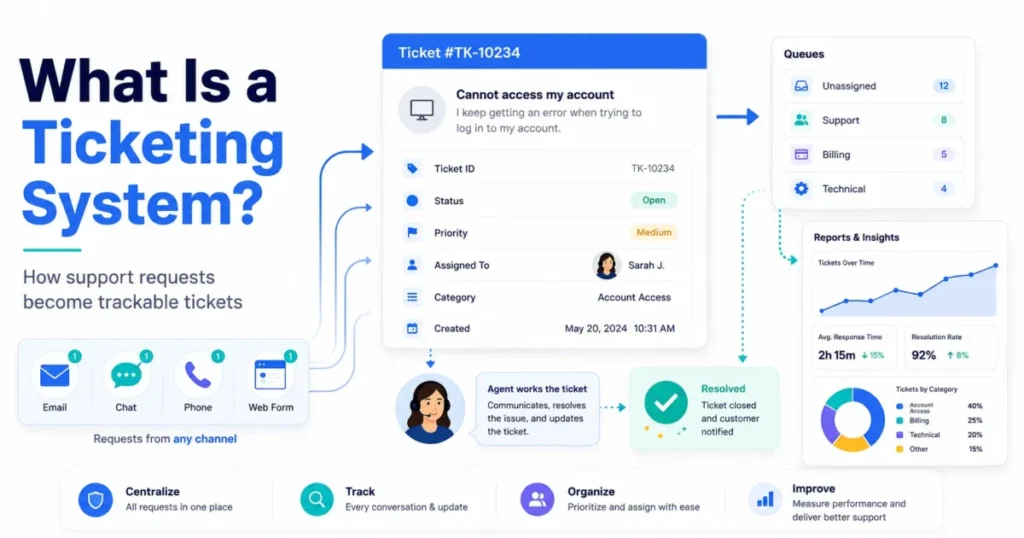
Quick answer: A ticketing system is software that converts support requests from email, chat, phone, forms, or portals into trackable tickets. Each ticket gets a unique ID, owner, status, priority, and history, so teams can route, prioritize, resolve, escalate, and report on every request from intake to closure.
In This Article (19 sections)
What a Ticketing System Means
At the simplest level, a ticketing system is a shared, organized record of support work. Every question, complaint, or request becomes one tracked item instead of a loose message.
The technical layer is more specific. Based on official vendor pages from Zendesk, SysAid, and OTRS, the system captures a request, assigns a unique ticket number, stores requester and channel data, then moves the ticket through categorization, routing, and resolution.
The business layer is where buyers should focus. It exists to prevent lost requests, fix unclear ownership, hold response commitments, and turn support activity into reporting a manager can defend.
That last point matters for revenue teams, where support activity overlaps with how CRM software works. Support data becomes a signal: which accounts struggle, which issues repeat, and which customers are at renewal risk.
It sits between two extremes. It is narrower than full IT service management, and it is heavier than a basic shared inbox once routing, priorities, SLAs, and reporting become real needs.
How a Ticketing System Works
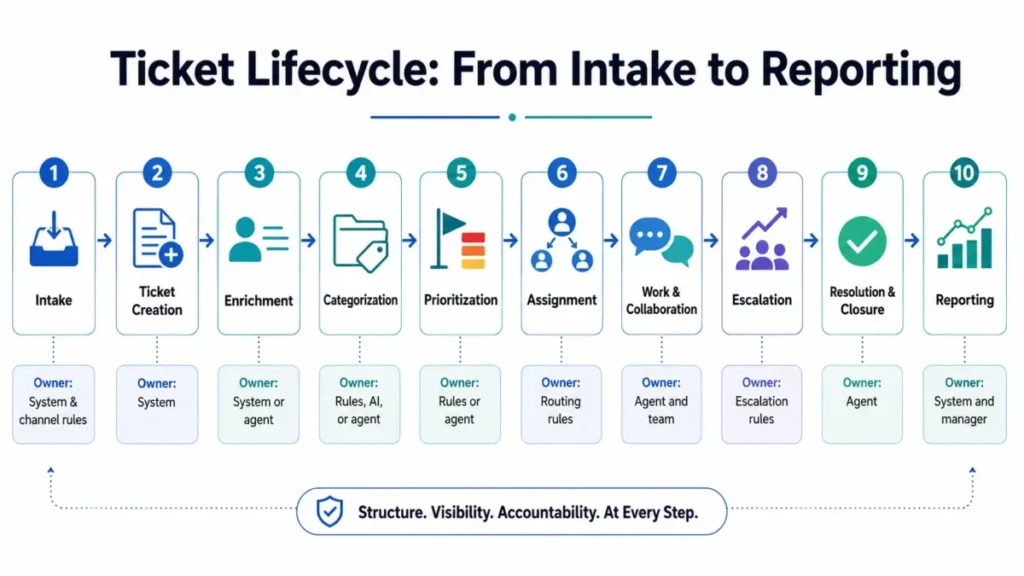
A request enters, becomes a ticket, gets worked, and closes with a record left behind. The value is in the structure added at each stage, not in any single step.
Here is the lifecycle most support and IT teams follow, based on Zendesk, Atlassian, and Decagon documentation.
| Stage | What happens | Who typically owns it |
|---|---|---|
| Intake | Request arrives via email, chat, phone, social, web form, portal, or API | System and channel rules |
| Ticket creation | A unique ID is generated, then requester, channel, and content are stored | System |
| Enrichment | Customer, account, order, or asset context is attached | System or agent |
| Categorization | Ticket is tagged by type, product, urgency, or department | Rules, AI, or agent |
| Prioritization | Priority and SLA target are applied | Rules or agent |
| Assignment | Ticket routes to a queue, team, or specific agent | Routing rules |
| Work and collaboration | Replies, internal notes, macros, and linked records are added | Agent and team |
| Escalation | Aging, blocked, or high-severity tickets move to a specialist or manager | Escalation rules |
| Resolution and closure | Issue is fixed, documented, and closed | Agent |
| Reporting | Ticket data becomes response time, backlog, and volume metrics | System and manager |
The lifecycle looks obvious until volume rises. The stage that breaks first is usually ownership: when no one owns it, tickets stall in a “new” queue and SLA clocks run out quietly.
One distinction trips up buyers here. Multichannel means requests can arrive from many places.
Omnichannel means the system preserves one connected view of the customer across those places, so an agent is not answering the same person twice in three windows.
How Ticketing Differs From Related Tools
The biggest source of confusion in this category is vocabulary. Teams compare tools that solve different problems because vendors use “ticketing system”, “help desk”, and “service desk” as if they were identical.
They are related, not equal. Ticketing is the request-tracking engine.
A help desk usually bundles that engine with a knowledge base, portal, surveys, and reporting.
| System | Core purpose | Primary user | Typical example |
|---|---|---|---|
| Ticketing system | Track requests as structured records | Support or IT teams | Zendesk, Freshdesk |
| Help desk software | Ticketing plus knowledge base, portal, surveys | Customer support | Freshdesk, Zoho Desk |
| Service desk | Broader IT service delivery and requests | Internal IT and employees | Jira Service Management |
| IT service management (ITSM) | Full service processes: incident, problem, change, asset | IT organizations | ServiceNow ITSM |
| CRM case management | Support tied to customer and account records | Revenue and service teams | HubSpot, Salesforce |
| Shared inbox | Multiple people reply from one mailbox | Small teams | Front, Help Scout style |
| Issue tracker | Internal engineering work and bugs | Product and dev teams | Jira issues |
Marketing copy often uses “ticketing system” and “help desk” interchangeably, so treat the label as a starting point and confirm the actual feature set. The practical rule is simple: match the tool to the problem, not to the noun on the pricing page.
Two more distinctions save buyers money. ITSM is broader than ticketing, so buying ServiceNow to answer customer emails is overkill for most support teams.
An issue tracker like Jira manages engineering work items, which is not the same as a requester-facing support ticket, even when the two integrate.
Terminology also varies by vendor. Salesforce calls a service inquiry a “case”, some tools call the thread a “conversation”, and IT tools call an outage an “incident”.
These often mean the same underlying record: one request, tracked to resolution.
What Is Inside a Support Ticket
A ticket is a structured object, not a loose message. Understanding the fields makes the whole system easier to picture and easier to keep clean.
Based on OTRS, SysAid, and Gladly definitions plus G2 category data, most tickets carry these fields.
| Field | What it stores | Why it matters |
|---|---|---|
| Ticket ID | Unique reference number | Lets everyone track one request without confusion |
| Requester | Who submitted it | Ties the ticket to a person and account |
| Channel | Email, chat, phone, form, portal | Shapes tone, speed, and routing |
| Subject and description | The reported issue | Drives categorization and search |
| Category and tags | Issue type, product, department | Feeds routing, SLAs, and reporting |
| Priority | Urgency level | Decides what gets handled first |
| Status | New, open, pending, resolved, closed | Shows where the ticket sits |
| Owner | Assigned agent or team | Fixes accountability |
| SLA target | Response or resolution deadline | Triggers escalation before a breach |
| Internal notes | Private agent context | Keeps handoffs clean without confusing the customer |
| Attachments | Screenshots, logs, files | Speeds diagnosis |
| Linked customer or account | CRM relationship record | Connects support to revenue context |
| Resolution | What fixed it | Builds knowledge and reporting |
A ticketing system is only as good as its ticket data. Vague subjects, wrong categories, and empty resolution notes quietly wreck reporting, routing, and any AI you layer on top later.
Types of Ticketing Systems and Tickets
Not all tickets are the same, and not all systems serve the same audience. Sorting them early prevents buying the wrong category.
Systems split into a few practical types, each aimed at a different audience.
- Customer support ticketing handles external questions, complaints, billing, and technical issues.
- IT ticketing tracks internal employee incidents and requests.
- CRM-connected ticketing links support tickets to customer and account records.
- Enterprise service management extends ticketing into full ITSM processes.
Ticket types matter most in IT, where a password reset and a full outage are not the same work.
| Ticket type | Plain example | Handled as |
|---|---|---|
| Incident | A payment system is down | Urgent restore, high priority |
| Service request | New laptop or software access | Standard fulfillment workflow |
| Access request | Reset a password or grant a role | Fast, often automated |
| Problem | Repeated crashes with one root cause | Investigation behind the scenes |
| Change | Planned system update | Approval and scheduling |
| Alert or event | Automated monitoring warning | Auto-created, sometimes auto-closed |
The audience split changes everything downstream. External customer support shapes channels, tone, and CSAT, while internal IT and HR support shapes approvals, privacy, and access workflows.
Use cases stretch wider than most articles admit. The same core engine handles external customer support, internal IT, HR and operations requests, product bug intake, ecommerce order support, and partner support, each with different SLAs and routing.
Priorities, SLAs, and Escalations
Tracking SLAs is a common selling point, but few explainers show how prioritization gets decided. This is where the system either improves service or just creates a prettier backlog.
Priority is a calculation, not a guess. Most teams combine severity, customer tier, business impact, channel, and ticket age into a priority level, then attach an SLA clock to that level.
| Input | Example values | Effect on priority |
|---|---|---|
| Severity | Outage vs cosmetic bug | Higher severity raises priority |
| Customer tier | Enterprise vs free plan | Higher tier often shortens targets |
| Business impact | Revenue-blocking vs minor | Higher impact raises priority |
| Channel | Phone vs low-urgency form | Faster channels may signal urgency |
| Ticket age | Approaching SLA breach | Aging tickets get escalated |
Set your own response and resolution targets, because there is no universal correct number, and copying a vendor default rarely fits your team. Assign labels like P1, P2, and P3, then define what each promises and how fast the clock runs.
Escalation is not the same as assignment. Assignment sends a ticket to an owner, while escalation moves or flags it when severity, blocking, or an approaching SLA breach demands a specialist or manager.
Atlassian’s Jira Service Management SLA rules, for example, are documented to escalate work before a breach happens.
Ticketing Systems in CRM
For revenue teams, the important shift is when tickets stop being isolated tasks and start connecting to customer records. This is the angle most definition pages skip.
The distinction is clean once you see it. The ticket is the support record, and the CRM contact or account is the relationship record.
When they connect, an agent sees the customer’s history, plan, and open deals while handling the request.
That connection changes support from reactive to informed. Support history informs renewal risk, high-value accounts route to senior agents, and account-level reporting shows which customers cost the most to serve.
Tools like HubSpot Service Hub build this link directly, and the HubSpot CRM review shows how tickets sit beside contact and deal records.
A TrustRadius buyer guide describes this plainly: help desk CRM integration links ticketing with customer data to create one unified view of interactions, history, and sales context.
Here is the buyer consequence. If your support tickets never sync to the CRM, your customer success team walks into renewal conversations blind to the last three months of frustration.
I would treat that gap as a real revenue risk, not a nice-to-have.
How AI Changes Ticketing
AI is described as one magic feature, but it plays several distinct roles. Separating them keeps you from believing marketing that promises to replace the whole system.
AI does different jobs at different stages, and each carries different risk.
| Stage | What AI can do | The limit to watch |
|---|---|---|
| Before creation | Deflect repeat questions with self-service answers | Poor answers frustrate customers |
| During triage | Classify, tag, and route tickets | Wrong categories corrupt reporting |
| During agent work | Summarize threads and draft replies | Drafts still need human review |
| During escalation | Flag complex or aging tickets | Escalation logic needs tuning |
| After closure | Detect related tickets and suggest articles | Duplicate detection is not perfect |
AI changes parts of the workflow, but it does not remove the need for a reliable ticket record, an audit trail, and a clean human handoff. Research on large-scale cloud support, such as the 2025 TickIt paper on LLM-powered escalation, treats AI as a layer on top of ticket structure, not a replacement for it.
I would avoid buying on AI claims alone. Ask the vendor what happens to reporting and audit history when the AI is wrong, because that is the scenario that hurts.
Duplicate Tickets and Major Incidents
Here is a scenario almost no definition page covers: one outage, one hundred customers, and one hundred separate tickets in slightly different words. This is where weak systems fall apart.
Duplicate reports are common during incidents. A 2023 research paper on incident-aware ticket aggregation showed that a single cloud incident can generate many duplicate tickets with semantically different descriptions, which makes them hard to group automatically.
A capable process must group duplicate reports, link them to one parent incident, and push consistent updates to every affected customer. Otherwise agents solve the same problem a hundred times and customers get a hundred different answers.
Not every tool handles this equally, so it is a fair question to ask before buying. If you run a product where outages hit many users at once, treat duplicate handling and major-incident linking as a core requirement, not a bonus.
Integrations and CRM Context
Integration is often reduced to a wall of app logos, which tells a buyer nothing useful. What matters is what the integration does, not that it exists.
There are levels of depth, and they are not interchangeable.
| Integration type | What it does | Buyer question |
|---|---|---|
| Native connector | Built and maintained by the vendor | Is it two-way and reliable? |
| Marketplace app | Third-party built | Who supports it when it breaks? |
| API | Custom connection you build | Do you have engineering time? |
| Field sync | Keeps ticket and record data aligned | Which fields sync, and how often? |
| Workflow trigger | One system fires actions in another | Can it drive automations, not just display data? |
| Reporting sync | Data flows into shared analytics | Can you report across both systems? |
G2 help desk category data flags integration limitations as a recurring complaint in help desk software, so depth is worth verifying before signing. A logo on a page means a connection exists, not that it syncs the fields your team relies on.
The stack-fit question is the one to answer first. The tool must connect cleanly to your CRM, email, and any billing or reporting system, or it becomes another silo that hides customer context.
Common Misconceptions About Ticketing Systems
A few beliefs cause bad purchases and bad setups. Correcting them early saves budget and rework.
Misconception: a ticketing system is just a shared email inbox. Reality: a shared inbox lets several people reply from one place, while ticketing adds structured records, ownership, statuses, priorities, routing, SLA tracking, and reporting.
Misconception: help desk and ticketing system mean exactly the same thing. Reality: ticketing is the core request-tracking engine, and help desk software usually wraps it with a knowledge base, portal, surveys, and analytics.
Misconception: ITSM is just a fancy ticketing system. Reality: ticketing is one part of ITSM, which also covers incident, problem, change, request, and asset management across an IT organization.
Misconception: AI now replaces ticketing. Reality: AI can deflect, classify, route, summarize, and escalate, but the ticket remains the system of record for audit and reporting.
Misconception: every small team needs a full ticketing platform. Reality: very low-volume teams are often fine with a shared inbox or lightweight CRM ticketing until ownership, volume, SLAs, or reporting turn painful.
Common Setup Mistakes to Avoid
Most ticketing failures happen after purchase, not before. The software works, but the setup often does not.
G2 category data points to customization complexity and workflow rigidity as recurring pain, and the day-to-day damage is usually self-inflicted.
Here is my short buyer risk ledger for implementation.
| Mistake | What breaks | The fix |
|---|---|---|
| Too many categories | Agents pick the wrong tag, routing misfires, reports turn to noise | Start small, expand categories only when data demands it |
| Unclear ownership | Tickets stall in shared queues with no accountable owner | Enforce assignment rules and a no-ticket-without-an-owner policy |
| Stale statuses and priorities | Everything looks open or high, so nothing is prioritized | Audit statuses monthly and retire unused ones |
| Over-automation | Aggressive rules misroute tickets faster than humans can fix | Automate only rules you have watched work manually |
| No CRM sync | Support history never reaches the account record, renewals happen blind | Confirm two-way sync before rollout |
| Missing resolution notes | Repeat issues never become knowledge, the same tickets return | Require a short resolution note before closure |
The pattern is consistent: the tool rarely fails, the configuration does.
That last habit connects to a quiet benefit. When repeated tickets reveal a missing help article, publishing it and linking it in replies can cut future volume, which is the feedback loop that makes knowledge base software pay off.
What to Track: Ticketing Metrics That Matter
Reporting is the payoff, but only if the right numbers are tracked. Vague “analytics” claims do not help a manager defend a budget.
| Metric | What it measures | Why it matters |
|---|---|---|
| First response time | Speed to first reply | Sets customer expectation early |
| Resolution time | Time to close | Reflects real efficiency |
| SLA breach rate | Missed commitments | Flags process or staffing gaps |
| Backlog | Open unresolved tickets | Warns of overload before it explodes |
| Volume by category | Where requests come from | Guides staffing and product fixes |
| Reopen rate | Tickets closed too early | Signals quality problems |
These numbers only work if ticket data is clean, which is why category and resolution discipline matter more than any dashboard. A messy queue produces confident charts built on garbage.
When You Need One, and When You Do Not
Vendors push adoption regardless of fit, so it helps to have neutral signals. The honest answer is that some teams need ticketing now and some should wait.
You likely need a ticketing system when several of these are true:
- Requests get missed or answered twice.
- Ownership is unclear.
- You support more than one channel.
- You have SLA commitments.
- You need reporting a manager can defend.
- Volume is rising past what a shared inbox handles calmly.
Some vendors cite rough thresholds like 50 requests a week, but treat that as a signal, not a rule. G2 recommends weighing team size, volume, required integrations, customization, and high-volume performance together rather than one magic number.
You may not need one yet if your volume is low, you support a single channel, you have no SLA commitments, and you do not need reporting. In that case a shared inbox or lightweight CRM ticketing usually beats a heavy platform.
My switch-or-stay view is direct.
If you are drowning in a shared inbox, move now.
If support is calm and one person owns it, stay and revisit in a quarter.
If you are tempted by enterprise ITSM for a small support team, delay and buy the lighter tool first.
How to Choose a Ticketing System
Once you have decided you need one, the choice comes down to fit under load, not feature counts. Marketing pages describe the calm state, but buyers should test the busy state.
Ask high-volume questions before you commit:
- How fast do queues load during a spike?
- What are the automation and API limits?
- Does search stay quick with a large ticket history?
- How far does reporting lag?
- Can agents run bulk updates without the system stalling?
G2 flags performance under high ticket volume as a real challenge, so ask for benchmarks rather than assurances.
Budget realistically. Most help desk tools charge per agent per month, and G2 notes the total cost also includes onboarding, integrations, training, support tiers, and admin maintenance.
The advertised seat price is rarely the real budget. Add migration time, integration work, training, and the admin hours to keep categories and automations healthy, and the practical cost climbs well past the sticker.
I would not budget from the entry price alone. The renewal question to answer before you sign is whether the reporting and adoption will be strong enough in twelve months to justify the total spend, not just the first invoice.
Examples of Ticketing Systems
Real tools illustrate the categories better than abstract descriptions. These are examples of different use cases, not a ranking, and each fits a different team shape.
For customer support, Zendesk and Freshdesk bring email, chat, phone, and social into one ticket queue with AI assistance. The Zendesk review covers how that queue holds up as volume rises.
Based on Freshdesk’s official ticketing page, it also supports parent and child tickets for breaking complex cases apart, and the Freshdesk review digs into where that helps. Zoho Desk covers similar omnichannel intake across email, phone, chat, social, and web forms.
For IT service management, Jira Service Management handles queues, SLAs, and even conversational ticketing through Slack, while ServiceNow ITSM extends into full incident, problem, and change workflows for larger IT organizations.
For CRM-connected ticketing, HubSpot Service Hub and Salesforce Service Cloud link support tickets to customer and account records so service work informs revenue context.
Here is a rough map from team shape to system type.
| Team shape | Likely fit |
|---|---|
| 3-person team on email only | Shared inbox or lightweight ticketing |
| 10-agent ecommerce support team | Customer support ticketing |
| 20-person SaaS support team with CRM | CRM-connected ticketing |
| Internal IT help desk | IT ticketing or service desk |
| Engineering bug intake | Issue tracker linked to support |
| Enterprise IT organization | Full ITSM platform |
The goal is to pick the right category first, then compare tools inside it. Comparing an enterprise ITSM suite against a shared inbox is comparing different problems, not different products.
Beginner Setup Checklist
Use this list to sanity-check a first setup before you roll out to the team.
- Define the channels that will create tickets, and turn off the ones you cannot staff.
- Set a small, clear category list you can expand later.
- Write priority levels (P1, P2, P3) and what each promises.
- Set SLA targets that match your real staffing, not a vendor default.
- Create routing rules so every ticket lands with an owner.
- Require a subject, description, and category on every ticket.
- Turn on internal notes for clean handoffs.
- Connect the CRM so tickets link to customer records.
- Require a resolution note before closing.
- Pick the five metrics your manager will review.
- Watch automations run manually before you trust them.
- Schedule a monthly cleanup of stale statuses and unused fields.
Related Resources
If you are evaluating tools next, the shortlist stage is where a definition turns into a decision. Support platforms, CRM-connected options, and IT service desks each read differently once you compare them against your own volume and stack.
For a customer-support lens, the Zoho Desk review shows how omnichannel intake behaves inside one queue.
For internal IT, the Jira review covers how service-desk workflows differ from customer support.
Start with the category buyers land on most, then narrow by whether your priority is external customers, internal employees, or revenue context tied to the CRM.
FAQ
What is a ticketing system in simple terms?
A ticketing system is software that turns each support request into a tracked record called a ticket. Every ticket has an ID, an owner, a status, and a history, so requests are not lost and teams can prioritize, resolve, and report on them. It replaces scattered emails and chats with one organized queue.
How does a ticketing system work?
A request arrives through email, chat, phone, a form, or a portal, and the system creates a ticket with a unique ID. Rules or agents categorize and prioritize it, route it to an owner, and track work until resolution. The closed ticket leaves a record that feeds reporting on response time, volume, and recurring issues.
What is the difference between a ticketing system and help desk software?
Ticketing is the core engine that tracks requests as structured tickets. Help desk software usually includes that ticketing engine plus a knowledge base, self-service portal, surveys, and reporting. The terms are often used interchangeably in marketing, but help desk is the broader product and ticketing is the tracking layer inside it.
What is the difference between a ticketing system and a shared inbox?
A shared inbox lets several people reply from one mailbox, but it lacks structure. A ticketing system adds unique IDs, assigned ownership, statuses, priorities, routing, SLA tracking, and reporting. Small, low-volume teams can run on a shared inbox until missed requests, unclear ownership, or SLA commitments make the lack of structure painful.
What is the difference between a ticket and a case?
They usually mean the same thing: one tracked request handled to resolution. Salesforce and some CRM tools call it a “case”, most support platforms call it a “ticket”, and some call the thread a “conversation”. IT teams use “incident” for outages. The label depends on the vendor, but the underlying record is the same.
What are the main types of ticketing systems?
The main types are customer support ticketing for external requests, IT ticketing for internal employee incidents and requests, CRM-connected ticketing that links tickets to customer records, and enterprise service management that extends ticketing into full ITSM. Some tools blur these lines, so match the type to whether you serve customers, employees, or both.
When does a business need a ticketing system?
A business needs one when requests get missed or duplicated, ownership is unclear, support spans multiple channels, SLA commitments exist, or reporting is required. Rising volume is a signal, not a fixed rule. Teams with low volume, one channel, and no SLA or reporting needs can often stay on a shared inbox a while longer.
Is Jira a ticketing system?
Jira Service Management is a ticketing and IT service desk tool with queues, SLAs, and routing. Standard Jira, however, is an issue tracker built for engineering work items and bugs, which is different from a requester-facing support ticket. The two integrate, but a support team should evaluate Jira Service Management, not the base issue tracker.
Can AI handle support tickets?
AI can deflect repeat questions, classify and route tickets, summarize threads, draft replies, and flag tickets for escalation. It does not replace the ticketing system, which remains the record of truth for audit history, reporting, and human handoffs. Buyers should ask what happens to reporting and accuracy when the AI gets a ticket wrong.
Do small businesses need ticketing software?
Not always. A very small team with low volume, one channel, and no SLA commitments can run well on a shared inbox or lightweight CRM ticketing. The move to dedicated ticketing makes sense once requests get missed, ownership blurs, channels multiply, or a manager needs reporting to defend staffing and budget decisions.