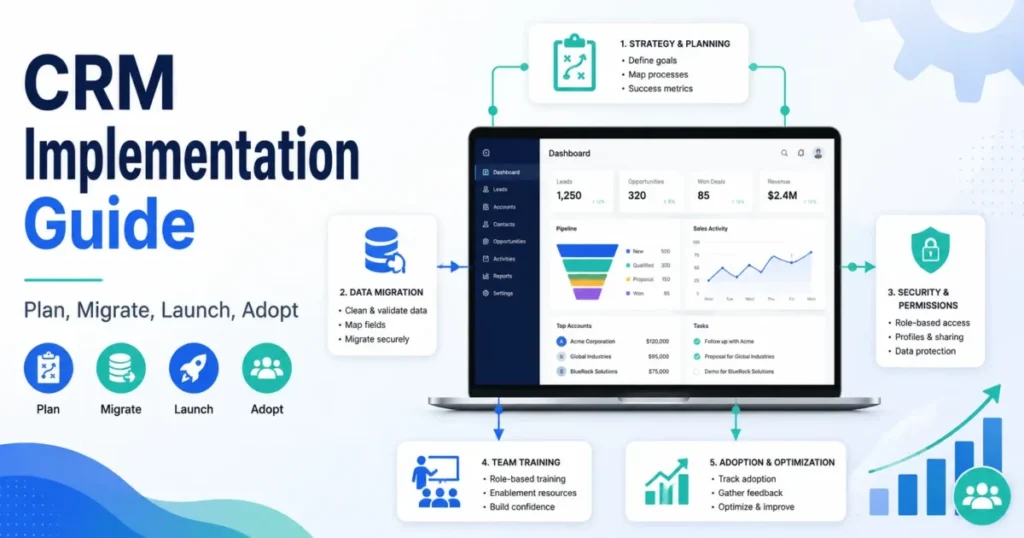
A CRM implementation rarely fails because the software is weak. It fails because a team moves its old habits, messy data, and undefined ownership into a new system and calls that a project.
CRM implementation is the work of configuring, migrating data into, integrating, launching, and adopting a customer relationship management system so a team runs sales, service, and reporting inside it. Most implementation articles hand you a numbered checklist and stop at “go live,” so you end up with a configured tool and a team that still runs the business in spreadsheets.
I write for the person who has to defend this decision to finance and then live with it. Whether you picked your platform from a shortlist of the best CRM software or inherited one, this guide treats implementation as an operating-model change: process design, data governance, permissions, migration, integrations, training, and adoption.
Everything here is built from official CRM documentation, vendor implementation guidance, and current review and community patterns. No hands-on CRM setup was performed for this article, so you will see “official documentation shows” and “vendor guidance recommends,” never “we tested.”
Quick answer: What is CRM implementation? CRM implementation is the process of configuring, migrating data into, integrating, launching, and embedding a customer relationship management system so a team runs daily sales, service, and reporting inside it. It is broader than software installation because the CRM has to match how people actually own leads, move deals, and trust reports. It is different from CRM strategy, which decides why the CRM exists, and from CRM migration, which is only the data-moving step inside implementation.
In This Article (18 sections)
The 60-Second Explanation of CRM Implementation
CRM implementation turns a chosen platform into a working revenue system, taking what CRM software does from a feature list to a daily habit. It covers discovery, process design, configuration, data migration, integrations, testing, training, launch, and post-launch optimization.
Here is the same idea at three depths, because a founder, an admin, and a CFO each need a different layer.
Layer 1, plain version. You are moving how your team tracks customers out of inboxes and spreadsheets and into one shared system. The work is not installing software but agreeing on how customer information will be owned and used.
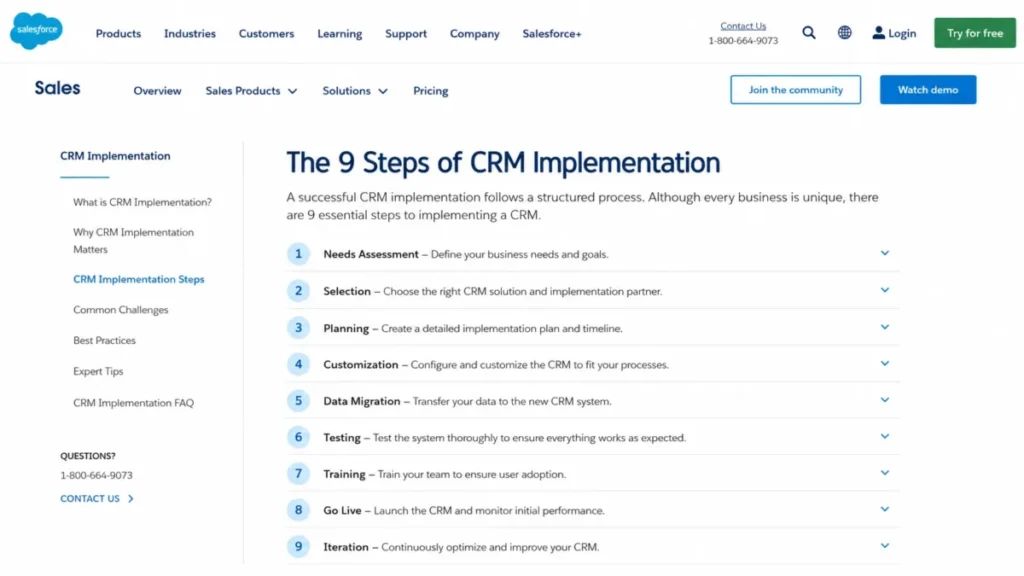
Layer 2, technical version. Implementation configures objects, fields, pipelines, permissions, automations, and integrations, then migrates records with mapped fields and unique identifiers. Salesforce’s own guidance frames this as a sequence of needs assessment, selection, planning, customization, migration, testing, training, go live, and iteration.
Layer 3, business version. The CRM becomes the system leadership uses to forecast, allocate headcount, and defend renewal spend. That only works if the data is trusted, the process is enforced, and the team actually logs its work, which is why adoption is the real deliverable.
Vendor guidance from Salesforce, HubSpot, and Pipedrive agrees on the broad shape of the work. Capterra narrows the term to data migration, which is one major sub-process, not the whole job.
How CRM Implementation Actually Works
The lifecycle runs in ten moves, and most of the risk sits in the human half, not the technical half. Official vendor guides describe the sequence, and the failure points below are where review and community patterns say projects stall.
- Define business outcomes, current pain points, and the metrics the CRM must improve.
- Map your real process: pipeline stages, lead ownership, service handoffs, and reporting needs.
- Confirm the platform against workflow fit, integrations, admin capacity, and scale.
- Build the implementation team and assign decision rights, not just job titles.
- Design the data model: objects, fields, required properties, unique identifiers, and owner fields.
- Clean, deduplicate, map, and test-migrate data before the real cutover.
- Configure pipelines, automations, dashboards, permissions, integrations, and reports.
- Test everything with a pilot group before the whole company touches it.
- Train by role and launch with live support coverage.
- Measure adoption and fix data and workflow issues across the first 90 days.
The failure points are predictable. Teams start configuring at step 7 before they finish steps 1 and 2, they migrate everything at step 6 instead of deciding what to leave behind, and they treat step 9 as a single training session instead of an adoption program.
CRM Implementation vs Strategy vs Customization
These three words get blended in most guides, and the blend is why teams configure software before anyone has agreed on why. Salesforce’s strategy page draws the line clearly: strategy is the business plan, implementation is the technical rollout.
| Term | What it decides | One example deliverable |
|---|---|---|
| CRM strategy | Why the CRM exists and how success is measured | A one-page goal doc with target metrics and owner |
| CRM implementation | How the system is configured, migrated, launched, and adopted | A live CRM with clean data, trained users, and working reports |
| CRM customization | How objects, fields, automations, and layouts match your process | A pipeline with stage exit rules and required fields |
If you cannot name your strategy in a sentence, do not start implementation. Customization without strategy produces a tidy system that measures the wrong things, and no amount of configuration fixes that later.
Step-by-Step Implementation
The rest of this guide is the practitioner sequence, with the assets competitors skip. Treat each step as a gate: you do not move forward until the previous one has an owner and a “done” definition.
Write the implementation blueprint first
The plan is a document, not a kickoff call. Practitioner guidance from MO Agency describes the discovery deliverable as a map of every process, integration, migration requirement, and configuration decision before anyone touches the platform.
Your blueprint should name, at minimum: objectives, the KPI baseline, users and roles, objects and fields, pipeline stages, automations, integrations, migration scope, permissions, reports, the training plan, and the rollout shape. A thin plan is the single most reliable predictor of rework, because every undefined field becomes an argument during configuration. Treat the integrations line as ongoing work, not part of the one-time migration: CRM integration planning decides sync direction and which system owns each field before anything is connected.
I would timebox the blueprint rather than perfect it. Two weeks of decisions beats two months of drift, and the document becomes the contract everyone points to when scope creep starts.
Build the team as a RACI, not a headcount
“Assign a project team” is where most guides stop. The useful version says who decides, who configures, who validates, who trains, and who owns the system after launch.
| Role | Responsibility |
|---|---|
| Executive sponsor | Approves scope and budget; unblocks decisions; models usage |
| RevOps or CRM admin | Owns configuration, fields, and post-launch changes |
| Sales leader | Signs off on pipeline, stages, and lead ownership rules |
| Marketing leader | Owns lead sources, forms, and handoff definitions |
| Service leader | Owns support handoffs and shared customer records |
| IT | Owns integrations, security review, and access provisioning |
| Finance | Validates reporting and renewal-cost visibility |
| End-user champions | Test workflows and carry adoption inside each team |
| Implementation partner | Fills capability or capacity gaps, if engaged |
Without a named admin, the CRM has no owner after go live, and that is the account most likely to rot within a quarter. If you cannot staff a part-time admin, that is a signal to narrow scope, not to skip the role.
Run two workstreams in parallel, not one line
The single biggest structural gap in generic guides is treating implementation as one linear process. MO Agency’s guidance splits it into a technical stream and a human-adoption stream that run alongside each other.
| Phase | Technical stream | Adoption stream |
|---|---|---|
| Discovery | Data audit, integration inventory | Process mapping, ownership rules |
| Build | Fields, pipelines, automations, migration prep | Training plan, change comms, champions |
| Test | Pilot import, permission checks, integration tests | Pilot user feedback, workflow fixes |
| Launch | Cutover, go-live monitoring | Role-based training, live support |
| Stabilize | Data fixes, report tuning | Usage audits, reinforcement, governance |
The system can pass every technical check and still fail because habits did not change. Resource the adoption column as seriously as the configuration column, or the launch quietly reverts to spreadsheets.
Design lead ownership before you configure anything
Undefined ownership breaks routing, forecasting, and trust faster than any missing feature, which is why it matters more than picking from the best CRM for sales teams. HubSpot’s implementation guidance calls out clear rules for who owns leads and accounts to prevent conflict between reps and departments.
| Lead source | Primary owner | Backup owner | SLA to first touch | Escalation rule |
|---|---|---|---|---|
| Inbound form | Round-robin AE for segment | Team lead | 1 business hour | Manager reassign after breach |
| Demo request | Assigned AE by territory | Pooled AE | 30 minutes | Sales ops reroute |
| Partner referral | Named partner-channel rep | AE by region | 1 business day | Channel manager review |
| Renewal opportunity | Account owner | CS manager | Same day | CS lead reassign |
Agree these rules before import, because the owner field is one of the first columns you will map. If two reps both think a lead is theirs on day one, adoption starts with a fight instead of a habit.
Give every deal stage an exit rule, not a label
Stages named “Qualified” and “Proposal” mean nothing until you define what has to be true to move. HubSpot’s guidance is that effective deal stages are clearly defined and tied to a trackable action.
| Stage | Required evidence to enter | Exit action | Required fields |
|---|---|---|---|
| Discovery | Confirmed pain and budget owner | Book scoping call | Contact role, use case |
| Qualified | Budget, authority, need, timeline confirmed | Send tailored proposal | Deal value, close date |
| Proposal | Proposal delivered to decision maker | Verbal or written intent | Competitor, decision date |
| Closed won | Signed agreement | Trigger onboarding handoff | Owner, contract value |
Stage discipline is what makes a forecast trustworthy, so treat these rules as reporting infrastructure, not sales admin. When stages are ambiguous, every pipeline report becomes a negotiation instead of a number.
CRM Data Migration: Treat It as an Adoption Control
Migration is not a back-office cleanup task but the moment user trust is won or lost. If reps open the new CRM and see duplicate accounts, dead contacts, or wrong owners, they stop trusting it and quietly return to their own lists.
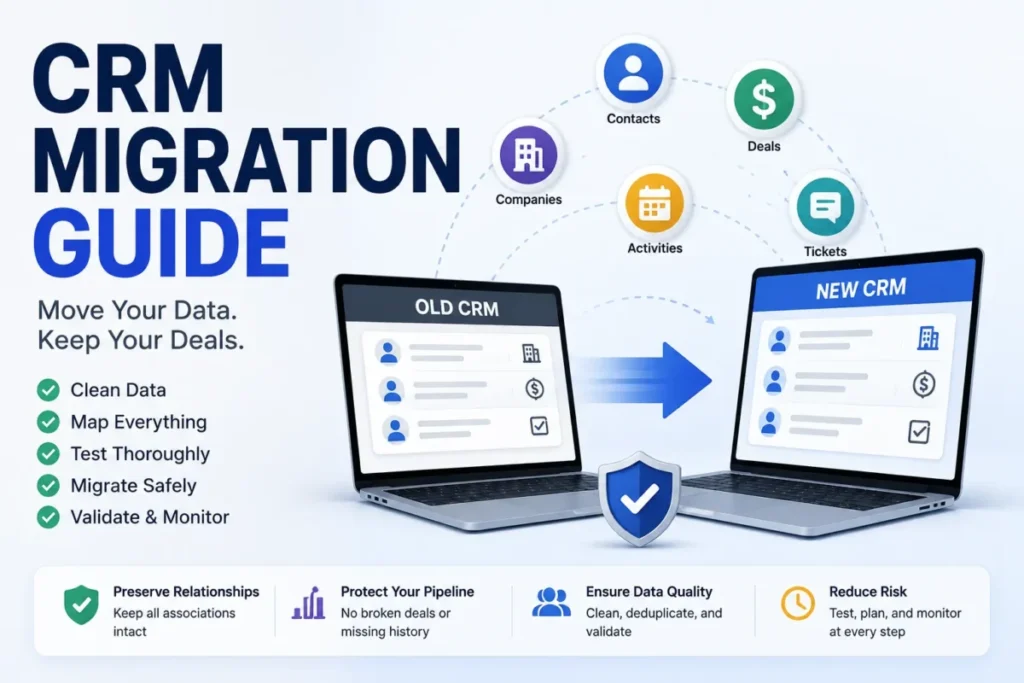
That is the real reason “clean your data” matters, and generic guides never connect the two. Community patterns are blunt about it: stale or wrong data destroys trust, and untrusted data drives people back to spreadsheets. The checklist below covers the trust side of preparation; for the full move, including test imports, freeze windows, rollback and post-go-live reconciliation, follow our CRM data migration guide.
The data-trust checklist
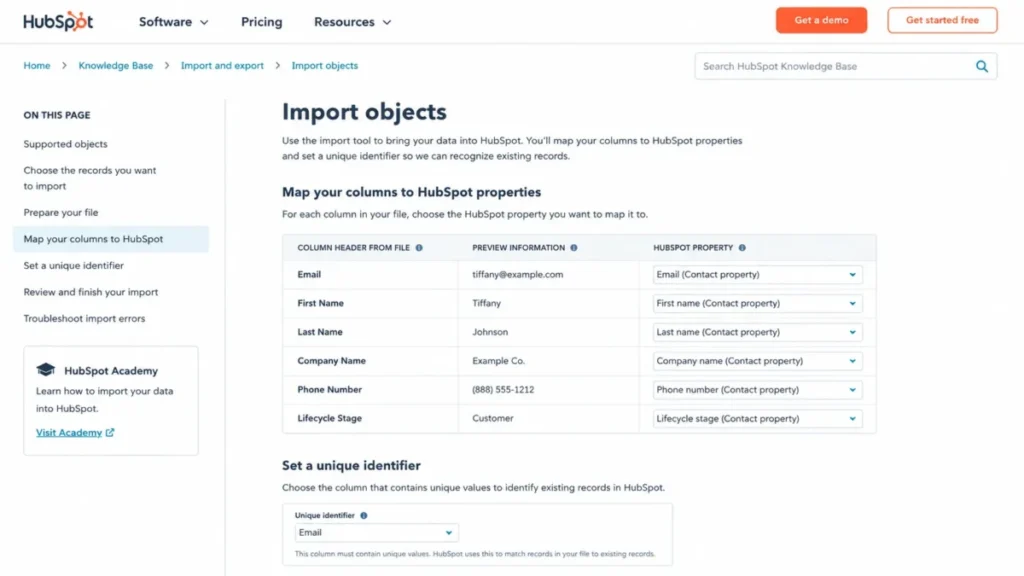
Before you import, confirm each record type against the columns that reporting and routing depend on. Official import documentation from HubSpot and Pipedrive both require field mapping and clean identifiers, so this is not optional hygiene.
- Duplicates removed against a defined match rule (email, domain, or record ID).
- Required fields populated for anything a report or automation depends on.
- Unique identifiers set so contacts, companies, and deals associate correctly.
- Owner field assigned so no record lands unowned on day one.
- Stale records flagged for archive rather than migrated by default.
- Date and currency formats standardized to the destination’s expected format.
Decide what not to migrate
Moving every legacy record recreates the old mess with a new logo. Copper’s migration guidance frames migration as deciding what the business should remember and what to leave behind, and Bitrix24 warns that dumping in too much data causes problems.
Archive or review rather than migrate by default: confirmed duplicates, invalid or bounced contacts, abandoned custom fields, closed-lost deals beyond any retention need, unowned accounts, obsolete workflow flags, and records with no reporting value. Legal retention and compliance rules can override this list, so check those before deleting anything.
Set custom fields and identifiers before import
The blockers show up at upload, not after. The HubSpot CRM review covers a platform whose import docs detail unique identifiers, required properties, and a prevent-overwrite option, while Pipedrive’s docs say to create custom fields before importing when the default fields do not fit.
Confirm before the first upload: required properties, unique identifiers, custom fields and their types, date formats, association labels between objects, owner fields, and any columns you intend to skip. Missing identifiers are what create duplicates and broken associations, and those are expensive to unwind after go live.
Data Migration and Import Limits
Generic guides assume every migration is a simple CSV upload. Official import tools have file, row, and method limits that decide whether you can self-serve or need an API or partner, so check them before you scope the timeline.
| Tool | Example import constraint (checked July 7, 2026) |
|---|---|
| Salesforce Data Import Wizard | Supports accounts and contacts, leads, solutions, and custom objects; requires field mapping before import |
| HubSpot import | Multi-object import with unique identifiers, required properties, association labels, and a prevent-overwrite option |
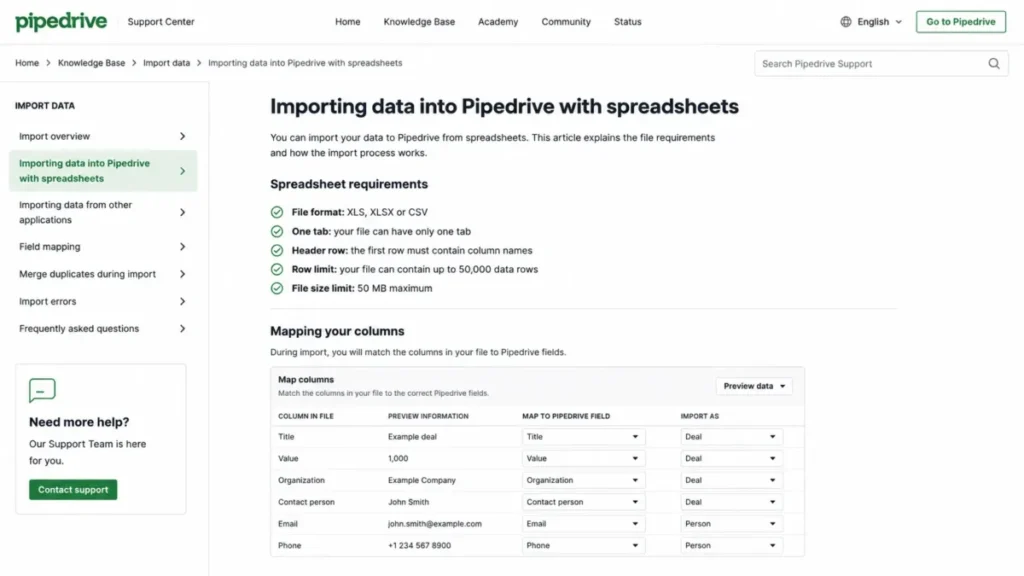
| Pipedrive spreadsheet import | XLS, XLSX, or CSV; one tab per import; header row required; up to 50,000 rows; file under 50 MB; map fields, create custom fields first if needed |
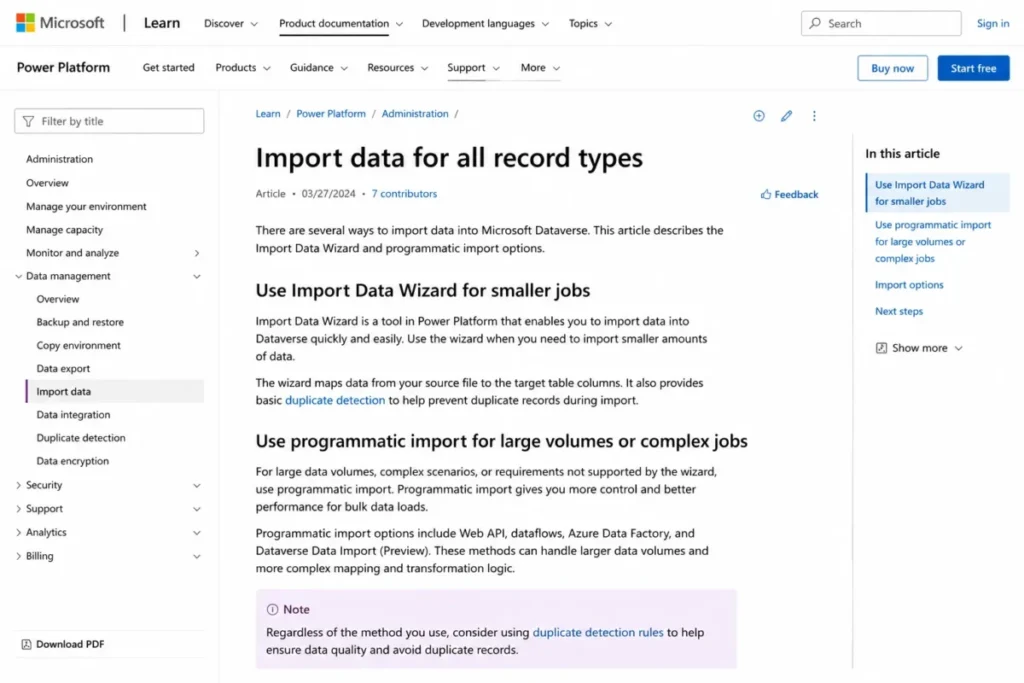
| Microsoft Power Platform (Dynamics 365) | Import Data Wizard for smaller jobs; programmatic import recommended for large volumes; duplicate detection available |
These are examples from official documentation, not universal CRM rules, and vendor docs can change after the checked date. The practical point stands: a 60,000-row contact file will not fit Pipedrive’s spreadsheet import in one pass, so you plan around the limit instead of discovering it at upload.
Choose the right migration method
Match the method to the data volume and complexity, not to whatever is easiest to click. Microsoft’s documentation says programmatic import is the efficient path for large volumes and offers capabilities the wizard does not.
| Method | Best fit | Main risk |
|---|---|---|
| Manual entry | Under a few hundred records, one team | Slow, error-prone at scale |
| Native import wizard | Clean CSV, standard objects, moderate volume | Row and mapping limits |
| Vendor migration tool | Same-vendor or supported source system | Coverage gaps on custom fields |
| Partner-led migration | Complex, multi-object, regulated data | Cost and coordination overhead |
| API or programmatic | Large volumes, custom relationships, repeatable loads | Requires developer capacity |
Security, Permissions, and Admin Controls
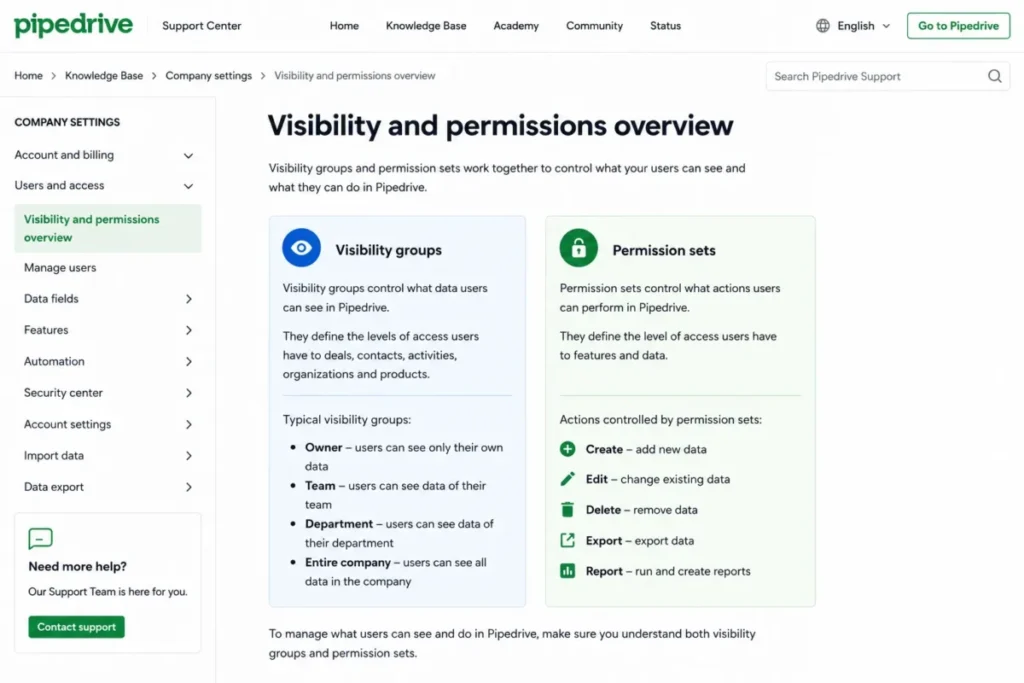
Permissions are two questions, not one, and most guides treat them as one. As the Pipedrive CRM review notes, its documentation separates visibility groups, which control what a user can see, from permission sets, which control what a user can do.
Plan both before go live. A rep who can export the entire database is a privacy risk, while a manager who cannot see their own team’s pipeline is an adoption problem, and both come from skipping this step.
Confirm these before launch: view, edit, delete, export, import, report access, dashboard access, admin settings, ownership transfer, and any sensitive fields. The Zoho CRM review covers a platform whose role-management docs handle role hierarchy and data sharing, which is how you decide who sees whose records as the org grows.
On data ownership, HubSpot’s security page states customer data in its products is protected under its security program, is not shared across customers, and is not sold. That is the kind of vendor commitment worth confirming in writing for any regulated buyer before contracts are signed.
How Long CRM Implementation Takes
Timelines track complexity, not company-size labels. Practitioner guidance from MO Agency gives ranges by small, mid-market, and enterprise complexity, and notes internal decision-making often stretches the calendar more than the technical build does.
| Complexity driver | Faster end | Slower end |
|---|---|---|
| User count | One team, few seats | Many departments, hundreds of seats |
| Migration volume | Clean CSV, one source | Multiple legacy systems |
| Integrations | One or two | ERP, billing, marketing, support |
| Customization | Standard fields | Heavy custom objects and automation |
| Permissions | Simple roles | Regional and field-level controls |
| Decision readiness | Process already agreed | Ownership and stages still contested |
Treat published ranges as practitioner examples, not promises: a small clean setup can land in a few weeks, while a multi-department enterprise rollout runs into months. The variable that surprises most teams is not the software but how long it takes to agree on ownership and stage rules, so lock those decisions early to protect the schedule.
CRM Rollout Plan: Phased or Big-Bang
Rollout shape decides how much breaks on day one. Gain.io’s 2026 checklist frames phased rollouts as lower-risk but longer, and big-bang as acceptable mainly for fewer than 100 users with simple migration.
Use this rule of thumb. Choose a pilot or phased rollout if you have multiple departments, messy data, live integrations, custom permissions, or regional complexity, and choose big-bang only when data is simple, workflows are few, and training coverage is strong.
A pilot group is cheap insurance. Run the full workflow with five to ten real users first, fix what breaks, then expand, because the alternative is debugging permissions and automations in front of the entire company.
Train by Role Before You Launch
“Train the team” is the vaguest instruction in most guides, and it produces low-confidence users who quietly opt out. Gain.io’s checklist recommends training tailored to sales reps, managers, marketers, service agents, and executives, because each role touches different records, workflows, and reports.
| Role | Must-know daily task | Reports they rely on | Readiness check |
|---|---|---|---|
| Sales rep | Log activity, advance deal stages | Personal pipeline | Can move a deal with correct fields |
| Sales manager | Reassign leads, review forecast | Team pipeline, forecast | Can spot a stuck deal and reroute it |
| Marketer | Track lead source and handoff | Lead source, conversion | Can confirm a form routes correctly |
| Service agent | Open shared customer record | Ticket and account history | Can find a customer’s full context |
| Executive | Read the forecast and adoption view | Board-level dashboard | Trusts the numbers without a side sheet |
Generic training fails because the rep and the executive were shown the same buttons. Build the session around what each role does on a Monday morning, and confirm competence with the readiness check before that group goes live, not after.
Go Live and Cutover
Do not cancel the old CRM the moment the new one is live. Capterra’s guidance is explicit: keep the old tool until the new platform is fully implemented.
Keep the legacy system accessible through validation, a parallel reporting check, user acceptance testing, and a final export backup. There is no universal safe period, so tie cutover to validation milestones, not to a calendar date, and take a full export before you switch anything off.
The Mistakes That Waste Your First Month
The wasted implementations I read about share the same early errors, and none of them are technical. They are decisions skipped before configuration.
The first is configuring before mapping the process, which bakes an undefined workflow into fields and automations. The second is migrating everything, which imports the old data problems you were trying to escape.
The third is treating training as one session instead of a role-based program with reinforcement. The fourth is launching without a named admin, so the system has no owner the week after go live when the first fixes are needed.
I would rather delay a launch by two weeks than ship any of these. Each one costs more to fix live than it does to prevent, because you are now fixing habits and data at the same time.
Common Misconceptions
A few beliefs quietly sink projects, so it helps to correct them directly.
Misconception: CRM implementation means installing the software. Reality: installation is one step, and process design, migration, permissions, integrations, training, and adoption are the harder majority of the work.
Misconception: a new CRM will fix bad reporting on its own. Reality: reporting only improves when fields, ownership, required data, and process definitions are cleaned and governed first.
Misconception: all historical data should be migrated. Reality: old, duplicated, or irrelevant records recreate the same mess unless archived or cleaned before import.
Misconception: adoption is solved by one training session. Reality: adoption needs role-specific training, trusted data, leadership reinforcement, and post-launch support across the first 90 days.
Misconception: a CSV import is always enough. Reality: import tools have file, row, and method limits, so larger or complex migrations may need APIs, programmatic import, or partner help.
When to Use and When to Avoid Implementing Now
A readiness check is worth more than another feature comparison. Score your team on the ten signals below before you commit a budget.
| Readiness signal | Ready | Not ready |
|---|---|---|
| Executive sponsor | Named and engaged | None assigned |
| Process defined | Pipeline and stages agreed | Still informal |
| Data owner | Someone owns data quality | No owner |
| Lead ownership rules | Written and agreed | Undefined |
| Users | Team has capacity to learn | No time allotted |
| Integrations | Priorities known | Unmapped |
| Permissions | See and do planned | Not considered |
| Training | Role-based plan exists | “We’ll figure it out” |
| Reporting | Definitions agreed | Vague |
| Admin capacity | Part-time admin available | None |
If you scored mostly in the right column, the software is not your problem yet. Delay implementation if you have no executive sponsor, no agreed pipeline, no data owner, no lead ownership rules, no cleanup budget, no admin capacity, or no time carved out for training.
Community patterns make the same point from the other side: switching tools does not simplify anything if the decision logic, ownership, and workflows stay broken. Fix the process, then implement, or you pay for the migration twice.
Do you need a consultant?
Vendor pages push partners, but the honest answer depends on complexity, not company size. Gain.io suggests smaller teams shopping the best CRM for small business can manage internally when requirements are contained, and Capterra notes centralized-data migrations are simpler than fragmented ones.
Self-implement when you have one team, clean data, few integrations, and standard fields. Bring in help when you have multiple departments, a legacy CRM, complex permissions, API-level migration, regulated data, or executive reporting requirements that must be right on day one. Either way, budget for CRM implementation before you commit: partner days or internal project hours, data migration and training are one-time costs on top of the subscription.
How to Measure Success: The First 90 Days
Launch is the start of the hardest phase, not the finish line. MO Agency’s guidance treats the first 90 days as the window where adoption is won or lost, so measure it deliberately.
| Checkpoint | What to check | Healthy signal |
|---|---|---|
| Week 1 | Login rate, support tickets, blocking bugs | Most users logged in; issues triaged |
| Day 30 | Activity logging, required-field completion | Reps logging work; fields populated |
| Day 60 | Pipeline hygiene, stale records, workflow fixes | Stages accurate; automations tuned |
| Day 90 | Report usage, forecast trust, governance review | Leadership runs decisions from CRM data |
Pick a small number of adoption metrics and watch them weekly. A practical bar is most of the sales team logging activity and leadership reporting from the CRM instead of a side spreadsheet by day 90.
The renewal question sits underneath all of this. Before the next renewal, you should be able to say whether the CRM improved forecast accuracy and adoption, because if you cannot, you are paying for a database, not a revenue system.
What Good CRM Implementation Looks Like
The before-and-after is usually about trust, not features. Before, the pipeline lives in three spreadsheets, two reps claim the same accounts, and the forecast is a guess leadership quietly discounts.
After a working implementation, one system holds ownership rules, stage exit criteria, and required fields, so a pipeline report is a number people act on. Role-based training and clean data mean reps log work because the system is faster than their old habit, not because they were told to.
Here is a realistic example set drawn from how these products document their own setup. A five-person outbound team implements a single-pipeline CRM, imports a clean contact CSV, connects email and calendar, and trains reps on stage exit rules in a week.
A 30-person SaaS company maps lifecycle stages, imports contacts and companies with unique identifiers, connects marketing forms, and builds sales and service dashboards. A mid-market team migrating off spreadsheets and a legacy CRM uses a test import, field mapping, and role permissions to avoid duplicate accounts and broken ownership, and a Microsoft-heavy org chooses programmatic import over the wizard for larger volumes.
Tools That Make CRM Implementation Easier
This guide is deliberately tool-neutral, because the implementation discipline matters more than the logo. The platforms below are common examples, and each documents its own import, permission, and setup behavior.
Salesforce Sales Cloud is the enterprise-scale example, and the Salesforce CRM review covers a platform that usually requires structured migration, permissions, and training. HubSpot Smart CRM pairs official import tooling with lifecycle data and go-to-market workflows, while Pipedrive is the sales-pipeline example with clear spreadsheet-import limits and visibility-versus-permission controls.
Zoho CRM is useful for explaining role hierarchy and data sharing across team sizes, and the Microsoft Dynamics 365 Sales review covers a platform that fits Microsoft-centric orgs where programmatic import and duplicate detection matter. If you are still choosing, match the platform to your process and admin capacity first, then compare features.
Beginner implementation checklist
Copy this into your project doc and treat each line as a gate.
- Write a one-sentence CRM strategy with a target metric and owner.
- Map your pipeline stages and their exit rules.
- Define lead ownership and handoff rules before import.
- Assign a RACI, including a named admin.
- Draft the blueprint: objects, fields, integrations, migration scope, permissions, reports.
- Clean and deduplicate data, then decide what not to migrate.
- Set unique identifiers, required fields, and owner fields.
- Test-import with a pilot before the full cutover.
- Plan permissions for both “see” and “do.”
- Train by role and launch with live support.
- Run the 30/60/90-day adoption checks.
- Keep the old CRM until validation and backup are complete.
Frequently Asked Questions
What is CRM implementation?
CRM implementation is the process of configuring, migrating data into, integrating, launching, and embedding a CRM so teams run sales, service, and reporting inside it. It includes process design, permissions, training, and adoption, so it is broader than installing software.
How long does CRM implementation take?
It depends on complexity, not company-size labels. Practitioner sources give ranges from a few weeks for a small clean setup to several months for enterprise rollouts, and internal decision-making often extends the timeline more than the technical work does.
What is the difference between CRM implementation and CRM migration?
Migration is the data-moving step inside implementation. Implementation also covers process design, configuration, integrations, permissions, testing, training, and post-launch adoption, so migration is one major sub-process rather than the whole project.
Who should own CRM implementation?
An executive sponsor owns the outcome and budget, and a RevOps or CRM admin owns the configuration and post-launch changes. Sales, marketing, service, IT, and finance leaders each own their part, ideally mapped in a RACI so decisions do not stall.
What data should be cleaned before CRM migration?
Remove duplicates, invalid contacts, and records with no reporting value, and standardize formats and identifiers. Assign owner fields and required properties so nothing lands unowned, and check legal retention rules before deleting anything.
How do you improve CRM adoption after go live?
Trust the data, train by role, and reinforce usage through leadership and the first-90-day checks. Adoption follows when the system is faster and more reliable than the spreadsheet it replaced, not when usage is merely mandated.
When should a business hire a CRM implementation consultant?
Hire help for multiple departments, a legacy CRM, complex permissions, API-level migration, regulated data, or executive reporting that must be right on day one. Smaller teams with clean data, few integrations, and standard fields can usually self-implement.
What should be tested before CRM go live?
Test permissions, workflows, imports, reporting, automations, and integrations with a pilot group. Confirm that stage rules, required fields, and owner assignments behave correctly before the whole company logs in.
What are the most common CRM implementation mistakes?
Configuring before mapping the process, migrating everything, training once, and launching without a named admin. Each one is a decision skipped before configuration, and each costs more to fix after launch.
Can you implement a CRM without a consultant?
Yes, for a single team with clean data, few integrations, and standard fields. Use the vendor’s native import, plan permissions and training, and keep the scope narrow enough for a part-time admin to own.