SaaS (Software as a Service) is a software delivery model where applications are hosted in the cloud by a vendor, sold on a subscription basis, and accessed through a web browser—no local installation required. The vendor manages the infrastructure, security, updates, and backups. You pay a recurring fee and use the software over the internet. Products like Salesforce, Microsoft 365, and Slack are some of the most widely recognized SaaS applications in business today.
This guide covers what SaaS means, how it works, how it compares to on-premise, IaaS, and PaaS, the real benefits and risks, pricing models, how to evaluate vendors, and what current trends mean for buyers.
Key Takeaways
- SaaS is subscription-based, cloud-hosted software managed entirely by the vendor. You access it through a browser and never touch the infrastructure.
- It’s faster to deploy, lower in upfront cost, and easier to scale than on-premise software—but it introduces real tradeoffs around vendor lock-in, data portability, customization limits, and internet dependency.
- Before buying, evaluate every SaaS vendor on security, compliance, integration, data export, SLAs, and total cost of ownership (TCO).
- Plan your exit strategy before you sign a contract—not after.
- The SaaS market is evolving fast: AI-native tools, vertical SaaS, and usage-based pricing are reshaping how software is built and sold.
In This Article (15 sections)
What Is SaaS?
SaaS stands for Software as a Service. It is a software distribution model in which a third-party provider hosts applications on cloud infrastructure and delivers them to customers over the internet on a subscription basis.
In a SaaS arrangement, the vendor owns and operates everything beneath the application layer: the physical servers, the operating systems, the middleware, the runtime environment, the database, and the application code. The customer simply uses the software from a web browser or lightweight client app.
Before SaaS became mainstream, businesses bought perpetual licenses for installed software, deployed it on their own servers, and maintained it with in-house IT teams. SaaS eliminates that burden. The vendor handles uptime, patching, scaling, backups, and disaster recovery.
Why SaaS matters today: According to Gartner, SaaS is the largest segment of public cloud spending globally, and it continues to grow year over year. The vast majority of new business applications—CRM, ERP, HR management, collaboration, customer support, marketing automation—are now delivered as SaaS.
How Does SaaS Work?
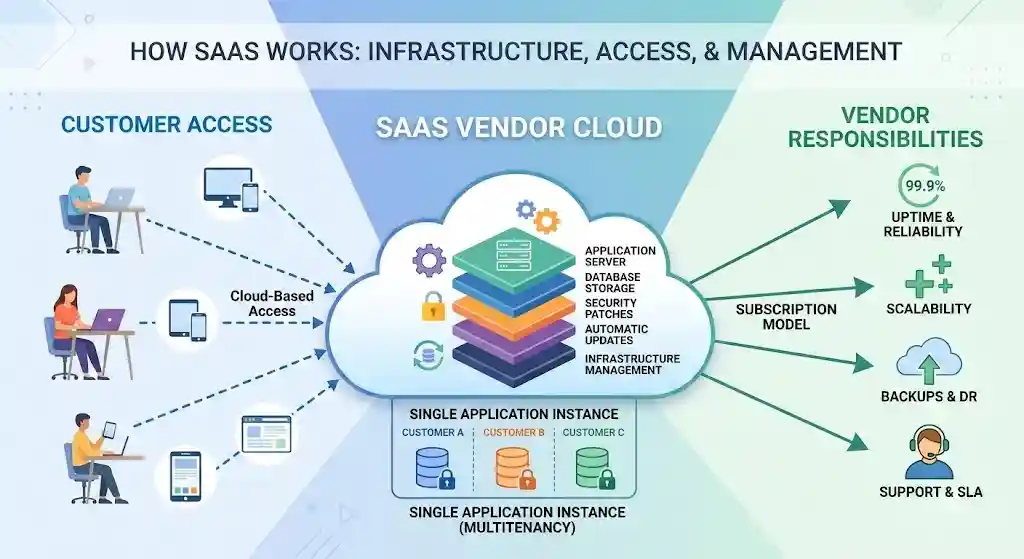
At a high level: a vendor builds and maintains an application, hosts it in the cloud (typically on infrastructure like AWS, Microsoft Azure, or Google Cloud), and gives customers access through a web browser or dedicated app.
Access Model
Users log in from any device with an internet connection. There is nothing to install locally beyond a browser. Some SaaS products also offer mobile apps or desktop clients that sync with the cloud-hosted service—Slack, Zoom, and Dropbox are common examples.
Vendor-Hosted Infrastructure
The SaaS provider manages the full technology stack: physical servers and cloud infrastructure, operating system and runtime, database and storage, application code and business logic, and all security patches, updates, and backups.
Multitenancy
Most SaaS platforms use a multitenant architecture: multiple customers share the same underlying infrastructure and application instance, but each customer’s data is logically isolated. This is what allows SaaS vendors to offer lower prices and push updates simultaneously.
Some enterprise SaaS products offer single-tenant deployments where a customer gets a dedicated instance. This provides stronger data isolation and compliance advantages but typically costs more and receives slower updates.
Automatic Updates and Maintenance
Updates are continuous and vendor-managed. When the provider patches a vulnerability or ships a new feature, every customer receives it without any action on their part.
SLAs and Uptime
Reputable SaaS vendors publish a Service Level Agreement (SLA) specifying guaranteed uptime (commonly 99.9% or higher), support response times, and remedies for breaches. Before signing, read the SLA carefully—not all “99.9% uptime” commitments define downtime or calculate penalties the same way. See Salesforce Trust Status for an example of how a major SaaS vendor reports real-time availability.
Customer vs. Vendor Responsibilities
| Area | Vendor Manages | Customer Manages |
|---|---|---|
| Infrastructure & hosting | ✅ | — |
| Application code & updates | ✅ | — |
| Security patches | ✅ | — |
| Backups & disaster recovery | ✅ | — |
| Data entry & data quality | — | ✅ |
| User access & identity (SSO, MFA) | Shared | ✅ |
| Compliance & data governance | Shared | ✅ |
| Integration with other systems | — | ✅ |
| User training & adoption | — | ✅ |
This shared-responsibility model is a concept formalized by major cloud providers. For a detailed breakdown, see the NIST definition of cloud computing (SP 800-145), which defines the IaaS/PaaS/SaaS boundaries.
SaaS vs. Traditional On-Premises Software
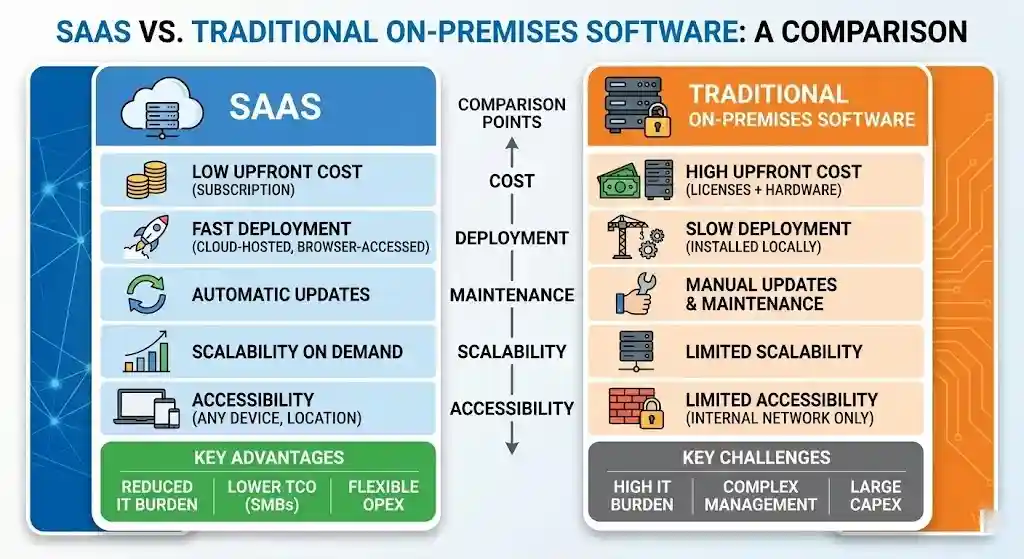
The core difference is ownership. With on-premises software, the customer owns and manages everything—hardware, licenses, maintenance, and security. With SaaS, the vendor owns and manages the stack and the customer subscribes.
Comparison Table: SaaS vs. On-Premises Software
| Factor | SaaS | On-Premises |
|---|---|---|
| Deployment | Cloud-hosted, browser-accessed | Installed on local servers |
| Upfront cost | Low (subscription) | High (licenses + hardware) |
| Ongoing cost | Recurring subscription fee | Maintenance, IT staff, upgrades |
| Time to deploy | Hours to days | Weeks to months |
| Maintenance | Vendor-managed | Customer-managed |
| Updates | Automatic, continuous | Manual, often disruptive |
| Scalability | Elastic; add/ | Requires capacity planning |
| Accessibility | Any device, any location | Typically limited to internal network |
| Customization | Limited to vendor configuration/ | Deep customization possible |
| Security responsibility | Primarily vendor (infrastructure) | Primarily customer |
| Data control | Vendor hosts your data | You host your own data |
| Internet dependency | Required | Not required |
When On-Premises Still Wins
SaaS is not always the right answer. On-premises deployment may be better when:
- Regulatory requirements mandate data stays on your own infrastructure (certain government, defense, or healthcare scenarios).
- Extreme customization is needed and the SaaS vendor’s configuration options are insufficient.
- Latency requirements make cloud round-trips impractical (e.g., real-time industrial control systems).
- Total cost of ownership favors ownership at very large scale with a mature IT organization.
In our experience evaluating software for mid-market teams, the break-even point where on-premise TCO beats SaaS generally requires a large user base (often several hundred or more), a mature internal IT function, and a 5+ year time horizon. Below that threshold, SaaS almost always wins on both cost and operational burden.
SaaS vs. IaaS vs. PaaS
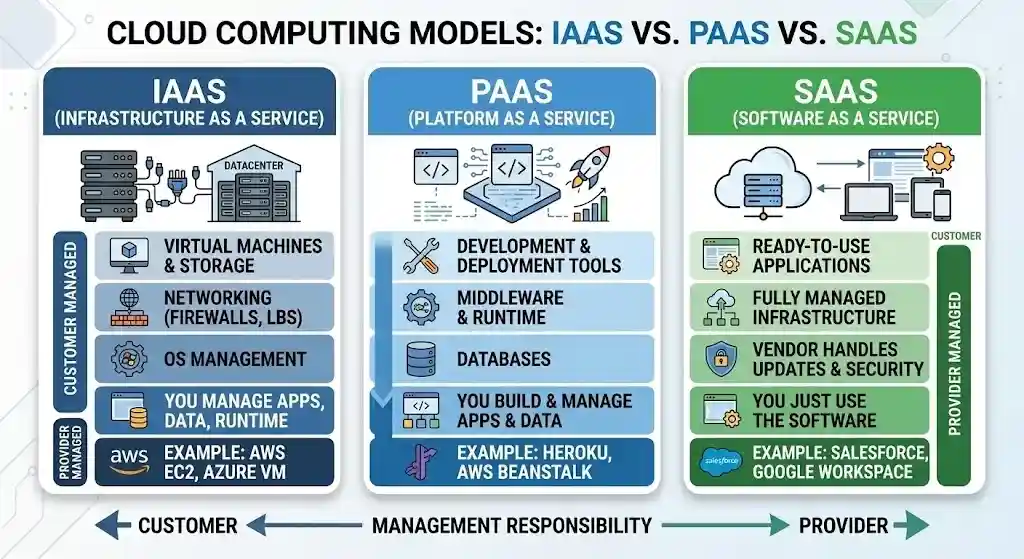
SaaS is one of three primary cloud computing service models, as defined by NIST SP 800-145. Understanding the differences matters because each model shifts the boundary between what the vendor manages and what you manage.
What Each Model Means
- IaaS (Infrastructure as a Service): Raw computing resources—virtual machines, storage, networking. You manage everything from the OS up. Examples: AWS EC2, Microsoft Azure Virtual Machines, Google Compute Engine.
- PaaS (Platform as a Service): Infrastructure plus a development platform—runtime, middleware, databases, dev tools. You build and deploy your own applications on top. Examples: Heroku, Google App Engine, AWS Elastic Beanstalk.
- SaaS (Software as a Service): A complete, ready-to-use application. You log in and use it. Examples: Salesforce, Google Workspace, HubSpot, Zendesk.
Comparison Table: SaaS vs. PaaS vs. IaaS
| Layer | IaaS | PaaS | SaaS |
|---|---|---|---|
| Applications | You manage | You manage | Vendor manages |
| Data | You manage | You manage | Shared |
| Runtime | You manage | Vendor manages | Vendor manages |
| Middleware | You manage | Vendor manages | Vendor manages |
| OS | You manage | Vendor manages | Vendor manages |
| Virtualization | Vendor manages | Vendor manages | Vendor manages |
| Servers / Storage | Vendor manages | Vendor manages | Vendor manages |
| Networking | Vendor manages | Vendor manages | Vendor manages |
Quick Selection Guide
- Choose IaaS if you need maximum infrastructure control and want to build custom environments.
- Choose PaaS if you’re building custom applications and want to skip infrastructure management.
- Choose SaaS if you need a ready-made application for a well-defined business function and don’t want to build or maintain anything.
Most businesses use all three. A company might use AWS (IaaS) for custom workloads, Heroku (PaaS) for internal tools, and Salesforce (SaaS) for CRM.
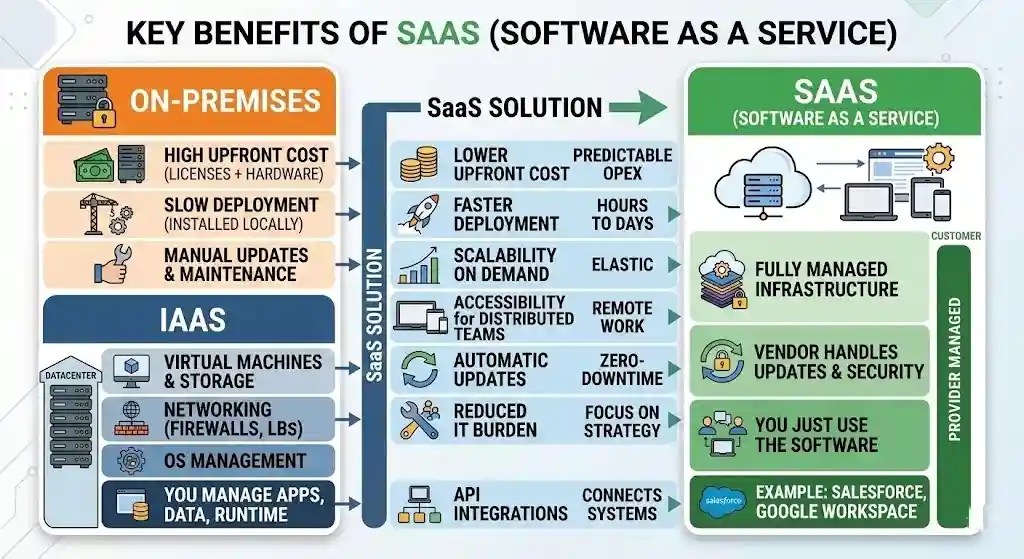
Key Benefits of SaaS
Lower Upfront Cost
No capital expenditure on servers or perpetual licenses. SaaS replaces a large upfront investment with predictable recurring operating expenses—particularly advantageous for startups and small businesses.
Faster Deployment
Most SaaS products can be provisioned in minutes or hours. No hardware to procure, no software to install, no environment to configure.
Scalability on Demand
Adding users, increasing storage, or upgrading to a higher tier takes a few clicks. You don’t need to forecast peak capacity or buy hardware in advance.
Accessibility for Distributed Teams
SaaS applications work from any location with an internet connection. Tools like Google Workspace, Zoom, Asana, and Trello are built specifically for this.
Automatic Updates and Patching
The vendor handles all updates, including security patches and new features. You never run an outdated version.
Reduced IT Burden
SaaS offloads infrastructure management, monitoring, backup, and disaster recovery to the vendor. Internal IT teams can focus on strategic work.
API Integrations
Modern SaaS platforms are built with APIs that connect with other applications—linking your CRM to your marketing automation platform, your help desk software to your billing system, and so on.
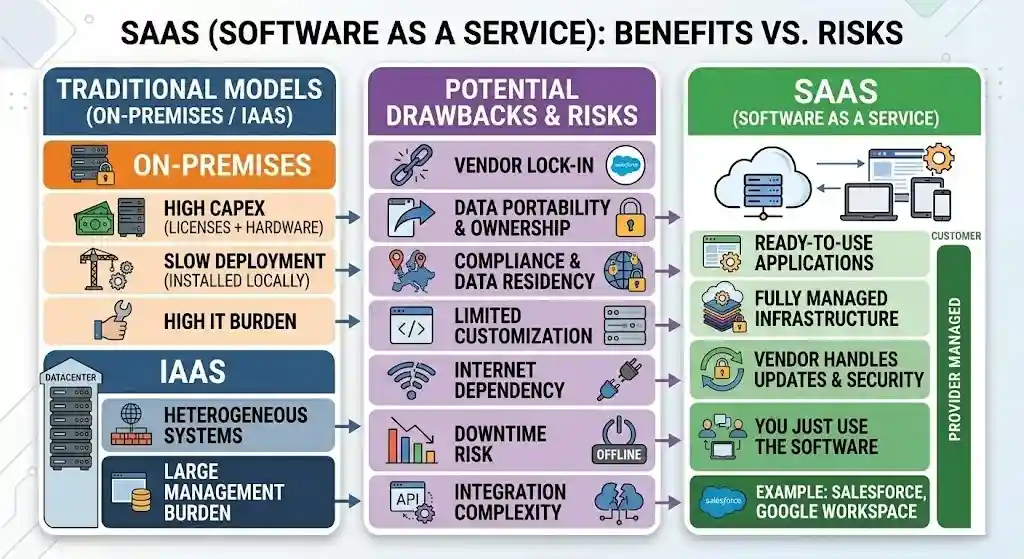
Potential Drawbacks and Risks of SaaS
SaaS is convenient, but it comes with real tradeoffs. Any honest evaluation must account for these.
Vendor Lock-In
Once your data, workflows, and team habits are built around a SaaS vendor, switching is expensive and disruptive. Many SaaS products make it easy to import data but hard to export it. Ask: What does it cost—in time, money, and disruption—to leave?
Data Portability and Ownership
Your data lives on the vendor’s infrastructure. Before signing, confirm: Can you export all data in standard, open formats? How frequently can you run exports? Who owns the data if the vendor is acquired or shuts down? What happens to your data if you cancel?
Compliance and Data Residency
If you operate in regulated industries, verify that the vendor meets relevant standards: SOC 2 Type II, HIPAA, GDPR, FedRAMP, or industry-specific requirements. Know where your data is stored geographically—data residency laws vary by jurisdiction.
Limited Customization
SaaS products serve many customers from a shared codebase. Customization is limited to whatever the vendor exposes through configuration, APIs, or marketplace extensions. If your process doesn’t fit the vendor’s model, you may end up adapting your workflow to the software.
Internet Dependency
SaaS requires a stable internet connection. If your internet goes down, your software goes with it. Most modern SaaS tools offer limited offline capabilities, but they are usually minimal.
Downtime Risk
No SaaS vendor guarantees 100% uptime. When a major platform goes down—as has happened with Salesforce, Microsoft 365, Slack, and Zoom—you have no ability to fix it yourself. You wait.
Integration Complexity
While APIs make SaaS-to-SaaS integrations possible, building and maintaining integrations across many tools creates real complexity. Data consistency, authentication, rate limits, and breaking API changes all require ongoing attention.
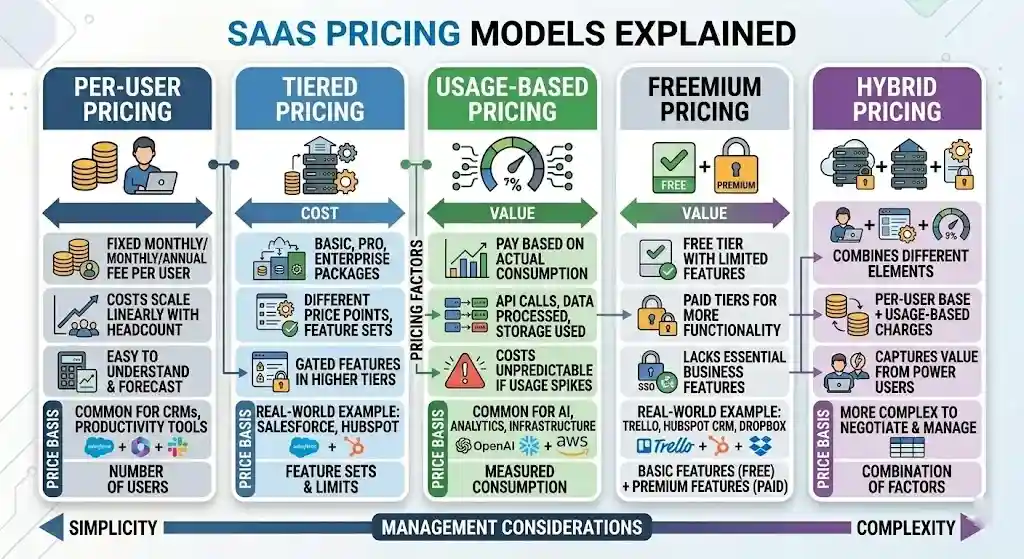
SaaS Pricing Models Explained
SaaS pricing is not one-size-fits-all. Understanding the model is critical for forecasting costs accurately.
Per-User Pricing
The most common model. You pay a fixed monthly or annual fee per user. Examples: Microsoft 365, Salesforce, Slack.
Watch for: Costs scale linearly with headcount. For large teams, this gets expensive fast.
Tiered Pricing
Multiple packages (e.g., Basic, Professional, Enterprise) at different price points with different feature sets. See our breakdown of Salesforce pricing for a real-world example of how tiered pricing works.
Watch for: Critical features are sometimes gated behind higher tiers.
Usage-Based Pricing
You pay based on actual consumption—API calls, data processed, storage used. Examples: AWS services, Twilio, many AI and analytics platforms.
Watch for: Costs can be unpredictable if usage spikes. Set alerts and usage caps.
Freemium
A free tier with limited features, plus paid tiers for more functionality. Examples: Trello, HubSpot CRM, Dropbox.
Watch for: Free tiers often lack essential business features like admin controls, SSO, or audit logs.
Hybrid Pricing
Combines elements—a per-user base price plus usage-based charges for storage overages, API usage, or premium features. This is becoming more common as vendors try to capture value from power users.
Hidden Costs to Watch For
- Implementation and onboarding fees
- Data migration costs
- Premium support charges
- API access or integration costs
- Overage fees (storage, users, usage)
- Price increases at renewal (check contract terms)
- Exit costs (data extraction, migration services)
Common SaaS Examples by Category
SaaS spans nearly every business software category. These are well-known examples by function.
| Category | SaaS Examples |
|---|---|
| Collaboration & Productivity | Google Workspace, Microsoft 365, Slack, Zoom, Dropbox |
| CRM | Salesforce, HubSpot CRM, Zoho CRM, Pipedrive |
| ERP | Oracle NetSuite, SAP S/4HANA Cloud |
| HR & People Management | Workday, BambooHR, Gusto |
| Accounting & Finance | QuickBooks Online, Xero, FreshBooks |
| Customer Support | Zendesk, Intercom, Freshdesk |
| Marketing Automation | HubSpot Marketing Hub, Mailchimp, ActiveCampaign |
| Project Management | Asana, Trello, Monday.com, Atlassian Jira |
| Design & Content | Adobe Creative Cloud, Canva, Figma |
| E-Signature | DocuSign, Adobe Sign, PandaDoc |
| AI & Analytics | Snowflake, Tableau, Jasper, Copy.ai |
| IT & Security | ServiceNow, Cloudflare, Okta, 1Password |
For a deeper look at CRM specifically, see our best CRM software comparison.
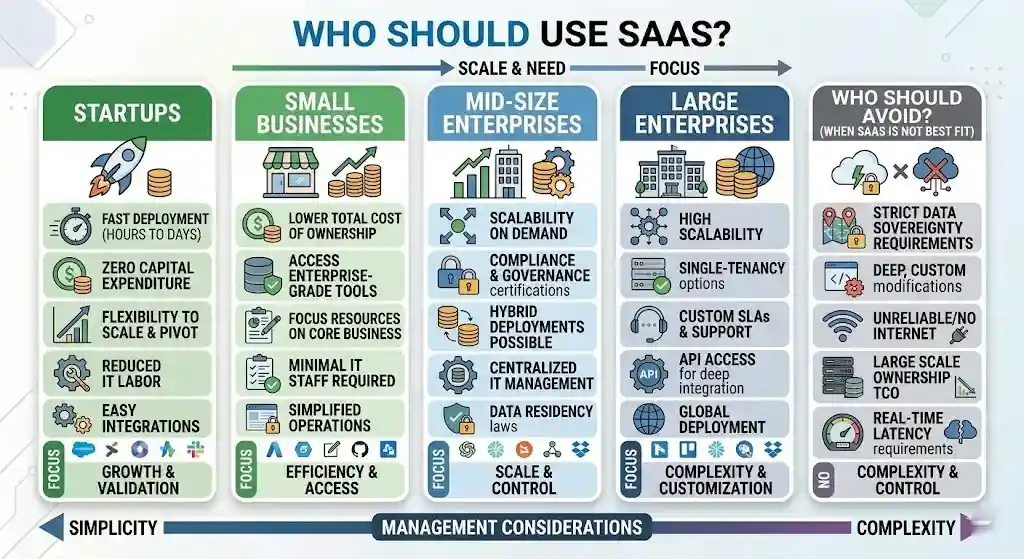
Who Should Use SaaS?
Startups
SaaS is almost always the right starting point. No capital outlay, fast deployment, ability to scale or pivot. Startups rarely have IT resources for on-premise infrastructure.
Illustrative scenario: A five-person startup signs up for HubSpot CRM (free tier), Slack (free), and Google Workspace (starting around $7/user/month at the time of writing). Total monthly cost: under $50. They’re operational on day one with no IT hire.
Small and Midsize Businesses (SMBs)
Most SMBs benefit from SaaS heavily—it eliminates the need for a large IT team and provides access to enterprise-grade tools at accessible prices.
Illustrative scenario: A 40-person e-commerce company uses Freshsales for CRM, Xero for accounting, Zendesk for support, and Slack for team communication. Annual SaaS spend in this range can be a fraction of the equivalent on-premise setup once you factor in hardware, licenses, and a dedicated IT administrator.
Mid-Market Organizations
Mid-market companies often run a mix of SaaS and legacy systems. The main considerations are integration complexity, data governance, and managing a growing SaaS stack. Regular stack audits are essential.
Enterprises
Large enterprises use SaaS extensively but often require single-tenant deployment, custom SLAs, advanced compliance certifications, dedicated support, and deep API access. Enterprise contracts are typically negotiated individually.
Illustrative scenario: A 5,000-person financial services firm uses Salesforce Enterprise, ServiceNow, Workday, and Microsoft 365. They negotiate custom SLAs, require SOC 2 Type II reports from every vendor, and maintain dedicated exit plans for each platform.
When SaaS Is Not the Best Fit
- Strict data sovereignty requirements prohibit cloud hosting.
- You need deep, custom modifications beyond what any SaaS vendor supports.
- You operate in environments with unreliable or no internet.
- Your long-term TCO analysis shows owning infrastructure is significantly cheaper at your scale.
- Real-time latency requirements make cloud round-trips impractical.
Common SaaS Buying Mistakes (and How to Avoid Them)
After years of evaluating SaaS tools, these are the mistakes we see buyers make most often:
1. Comparing SaaS Subscription Fees to On-Prem License Costs
This is an apples-to-oranges comparison. The fair comparison is total cost of ownership over 3–5 years, including hardware, IT labor, maintenance, training, integration, and exit costs. SaaS often wins, but not always—particularly at large scale with a mature IT team.
2. Ignoring the Exit Plan
Most buyers plan for onboarding but not offboarding. Before you sign: Can you export all data in open formats? What’s the timeline? Is there an exit fee? What happens to your data after cancellation? The time to negotiate exit terms is before you sign, not after you’re locked in.
3. Underestimating Integration Costs
Connecting a new SaaS tool to your existing stack is rarely free. Budget for API development, middleware (Zapier, Workato, MuleSoft), ongoing maintenance, and the time cost of debugging data sync issues.
4. Buying on Features, Not on Fit
A feature-rich product that doesn’t match your workflow creates more friction than a simpler product that does. During evaluation, test with your real data and real users—not a demo account.
5. Skipping the Security and Compliance Review
Vendors will tell you their product is “secure.” That’s not the same as holding SOC 2 Type II certification, supporting SSO and MFA, offering RBAC, or meeting your industry’s specific compliance requirements. Ask for evidence, not assurances.
6. Not Negotiating Renewal Terms Upfront
Many SaaS contracts include automatic renewal with built-in price increases. It’s not uncommon to see annual increases in the 5–10% range or higher. Negotiate renewal caps and opt-out windows at signing.
How to Evaluate a SaaS Product Before Buying
Here is a structured checklist covering the most important evaluation areas.
Security Checklist
- Does the vendor hold SOC 2 Type II certification? (See AICPA SOC 2 overview)
- Is data encrypted at rest and in transit (TLS 1.2+)?
- Does the vendor support SSO and MFA?
- What is the vulnerability disclosure and patching policy?
- Has the vendor experienced data breaches? How were they handled?
- Is role-based access control (RBAC) supported?
Compliance Checklist
- Does the vendor meet your industry requirements (HIPAA, GDPR, FedRAMP, PCI DSS)?
- Where is data stored geographically? Does it meet your data residency needs?
- Can the vendor support audit and reporting requirements?
- Is a Data Processing Agreement (DPA) available?
Integration Checklist
- Does the vendor offer a documented, well-maintained API?
- Are there pre-built integrations with your existing tools?
- Does the vendor support webhooks or event-driven integrations?
- What are the API rate limits and costs?
Data Export and Exit Checklist
- Can you export all data in standard, open formats (CSV, JSON, XML)?
- Is there a documented offboarding process?
- How long does the vendor retain data after cancellation?
- Is there an exit fee for full data exports?
SLA Checklist
- What is the guaranteed uptime percentage?
- How is downtime defined and measured?
- What remedies exist (credits, refunds) for SLA breaches?
- Is there a public status page or historical uptime record?
Support and Onboarding Checklist
- What support channels are available (email, chat, phone)?
- What are guaranteed response times by severity?
- Is onboarding included, or is it an additional cost?
- Is there documentation, a knowledge base, or a community forum?
Total Cost of Ownership (TCO)
Don’t compare SaaS subscription fees to on-premise license costs in isolation. A real TCO comparison includes:
- Subscription fees over 3–5 years
- Implementation and migration costs
- Training and change management
- Integration development and maintenance
- Premium support or add-on costs
- Potential price increases at renewal
- Exit / migration costs if you switch later
How to Implement SaaS Successfully
Buying SaaS is easy. Implementing it well is harder.
1. Stakeholder Alignment
Identify who owns the tool, who uses it, and who approves the purchase. Define success criteria before deployment.
2. Identity and Access Setup
Configure SSO and MFA from day one. Map user roles and permissions. Use your identity provider (Okta, Azure AD, Google Workspace) to centralize provisioning and deprovisioning.
3. Data Migration
Plan migration carefully. Clean and standardize data before importing. Run a test migration first. Validate data integrity after final migration. Keep a backup of the source data.
4. Integration Configuration
Connect the SaaS tool to your existing stack using APIs, native integrations, or middleware. Test data flows end-to-end.
5. Training and Change Management
Don’t assume adoption will happen organically. Provide role-specific training. Create internal documentation. Designate power users who can support peers.
6. Adoption Tracking
Monitor usage metrics: active users, feature adoption, login frequency. Low adoption signals a problem—either with the tool, the training, or the fit.
7. Renewal Review
Before every renewal, evaluate whether the tool is meeting objectives. Review usage against plan. Negotiate terms if pricing no longer matches needs.
Current Trends Shaping SaaS
AI-Native SaaS
A new generation of SaaS products are built with generative AI at the core—not bolted on as an afterthought. These tools handle content generation, demand forecasting, customer intent analysis, and automated workflow building. Most established SaaS vendors are also embedding AI capabilities into existing products.
AI-native browser-agent platforms are one example: they sell always-on digital workers for web automation tasks on usage-based pricing, and some can be self-hosted for full data control.
Vertical SaaS
Instead of horizontal platforms serving every industry, vertical SaaS products are purpose-built for specific sectors: healthcare, construction, legal, real estate, logistics, restaurants. They typically include industry-specific workflows, compliance features, and integrations that horizontal tools lack.
Usage-Based Pricing Growth
More vendors are shifting toward consumption-based pricing, especially for AI, analytics, and data-heavy products. This aligns cost with value but makes budgeting less predictable.
Low-Code / No-Code Platforms
SaaS platforms increasingly let non-technical users build custom applications, automations, and workflows without writing code. This accelerates deployment but introduces governance challenges. A related trend is vibe coding, where users describe what they want to build in natural language and AI models generate the actual code — blurring the line between no-code tools and traditional software development.
Vendor Consolidation
The SaaS market is consolidating. Large platforms are acquiring point solutions to build broader suites. For buyers, this can simplify procurement but may reduce competition over time.
Security and Compliance Pressure
As the number of SaaS apps per organization grows, so does the attack surface. Enterprises are investing more in SaaS security posture management (SSPM), stricter vendor vetting, and zero-trust architectures.
What is SaaS? FAQs
What is SaaS?
SaaS (Software as a Service) is a cloud-based software delivery model in which a vendor hosts an application, manages the infrastructure, and provides access to customers over the internet on a subscription basis. Users access SaaS through a web browser without installing anything locally.
How does SaaS work?
The SaaS vendor hosts the application on cloud infrastructure, handles all maintenance and updates, and delivers it to users via the internet. Customers log in through a browser or app, use the software, and pay a recurring fee. The vendor manages servers, security, backups, and scaling.
What are examples of SaaS?
Common SaaS examples include Salesforce (CRM), Microsoft 365 (productivity), Google Workspace (collaboration), Slack (messaging), Zoom (video conferencing), HubSpot (marketing/CRM), Zendesk (customer support), Shopify (e-commerce), and Workday (HR).
What is the difference between SaaS and PaaS?
SaaS delivers a ready-to-use application. PaaS (Platform as a Service) delivers a development platform where you build your own applications. With SaaS, you use the vendor’s software. With PaaS, you build on the vendor’s platform. SaaS is for end users; PaaS is for developers.
What is the difference between SaaS and IaaS?
SaaS provides a fully managed application. IaaS (Infrastructure as a Service) provides raw computing resources—virtual machines, storage, and networking—that you configure yourself. SaaS requires no technical management. IaaS requires significant technical expertise.
Is Netflix SaaS?
Technically, Netflix fits the SaaS model: subscription-based, cloud-delivered, browser-accessible. However, in industry context, “SaaS” typically refers to business software. Netflix is a consumer media streaming service. Whether you classify it as SaaS depends on how strictly you define the term.
Is Microsoft 365 SaaS?
Yes. Microsoft 365 is one of the best-known SaaS products. It delivers Word, Excel, PowerPoint, Outlook, Teams, and other applications through the cloud on a subscription basis. Microsoft manages infrastructure, updates, and security.
What is B2B SaaS?
B2B SaaS refers to Software as a Service products sold to businesses rather than individual consumers. Examples include Salesforce (CRM), ServiceNow (IT management), Workday (HR), and HubSpot (marketing). B2B SaaS typically involves more complex sales cycles, contract negotiations, and compliance requirements.
What is vertical SaaS?
Vertical SaaS is software built specifically for a single industry or niche. Unlike horizontal SaaS products that serve many industries, vertical SaaS products are tailored to the workflows, regulations, and data structures of a particular sector—such as healthcare, construction, legal, or real estate.
Conclusion
What is SaaS? It is the dominant model for how modern businesses buy, deploy, and use software. SaaS delivers applications through the cloud on a subscription basis, with the vendor handling infrastructure, updates, security, and maintenance.
For most organizations, software as a service reduces upfront costs, accelerates deployment, improves accessibility, and simplifies IT operations. But it is not a universal answer. Vendor lock-in, limited customization, data portability concerns, and compliance complexity require careful evaluation.
The right approach is not to default to SaaS—or avoid it—but to evaluate each purchase against clear criteria: security, compliance, integration, TCO, and exit planning. If you’re evaluating SaaS for your business, start with the buyer checklist in this article. Test rigorously. Negotiate your contract. And plan your exit strategy before you sign.