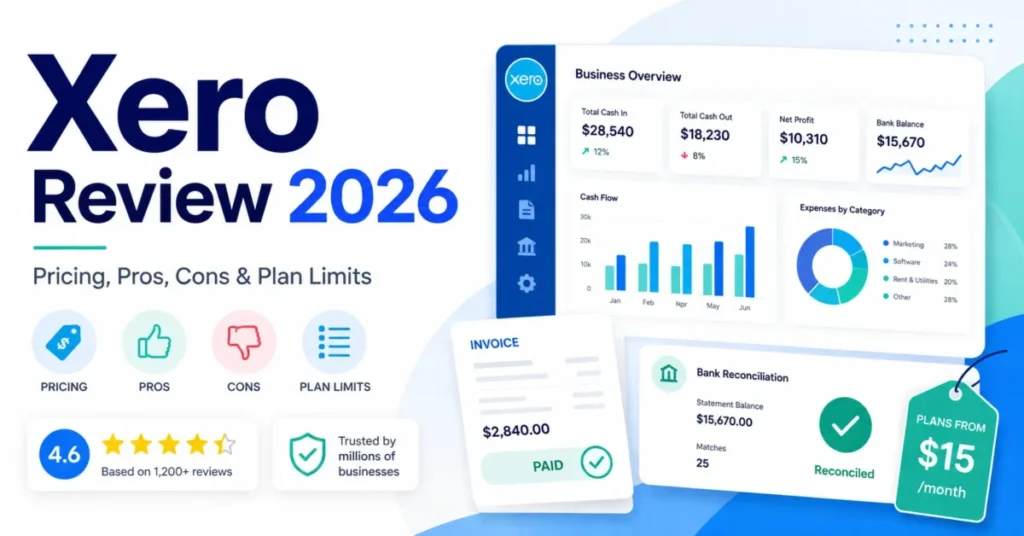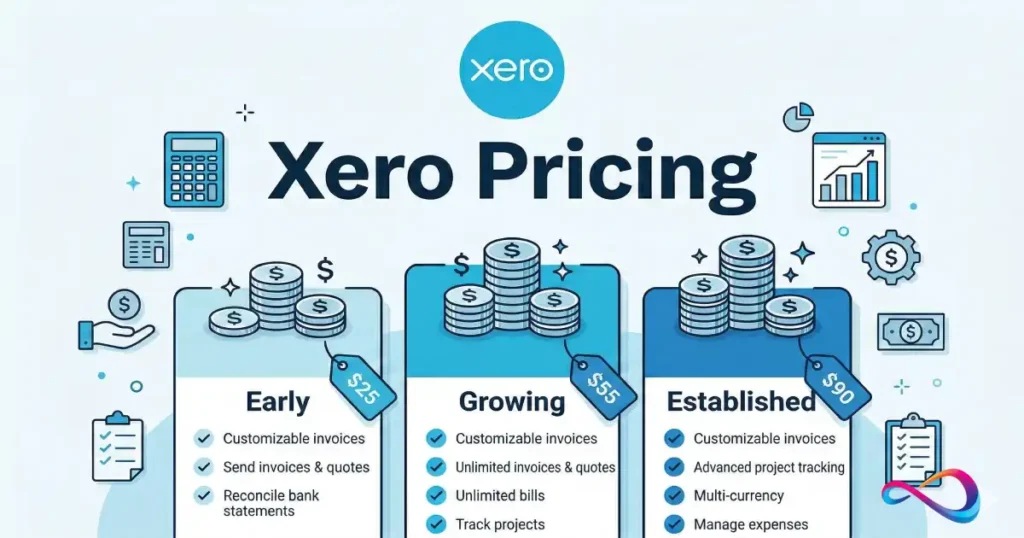
Xero pricing in 2026 ranges from $25 to $90 per month across three US plans—Early, Growing, and Established—each including unlimited users and no per-user license fees.
This guide breaks down every plan’s features, limits, hidden fees, and add-on costs so you can choose the right tier without overpaying. (For a broader look at Xero’s features, UX, and who it’s best for, see our full Xero review.)
⚡ Current promo (as displayed on Xero’s pricing page, March 1, 2026): 85 % off your first 6 months (code DC23854633) for new US customers—valid through 11:59 pm PDT, March 31, 2026. Promotional offers change frequently and Xero can modify or cancel them at any time; always verify on xero.com/us/pricing-plans before purchasing.
In This Article (15 sections)
Credibility & Evaluation Box
Who this is for: US small-business owners, freelancers, agencies, ecommerce operators, and bookkeepers comparing cloud accounting options.
How we evaluated: We compiled pricing, feature, and policy data directly from Xero’s official US pricing pages on March 1, 2026, cross-referenced with Xero’s help documentation and third-party accounting-software reviews. We did not test every feature hands-on; where limitations exist, we note our sources.
Sources used: Xero US Pricing, individual plan detail pages (Early, Growing, Established), Xero Terms of Use, and Xero Support documentation.
What could change: Xero reserves the right to change pricing at any time. Promotional offers rotate regularly. Always confirm the latest price on Xero’s website before subscribing.
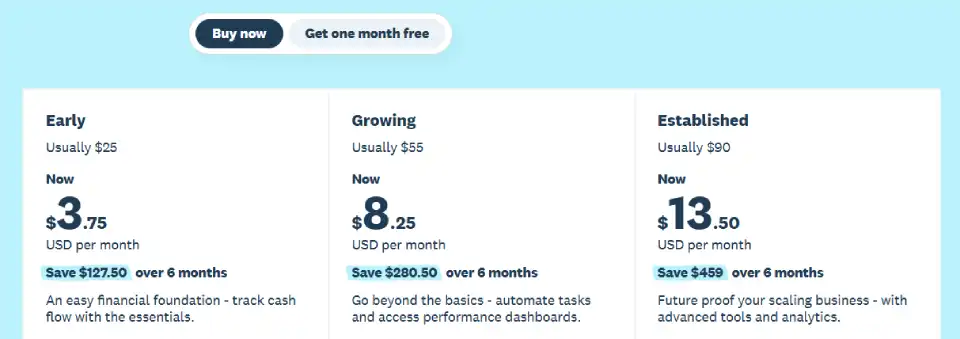
Xero Pricing Plans Compared (US): At a Glance
As of March 1, 2026 · Prices in USD, billed monthly. Applicable taxes may apply separately.
| Feature | Early — $25 /mo | Growing — $55 /mo | Established — $90 /mo |
|---|---|---|---|
| Best for | Solo operators & micro-businesses with very low transaction volume | Growing SMBs that have outgrown invoice/ | Scaling businesses needing multicurrency, projects & advanced analytics |
| Invoices & quotes | Up to 20 per month † | Unlimited | Unlimited |
| Bills | Up to 5 per month | Unlimited | Unlimited |
| Bank reconciliation | ✅ | ✅ | ✅ |
| Hubdoc (bill/ | ✅ | ✅ | ✅ |
| W-9 + 1099 management | ✅ | ✅ | ✅ |
| Sales tax (auto) | ✅ | ✅ | ✅ |
| Cash flow forecast | Up to 30 days | Up to 30 days | Up to 180 days |
| Performance graphs | ✅ | ✅ | ✅ |
| Customizable dashboards | ❌ | ✅ | ✅ |
| Financial health scorecards | ❌ | ✅ | ✅ |
| KPI & ratio analysis | ❌ | ❌ | ✅ |
| Multicurrency | ❌ | ❌ | ✅ |
| Project tracking | ❌ | ❌ | ✅ (usage charges may apply) |
| Expense claims | ❌ | ❌ | ✅ (usage charges may apply) |
| Online invoice payments | ✅ (fees apply ^) | ✅ (fees apply ^) | ✅ (fees apply ^) |
| Online bill payments | ✅ (fees apply ††) | ✅ (fees apply ††) | ✅ (fees apply ††) |
| Users | Unlimited | Unlimited | Unlimited |
| Promo price (first 6 mo) | $3.75 /mo | $8.25 /mo | $13.50 /mo |
Quick Recommendation (3-Line Summary)
- Early ($25/mo): Best if you send ≤ 20 invoices and enter ≤ 5 bills per month—ideal for solo freelancers and micro-businesses.
- Growing ($55/mo): Best if you need unlimited transactions plus customizable dashboards and financial health scorecards—fits most growing small businesses.
- Established ($90/mo): Required the moment you need multicurrency, project tracking, expense claims, KPI analysis, or 180-day cash flow forecasting.
📌 Plan-Name Clarification: Xero uses different plan names in different country editions. In the US it’s Early, Growing, Established. You may see “Starter,” “Standard,” and “Premium” referenced in non-US reviews—those are different regional editions. This article covers US plans only.
† The 20-invoice limit on Early applies to both approving and sending. Transactions initiated by connected app partners (e.g., ecommerce integrations) may automatically count toward this cap.
Pros & Cons at a Glance
| ✅ Pros | ❌ Cons |
|---|---|
| Unlimited users on every plan — no per-seat fees | Early plan has tight limits (20 invoices, 5 bills/ |
| W-9 + 1099 management included at no extra cost (all plans) | Multicurrency, projects, and expenses locked to Established ($90/mo only) |
| Excellent bank reconciliation engine + Hubdoc OCR capture included | No native US payroll — relies on third-party Gusto integration |
| Clean, intuitive UX with strong mobile app | Usage charges on Projects and Expenses add to the subscription cost |
| Robust integrations ecosystem (1,000+ apps) | Basic inventory even with Inventory Plus add-on — not suited for manufacturing |
| Multi-organization discount for businesses running multiple entities | No permanently free tier |
| Cash flow forecasting now available on all plans | Payment processing fees (invoice + bill payments) are extra on all plans |
- Verdict:
- Xero is one of the strongest cloud accounting platforms for US small businesses that value unlimited users, clean design, and built-in tax compliance (W-9/1099). The Growing plan at $55/mo is the sweet spot for most. However, businesses needing deep inventory, native payroll, or a free plan should evaluate alternatives.
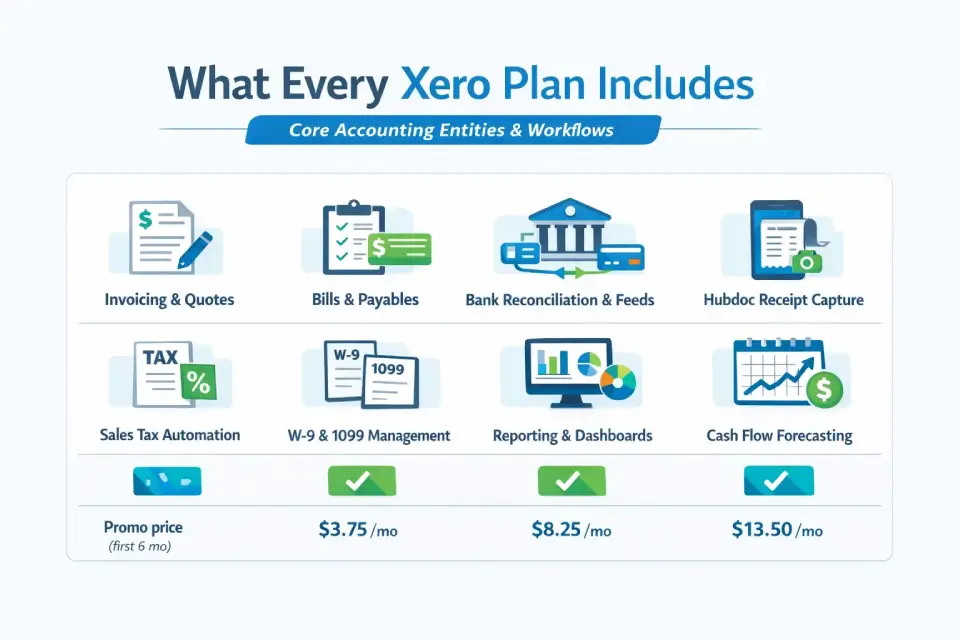
What Every Xero Plan Includes (Core Accounting Entities & Workflows)
Regardless of which tier you choose, every Xero plan shares a common accounting foundation. Understanding this baseline helps you evaluate what you’re really paying extra for when you step up to Growing or Established.
Invoicing & Quoting
Create, customize, and send online invoices and quotes. Attach a payment service so clients can pay instantly. On the Early plan, you’re capped at 20 invoices/quotes per month; Growing and Established remove that limit.
Bills & Payables
Enter bills, schedule bill payments, and pay suppliers in a batch. The Early plan caps you at 5 bills per month. Growing and Established are unlimited.
Bank Reconciliation & Bank Feeds
Connect bank accounts and credit cards to pull in transaction data automatically. Match transactions to keep your general ledger in sync—the core of Xero’s double-entry bookkeeping engine. Bank connections, including direct bank feeds, are available on all plans (note: some direct feeds may carry a small chargeable fee—see the Real Cost section).
Hubdoc — Bill & Receipt Capture
All plans include Hubdoc at no extra cost. Use it to snap photos of receipts, pull bills from suppliers automatically, and store documents online. Hubdoc uses OCR to extract key data and push it into Xero, reducing manual data entry.
Reporting & Dashboards
Every plan provides access to core financial statements: profit & loss (P&L), balance sheet, and other real-time reports. Dashboards become more powerful as you move up: Growing adds customizable dashboards and financial health scorecards; Established adds KPI and ratio analysis.
Sales Tax
Auto sales tax calculates, tracks, and helps you report US sales tax obligations. Available on all plans.
W-9 + 1099 Management
A meaningful US differentiator. Xero lets you collect W-9 forms from contractors digitally and generate 1099 reports for easy year-end IRS filing. This is included on every plan—no add-on required. Many competing platforms charge extra for 1099 workflows or need a third-party integration.
Cash Flow Forecasting
All plans now include cash flow forecasting (marked “New” on Xero’s pages). Early and Growing offer a 30-day forecast window. Established extends this to a 180-day forecast—a major advantage for seasonal businesses or anyone needing longer-horizon planning.
Other Universal Features
All plans also include: purchase orders, inventory tracking, file storage, contact management, accept-payments functionality, and role-based user permissions. Xero does not charge per user—every plan supports unlimited users with configurable access levels.
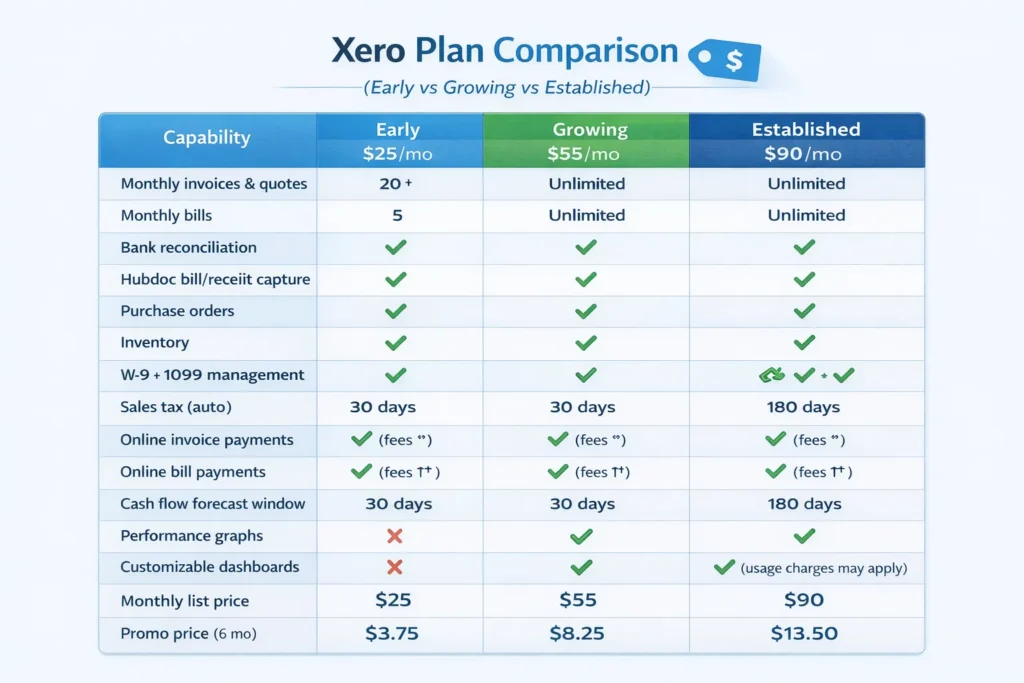
Xero Plan Comparison (Early vs Growing vs Established)
Below is the detailed feature-by-feature comparison table, followed by “best-for” profiles and upgrade triggers for each plan.
Full Feature / Limits Comparison Table
| Capability | Early ($25/ | Growing ($55/ | Established ($90/ |
|---|---|---|---|
| Monthly invoices & quotes | 20 † | Unlimited | Unlimited |
| Monthly bills | 5 | Unlimited | Unlimited |
| Bank reconciliation | ✅ | ✅ | ✅ |
| Hubdoc bill/ | ✅ | ✅ | ✅ |
| Purchase orders | ✅ | ✅ | ✅ |
| Inventory | ✅ | ✅ | ✅ |
| W-9 + 1099 management | ✅ | ✅ | ✅ |
| Sales tax (auto) | ✅ | ✅ | ✅ |
| Online invoice payments | ✅ (fees ^) | ✅ (fees ^) | ✅ (fees ^) |
| Online bill payments | ✅ (fees ††) | ✅ (fees ††) | ✅ (fees ††) |
| Cash flow forecast window | 30 days | 30 days | 180 days |
| Performance graphs | ✅ | ✅ | ✅ |
| Customizable dashboards | ❌ | ✅ | ✅ |
| Financial health scorecards | ❌ | ✅ | ✅ |
| KPI & ratio analysis | ❌ | ❌ | ✅ |
| Multicurrency | ❌ | ❌ | ✅ |
| Project tracking | ❌ | ❌ | ✅ |
| Expense claims | ❌ | ❌ | ✅ |
| Users | Unlimited | Unlimited | Unlimited |
| Monthly list price | $25 | $55 | $90 |
| Promo price (6 mo) | $3.75 | $8.25 | $13.50 |
Structured Facts: Early Plan
- Plan: Xero Early
- Price: $25/mo (promo: $3.75/mo for 6 months)
- Invoice limit: 20 per month (approving + sending)
- Bill limit: 5 per month
- Key unlock features: Core accounting, bank reconciliation, Hubdoc, W-9/1099, 30-day cash flow
- Upgrade trigger: Exceed 20 invoices or 5 bills monthly; need dashboards/scorecards
Structured Facts: Growing Plan
- Plan: Xero Growing
- Price: $55/mo (promo: $8.25/mo for 6 months)
- Invoice limit: Unlimited
- Bill limit: Unlimited
- Key unlock features: Everything in Early + customizable dashboards + financial health scorecards
- Upgrade trigger: Need multicurrency, project tracking, expense claims, KPI analysis, or 180-day cash flow
Structured Facts: Established Plan
- Plan: Xero Established
- Price: $90/mo (promo: $13.50/mo for 6 months)
- Invoice limit: Unlimited
- Bill limit: Unlimited
- Key unlock features: Everything in Growing + multicurrency + project tracking + expense claims + KPI/ratio analysis + 180-day cash flow forecast
- Upgrade trigger: N/A (top tier); consider NetSuite or enterprise ERP if you outgrow Xero entirely
Early Plan — $25 /mo
🏷️ Best for: Freelancers, solo consultants, and very-early-stage businesses invoicing fewer than 20 clients per month with minimal bills to track.
What you get: Full double-entry accounting, bank reconciliation, bank feeds, Hubdoc, W-9/1099, sales tax, basic cash flow forecast (30 days), and performance graphs. You can invoice, quote, accept online payments, enter bills, and reconcile—everything a micro-business needs to stay IRS-compliant and cash-flow-aware.
Key limits:
- 20 invoices/quotes per month (approving or sending counts; partner-app transactions count too)
- 5 bills per month
- No dashboards, scorecards, multicurrency, projects, or expenses
⚠️ Upgrade Trigger: If you regularly exceed 20 invoices or 5 bills in a month—or an ecommerce integration is auto-generating invoices that eat into your cap—you need to move to Growing. Also upgrade if you need customizable dashboards or financial health scorecards.
🔍 Hidden Gotcha: Transactions initiated by app partners (e.g., Shopify, Stripe, or other connected apps) may automatically count toward the Early plan’s invoice limit. If you connect an ecommerce store, you could hit the 20-invoice ceiling without manually creating a single invoice.
Growing Plan — $55 /mo
🏷️ Best for: Small businesses with steady transaction volume, anyone who has outgrown Early’s limits, and operators who want performance dashboards and scorecards.
What you get: Everything in Early, plus unlimited invoices/quotes, unlimited bills, customizable performance dashboards, tailored financial health scorecards, and the same 30-day cash flow forecast.
What you still don’t get: Multicurrency, project tracking, expense claims, KPI/ratio analysis, or the 180-day cash flow forecast window.
⚠️ Upgrade Trigger: If you invoice in foreign currencies, need to track project profitability by job, require employee expense claim workflows, or want deeper financial analytics (KPIs, ratios, 180-day cash flow), move to Established.
Established Plan — $90 /mo
🏷️ Best for: Scaling businesses, agencies, project-based firms, ecommerce sellers with international customers, and any company needing advanced analytics or multicurrency support.
What you get: Everything in Growing, plus:
- Multicurrency — track gains/losses, invoice, and accept payments in multiple currencies with live exchange rates
- Project tracking — quote, invoice, track time, costs, and profitability per project (usage charges may apply)
- Expense claims — capture, submit, approve, reimburse employee expenses (usage charges may apply)
- KPI & ratio analysis — analyze key performance indicators and financial ratios
- 180-day cash flow forecast — long-horizon planning for seasonal or growth-stage businesses
- Customizable dashboards and financial health scorecards (shared with Growing)
💡 Cost Checklist Before Choosing Established:
- ✅ Do you invoice in multiple currencies? → Established is the only option.
- ✅ Do you track project profitability and time? → Established required (but watch for usage charges on Projects).
- ✅ Do you process employee expense claims? → Established required (usage charges may apply on Expenses).
- ✅ Do you need KPI dashboards or 180-day cash flow? → Established only.
- ❌ If none of the above, Growing at $55/mo covers you.
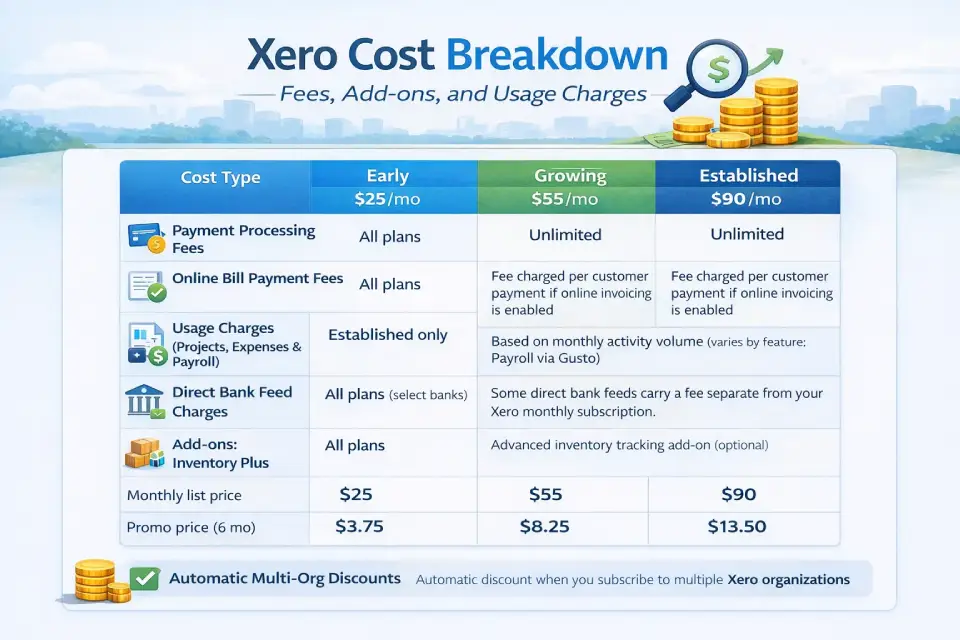
Xero Cost Breakdown: Fees, Add-ons, and Usage Charges
The monthly subscription cost on your plan page is not the full picture. Here’s what else can appear on your monthly invoice.
1. Payment Processing Fees — Online Invoice Payments
When you enable online invoice payments (powered by Stripe), Xero does not absorb the payment-processing fees. These are charged on top of your subscription. Current fee rates are published on Xero’s Stripe fee page—note that rates may vary based on transaction type and payment method; always check that page for the latest schedule before enabling invoice payments.
Watch-out: Payment fees apply on all three plans. Per Xero’s US pricing page, invoices sent with a payment service and via SMS may result in faster payment times—but each transaction carries a processing fee on top of your subscription.
2. Online Bill Payment Fees
Using Xero’s online bill-payment feature to pay suppliers also carries fees—separate from your subscription. Per Xero’s footer disclosure: “The payment fees are in addition to your Xero monthly subscription amount, and are subject to change. All fees are in US dollars and exclude applicable taxes.” These apply on all plans.
3. Usage Charges — Projects, Expenses & Payroll
Even on the Established plan, three modules can generate usage-based charges that appear on top of your flat monthly subscription:
| Module | Availability | Charging model |
|---|---|---|
| Xero Projects | Established only | Usage charges invoiced monthly for the previous month |
| Xero Expenses | Established only | Usage charges invoiced monthly for the previous month |
| Xero Payroll | Via Gusto integration | Gusto pricing applies; charges invoiced separately |
Per Xero’s FAQ: “If you’ve incurred usage charges for Xero Payroll, Xero Projects or Xero Expenses—or you have a chargeable direct bank feed—these charges will be invoiced for the previous month.”
4. Direct Bank Feed Charges
While bank connections are included on all plans, certain direct bank feeds may carry a small fee. This varies by financial institution and feed type. It’s a line item most users won’t see, but high-volume users connecting multiple accounts should be aware.
5. Add-ons — Inventory Plus
Xero offers basic inventory tracking on all plans. For businesses with more complex stock management needs (e.g., light manufacturing, product-based ecommerce), the Inventory Plus add-on provides enhanced capabilities. Pricing for Inventory Plus is separate from your plan subscription—check Xero’s add-ons page for current rates.
6. Multi-Organization Pricing & Discounts
Running multiple businesses? Xero plans and pricing for multi-entity operators works as follows:
- You can add as many Xero organizations as you like, each on its own plan (or a free 30-day trial).
- Automatic multi-org discount: If you subscribe to more than one Business Edition organization using the same subscriber email address and the same country edition (e.g., all US), Xero automatically applies a discount.
- Cross-country orgs: If your organizations span different country editions (e.g., US + UK), contact Xero Support to have the multi-org discount applied manually.
💡 Tip: Use one email address for all your Xero subscriptions to ensure the multi-organization discount kicks in automatically.
Total-Cost Example
Here’s a realistic scenario showing annualized cost for a small services firm on the Growing plan:
| Line item | Monthly (est.) | Annual (est.) |
|---|---|---|
| Growing subscription | $55.00 | $660.00 |
| Invoice-payment fees (varies by volume; seeXero’s Stripe fee page) | Varies | Varies |
| Bill-payment fees (per-transaction; see Xero’s terms) | Varies | Varies |
| Direct bank feed (if chargeable) | $0–5 | $0–60 |
| Estimated subscription + feed total | ~$55–60 | ~$660–720 |
Payment fees depend entirely on transaction volume and payment methods used. Always check Xero’s published fee schedules.
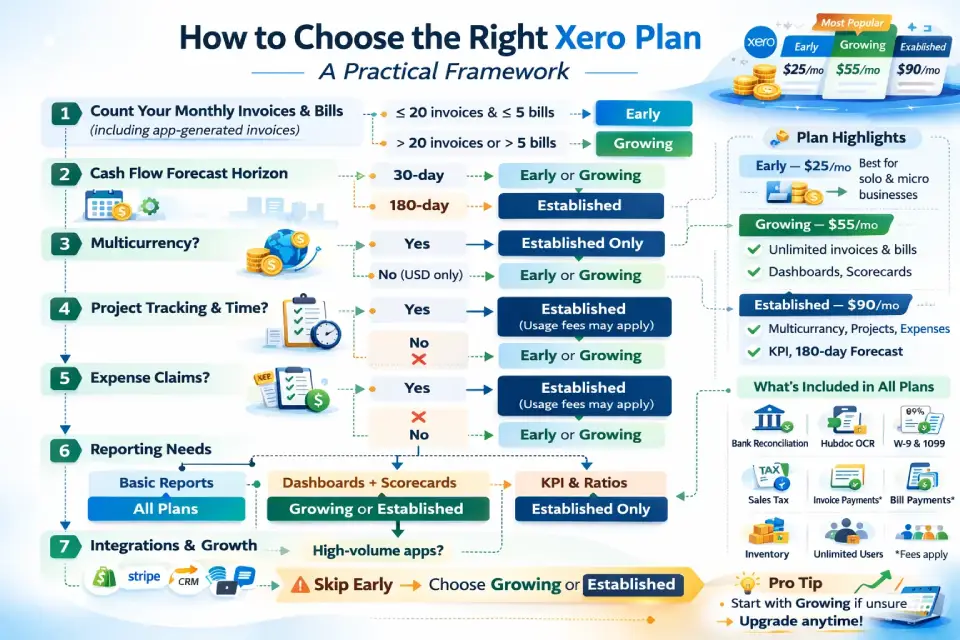
How to Choose the Right Xero Plan: A Practical Framework
Use this 7-step decision tree to find the best plan for your business.
Step 1: Count Your Monthly Invoices & Bills
- ≤ 20 invoices and ≤ 5 bills: Early works. But factor in whether connected apps auto-generate invoices.
- > 20 invoices or > 5 bills: You need Growing (minimum).
Step 2: Cash Flow Forecast Horizon
- 30-day window is enough: Early or Growing.
- Need 180-day forecast: Established only.
Step 3: Multicurrency — Yes or No?
- Invoice or accept payments in foreign currencies? Established is the only plan with multicurrency support.
- USD only? Early or Growing.
Step 4: Project Tracking & Time Tracking
- Track profitability per project/job? Established only (with usage charges).
- No project tracking needed? Early or Growing.
Step 5: Expense Claims Workflow
- Employees submitting expense claims? Established only (with usage charges).
- No employee expenses? Early or Growing.
Step 6: Reporting Depth
- Basic P&L, balance sheet, and graphs: All plans.
- Customizable dashboards + financial health scorecards: Growing or Established.
- KPI & ratio analysis: Established only.
Step 7: Integration & Growth Headroom
Consider your app stack. If you connect ecommerce platforms, CRMs, payroll (Gusto), or inventory tools, Growing or Established gives you unlimited transaction headroom and avoids the partner-app-invoice-limit gotcha on Early. Check the Xero App Marketplace to confirm that your key tools integrate with your chosen plan.
Quick Decision Matrix
| Your situation | Recommended plan |
|---|---|
| < 20 invoices/ | Early ($25/ |
| Growing transaction volume, need dashboards | Growing ($55/ |
| Multi-currency, projects, expenses, or advanced analytics | Established ($90/ |
| Multiple entities, same country | Any plan + multi-org discount |
| Very high inventory complexity | Established + Inventory Plus add-on |
Use-Case Recommendations (By Business Type)
Freelancer / Solo Operator
Recommended plan: Early ($25/mo)
You invoice a handful of clients, have minimal bills, and want a clean, compliant accounting system with W-9/1099 built in. Early’s 20-invoice cap is plenty for most solopreneurs. Upgrade to Growing only when you start scaling past 20 clients/month or want dashboards.
Agency / Project-Based Services
Recommended plan: Established ($90/mo)
Agencies need to track profitability per client or project, bill time, and often handle employee expense claims. The project-tracking and expense-claims modules on Established are purpose-built for this. The 180-day cash flow forecast helps with retainer and pipeline planning.
Ecommerce / Light Inventory
Recommended plan: Growing ($55/mo) or Established ($90/mo)
If you sell domestically in USD, Growing gives you unlimited invoices and bills plus dashboards to track performance. If you sell internationally (multicurrency) or need deeper inventory management, step up to Established and consider the Inventory Plus add-on.
⚠️ Integration Warning for Early Plan Users: Ecommerce integrations (Shopify, WooCommerce, etc.) can auto-create invoices that count toward Early’s 20-invoice cap. Even a modest online store could hit that limit in week one. If you connect any ecommerce platform, skip Early and go directly to Growing.
Multi-Location or Multi-Entity Owner
Recommended plan: Any tier + multi-org discount
Each entity gets its own Xero organization on whatever plan suits its needs. Use the same subscriber email to auto-activate multi-org discounts. For cross-country entities, contact Xero Support for manual discount application.
International Sales (Multicurrency)
Recommended plan: Established ($90/mo)
Multicurrency is exclusively an Established feature. If you invoice even one client in a foreign currency or accept payments in EUR, GBP, AUD, etc., you must be on Established. The plan automatically tracks foreign-exchange gains and losses and applies live exchange rates.
Who Should NOT Choose Xero
Xero is strong for many US small businesses, but it’s not the right fit for everyone. Being honest about its limitations reduces pogo-sticking and helps you make a faster decision.
❌ You need deep inventory or manufacturing features. Xero’s built-in inventory is basic and even the Inventory Plus add-on focuses on light stock management. If you need bill-of-materials, work orders, lot tracking, or multi-warehouse management, look at NetSuite, Cin7, or DEAR Inventory instead.
❌ You need tightly integrated US payroll. Xero relies on Gusto as a third-party payroll partner—functional, but not native. If payroll is a core requirement and you want one vendor, QuickBooks Online’s built-in payroll add-on may suit better.
❌ You require advanced custom reporting or BI. Xero Established adds KPI/ratio analysis and dashboards, but it’s not a reporting powerhouse. If you need pivot-style tables, custom calculated fields, or robust management reporting, supplement with Syft Analytics (now part of Xero’s ecosystem) or a standalone BI tool.
❌ You want a permanently free plan. Xero does not offer a free tier. Wave (free invoicing and accounting) or Zoho Books (free for very small businesses) are alternatives if budget is your primary constraint—though they trade off features, integrations, and support quality.
❌ You outgrow the SMB ceiling. Xero is built for small-to-medium businesses. If you’re scaling toward enterprise-level complexity (multi-subsidiary consolidation, advanced workflow automation, 500+ employees), you’ll likely need to migrate to NetSuite, Sage Intacct, or an ERP platform.
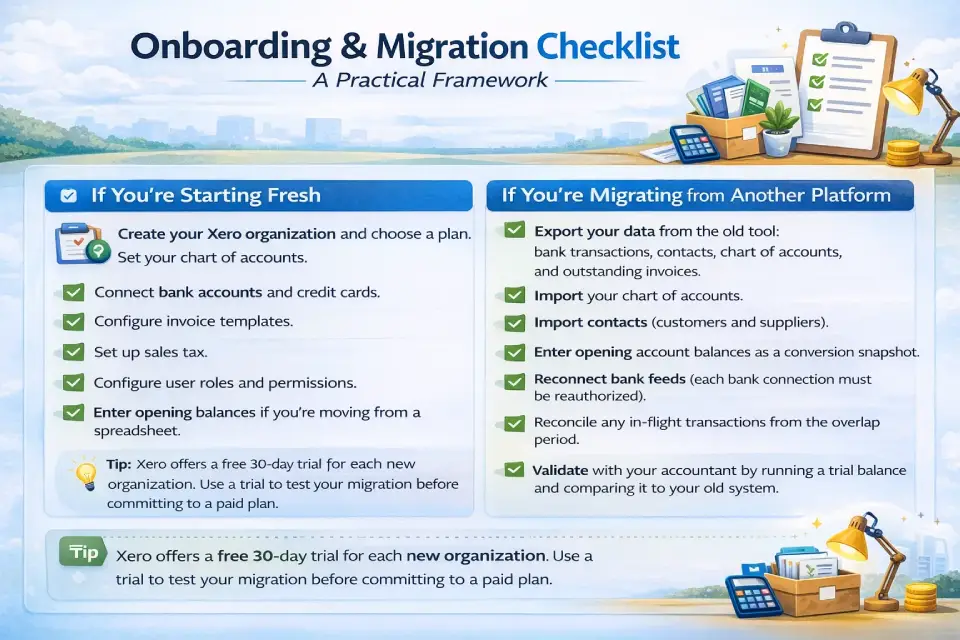
Onboarding & Migration Checklist
Switching to Xero—or starting fresh—takes roughly 30–60 minutes for a basic setup. Here’s a practical checklist:
If You’re Starting Fresh
- Create your Xero organization and choose a plan (start with Growing if unsure—you can always downgrade after the first month per Xero’s terms).
- Set your chart of accounts. Xero provides a US-standard default chart; customize as needed for your industry.
- Connect bank accounts and credit cards. Set up bank feeds to pull in transactions automatically.
- Configure invoice templates. Add your logo, payment terms, and any payment service (Stripe) for online invoice payments.
- Set up sales tax. Enable auto sales tax and confirm your nexus states.
- Configure user roles and permissions. Invite your accountant, bookkeeper, or team members with appropriate access levels.
- Connect key integrations. Link your CRM, ecommerce platform, payroll (Gusto), and any other essential apps from the Xero App Marketplace.
- Enter opening balances if you’re moving from a spreadsheet or have balances to carry forward.
If You’re Migrating from Another Platform
- Export your data from QuickBooks, Wave, or whichever tool you’re leaving—bank transactions, contacts, chart of accounts, and outstanding invoices.
- Import your chart of accounts into Xero (CSV upload supported).
- Import contacts (customers and suppliers).
- Enter opening account balances as a conversion snapshot—Xero has a conversion balances wizard for this.
- Reconnect bank feeds (you’ll need to re-authorize each bank connection).
- Reconcile any in-flight transactions from the overlap period.
- Validate with your accountant. Run a trial balance in Xero and compare it to your old system before going live.
💡 Tip: Xero offers a free 30-day trial for each new organization. Use a trial to test your migration before committing to a paid plan.
Security, Support & Compliance
Security & Data Protection
- Two-factor authentication (2FA): Available on all plans; strongly recommended for every user.
- Role-based access control (RBAC): Fine-grained user permissions—restrict what each team member, bookkeeper, or accountant can see and do.
- Audit trail: Xero maintains a full history log of changes for accountability and compliance.
- Encryption & infrastructure: Xero stores data in the cloud using industry-standard encryption. Xero has published commitments to data protection and data security (see Xero’s privacy notice).
What Happens If You Cancel
Per Xero’s terms, subscriptions auto-renew monthly and can be cancelled at any time. Per the Xero US pricing page (checked March 1, 2026), if you downgrade to a less-expensive plan you can do so 1 month after upgrading—though this policy may change, so always check Xero’s current Terms of Use before making changes. After cancellation, consult Xero’s Help Center for the latest details on data retention, export windows, and account reactivation options.
Accountant & Bookkeeper Collaboration
All Xero plans support unlimited users at no extra cost, making it seamless to invite your accountant or bookkeeper with their own login and permission level. Xero’s advisor tools (practice-management features) are designed for ongoing collaboration—shared access to real-time data, month-end close checklists, and reporting.
Integrations Ecosystem as a Decision Factor
Xero’s App Marketplace connects with hundreds of third-party tools. Your integration needs can heavily influence which plan to choose:
Key Integration Categories
| Category | Examples | Plan Impact |
|---|---|---|
| Ecommerce | Shopify, WooCommerce, Amazon | Avoid Early (auto-invoices hit limits) |
| Payroll | Gusto (official partner) | All plans; Gusto pricing separate |
| CRM | HubSpot, Salesforce, Pipedrive | All plans |
| Project management | Asana, Monday.com, ClickUp | all plans for basic sync; Established for project profitability tracking in Xero |
| POS | Square, Vend, Shopify POS | Avoid Early if daily sales volume is high |
| Payments | Stripe (built-in), GoCardless | All plans; payment fees apply |
| Inventory | Cin7, DEAR Inventory, TradeGecko | All plans for sync; Established + add-on for in-Xero tracking |
⚠️ Early Plan + Integrations = Risk: Any connected app that auto-creates invoices (ecommerce, POS, subscription billing) will eat into Early’s 20-invoice cap. If you plan to connect Shopify, Stripe subscriptions, or any high-volume app, skip Early entirely and start on Growing.
📚 Related Guides
If you’re building your SaaS stack around Xero, these resources may help:
- Xero review — features, UX, and honest pros/cons — our in-depth review of the platform beyond pricing
- CRM tools that integrate with accounting software — options for freelancers and small teams pairing a CRM with Xero
- Project management platforms agencies connect to Xero — compare PM tools that sync with your accounting workflow
Xero vs Alternatives: When Xero Is—and Isn’t—the Best Value
This is not an exhaustive comparison article, but here’s a high-level grid to help you decide whether Xero pricing represents the best value for your specific needs.
As of March 1, 2026. Competitor pricing changes independently; always verify on each vendor’s website before comparing.
| Criteria | Xero (US) | QuickBooks Online | FreshBooks | Zoho Books | Wave |
|---|---|---|---|---|---|
| Starting price | $25/mo | Varies by plan (check qbo.intuit.com) | Varies by plan (check freshbooks.com) | Free tier available; paid plans from ~$15/mo | Free |
| Unlimited users | ✅ All plans | ❌ Per-user pricing | ❌ Per-user pricing | Limited free users | ✅ |
| Multicurrency | Established only | Higher tiers | Higher tiers | Paid plans | ❌ |
| Project tracking | Established only | Higher tiers | Most plans | Paid plans | ❌ |
| US payroll (native) | Via Gusto (third-party) | Built-in add-on | ❌ | ❌ | ❌ (check vendor for current status) |
| W-9 + 1099 | ✅ All plans | Add-on/ | ❌ | ❌ | ❌ |
| Inventory depth | Basic + add-on | Moderate | Minimal | Good | Minimal |
| Hubdoc (OCR capture) | ✅ Included | Receipt capture built-in | Receipt capture | Receipt capture | Receipt capture |
When Xero Is the Best Value
- You need unlimited users — Xero’s no-per-user pricing is a standout for firms with multiple team members, bookkeepers, or accountant access needs.
- W-9/1099 compliance matters — Built into every plan at no extra cost.
- You want a clean UX with strong bank reconciliation — Xero’s reconciliation engine and Hubdoc integration are highly regarded.
- Your accountant/bookkeeper prefers Xero — Advisor compatibility matters for month-end close and collaboration.
When Xero May Not Be the Best Fit
- You need advanced US payroll built-in — Xero relies on Gusto. QuickBooks Online offers a more integrated payroll add-on.
- You need deep inventory/manufacturing — Consider NetSuite or dedicated inventory tools.
- Budget is your top priority — Wave (free) or Zoho Books (free tier) cost less, though they trade off depth, integrations, and support.
- You need advanced BI and custom reporting — Xero’s analytics improve at the Established tier but aren’t as deep as dedicated tools. Consider Syft Analytics or a standalone BI tool.
- You’re scaling toward enterprise — Xero is built for SMBs. At 100+ employees or multi-subsidiary consolidation, evaluate NetSuite or Sage Intacct.
Xero Pricing 2026 – FAQs
How much does Xero cost per month in 2026?
As of March 1, 2026, Xero’s US monthly subscription pricing is $25 for Early, $55 for Growing, and $90 for Established. All prices are in USD and billed monthly. Xero currently offers 85 % off for the first 6 months for new US customers (code DC23854633, as displayed on Xero’s pricing page; valid through March 31, 2026). Promos change regularly.
What is Xero’s cheapest plan?
The cheapest Xero plan is Early at $25/month. It includes core accounting, bank reconciliation, Hubdoc, W-9/1099, sales tax, and up to 20 invoices and 5 bills per month. With the current promo, it drops to $3.75/month for the first 6 months.
Does Xero have a free plan?
No, Xero does not offer a permanently free plan. However, every new subscription includes one free month to get started. Xero also offers a free 30-day trial for each new organization you create, so you can test features before committing.
Does Xero charge per user?
No. Xero does not charge per user on any plan. All three US plans—Early, Growing, and Established—include unlimited users with role-based permissions. This makes Xero cost-effective for teams, accountant/bookkeeper access, and firms with multiple staff members.
What are the limits on the Xero Early plan?
Early caps you at 20 invoices/quotes and 5 bills per month. Invoice limits apply to both approving and sending. Transactions from connected app partners (e.g., Shopify) count toward these limits. You also miss out on dashboards, scorecards, multicurrency, project tracking, and expense claims.
Which Xero plan includes multicurrency?
Only the Established plan ($90/month) includes multicurrency. It automatically tracks foreign-exchange gains and losses, lets you invoice in multiple currencies, and applies live exchange rates. Early and Growing are USD-only.
Which Xero plan includes project tracking?
Established only. Xero Projects lets you quote, invoice, track time, monitor costs, and measure profitability per project. Note that usage charges may apply on top of the $90/month subscription depending on volume.
Which Xero plan includes expense claims?
Established only. Xero Expenses enables employees to capture costs, submit claims, and get manager approval and reimbursement—all within Xero. Usage charges may apply in addition to the plan subscription.
Is Xero worth it in 2026?
For US small businesses that value unlimited users, clean UX, strong bank reconciliation, and built-in W-9/1099 management, Xero remains a competitive choice. It’s especially strong for service firms, agencies, and businesses with accountant/bookkeeper collaboration needs. Evaluate whether the Growing or Established plan’s extra features justify the cost increase for your specific situation.
Can I cancel my Xero subscription anytime?
Yes. Xero subscriptions auto-renew monthly and can be cancelled at any time—there is no annual lock-in contract. Per Xero’s pricing page, if you downgrade to a less-expensive plan, you can do so 1 month after upgrading. Consult Xero’s Terms of Use for complete cancellation and data-retention details.
Is there an annual billing option for Xero?
As of March 2026, Xero US plans are billed monthly only. There is no annual prepay billing option on the US edition. Subscriptions auto-renew each month until cancelled.
Does Xero include Hubdoc?
Yes. Hubdoc is included in all Xero plans at no extra cost. It lets you capture bills and receipts using OCR, pull documents from suppliers automatically, and store everything online. Hubdoc is subject to its own terms of use.
Are there Xero discounts for multiple companies?
Yes. Xero offers an automatic multi-organization discount when you subscribe to more than one Business Edition organization using the same subscriber email address and the same country edition. For organizations in different country editions, contact Xero Support to have the discount applied manually.
Are online payments included in Xero or extra?
Online invoice payments and online bill payments are available on all plans, but they carry separate payment fees on top of your subscription. Invoice-payment fees are outlined on Xero’s Stripe fee page; bill-payment fees are charged per transaction. These fees are not included in the plan price.
What’s the best Xero plan for a freelancer?
Most freelancers should start with Early ($25/month). It covers invoicing (up to 20/month), bank reconciliation, Hubdoc receipt capture, W-9/1099 management, and basic cash flow forecasting. If you need customizable dashboards or consistently exceed 20 invoices, upgrade to Growing.
Conclusion
Choosing the right Xero pricing plan comes down to three questions: How many invoices and bills do you process? Do you need multicurrency, projects, or expense workflows? And how deep does your reporting need to go?
- Early ($25/mo) is enough for solo operators and micro-businesses with low volume.
- Growing ($55/mo) is the sweet spot for most small businesses—unlimited transactions plus dashboards and scorecards.
- Established ($90/mo) is essential the moment you need multicurrency, project tracking, expense claims, or KPI analysis.
Remember that the sticker price isn’t the whole story. Factor in payment processing fees (see Xero’s published fee schedules), potential usage charges on Projects and Expenses, and any add-ons like Inventory Plus to calculate your true monthly subscription cost. Use the multi-org discount if you run multiple entities, and always verify the latest promo on Xero’s pricing page before subscribing.
All prices and features checked on March 1, 2026. Xero reserves the right to change pricing at any time.