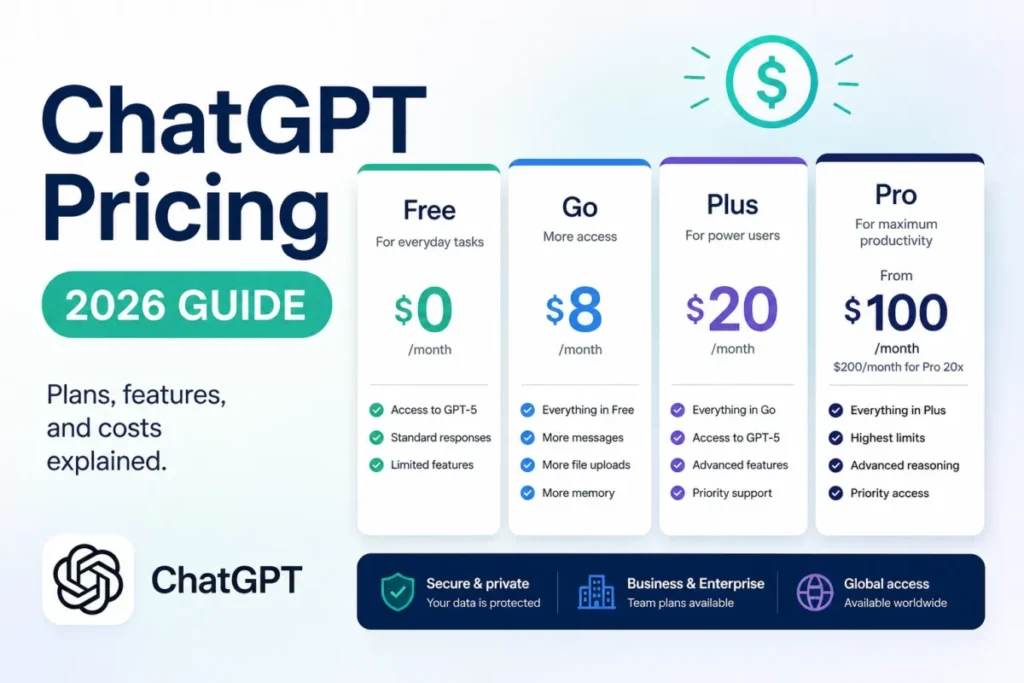
The sticker price is the easy part of a ChatGPT budget. What moves the number is everything the plan card leaves out.
Pro is now three plans rather than one, with a new $500 tier at the top and a quieter cut to what $200 buys. Add a two-seat floor on Business, purchased credits that bill after the included allowance runs out, and a workspace merge that cannot be reversed.
This guide prices the whole lineup for US buyers, then works out what each option costs over twelve months at one, two, five, twenty-five and one hundred users. Every ChatGPT figure was checked against OpenAI’s own pages on 2026-10-01.
For the product side of the decision rather than the money side, the ChatGPT review covers capability and workflow fit, and the generative AI primer covers the underlying category.
In This Article (16 sections)
The Quick Pricing Verdict
| Decision | Answer |
|---|---|
| Starting price | Free is $0, and Go is $8 per account per month in the US |
| Free plan | Yes, permanent, with ads on eligible accounts |
| Best plan for most paying individuals | Plus at $20 per account per month |
| Best plan for a real team | Business Standard at $20 per seat per month billed annually |
| Plan to avoid by default | Pro 500 at $500 per account per month, unless you need Ultrafast |
| Biggest hidden cost | Purchased credits and API usage, neither included in the subscription |
| Cheaper alternative if Plus is too much | Go, or Free with ads |
| Pricing verified | 2026-10-01 |
Source: OpenAI’s official ChatGPT pricing page.
ChatGPT Pricing at a Glance
ChatGPT splits into three separate products that happen to share a name. Personal plans bill monthly to one account, Business bills per seat to a managed workspace, and Enterprise is a negotiated contract.
The API is a fourth thing entirely, and none of these subscriptions include it.
| Plan | Price | Annual option | Billing basis | Best for | Key limit |
|---|---|---|---|---|---|
| Free | $0 | None | Per account | Occasional everyday chat | Smallest context window, ads on eligible accounts |
| Go | $8 per account per month in the US | None | Per account | More files, images and voice than Free | No GPT-6 Sol, may include ads |
| Plus | $20 per account per month | None | Per account | Advanced reasoning and daily professional work | Usage limits vary with system conditions |
| Pro 100 | $100 per account per month | None | Per account | Heavy research and coding | Lowest of the three Pro allowances |
| Pro 200 | $200 per account per month | None | Per account | Sustained heavy workloads | New subscriptions get a lower allowance than before |
| Pro 500 | $500 per account per month | None | Per account | Maximum usage and Ultrafast | The only Pro plan with Ultrafast |
| Business Standard | $25 per seat per month | $20 per seat per month billed annually | Per seat, two-seat minimum | Teams that need governance | Card payment only, no invoicing |
| Business Premium | $125 per seat per month | $100 per seat per month billed annually | Per seat | Workspaces exceeding Standard usage | 5x Standard usage, no 5-hour limit |
| Enterprise | Custom | Custom | Negotiated | Regulated or large deployments | No public seat price |
Source: ChatGPT’s public pricing page, OpenAI’s Pro tiers documentation and OpenAI’s Business pricing page.
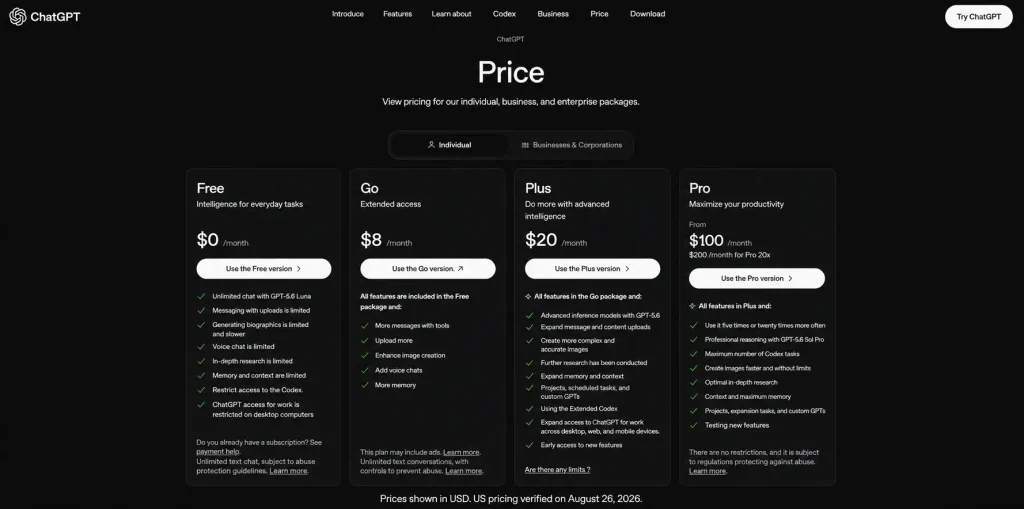
Two things in that table cost buyers money more often than anything else on this page.
The first is the Pro ladder. OpenAI now sells three monthly Pro plans: Pro 100 at $100, Pro 200 at $200 and Pro 500 at $500. Pro 200 includes more usage than Pro 100, Pro 500 offers the highest included usage of the three, and Pro 500 is the only one with Ultrafast.
The second is annual billing, which does not exist where most buyers assume it does. OpenAI documents that annual billing is not supported for Go, Plus or Pro, so a twelve-month figure for any personal plan is twelve monthly payments and nothing else.
What Each ChatGPT Plan Includes
Each plan below carries what it includes, the limit that binds it, and the condition that should stop you buying it. The prices repeat only where a tier boundary is the point.
Free
Free is a real plan rather than a trial, and for a reader whose work is everyday text it is often the correct answer.
The constraints are the context window and the tool access. The plan matrix lists Free at a 27K total context on the instant model against 54K on Go and Plus, which is the difference between pasting a short brief and pasting a contract.
Free accounts are also eligible to show ads, and there is an ad-free version of Free that trades them for lower message limits and reduced access to tools such as image generation and deep research.
- Avoid if:
- you upload long documents, generate images regularly, or need reasoning depth on analytical work.
Go
Go is a limits upgrade, not a discounted Plus. That distinction is worth exactly 12 dollars a month to the wrong buyer.
Go raises the ceilings on messaging, image creation, file uploads and memory, and it moves the instant-model context to 54K. What it does not include is the advanced reasoning model: OpenAI documents that Go’s Think mode uses GPT-5.6 Luna and that Go does not include GPT-5.6 Sol, and the current plan matrix lists GPT-6 Sol as not included on Go either.
Go accounts can also show ads, which matters if the reason for upgrading was to stop seeing them.
- Avoid if:
- the work is research, analysis, or anything where reasoning quality is the point. Sol lives one tier up.
Plus
Plus is the plan most paying individuals should start on. The upgrade trigger from Go is specific rather than vague: it is access to GPT-6 Sol plus the wider advanced-work feature set built on top of it.
Plus is ad-free by plan rather than by tradeoff, which is a different proposition from the ad-free Free mode. Nothing is reduced to get there.
The honest limitation is that Plus usage allowances are not a fixed published number. OpenAI documents that Plus limits vary with system conditions, so a buyer sizing a workload cannot budget against a message count.
- Avoid if:
- you regularly stall on Plus limits during paid work. At that point the interruption is costing more than the upgrade.
Pro 100
Pro 100 is the entry point to the Pro feature set, including Pro reasoning powered by GPT-6 Astra, at $100 a month. It carries the smallest of the three Pro allowances.
I would treat it as the default Pro purchase. Changes between Pro plans are made from Settings → My Plan, so starting low costs one month at most.
- Avoid if:
- what you actually need is programmatic access. Pro is a chat subscription and does not include API usage.
Pro 200
Pro 200 includes more usage than Pro 100 at $200 a month. The number to watch is not the price, though. OpenAI now documents that new Pro 200 subscriptions that are not eligible for grandfathering get a lower usage allowance than Pro 200 used to include.
Existing subscribers who qualify keep their previous allowance only through Oct 29, 2026. After that, the price stays at $200 and the allowance drops to the new level.
That makes reviews and forum threads about Pro 200 written before this change a poor guide to what $200 buys today.
- Avoid if:
- your evidence for needing it comes from the old allowance. Run Pro 100 at full load first.
Pro 500
Pro 500 is the new top of the personal lineup at $500 a month. It offers the highest included usage of the three Pro plans, and it is the only one that includes Ultrafast, which you select in the model picker.
Ultrafast is not something you can buy your way into on a cheaper plan. OpenAI states that buying credits on Pro 100 or Pro 200 does not unlock it at launch. On Pro 500 it uses the plan’s included usage first, then draws from the credit balance.
Twelve months of Pro 500 cost $6,000, which is $3,600 more than a year of Pro 200 and $4,800 more than a year of Pro 100.
- Avoid if:
- you cannot name a workload where Ultrafast speed or the extra allowance pays back $300 a month over Pro 200.
Business Standard
Business is a governance purchase before it is a capability purchase. The workspace adds centralized billing, admin controls over users and roles, usage visibility and spend controls, and a different data default: OpenAI documents that business data is excluded from training by default.
The floor is two seats, self-serve Business is sized for teams of up to 200 employees, and seat reductions only take effect at the next billing cycle.
- Avoid if:
- your procurement process requires an invoice, a purchase order or net terms. Self-serve Business takes cards only.
Business Premium
Premium is no longer a pre-launch seat. OpenAI’s Business billing documentation prices it at $100 per user per month billed annually, or $125 per user per month billed monthly.
The positioning is usage rather than features. Premium includes five times the Standard usage and no five-hour usage limit, and Standard and Premium seats can be mixed in one workspace.
- Avoid if:
- you have not measured Standard usage yet. Premium costs five times a Standard seat and solves a problem you may not have.
Pro 500 or Two Business Premium Seats?
For a heavy user who works with one colleague, this comparison is worth running before buying Pro 500.
| Option | 12-month subscription cost, USD |
|---|---|
| One Pro 500 account | 6,000 |
| Two Business Premium seats, billed annually | 2,400 |
Source: calculated from OpenAI’s Pro tiers and Business seat prices. Subscription only, excluding tax, credits and API usage.
The two are not the same product. OpenAI defines Premium usage relative to a Standard seat and Pro 500 usage relative to the other Pro plans, and it publishes no common unit to compare them. Only Pro 500 includes Ultrafast. Business adds a managed workspace with business data excluded from training by default, but it is card-paid, has a two-seat minimum, and seats added on an annual plan stay committed until the term ends.
If the requirement is heavy usage for two people rather than Ultrafast for one, Business Premium is the cheaper place to start.
Enterprise
Enterprise has no public seat price and routes to sales, which is normal at this level and unhelpful for budgeting.
What is worth knowing before that call is that the contract can carry a usage component as well as seats. OpenAI publishes a token-based rate card for new Enterprise agreements that specify usage-based billing.
Its multipliers stack. Long context above 272K tokens bills input at twice the standard rate, fast mode on Work and Codex bills GPT-5.6 at 2.5 times, and regional processing adds 1.1 times.
- Avoid if:
- you need cheap individual access and nothing else. Enterprise exists for control, not for price.
Feature Gates by Plan
A feature gate only matters when crossing it changes what you pay. These five do.
| Gate | Reached at | What sits below it | Cost of crossing |
|---|---|---|---|
| GPT-6 Sol reasoning | Plus | Go runs Think on GPT-5.6 Luna | 12 dollars more a month from Go |
| Pro reasoning on GPT-6 Astra | Pro 100 | Plus has no Pro reasoning | 80 dollars more a month from Plus |
| Ultrafast | Pro 500 | Pro 100 and Pro 200 cannot unlock it with credits | 300 dollars more a month from Pro 200 |
| Managed workspace and default training exclusion | Business Standard | Personal plans offer a user-level opt-out instead | Two seats minimum, 480 dollars a year on annual billing |
| SCIM, key management, contracted terms | Enterprise | Business is card-only self-serve | Negotiated, no public price |
The context window is the gate buyers underestimate. On the ChatGPT plan matrix the reasoning-model figures run 256K on Go and Plus against 400K on Pro, and on the instant model 27K on Free, 54K on Go and Plus, and 128K on Pro.
For a lawyer or analyst working through long documents, that spread decides whether a file fits in one pass. For someone writing emails it changes nothing, and paying for it is waste.
Hidden Costs and Usage Charges
Four costs sit outside the subscription line. Three of them can be triggered without an explicit purchase decision.
| Cost | Applies to | Trigger | Budget effect |
|---|---|---|---|
| API usage | All plans | Any programmatic use | A separate bill, never included in a subscription |
| Purchased credits | Eligible personal plans and Business | Included usage runs out | Variable, expires after 12 months |
| Extra Business seats | Business | Adding a member | Immediate prorated charge |
| Enterprise usage components | Enterprise | Contract type | Token-based charges on top of negotiated seats |
The API is a separate bill. OpenAI’s Plus documentation states plainly that API usage is separate and billed independently, and the Go documentation repeats it. A developer who buys Plus expecting included API credits gets a subscription and an empty API balance.
Credits are the second meter. OpenAI documents that a plan’s included usage is consumed first, and that usage then draws from the purchased credit balance.
Those credits stay valid for 12 months, are non-refundable except where law requires, and are non-transferable.
That combination is what turns a fixed subscription into a variable one. A heavy Codex or agent workload can add spend on top of any personal plan, and the unused balance expires rather than banking.
I would not model a flat monthly cost for anyone running sustained agentic work. Budget the subscription, then budget a credit ceiling separately, and treat hitting it as a signal to re-evaluate the tier rather than to top up again.
The ad-free option on Free is not free of cost either. It is paid in capability: lower usage limits and reduced tool access, including image generation and deep research.
For a reader whose objection to Free was purely the ads, that trade is worth taking. For anyone using the tools, it is a downgrade dressed as a preference.
ChatGPT Business Total Cost
Business seat pricing is where cadence actually changes the bill, because Business is the only ChatGPT product with a real annual option.
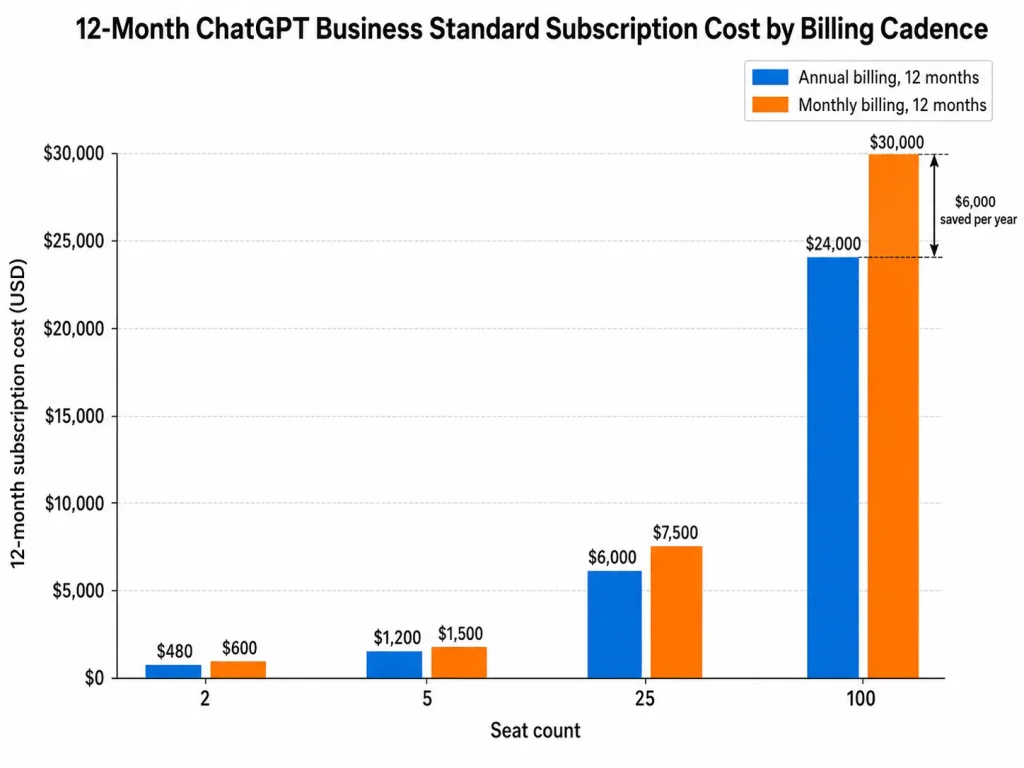
A Business Standard seat is $20 per seat per month billed annually against $25 per seat per month on monthly billing. Over twelve months that is 240 dollars a seat instead of 300, a gap of 60 dollars a seat a year that scales linearly.
| Plan | Seats | Annual billing, 12 months, USD | Monthly billing, 12 months, USD | Difference, USD |
|---|---|---|---|---|
| Business Standard | 2, the minimum | 480 | 600 | 120 |
| Business Standard | 5 | 1,200 | 1,500 | 300 |
| Business Standard | 25 | 6,000 | 7,500 | 1,500 |
| Business Standard | 100 | 24,000 | 30,000 | 6,000 |
Source: calculated from the Business Standard seat prices and two-seat minimum. Subscription only, excluding tax, credits and API usage.
The two-person case, where price stops deciding
At exactly two users the base subscription cost is identical either way. Two Plus subscriptions run 480 dollars over twelve months, and two annually billed Business Standard seats also run 480.
Since the money is a tie, the decision moves to what each side actually gives you. Business adds the managed workspace, centralized billing, admin roles and the default exclusion of business data from training.
Two Plus accounts stay simpler, stay month to month, and keep each person’s history under their own control.
I would take Business at two seats when the work is company work and someone other than the user has to administer it. I would stay on two Plus accounts when the pair are effectively two individuals who happen to work together, because the annual commitment buys governance nobody has asked for.
Seat mechanics that change the cash timing
Three documented behaviours make a Business bill move differently from a headcount spreadsheet.
Adding a seat charges immediately. OpenAI documents that increasing the seat count beyond the current subscription level triggers an immediate prorated charge covering the rest of the billing cycle.
Removing a member does not reduce the bill. The documentation is explicit that removing someone frees their seat for reassignment but does not automatically reduce the number of paid seats.
Reductions wait for the next cycle. Seat reductions can be scheduled, but they take effect at the start of the next billing cycle, not immediately. On annual plans, seats added mid-term stay committed until the annual term ends.
That asymmetry is the argument for buying Business slightly under headcount rather than slightly over. Adding is instant and prorated, and unwinding waits for renewal.
Annual vs Monthly Billing: Where the Discount Actually Exists
There is exactly one annual discount in the ChatGPT lineup, and it is on Business seats.
For personal plans, OpenAI’s Pro documentation states that annual billing and paying multiple months in advance are not supported for Go, Plus or Pro. The public pricing FAQ says the same thing from the other direction, listing monthly plans for Go, Plus and Business and annual plans for Business and Enterprise.
That makes the twelve-month personal figures arithmetic rather than contracts. Twelve months of Go totals 96 dollars and twelve months of Plus totals 240.
At the top of the personal ladder, twelve months of Pro totals 1,200 dollars on Pro 100, 2,400 on Pro 200 and 6,000 on Pro 500.
None of those is an annual plan, and none carries a discount. The upside is that cancelling a personal plan costs one month, which is the opposite of the Business trade.
Before You Move to ChatGPT Business
Business is the only decision on this page that is difficult to reverse, and the pricing pages do not say so.
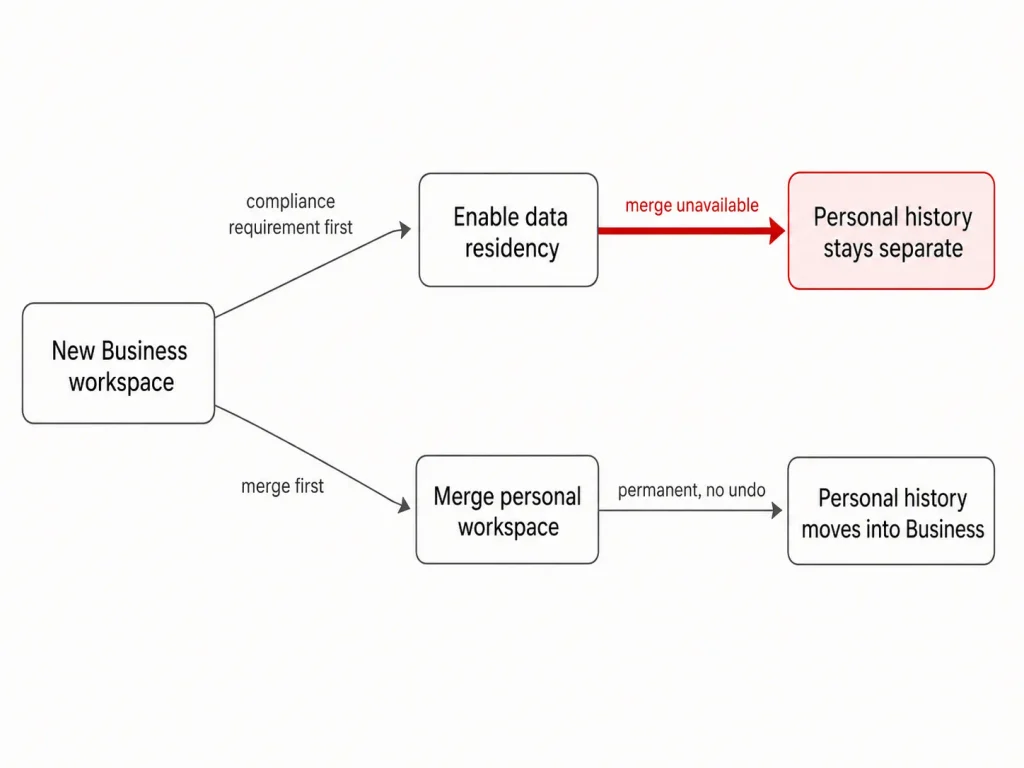
Merging a personal workspace into Business is permanent and cannot be undone. After the merge the personal workspace no longer appears in the account.
Chat history and GPTs move across. Plugins are deleted, custom instructions are deleted and do not migrate, and OpenAI warns that in rare cases long-running or historical chats may not be retrievable afterwards.
Then there is the exit. Data export is not available in a Business workspace, so the usual escape hatch of taking your content elsewhere is not there.
A mobile subscription is a separate loose end. It has to be cancelled on iOS or Android independently, or the charge continues after migration.
Data residency and the migration it blocks
Data residency is where a security requirement quietly removes a capability. OpenAI documents that Business data residency is rolling out gradually and is not yet available to all customers.
Where it is enabled, a personal workspace cannot be merged in at all, and the ChatGPT shopping experience is unavailable. Abuse-monitoring logs stay stored in the United States regardless of the region selected, and a non-US region still means a copy of every prompt and response is retained in the United States for safety and enforcement.
The sequencing consequence is concrete. Decide residency before anyone merges a personal workspace, because the other order forces a choice between the compliance configuration and the history the team wanted to keep.
Which ChatGPT Plan Should You Choose?
Every recommendation below is conditional, because the plans differ on usage and governance rather than on quality. Each one names the feature gate that separates the tiers, the usage condition that triggers the upgrade, and the total cost the buyer actually carries.
Stay on Free when the work is everyday text and the occasional question, and ads are tolerable. The upgrade trigger is specific: repeated interruptions on uploads, images, voice or research depth.
Buy Go when Free’s tool and file ceilings are the bottleneck and reasoning depth is not. The trigger to leave Go is equally specific, and it is the documented Sol feature gate on the official plan matrix.
Buy Plus when advanced reasoning, deep research, file analysis, custom GPTs, scheduled tasks or Codex show up in a normal working week. For most paying individuals this is where the ladder should stop, and the practical cost is one subscription a month.
Buy Pro 100 when Plus usage limits interrupt paid work often enough that the interruption costs more than 80 dollars a month. Not before.
Buy Pro 200 only after running Pro 100 at full load and hitting its ceiling, and judge it on the current allowance, not on what Pro 200 offered before the change.
Buy Pro 500 when you need Ultrafast or the highest personal allowance. No cheaper Pro plan can buy Ultrafast with credits.
Buy Business Standard when two or more people need one governed workspace: shared administration, central billing, spend controls and business data excluded from training by default. Take the annual cadence only if the team size is stable, because added seats stay committed until the term ends, and the total cost is 480 dollars a year at the two-seat minimum.
Look at Business Premium only when Standard usage has been measured and found short, or when two heavy users are weighing it against two Pro accounts.
Go to Enterprise when procurement, identity management or contracted terms are requirements rather than preferences. The self-serve card-only limit on Business is a hard stop, not a nuisance.
Which ChatGPT Plan to Avoid
Pro 500 as a first Pro purchase. It costs 4,800 dollars a year more than Pro 100. Unless Ultrafast is the reason you are buying, that money pays for allowance you have not yet shown you need.
The exception: a user who already exhausted Pro 200 under the current allowance has the evidence and should upgrade.
Go for anyone who bought it for reasoning. Go is a limits plan. The 12 dollar gap to Plus buys the reasoning model, which is usually the thing that was actually wanted.
Ad-free Free for a tool user. Removing ads by accepting lower limits and losing access to image generation and deep research is a bad trade for anyone who uses those tools weekly.
Annual Business seats for a team that is still forming. The 60 dollar per seat saving is real, and so is a commitment on added seats that runs to the end of the term for a headcount you have not settled.
ChatGPT Pricing vs Gemini, Copilot and the Bundles
ChatGPT’s competitors price the same ladder in noticeably similar places, which suggests the tiers are market convention rather than a ChatGPT quirk.
| Product | Entry paid tier | Mainstream tier | Top consumer tier | Business seat |
|---|---|---|---|---|
| ChatGPT | Go, $8 per account per month | Plus, $20 per account per month | Pro, $100, $200 or $500 per account per month | Business Standard, $20 to $25 per seat per month |
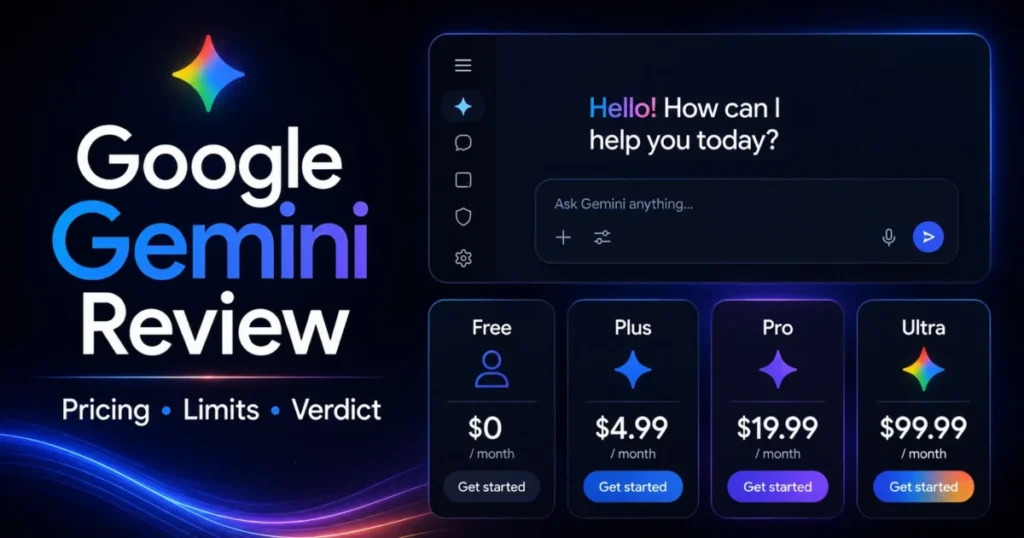
| Google Gemini | Google AI Plus, $4.99 per user per month | Google AI Pro, $19.99 per user per month | Google AI Ultra, from $99.99 per user per month | Not compared here |
| Microsoft 365 Copilot | Bundled, not sold standalone | Bundled, not sold standalone | Bundled, not sold standalone | Microsoft 365 Copilot Business, $21.00 per user per month billed yearly at list |
Source: the ChatGPT pricing page plus the competitor pricing pages linked in each row. Microsoft’s yearly Copilot Business rate showed a promotional 18.00 rate against the 21.00 list price used in this table, and a promotional rate needs re-checking on the day of purchase. Competitor prices were last checked on 2026-08-26.
Gemini is the direct comparison. Google AI Pro sits a cent under Plus, and Google AI Ultra runs from 99.99 dollars with a higher tier at 199.99 that carries twenty times the AI Pro usage limits.
ChatGPT now goes one step further, with Pro 500 above its $200 plan. Even so, the top-tier decision stays a usage question in both ecosystems rather than a brand one.
Microsoft is the bundle argument rather than a price argument. Copilot rides inside a productivity suite, so the honest comparison is against what a team already pays Microsoft, not against a standalone assistant.
That changes who should even run the comparison. A company already standardized on Microsoft 365 is choosing between adding Copilot to an existing bill and adding a second vendor, while a company on Google Workspace is choosing between Gemini’s near-identical ladder and ChatGPT’s.
Feature counting settles none of it. For a wider field the best AI chatbots roundup covers capability, and Claude pricing and the Gemini review go deeper on the two closest rivals.
Is ChatGPT Worth the Price?
Worth it on Plus for anyone doing analytical, research or writing work several times a week. The gap between Luna and Sol is the difference between a fast answer and a defensible one, and 240 dollars a year is inside the noise of a professional software budget.
Worth it on Pro 100 when Plus limits are interrupting billable work. The arithmetic is simple: if the interruptions cost more than 80 dollars a month in lost time, the plan pays for itself.
Worth it on a Business seat for a team that needs one administered workspace with business data excluded from training by default. That is a governance outcome you cannot assemble from personal accounts at any price.
Worth it on Pro 500 only for Ultrafast or measured maximum usage. At 6,000 dollars a year it is the most expensive personal subscription OpenAI sells, and for two heavy users two annually billed Business Premium seats cost 2,400.
Not worth it on Business for an organization whose procurement requires invoicing, purchase orders or net terms. Self-serve Business cannot take that payment, and no feature comparison changes it.
One thing more money does not buy is factual reliability. Paying for a higher tier raises allowance and reasoning depth, and it does not remove the need to check output that matters.
How to Avoid Overpaying for ChatGPT
- Start one tier below where you think you belong. Every personal plan is month to month, so an underbuy costs one month to fix while an overbuy costs twelve.
- Climb the Pro ladder one plan at a time. Start on Pro 100, move to Pro 200 on evidence, and buy Pro 500 only for Ultrafast or a proven ceiling. Changes are made from Settings → My Plan.
- Buy Business seats slightly under headcount. Adding a seat charges immediately and prorates, while reductions only take effect at the next billing cycle.
- Take annual Business billing only on stable headcount. It saves 60 dollars a seat a year, and seats added mid-term stay committed until the term ends.
- Budget credits and API usage as separate lines. Neither is included in a subscription, and credits expire twelve months after purchase.
- Decide data residency before anyone merges a personal workspace. A residency-enabled workspace cannot accept a merge, and a merge cannot be undone.
- Re-check any promotional rate on the day you buy. That applies to competitor bundles as much as to OpenAI, and a promotional rate is never the standard price.
How This Pricing Was Verified
These figures come from OpenAI’s public pricing pages, the Business pricing page, and current Help Center billing, plan and data-control documentation. Every price, limit and gate was verified against the official page that states it, on the date shown in the pricing verdict above.
Each plan was assessed against the same buyer-focused criteria: list price by region and cadence, billing unit and minimums, feature and model gates, published usage and context limits, add-on and credit exposure, administration and data controls, and migration constraints.
Greater weight went to the factors that change what a buyer pays or can reverse later. Those are the cheapest genuinely usable tier, the events that force an upgrade, seat-billing behaviour, and switching risk.
Claims that could not be verified against a current official page were excluded rather than estimated. Promotional rates are labelled separately from list prices and need re-checking on the day of purchase.
Frequently Asked Questions
These are the questions the body above does not fully close for a buyer about to pay.
How much does ChatGPT cost per month?
Free is $0 per account per month and Go is $8 per account per month in the US. Plus is $20 per account per month, and Pro comes as three plans: Pro 100 at $100, Pro 200 at $200 and Pro 500 at $500 per month.
Business Standard is $25 per seat per month, or $20 per seat per month billed annually, with a two-seat minimum.
What is the difference between Pro 100, Pro 200 and Pro 500?
Usage and one feature. Pro 200 includes more usage than Pro 100, and Pro 500 offers the highest included usage of the three and is the only one with Ultrafast. New Pro 200 subscriptions also get a lower allowance than the plan used to include.
Is ChatGPT Pro 500 worth it?
Only if you need Ultrafast or have hit the Pro 200 ceiling under the current allowance. It costs 3,600 dollars a year more than Pro 200, and the extra buys allowance and Ultrafast speed.
Can I pay for ChatGPT Plus annually?
No. OpenAI documents that annual billing and paying multiple months in advance are not available for Go, Plus or Pro, and only Business and Enterprise carry annual plans.
Does a ChatGPT subscription include API access?
No. API usage is billed separately from every ChatGPT subscription, so a Plus, Pro or Business purchase leaves the API bill untouched and unfunded.
Does ChatGPT Pro give unlimited usage?
Not in the plain sense. OpenAI marks Pro usage as unlimited subject to abuse guardrails, but each Pro plan has its own included allowance, and a model can become temporarily unavailable when its allowance is used up.
Does removing a Business user stop the charge?
Not on its own. Removing a member frees the seat for reassignment but does not automatically reduce the number of paid seats. You have to schedule a seat reduction, and it takes effect at the start of the next billing cycle.
Can I get ChatGPT without ads for free?
Yes, on an eligible Free account. The ad-free Free experience lowers your message limits and reduces access to some tools, including image generation and deep research, so it suits light users rather than tool users.
Is ChatGPT Business Premium available to buy now?
Yes. OpenAI’s Business billing documentation now lists Premium seats at $125 per user per month on monthly billing, or $100 per user per month billed annually, and they can be mixed with Standard seats in one workspace.
The Bottom Line
The cheapest plan that meets the requirement is almost always the right ChatGPT plan, and for most individual buyers that is Plus rather than anything above it.
Move up only on evidence. Take Pro 100 when Plus limits interrupt paid work, Pro 200 only after Pro 100 runs out, and Pro 500 only when Ultrafast or the highest allowance is a real requirement.
Take Business Standard when two or more people need one governed workspace with business data excluded from training, and Enterprise when procurement and identity controls are hard requirements.
Then budget the parts the plan card leaves out: credits, API usage, and the seat mechanics that make a Business bill move faster upward than downward. Select the lowest-cost plan that covers the reasoning, tools, usage allowance, collaboration, privacy and administration you actually need, and leave the capacity you do not need unpurchased.