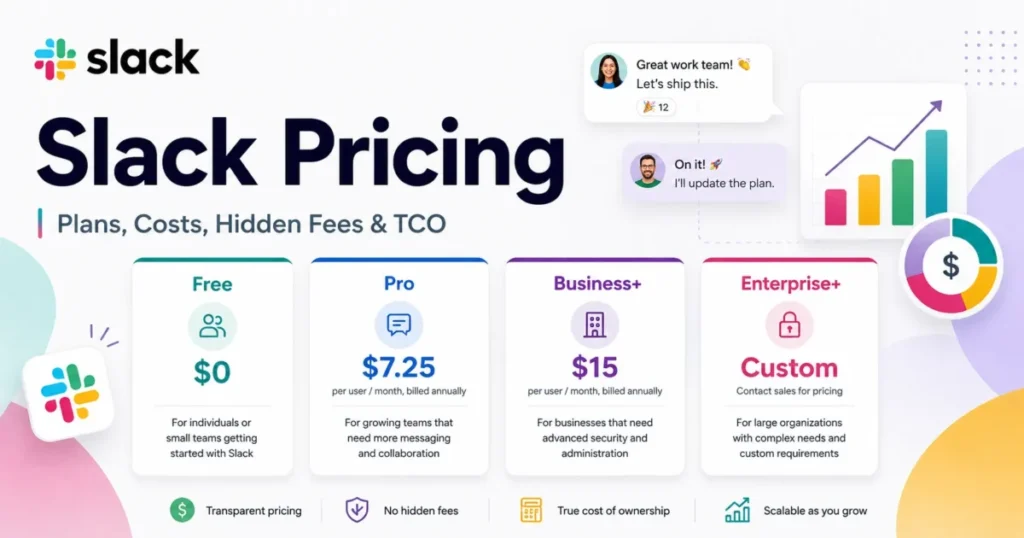
Slack pricing starts at 0 dollars, but the number that decides your budget is $7.25 per active user per month on Pro, billed annually. That is the plan most 5-to-100-person operating teams land on.
The gotcha sits below the sticker price. Slack bills active members rather than purchased seats, and one multi-channel guest costs exactly the same as a full-time employee.
I treat Slack the way a finance team treats a renewal line item. This guide calculates total cost at 5, 10, 25, 50, and 100 active members and ranks the hidden costs by how much they move the invoice.
It also maps every plan gate that forces an upgrade, and names the buyers who should not pay for Slack at all. If Slack is still one name on a longer shortlist, start with the wider roundup of best team collaboration tools.
All figures below are US list prices in USD, checked against Slack’s official pricing and help documentation on September 5, 2026. This analysis is documentation-based, not a hands-on workspace test.
In This Article (21 sections)
Quick Pricing Verdict
Here is the whole Slack pricing decision in one table, before the detail.
| Buyer question | Answer, checked September 5, 2026 |
|---|---|
| Starting price | $0 on the Free plan |
| Entry paid price | $7.25 per active user per month, billed annually (Pro) |
| Pro, billed monthly | $8.75 per active user per month |
| Best plan for most teams | Pro |
| Practical upgrade tier | Business+ at $15 annual / $18 monthly per active user |
| Plan to avoid | Free, for any team that needs message history past 90 days |
| Plan most teams overpay for | Business+, when it is bought only for AI |
| Biggest hidden cost | Multi-channel guests, billed at the full member rate |
| Enterprise+ price | Custom quote. Slack publishes no US list price |
| Free trial | Pro and Business+ trials exist without a credit card; duration varies by workspace |
| Cheapest alternative compared here | Microsoft Teams Essentials at 4 dollars per user per month, paid yearly, for chat and meetings only |
| Best bundled alternative | Microsoft 365 Business Basic at 7 dollars per user per month, paid yearly, if you also need business email |
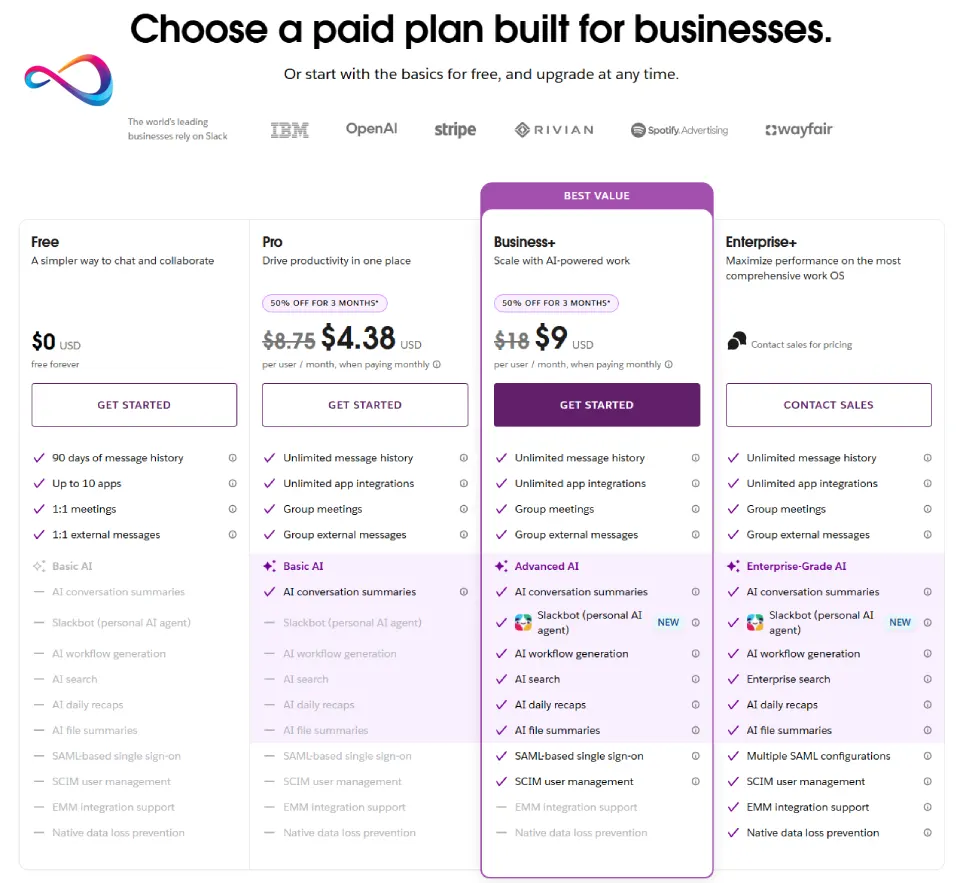
Slack’s official pricing page compares Free, Pro, Business+ and Enterprise+, including a limited-time 50% discount on Pro and Business+.
The two Microsoft rows in that table are sourced separately, from Microsoft’s own Teams plan comparison.
Executive Summary: Slack TCO at 5 to 100 Users
Annual billing is the only sane starting point for a budget, so every figure here assumes an annual commitment at the standard list rate.
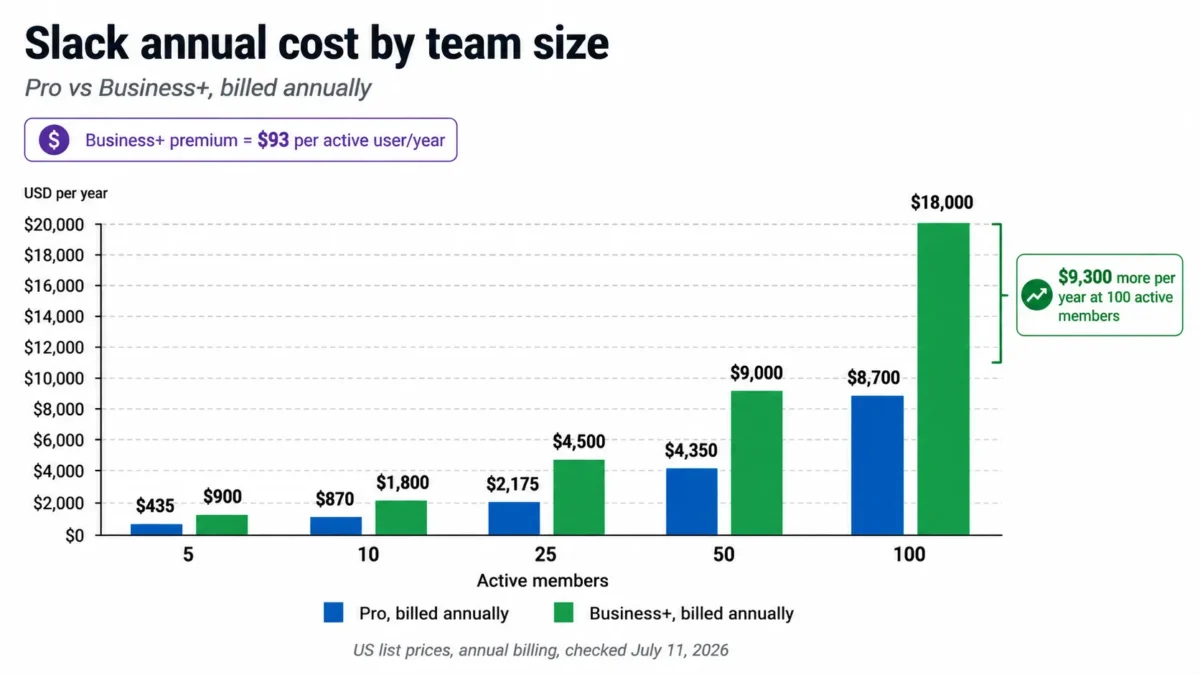
| Active members | Slack Pro, per year | Slack Business+, per year | Cost of moving up to Business+ |
|---|---|---|---|
| 5 | 435 dollars | 900 dollars | +465 dollars |
| 10 | 870 dollars | 1,800 dollars | +930 dollars |
| 25 | 2,175 dollars | 4,500 dollars | +2,325 dollars |
| 50 | 4,350 dollars | 9,000 dollars | +4,650 dollars |
| 100 | 8,700 dollars | 18,000 dollars | +9,300 dollars |
Every row multiplies the published Pro and Business+ annual rates by twelve months and the member count in the first column.
The Business+ premium works out to 93 dollars per user per year at annual rates. That single number is the whole upgrade decision, and I would not spend it on AI alone.
At 100 people the same choice is a 9,300 dollars annual swing, which is enough to fund a headcount conversation. Buy Business+ when SAML, SCIM, data residency, conditional workflows, or private-channel exports are hard requirements, not when someone liked the AI demo.
Slack Seat Cost Calculator
Those five rows assume something no real workspace does. They assume everyone you employ is an active member, nobody is a guest, and nothing is dormant. Your invoice is set by a different number: how many people Slack counts as billable in a given month.
The calculator below applies Slack’s own billing rules to your workspace shape. It separates active members from dormant accounts, prices multi-channel guests at the full member rate they actually carry, checks single-channel guests against the five-per-member free allowance, and applies the annual or monthly rate you select. It also takes the requirements your security team has written down and returns the minimum plan those requirements allow, which is the part of a Slack quote that gets argued about after the seat count is agreed.
Every rate field starts at the published list price and stays editable, so a negotiated rate, a nonprofit rate, or a promotional rate can replace it. Nothing is estimated: where Slack publishes no number, the tool says so rather than filling the gap.
How to Turn Headcount Into Billable Seats
Seven steps take you from an org chart to a defensible Slack budget, because the plan price on the card and the total cost on the invoice are set by different numbers. Each one is a place I have seen a real quote go wrong.
Work through them in order. Team size and usage decide the billable seat count, the plan gate decides the tier, the upgrade trigger decides when that tier changes, and only then does the official documentation give you a realistic buyer cost.
Step 1: Count active members, not invited accounts
Slack’s Fair Billing Policy bills members who are actively using Slack. An invited person starts generating a charge once they accept and become active, prorated for the remainder of the billing period.
Start from the number of people who opened Slack last month, not from your headcount and not from your seat count.
Step 2: Deactivate before you count
Fair Billing also works in the other direction. When a paid member goes inactive, Slack adds prorated credits to the account, and if every member goes inactive the floor is the equivalent of one paid member.
A dormant account is a live charge until somebody deactivates it. Offboarding discipline is worth 87 dollars per person per year on Pro annual billing, which is why the calculator asks for dormant accounts as a separate input.
Step 3: Split guests into two lanes before you invite anyone
This is the largest number in a Slack budget that you control by design rather than by negotiation. Slack’s guest-role documentation makes multi-channel guests billable as regular members, and makes single-channel guests free at up to five per paid active member.
Decide the channel architecture first. A client who needs one shared channel costs nothing, and the same client with access to three channels costs a full seat.
Step 4: Match the rate to the billing cycle, not to the plan
Each paid plan carries two rates, one for annual billing and a higher one for monthly, and the plan tables above give both. Quoting the annual rate against a monthly commitment understates a 50-person Business+ budget by 1,800 dollars a year.
Step 5: Apply the requirement floor before the price
Price the plan your requirements allow, not the plan you would prefer. SAML, SCIM, data residency, private-channel exports and conditional workflow branching all sit at Business+, and DLP, audit logs, legal holds, HIPAA support, enterprise mobility management and enterprise search all sit at Enterprise+.
One exception is worth a direct question to Slack. SAML is documented as available on Free and Pro for workspaces with a Salesforce org connected, which can remove the single most common reason to upgrade.
Step 6: Model year two, not year one
Any introductory discount is an acquisition rate. Slack’s pricing page showed 50% off for three months for teams that upgrade shortly after creating a workspace, on monthly billing, when checked on September 5, 2026, and that offer changes year one only.
Build the business case on the renewal number. If the plan only works at the promotional rate, it does not work.
Step 7: Check whether you can pay the way finance wants to pay
Paying by invoice rather than card has its own conditions, and a 20-person workspace usually fails them. Slack’s supported payment methods require annual billing, at least three active members, at least 58 members on Pro or 28 on Business+, and an invoice equivalent to a minimum of 5,000 dollars. A remittance fee applies on top.
Slack Pricing Plans Compared in 2026
Slack sells four plans on its official pricing page. Two carry public US list prices, one is free, and one is quote-only.
| Plan | Billed monthly | Billed annually | Billing basis | Best for | Key limits |
|---|---|---|---|---|---|
| Free | $0 | $0 | Flat, no charge | A 3-to-8 person team testing whether channels stick | 90 days of visible history, data older than 1 year permanently deleted, 10 app integrations, 1:1 huddles only |
| Pro | $8.75 per active user | $7.25 per active user | Per active member, per month | 5-to-100 person operating teams that live in channels | No standard SAML, no SCIM, no data residency, no private-channel or DM export, basic AI only |
| Business+ | $18 per active user | $15 per active user | Per active member, per month | Teams with an identity provider, a compliance owner, or an automation backlog | Slackbot capped at 15 messages per user per week; no DLP, audit logs, legal holds, HIPAA support, or enterprise search |
| Enterprise+ | Custom | Custom | Per user, negotiated | Regulated or multi-workspace organizations with named control requirements | Price, seat minimum, allowances, and support terms are all contract-specific |
Rates and plan limits above come from Slack’s Business+ plan page and the pricing page linked earlier.
The gap that matters is not Free to Pro. It is Pro to Business+, because that is where identity, compliance, and automation stop being optional and start being billable.
Two of these plans have a price you can plan against. Enterprise+ does not, and any article quoting a per-seat Enterprise+ figure is guessing.
Line-Item Cost Breakdown: Every Billable Item on a Slack Invoice
Slack pricing is not a normal seat contract, and the difference shows up on the first invoice. Most SaaS subscription models bill the seats you purchase, while Slack bills the people who show up.
Slack bills active members, not purchased seats
Fair Billing is the rule the rest of this section rests on, and it is worth stating precisely. Slack charges for members who are active in the workspace, prorating a new member from the day the invitation is accepted.
When a paid member goes inactive, Slack can issue a prorated credit toward future charges rather than leaving the seat billing forever. If every member in a workspace goes inactive, the billing floor is the equivalent of one paid member.
For a 40-person agency with seasonal contractors, that model is materially cheaper than a fixed-seat contract. For a workspace where everyone logs in daily, it behaves exactly like per-seat pricing and offers no relief.
Fair Billing rewards teams that deactivate people promptly. It does nothing for teams that leave dormant accounts alive out of habit.
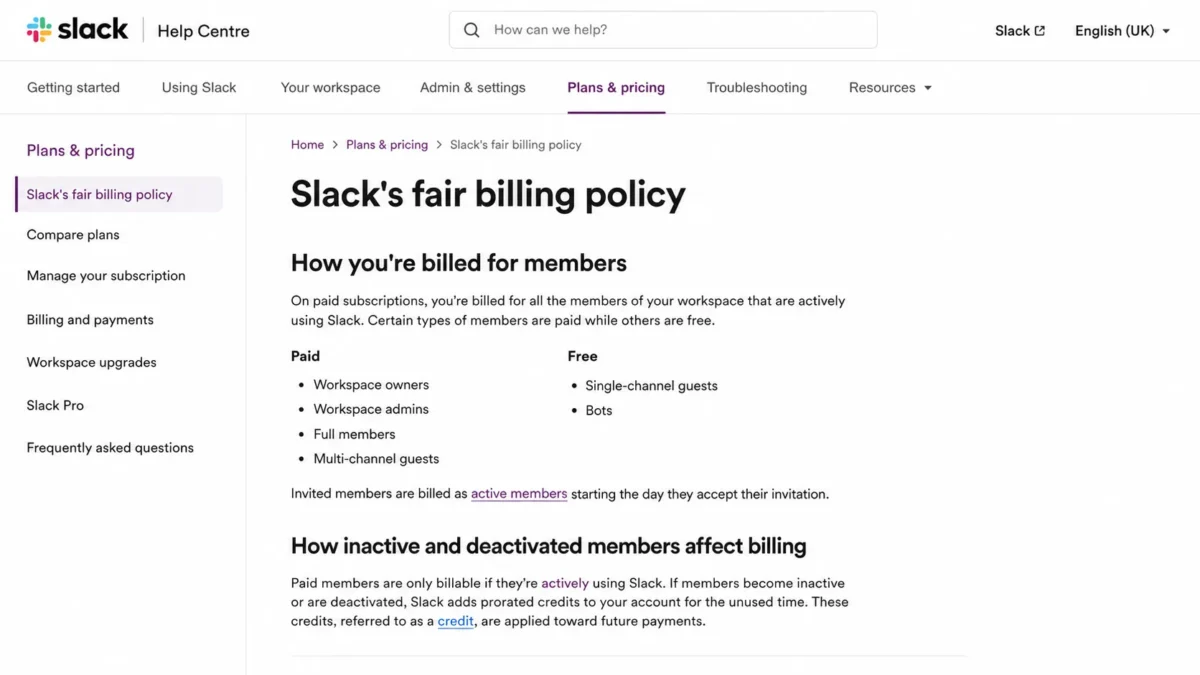
Slack’s Fair Billing Policy explains which workspace members are billable and how prorated credits apply when paid members become inactive.
Guests are the largest controllable line item
This is where agencies and client-service teams either save thousands or quietly double their bill. Slack’s guest-role documentation draws a hard line between the two guest types.
A multi-channel guest is billed at the regular active-member rate. A single-channel guest is free, up to five single-channel guests per paid active member.
Run the math on a 10-person agency on Pro annual billing. The base cost is 870 dollars per year, and the five-to-one allowance gives that agency up to 50 free single-channel guests.
Give twelve clients a single channel each and the incremental cost is nothing. Give the same twelve clients multi-channel access and you add twelve billable seats at 87 dollars per year, which is 1,044 dollars more, taking the invoice to 1,914 dollars.
The channel architecture, not the headcount, sets the price. I would design guest roles before I negotiate anything.
| Person type | Paid on Pro / Business+? | Annual cost each at Pro annual rate |
|---|---|---|
| Full member | Yes | 87 dollars |
| Multi-channel guest | Yes, at the full member rate | 87 dollars |
| Single-channel guest, within the 5-per-paid-member allowance | No | None |
| Bots and apps | No | None |
| Deactivated member | No, and inactivity can trigger a credit | None |
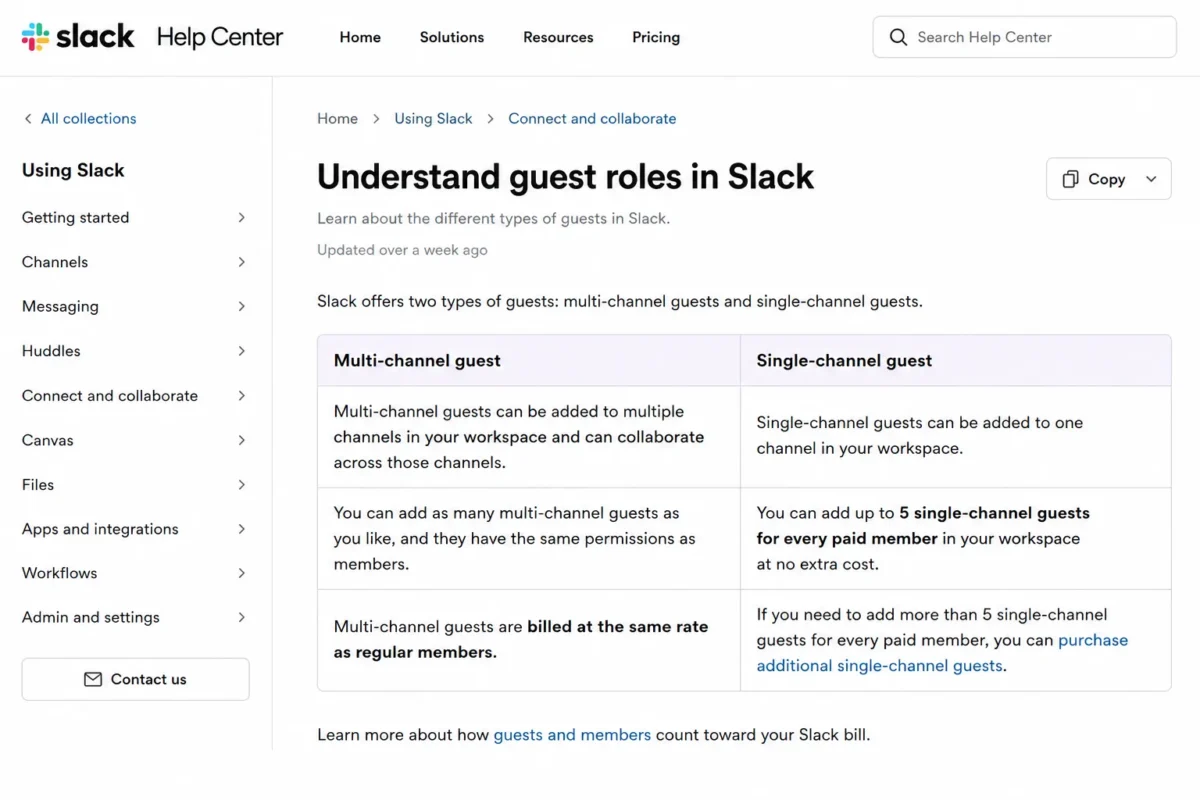
Slack distinguishes between paid multi-channel guests and single-channel guests, with up to five single-channel guests allowed per paid member.
There is no general three-seat minimum
Several widely read pricing guides claim Slack requires three paid users. That claim does not survive contact with Slack’s own billing documentation.
Fair Billing describes a floor equivalent to one paid member when everyone else goes inactive. The three-active-member rule that keeps getting repeated is an invoice-payment condition, not a subscription minimum.
A solo consultant can buy one Pro seat. A two-person studio can buy two.
Invoice payment carries its own thresholds
Slack’s supported-payment-methods documentation sets separate rules for paying by invoice instead of card: annual billing, at least three active members, and a minimum account size. The published examples are at least 58 Pro members or 28 Business+ members, and the invoice must be equivalent to a minimum of 5,000 dollars.
Run those member counts against the annual rates and the pattern is obvious. 58 Pro members at 87 dollars per year is 5,046 dollars, and 28 Business+ members at 180 dollars per year is 5,040 dollars.
The seat thresholds are a 5,000 dollars annual-spend floor wearing a costume. Slack also discloses that a remittance fee applies to invoice payments, though it does not publish the amount.
If your finance team refuses to pay software by credit card, that 5,000 dollars floor is a real constraint on a 20-person Pro workspace.
Slack Connect can move cost onto the other company
Shared channels are not free collaboration for everyone. Slack Connect channels generally require each participating organization to be on an eligible paid plan, while external direct messages are available more broadly.
A client on the Free plan may be unable to join your shared channel. Budget for the possibility that your side pays and your partner still cannot participate the way you planned.
What Each Slack Plan Includes
Each plan below carries what it adds, what it is missing, the buyer it fails, and a verdict. The missing lists are the useful half: they are the reason an upgrade happens.
Slack Free: $0
Free gives you channels, direct messages, one-to-one huddles, and 10 app integrations. That is enough to find out whether your team adopts channel-based work at all.
The limits are aggressive and widely misreported. Slack’s Free plan documentation sets 90 days of accessible message and file history, and separately states that data older than one year is permanently deleted.
Slack’s own two pages disagree on one number, and the help centre is the one to trust. The help article sets the app limit at 10 installations, while the marketing Free plan page still advertises up to 3 apps and 30-minute calls, which is the older packaging.
Those are two different limits, and the difference is worth real money. Between day 91 and the one-year mark, your history is hidden rather than destroyed, so upgrading can restore access.
After one year, it is gone and no upgrade brings it back.
Missing: full history, group huddles, Slack Connect channels, unlimited apps, guest roles, Workflow Builder, custom retention, and paid AI.
Avoid Free if: you need to find a decision made four months ago, you invoice clients from Slack threads, or you run any process where the message record is the record.
Verdict: Free is a 60-day adoption test, not a plan. Treat the one-year deletion clock as the deadline to decide.
Slack also offers a paid trial rather than only the Free plan. Eligible workspaces can request a Pro or Business+ trial without a credit card, and the workspace reverts to Free if nobody upgrades.
Slack does not publish one universal trial length that applies to every workspace. Check the duration shown when you request it, and build the evaluation schedule around that number rather than a figure quoted on a third-party blog.
Slack Pro: $7.25 annual, $8.75 monthly
Pro is the practical tier and the plan I recommend for most buyers reading this. It adds full message history, unlimited app integrations, group huddles, Slack Connect channels, Workflow Builder, custom retention, 24/7 support, conversation summaries, and huddle notes.
Missing: standard SAML SSO, SCIM provisioning, data residency, all-message exports covering private channels and DMs, conditional workflow branching, and the advanced AI set.
Avoid Pro if: your security team has already written SAML into the requirements, or legal needs to export private channels and direct messages.
Verdict: at 87 dollars per active user per year, Pro is the only Slack plan whose price and value line up cleanly for a 5-to-100 person team.
Slack Business+: $15 annual, $18 monthly
Business+ is the compliance and identity tier, and the price reflects that at 180 dollars per active user per year. It adds standard SAML SSO, SCIM provisioning, data residency, broader exports, administrative analytics, and a support target of four hours to first response.
It also adds the advanced AI set: recaps, translations, file summaries, search answers, workflow generation, and Slackbot.
Here is the catch buyers keep missing. Slackbot on Business+ is limited to 15 messages per user per week, resetting Monday at midnight in the user’s time zone, according to Slack’s Slackbot limits documentation.
Fifteen messages a week is a ceiling of 780 per user per year. A team upgrading purely for Slackbot pays the 93 dollars per-user annual premium for at most 780 messages.
That is about 0.12 dollars per message at full use, and worse than that for every user who never reaches the cap.
Two escape hatches exist, and both cost money. Slack documents Enterprise+ members as not subject to weekly or lifetime message limits, and workspaces with Salesforce Flex Credits connected can spend credits on Slackbot usage past the plan limit at the published credit rates.
Neither one makes Business+ a good AI purchase. They make the AI budget a second line item on top of the seat budget.
Missing: native DLP, audit logs, legal holds, HIPAA support, EMM, enterprise search, single-user exports, and multi-workspace administration.
Avoid Business+ if: AI is the only reason on the business case. The weekly cap will not survive contact with an enthusiastic 50-person team.
Verdict: Business+ earns its price on identity, provisioning, residency, and export scope. It does not earn its price on Slackbot.
Slack Enterprise+: custom pricing
Enterprise+ is quote-only, and I will not estimate it. Slack’s pricing page routes it to sales, and the third-party figures floating around the search results are not Slack list prices.
What it adds is a control set, not a seat discount: enterprise search, multi-workspace administration, native DLP, audit logs, legal holds, HIPAA support, EMM, single-user exports, and Discovery API access.
Avoid Enterprise+ if: you are considering it because you have 800 employees rather than because you have a named control requirement. Headcount alone is a bad reason to enter a custom sales process.
Verdict: ask for the quote only when you can name the specific control that Business+ cannot provide. Then ask what it costs to keep that control at renewal.
Feature Gates: What You Actually Get by Plan
| Gate | Free | Pro | Business+ | Enterprise+ |
|---|---|---|---|---|
| Message history | 90 days visible, deleted after 1 year | Full | Full | Full |
| App integrations | 10 | Unlimited | Unlimited | Unlimited |
| Huddles | 1:1 only | Group | Group | Group |
| Slack Connect channels | No | Yes | Yes | Yes |
| Workflow Builder | No | Yes | Yes, plus conditional branching | Yes, plus conditional branching |
| Slack AI | No | Conversation summaries, huddle notes | Advanced set; Slackbot capped at 15 messages per user per week | Advanced set, enterprise search, no weekly Slackbot limit |
| SAML SSO | No, outside the Salesforce-connected exception | No, outside the Salesforce-connected exception | Yes | Yes |
| SCIM provisioning | No | No | Yes | Yes |
| Data residency | No | No | Yes | Yes |
| Export of private channels and DMs | No | No | By application and approval | Yes, plus single-user exports |
| Custom retention | No | Yes | Yes | Yes |
| Support | Limited | 24/7 | 24/7, four-hour first-response target | Contract-specific |
| DLP, audit logs, legal holds, HIPAA, EMM | No | No | No | Yes |

Slack’s official feature comparison shows which AI, identity, export, security and compliance capabilities are available on Free, Pro, Business+ and Enterprise+.
Read that table as an upgrade-trigger list rather than a feature inventory. Only four rows realistically force a paid upgrade for a normal team: history, SAML, export scope, and enterprise compliance controls.
Slack AI: what Pro gets and what Business+ adds
Slack repackaged AI in 2025, and a lot of the search results have not caught up. The standalone Slack AI add-on is no longer sold for new website purchases, and advanced AI now sits inside the Business+ and Enterprise+ plans.
Pro is not AI-free. It includes conversation summaries and huddle notes, which covers the two things most teams asked for.
Business+ adds recaps, translations, file summaries, search answers, workflow generation, and Slackbot at the 15-message weekly cap. Enterprise+ is the only plan with enterprise search, and the only plan whose members are documented as free of the weekly Slackbot limit.
Legacy customers who bought the old AI add-on may keep their arrangement until the relevant renewal transition. If a vendor quote still contains a standalone AI line item, ask what happens to it at renewal before you sign.
Single sign-on: the SAML gate and the Salesforce exception
SSO is the most common reason a team pays 93 dollars more per user per year, and it is also the most commonly misdescribed. Work through it in this order.
Do you only need Google sign-in? Google authentication and Google SAML are different configurations in Slack, and they do not sit at the same plan level. Confirm which one your identity policy requires before you assume Business+.
Is your Slack workspace connected to Salesforce? Slack’s SAML documentation lists the feature as available on Business+ and Enterprise, and separately as available on Free and Pro for workspaces that have connected a Salesforce org.
For a revenue-operations team already standardized on Salesforce, that exception is worth a direct question to Slack before you upgrade for identity alone.
Neither applies? Standard SAML SSO sits on Business+ and Enterprise+, and SCIM provisioning sits at the same gate. That is the upgrade, and it is a real one.
The cost of getting this wrong is not theoretical. A 60-person team that upgrades to Business+ purely for SAML spends 5,580 dollars more per year than it would on Pro.
Exports, retention, and the compliance trigger
Feature tables say “data export” and stop. Slack’s export documentation is far more specific, and legal buyers need the specifics.
| Export scope | Minimum plan |
|---|---|
| Public channel messages and files | Free and Pro |
| Private channels and direct messages | Business+, by application and approval |
| Scheduled recurring exports, weekly or monthly | Business+ |
| Single-user exports across all conversations | Enterprise+ |
Export scopes above are set out in Slack’s export documentation.
Business+ does not hand you private-channel exports at checkout. Slack requires an application, and approval depends on qualifying, so I would not sign a Business+ contract on the assumption that the export you need is certain.
One row here corrects a claim that circulates widely, including in an earlier version of this guide. Scheduled recurring exports run on Business+ at weekly or monthly frequency, not on Enterprise+ only, which removes one reason a compliance team reaches for the custom quote.
Paid plans keep workspace data for the life of the workspace by default and allow custom retention. That default is generous, and it is also a discovery liability if nobody sets a policy.
The Business+ versus Enterprise+ compliance trigger
Do not pick Enterprise+ by company size. Pick it by control requirement.
| Requirement | Minimum plan |
|---|---|
| SAML SSO | Business+ |
| SCIM provisioning | Business+ |
| Data residency | Business+ |
| Export of private channels and DMs | Business+ (application and approval) |
| Native DLP | Enterprise+ |
| Audit logs | Enterprise+ |
| Legal holds | Enterprise+ |
| HIPAA support | Enterprise+ |
| Enterprise mobility management | Enterprise+ |
| Enterprise search | Enterprise+ |
| Single-user exports | Enterprise+ |
| Multi-workspace administration | Enterprise+ |
| Enterprise Key Management | Enterprise+ eligible, custom-priced add-on |
Plan floors above follow Slack’s published plan and feature documentation, with SAML availability taken from the SSO article linked above.
If none of the Enterprise+ rows appear in your security questionnaire, you are shopping in the wrong tier. A 400-person software company with no HIPAA exposure and no legal-hold obligation can run on Business+ without apology.
Automation and API limits
Slack sells “unlimited integrations” on paid plans, and that phrase is doing a lot of work. The installation allowance is unlimited.
The data access is not.
Workflow Builder is available on paid plans, but conditional branching requires Business+ or Enterprise+. Webhook-triggered workflows are limited to one request per second, which is a hard ceiling for anyone routing alerts from a monitoring system.
The bigger trap is on the API side. Under Slack’s 2025 rate-limit changelog, affected commercially distributed non-Marketplace apps face one request per minute on conversations.history and conversations.replies, with a maximum of 15 objects per request.
That is roughly 900 objects an hour for an archiving or analytics tool built outside the Marketplace. If your compliance vendor needs to backfill two years of channel history, model that limit before you commit, because no Slack plan buys your way out of it.
Two carve-outs matter when you check a vendor. Internally built custom apps are not affected and keep the higher allowance of 50 or more requests per minute with up to 1,000 objects, and existing installations of apps distributed before the change stay on the old limits. What an API is rated to do matters more here than the plan you bought.
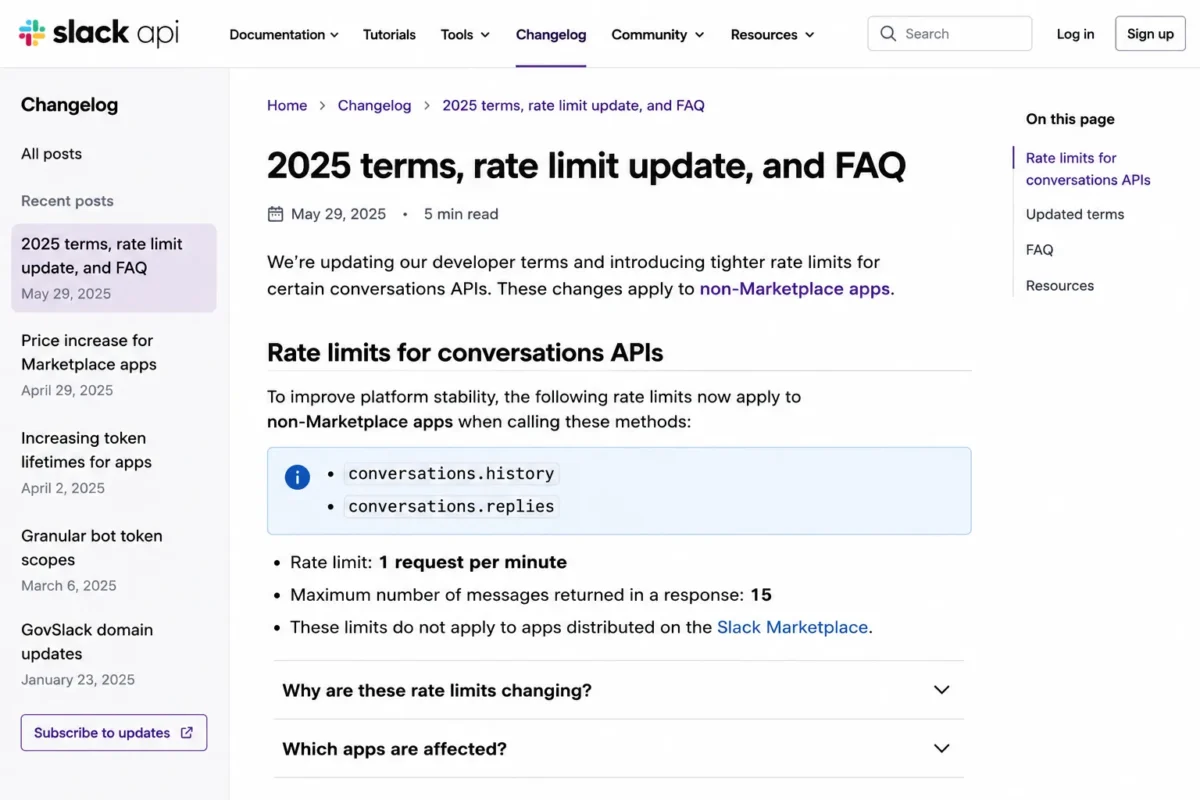
Slack limits affected commercial non-Marketplace apps to one request per minute and a maximum of 15 objects per request for selected Conversations API methods.
Annual vs Monthly: The Real Savings Math
Slack’s annual discount is real, consistent, and worth taking.
| Plan | Annual-rate price | Monthly-billed price | Monthly premium | Effective annual discount |
|---|---|---|---|---|
| Pro | $7.25 per active user | $8.75 per active user | +1.50 dollars per user per month | about 17% |
| Business+ | $15.00 per active user | $18.00 per active user | +3.00 dollars per user per month | about 17% |
Both list rates come from Slack’s Business+ plan page and the Pro page cited earlier; the premium and discount columns are arithmetic on those two figures.
Applied to a real team, the premium for staying flexible adds up fast. A 50-person Business+ workspace pays 1,800 dollars more per year on monthly billing, and a 100-person one pays 3,600 dollars more.
There is one reason to accept that premium. If you are inside the first 90 days of rollout and adoption is genuinely uncertain, monthly billing is cheap insurance against a 12-month commitment to a tool nobody opened.
One warning on promotions. Slack’s live pricing page shows 50% off for three months for teams that upgrade shortly after creating a workspace, on monthly Pro and Business+ billing, and a promotional acquisition price is not a renewal price.
Build your budget from the standard list rate. Then check the checkout screen and the renewal terms before you sign anything.
Add-Ons, Overages, and Surprise Costs
These are the Slack pricing items that never appear on a plan card, ranked by how much each one moves a real invoice.
| Rank | Cost | Trigger | Impact on the bill |
|---|---|---|---|
| 1 | Multi-channel guests | An external collaborator needs more than one channel | Full member rate: 87 dollars per year each on Pro annual, 180 dollars on Business+ annual |
| 2 | Compliance-driven Enterprise+ upgrade | DLP, audit logs, legal holds, HIPAA support, EMM, or enterprise search becomes mandatory | A custom quote replaces the public rate entirely |
| 3 | Third-party app subscriptions | CRM, support, analytics, archive, or workflow vendors | Billed by that vendor, not by Slack; often larger than the Pro-to-Business+ gap |
| 4 | Monthly billing premium | Choosing monthly over annual | +1.50 dollars (Pro) or +3.00 dollars (Business+) per user per month |
| 5 | Slackbot usage past the weekly cap | A Business+ team exhausts 15 messages per user per week | Flex Credits at the published credit rates, on top of the seat cost |
| 6 | Slack Atlas | Enhanced profiles and organizational directory on eligible Business+ | Custom quote; Slack does not publish a price |
| 7 | Enterprise Key Management | Customer-controlled encryption keys on an eligible enterprise plan | Custom quote; Slack does not publish a price |
| 8 | Slack Connect counterpart plan | Shared channels with an external organization | The other organization may need its own paid Slack plan |
| 9 | Mid-cycle active members | An invited user accepts and becomes active | Prorated charge for the remainder of the term |
| 10 | Invoice remittance fee | Qualifying for and using invoice payment | Slack discloses a fee; the amount is not published |
Seat rates in this table are the published Pro and Business+ annual prices; the add-on rows carry no public price and are marked as such.
Three of these have no public number at all. Enterprise Key Management, Slack Atlas and Flex Credits pricing are add-ons rather than included features, and any enterprise TCO that ignores them is fiction.
“Unlimited integrations” is a Slack entitlement, not a software budget. The connected vendors bill you separately, and the connected app stack can easily cost more than the Slack subscription itself.
Real Cost Scenarios: 5, 10, 25, 50, and 100 Users
Every figure assumes all listed people are active paid members for the full year, at standard US list rates, before tax, promotions, negotiated discounts, third-party apps, and custom add-ons.
| Active members | Plan I would buy | Annual billing, per year | Monthly billing, per year | Saved by paying annually | The constraint that decides it |
|---|---|---|---|---|---|
| 5 | Pro | 435 dollars | 525 dollars | 90 dollars | Well below any invoice threshold; pay by card |
| 10 | Pro | 870 dollars | 1,050 dollars | 180 dollars | Up to 50 free single-channel guests available |
| 25 | Pro | 2,175 dollars | 2,625 dollars | 450 dollars | Business+ would cost 4,500 dollars; only buy it for SAML |
| 50 | Pro, or Business+ if SAML is mandatory | 4,350 dollars or 9,000 dollars | 5,250 dollars or 10,800 dollars | 900 dollars or 1,800 dollars | Identity policy, not headcount |
| 100 | Business+ as the public-price baseline | 18,000 dollars | 21,600 dollars | 3,600 dollars | Enterprise+ only if a named control is missing |
Slack Business+ costs 93 dollars more per active user per year than Pro, creating a 9,300 dollars annual difference for a 100-member team.
The 25-person row is the one I would frame and hang on the wall. Pro costs 2,175 dollars and Business+ costs 4,500 dollars, so the AI demo has to be worth 2,325 dollars a year before it wins the argument.
At 100 people, Business+ at 18,000 dollars is the last number Slack will publish. Anything past that is a negotiation, and you should walk into it with a control requirement rather than a headcount.
Which Slack Plan Should You Choose?
Solo consultants and 2-to-4 person studios: Pro. There is no three-seat minimum, so buy the seats you have. At 87 dollars per person per year, Pro removes the 90-day history limit that makes Free unusable for client work.
5-to-25 person operating teams: Pro. This is the plan Slack is priced for, and almost nothing in Business+ changes a 15-person team’s daily work. Spend the difference on the integrations your team opens every day.
Agencies and client-service teams: Pro, with a guest-role plan written down first. Single-channel guests are free within the five-per-paid-member allowance, and multi-channel guests are not. Decide the channel structure before you send the first client invite.
Teams with an identity provider and a compliance owner: Business+. SAML, SCIM, data residency, and broader export scope all sit at the same gate, and buying them separately is not an option. Confirm the Salesforce-connected SAML exception does not already cover you.
Regulated and multi-workspace organizations: Enterprise+. Enter that conversation with a written list of the controls Business+ cannot provide, and ask for the price of keeping them at renewal.
Nonprofits and schools: check eligibility before you do any of the above. The discounts are large enough to change the answer entirely.
Which Slack Plan Should You Avoid?
Avoid Free for any team where the message record is the record. The 90-day visibility limit hides your history, and the one-year rule deletes it. A design agency that loses the thread where a client approved a scope change has lost something worth more than 435 dollars a year.
Avoid Business+ when AI is the only line on the business case. Slackbot is capped at 15 messages per user per week, and a 50-person team that upgrades for AI is paying 4,650 dollars a year for an allowance a heavy user can exhaust in a single day.
Avoid Enterprise+ when the only argument is headcount. A custom sales process with no named control requirement produces a quote you cannot evaluate and a renewal you cannot defend.
The exception on Free is real, though. A 4-person team in month one, still deciding whether channels beat group chat, should not pay Slack anything yet.
Who Should Not Buy Slack at All
Per-active-member pricing scales beautifully for employee teams and badly for everyone else.
Large open communities. A 3,000-member community where participation is intermittent is exactly the shape that per-active-member billing punishes. Community operators keep asking about this on public forums, and the pricing model has no answer that makes it affordable.
Passive-reader networks. If most participants read and rarely post, you are paying full member rates for an audience, not a team.
Slack does not publish a read-only seat option, so there is no cheap tier to demote those people into.
Long-running projects with many occasional participants. Contractors who touch the workspace once a month still count as active members in the months they show up. The bill tracks activity, not value delivered.
Teams already paying for Microsoft 365. If Microsoft Teams is already bundled and adoption is fine, adding Slack means paying twice for the same job.
That is a duplicate-tooling argument rather than a pricing one, and finance usually wins it at renewal.
Slack Pricing vs Competitors
Prices below are standard US list rates checked on each vendor’s official pricing page on September 5, 2026. This is not a like-for-like table, and the warning matters more than the numbers.
| Product, entry paid plan | List price per user per month | 10-user annual cost | What the price also covers | Best for |
|---|---|---|---|---|
| Slack Pro | $7.25 annual / $8.75 monthly | 870 dollars | Channels, full history, unlimited apps, Slack Connect | Teams that live in channels |
| Microsoft Teams Essentials | 4.00 dollars, paid yearly | 480 dollars | Chat and meetings only | Cheapest managed chat and meetings |
| Microsoft 365 Business Basic | 7.00 dollars, paid yearly | 840 dollars | Teams plus the Microsoft 365 Business Basic bundle | Organizations already inside Microsoft |
| Google Workspace Business Starter | 7.00 dollars, annual commitment | 840 dollars | Gmail, Meet, Drive, and Docs | Google-native teams |
| Asana Starter | 10.99 dollars annual / 13.49 dollars monthly | 1,318.80 dollars | Task and project management, not messaging | Work management, not chat |
| Zoom Workplace Pro | From 14.16 dollars | about 1,699 dollars at the starting rate | A meetings-first suite that includes chat | Meeting-heavy organizations |
Source: each vendor’s own official pricing page, checked September 5, 2026. The Slack row comes from the Slack Pro plan page, and each competitor is linked from its subsection below.
The headline finding is uncomfortable for Slack. Microsoft 365 Business Basic costs 840 dollars a year for 10 people and Slack Pro costs 870 dollars, and the Microsoft price includes an entire productivity bundle while Slack’s includes messaging.
That does not make Slack overpriced. It makes Slack a specialist purchase you justify on adoption, integration depth, and how much of the work happens in channels rather than email.
Microsoft Teams and Microsoft 365
Microsoft Teams Essentials at 4 dollars per user per month paid yearly is the cheapest line in this table, at 480 dollars a year for 10 people.
That is 45% below the Slack Pro rate, for chat and meetings only.
The sharper comparison is Microsoft 365 Business Basic at 7 dollars per user per month paid yearly. At 840 dollars a year for 10 people it undercuts Slack Pro while carrying Teams inside a bundle many buyers already pay for.
The switching question is rarely about features. It is about whether your team will move its daily conversation into a tool the company bought for email.
Slack has to win on channel adoption, integration depth, and Slack Connect, because it will not win on price. Microsoft publishes both rates on its Teams plan comparison, and the Microsoft Teams review sets out where the bundled option is good enough and where it breaks.
Google Workspace
Google Workspace Business Starter lists at 7 dollars per user per month on an annual commitment, or 840 dollars a year for 10 people. Google was also running a new-customer discount on that plan at the time of this check, so confirm the renewal rate rather than the acquisition rate.
For a Google-native team, chat already arrives inside a suite bought for mail, meetings, and files. Slack then has to justify 870 dollars a year on top of that.
It clears that bar when work genuinely lives in channels. It does not clear it when Slack is a second inbox people check out of guilt.
The honest test is whether the team would notice if Slack went dark for a week. If the answer is no, the bundled chat layer is already enough.
Google lists the tier on its Workspace plan pricing, and the Google Workspace review covers how far that layer carries a 10-person team before it starts to hurt.
Zoom Workplace
Zoom Workplace Pro starts at 14.16 dollars per user per month, which is about 1,699 dollars a year for 10 people at the starting rate.
That is nearly double the Slack Pro rate.
Zoom is meetings-first with chat attached, and Slack is chat-first with huddles attached. A team whose day is built around scheduled calls will get more from Zoom than from a second messaging bill.
The overlap between them is real but shallow. Slack huddles do not replace a webinar platform, and Zoom Team Chat does not replace channel-based operations at 50 people.
Plenty of organizations end up running both, and the budget should assume that rather than hope for consolidation. Zoom publishes the tier on its Workplace plan pricing, and the Zoom Workplace review covers where its chat layer holds up and where it does not.
Asana
Asana Starter costs 10.99 dollars per user per month billed annually or 13.49 dollars billed monthly, which is 1,318.80 dollars a year for 10 people. That is the second most expensive row in this table, for a product that does a different job.
Asana is work management. It tracks tasks, owners, and due dates, and it does not carry the conversation layer Slack owns.
Teams that run both are buying two tools, not choosing between them. A 25-person team paying for both subscriptions is at 5,472 dollars a year before a single other app is added.
The failure mode I see most often is a team buying a project tool as a chat replacement, then wondering why nobody posts in it. Asana publishes the tier on its plan pricing page, and the Asana review is the place to check that boundary before you commit.
If the real problem is invisible work rather than scattered conversation, a cheaper Slack plan will not fix it. Downgrading Slack to Free to fund Asana is the worst of both outcomes, because you lose the history and the work is still not legible.
A 10-person agency paying for both entry plans spends 2,188.80 dollars a year for the pair. That is a defensible number, and it is easier to defend when each tool owns a distinct job.
Budget for both, or pick the one that solves the problem in front of you. The Asana pricing tiers show what the work-management side costs before you commit to two subscriptions.
Slack Discounts for Nonprofits and Education
These two programs are ignored by nearly every pricing guide, and they can reverse the entire recommendation.
Qualified nonprofits can receive Pro free for workspaces of 250 or fewer members, an 85% discount on Pro above that size, and an 85% discount on Business+ at any size, under Slack’s nonprofit discount terms. A 200-person nonprofit that would otherwise budget 17,400 dollars a year for Pro may pay nothing.
Qualified educational organizations can receive an 85% discount on Pro or Business+ under Slack’s education discount terms. At 85% off the Business+ annual rate, that tier works out to about 2.25 dollars per active user per month, which is well under the standard Pro price and changes which tier is rational.
Eligibility is not automatic and Slack reviews applications. Verify your status before you build a budget around it, because the gap between list price and discounted price is too large to guess at.
What Changed in Slack Pricing, and What Is Still Wrong Online
Slack restructured plans and AI packaging in 2025, which is why so many current-looking pricing pages are quietly wrong. Four corrections are worth making explicitly.
Pro annual is $7.25, not $8.75. The official Slack Pro pricing page shows $7.25 on annual billing and $8.75 on monthly billing.
Several pages, including an earlier version of this one, printed the Pro monthly rate of $8.75 in the annual column.
Enterprise+ has no published price. A 45 dollars per-user figure circulating in procurement content is not a Slack list price, and Slack routes Enterprise+ to sales.
Free data is not deleted at day 90. It becomes inaccessible at day 90 and is permanently deleted after one year, which are different problems with different remedies.
The standalone Slack AI add-on is no longer sold for new website purchases. Advanced AI is packaged into Business+ and Enterprise+, and legacy add-on arrangements transition at renewal.
If a pricing page you are reading still contains any of those four errors, the rest of its math is downstream of a wrong number. That is also why every figure in this guide carries a checked date rather than an undated freshness claim.
Is Slack Worth the Price?
Worth it if your team already routes work through channels, your integration stack is deep, and searchable history is part of how decisions get made. At 87 dollars per active user per year, Pro is cheap against a single rehashed decision.
The product case, as opposed to the price case, is set out in the Slack review.
Worth it if you collaborate with clients or partners and can structure most of them as single-channel guests. The free guest allowance is the strongest cost lever in Slack’s pricing model, and it is easy to lose by defaulting new external people to multi-channel access.
Not worth it if Microsoft 365 or Google Workspace is already paid for, adoption of the bundled chat tool is acceptable, and nobody is complaining. Paying 870 dollars a year for 10 people to duplicate a tool you already own is a hard sell at renewal.
Compare the suite tiers against the standalone bill before you argue for Slack. The Google Workspace pricing guide shows what each Business plan already covers.
Not worth it if your workspace is a community rather than a team. Per-active-member pricing was not built for audiences.
The Buyer Risk Ledger
| Risk | Buyer consequence | Mitigation |
|---|---|---|
| Guest-role sprawl | Multi-channel guests silently become full-price seats | Default every external person to single-channel; require approval to widen |
| Dormant accounts | You pay for members who left, until someone deactivates them | Tie offboarding to Slack deactivation and claim the inactivity credit |
| AI-led upgrade | Business+ bought for Slackbot, capped at 15 messages per user per week | Justify Business+ on SAML, SCIM, residency, or exports, never on AI alone |
| Export assumption | Legal expects private-channel export at Business+ checkout | Confirm the application and approval path before signing |
| API backfill failure | Archive or analytics tool cannot pull history fast enough | Check whether the vendor app is in the Slack Marketplace before you buy it |
| Promotional pricing | The rate you sign at is not the rate you renew at | Budget from list price; confirm renewal terms in writing |
The 30/90-Day Adoption Test
At 30 days, channel count should be growing slower than message volume. If people are creating channels faster than they are talking in them, you bought a filing cabinet.
At 90 days, three things must be true. Search is where people look first, at least two integrations are used daily, and nobody has asked to move a recurring decision back to email.
If those are not true by day 90, cancel before the Free plan’s one-year deletion clock removes the option to leave cleanly.
The Renewal Question
Before you renew, answer one thing: how many billable members opened Slack in the last 30 days? If the answer is under 70% of your paid count, you are not renewing a tool, you are renewing a habit.
How to Avoid Overpaying for Slack
Each tip below attacks a specific line on the invoice rather than the headline Slack pricing number.
Pay annually. The premium for monthly billing is 1.50 dollars per user per month on Pro and 3.00 dollars on Business+, which is roughly a 17% surcharge for flexibility you probably will not use after day 90.
Default external people to single-channel guest. Every paid member buys five free single-channel guests. A 10-person team has room for 50 of them at no cost, and one careless multi-channel invite costs 87 dollars a year.
Deactivate leavers on their last day. Slack bills active members and can credit the account when a paid member goes inactive, so offboarding discipline is a direct line-item saving.
Do not buy Business+ for AI. The Slackbot cap of 15 messages per user per week is the whole answer to that business case, and going past it means buying credits.
Test the SAML exception before you upgrade. If your workspace is connected to Salesforce, ask Slack directly whether the documented Free or Pro exception applies to you. That question is worth 93 dollars per user per year.
Check nonprofit and education eligibility first. Under Slack’s nonprofit programme terms, qualified nonprofits can get Pro free up to 250 members, and qualified schools can get 85% off, which makes every other tip on this list irrelevant.
Budget the app stack, not just the seats. Unlimited integrations means unlimited installs, not free software, and the connected vendors bill you separately.
Verify the renewal price, not the promo price. Any introductory discount on the pricing page is an acquisition rate. Ask what year two costs before you commit to year one.
FAQ
The questions below are the ones that decide a Slack budget. The per user rates in the answers, annual and monthly alike, come from Slack’s published plan rates, and the limits come from the help documentation cited throughout this guide.
How much does Slack cost per month?
Slack Pro costs $7.25 per active user per month when billed annually, or $8.75 when billed monthly. Business+ costs $15 annually or $18 monthly per active user. Free is 0 dollars, and Enterprise+ is a custom quote with no published US list price. All prices were checked on Slack’s official pricing pages on September 5, 2026.
Is Slack free for business use?
Yes, but with limits that break most real businesses. The Free plan gives you 90 days of accessible message and file history, 10 app integrations, and one-to-one huddles only. Data older than one year is permanently deleted. Free works as an adoption test, not as the system of record for client work or decisions.
Does Slack charge for inactive users?
No. Under the Fair Billing Policy, Slack bills active members rather than purchased seats, and it can issue a prorated credit toward future charges when a paid member becomes inactive. New members start generating charges once they accept the invitation and become active. If everyone goes inactive, the billing floor is the equivalent of one paid member.
Does Slack charge for guest accounts?
It depends entirely on the guest type. A multi-channel guest is billed at the regular active-member rate, which is 87 dollars per year on Pro annual billing. A single-channel guest is free, up to five single-channel guests for every paid active member. A 10-person Pro workspace can host 50 single-channel guests at no extra cost.
Which Slack plan includes SSO?
Standard SAML single sign-on sits on Business+ and Enterprise+, alongside SCIM provisioning. Slack documents an exception that can extend SAML to qualifying Free or Pro workspaces connected to Salesforce. Google authentication and Google SAML are separate configurations, so confirm which one your identity policy requires before you upgrade for it.
How long does Slack keep messages on the Free plan?
Two different limits apply, and they are often confused. Message and file history stays accessible for 90 days, after which it is hidden from search and scrollback. Data older than one year is permanently deleted under the current Free plan policy. Upgrading can restore hidden history, but nothing restores data that has already passed the one-year deletion point.
Is Slack AI included in the subscription price?
Yes, in the current packaging, and the allowance is where the difference sits. Pro carries summaries and huddle notes; the advanced set arrives with Business+, capped at 15 Slackbot messages per user each week; Enterprise+ carries no weekly cap and is the only tier with enterprise search. The standalone add-on is no longer sold for new website purchases.
How much is Slack Enterprise+?
Slack does not publish a US list price for Enterprise+. The plan routes to sales, and pricing depends on seats, term, and contract scope. Third-party estimates circulating online, including a 45 dollars per-user figure, are not Slack list prices. Ask for a written quote that names the included controls, allowances, support terms, and renewal conditions.
Does Slack have a minimum number of users?
No general three-seat self-service minimum applies. Slack’s Fair Billing documentation describes a floor equivalent to one paid member. The three-active-member rule that appears in other guides is one condition for paying by invoice rather than card, alongside annual billing and a minimum invoice equivalent to 5,000 dollars.
Is Slack cheaper than Microsoft Teams?
No. Microsoft Teams Essentials is 4 dollars per user per month paid yearly, and Microsoft 365 Business Basic with Teams is 7 dollars.
Slack Pro is $7.25 on annual billing. For 10 people that is 480 dollars, 840 dollars, and 870 dollars per year respectively.
Slack is a specialist purchase, and it wins on channel adoption and integration depth, not on price.
Final Verdict
Buy Slack Pro on annual billing if you are a 5-to-100 person operating team, and treat the Pro annual rate as the real Slack pricing baseline. Move to Business+ only when SAML, SCIM, data residency, conditional workflows, or private-channel exports become requirements someone has written down.
Do not buy Slack for a community, do not buy Business+ for Slackbot, and do not enter an Enterprise+ sales process without a named control requirement.
If channels are not where your work happens, no Slack tier will fix that, and a project management platform is the better place to spend the budget.
Run your own numbers through the seat calculator above before the renewal conversation. The gap between headcount and billable seats is where the argument gets won.
Prices verified against Slack’s official US pricing and help documentation on September 5, 2026, by Macedona. Promotional terms re-verified on the publish date: 2026-09-05. Slack can change prices, promotions, and AI allowances at any time, so confirm the rate at checkout before you commit.