Confluence is worth buying if your product, engineering, IT, or operations team already runs work in Jira and needs documentation that survives staff turnover. It is the wrong purchase for a ten-person team that wants quick notes with no taxonomy, no permissions work, and no admin owner.
This Confluence review is built on Atlassian’s live pricing page, current Cloud documentation, developer docs, Trust Center material, and verified reviewer patterns from G2, Capterra, and TrustRadius. Pricing was checked on July 11, 2026, when Atlassian displayed $0 for Free, $5.42 per user per month for Standard, and $10.44 per user per month for Premium, with Enterprise sold annually through sales.
The number on the pricing card is not the number that lands on your invoice. Seats, billing term, Marketplace apps, and Atlassian Guard all move it, and the plan you need is decided by a limit nobody advertises.
In This Article (20 sections)
Quick Verdict
| Category | Verdict |
|---|---|
| Best for | 10-200 person product, engineering, and IT teams already using Jira for delivery work |
| Not ideal for | Small non-Atlassian teams that want lightweight notes without permissions or admin ownership |
| Starting price | $0 (Free, up to 10 users); Standard displayed at $5.42 per user per month on July 11, 2026 |
| Best practical plan | Standard for most teams under 50 users; Premium once automation, storage, or 24/7 support becomes real |
| Free plan / trial | Free plan exists; trial length depends on your current plan and billing state |
| Setup difficulty | Medium to high, because spaces, permissions, templates, and naming standards need an owner |
| Main strength | Structured, permissioned documentation wired directly into Jira delivery work |
| Main limitation | Search and navigation quality collapse without content governance, per recurring reviewer complaints |
| Best alternative | Notion for lighter documentation, Guru for verified knowledge delivery, SharePoint for Microsoft-first governance |
Confluence is one of the few documentation tools where the purchase decision is mostly a governance decision. That is the lens this review uses, so the sections below follow the buying risk rather than the feature list.
If you are still building a shortlist, our roundup of knowledge base software covers the wider category.
How We Built This Confluence Review
Testing level for this Confluence review is third-party validated. No Confluence workspace was provisioned for this article, so nothing here is presented as a hands-on usability test.
Product facts come from Atlassian’s official product page, pricing page, Cloud plan documentation, licensing pages, support articles, developer documentation, Trust Center resources, and Marketplace documentation. Sentiment claims come from verified-reviewer patterns on G2, Capterra, and TrustRadius reviewer feedback, and they are labeled as reviewer patterns, never as our own measurements.
Pricing, plan gates, automation quotas, storage rules, and API limits were checked on July 11, 2026. Atlassian uses dynamic pricing, so the totals you see at checkout can differ from any figure published here.
Two official contradictions surfaced during research, and this review preserves them instead of picking a convenient answer: trial duration and maximum supported user count. Both are covered later, with the safe wording a buyer should use with a vendor rep.
The limitation of a documentation-based review is real. Interface speed, onboarding friction, and search relevance cannot be measured from official pages, so those subjects are handled through reviewer patterns and plan evidence, not invented test results.
What Confluence Is
Confluence is Atlassian’s workspace for creating, organizing, and governing company knowledge. Teams build spaces, then fill them with pages, folders, whiteboards, databases, and Live Docs.
The product sits next to Jira rather than replacing it. Jira tracks the work, Confluence holds the requirements, decisions, runbooks, onboarding material, and meeting records behind the work.
That distinction matters for buyers who arrive from a project-management search. Confluence is not a task-management replacement, and treating it like one is the fastest way to end up with a wiki full of abandoned checklists.
Day 1: What Confluence Setup Requires
Creating your first Confluence page takes minutes. Creating a workspace that still works in year two takes an owner, a naming standard, a template set, and a permission model.
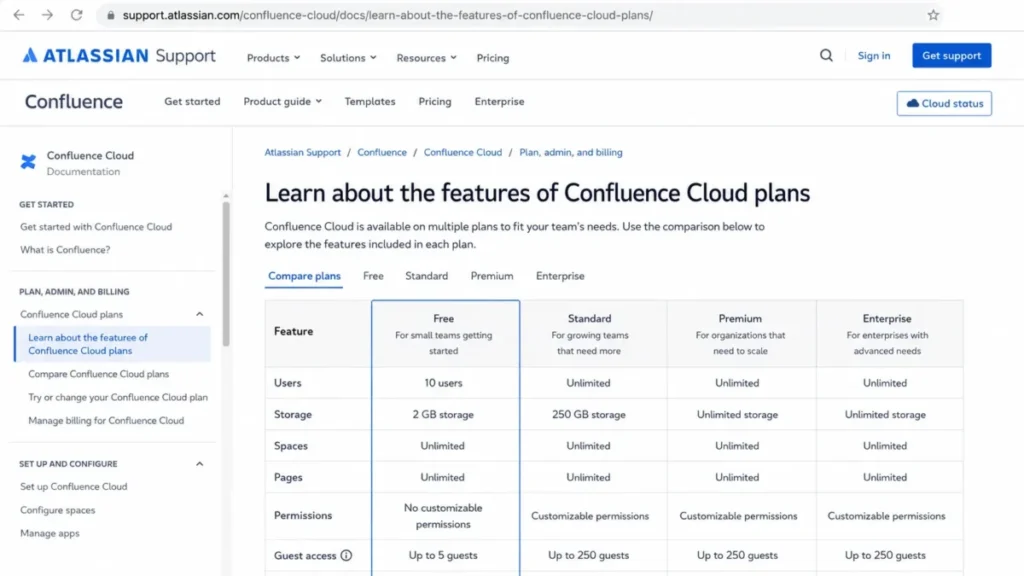
Free is the obvious starting point, and it is where the first hard limit appears. Free supports up to 10 users and 2 GB of storage, with Community support only.
Where the Free plan stops working
Free does not allow customizable space or content permissions. Everyone with access can view, add, and edit content, which is fine for a five-person startup wiki and unacceptable for HR files, client material, or salary bands.
That is the real upgrade trigger, and it has nothing to do with seat count. A team of six storing contractor agreements or board material has already outgrown Free.
Free sites can also be deactivated for inactivity under Atlassian’s plan terms. A dormant knowledge base is not a safe archive.
What changes at user 11
Adding the eleventh user is not a seat event. It is a governance event, and every one of these changes lands at once.
| Dimension | Free (up to 10 users) | Standard (from user 11) |
|---|---|---|
| Billing | $0 | Per-user charge, displayed at $5.42 per user per month on July 11, 2026 |
| Permissions | No customizable space or content permissions | Space and page restrictions available |
| Storage | 2 GB | 250 GB |
| Support | Community only | Regional business-hours support |
| Guests | Not available | Up to 5 free guests per paid user |
| Automation | 10 executions per month | 100 executions per month, site-wide |
Teams that plan for the seat cost and forget the permission model are the ones that end up rebuilding their space structure six months later. Budget the admin hours, not only the license.
Week 1: The Workflows Confluence Handles Well
Once permissions exist, Confluence starts to earn its price through structure. The content model is broader than it was two years ago, and picking the wrong content type is a common early mistake.
Pages, Live Docs, whiteboards, and databases
Pages are structured, published content with version history. Live Docs update in real time without a publish step, which suits drafts, meeting notes, and evolving working documents.
| Content type | Use it for | Avoid it for |
|---|---|---|
| Page | Specs, runbooks, policies, decision records | Fast-moving drafts nobody wants to publish |
| Live Doc | Meeting notes, active collaboration, working drafts | Content that must be treated as an approved reference |
| Whiteboard | Ideation, planning sessions, Jira-connected mapping | Long-form documentation |
| Blog post | Announcements and timely internal news | Evergreen reference material |
| Database | Structured records and lists | Narrative documentation |
The practical rule is simple: if a document will be cited later as the source of truth, it should be a page with version history. Everything else can live as a Live Doc until it stabilizes.
Jira-linked documentation
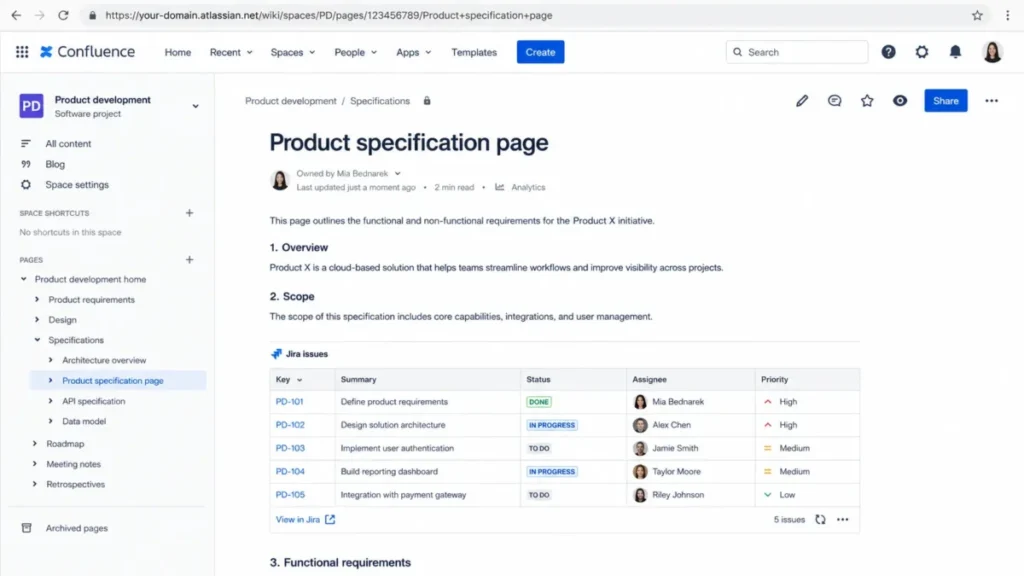
Jira integration is the strength verified reviewers name most often, and it is the reason to pick Confluence over a lighter wiki. Official documentation supports displaying Jira work items inside pages and creating work items directly from Confluence content.
In practice this means a product spec can carry live delivery status, and a retrospective can spawn tickets without leaving the page. If your team already runs Jira for delivery work, that loop is worth real money.
Strip Jira out of the picture and the calculus changes. A marketing or operations team with no Atlassian footprint gets a heavier tool, more administration, and a weaker payoff.
Rovo AI search, chat, and writing
Rovo is Atlassian’s AI layer for search, summarization, writing help, and agents, and it is available from Standard upward. It respects existing Confluence permissions, so it does not surface content a user could not otherwise open.
The compliance caveat is significant and appears later in this review. Healthcare buyers should read the security section before enabling anything AI-related.
Guest access and external collaboration
Paid plans allow up to five free guests per paid user, which reads like a strong deal for agencies and client-facing teams. The restriction is the part competitors skip: each guest can access only one space.
A client portal built as a single space fits the guest model well. A consultant who needs three project spaces does not, and that person becomes a paid seat.
Model your external collaborators before you sign. Agencies with cross-project contractors should assume paid seats, not free guests.
Month 1: What Breaks First in Confluence
Every documentation tool degrades under growth. Confluence degrades in four specific places, and three of them are quotas rather than opinions.
Automation quotas run out faster than teams expect
Built-in automation is plan-gated by monthly execution count, and the numbers are far apart. Atlassian’s Confluence automation usage documentation sets the limits below.
| Plan | Monthly automation executions | Scope |
|---|---|---|
| Free | 10 | Whole site |
| Standard | 100 | Whole site |
| Premium | 1,000 per user | Pooled across the site |
| Enterprise | Unlimited | Whole site |
Standard’s 100 executions are shared by the entire site, not granted per user. A single content-review rule that fires on page updates can exhaust the allowance in a busy week, and rules stop until the monthly reset.
That gap is one of the clearest upgrade triggers in the product. If content maintenance is automated, Premium is not a luxury.
Storage limits can stop people from writing
Storage is 2 GB on Free, 250 GB on Standard, and unlimited on Premium and Enterprise. The consequence of an overage is the part competitors omit: Atlassian’s storage management documentation states that unresolved overage can block creating or editing pages, spaces, whiteboards, and other content.
Archiving does not rescue you either. Archived content keeps its attachments for historical access, so reclaiming space requires deletion, not archiving.
Video-heavy and design-heavy teams should treat 250 GB as a real ceiling, not a formality.
Whiteboards can force an upgrade before storage does
Free and Standard limit active whiteboards to three per user, while Premium and Enterprise remove the ceiling. A workshop-heavy product team can hit that limit in a single quarter of discovery sessions.
That is a workflow limit, not a capacity limit, and it surprises teams that budgeted only for seats.
Search and structure decay without an owner
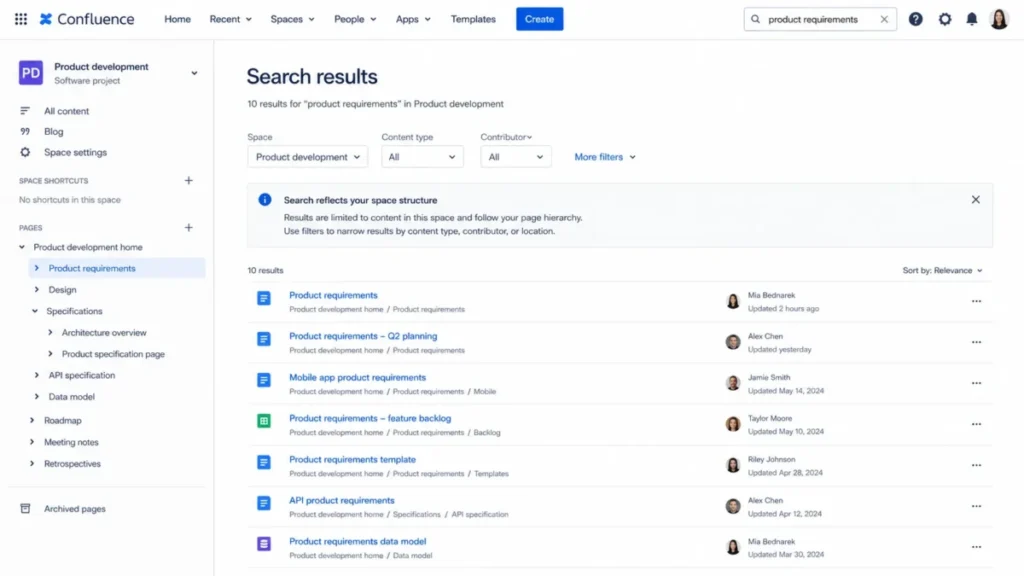
Reviewer patterns on TrustRadius repeatedly describe search, hierarchy, and navigation problems as workspaces grow. The same reviewers also describe the cause: no naming convention, no template baseline, no page owner, and no review dates.
Confluence does not enforce information architecture for you. It gives you the tools and then bills you for the sprawl.
If nobody owns the space design, the search complaints in year two are already scheduled.
Mobile is for reading, not for building
The iOS and Android apps handle notifications, reading, comments, and basic editing. Only a subset of macros is fully supported, and adding or editing most macros still requires the web editor.
Field teams can consume and comment on documentation from a phone. They cannot maintain complex pages there.
Confluence Feature Gates by Plan
| Feature | Free | Standard | Premium | Enterprise |
|---|---|---|---|---|
| Users | Up to 10 | Large deployments (see scale caveat) | Large deployments | Multi-instance, up to 150 app instances |
| Storage | 2 GB | 250 GB | Unlimited | Unlimited |
| Customizable permissions | No | Yes | Yes | Yes |
| Guests | No | 5 free guests per paid user, 1 space each | Same | Same |
| Automation | 10 per month | 100 per month | 1,000 per user, pooled | Unlimited |
| Active whiteboards | 3 per user | 3 per user | Unlimited | Unlimited |
| Rovo AI | Not included | Included | Included, higher quotas at Enterprise | Included, higher quotas |
| Advanced admin and analytics | No | No | Yes | Yes, plus Atlassian Analytics and Data Lake |
| Atlassian Guard Standard | No | Paid add-on | Paid add-on | Included |
| Support | Community | Regional business hours | 24/7 for critical issues | 24/7 for all issues |
| Uptime SLA | None | None | 99.9% | 99.95% |
Permissions, automation, and support are the gates I would use to pick a plan, in that order. Storage rarely decides anything until a team starts attaching video.
Confluence Pricing and the Math Nobody Shows You
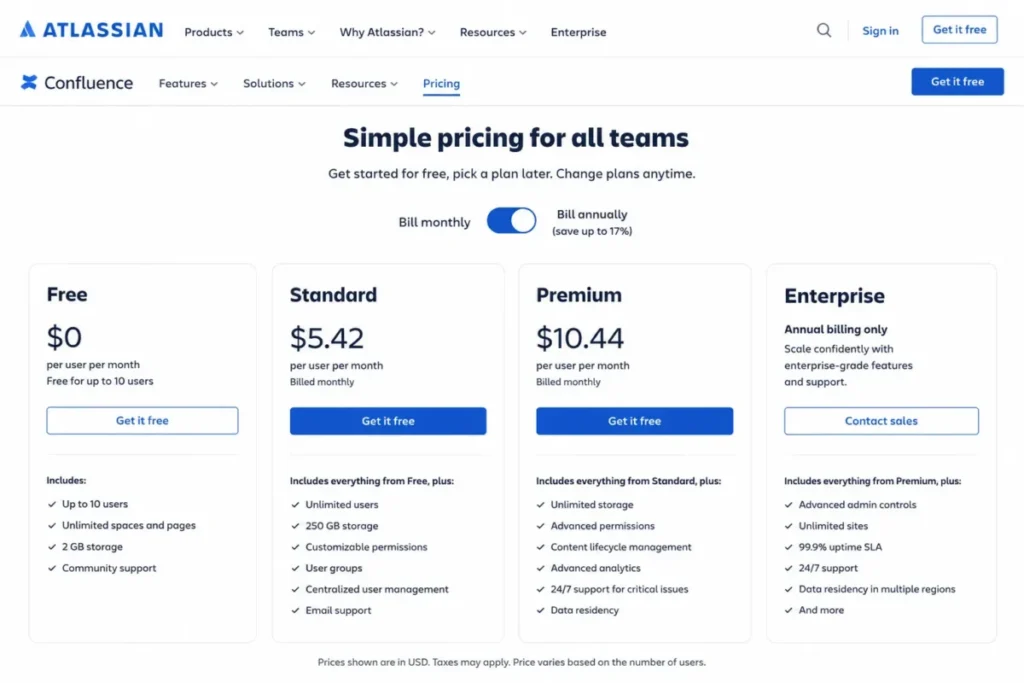
Atlassian’s official Confluence pricing page displayed the rates below when checked on July 11, 2026. Enterprise is annual and sales-led, so no public rate exists.
| Plan | Displayed price (July 11, 2026) | Best for | Key limits | Worth it? |
|---|---|---|---|---|
| Free | $0 | Testing, tiny teams, non-sensitive content | 10 users, 2 GB, no custom permissions | Good only until access control matters |
| Standard | $5.42 per user per month | Most 11-50 person teams | 250 GB, 100 automations, business-hours support | The practical starting plan |
| Premium | $10.44 per user per month | Automation-heavy or uptime-sensitive teams | Higher cost, still no Guard included | Worth it at the automation or support trigger |
| Enterprise | Custom, annual | Multi-instance governance, regulated data boundaries | Sales-led, contract-specific | Only for multi-site or identity-driven needs |
The displayed rate is a unit price, not an invoice. Atlassian uses progressive monthly pricing and annual user tiers, and it directs buyers to its own calculator for a real total.
Cost at 10, 50, 100, and 200 users
The table below multiplies the displayed list rates by seat count, and the annual column multiplies the displayed monthly rate by twelve. Atlassian’s annual billing uses its own user tiers, so treat every figure here as a planning estimate and confirm the real total in Atlassian’s calculator with your seat count, billing term, and taxes.
| Seats | Standard estimate per month | Premium estimate per month | Standard estimate per year |
|---|---|---|---|
| 10 | $54 | $104 | $650 |
| 50 | $271 | $522 | $3,252 |
| 100 | $542 | $1,044 | $6,504 |
| 200 | $1,084 | $2,088 | $13,008 |
The gap between Standard and Premium at 100 users is roughly $6,000 per year at list rates. That is the number to hold against the automation quota, the storage ceiling, and the 24/7 support target when you decide which plan to buy.
The billing trap: Maximum Quantity Billing
Atlassian’s Cloud licensing documentation describes Maximum Quantity Billing on monthly plans. The invoice for a cycle reflects the highest number of seats assigned during that cycle.
Remove five inactive users mid-month and the current bill does not shrink. The freed seats can be reassigned, but the maximum quantity for that period is already set.
Run seat cleanup before the cycle starts, not after finance asks why the bill did not move. Of every cost trap in this review, this is the easiest one to avoid.
Add-ons that quietly change the budget
Two line items sit outside the plan price. Atlassian Guard Standard, which carries the identity controls many buyers assume are included, is a separate subscription on Standard and Premium and is bundled only with Enterprise.
Marketplace apps are the second. Diagrams, forms, advanced reporting, and specialized workflows frequently arrive as separately subscribed third-party apps with their own pricing, permissions, support, and data-retention terms.
Removing an app can also forfeit the remainder of its billing period, and app data is retained only for a limited window after removal. Treat each app as a vendor decision, not a checkbox.
Trials and refunds: the official pages disagree
Atlassian’s pricing copy references a seven-day trial in places, while support and licensing documentation describe 14 days for Standard and 30 days for Premium when upgrading from Free. Publishing one number would be false precision.
Confirm the entitlement shown in your own billing interface before you plan an evaluation calendar. If the evaluation window matters to your process, ask the vendor in writing.
Confluence Security, Support, and Admin Controls
Confluence Cloud sits inside Atlassian’s SOC 2 scope, and Atlassian documents ISO-aligned controls, GDPR commitments, encryption, data residency, and portability. Those are table stakes for most buyers.
The gap that catches people is identity. SSO and SCIM are associated with Atlassian Guard Standard, and Atlassian’s Cloud plan documentation shows Guard included with Enterprise while remaining a separate purchase on Standard and Premium.
Rovo AI carries a hard compliance stop
Atlassian’s AI trust documentation states that Rovo honors existing permissions and supports data residency for in-scope data, and it also states that Rovo is not HIPAA compliant and is not covered by Atlassian’s BAA. That was the position on July 11, 2026.
Confluence Cloud itself is not disqualified for healthcare use by that statement. Rovo is, and a healthcare organization that enables AI features anyway is making a compliance decision, not a product decision.
Ask Atlassian for the current coverage position in writing before any regulated rollout.
Support is a plan decision, not a feature
| Plan | Support level | Critical-issue response target |
|---|---|---|
| Free | Atlassian Community | None |
| Standard | Regional business-hours support | None published |
| Premium | 24/7 support for critical issues | 1 hour |
| Enterprise | 24/7 support for all issues, phone, senior resources | 30 minutes |
A distributed team with on-call engineers depending on runbooks has a support argument for Premium even when every feature on Standard is adequate. Buy the response time, not the feature list.
Scale claims deserve a source check
Atlassian’s own pages conflict on the maximum supported user count, with the pricing page referencing up to 250,000 users and a Standard support page referencing 20,000. Any review that publishes one figure is guessing.
Organizations planning tens of thousands of seats should confirm supported scale directly with Atlassian and get it into the contract. Enterprise exists for exactly this territory: multiple app instances (up to 150), centralized per-user pricing, Guard Standard, Atlassian Analytics, Data Lake, and a 99.95% SLA.
Confluence Integrations, Marketplace, and API Limits
Confluence connects natively to Jira, Trello, Slack, Microsoft Teams, and Loom (whose plans and limits we break down in our Loom review), with Smart Links covering a broader set of URLs. Everything beyond that native set arrives through the Marketplace.
Do not read a Marketplace logo wall as a native integration list. A Marketplace app is a separate vendor relationship with separate cost, separate permission scope, and separate data handling.
The 2026 API quota change matters for anyone syncing content
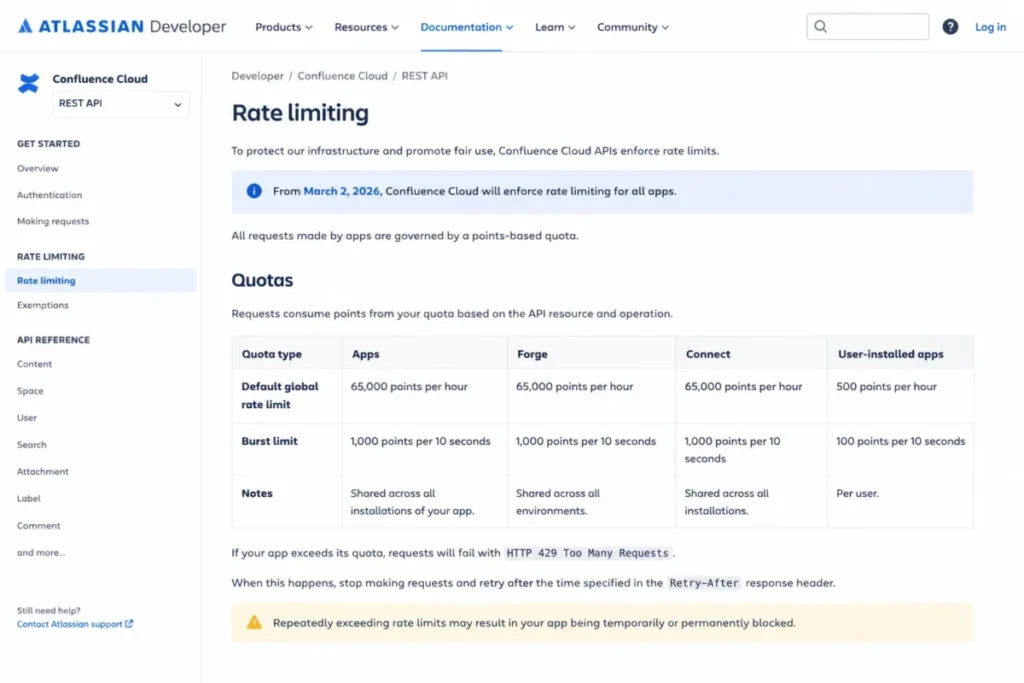
From March 2, 2026, Forge, Connect, and OAuth apps are subject to points-based quota enforcement. The default global pool is 65,000 points per hour, and approved per-tenant pools use edition and user-count formulas capped at 500,000 points per hour on paid editions.
| API constraint | Detail |
|---|---|
| Enforcement start | March 2, 2026 |
| Default global pool | 65,000 points per hour |
| Approved per-tenant cap | Up to 500,000 points per hour on paid editions |
| Over-quota behavior | HTTP 429 responses with retry timing |
| Required design | Pagination, caching, webhooks, request spreading, backoff and jitter |
Anyone planning a high-volume sync, a data-warehouse export, or an external AI indexing job should architect for these quotas from day one. The full formulas sit in Atlassian’s Confluence rate-limiting documentation.
If quota, backoff, and pagination are new territory for your team, start with what an API does before scoping the integration.
Built-in automation runs on its own monthly quota and does not borrow API capacity. The two ceilings are separate, and both can bite the same team.
Confluence Migration, Export, and Switching Costs
Confluence can import from Notion, Miro, Mural, FigJam, Word, Google Docs, and HTML. Import availability is not the same as import fidelity, and this is where switching projects overrun.
| Source | What imports | What you rebuild by hand |
|---|---|---|
| Notion | Content and users | Guest accounts are not imported |
| Miro or Mural | Board objects | Comments and connectors are not supported; colors and rotated elements can shift |
| Word or Google Docs | Document content | Single-file and bulk import limits apply, so large libraries need batching |
| HTML | Page content | Formatting and unsupported objects need review |
Run a pilot import of your ugliest twenty documents before you commit a whole library. If your Miro boards carry decision history in the comments, that history does not travel.
The exit path is healthier than most buyers expect. Confluence exports to Word, PDF, HTML, CSV, and XML, and full site backups are available.
An export option is not a one-click migration into another platform. Test a sample export before signing a multi-year contract, because format fidelity decides your real switching cost.
Teams doing a broader stack move should budget rebuild time for anything the importer drops, not only for the import itself.
Confluence Pros and Cons
| Pros | Cons |
|---|---|
| Jira integration links specs, decisions, and retrospectives directly to delivery work | Free plan has no customizable permissions, so sensitive content forces a paid plan immediately |
| Space and page permissions on paid plans support HR, finance, and client separation | Standard’s 100 monthly automation executions are shared site-wide and exhaust quickly |
| Structured content model (pages, Live Docs, whiteboards, databases) fits both drafts and approved references | Guests are limited to one space each, which breaks multi-project external collaboration |
| Premium adds a 99.9% SLA and 24/7 critical support with a one-hour response target | Storage overage on Free or Standard can block page creation and editing until resolved |
| Rovo AI respects existing permissions and supports data residency for in-scope data | Rovo is not HIPAA compliant and is not covered by Atlassian’s BAA as of July 11, 2026 |
| Marketplace and REST API extend the product well beyond the native feature set | Marketplace apps add separate subscriptions, vendor reviews, and data-retention terms |
The pattern here is consistent: the strengths are structural and the weaknesses are quotas. Quotas are predictable, which means most Confluence disappointments are avoidable at the planning stage.
Confluence Limitations
Access control is a paid feature. Free cannot restrict spaces or pages, which disqualifies it for any team storing confidential material, regardless of headcount.
Automation is rationed on Standard. One hundred site-wide executions per month is a small budget for content-maintenance rules, and hitting the ceiling stops the rules until the reset.
Storage enforcement is a work stoppage, not a warning. Unresolved overage can prevent creating or editing content, and archiving attachments does not necessarily reclaim space.
External collaboration is narrower than it looks. Five free guests per paid user sounds generous until each guest is locked to a single space.
AI has a compliance boundary. Rovo was not HIPAA compliant and was not covered by Atlassian’s BAA on July 11, 2026, so regulated buyers must plan around it.
Governance is your job. Reviewer patterns tie search, hierarchy, formatting, and navigation complaints to missing ownership, naming standards, templates, and review dates, not to a single missing feature.
Who Should Use Confluence
Product and engineering teams of 10 to 200 already running Jira. Requirements, architecture decisions, release notes, and retrospectives gain live delivery context, and that link is the strongest reason to pay for this product over a lighter wiki.
Distributed IT and operations teams that need audited internal documentation. Space permissions, version history, templates, and audit trails cover runbooks, policies, and onboarding material.
Customer-success and agency teams that can isolate each client in one space. The guest model fits this shape exactly, and it keeps external collaborators off the paid seat count.
Enterprises that need multiple instances and centralized identity. Enterprise handles regional or business-unit separation, Guard Standard, cross-product analytics, and a 99.95% SLA in one contract.
Who Should Avoid Confluence
Three-to-ten-person teams with no Atlassian footprint. The administration overhead is real, the payoff is Jira-shaped, and a simpler tool will be adopted faster. A Notion workspace or a lighter wiki will beat Confluence on time-to-value here.
Teams shopping for project management. Confluence documents work, it does not run it, and buying it as a task tracker leads to abandoned checklists.
Teams that want documentation sitting inside execution should look at ClickUp Docs instead.
Healthcare organizations that need AI inside a HIPAA-covered BAA. Rovo is outside that coverage today, so either disable it or choose a different AI path.
Mobile-first teams that must build complex pages from phones. Macro creation and editing remains web-dependent, and only a subset of macros is fully supported on mobile.
Teams that need spreadsheet-grade tables. Reviewers consistently ask for better formulas, sorting, filtering, and formatting, and that request has not been fully answered.
Best Confluence Alternatives
Pick the alternative that matches the reason Confluence is wrong for you, not the one with the best homepage. This Confluence review groups them by failure mode, not by feature count.
| Alternative | Choose it instead when | Why it wins | Stay with Confluence when |
|---|---|---|---|
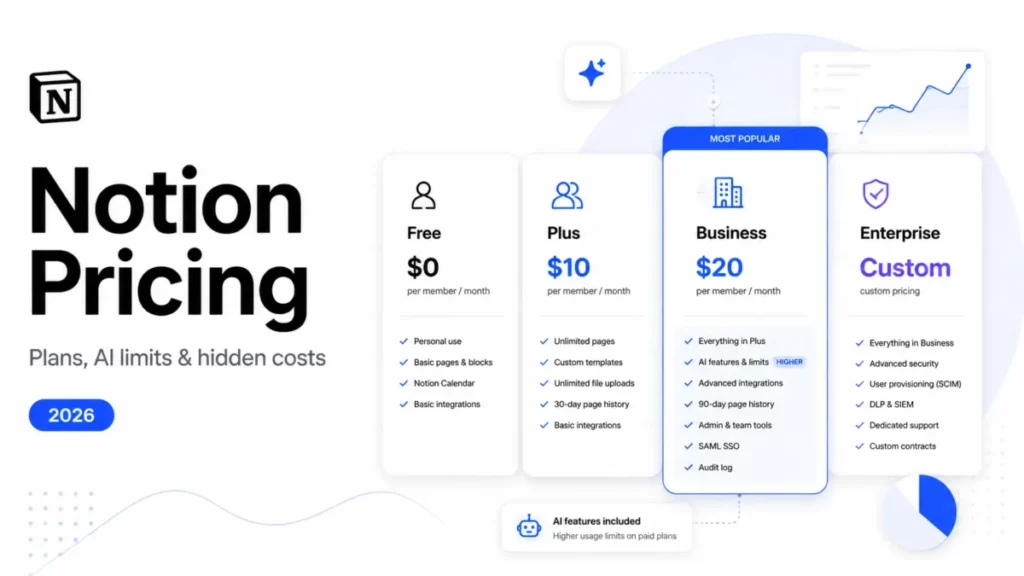
| Notion | You want flexible, lightweight docs and databases with minimal admin | Faster adoption, softer learning curve, better fit for small teams | Requirements, permissions, and Jira workflows are central |
| Guru | You need verified knowledge delivered inside employee workflows | Verification and answer delivery beat long-form authoring | You need deep long-form documentation and project context |
| Slite | You want a simpler internal knowledge base with less overhead | Lower administration burden for small and midsize teams | You need advanced permissions, Marketplace depth, or enterprise scale |
| Microsoft SharePoint | Your company is standardized on Microsoft 365 | Microsoft-native governance, identity, and intranet controls | Product and engineering documentation is the primary workflow |
| ClickUp | You want docs, tasks, and dashboards in one operational tool | Documentation sits next to execution without a second product | Long-lived structured knowledge matters more than task management |
The head-to-head that decides most shortlists is Notion vs Confluence, because those two products fail in opposite directions. Notion breaks on governance, Confluence breaks on simplicity.
Support and enablement teams face a different fork. If the job is delivering verified answers inside daily workflows rather than authoring long specs, a Guru knowledge base will beat a full workspace on adoption.
Which Confluence Plan Should You Buy?
Use the trigger, not the headcount.
- Stay on Free only while every user can see every page and the content is not sensitive.
- Move to Standard the moment you need space or page restrictions, guests, or business-hours support.
- Move to Premium when automation exceeds 100 monthly executions, storage passes 250 GB, whiteboards pass three per user, or you need a 99.9% SLA with 24/7 critical support.
- Talk to Atlassian about Enterprise when you need multiple instances, centralized identity with Guard included, or cross-product analytics.
Before the contract, answer four questions: who owns space design, who reviews stale pages, which Marketplace apps are mandatory, and what happens to the bill if headcount drops. If you cannot answer those, the tooling decision is not the problem yet.
Our guide on how to choose knowledge base software walks through the same evaluation with a scoring sheet.
The 30/90-Day Confluence Adoption Test
At 30 days, a healthy Confluence rollout has a named owner per space, a template for specs and meeting notes, a permission model that matches your org chart, and Jira links appearing inside real project pages.
At 90 days, search should be returning the right page for common queries, stale pages should carry review dates, and automation rules should be running under quota.
If people are still asking colleagues in Slack where the document lives, the tool is not the failure. The governance is.
Final Verdict: Is Confluence Worth It in 2026?
Confluence is worth it for Jira-based product, engineering, IT, and operations teams that need permissioned, structured documentation with an audit trail. At $5.42 per user per month on Standard, it is inexpensive relative to the administration value, and the Jira link is a genuine workflow advantage rather than a marketing line.
It is not worth it for small non-Atlassian teams that want fast notes, for buyers looking for a project-management tool, or for healthcare teams that need AI inside a HIPAA-covered BAA.
Choose Confluence if you use Jira, need access control, and can name the person who owns your space structure. Miss any one of those three conditions and a lighter tool such as Slite for internal documentation, Notion, Guru, SharePoint, or ClickUp will serve you better.
This Confluence review lands on one buying rule: buy Standard first, watch the automation counter and the storage meter, and upgrade to Premium on the trigger rather than the sales pitch. The renewal question to answer twelve months in is simple: can your team find the right page in under thirty seconds, and did automation ever stall because you were rationing executions?
FAQ
Is Confluence worth using in 2026?
Yes, if your team already uses Jira and needs permissioned documentation that outlives staff turnover, which is the core finding of this Confluence review. Standard was displayed at $5.42 per user per month on July 11, 2026, which is modest for structured spaces, page permissions, guest access, and Rovo AI.
It is not worth it for small teams that want quick notes with no admin owner.
How much does Confluence cost per user?
Atlassian displayed $0 for Free, $5.42 per user per month for Standard, and $10.44 per user per month for Premium on July 11, 2026, with Enterprise sold annually through sales. Your actual invoice depends on seat count, billing term, taxes, Marketplace apps, and any Atlassian Guard subscription.
Confirm the total in Atlassian’s pricing calculator.
Is Confluence free for small teams?
Confluence Free supports up to 10 users and 2 GB of storage. The catch is that Free does not allow customizable space or content permissions, so everyone with access can view and edit everything.
A six-person team storing contracts, HR files, or client material needs Standard, regardless of the seat cap.
What are the biggest disadvantages of Confluence?
The main disadvantages are quota-shaped. Standard shares only 100 automation executions per month across the whole site, storage overage can block page creation and editing, guests are limited to one space each, and Rovo is not HIPAA compliant.
Reviewers also report that search and navigation degrade when nobody owns naming standards and templates.
What is the difference between Confluence Standard and Premium?
Premium adds unlimited storage, unlimited whiteboards, pooled automation of 1,000 executions per user per month, advanced administration and analytics, Company Hub, 24/7 support for critical issues with a one-hour target, and a 99.9% uptime SLA. Standard caps storage at 250 GB and automation at 100 monthly executions site-wide.
Upgrade on the trigger, not the headcount.
Does Confluence work without Jira?
Yes, but it loses its sharpest advantage. Confluence functions as a standalone wiki with spaces, pages, permissions, templates, and search.
Teams outside the Atlassian ecosystem often get similar documentation value from Notion or Slite with less administration, which is why the Jira question decides the purchase for most buyers.
Can clients access Confluence without buying a license?
Yes, within limits. Paid plans allow up to five free guests per paid user, but each guest can access only one space.
A single client portal fits that model, while a contractor working across three project spaces needs a paid seat instead of a guest invitation.
Is Confluence secure enough for enterprise use?
Confluence Cloud sits inside Atlassian’s SOC 2 scope, with documented ISO-aligned controls, GDPR commitments, encryption, and data residency. SSO and SCIM come through Atlassian Guard Standard, which is included with Enterprise and sold separately for Standard and Premium.
Rovo AI remains outside HIPAA coverage, so regulated teams must plan around it.
Can I migrate everything from Notion into Confluence?
No, not everything. Atlassian’s Notion import brings content and users but does not import Notion guest accounts, and whiteboard imports from Miro or Mural drop comments and connectors.
Word and Google Docs imports carry file and batch limits, so pilot your messiest documents before committing the full library.
Is Confluence better than Notion for a company wiki?
For Jira-based engineering and product teams, yes. Confluence wins on permissions, structure, audit trails, and delivery-linked documentation.
Notion wins for small teams that want flexibility, faster adoption, and less administration, so the answer depends on whether governance or speed is your real constraint.