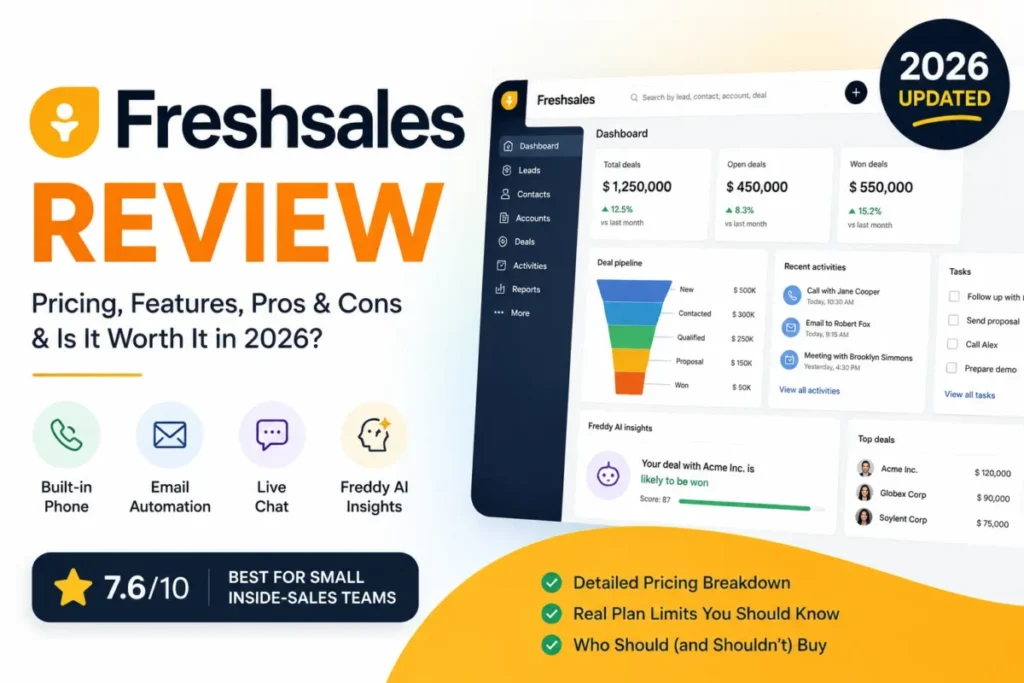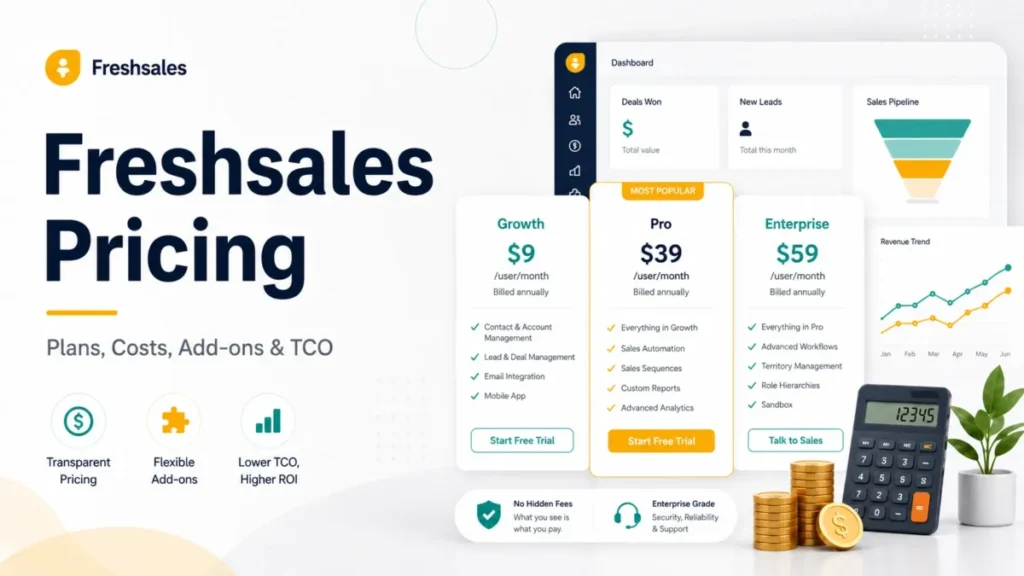
Freshsales advertises a $9 per user/month entry plan, and that number is real. It is also the wrong number to budget from if anyone on the team needs automated outbound follow-up.
The plan gate that decides most Freshsales purchases is not a feature list. It is sales sequences, which carry zero capacity on Free and Growth and only appear on Pro at $39 per user/month.
That single gate moves a ten-seat team from $1,080 a year to $4,680 a year. This guide prices Freshsales the way a finance reviewer would: seat cost, feature gates, usage ceilings, add-ons, migration effort, and the renewal terms that decide what happens in year two.
If Freshsales turns out to be the wrong shape for the team, the best CRM software shortlist covers the rest of the category.
In This Article (15 sections)
Quick Answer
| Question | Answer |
|---|---|
| Starting price | $0 on Free for up to three users |
| Cheapest paid plan | Growth at $9 per user/ |
| Best plan for most sales teams | Pro at $39 per user/ |
| Plan to avoid | Growth, when the team needs native sales sequences |
| Biggest hidden cost | Freddy AI Agent sessions at $49 per 100 sessions after the one-time allowance |
| Free trial | 21 days, no credit card required |
| Prices verified | 2026-08-21, US market, USD |
Freshsales is Freshworks’ AI-powered CRM for sales teams, and Freshworks positions it for startups, SMBs, and large enterprises alike. Pricing follows the standard per-seat model that most CRM software uses, so the interesting question is never the sticker price.
It is which tier the team’s actual workflow forces.
Everything below prices standalone Freshsales. Freshsales Suite is a separate Freshworks package, and none of its plan limits or prices carry over here.
Freshsales Plans and Prices
| Plan | Annual-effective price | Annual cost per seat | Billing basis | Best for | First limit that bites |
|---|---|---|---|---|---|
| Free | $0 | $0 | Up to 3 users | Founder-led selling before outbound starts | 50 individual emails per active user per day, no sequences |
| Growth | $9 per user/ | $108 | Per user, billed annually | Small relationship-selling teams | Zero sales sequences |
| Pro | $39 per user/ | $468 | Per user, billed annually | Outbound and inside-sales teams of roughly 5 to 50 | 10 sequences per user |
| Enterprise | $59 per user/ | $708 | Per user, billed annually | Governance-heavy or heavily customized sales orgs | 25 sequences per user |
Source: Freshworks official pricing page and the Freshsales plan comparison page, checked 2026-08-21. Annual cost per seat is this guide’s arithmetic, at rate times 12 months.
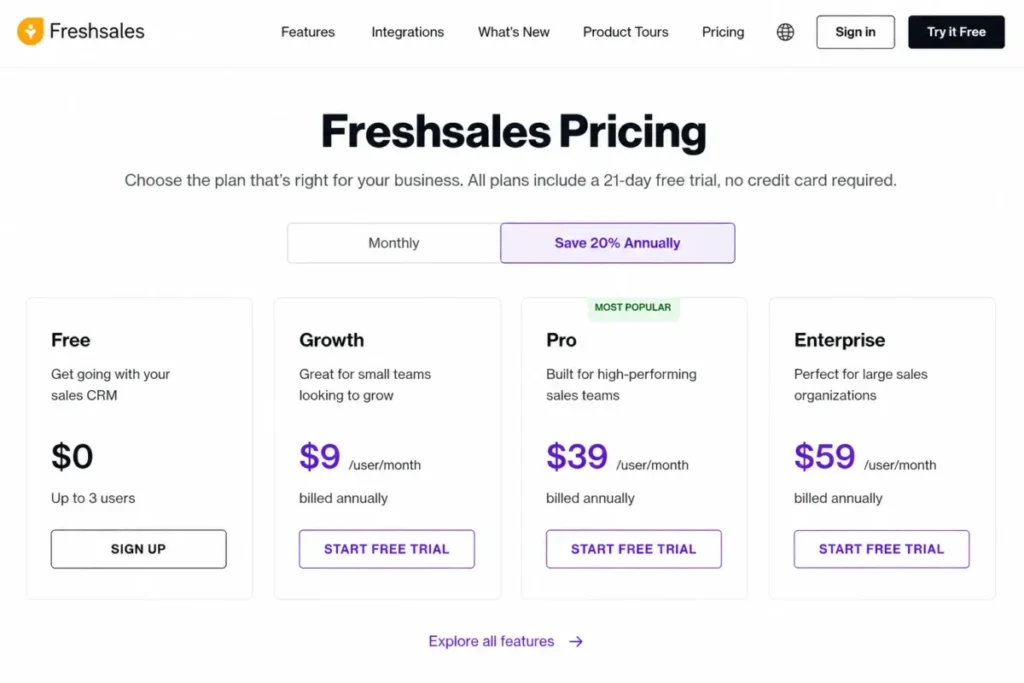
The annual cost per seat column is the number worth carrying into a budget conversation. Freshworks displays a monthly rate, and a monthly rate makes a $30 gap between Growth and Pro look small.
At $360 per seat per year, it is not small.
Free: three users, and no automated follow-up
Freshworks describes a free plan for small teams of up to three users who want to manage customer data. That framing is accurate rather than generous.
Free carries no sequence capacity at all, and its daily individual-email allowance is 50 per active user. A two-person team sending personal follow-ups will not notice that ceiling.
A high-volume SDR can reach that ceiling quickly.
Avoid Free if: anyone on the team needs bulk email, workflow email, or a repeatable outbound cadence. Those capabilities are either zero or capped at zero on this tier.
Growth: the honest low-cost tier, with one large gap
Growth at $9 per user/month includes Kanban view, contact lifecycle stages, and basic workflows, plus chat, email and phone, email templates, and custom fields. For a team that sells through relationships and inbound demand, that set genuinely covers the daily job.
The gap is sequences. Growth has none, and the only add-ons on its plan card are branded documents and Freddy AI sessions.
Growth also gains bulk email capacity that Free lacks, at 250 per active user per day, plus 500 workflow emails to owners. Workflow email to leads and contacts stays at zero, which matters more than it sounds: a Growth team can notify itself automatically but cannot email a prospect automatically.
Avoid Growth if: the sales motion depends on multi-step outbound. The workaround is manual follow-up or an external sequencing tool, and neither is equivalent to a native cadence attached to the CRM record.
Pro: the tier most outbound teams actually need
Pro at $39 per user/month adds contact scoring, deal insights, custom sales activities, territory management, and sales sequences. Three of those five are prioritization and routing features, which is why Pro reads like a manager’s tier rather than a rep’s tier.
Sequences are the reason it gets bought. Pro is the lowest plan with any native sequence capacity, at 10 per user.
The practical read for a five-person outbound team: Pro costs $2,340 a year against $540 on Growth. That $1,800 difference buys sequencing, scoring, and territory logic that Growth cannot approximate.
Avoid Pro if: the team runs inbound or account-managed selling and would use sequences rarely. Paying $360 per seat per year for a feature nobody opens is the most common way to overpay for this product.
Enterprise: a governance purchase, not a capability purchase
Enterprise at $59 per user/month adds forecasting insights, field-level permissions, custom modules, sandbox, and audit logs. Four of those five are administration and control features.
That shapes the upgrade rule. Enterprise is worth $240 per seat per year over Pro when a named governance requirement exists, and it is hard to justify on general sophistication.
Enterprise also raises the documented sequence allowance from 10 to 25 per user and lifts several daily email ceilings. For a high-volume outbound org, capacity alone can carry the decision.
Avoid Enterprise if: no one has written down a requirement for field-level permissions, custom modules, a sandbox, or audit logs. At 50 seats the Pro-to-Enterprise gap is $12,000 a year.
Monthly vs Annual Cost
Every price Freshworks displays on the Freshsales pricing page is an annual-effective rate, labelled “billed annually”. The page carries a Monthly toggle and a “Save 20% Annually” label, but the monthly amounts are not exposed in the page text.
The most recent official Freshworks document that does state them is the company’s own price list, current as of Jun 13th, 2025. The annual column below repeats the rates published on the Freshsales pricing page, and the monthly column comes from that dated list.
| Plan | Annual-effective, per user/ | Monthly per user, 2025 official list | Annualized month-to-month | Difference per seat per year |
|---|---|---|---|---|
| Growth | $9 | $11 | $132 | $24 |
| Pro | $39 | $47 | $564 | $96 |
| Enterprise | $59 | $71 | $852 | $144 |
Source: annual rates from the Freshworks pricing page; monthly rates from the Freshworks price list dated 2025-06-13. Annualized and difference columns are this guide’s arithmetic.
Two things follow from that table, and only one of them is comfortable.
The comfortable one: at those monthly values, annual billing saves $24 per seat on Growth, $96 on Pro, and $144 on Enterprise. Expressed as a share, that is roughly 18 percent on Growth and about 17 percent on Pro and Enterprise, which is close to the marketing label without matching it exactly.
The uncomfortable one: the monthly figures come from a document Freshworks dated more than a year before this guide was written. Treat $11, $47, and $71 as the last officially published monthly prices rather than as confirmed 2026 checkout prices, and confirm the monthly rate in checkout before modelling a month-to-month budget.
For a ten-seat team choosing Pro, the modelled gap is $4,680 annually against $5,640 month-to-month. Under Freshworks’ contract terms, that saving is bought with a commitment that cannot be reduced mid-term, which is a trade worth making deliberately rather than by default.
Feature Gates and Usage Limits
Feature availability is only half of what a plan buys. The other half is capacity, and Freshworks documents both separately.
Sales sequences decide the plan
| Sequence limit | Free | Growth | Pro | Enterprise |
|---|---|---|---|---|
| Sequences per user | 0 | 0 | 10 | 25 |
| Sequence emails per user, per day | 0 | 0 | 1,000 | 2,000 |
| Maximum steps per sequence | Not available | Not available | 25 | 25 |
| Maximum conditions per step | Not available | Not available | 8 | 8 |
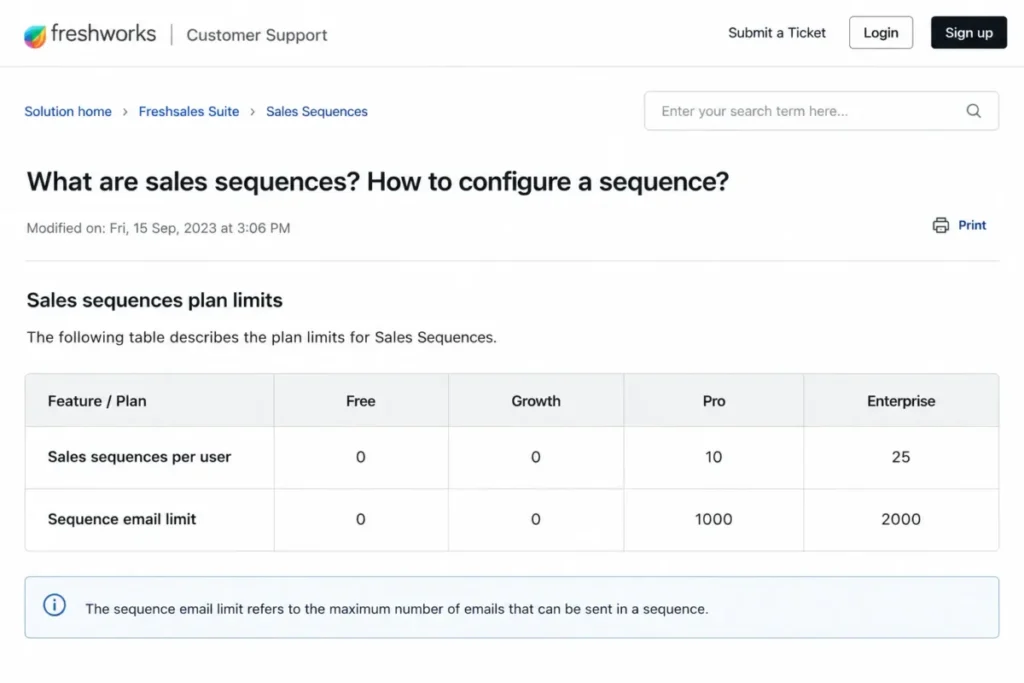
Two zeros in that table do the work of an entire pricing negotiation. A five-person outbound team is not choosing between Growth and Pro on preference; it is choosing between having a cadence and not having one.
Sequence design has its own ceilings once a team is on Pro. A cadence cannot exceed 25 steps, and a single step cannot carry more than eight conditions, so heavily branched plays need to be split across sequences rather than modelled in one.
One operational detail belongs in the buying decision rather than in onboarding. An outbound sequence once started can’t be edited or paused, and the documented remedy is to clone it and build a replacement.
A team that iterates cadences weekly should plan for that, because the cost of a mistake is a sequence that runs to completion. Access is also role-controlled, so a Pro seat is not automatically a sequence-building seat.
For a fuller picture of how those workflows behave outside the pricing question, the Freshsales review covers the product side.
Daily email capacity scales with active users, not with the plan alone
| Send type | Free | Growth | Pro | Enterprise |
|---|---|---|---|---|
| Individual email | 50 | 200 | 500 | 1,000 |
| Bulk email | 0 | 250 | 1,000 | 5,000 |
| Workflow email to leads and contacts | 0 | 0 | 1,000 | 2,000 |
| Workflow email to record owners | 0 | 500 | 1,000 | 2,000 |
| Sales sequence email | 0 | 0 | 1,000 | 2,000 |
Source: Freshworks sales email limits documentation, modified 2024-12-10. Every figure is a per-active-user multiplier applied across the account.
This is a capacity model rather than a feature list, and it is the part most pricing pages skip. A ten-seat Pro account carries a modelled sequence-email ceiling of 10,000 a day, because the per-user figure multiplies by active users.
Growth teams should read the two zero rows carefully. Workflow email to leads and sequence email are both unavailable, so “email is included” on Growth means human-sent and bulk email only.
Exhausting the daily allowance has a documented consequence rather than a graceful one. Freshworks states that emails will no longer be sent and that sending resumes at 12:01 AM the next day.
What happens to each individual queued message is not specified in that article, so a team running near the ceiling should treat the reset as a hard stop rather than a delay. Sequence email allowances can be redistributed across roles, which is the documented lever when one team is capped and another is idle.
Connected mailboxes add a second capacity layer that is easy to miss. A connected Gmail or Office 365 mailbox sends up to 300 emails before Freshsales switches to product SMTP, so mailbox-provider capacity and account capacity are separate budgets that both need checking.
API, import, and mobile ceilings
| Constraint | Documented limit | Behaviour at the limit | Who it affects |
|---|---|---|---|
| API requests | 1,000 per hour per account | HTTP 429 | Integration and RevOps teams |
| CSV or XLSX import file | 5 MB per upload | File must be split or reduced | Admins running migration |
| Offline mobile views | 4 views across default modules | Additional views stay online-only | Field sales |
| Offline records per view | First 100 records | Later records do not sync | Field sales with large territories |
The API figure deserves a caveat that competing pages usually drop. Freshworks’ developer documentation states one generic account-level ceiling of 1,000 requests per hour, and it does not publish a per-plan table alongside it.
An integration-heavy buyer should get that number confirmed for the specific tier in writing before committing to an architecture, because the 2025 price list carried a paid API Extension line whose current status is not visible on the pricing page.
Mobile offline capability is narrower than the phrase suggests. Four downloadable views, the first 100 records in each, no lookup associations when creating records offline, and search restricted to cached records add up to a subset of the CRM rather than a portable copy of it.
A rep covering several hundred accounts cannot rely on that. The workaround is filtered, tightly sorted views that put the day’s accounts first, which is a real operational task rather than a setting.
Hidden Costs and Add-ons
| Add-on | Current listed price | Cadence as displayed | Status |
|---|---|---|---|
| Freddy AI Agent | $49 per 100 sessions | Usage-based | Current. Paid plans receive 500 sessions once per account |
| Branded documents, Pro and Enterprise | $19 per user | Per month | Current |
| Branded documents, Growth | $19 per user | Displayed as annually | Current display, cadence unresolved |
| Configure, Price, Quote | $19 per license | Per month | From the 2025 price list, not reconfirmed for 2026 |
| Phone credits | $1 per credit | One-time purchase | From the 2025 price list, not reconfirmed for 2026 |
| API Extension | $250 per account, maximum two units | Per month | From the 2025 price list, not reconfirmed for 2026 |
| Workflow add-on | $5 per workflow | Per month | From the 2025 price list, not reconfirmed for 2026 |
Source: current add-on rows from the Freshworks pricing page; the four reconfirmation rows from the Freshworks price list dated 2025-06-13.
Three of these rows carry a buying consequence, and one carries a warning.
Freddy AI Agent is the add-on most likely to become a variable line item. Paid plans receive 500 sessions once per account, and after that sessions are purchased at $49 per 100, with purchased-session validity following the payment cycle.
The older Freshworks price list packaged AI sessions very differently, at $100 for a 1,000-session pack. Those are not the same economics, so any budget built from the older packaging needs rebuilding against the current session price.
The warning is Branded documents. Freshworks displays $19 per user on all three paid rows, but the Growth row is labelled annually while Pro and Enterprise are labelled per month.
That is a twelve-fold difference in annual cost depending on which reading is correct, and there is no way to resolve it from the page alone. Do not model Growth’s branded-documents cost until Freshworks confirms the billing basis in checkout or on the order form, and treat any competing article that quotes a single normalized figure as having guessed.
The four price-list rows are a different kind of risk. CPQ, phone credits, the API Extension, and the per-workflow add-on all appeared in an official Freshworks document, and none of them is visible on the current Freshsales pricing page.
Quoting them as 2026 prices would be inventing freshness. Ask for each one by name during procurement rather than assuming either the price or its continued availability.
Freshsales TCO by Team Size
Seat subscription cost follows directly from the annual-effective rates, at seats times rate times 12 months.
| Seats | Growth per year | Pro per year | Enterprise per year | Growth to Pro delta |
|---|---|---|---|---|
| 3 | $324 | $1,404 | $2,124 | $1,080 |
| 5 | $540 | $2,340 | $3,540 | $1,800 |
| 10 | $1,080 | $4,680 | $7,080 | $3,600 |
| 20 | $2,160 | $9,360 | $14,160 | $7,200 |
| 25 | $2,700 | $11,700 | $17,700 | $9,000 |
| 50 | $5,400 | $23,400 | $35,400 | $18,000 |
Source: calculated from the annual-effective seat rates on the Freshworks pricing page, at seats times rate times 12 months. Seat subscription only, before taxes and add-ons.
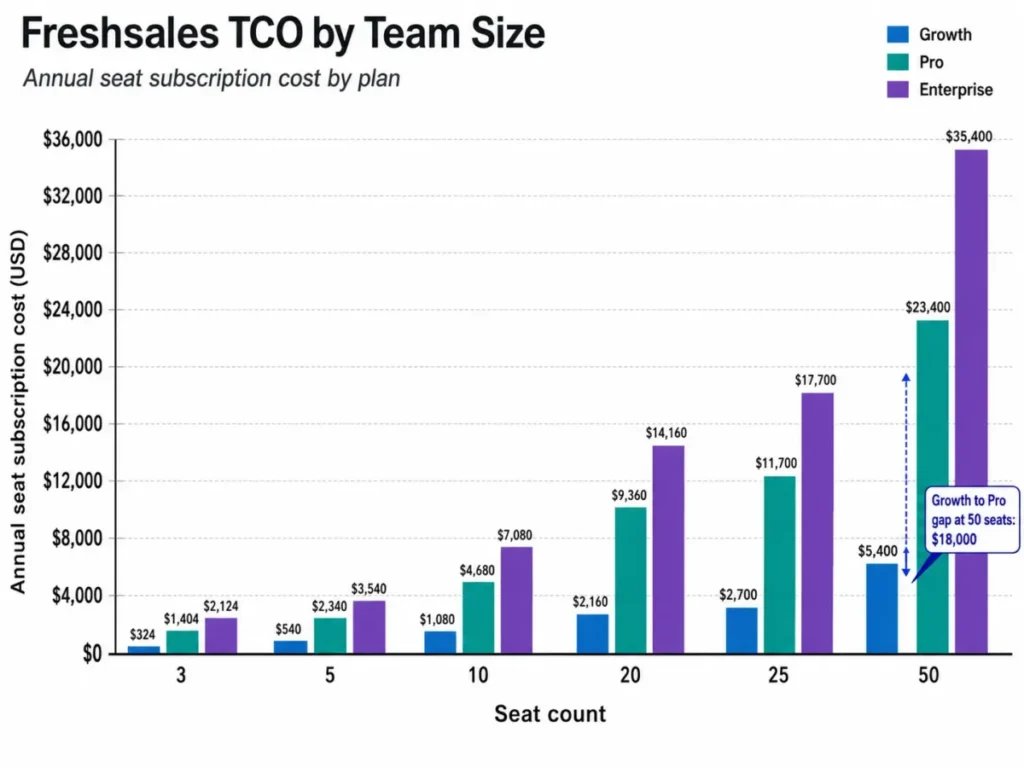
The table is seat cost only, and that is deliberate. Taxes sit outside the quoted fees under Freshworks’ terms, add-ons are separate, and the Growth branded-documents cadence is unresolved, so folding any of those in would produce false precision.
Two thresholds are worth marking. Below roughly ten seats the Growth-to-Pro decision is a few thousand dollars a year and can be made on judgment.
At 25 seats and above it is a $9,000 line item that a finance reviewer will ask about by name. That is the point at which the answer needs to be a documented workflow requirement rather than a preference.
Renewal and Contract Risks
Annual billing is not only a discount mechanism at Freshworks. It is a commitment with three specific terms that change what the headline price actually costs over two years.
Seat count is locked downward. Freshworks’ terms state that during the subscription term the customer is not permitted to reduce their User or Asset Unit count, or downgrade their Service Plan.
For a team with volatile headcount, that turns unused seats into a sunk cost until renewal. A sales org that plans to hire ten reps and hires six has paid for ten.
Renewal is automatic on a 30-day clock. Absent written notice of non-renewal or downgrade at least thirty days before expiration, the plan renews at the same user count, the same plan, and the same add-ons for a term equal to the previous one.
The practical control is a calendar entry 45 to 60 days out, not 30. Thirty days is the contractual deadline, which means it is the last possible day to act rather than a comfortable review window.
Renewal pricing can move. Freshworks reserves the right to adjust the Fees at renewal, and states that previously provided discounts or price protections will not apply at renewal if the customer’s user count, plan, or contract terms are reduced from the prior term.
Read together, those two clauses create a specific trap: downsizing at renewal can cost more per seat than staying flat. A team planning to shrink should price the reduced renewal explicitly rather than assuming the current per-seat rate carries over.
Two smaller terms complete the picture. Payment obligations are non-cancelable and non-refundable except where the agreement expressly permits otherwise, and quoted fees exclude taxes, so the invoiced total sits above every figure in this guide.
Migration and Switching Costs
Freshworks documents a migration path from Zoho, Pipedrive, Insightly, Salesforce, and Salesforce IQ, and the supported objects are contacts, accounts, deals, and activities including tasks, appointments, and notes. What that list leaves out is the switching cost.
| Migration element | Documented behaviour | Work it creates |
|---|---|---|
| Contacts, accounts, deals | Migrated | Post-import validation |
| Activities: tasks, appointments, notes | Migrated | Spot-check for completeness |
| Users | Cannot be imported | Recreate every user and reassign records manually |
| Emails inside activities | Not migrated | Email history stays in the old CRM |
| Pipelines | Up to 10 stay distinct | Remaining deals land in the admin-default pipeline’s first stage |
| Attachments and automations | Not stated in the migration article | Confirm with Freshworks before committing |
Three of those rows are the ones that turn a weekend project into a sprint. Users must be added by hand and then reassigned to records, which is proportional to headcount rather than to data volume.
Activity email history does not come across at all. For a team whose sales context lives in threaded email, that is the single largest hidden cost of switching, and it usually forces a read-only retention decision about the old system.
The pipeline ceiling changes data rather than losing it. An org running more than ten pipelines will find the overflow deals sitting in the first stage of the admin-default pipeline, which quietly corrupts stage-based forecasting until someone fixes it.
Bulk import has its own preflight requirements. Uploads are capped at 5 MB per file, contact records require the last name field to be mapped, and custom fields have to exist in Freshsales before the import runs.
A large export therefore needs splitting, field preparation, and owner mapping before the first upload. Budget additional admin time; the exact effort depends on data volume and cleanup.; a general CRM migration plan covers the sequencing.
Which Freshsales Plan Should You Choose?
| If this is true | Choose | Annual cost at 10 seats | Watch for |
|---|---|---|---|
| Three or fewer users, no outbound cadence | Free | $0 | 50 individual emails per user per day |
| Relationship or inbound selling, no sequences needed | Growth | $1,080 | Zero workflow email to prospects |
| Any native outbound sequencing requirement | Pro | $4,680 | 10 sequences per user, 25 steps each |
| Field-level permissions, custom modules, sandbox, or audit logs required | Enterprise | $7,080 | $240 per seat per year over Pro |
| Heavy API integration planned | Confirm limits first | Plan-dependent | One generic ceiling of 1,000 requests per hour |
The decision rule is simpler than the plan grid suggests. Write down the workflows the team must run, then find the lowest tier that supports all of them, and ignore everything above it.
For most sales teams that lands on Pro, because sequences are the capability that has no partial version. A team either has cadences attached to CRM records or it does not.
Growth is the right answer more often than its reputation suggests. Account management, inbound-led SaaS sales, and services businesses that sell through relationships get real value from lifecycle stages, built-in phone, and basic workflows at $108 a seat a year.
Enterprise is a governance answer. If nobody can name the control that requires it, the $240 per seat premium is buying reassurance rather than capability.
Which Freshsales Plan Should You Avoid?
Growth is the plan to avoid, and only for one specific buyer: the outbound team that assumes $9 per seat covers automated follow-up. It does not, and the discovery usually happens after data has been imported and reps have been trained.
The cost of that mistake is not just the upgrade. It is a mid-term plan change on a contract where downgrades are blocked in the other direction, plus the retraining that follows.
The exception is a team that already runs a dedicated sequencing tool and intends to keep it. In that setup Growth is a deliberate choice rather than a mistake, and the $360 per seat per year saved against Pro is real money.
Free deserves a narrower warning. It is a genuine free tier rather than a trial, but the three-user cap and the zero-sequence ceiling mean it works as a starting point rather than as a destination.
Freshsales Pricing vs Pipedrive, HubSpot, and Salesforce
| Product and plan | Entry price | Practical tier price | Notable cost condition |
|---|---|---|---|
| Freshsales Growth to Pro | $9 per user/ | $39 per user/ | Sequences start at Pro |
| Pipedrive Lite to Growth | US$14 per seat/ | US$39 per seat/ | Billed as one payment of US$468 per seat per year |
| HubSpot Sales Hub Starter to Professional | From $7 per seat/ | From $90 per seat/ | Required one-time Professional onboarding of $1,500 |
| Salesforce Starter Suite to Enterprise | $25 per user/ | $175 per user/ | Enterprise billed annually |
Each row links to that vendor’s own official pricing page, and each pairs the entry tier with the tier most teams actually move to. The plans are not feature-equivalent.
Freshsales is the cheapest entry point in this group only if Growth fits the workflow. Once sequences are required, its practical tier at $39 lands level with Pipedrive Growth and far below HubSpot Professional.
HubSpot’s line carries the sharpest hidden cost in the comparison. A required, one-time Professional Onboarding for a fee of $1,500, rising to $3,500 on Enterprise, is a first-year charge that no per-seat comparison surfaces.
Salesforce sits in a different bracket entirely at the practical tier. Its Starter Suite at $25 per user per month is more expensive than Freshsales Growth, and the comparison stops being useful further up the ladder because the products solve different problems at that price.
None of these plans is feature-matched. Use the table as a price anchor for the tier a team realistically buys, then compare on the two or three workflows that actually decide the purchase. Pipedrive pricing plans and Salesforce pricing break down each of those ladders in full.
Is Freshsales Worth the Price?
Freshsales is worth its price for a five-to-fifty person sales team that needs sequences, calling, email, and pipeline in one system and wants to spend under $500 per seat per year to get it. At $468 a seat annually, Pro sits level with Pipedrive Growth and well under HubSpot Professional at the tier a team realistically buys.
It is not worth the price for three groups. Teams migrating more than ten source pipelines should plan remediation for pipeline placement.
Field teams that need offline access to a full territory come second, because four views and 100 records each will not carry them. Integration-heavy orgs that cannot get a per-plan API commitment in writing come third.
The strongest argument for Freshsales is the shape of its Pro tier. Contact scoring, deal insights, territory management, and sequences arriving together at $39 is a coherent package rather than a set of upsells.
The strongest argument against it is contractual rather than functional. A plan that cannot be downgraded mid-term, renews automatically on 30 days’ notice, and carries no price protection through a downsized renewal asks the buyer to be right about headcount a year in advance.
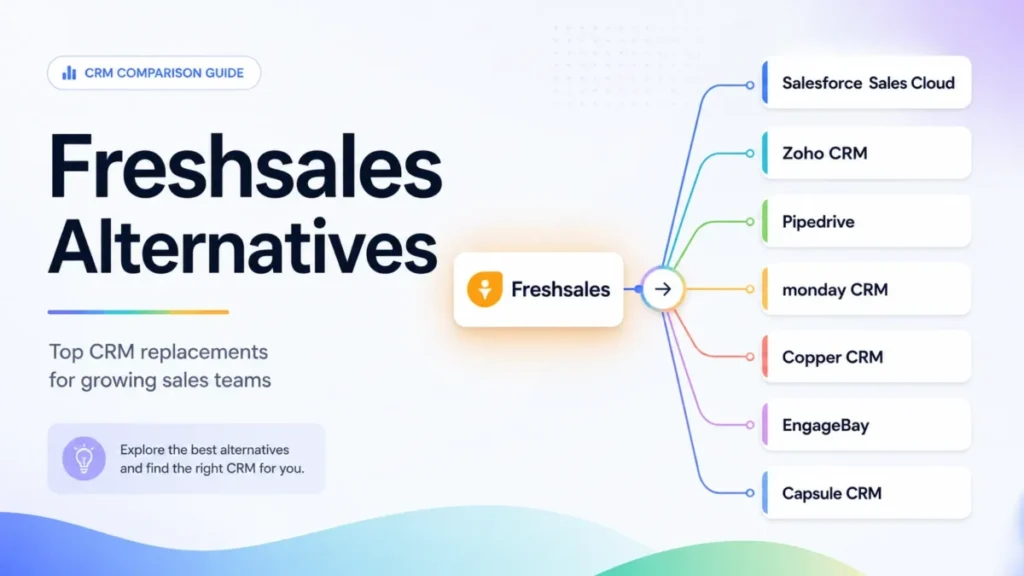
If the sequence gate is the sticking point, comparing Freshsales alternatives on where each vendor places its automation tier is the faster route to an answer than negotiating this one.
How to Avoid Overpaying for Freshsales
Price the workflow, not the tier. List the specific cadences, permissions, and reports the team must have, then buy the lowest plan that carries all of them. Most overspend on this product comes from buying Enterprise for a governance requirement nobody wrote down.
Run the 21-day trial against the sequence limits, not the interface. The trial runs without a credit card, so the question worth answering in that window is whether 10 sequences per user and 25 steps each hold the real cadence design.
Model email capacity before signing. Multiply the per-user daily figure for the send type the team actually uses by the number of active users, and compare it against current volume with headroom.
Get the Growth branded-documents cadence in writing. Until Freshworks resolves the annual-versus-monthly display, that single line is the difference between $19 and $228 per user per year.
Ask for the four price-list add-ons by name. CPQ, phone credits, the API Extension, and the per-workflow charge all appeared in an official list and none appears on the current pricing page, so confirm both availability and rate during procurement.
Set the renewal review at 45 to 60 days. The contractual notice deadline is 30 days, which makes it the wrong date to put in a calendar.
Size seats to the floor, not the plan. Seat counts cannot be reduced mid-term, so buying to a hiring forecast rather than to current headcount converts optimism into a fixed cost. Compare that structure against HubSpot pricing, where the mandatory onboarding fee front-loads a different kind of commitment.
Pricing Methodology and Sources
Every price, plan limit, and contract term in this guide was checked against Freshworks’ own pricing page, plan comparison page, published price list, support documentation, developer documentation, security pages, and terms of service, with volatile facts verified on the date shown in the pricing table.
Each plan was assessed against the same buyer criteria: usable entry price, the workflows each tier supports, documented capacity ceilings, add-on and overage exposure, migration effort, and contract flexibility at renewal.
Greater weight went to the factors that change what a team pays or what it can do, which means feature gates, per-user capacity multipliers, and renewal mechanics rank above interface impressions or vendor positioning.
Claims that could not be traced to an official source were excluded, historical price-list figures are labelled with the date of the document they come from, and calculated totals are marked as this guide’s arithmetic rather than as vendor offers.
Freshsales Pricing FAQ
Is Freshsales free?
Yes, for up to three users. The Free plan carries no seat charge, but it has no sales sequence capacity and caps individual email at 50 per active user per day, so it suits founder-led selling rather than a working sales team.
Does Freshsales offer monthly billing?
The pricing page carries a Monthly toggle, so monthly billing exists. The current monthly amounts are not exposed in the page text, and the most recent official Freshworks figures for them come from a price list dated June 2025, so confirm the monthly rate in checkout before budgeting month-to-month.
Are sales sequences included in Freshsales Growth?
No. Growth carries zero sequences per user, and Pro at $39 per user/month is the lowest tier with any native sequence capacity.
What is the real difference between Growth and Pro?
$360 per seat per year, in exchange for sales sequences, contact scoring, deal insights, custom sales activities, and territory management. At ten seats that is $1,080 against $4,680 a year.
Can Freshsales seats be reduced mid-contract?
No. Freshworks’ terms block both a reduction in user count and a plan downgrade during the subscription term, so seat count should be sized to current headcount rather than to a hiring plan.
What does Freddy AI Agent cost on top of the plan?
$49 per 100 sessions, after a one-time allowance of 500 sessions per account on paid plans. Purchased-session validity follows the payment cycle, which makes it a variable line item rather than a fixed one.
Does Freshsales meet enterprise security requirements?
Freshworks states that AES 256-bit encryption at rest and TLS 1.2 in transit protect customer data, that its products are audited by independent entities for ISO 27001 and SOC 2 at least once a year, and that all its products are GDPR compliant, with data centers in the United States, Europe, India and Australia.
Those are vendor statements rather than independent findings, and Freshsales-specific HIPAA availability is not published, so a regulated buyer should request the current compliance documentation directly.