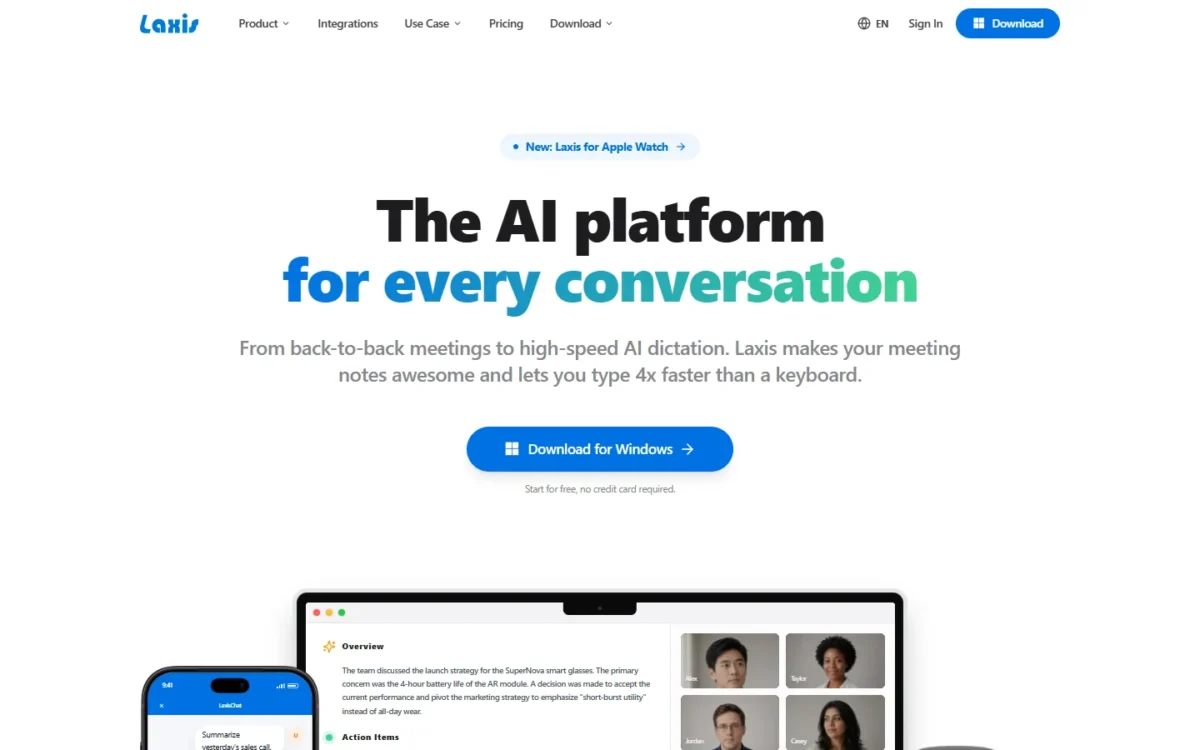
This Laxis review lands on a clear yes for sales reps who record their calls: Premium turned my test call into notes with every planted fact, dated action items and a BANT write-up, without me typing a line.
One subscription covers the AI note taker and the AI voice keyboard: the note taker runs on web, desktop, iPhone, Android and the Chrome extension, and the voice keyboard on desktop, iPhone and Android. Premium, the entry paid plan, includes 2,000 minutes a month; Business, the team plan, lifts that cap and adds team admin, CRM Automation and 7,000+ app integrations.
Quick verdict
Worth it for: a sales rep or AE who records calls and wants accurate call notes, dated action items and BANT-style summaries without typing them, on Laxis Premium.
Skip Laxis if: you want more than 300 free minutes a month and do not plan to pay, since Basic stops at 300 minutes.
Strength and limit: the notes held 8 of 8 planted facts and 4 of 4 dated action items on my test call; Premium’s 2,000 minutes a month are shared with dictation.
Price basis: Premium is the entry paid plan, Business, the team plan, costs about twice as much, and Enterprise above it is priced by quote; both paid plans cost less on yearly billing, checked November 2026.
In This Article (10 sections)
Laxis at a Glance
- Category: AI note taker and AI voice keyboard on one subscription
- Best for: individual sales reps and AEs who review their own call notes
- Free plan and trial: Basic with 300 minutes a month; a 14-day Premium trial, no credit card
- CRM sync: Business and Enterprise plans
- Apps and languages: web, desktop, iPhone, Android and Chrome extension on one plan; meetings transcribed in 100+ languages
- Minutes: Premium’s 2,000 a month are shared with dictation and live translation
- Voice keyboard: dictation in the desktop, iPhone and Android apps; Translate and Agent mode from Premium
- Main limitation: a single recording stops at 45 minutes on Basic and 2 hours on Premium
Those are the plan facts; my test shows which of them hold on a sales call.
Laxis Pros and Cons
Pros
- 2 of 553 words wrong and 27 of 27 turns on the right speaker in my test call’s transcript, so a rep rarely replays the call
- Notes caught 8 of 8 planted facts and 4 of 4 dated action items, enough to replace typed call notes
- 13 sales templates in my Premium trial, including BANT, MEDDIC and SPICED; BANT rewrote my call’s notes in about 10 seconds
- Note taking and dictation share one subscription that works in every Laxis app you sign in to, so a rep pays once for both
- AI Chat’s pilot-terms answer in my test came with a cited transcript moment, and Premium adds an MCP connector for Claude, ChatGPT and Cursor
- Basic is an ongoing free plan with search and export; my export dialog offered TXT, Word, PDF and SRT
Cons
- AI Chat answers and follow-up email drafts are worth a quick check against the call before they reach a prospect
- A misheard company name carries into the notes and search, so proper nouns are the first thing to check
- There is no self-serve Business trial, so CRM Automation is tried through sales
My take
Laxis is worth it for a sales rep who records calls. On my test call the notes held every planted fact and action item, and the BANT view turned them into a qualification write-up in about 10 seconds. A practical habit: open AI Chat’s cited moment before you reuse an answer.
How I Tested Laxis on a Sales Discovery Call
I tested Laxis on November 8, 2026, on the Premium trial (“Premium (Free Trial)”, 14 days left).
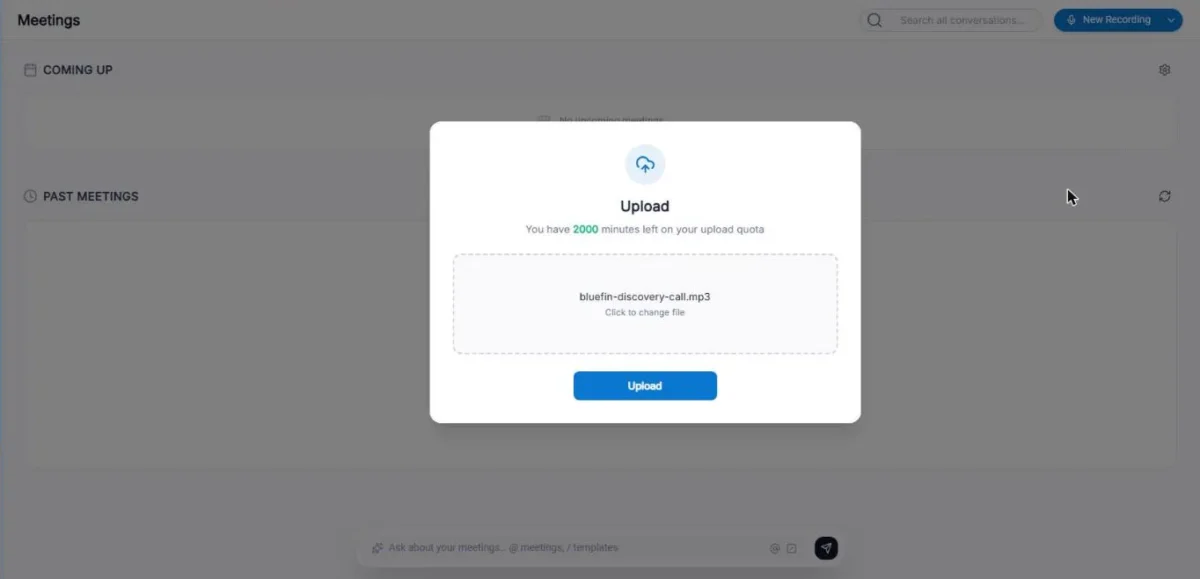
The test file was a sales discovery call I scripted: two text-to-speech voices, 27 turns, 563 words, 4 minutes 1 second, as an MP3. The people and companies are fictional. I planted eight facts a rep needs (team size, current tools, must-haves, budget, approver and deadline, pilot terms, migration size, next meeting) and four action items with owners and dates.
I compared the transcript with the script word by word after normalizing number formats (“forty two” as 42), which left 553 words. The upload used 4 of my 2,000 minutes.
| Task | What I checked | Result |
|---|---|---|
| Upload | One 4:01 file | In the meeting list after about 5 seconds; summary ready on refresh at about 50 seconds |
| Transcript | 553 compared words | 2 wrong: “BrightTeline” and “opened shipments” |
| Speakers | 27 turns | 27 of 27 on the right voice |
| Notes | 8 facts, 4 action items | 8 of 8; 4 of 4 with owner and date |
| AI Chat | 3 known-answer questions | 2 of 3 right |
| Follow-up email | One draft | Facts right, wrong recipient |
The audio was clean, with no crosstalk, accents or noise, so these accuracy figures are a best case, not a forecast for a noisy six-person call.
This review evaluates Laxis using a scripted four-minute sales discovery recording. Voice Keyboard workflows and full-length live meetings were not independently tested. The test covers uploaded audio only: the live meeting bot, CRM sync and Zapier sit outside it, and Business features were not on the trial. The competitor section compares plans, not the rivals’ note accuracy.
Prices come from Laxis’s pricing page in both billing views and its Billing & Plans help page, and the Voice Keyboard description from its Voice Keyboard help pages, all checked November 2026. Laxis does not publish a separate price per Business seat or a self-serve Business trial.
Laxis Features for Sales Calls
The notes and the sales templates did the most work on my test call, AI Chat answered my pilot-terms question with a cited transcript moment, and CRM sync comes with the Business plan.
Laxis captures Zoom, Google Meet and Microsoft Teams calls three ways: bot-free capture, an AI notetaker, or a file upload. The bot-free Mac app records with no bot joining, which helps a rep whose prospects object to a bot joining the call.
Transcript and speaker labels
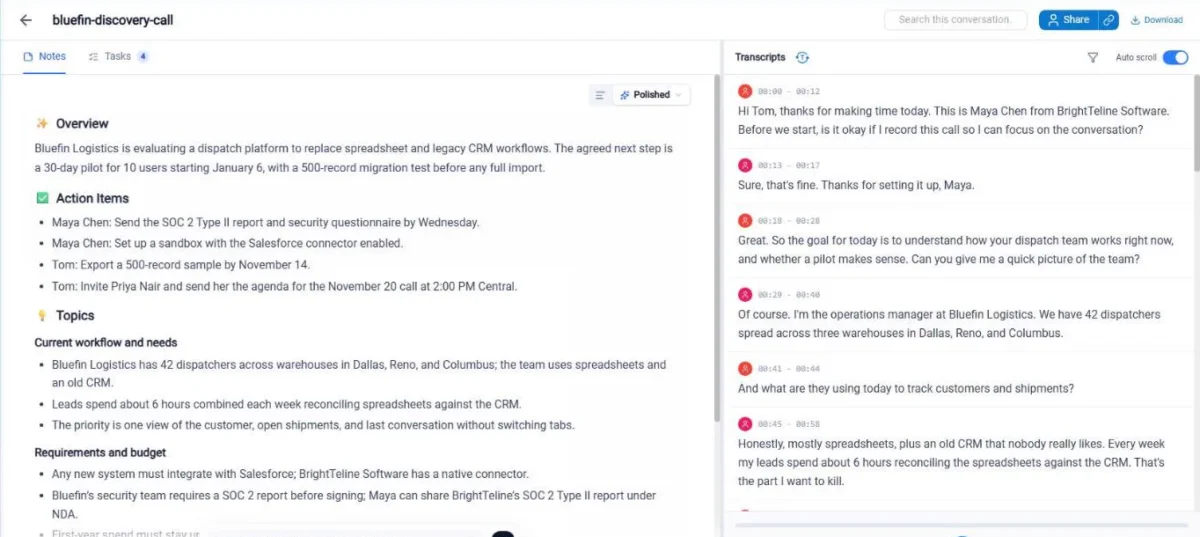
All 27 segments went to the right voice. My uploaded file showed them as “Speaker 1” and “Speaker 2”, and clicking one opens “Search or create speaker” with an “Apply to all Speaker 1” option to name every line at once.
Laxis documents two ways to put names on speakers automatically. Voice Recognition, off by default, has you record 10-second samples of a voice, then labels enrolled people during meetings and when you open them afterwards. The Chrome extension takes speaker names from the meeting’s participant list and shows unknown speakers as “Speaker”.
The two word errors were the company name, “Brightline” heard as “BrightTeline”, and “opened shipments” for “open shipments”, plus a missing space after “under” in the budget line. The company-name slip carried into the notes and search, so proper nouns are the first thing to check after a call.
AI notes, action items and the BANT template
The Polished notes held all 8 planted facts and all 4 action items with the right owner and date, such as “Tom: Export a 500-record sample by November 14”, and the Tasks tab listed the same four as checkboxes.
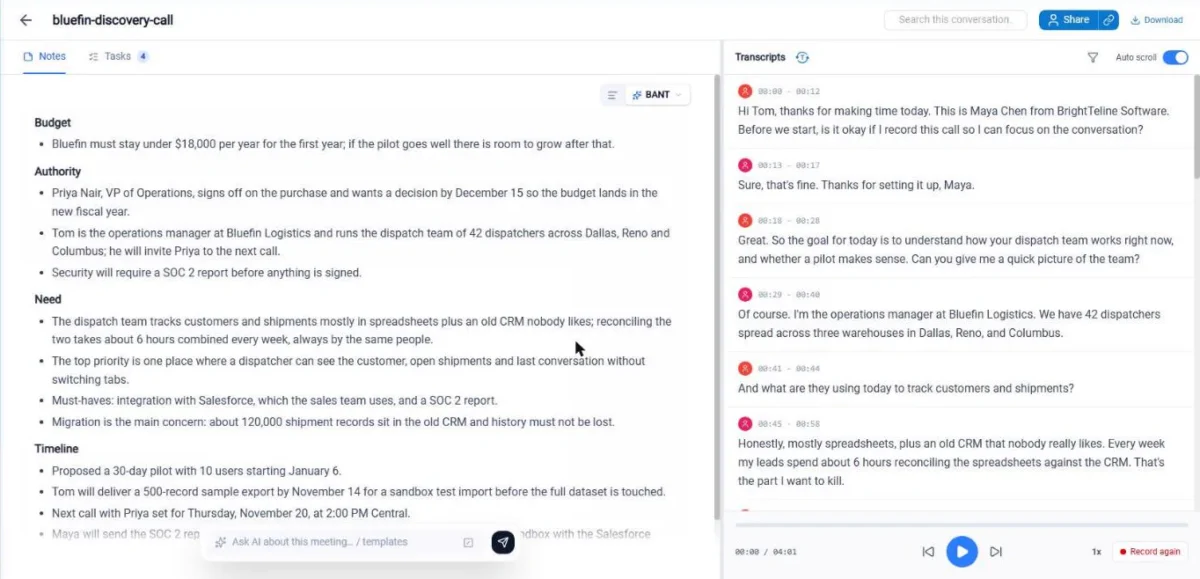
Switching the view to BANT rewrote the notes into Budget, Authority, Need and Timeline within about 10 seconds, each matching the call; Authority named Priya Nair and her December 15 date.
My account’s view menu listed 48 templates in 7 groups, 13 of them Sales: Demo call, Discovery call, Existing Client, Account Management, Sales Pipeline, MEDDIC, SPICED, BANT, GPCT, CHAMP, ANUM, BEBEDC and SPIN. The plan card lists “AI Writer & 40+ Pro Templates” under Premium and not under Basic.
AI Chat and the follow-up email
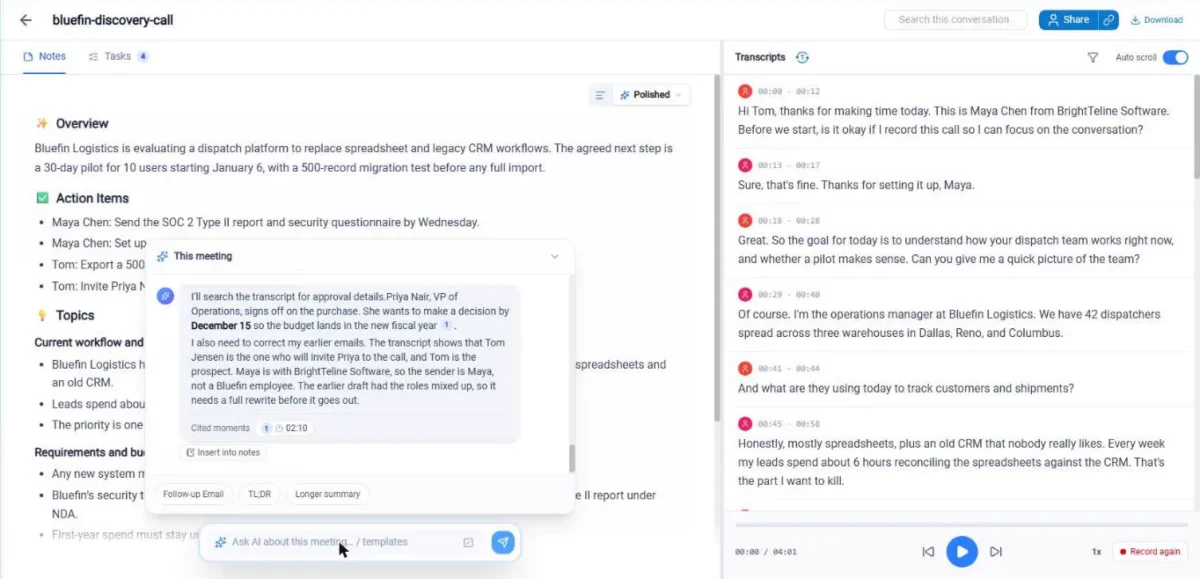
AI Chat answers questions about a meeting and points to the transcript moment behind its answer. On my one 4-minute, two-voice synthetic call, it answered 2 of my 3 known-answer questions correctly:
- Pilot terms: right (January 6, 30 days, 10 users), with a cited moment.
- Approver and deadline: right (Priya Nair, December 15), though it called Tom “Tom Jensen”, a surname nobody said.
- Budget: missed. It said the transcript states no budget figure, although the figure is there, written as “under$18,000” with no space.
The TL;DR template got all three of its lines right. The Follow-up Email template had every fact right and opened “Hi Priya”, thanking her for her time today; Priya was not on the call, Tom was.
My take
AI Chat pulled the pilot terms and the approver’s name and deadline straight from my test call, and the pilot-terms answer came with a cited moment, which makes checking an answer quick. Pick Premium for AI Chat and the email drafts, open the cited moment before an answer goes into an email, and read a draft’s greeting before you send it.
Search and export
Search across all conversations found all 10 mentions of the three correctly spelled terms I tried: “Salesforce” 4 of 4, “Priya” 4 of 4, “budget” 2 of 2. “Brightline” returned 0, because the transcript spelled it “BrightTeline”, so search a name the way the transcript spells it.
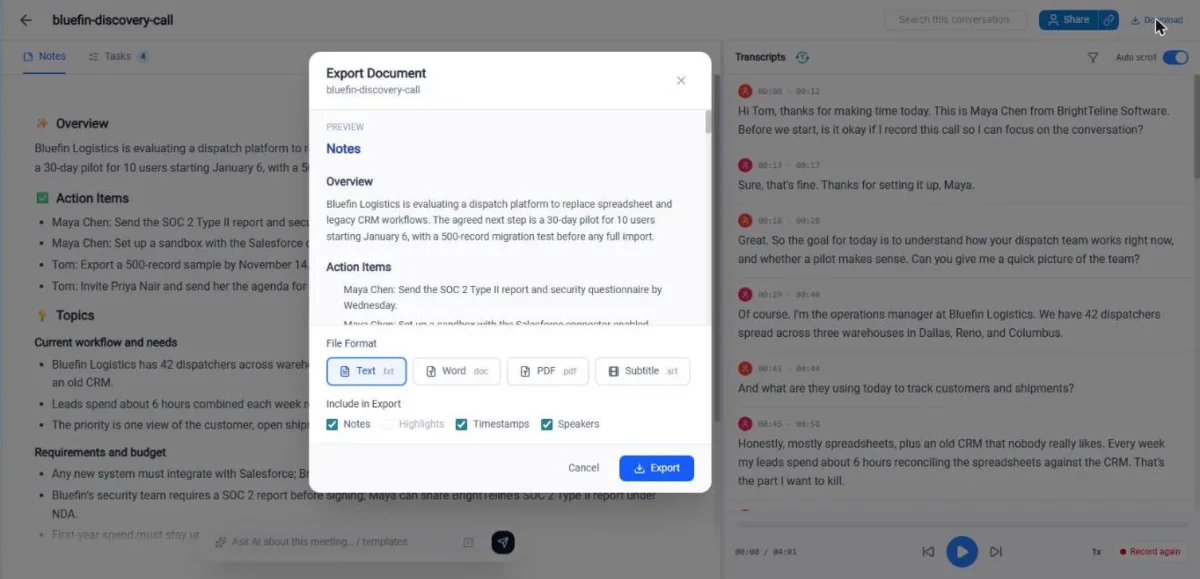
The Download dialog exports Text (.txt), Word (.doc), PDF or Subtitle (.srt), with notes, timestamps and speakers as options. Search and Export & Share come with the free Basic plan too.
CRM sync, Zapier and the MCP connector
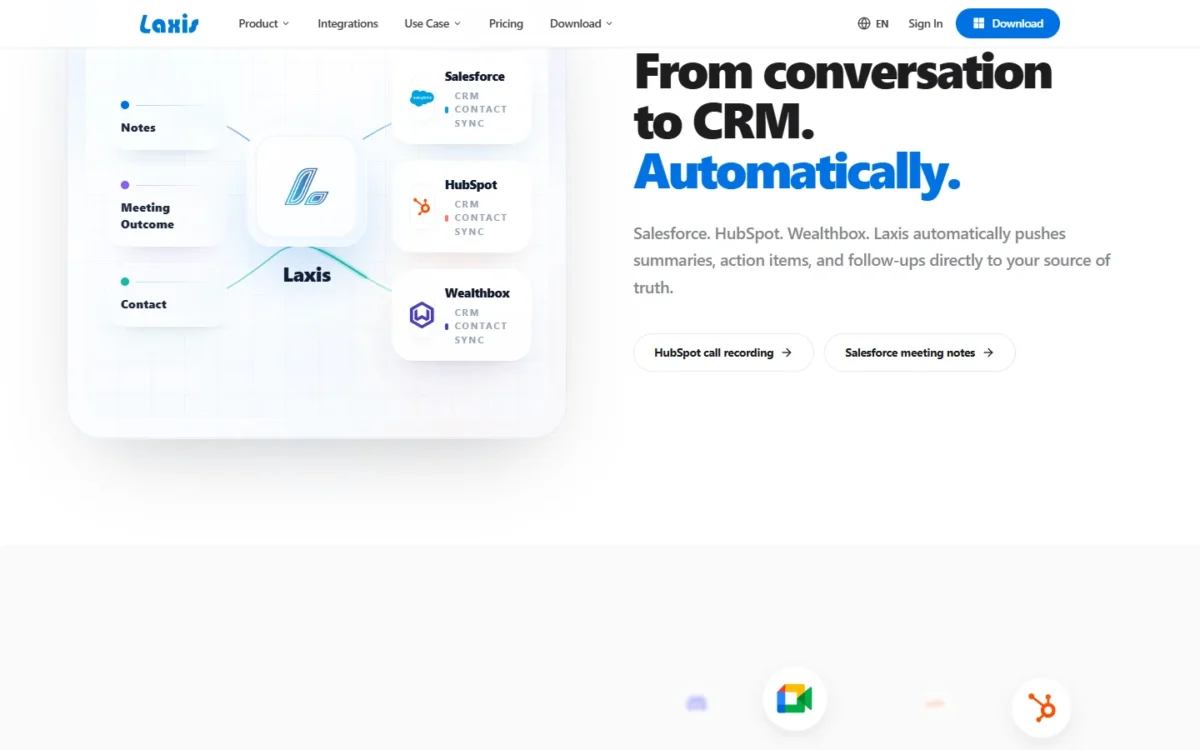
Notes reach HubSpot, Salesforce or Wealthbox from the Business plan up, where CRM Automation and the 7,000+ app integrations through Zapier start. Laxis says it pushes summaries, action items and follow-ups to the CRM automatically. There is no self-serve Business trial, so ask sales for the team trial and check which fields land where.
Premium has its own route out: the AI Connector (MCP) for Claude, ChatGPT and Cursor answers questions about a meeting’s transcript, summary or action items from inside the chat app. For a rep whose CRM updates are manual anyway, that covers lookups without Business.
AI Voice Keyboard for Everyday Writing
The AI Voice Keyboard is the second product in the same Laxis subscription. This section reports what Laxis publishes about it in its Voice Keyboard help pages; it is the vendor’s description, not a result of my test.
Laxis documents dictation as speech to text in 60 languages that appears where your cursor is, in an email, a chat, a document or a search box. It runs in the desktop app for Mac and Windows and in the iPhone and Android apps, and Laxis says it does not run in the web app or in the Mac App Store version of the desktop app.
Laxis lists these Voice Keyboard features:
- Polish, on every plan: removes “um”, “uh”, repetitions and self-corrections, fixes punctuation and formats dictated lists, in a Formal, Casual, Very casual or Excited tone.
- Translate, Premium and Business: speak in any language and Laxis pastes the translation in your target language.
- Agent mode, Premium and Business: say what you want written, such as a reply, and Laxis types it where you work; within 5 minutes of the last request, a follow-up such as “make it shorter” is accepted.
- AI that knows your meetings, Premium and Business: listed beside Agent mode in Laxis’s plan table; the help pages I read do not say how it works.
Dictation draws on the same monthly minutes as meetings: 300 on Basic, 2,000 on Premium and unlimited on Business. One dictation take can last up to 5 minutes. Agent mode also sends Laxis the text around your cursor, up to 1,000 characters on each side, along with your instruction.
For a rep who writes follow-up emails by voice, Premium is the entry point for Translate and Agent mode, and Business is where dictation stops counting against a minutes cap. Because Voice Keyboard workflows sit outside my test, try one on your own writing, with your own names and jargon, before you rely on it.
Laxis Ease of Use
Getting notes out of a call took little effort: New Recording, Upload Audio File, Upload, then a finished summary at about 50 seconds. The only manual steps were naming the two speakers and a glance at the company name.
At a plan’s recording cap, the recording stops and saves automatically, and a new one continues in the same note. The plan follows your account across web, desktop, mobile and the Chrome extension, but you change or cancel it only where you bought it: an iPhone purchase is managed through Apple.
With Voice Recognition on, naming a speaker after a meeting teaches Laxis that voice for next time, and on my test file a click on a speaker offered “Apply to all Speaker 1” to name every line of that voice; what decides the plan is call volume.
Laxis Plans at a Glance
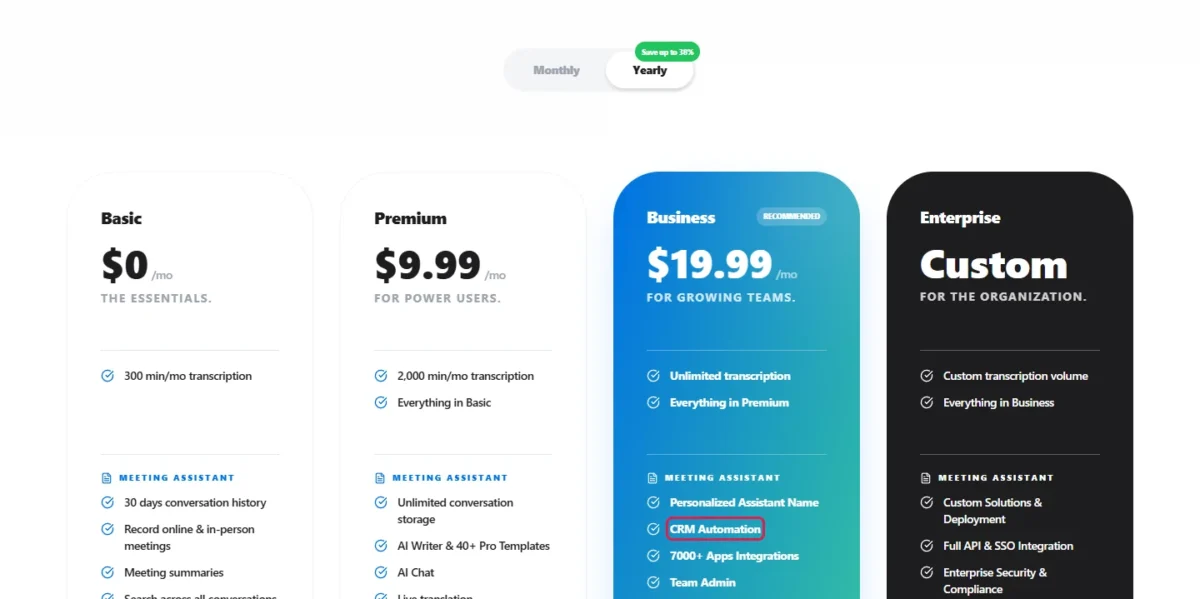
Laxis Meeting Assistant has a free Basic plan, Premium as the entry paid plan, Business as the team plan, and Enterprise, the top plan, by quote. Plans are personal subscriptions billed monthly or yearly, with Premium at $9.99 a month on yearly billing and Business at roughly double that.
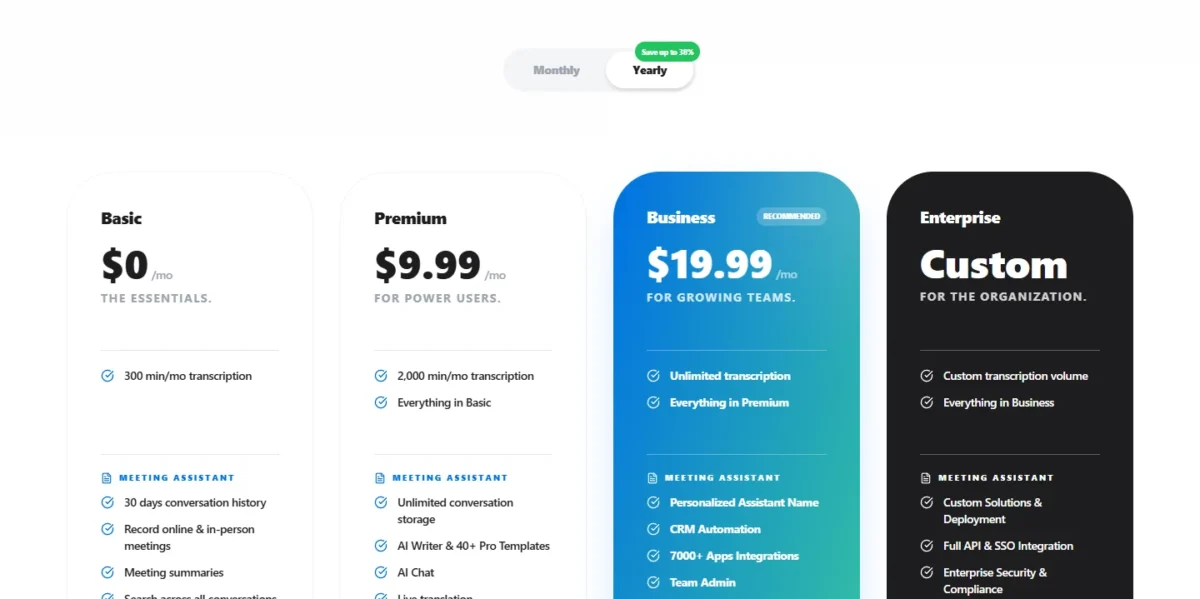
| Plan | Where it sits | Minutes per month | Longest recording |
|---|---|---|---|
| Basic | Free plan | 300 | 45 minutes |
| Premium | Entry paid plan | 2,000 | 2 hours |
| Business | Team plan: team admin, CRM Automation, 7,000+ app integrations | Unlimited | 4 hours |
| Enterprise | Top plan, priced by quote | Custom | Custom |
Sources: Laxis pricing page, Monthly and Yearly views, and Laxis Billing & Plans help page, checked Nov 2026.
The full plan-by-plan breakdown and the team math are in my Laxis pricing guide.
Paying monthly for a year of Premium costs $15.99 x 12 = $191.88, which is $191.88 – $119.88 = $72 more than yearly billing, so switch to yearly once the trial proves the habit. Purchases inside the iOS and Android apps follow Apple’s and Google’s regional price tiers.
Business is worth the step from Premium when you need what it adds: unlimited transcription and dictation instead of 2,000 minutes, recordings up to 4 hours instead of 2, video recording replay, team admin, a personalized assistant name, priority support, 7,000+ app integrations or CRM Automation. Basic, what remains after the trial, keeps 30 days of history; older meetings are archived, not deleted.
My take
Pick Basic for light use: it is an ongoing free plan with 300 minutes a month, 45-minute recordings and 30 days of history. Pick Premium if you are one rep who wants AI Chat and the sales templates within 2,000 minutes; pick Business if you run a team, want notes in HubSpot or Salesforce, or your calls pass 2,000 minutes or 2 hours.
Minutes, recording length and the shared pool
Premium’s 2,000 minutes cover about 44 calls of 45 minutes a month (2,000 / 45 = 44.4), less whatever you dictate. Meetings, Voice Keyboard dictation and live translation share the pool and pause together when it runs out.
A rep on four 30-minute calls a day for 21 working days needs 4 x 30 x 21 = 2,520 minutes, past Premium’s 2,000, so Business is that rep’s plan.
Team plans
Five reps on Premium means five subscriptions, because Laxis plans are personal, while Business is bought as seats by the team’s billing owner. Laxis prints no separate seat price, so confirm it with sales before budgeting Business for a team.
Who Should Use Laxis?
Laxis is worth it when one seller records their own calls and wants a qualification write-up without typing it. If you take typed notes and never record calls, a meeting assistant is the wrong tool; note-taking apps without call recording fit that job.
Best for
- A rep or AE on up to about 44 calls of 45 minutes a month
- A founder who sells and wants a BANT write-up like the one my Premium trial produced
- A rep who works in Claude or ChatGPT and wants meetings there through the MCP connector
- A rep who moves between desktop, phone and the Chrome extension on one plan
- A sales team that wants seat admin, no minute cap and notes in HubSpot or Salesforce, on Business
Not ideal for
- A rep who wants free recording without a cap, since Basic stops at 300 minutes
- A rep on four or more 30-minute calls a day who wants to stay on Premium
- A team that wants to try CRM Automation self-serve, since the Business trial runs through sales
Laxis vs Fathom, Fireflies.ai and Avoma
For one rep, Laxis Premium and Fireflies.ai Pro cost about the same, $9.99 against $10 a month on yearly billing.
Where CRM sync matters, compare the plan that carries it at each tool:
- Laxis Business: $19.99 a month, billed yearly, with CRM Automation for HubSpot, Salesforce and Wealthbox
- Avoma Startup: $19 per recorder seat a month, billed annually, with Auto Save Notes to CRM Records
- Otter.ai Pro: $8.33 per user a month on annual billing, listing Salesforce and HubSpot integrations, subject to user limits
- Fathom Business: $25 per user a month on annual billing, 2-user minimum, with CRM field sync
| Software | Best for | Starting price | Key difference | Main trade-off |
|---|---|---|---|---|
| Laxis | Reps who want sales-template notes | Free; Premium $9.99 per month, billed yearly | 13 sales templates; note taker and voice keyboard on one plan | Premium’s 2,000 minutes cover meetings and dictation together |
| Fathom | Free recording without a cap | Free; Team $15 per user per month, billed annually | Free plan lists unlimited recordings | Team needs 2 users; CRM field sync on Business |
| Fireflies.ai | A low-priced paid seat | Free; Pro $10 per seat per month, billed annually | Pro lists unlimited AI summaries and integrations | Free plan holds 400 minutes of storage per team |
| Avoma | Notes saved to CRM records | Startup $19 per recorder seat per month, billed annually | Auto Save Notes to CRM Records on Startup | Every recording rep needs a paid seat |
Sources: Fathom pricing, Fireflies.ai pricing, Avoma pricing, Otter.ai pricing and Laxis pricing, checked Nov 2026.
Fathom is the pick when free recording comes first, since Basic stops at 300 minutes. If none of these four fits, my ranking of AI note takers widens the choice.
My take
Laxis Premium is worth it if BANT or MEDDIC write-ups are part of your job, since my trial account held 13 sales templates. If CRM-synced notes for a team are the point, trial Avoma Startup and Laxis Business side by side.
Laxis Review: Final Verdict
Buy Laxis Premium on yearly billing, $9.99 a month, if you record your own calls: on my test call it produced notes with every planted fact, dated action items and a BANT write-up, and AI Chat answered my pilot-terms question with a cited moment.
Premium also adds the Voice Keyboard’s Translate and Agent mode, which Laxis documents but my test did not cover, and its 2,000 minutes a month are shared by meetings and dictation.
Move to Business when a team needs what it adds, such as seat admin, unlimited transcription and dictation, 4-hour recordings, Zapier’s 7,000+ apps or CRM Automation, after a team trial through sales.
Use the 14-day Premium trial to see it on your own calls:
- Record one real call with three or more people and compare names and numbers with your own notes
- Switch that call’s notes to BANT or MEDDIC and compare the write-up with your CRM fields
- Ask AI Chat a question you know the answer to, then open the cited moment