In the Notion vs Obsidian choice, pick Obsidian if you want private notes kept as files on your own devices, and pick Notion if your team needs one shared cloud workspace with databases, permissions and built-in AI. Obsidian stores every note as a Markdown text file in a local folder called a vault, while Notion keeps pages and databases in its cloud and downloads only the pages you mark for offline use.
The Obsidian app is free for any purpose, including work, and you pay only for add-ons such as Sync at $4 per user per month, billed annually. Notion charges per seat: Plus is $10 and Business is $20 per seat per month, billed yearly.
For a five-person team, that is $4 x 5 users x 12 months = $240 a year on Obsidian Sync Standard against $10 x 5 seats x 12 months = $600 on Notion Plus, because every member of an Obsidian shared vault needs an active Sync subscription. The lower number has limits: a shared vault holds at most 20 users, all with the owner’s permissions, and Obsidian does not yet support live editing of the same file.
Notion puts Notion Agent and AI Meeting Notes on Business, while Obsidian’s pricing page lists no AI product and AI comes from community plugins. The table below lines up the rest.

Quick verdict
The deciding difference is where your notes live: Obsidian keeps them as Markdown files in a folder you control, and Notion keeps them in a shared cloud workspace.
Obsidian is the pick for one person, or a small group editing different notes, who wants local files, offline work and plugins. Notion is the pick for a team that needs permissions, databases with automations, and AI in the workspace.
The trade-off: for a team, Obsidian costs less per person, but its shared vault stops at 20 people with equal permissions.
Choose Notion if
- Roles, guests or private teamspaces matter to your team
- AI should come built in, from the Business plan
Choose Obsidian if
- Your notes should stay Markdown files on your own disk
- You want a free app and pay only if you need Sync
In This Article (10 sections)
Notion vs Obsidian at a Glance
The table sets the two side by side by job, with Obsidian’s Sync add-on where Notion’s seat price stands.
| Attribute | Notion | Obsidian |
|---|---|---|
| Best for | Teams that share one workspace with permissions | Individuals and small groups who want local, private notes |
| How notes are stored | Pages and databases in Notion’s cloud | Markdown files in a local folder (vault) |
| Starting paid price | Plus: $10 per seat per month, billed yearly | Sync Standard: $4 per user per month, billed annually (app free) |
| Team collaboration | Teamspaces; private teamspaces and granular database permissions on Business | Shared vault through Sync, up to 20 users |
| Built-in AI | Business: Notion Agent, AI Meeting Notes | Not listed on obsidian.md/ |
| Main limitation | Offline access is per page and per device | No live co-editing; every collaborator has the owner’s permissions |
Sources: Notion pricing, Notion offline guide, Obsidian pricing, Obsidian Sync, shared vault help page, checked Nov 2026.
Privacy points to Obsidian; a team with roles points to Notion.
Key Differences Between Notion and Obsidian
Five differences decide most picks between these two knowledge management apps, and each one favors a different kind of reader.
- Storage model: Obsidian notes are plain text files in a vault that other editors can open; Notion pages live in its cloud. Ownership matters to journalers; a shared workspace matters to teams.
- Pricing model: Obsidian’s app is free and you pay per user for Sync or per site for Publish; Notion bills every member’s seat. A team pays for every member on Notion and every Sync collaborator on Obsidian.
- Collaboration: an Obsidian shared vault gives all collaborators the owner’s permissions; Notion separates teamspaces, guests and, on Business, granular database permissions. Teams with contractors feel this first.
- AI: Notion builds AI into Business; Obsidian leaves AI to community plugins. A team that wants one vendor to answer for its AI needs Notion; someone who picks their own AI tool can stay with Obsidian.
- Extension model: Obsidian grows through community plugins and themes; Notion offers over 10,000 templates and a connections directory. People who reshape the app lean to Obsidian, and people who want a ready template lean to Notion.
My take
Pick Obsidian when the notes are yours alone, such as a journal or research archive, or one of the apps built for a second brain. Pick Notion the moment a second person needs a different level of access than you.
Notion vs Obsidian: Features Compared
Obsidian fits better on storage, offline work and customization; Notion fits better on collaboration, structured data and built-in AI; setup depends on the kind of work you do.
| Criterion | Notion | Obsidian |
|---|---|---|
| Where notes live | Notion’s cloud | Local Markdown files |
| Offline work | Pages marked per device; first 50 database rows | Works without a connection |
| Shared editing | Plus: collaborative blocks | Add-on: Sync shared vault, Limited: 20 users |
| Permissions | Business: private teamspaces, granular database permissions | Limited: same permissions as the vault owner |
| Databases | Free: subtasks, dependencies, custom properties | Bases core plugin: table, list, cards, kanban, map |
| Automations | Free: buttons only; Plus: custom database automations | Community plugins (812 in Automation) |
| Built-in AI | Business: Notion Agent, AI Meeting Notes | Not listed on obsidian.md/ |
| Max file size | Free: 5 MB; paid plans: 5 GB | Sync Standard: 5 MB; Sync Plus: 200 MB |
| Version history | Free 7 days; Plus 30 days; Business 90 days | Sync Standard 1 month; Sync Plus 12 months |
| Web publishing | Free: 1 notion.site domain; Plus and up: 5 | Add-on: Publish |
Sources: Notion pricing, Obsidian Sync plans and storage limits, Obsidian Bases, Obsidian plugins, checked Nov 2026.
The full verdict on Notion as a product sits in my Notion review; the criteria below stay on the head-to-head.
Where your notes live: storage, offline and security
Obsidian keeps plain Markdown files in a local folder that works offline by design, while Notion stores pages in its cloud and works offline only for pages you mark on each device. Obsidian’s apps collect no telemetry data, and notes stored on your device stay inaccessible to the company; Sync adds AES-256 end-to-end encryption.
In Notion, offline pages must be downloaded on each device, a database brings only its first 50 rows, and embeds, forms and buttons stay unavailable until you reconnect. Business and Enterprise also download recent and favorited pages automatically.
Notion’s advantage is a vendor with published audits: TLS 1.2 or higher in transit, AES-256 at rest, annual SOC 2 and ISO 27001 audits listed on its security page, and a HIPAA Business Associate Agreement for Enterprise customers.
Verdict: storage and offline
Obsidian fits better for files you own and full offline access. Notion fits better for a company whose security review asks for named audits.
Collaboration and permissions
Notion fits teams that need permissions: Business adds private teamspaces and granular database permissions, and guests are free but see only the pages they are invited to. Obsidian shares a vault with up to 20 users through Sync, and every one of them gets the owner’s permissions except the right to invite.
Two people cannot type in one Obsidian file live: no shared cursor, and a colleague’s changes show up only after Sync runs, which merges any conflicts. That works for a three-person research group that splits notes by owner; it strains a team that drafts one document together.
Readers building a company wiki should also see how Notion compares with Confluence for a team wiki.
Verdict: collaboration
Notion fits better for any team with roles, clients or contractors. Obsidian works for up to 20 people who share the same access and rarely edit the same file at once.
Databases, tasks and project tracking
Notion’s databases fit project tracking: every plan includes subtasks, dependencies and custom properties, and Plus adds charts and custom database automations, where Free gets buttons only. Obsidian’s Bases core plugin gives table, list, cards, kanban and map views over note properties, and all of that data stays in your local Markdown files.
A Notion database can run a content calendar that sets a status or assignee on its own once Plus automations are on. An Obsidian base turns a folder of book or meeting notes into a sortable table without moving text out of plain files, and the Canvas core plugin adds an infinite board saved in the open JSON Canvas format.
Verdict: databases and projects
Notion fits better for tracking tasks with automations. If project management, not notes, is the team’s main job, I would also compare dedicated project management tools before choosing either.
Customization, plugins and integrations
Obsidian is extended by 10,068 community plugins and 985 themes, while Notion gives a gallery of over 10,000 templates plus a connections directory, a public API and webhooks. Obsidian’s directory sorts 1,445 plugins under Integrations.
Notion gates connections by plan: Plus connects to tools like Slack and Google Drive, and Business adds premium connections to GitHub, Asana and more. A plugin count says nothing about quality, so try the two or three Obsidian plugins you would depend on before committing.
Verdict: customization
Depends on use: Obsidian fits people who want to reshape the app, and Notion fits people who want a ready template and a vendor-built connection.
Built-in AI
Notion includes Notion Agent and AI Meeting Notes on Business, with 1,500 Standard credits and 500 Select credits per member a month, while Obsidian’s pricing page lists no AI product at all. Notion’s Free and Plus plans get only a limited trial of these features, and Custom Agents are free to try, then $10 per 1,000 monthly Notion credits.
Obsidian is not closed to AI: its directory lists 1,197 community plugins in the AI category. That suits someone who wants to choose their own AI tool, but a company that wants one vendor to answer for its AI cannot buy it from Obsidian.
Verdict: built-in AI
Notion fits better for a team that wants AI in the workspace, but only on Business; Plus buys a trial, not the feature.
Setup and ease of getting started
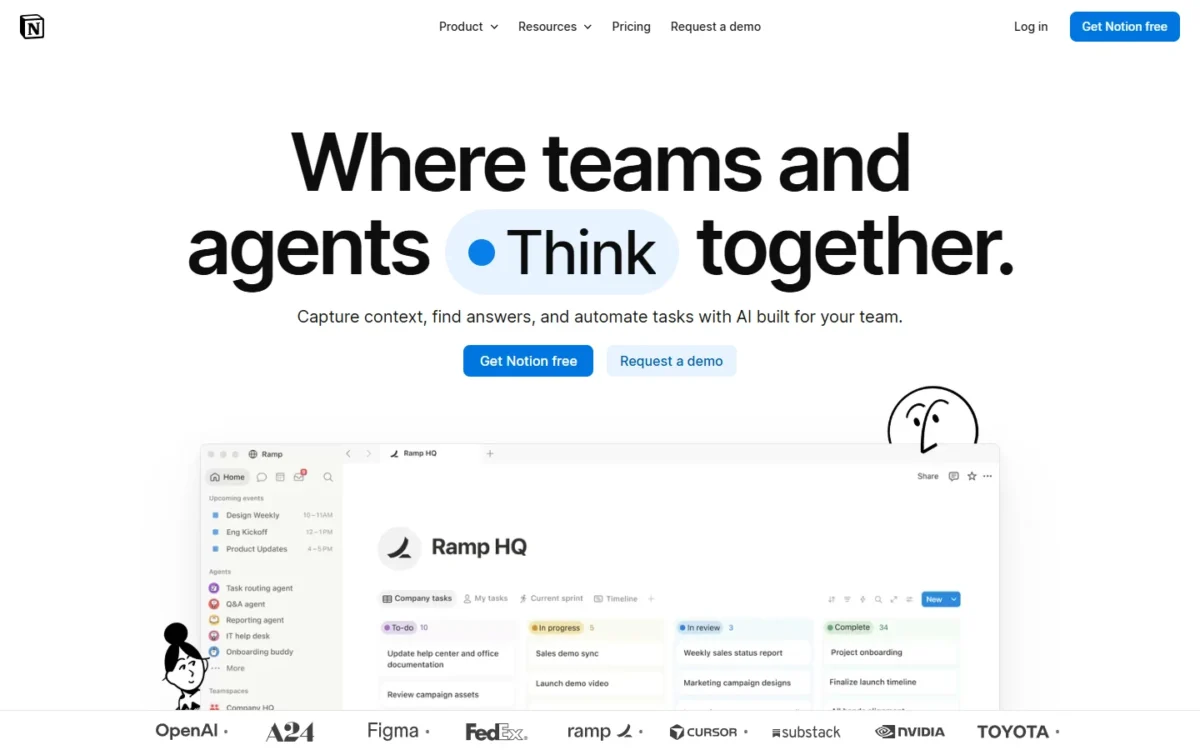
Obsidian starts with no account and a folder of files, while Notion starts from a cloud workspace and a gallery of over 10,000 templates. A vault is simply a folder on your computer, so a note-taker can start typing and decide on sync later.
Notion hands you structure instead: you can start a page from its template gallery rather than from a blank workspace. Writing notes favors Obsidian’s blank folder; building structured pages favors Notion’s templates. Put a week of your own notes into the free Obsidian app and into Notion Free before you pay for either.
Notion vs Obsidian Pricing
Obsidian’s app is free for any use, and you pay only for add-ons: Sync at $4 or $8 per user per month and Publish at $8 per site per month, billed annually. Notion charges per seat: Plus costs $10 per seat per month billed yearly, or $12 billed monthly. Business costs $20 per seat per month billed yearly, or $24 billed monthly, and Enterprise is custom pricing through Contact Sales.
Yearly billing takes $2 off each $12 Plus seat and $4 off each $24 Business seat a month; Notion’s plans in detail cover every tier, and the table below pairs the two by job.
| Plan tier | Notion | Obsidian |
|---|---|---|
| Free use | Free: $0; as many blocks as you like for one member, limited for 2+ members | App free for any purpose, no account needed |
| Entry paid tier | Plus: $10 per seat per month yearly, $12 monthly | Sync Standard: $4 per user per month annually, $5 monthly |
| Higher tier | Business: $20 per seat per month yearly, $24 monthly | Sync Plus: $8 per user per month annually, $10 monthly |
| Organization option | Enterprise: custom pricing, Contact Sales | Commercial license: $50 per user per year, optional |
| Public website | Custom domain: $8 per domain per month paid annually, $10 monthly | Publish: $8 per site per month annually, $10 monthly |
| Refunds | Full refund within 3 days (monthly) or 30 days (annual) | Sync and Publish: full refund within 7 days; licenses non-refundable |
Sources: Notion pricing, Obsidian pricing, Obsidian Sync, Obsidian Publish, Obsidian license overview, checked Nov 2026.
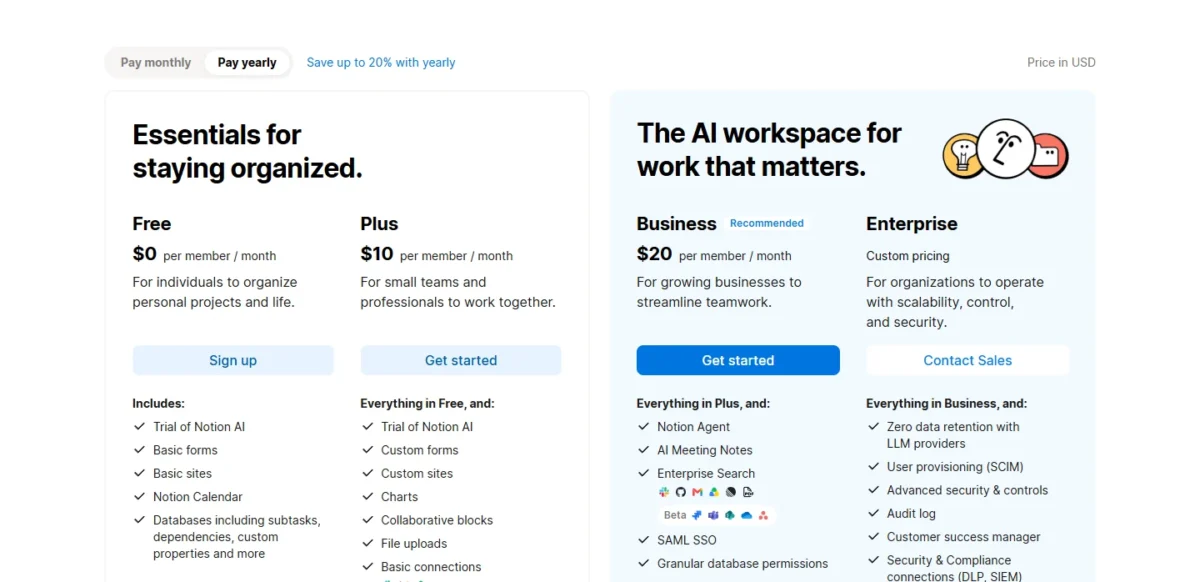
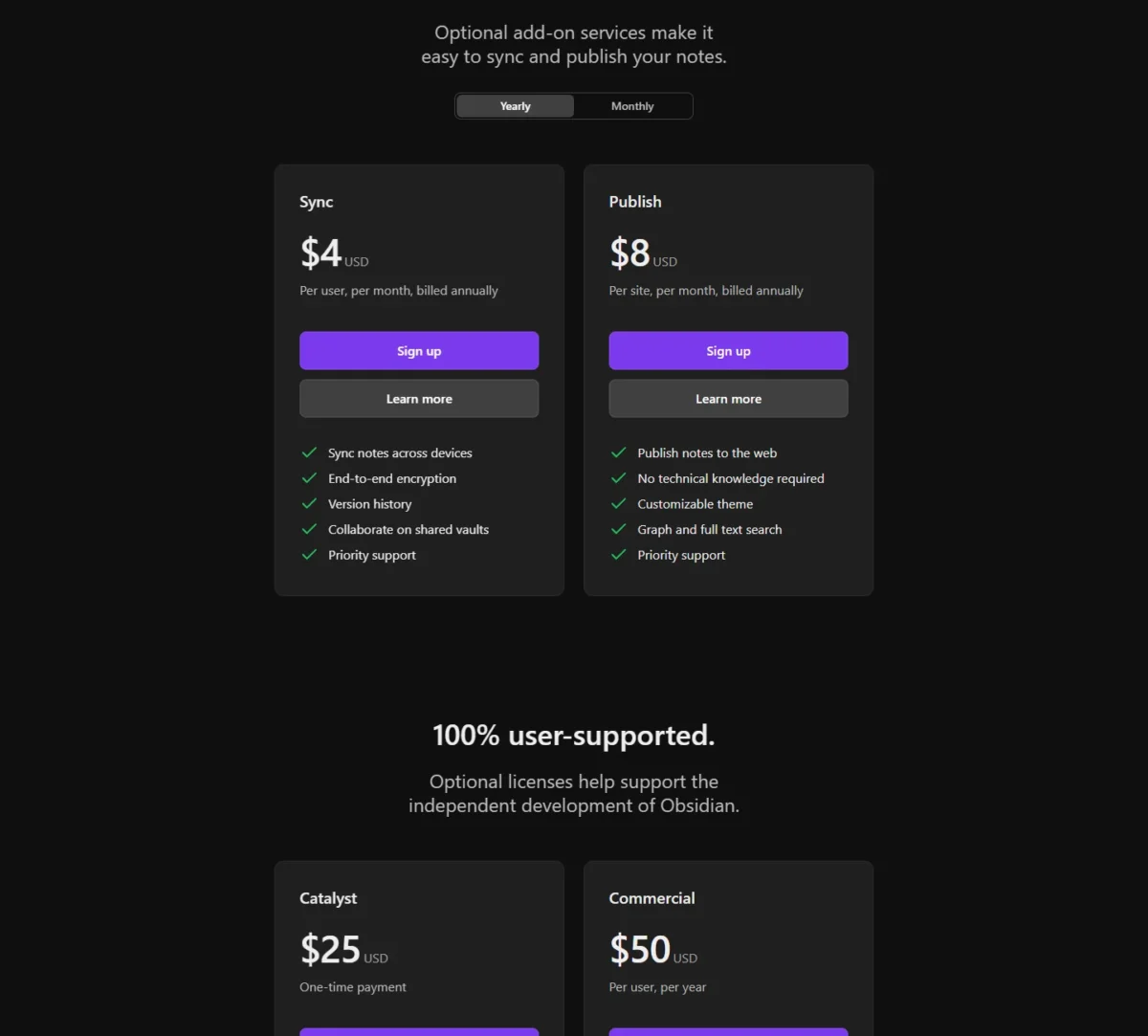
The upgrade triggers differ. A Notion Free workspace with two or more members can add only a limited number of blocks, then no new content blocks; Notion does not publish that number, so treat Free as a trial for any team.
Obsidian Sync Standard caps you at 1 synced vault, 1 GB of storage and 5 MB per file, which a vault of PDFs or recordings hits first; Sync Plus raises that to 10 vaults, 10 GB and 200 MB per file, upgradable to 100 GB through the account dashboard. The licenses are optional support: no one must buy a commercial license, and Catalyst is a $25 one-time payment for early beta access.
What the same job costs on each
A five-person team pays $600 a year on Notion Plus and $240 on Obsidian Sync Standard, billed annually, and the gap grows with every person you add.
| Setup | Notion | Obsidian |
|---|---|---|
| One person, one device | Free: $0 | App only: $0 |
| One person, several devices | Free: $0 | Sync Standard: $4 x 1 user x 12 months = $48 |
| 5-person team sharing notes | Plus: $10 x 5 seats x 12 months = $600 | Sync Standard: $4 x 5 users x 12 months = $240 |
| 5-person team plus optional Commercial licenses | Plus: $600 | $240 + $50 x 5 users = $490 |
| 10-person team sharing notes | Plus: $10 x 10 seats x 12 months = $1,200 | Sync Standard: $4 x 10 users x 12 months = $480 |
| 5-person team with built-in AI | Business: $20 x 5 seats x 12 months = $1,200 | Not listed on obsidian.md/ |
| 5-person team with files up to 200 MB | Plus: $600 (5 GB per file) | Sync Plus: $8 x 5 users x 12 months = $480 |
| Public site on your own domain | Custom domain: $8 x 12 months = $96 | Publish: $8 x 12 months = $96 |
Sources: Notion pricing, Obsidian pricing, Obsidian Sync, Obsidian Publish, checked Nov 2026.
Assumptions: US list prices in USD, annual billing, before tax. The Obsidian rows count one Sync subscription per collaborator, because every shared-vault collaborator must have an active Sync subscription. Joining a shared vault does not count toward a collaborator’s vault limit, so Sync Standard’s one-vault cap still leaves each member room for a personal vault. Excluded: Notion credits for Custom Agents and Obsidian Sync storage above 10 GB, whose price Obsidian does not publish.
Paying monthly widens the gap: Notion Plus at $12 x 5 seats x 12 months = $720 against Sync Standard at $5 x 5 users x 12 months = $300. A solo writer can also keep Obsidian at $0 across devices by syncing the vault through iCloud, Dropbox, OneDrive or Git instead of Sync.
The $600 – $240 = $360 a five-person team saves each year on Obsidian buys files on disk and plugins, not fine-grained permissions or built-in AI. If the team needs AI, the real comparison is Notion Business at $1,200 against Obsidian plus whatever AI plugin the team chooses.
Notion vs Obsidian: Pros and Cons
Each list below names the plan behind a strength wherever a plan decides it.
Pros
- Notion databases include subtasks, dependencies and custom properties on every plan, with custom automations from Plus
- Private teamspaces and granular database permissions on Business keep sensitive pages away from the wider team
- Notion Agent and AI Meeting Notes come with Business, with monthly credits per member
- Paid plans upload files up to 5 GB each
Cons
- Offline access works only for pages marked on each device, and embeds, forms and buttons stay unavailable
- AI beyond a limited trial needs Business at $20 per seat per month, billed yearly
- A Free workspace with 2+ members hits a block limit Notion does not publish
Pros
- Obsidian is free for personal, commercial and nonprofit use, with no account needed
- Notes are Markdown files in a local folder that other editors can open
- Community plugins and themes let you reshape the app
- Sync encrypts notes end to end with AES-256
Cons
- No live co-editing, and every shared-vault collaborator has the owner’s permissions
- Every collaborator pays for Sync, from $4 per user per month billed annually
- Sync Standard caps files at 5 MB
- No first-party AI; AI comes only from community plugins
My take
Weigh the weakness you would hit first. Pick Obsidian if you write alone, because its missing permissions never come up; pick Notion if a contractor joins on day one. Notion’s offline limits are worth worrying about only if you work on planes or in the field.
Which Is Better for Your Needs?
Obsidian is better for private, local and plugin-driven notes, and Notion is better for team workspaces, project tracking and built-in AI.
| Your priority | Better fit | Reason | Trade-off |
|---|---|---|---|
| Private notes or journaling on your own devices | Obsidian | Notes are local Markdown files and the app collects no telemetry | Sync between devices costs $4 per user per month unless you use iCloud, Dropbox or Git |
| Student | Depends | Notion Plus is free for students and educators with a 1-member limit; Obsidian gives 40% off Sync and Publish | Notion’s offer covers one person only; Obsidian’s app is already free |
| Team wiki with permissions and guests | Notion | Teamspaces, free page-level guests, and granular permissions on Business | $10 to $20 per seat per month, billed yearly |
| Project tracking with automations | Notion | Custom database automations start on Plus | Free gets buttons only |
| Built-in AI | Notion | Notion Agent and AI Meeting Notes on Business | Plus has only a limited trial |
| Large attachments synced across devices | Depends | Notion paid plans take 5 GB per file; Sync Plus takes 200 MB | Sync Plus costs $8 per user per month, billed annually |
| Public knowledge site on your own domain | Tie | $8 a month billed annually on both, $96 a year | Notion Free includes one notion.site domain at no cost |
| Deep customization | Obsidian | 10,068 community plugins and 985 themes | Plugins come from the community, not Obsidian |
Sources: Notion pricing, Obsidian pricing, Obsidian Sync, checked Nov 2026.
My take
For personal use, I would start in Obsidian: the app costs nothing, and Notion imports Markdown files if you later need a team workspace.
For a team of five or more with any outside collaborator, I would start in Notion Plus and move to Business only when the team wants AI or private teamspaces. A student should take Notion’s free Plus if they work alone in the cloud, and Obsidian if they want their notes as files after graduation.
If neither fits, the best note-taking apps for your workflow cover OneNote and the other options outside this pair.
Who should skip each
Skip Obsidian if your team needs role permissions, more than 20 people in one vault, or two people typing in the same file at once, which Obsidian does not yet support. A client-facing agency or a company of 30 will fight the shared vault’s limits from the start.
Skip Notion if you need full offline access to everything, files you own on disk, or built-in AI without paying for Business. A field researcher who works for days without a connection gets neither. Obsidian is only one of Notion’s competitors; if you rule Notion out for other reasons, compare other Notion alternatives.
Switching Between Notion and Obsidian
Moving from Notion to Obsidian runs through Obsidian’s Importer plugin, and moving from Obsidian to Notion means importing Markdown files or a ZIP of them into Notion. Neither direction carries everything.
Notion to Obsidian:
- The Importer’s Notion API route needs a Notion integration token and an internet connection, and it converts databases and formulas into Bases.
- Only the primary view of each database is imported, linked data sources are not imported, and large workspaces may take considerable time because of Notion API rate limits.
- The file route uses Notion’s HTML .zip export, needs no token, and does not preserve databases; Notion’s Markdown export omits important data, so Obsidian recommends HTML.
- Obsidian’s import guide asks for admin access to export all workspace content, and a Notion export can take up to 30 hours on a large workspace.
Obsidian to Notion:
- Notion imports Text & Markdown files and ZIP archives of up to 5 GB, but 10,000 or more files are likely to fail or partially import, so a large vault goes in batches.
- Canvas boards are .canvas files, which are not on Notion’s import list.
The data moves both ways; the structure around it does not, so pick for the next two years rather than as a trial.
How I Compared Notion and Obsidian
I read Notion’s pricing, AI, offline, export, import, security and connections pages and Obsidian’s pricing, Sync, Publish, license, plugin and help pages in November 2026, and compared the two on seven criteria: storage, collaboration, databases, customization, AI, setup and cost.
Plans are paired by job, not by name: Notion Free against the free app, Plus against Sync Standard, Business against Obsidian’s missing first-party AI, and Notion’s custom domain against Publish. Prices are US list prices in USD, and yearly costs are the monthly price times users times 12 months.
Notion does not publish its Free block limit for two or more members, and Obsidian does not publish the price of Sync storage above 10 GB. Try both on your own notes before paying.
FAQ
Is Obsidian free for commercial use?
Yes. The Obsidian app is free for all purposes, including personal, commercial and nonprofit use, and needs no account to download. The $50 per user per year Commercial license is optional and supports development rather than adding features; Sync and Publish are the only paid services.
Why are people moving away from Notion?
The documented reasons sit in Notion’s own limits: offline access only for pages downloaded to each device, AI beyond a trial only on Business, and notes that live in Notion’s cloud. Obsidian answers each with local Markdown files, and its Importer brings Notion pages across. The move is worth it for a solo user; a team should first check whether 20 users with equal permissions is enough.
Why are people leaving Obsidian?
The documented reasons are team limits: a shared vault holds at most 20 users, all with the owner’s permissions, two people cannot edit one file live, every collaborator needs an active Sync subscription, and Obsidian’s pricing page lists no first-party AI. A team that hits one of these can move to Notion, which imports Markdown files; a solo writer rarely hits any of them.
Final Verdict: Notion or Obsidian?
There is no overall winner: Obsidian is the pick for individuals and small groups who want private, local, plugin-driven notes, and Notion is the pick for teams that need a shared workspace with databases, permissions and built-in AI.
Choose Notion if
- Outside guests or several roles need different access to your pages
- You track projects in databases with automations (Plus and up)
- AI meeting notes and an AI agent belong in your workspace, and Business fits the budget
- You attach files larger than 200 MB (5 GB per file on paid plans)
Choose Obsidian if
- You want every note as a Markdown file you own, usable fully offline
- You work alone or with up to 20 people who share the same access
- Your team’s cost per person decides: Sync Standard is $4 per user per month, billed annually (alone, you pay $0 on Notion Free or on Obsidian synced through iCloud, Dropbox, OneDrive or Git)
- You want to reshape the app with community plugins and themes
For a team, the core trade-off is cost per person against depth of team features: Obsidian’s lower bill gives up fine-grained permissions and built-in AI, and every collaborator needs a paid Sync subscription. If your notes are yours alone, you lose nothing you would use; once your team grows past a handful of trusted people, Notion’s seat price is what those controls cost.