Camtasia is worth paying for if you make polished, screen-first training or tutorial videos, and the plan to buy is Essentials at $179.88 per year, billed yearly. The $39.00 Starter plan still watermarks every Camtasia Editor export, so it is not the cheap way in that it looks like.
This Camtasia review reads TechSmith’s four individual plans in US dollars, as its store page listed them on September 29, 2026. It includes the August 2026 release (2026.2), which added Step Capture to Video, WebM export and script-to-narration generation. You get the plan each job needs and when Loom, OBS Studio or Descript fits better.
Quick verdict
- Worth it for: trainers, customer-education teams and software marketers who publish edited screen tutorials, on the Essentials plan
- Skip it if: you send quick async updates (Loom fits better) or need free recording and live streaming (OBS Studio)
- Main strength: screen, camera, microphone and system audio record as separate tracks, with cursor data you can edit after recording
- Biggest limit: Starter at $39.00 per year watermarks Camtasia Editor exports, and Screencast review sharing stops at 25 videos below Pro
- Price basis: individual plans, billed yearly in US dollars, from TechSmith’s store page as of September 29, 2026
In This Article (12 sections)
Camtasia at a Glance
Camtasia is a desktop screen recorder and multitrack video editor that TechSmith sells as a suite, with a free entry point and four paid yearly plans.
- Category: screen recorder and video editor, sold with Snagit, Audiate and Screencast
- Best for: corporate training, customer education, software marketing and classroom videos
- Starting price: $39.00 per year, billed yearly (Starter, watermarked Editor); watermark-free from Essentials
- Free options: the free Camtasia Editor with watermarked exports, and Camtasia Online with recordings up to 5 minutes
- Platforms: Windows 10 and 11, macOS 14 or later
- Refund: 14-day money-back guarantee on all plans
- Main limitation: Screencast sharing and review stop at 25 videos below Pro
Two catches show up before any feature does: the cheapest plan watermarks, and the review cap lifts only on the top plan.
Camtasia Pros and Cons
Camtasia’s strengths sit in recording and training output; most of its cons come from the plan you buy.
Pros
- Separate screen, camera, mic and system-audio tracks plus recorded cursor data let tutorial makers fix the cursor after recording
- Quizzes, SCORM export and ADA-compliant closed captions from Essentials suit trainers who publish to an LMS
- Snagit comes with every plan, so documentation writers get screenshots and step capture without a second subscription
- Audiate’s text-based editing from Essentials lets narrators cut video by deleting words in a transcript
- The free Editor includes every editing feature, so a buyer can judge the workflow before paying
Cons
- Starter’s $39.00 a year buys a watermarked Editor, so anyone who wants clean videos starts at Essentials
- Screencast sharing and review stop at 25 videos below Pro, which pinches teams that review many drafts
- Individual plans bill yearly only and cannot be reassigned, which complicates teams whose people change
- Snapdragon X PCs run Camtasia by emulation only, and Macs need macOS 14 or later
- Automatic filler-word detection works in English only, a limit for narrators in other languages
What Is Camtasia?
Camtasia is TechSmith’s screen-first video suite: Camtasia Editor records and edits on a multitrack timeline, and the plans add other TechSmith apps around it.
Camtasia Snagit (image and step capture) is in every plan, and Camtasia Audiate (transcript editing) starts at Essentials. Screencast sharing comes with every plan, capped at 25 videos below Pro. Unlimited Screencast sharing and the full Assets libraries come with Pro, and the Camtasia Online browser recorder works on every plan.
Camtasia Features
The recorder and editor are the same on Essentials, Create and Pro; what the plan decides is the AI layer and how many videos you can share for review. Text editing arrives with Essentials, generated voice with Create, and avatars and dubbing with Pro.
Multitrack recording and cursor editing
Camtasia records screen, camera, microphone and system audio as independent layers and captures cursor metadata alongside them. For a tutorial maker, that means a jerky cursor can be smoothed, resized or repositioned, and clicks and keystrokes edited, after recording instead of re-recorded.
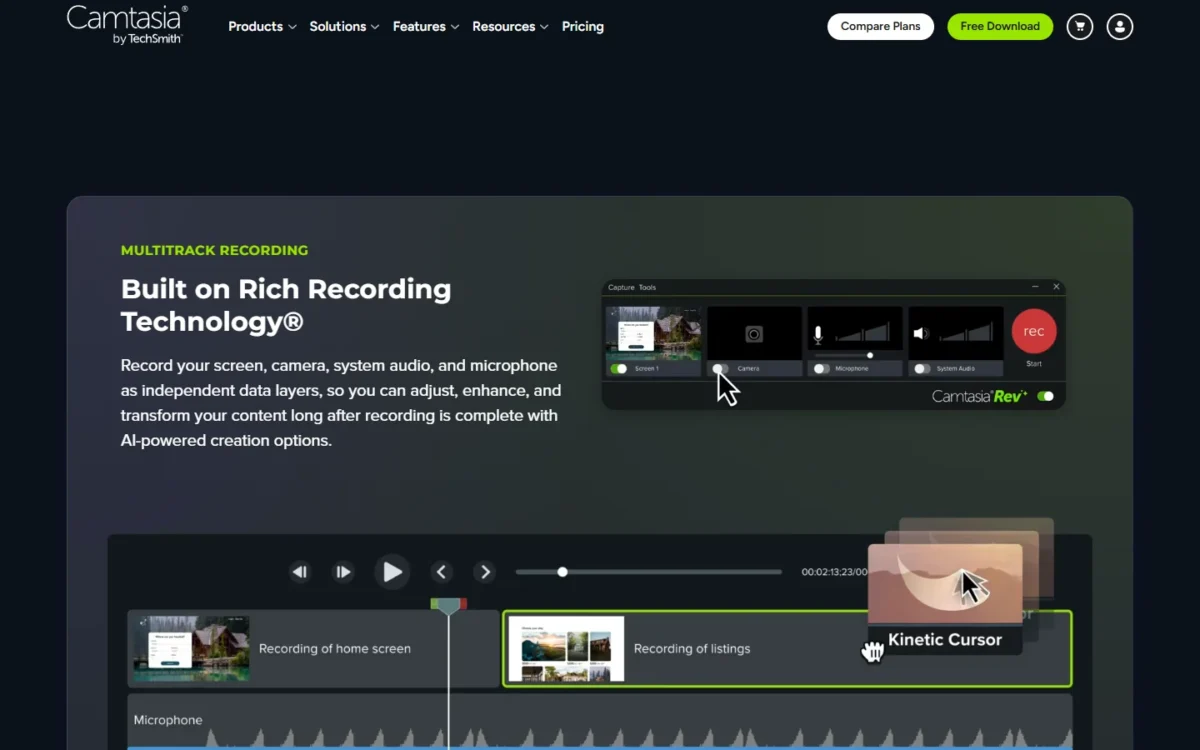
The plans start with unlimited 4K/60fps recordings, but on Starter each Editor feature, from screen recording to cursor animation, is marked “watermarked”. The clean version of this feature starts at Essentials.
Text-based editing with Audiate
Yes, you can cut a Camtasia video by deleting words, from Essentials upward: Audiate transcribes the audio, and deleting a word removes that stretch of video. It also removes filler words and hesitations without manual cuts.
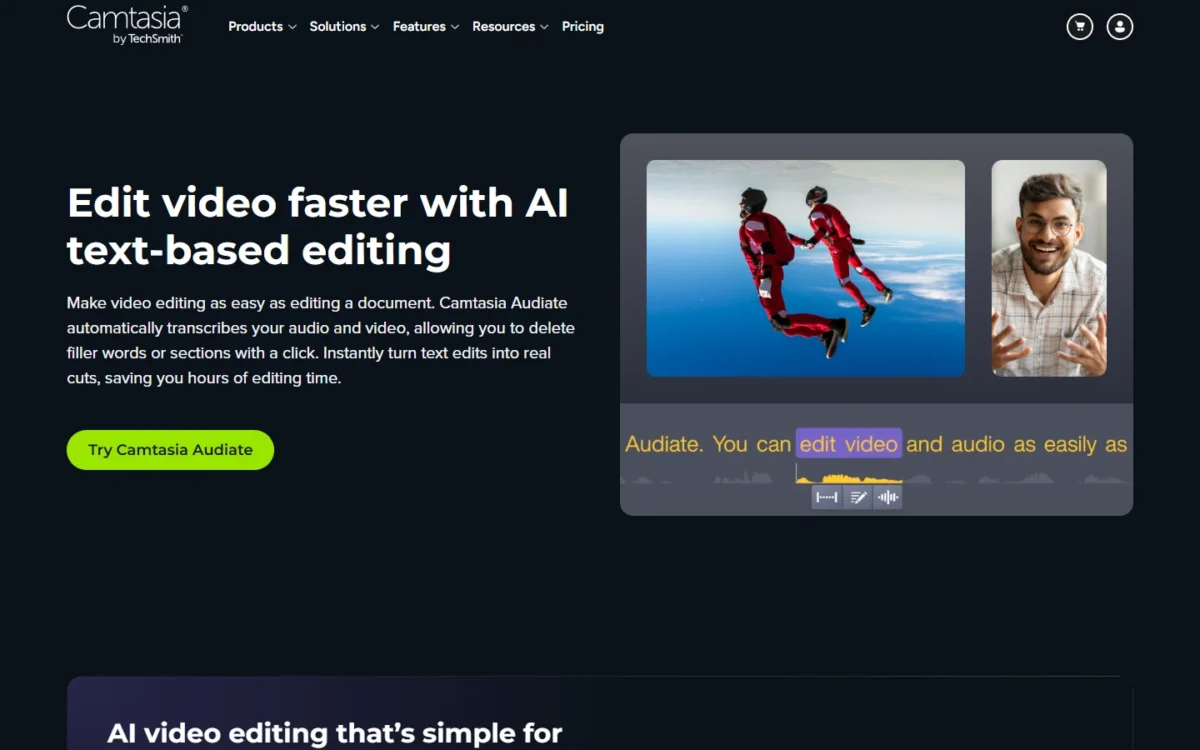
The limit is language: Audiate’s automatic filler-word detection supports English only. A Spanish or German narrator keeps the transcript editing but cleans hesitations by hand.
AI scripts, voices and avatars
Create adds the generation layer: scripts from prompts, AI script improvement, script import and voiceover generation with 200+ voiceover options. Since the August 2026 release, the Narration tab sends a script straight to Audiate for audio generation.
Pro adds 49 avatar styles, script translation, audio dubbing and AI titles, chapters and descriptions for videos shared on Screencast.
ElevenLabs Premium Voices come only with Audiate, Create or Pro subscriptions bought directly from TechSmith’s online store, not through a reseller or a sales rep.
How natural the voices and avatars sound depends on your script. Use the 14-day money-back window to run one of your own scripts through Create or Pro before you commit.
Training output: quizzes, SCORM and captions
Camtasia delivers to a learning management system from Essentials: it builds interactive quizzes and exports SCORM packages or MP4s for upload to your LMS. The same plans add ADA-compliant closed captions, subtitles and caption export as .srt, .json and .txt files.
The April 2026 release (2026.1) added VTT caption import and export, which matters when captions move between Camtasia and a video platform. On Starter, quizzes, SCORM and caption export all carry the watermark, so a trainer cannot ship clean course video from that plan.
Sharing and review in Screencast
Reviewers can leave timestamped comments, annotations and reactions on drafts in Screencast, but only on 25 videos below Pro. Starter, Essentials and Create also keep Screencast media storage for 12 months, while Pro shares unlimited videos and stores media for the duration of the subscription.
The 25-video cap is the limit most likely to push a busy team to Pro. A course of more than 25 lessons, each sent to an expert for comments, will not fit.
PowerPoint, Zoom and Snagit imports
Camtasia brings in work from three tools a trainer already uses. It imports .ppt or .pptx slides for voice narration and pulls Zoom recordings into the media bin once you connect your Zoom account.
It also opens a timeline image in Snagit, and the edited file replaces the old one. That link keeps a course current when the software it teaches changes. PowerPoint import is watermarked on Starter, like the rest of the Editor.
Camtasia Ease of Use
You can judge Camtasia’s workflow before paying: the free Editor download includes every editing feature, and exports carry a watermark until you buy Essentials, Create or Pro. The trial needs an internet connection and a TechSmith account.
Rev shortens the first edit. Toggle it on in the recorder or import any video, pick size, layout, background and effects, then export or send the result to the Editor. Every plan includes tutorials, the Academy, certification, webinars and live chat and email support.
The setup risk is the computer, not the interface. TechSmith’s system requirements set these floors:
- Windows 10 (64-bit) 20H2 or later, 8GB of RAM (16GB recommended), 2GB of video memory (4GB recommended), Intel 8th Gen or AMD Ryzen 2000 Series or newer
- Snapdragon X Plus and X Elite PCs run it by emulation only
- macOS 14.0 or later, 8GB of RAM (16GB recommended), with Apple silicon M1 Pro, M1 Max or newer recommended
- Media on local drives only: OneDrive, iCloud and Dropbox folders are not supported during recording or editing
The last line catches teams that keep project files in a synced cloud folder. Run one real project through the free Editor on your own machine before you pay, because performance on your hardware is the one thing no spec sheet settles.
Camtasia Pricing
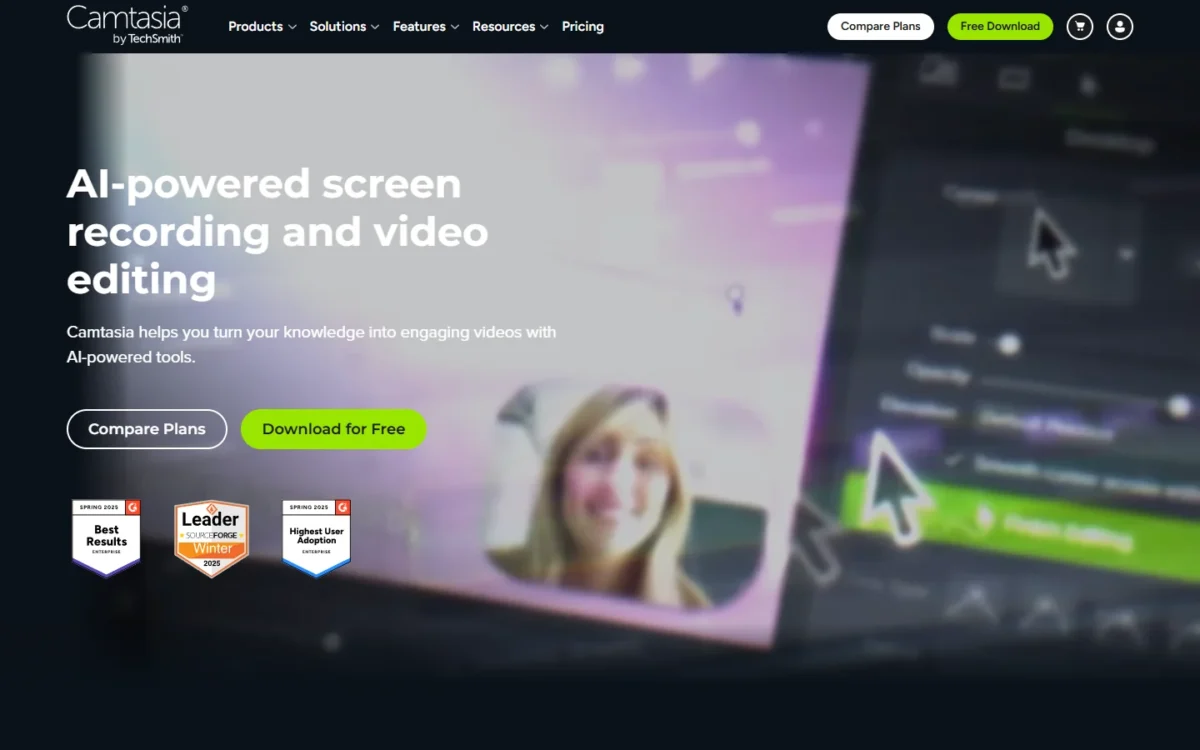
Camtasia’s four individual plans run from $39.00 to $599.00 per year, billed yearly in US dollars, as TechSmith’s store page listed them on September 29, 2026. Essentials is the plan most buyers need, because it is the first without the Camtasia Editor watermark. The screenshot below shows the Internet Archive’s copy of the store page from September 29, 2026.
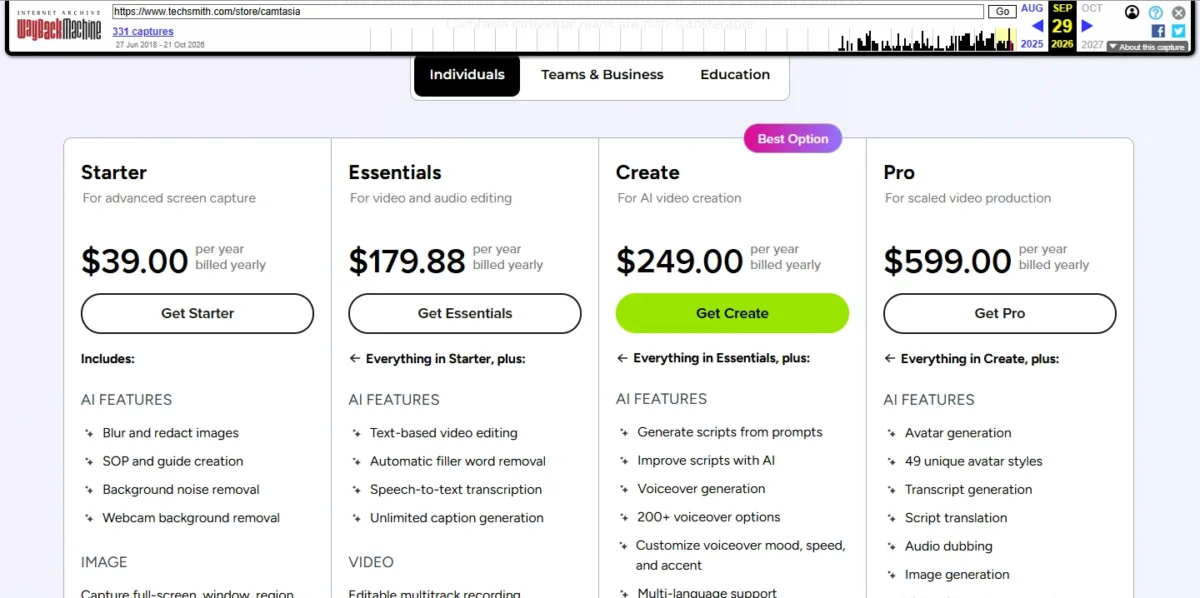
| Plan | Price (USD) | Billing | Adds over the plan below | Key limit |
|---|---|---|---|---|
| Starter | $39.00 per year | Billed yearly | Camtasia Snagit and a watermarked Camtasia Editor | Every Editor export is watermarked |
| Essentials | $179.88 per year | Billed yearly | Watermark-free exports, Audiate text editing, quizzes and SCORM | No script or voiceover generation |
| Create | $249.00 per year | Billed yearly | Script generation, voiceover generation, 200+ voiceover options | No avatars, translation or dubbing; 25 Screencast videos |
| Pro | $599.00 per year | Billed yearly | Avatars, script translation, audio dubbing, unlimited Screencast sharing, 100 million+ stock assets | Same Camtasia Editor features as Essentials |
Sources: TechSmith store page for Camtasia, Internet Archive copy of September 29, 2026, US dollars, read October 2026.
The Starter trap
Starter includes Camtasia Editor only in watermarked form: the Editor feature rows of TechSmith’s plan comparison read “watermarked” for Starter, the watermark-free exports row reads “not included”, and watermark-free exports start at Essentials. Buy Starter for Snagit’s screenshots and step guides, not for finished videos.
Three triggers move a buyer up a plan, and each has a clear yearly price:
- Clean exports: Starter to Essentials costs $179.88 – $39.00 = $140.88 more a year
- Generated scripts or AI narration: Essentials to Create costs $249.00 – $179.88 = $69.12 more a year
- Avatars, dubbing, translation or more than 25 review videos: Create to Pro costs $599.00 – $249.00 = $350.00 more a year
I would put a trainer who needs SCORM and captions on Essentials and stop there. Create adds script and voice generation, which a course in the trainer’s own voice does not use. Create earns its $249.00 only when you will generate scripts or narration. Pro is a hosting and localization plan. Its editor is the same as Essentials, so pay for it only for dubbing, avatars or unlimited review sharing. If you want the full breakdown, read my Camtasia pricing guide.
Individual plans carry no team discount: three people on Essentials pay 3 x $179.88 = $539.64 a year. Volume discounts start at ten licenses and do not apply to individual subscription licenses.
Each plan is tied to the purchase email and cannot be reassigned, though one license covers two devices used by the same person.
TechSmith also sells a Camtasia Editor Business License, which removes the export watermark too. Its sales team builds packages for whole teams. A team whose people change should ask sales whether that licence can move between users before buying individual plans.
TechSmith’s student page lists a student discount in the US, Canada and the UK.
Who Should Use Camtasia?
Camtasia fits people who publish edited, screen-first lessons and need SCORM, captions or cursor control. It does not fit quick async updates, a zero budget, Snapdragon PCs or Macs below macOS 14.
Best for
- L&D teams and trainers who publish to an LMS, with quizzes, SCORM export and ADA captions on Essentials
- Software marketers and customer-education teams who record product walkthroughs and polish the cursor afterward
- Documentation writers who also need screenshots and step guides, since Snagit comes with every plan
- Solo narrators who want to cut video by editing a transcript on one Essentials plan
Not ideal for
- Teams sending short async video updates, where Loom’s free Starter plan covers 25 videos
- Zero-budget recording or live streaming, where OBS Studio is free and open source
- Owners of Snapdragon X PCs (emulation only) or Macs below macOS 14
- Teams that hand seats between people on individual plans, which cannot be reassigned; ask TechSmith sales about a Business License instead
Camtasia vs Competitors
Loom fits quick async team messages, OBS Studio fits free recording and streaming, and Descript fits editing that starts from a transcript; Camtasia stays the pick for edited, screen-first lessons. If your videos are status updates rather than lessons, my full Loom review covers its free-plan limits and team pricing.
| Software | Best for | Starting price | Key difference | Main trade-off |
|---|---|---|---|---|
| Camtasia | Edited screen tutorials and training videos | $39.00 per year, billed yearly (watermarked Editor); $179.88 per year watermark-free | Multitrack recording with editable cursor data; quizzes and SCORM export | Yearly billing only; Starter watermarks Editor exports |
| Loom | Quick async video messages for a team | $0 Starter; Business $18 per user per month, billed monthly | Unlimited videos and recording time on Business | Starter stops at 25 videos and 5-minute recordings, up to 720p |
| OBS Studio | Free recording and live streaming | Free and open source | Scenes from many sources and a live-streaming workflow on Windows, macOS and Linux | No editing timeline listed on its homepage |
| Descript | Text-first editing of talking-head and podcast video | $0 Free plan | Text-based editing starts on its $0 Free plan; Camtasia’s starts at Essentials, $179.88 per year, billed yearly | Free plan processes 60 media minutes a month per editor and exports locally at 720p |
Sources: Loom pricing, OBS Studio homepage, Descript pricing and the TechSmith store copy above, checked October 2026.
Billing shape matters as much as features: Camtasia bills a year up front, Loom Business bills per user per month, and OBS Studio is free. If you mainly record quick updates, compare my Loom alternatives.
Best Camtasia Alternatives
Look beyond Camtasia if your job is live streaming, quick team messages, or recording on a Mac older than macOS 14. For a wider shortlist by job and price, my ranking of screen recording software sets Camtasia beside the other recorders worth a trial.
How I Evaluated Camtasia
I built this review from TechSmith’s own pages, read in October 2026: the Camtasia product, features, multitrack, text-based editing, Rev, system requirements, release notes, download, student and return-policy pages. Prices come from the US-dollar Individuals tab of TechSmith’s store page as the Internet Archive saved it on September 29, 2026.
The live student page, read October 28, 2026, states a 179.88 USD value, the same as the Essentials price on the store page. For the comparison I read Loom’s and Descript’s pricing pages and the OBS Studio homepage; plan fit, upgrade triggers and the three-seat cost are my analysis.
TechSmith does not publish prices for its team packages on the Individuals tab; its sales team quotes those. Prices can change, so confirm the figure at checkout.
Camtasia FAQ
Is Camtasia free?
Yes, in two forms. The free Camtasia Editor is a desktop app with every editing feature and 4K recording, but its exports carry a watermark. Camtasia Online is a browser app that records in 1080p for up to 5 minutes per recording, with unlimited recordings and sharing without a watermark.
Does Camtasia have a free trial or a refund?
The free Editor works as the trial. Paid plans carry a 14-day money-back guarantee: TechSmith refunds the product price within 14 days of purchase once you uninstall the software, and requests go through its return form. Refunds take 5-7 business days to appear on your statement.
Does Camtasia work offline?
Yes. Camtasia is a desktop application that works without an internet connection, so recording and editing do not depend on Wi-Fi. Some cloud-sharing and AI features may need online access, and starting the trial needs a connection and a TechSmith account.
Camtasia Review: Final Verdict
Buy Camtasia on Essentials if you make screen-first training, tutorial or customer-education videos: it is the cheapest plan with clean exports, cursor editing, transcript editing, SCORM and captions. Move to Create only to generate scripts or narration, and to Pro only for avatars, dubbing or more than 25 shared review videos.
Skip it for quick async video, where Loom fits, or for a zero budget, where OBS Studio records and streams for free. Before you pay, run the free Editor on your own computer, confirm macOS 14 or a non-ARM Windows PC, and keep media on a local drive.