A video conferencing purchase rarely fails on picture quality. It fails on a plan gate nobody checked before the contract. That gate is the 40-minute cap on an unassigned license, the breakout rooms that stop working above 300 attendees, or the replay that quietly consumes attendee credits.
This ranking covers ten platforms that US buyers shortlist in 2026, sorted by ecosystem fit, meeting size, billing unit, and the first constraint that forces an upgrade. Pricing and plan limits were checked on 2026-07-29 against official vendor pages.
Where a vendor does not publish a US amount on a publicly accessible page, this guide says so rather than filling the gap with a guess.
In This Article (17 sections)
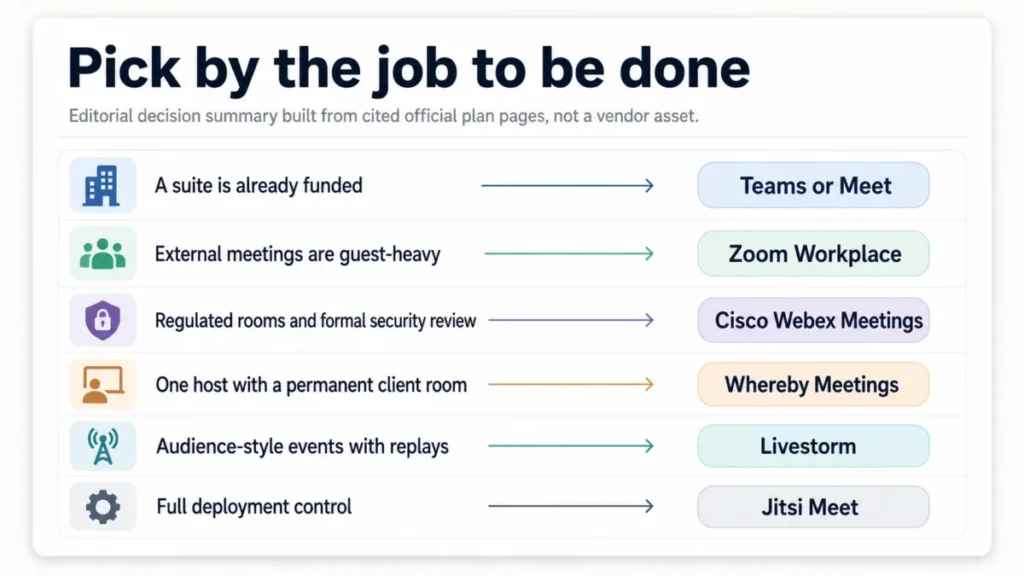
Quick Verdict: Best Video Conferencing Software by Use Case
| Use case | Best pick | Why it fits |
|---|---|---|
| Mixed internal and external meetings | Zoom Workplace | Free entry plan, paid meetings up to 30 hours, 300-participant Business threshold |
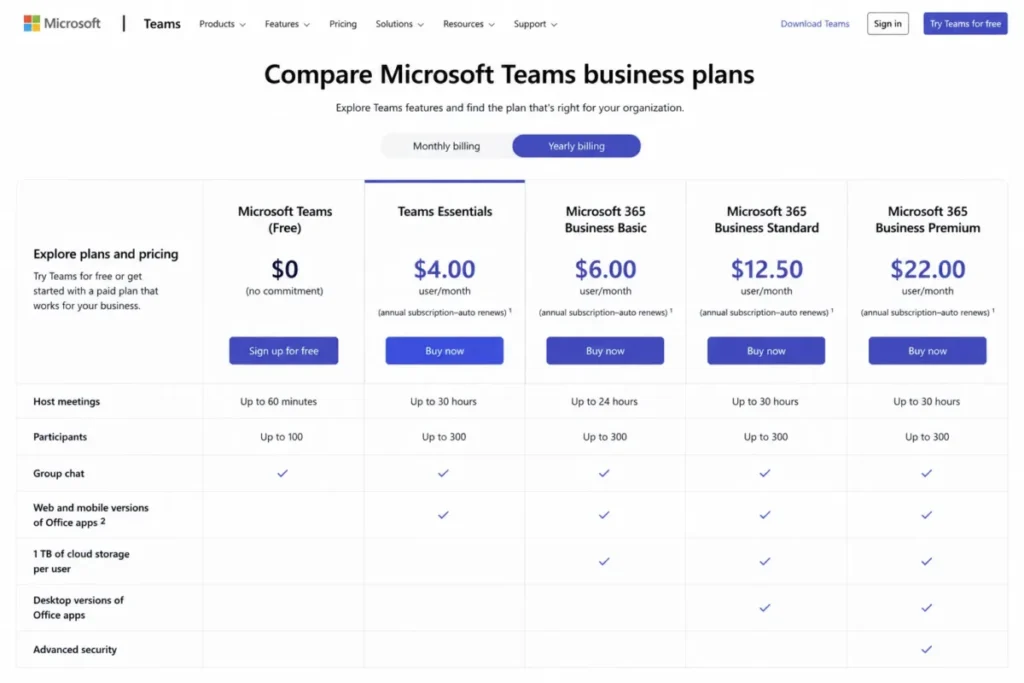
| Microsoft 365 organizations | Microsoft Teams | Essentials starts at $4.00 per user per month paid yearly, 300 interactive participants |
| Google Workspace organizations | Google Meet | Browser-first joining, 24-hour paid sessions, Calendar and Docs already licensed |
| Regulated enterprise and meeting rooms | Cisco Webex Meetings | Host-license model, paid columns reaching 24 hours and 1,000 capacity |
| Organizer-led client meetings | GoTo Meeting | $12 per organizer per month billed annually for 150 participants |
| Permanent client rooms, no install | Whereby Meetings | Pro at $10.99 per month keeps one host, three room URLs, 100 attendees |
| Budget pick inside the Zoho suite | Zoho Meeting | Free plan exists, Standard adds 24-hour meetings and 5 GB recording per host |
| Webinars and on-demand events | Livestorm | Attendee credits scale cost with real attendance instead of host seats |
| AI notes inside a phone system | Dialpad Meetings | Business tier adds transcription, Key Moments, and Action Items |
| Free plan pick and self-hosting | Jitsi Meet | Free, open source, guests join from a browser, optional end-to-end encryption |
Source: official vendor plan and documentation pages behind each row, checked 2026-07-29. Zoom Workplace meetings page. Microsoft Teams plan page. Google Meet product page. Cisco Webex feature comparison. GoTo Meeting price list. Whereby plan page. Zoho Meeting price list. Livestorm plan page. Dialpad meeting FAQ. Jitsi Meet overview page.
What These Ten Platforms Compete On
A ranked list hides a question buyers need answered first: whether these ten products are substitutes at all. Three of them are meeting apps bundled into a wider suite, two are event platforms in disguise, and one is software you host yourself.
| Platform | Interactive meetings | Suite bundle | Event or webinar focus | Self-hosting | Billing unit |
|---|---|---|---|---|---|
| Zoom Workplace | Yes | Partial | Add-on | No | Per host |
| Microsoft Teams | Yes | Yes | Yes | No | Per user |
| Google Meet | Yes | Yes | By plan | No | Per user |
| Cisco Webex Meetings | Yes | Yes | By plan | No | Per host license |
| GoTo Meeting | Yes | Partial | Separate product | No | Per organizer |
| Whereby Meetings | Yes | No | No | No | Per host |
| Zoho Meeting | Yes | Yes | Yes | No | Per host |
| Livestorm | Limited | No | Yes | No | Attendee credits |
| Dialpad Meetings | Yes | Yes | No | No | Per account |
| Jitsi Meet | Yes | No | No | Yes | None, infrastructure only |
This matrix is an editorial capability assessment, built from the official product pages behind each row and checked 2026-07-29. Zoom meetings product page. Teams business plans. Workspace product page for Meet. Webex meetings features. GoTo Meeting product page. Whereby meeting plans. Zoho Meeting overview. Livestorm plans and pricing. Dialpad meetings help documentation. Jitsi Meet about page.
Zoom, Teams, Meet, Webex, GoTo, Whereby, Zoho, and Dialpad genuinely compete for the same meeting. Livestorm competes for the marketing budget, and Jitsi competes with an infrastructure decision rather than a license.
How We Chose the Ten Platforms
Ten platforms were selected from the active US market against fixed inclusion criteria. A candidate needed an official product on sale, interactive video meetings, accessible official evidence for product and pricing status, one evidence-backed constraint, and relevance to US business buyers.
Four exclusions removed everything else. Hardware-only room systems, consumer-only social video apps, webinar-only tools with no interactive meeting relevance, and discontinued products were not eligible.
Placement inside the ten follows buyer fit and breadth first, then meeting limits and workflow capability, ecosystem fit, pricing and billing transparency, security and administration, guest experience, and evidence strength.
How We Evaluated the Best Video Conferencing Software
These rankings are based on current official US pricing pages, product and help-center documentation, published plan-limit pages, and vendor security pages. Pricing and plan limits were checked on 2026-07-29.
Each platform was assessed against the same buyer-focused criteria: participant ceiling, meeting duration, billing unit, recording and AI gates, guest joining friction, administration and security controls, and documented offboarding behavior.
Greater weight was given to factors that change a purchase order: the first tier that removes the free meeting cap, the unit a vendor bills, host minimums, and the constraint that forces an upgrade. Brand familiarity and vendor marketing did not affect placement.
Claims that could not be verified from reliable evidence were excluded from the ranking, and standard price is the baseline throughout. Temporary offers are recorded separately and re-checked before publication.
Meetings, Webinars, and Self-Hosted Deployments Are Three Different Purchases
Most rankings put a webinar platform, a unified communications suite, and an open-source project in one table and let the reader sort it out. That blurs the single decision that matters most, which is the interaction model the team needs.
An interactive meeting assumes everyone can speak, share a screen, and be moved into a breakout room. Capacity is the constraint, and the vendor bills the people who host.
A webinar or on-demand event assumes a small stage and a large audience. Capacity is still a constraint, but the meaningful cost driver is attendance, including people who never show up live.
A self-hosted deployment moves the entire question. There is no license to buy, so capacity, recording, monitoring, and uptime become internal engineering commitments instead of contractual ones.
The practical test is simple. If more than a handful of participants need to talk, buy a meeting platform; if the audience mostly listens and replays matter, buy an event platform; if data residency and customization outrank vendor support, host it.
Getting this wrong is expensive in both directions. Running a large listen-only product launch on an interactive meeting license means paying for capacity that never speaks, and running weekly stand-ups on an attendee-credit plan means paying twice for the same team.
Which Video Conferencing Platform Fits Your Ecosystem and Meeting Size
Ecosystem beats feature count for most buyers, because the meeting tool inherits identity, calendars, files, and admin policy from whatever suite already exists. Meeting size then decides the plan, and the plan decides which features are even present.
Start with the suite. An organization standardized on Microsoft 365 already licenses Teams meetings, and a Google Workspace organization already licenses Meet, so the incremental conferencing spend in both cases is close to zero.
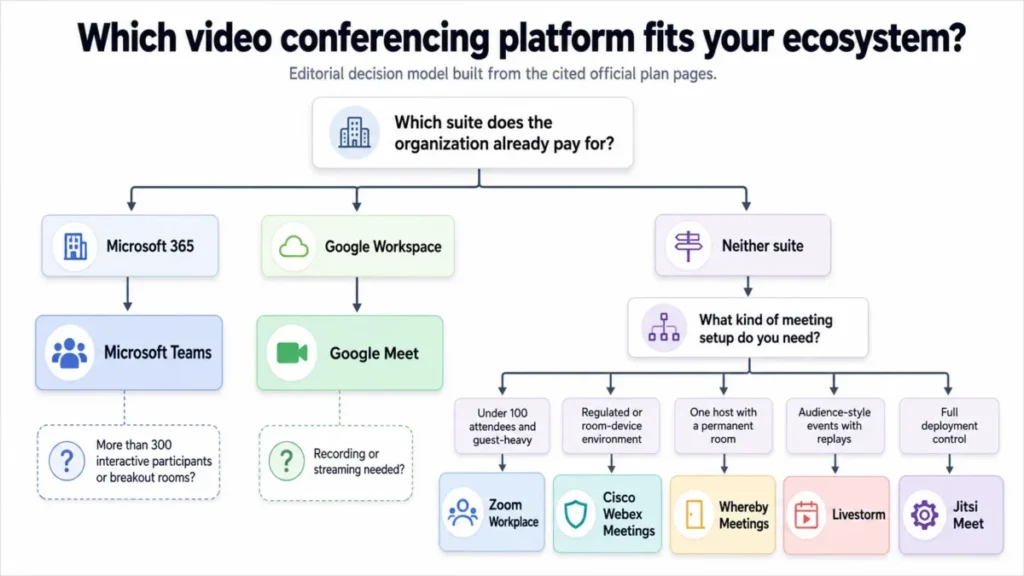
Then size the meeting honestly. Ten platforms publish very different ceilings, and the gap between a free plan and the first genuinely usable paid tier is where most budgets break.
The third question is the one buyers skip: which unit does the vendor bill? Per user, per host, per organizer, and per attendee credit produce wildly different invoices for the same 100-person meeting, and that question belongs at the top of the shortlist, not the bottom.
If none of the three questions has a clear answer yet, start with the best team collaboration tools shortlist, because the conferencing decision usually follows the collaboration stack rather than leading it.
The 10 Best Video Conferencing Platforms for 2026, Ranked
Each entry below carries the same decision fields in the same order, so the price, the first binding limit, and the disqualifier always sit in the same place. Depth is tiered by how often each platform lands on a real shortlist.
1. Zoom Workplace: Best for mixed internal and external business meetings

- Best for:
- Companies running a high volume of external meetings with guests who already know the join flow.
- Avoid if:
- The organization is already paying for Microsoft 365 or Google Workspace and wants the lowest total suite cost. Source: Zoom plan boundaries.
- Starting price:
- Workplace Basic is free.
- Practical tier:
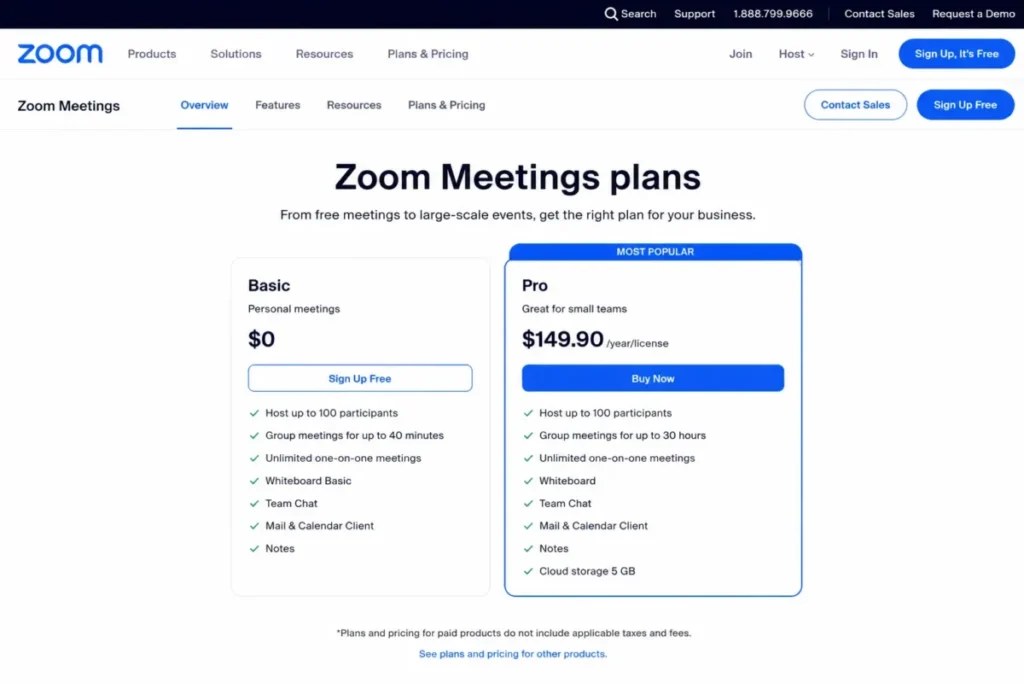
- Workplace Pro, which extends meetings to 30 hours with 100 participants and 10 GB of cloud storage. The US amount was not exposed on the accessible pricing render, so it is recorded as unverified rather than estimated. Source: Zoom paid tier detail.
- Free plan:
- Yes. Almost all meetings hosted by a Basic user are limited to 40 minutes, and the Basic product page lists 100 participants. Source: Zoom free plan terms.
- First limit that bites:
- The 40-minute Basic ceiling, which lands mid-meeting rather than at signup.
- Better than Microsoft Teams:
- Guest joining for external attendees who hold no account in the organizing tenant.
- Worse than Google Meet:
- Bundled value, because Meet arrives inside a suite that also replaces mail, storage, and documents.
- Setup difficulty:
- Low for meetings, medium once single sign-on and recording retention policies are involved.
- Hidden costs:
- Cloud storage beyond the included allowance, and large-meeting capacity above the Business default.
- Evidence status:
- Free-plan price and paid plan limits are documented on Zoom’s own meetings and support pages; the paid US amounts were not publicly readable at the checked date.
The badge here is breadth, not depth. Zoom is the least ecosystem-dependent option on this list, which is exactly why it keeps winning agency, consulting, and sales shortlists where half the attendees are outside the company.
Three capabilities carry the ranking: the 30-hour paid meeting window, the 300-participant default on Workplace Business, and a free tier guests can join without an account.
Source: Zoom official meetings pricing page and Zoom support documentation on meeting time limits, checked 2026-07-29. Zoom Meetings plans. Zoom meeting time limits.
There is a deployment trap worth building into rollout QA. Buying a paid account is not the same as assigning a paid license, and a host without an assigned license still runs into the documented 40-minute Basic behavior.
That single step causes more first-month escalations than any feature gap. Before a customer-facing team goes live, confirm that every host who needs sessions longer than 40 minutes holds an assigned license.
Capacity planning has a second threshold. Pro covers 100 participants, and the jump to a 300-participant default is a Business decision, so an all-hands that grows past 100 is a plan change rather than a setting.
For a deeper look at the platform itself, the Zoom Workplace review covers the wider Workplace bundle.
| Pros | Cons |
|---|---|
| Free Basic plan lets external guests join without an account | Basic-hosted meetings are capped at roughly 40 minutes |
| Paid meetings run up to 30 hours, which covers all-day training | Paid US amounts were not publicly readable at the checked date |
| Business raises the default participant cap to 300 | A purchased plan still behaves as Basic until the license is assigned |
| Widest guest familiarity of any platform in this ranking | Cloud storage above the included allowance is an extra cost |
- Verdict:
- Zoom is the stronger default when meetings are guest-heavy and the company has not standardized on a single suite, provided license assignment is verified during rollout.
2. Microsoft Teams: Best for Microsoft 365 organizations

- Best for:
- Companies whose documents, calendars, and identity already live in Microsoft 365.
- Avoid if:
- The requirement is a lightweight guest-facing meeting link with no wider Microsoft stack behind it.
- Starting price:
- Microsoft Teams Essentials at $4.00 per user per month, paid yearly with annual auto-renewal. Source: Teams entry price.
- Practical tier:
- Essentials for meeting-only needs, or a Microsoft 365 business plan when mail, storage, and Office apps are also in scope. Source: Teams paid tier detail.
- Free plan:
- A no-cost tier exists, but the business decision in this ranking starts at Essentials.
- First limit that bites:
- The 300-participant ceiling on Essentials and Microsoft 365 business plans. Source: Teams published limits.
- Better than Zoom Workplace:
- Document-centric collaboration, because the meeting sits beside the files and the channel it belongs to.
- Worse than Whereby Meetings:
- Friction for one-off external guests who only need a browser room.
- Setup difficulty:
- Low inside an existing tenant, medium when guest access and meeting policies need tightening.
- Hidden costs:
- Enterprise plan uplift for events above 300, plus storage and compliance add-ons at scale. Source: Teams cost add-ons.
- Evidence status:
- Price is published on Microsoft’s business comparison page, and both participant ceilings are documented on Microsoft Learn.
Teams earns second place on economics rather than meeting features. For an organization already paying for Microsoft 365, the incremental conferencing cost is effectively zero, which is a harder argument to beat than any capability list.
Capacity is where the plan choice gets decided. Teams Essentials and Microsoft 365 business plans support up to 300 interactive meeting participants, while eligible enterprise plans support up to 1,000.
Source: Microsoft Learn limits and specifications documentation, checked 2026-07-29: Teams participant limits.
The number that most comparison tables print is not the whole gate. Microsoft’s own meetings and events comparison states that breakout rooms are not supported when attendance increases above 300, so a large interactive workshop needs a format check, not only a headcount check.
Source: Microsoft Learn documentation on meetings, webinars, and town halls, checked 2026-07-29: Teams event format comparison.
That distinction changes how training teams should plan. A 400-person enablement session on an enterprise plan is technically possible and pedagogically different, because the small-group exercise that made the workshop work is no longer available.
Pricing carries one contractual detail worth flagging to finance. Essentials is billed yearly with automatic renewal, so the cancellation window sits twelve months out rather than at the next monthly cycle.
Source: Microsoft Teams business plan pricing page, checked 2026-07-29: Teams business pricing.
Buyers weighing the chat side of the same decision should read the Slack vs Microsoft Teams comparison before consolidating, and the Microsoft Teams review covers the collaboration surface in detail.
| Pros | Cons |
|---|---|
| $4.00 per user per month on Essentials, paid yearly | Annual auto-renewal moves the exit decision twelve months out |
| 300 interactive participants on Essentials and business plans | Breakout rooms are unsupported above 300 attendees |
| Meetings sit beside the files, channels, and calendars they belong to | Reaching 1,000 participants requires an eligible enterprise plan |
| Identity, policy, and admin controls are inherited from the tenant | External guest joining is heavier than a browser-room product |
- Verdict:
- Teams is the stronger choice for a Microsoft 365 organization under 300 interactive participants, provided large interactive workshops are checked against the breakout-room boundary first.
3. Google Meet: Best for Google Workspace organizations
- Best for:
- Teams already on Google Workspace who want browser-first meetings with no client install for guests.
- Avoid if:
- Deep standalone meeting administration is required without adopting Workspace.
- Starting price:
- Google Workspace Business Starter at a standard US rate of $7.00 per user per month on a one-year commitment. Source: Meet entry price.
- Practical tier:
- Business Standard or higher once recording, streaming, or larger meetings are needed.
- Free plan:
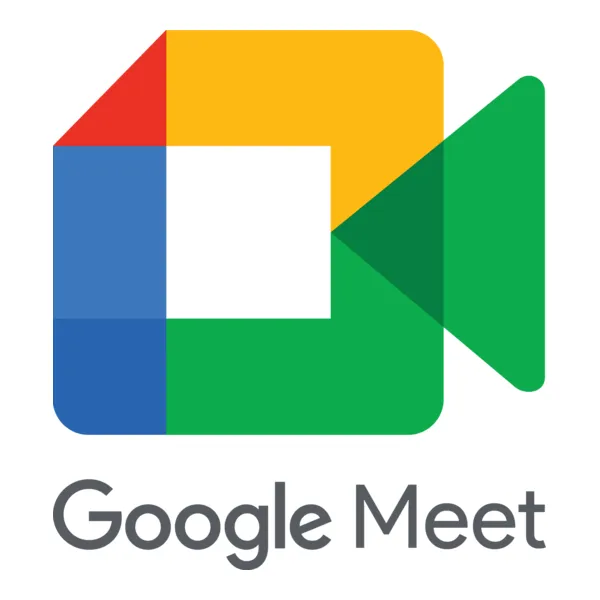
- Yes. The no-cost service supports up to 100 participants and group meetings up to 60 minutes, and the product page states no time limit for mobile and one-to-one calls. Source: Meet free plan terms.
- First limit that bites:
- The 60-minute group ceiling on the free service, which arrives in the middle of a workshop rather than a stand-up.
- Better than Cisco Webex Meetings:
- Guest simplicity, because a browser tab and a link are the entire join path.
- Worse than Zoom Workplace:
- Standalone purchasing, since Meet is bought through a suite rather than as a meeting license.
- Setup difficulty:
- Low for Workspace tenants, medium when recording retention and external sharing policies are configured.
- Hidden costs:
- The suite itself, because the meeting price is bundled with mail, storage, and documents.
- Evidence status:
- Free limits are published on the Meet product page, and paid capacity and duration are published on the Workspace pricing page.
Meet is the clearest example of why a meeting-only price comparison misleads. The relevant question is not whether $7.00 per user per month beats a standalone conferencing license, but whether Workspace replaces the mail, storage, and document stack a company is already funding.
For a Workspace tenant the incremental conferencing cost is effectively zero, and for everyone else the honest comparison is suite against suite.
Source: Google Workspace pricing page, checked 2026-07-29: Google Workspace plan pricing.
The rate quoted above is the standard price. Introductory offers shown on that page are excluded from this baseline, and standard price governs every figure in this guide.
The free service is more generous than most rivals on headcount and stricter on duration. One hundred participants with a 60-minute group cap suits interviews and client calls, and fails a half-day workshop.
Source: Google Meet product page limits, checked 2026-07-29: Google Meet plan limits.
Paid plans change both axes at once. Sessions extend to 24 hours, Business Plus lists 500 participants, Enterprise lists 1,000, and recording, streaming, and administrative controls sit behind the paid tiers.
That last point is the upgrade trigger to plan for. A team that needs recorded sessions cannot stay on the free service, and a team that needs 500 seats is choosing a suite tier rather than a meeting add-on.
Buyers modelling the bundle should compare the Google Workspace pricing guide against their current spend, and the Google Workspace review covers the wider suite.
| Pros | Cons |
|---|---|
| Free service supports 100 participants without a client install | Free group meetings stop at 60 minutes |
| Paid Workspace plans extend sessions to 24 hours | Recording and streaming are paid-plan features |
| Business Plus lists 500 and Enterprise lists 1,000 participants | Meet is purchased through the suite, not as a meeting license |
| Calendar, Gmail, and Docs integration removes a scheduling step | Standalone meeting administration is thinner than Webex or Zoom |
- Verdict:
- Meet is the stronger choice for a Google Workspace organization, and a weak standalone purchase for anyone who would adopt the suite only to get the meeting room.
4. Cisco Webex Meetings: Best for regulated enterprises and room-device environments
- Best for:
- Regulated organizations with conference-room hardware and formal security review cycles.
- Avoid if:
- The team wants the simplest first-run experience and a transparent self-serve paid price.
- Starting price:
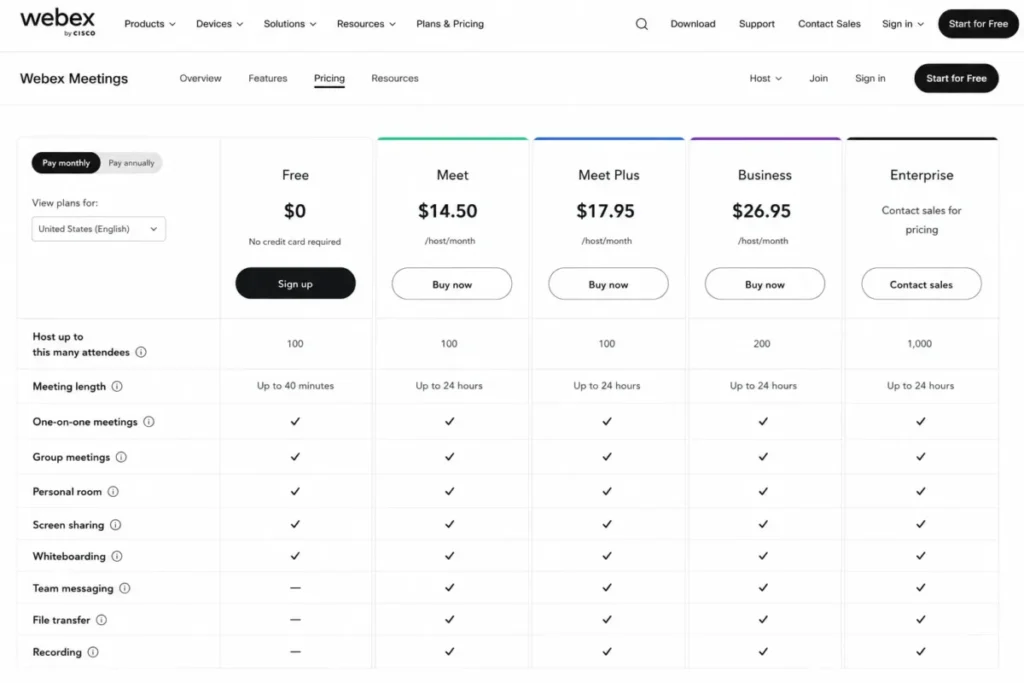
- Webex Free is $0. Source: Webex entry price.
- Practical tier:
- A paid host license, because paid columns on the official comparison extend meetings to 24 hours and scale capacity up to 1,000. The self-serve US amounts were not exposed in the accessible comparison render. Source: Webex paid tier detail.
- Free plan:
- Yes. Free meetings support up to 40 minutes and up to 100 attendees. Source: Webex free plan terms.
- First limit that bites:
- The 40-minute free ceiling, followed quickly by host-license concurrency.
- Better than GoTo Meeting:
- Enterprise administration, room-device support, and capacity headroom to 1,000. Source: Webex capability comparison.
- Worse than Google Meet:
- Purchase clarity, because the paid amounts are not readable on the public comparison page.
- Setup difficulty:
- Medium to high, since Control Hub, site administration, and room devices are part of the rollout.
- Hidden costs:
- One host license per concurrent meeting, plus room hardware and administration time.
- Evidence status:
- Free price, duration, capacity, and the host-license model are published on Webex’s own plan comparison, with Basic Meetings behavior documented in the Webex help center.
Webex is the enterprise answer on this list, and its licensing model is the part most rankings skip. Attendees do not need a host license, but paid features require one, and a single licensed user cannot run more than one call or meeting at a time on separate devices.
Source: Cisco Webex plan comparison page, checked 2026-07-29: Webex plan comparison.
That rule turns licensing into a concurrency exercise rather than a headcount exercise. An organization needs one host license for every meeting that runs at the same time, no matter how many employees it has. A support team with a dozen overlapping sessions licenses the overlap, not the headcount.
Counting attendees instead of concurrent hosts is the most common error in a Webex budget. Model the busiest hour of the week, then license that hour.
The free tier is competitive on capacity and short on time. One hundred attendees for 40 minutes is a demo and an interview, not a training day. Source: Cisco Webex help-center documentation on Basic Meetings, checked 2026-07-29: Webex Basic Meetings documentation.
| Pros | Cons |
|---|---|
| Free plan supports 100 attendees at $0 | Free meetings stop at 40 minutes |
| Paid columns reach 24-hour meetings and 1,000 capacity | Paid self-serve amounts were not readable on the public comparison |
| Attendees join without needing a host license | One host license cannot run two concurrent meetings |
| Control Hub and room-device support suit regulated rollouts | Setup effort is materially higher than a browser-room product |
- Verdict:
- Webex is the stronger fit for regulated, room-heavy enterprises that can model concurrent hosts, and a poor fit for a small team that wants a published self-serve price.
5. GoTo Meeting: Best for dependable organizer-led client meetings

- Best for:
- Sales, consulting, and training teams where a defined set of people host and everyone else attends.
- Avoid if:
- A strong free tier matters, or the meeting needs more than 250 participants. Source: GoTo plan boundaries.
- Starting price:
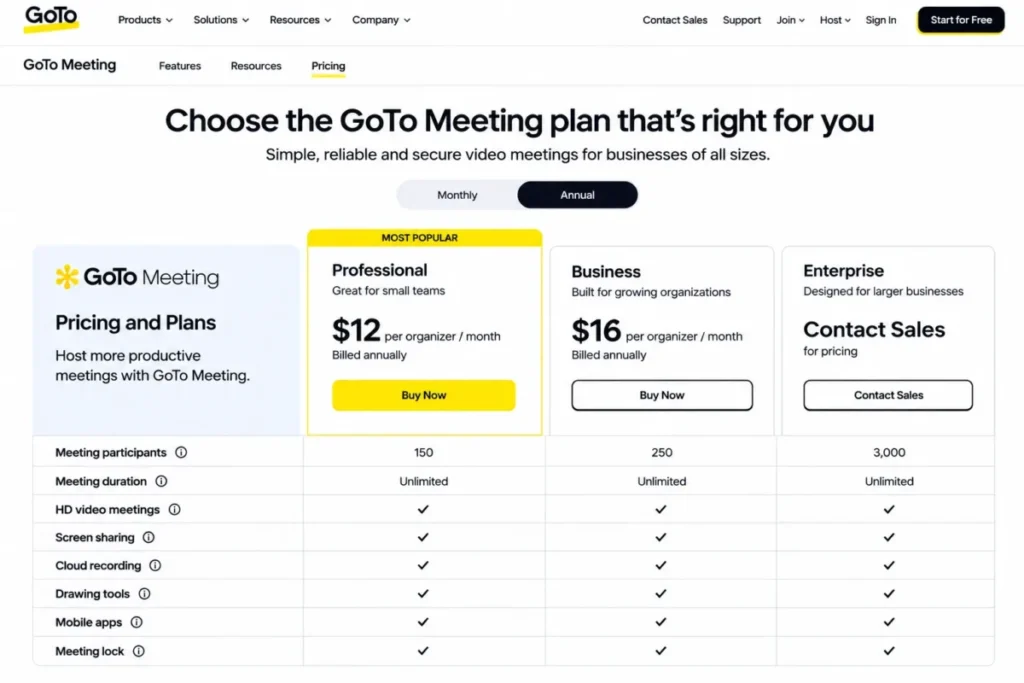
- Professional at $12 per organizer per month billed annually, including 150 participants. Source: GoTo entry price.
- Practical tier:
- Business at $16 per organizer per month billed annually, including 250 participants. Source: GoTo paid tier detail.
- Free plan:
- Not the reason to choose this platform; the public pricing page is built around paid organizer licenses.
- First limit that bites:
- The 150-participant ceiling on Professional, which arrives before any duration limit does. Source: GoTo published limits.
- Better than Whereby Meetings:
- Participant headroom, dial-in access, and organizer-level administration.
- Worse than Microsoft Teams:
- Bundled collaboration, because there is no document and channel layer behind the meeting.
- Setup difficulty:
- Low. Organizer accounts, calendar integration, and an invite link cover most rollouts.
- Hidden costs:
- Every occasional host needs an organizer license, so cost scales with hosts rather than attendees.
- Evidence status:
- Professional and Business amounts, participant counts, and the Enterprise custom-pricing status are published on GoTo’s own pricing page.
GoTo prices the host, not the room. Professional is $12 per organizer per month billed annually with 150 participants, Business is $16 with 250, and Enterprise is custom pricing that still lists up to 250 participants on the public page.
Source: GoTo Meeting official pricing page, checked 2026-07-29: GoTo Meeting plans and pricing.
The organizer unit is the decision. Five organizers on Professional is $60 per month, which annualizes to $720, and ten organizers is $120 per month or $1,440 annualized.
Those totals are editorial calculations from the published per-organizer rate, not a quoted bundle.
That maths rewards a narrow hosting model and punishes a wide one. A twelve-person consultancy where everyone occasionally hosts pays for twelve licenses, while a twelve-person team with three designated hosts pays for three.
Capability-wise the platform covers screen sharing, transcription, dial-in numbers, annotation, and mobile meetings, with password protection and network adaptation documented on the product page at GoTo Meeting product capabilities.
| Pros | Cons |
|---|---|
| Published US pricing at both $12 and $16 per organizer per month | Cost scales with the number of hosts, not attendees |
| 150 participants on Professional and 250 on Business | The public page tops out at 250 participants, even on Enterprise |
| Dial-in access and transcription suit client-facing calls | No bundled document or channel collaboration layer |
| Straightforward rollout with no room-device programme required | Free-tier access is not the platform’s strength |
- Verdict:
- GoTo is the stronger fit for a team with a small, fixed set of designated hosts and client meetings under 250 people, and an expensive one when everybody hosts.
6. Whereby Meetings: Best for frictionless browser rooms with permanent URLs
- Best for:
- Consultants, recruiters, and client-facing specialists who reuse one persistent room link.
- Avoid if:
- Attendance regularly passes 200, or a three-host minimum is unacceptable on the team plan. Source: Whereby plan boundaries.
- Starting price:
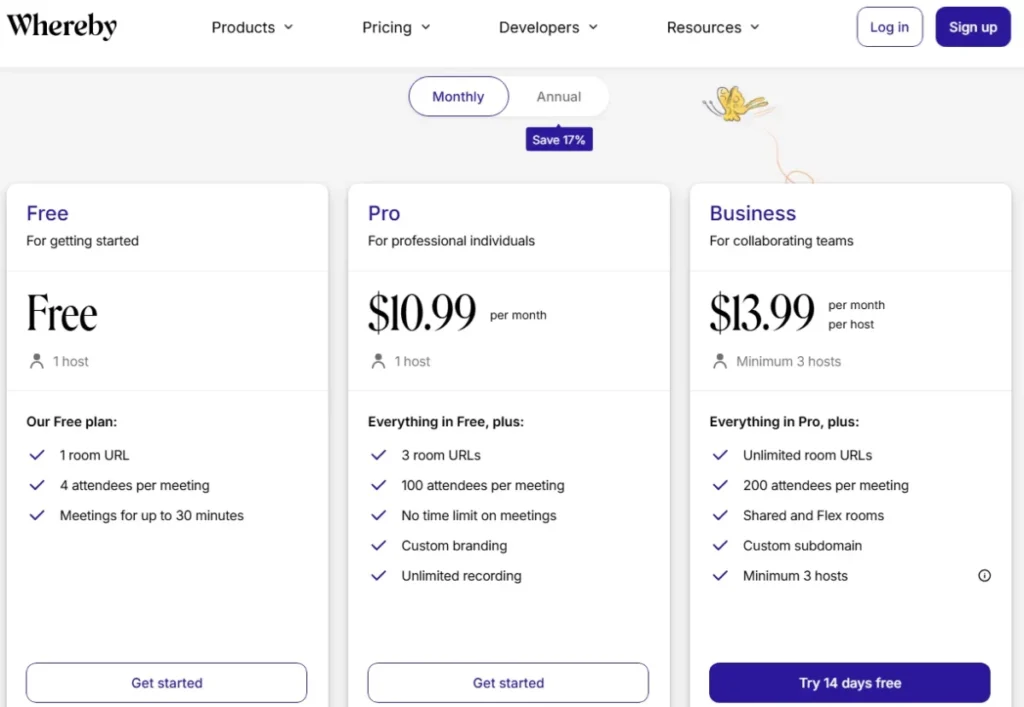
- Pro at $10.99 per month for one host, three room URLs, and 100 attendees, with no meeting time limit, custom branding, and unlimited recording. Source: Whereby entry price.
- Practical tier:
- Pro for a solo host; Business at $13.99 per host per month once a team needs 200 attendees. Source: Whereby paid tier detail.
- Free plan:
- Yes, and it is deliberately small: one host, one room URL, four attendees per meeting, and meetings up to 30 minutes. Source: Whereby free plan terms.
- First limit that bites:
- The four-attendee free cap, which rules out anything beyond a one-to-one call plus a colleague.
- Better than Zoom Workplace:
- Guest experience, because a permanent browser URL removes the install and account step entirely.
- Worse than Cisco Webex Meetings:
- Enterprise administration and capacity, which stop at 200 attendees. Source: Whereby capability ceiling.
- Setup difficulty:
- Low. Create a room, share the URL, and the room is the product.
- Hidden costs:
- The Business three-host minimum, which sets the real entry cost for a team rather than an individual.
- Evidence status:
- Free, Pro, and Business capacities, durations, and the host minimum are published on Whereby’s own plan selector.
Whereby wins on join friction, which is an underrated procurement criterion. A permanent room URL that a client can open in a browser removes the two failure points that derail external meetings: the install prompt and the account wall.
Source: Whereby Meetings plan and pricing page, checked 2026-07-29: Whereby plan selector.
The published starting price hides the team economics. Business is $13.99 per host per month and requires at least three hosts, which makes the minimum monthly commitment 3 x $13.99 = $41.97 before taxes, an editorial calculation from the published per-host rate.
That changes the shortlist maths for small teams. One host pays $10.99 on Pro; two hosts who need Business features still pay for three seats.
The free plan also moved. Breakout groups were removed from the free tier, which matters for facilitators who tested the product on the free plan and assumed the capability would survive.
Source: Whereby announcement on free-plan changes, checked 2026-07-29: Whereby free-plan changes.
| Pros | Cons |
|---|---|
| Permanent room URLs remove the install and account step for guests | Free plan allows only four attendees and 30-minute meetings |
| Pro is $10.99 per month with 100 attendees and no time limit | Business requires a minimum of three hosts |
| Unlimited recording and custom branding on Pro | Capacity stops at 200 attendees on Business |
| Simplest rollout in this ranking for a single host | Breakout groups were removed from the free plan |
- Verdict:
- Whereby is the stronger fit for a solo or two-person practice running repeat client calls, and a mismatch for teams that need more than 200 attendees or dislike seat minimums.
7. Zoho Meeting: Best budget-oriented option for existing Zoho customers

- Best for:
- Small businesses already running Zoho applications who want meetings inside the same account structure.
- Avoid if:
- Clear self-serve paid pricing for every tier and add-on is required before signup.
- Starting price:
- A free plan exists, and an account that is not upgraded after a trial expires moves to that free plan.
- Practical tier:
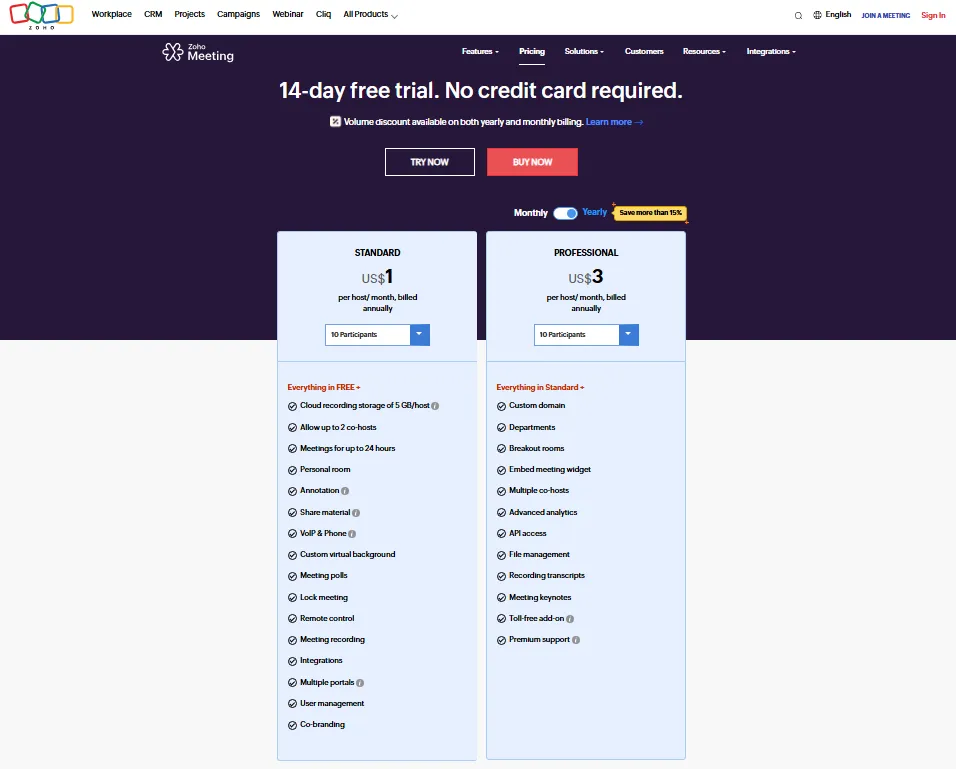
- Standard, which includes meetings up to 24 hours, up to two cohosts, and 5 GB of cloud recording storage per host. The USD amounts were blank in the accessible render, so no figure is published here. Source: Zoho paid tier detail.
- Free plan:
- Yes, and it is also the fallback state after an unconverted trial.
- First limit that bites:
- The 5 GB per-host recording allowance, which a team recording weekly sessions consumes quickly. Source: Zoho published limits.
- Better than Livestorm:
- Predictability, because cost follows hosts rather than attendance.
- Worse than Microsoft Teams:
- Ecosystem depth outside the Zoho suite.
- Setup difficulty:
- Low for existing Zoho tenants, medium for anyone adopting Zoho purely for meetings.
- Hidden costs:
- Premium support priced at 20% of the total license fee, plus storage expansion beyond 5 GB per host. Source: Zoho cost add-ons.
- Evidence status:
- Free-plan existence, Standard inclusions, feature gates, storage, and the support add-on are published on Zoho’s own pricing page.
The affordability story is real, and it comes with gates that a starting-price table will not show. Breakout rooms, API access, custom domains, and advanced analytics are reserved for the Professional tier, and premium support costs 20% of the total license fee.
Source: Zoho Meeting pricing and feature page, checked 2026-07-29: Zoho Meeting plan comparison.
Recording storage is the constraint that arrives first. Standard includes 24-hour meetings and 5 GB of cloud recording per host, which is enough for occasional sessions and thin for a team archiving every customer call.
Buyers should also price the support line before signing. A 20% uplift on license fees is not a rounding error at renewal, and it belongs in the budget rather than in a surprise invoice.
Product positioning and data-center availability are described on the Zoho Meeting product page, and buyers already evaluating the wider suite can start from the Zoho CRM review.
| Pros | Cons |
|---|---|
| Free plan available, with a documented fallback after trial expiry | USD amounts for paid tiers were not readable at the checked date |
| Standard includes meetings up to 24 hours and two cohosts | Cloud recording is capped at 5 GB per host on Standard |
| Fits neatly beside existing Zoho applications | Breakout rooms, API, and custom domains require Professional |
| Low entry cost for small teams | Premium support adds 20% of the total license fee |
- Verdict:
- Zoho Meeting is the stronger budget option for an existing Zoho customer that records selectively, and a weaker one for a facilitation-heavy team that needs breakout rooms on the entry tier.
8. Livestorm: Best for webinar workflows where cost follows attendance

- Best for:
- Marketing and customer-education teams running registration-based events with replays.
- Avoid if:
- The requirement is predictable per-host pricing for frequent internal meetings.
- Starting price:
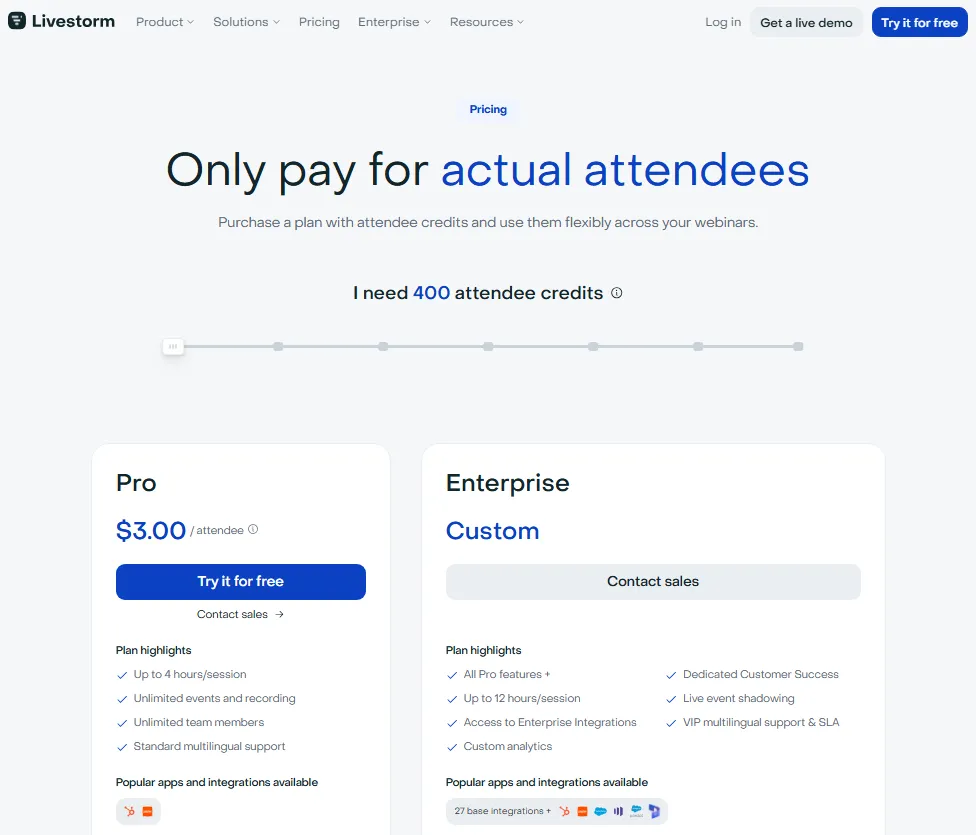
- A Free plan exists. The public pricing render showed euro amounts, so no US dollar figure is published here.
- Practical tier:
- Pro, which uses attendee credits, with Enterprise adding longer sessions and enterprise integrations.
- Free plan:
- Yes, and cancelling a paid plan downgrades the workspace back to Free-plan limitations.
- First limit that bites:
- Attendee credits, because they are consumed by live joins, replay views, and on-demand views alike.
- Better than Zoom Workplace:
- Event operations, including registration, replays, and on-demand delivery in one workflow.
- Worse than GoTo Meeting:
- Budget predictability, since a popular replay changes the bill after the event has ended.
- Setup difficulty:
- Medium. Registration, branding, and replay publishing are configuration steps, not defaults.
- Hidden costs:
- Replay and on-demand viewing, which draw down the same credit pool as the live session.
- Evidence status:
- Credit consumption, annual renewal, and post-cancellation deletion behavior are documented in Livestorm’s own support article.
Livestorm should be judged as an event platform, and its cost model is the whole story. Credits are consumed when a person joins live, watches a replay, or watches on demand.
Source: Livestorm attendee-based pricing documentation, checked 2026-07-29: Livestorm attendee credit rules.
A webinar whose replay outperforms the live session is not a live-attendance event in credit terms. Evergreen content that keeps earning views keeps drawing down the pool, which is the opposite of how per-host licenses behave.
The offboarding rule deserves equal attention. Subscriptions renew annually, and after Pro cancellation the documented behavior deletes events, sessions, registrants, replays, chat messages, polls, questions, and instant meeting rooms.
Anyone treating Livestorm as the archive of record for customer education needs an export plan before the term ends, not after. Plan and session details are listed on the Livestorm pricing page.
| Pros | Cons |
|---|---|
| Attendee-credit model matches spend to actual attendance | Replay and on-demand views consume the same credits |
| Registration, replay, and on-demand delivery in one workflow | US dollar amounts were not verifiable at the checked date |
| Free plan available for evaluating the event workflow | Annual renewal is automatic |
| Enterprise adds longer sessions and enterprise integrations | Cancellation deletes events, replays, polls, and questions |
- Verdict:
- Livestorm is the stronger fit for a marketing team that wants cost tied to attendance, provided the credit draw from replays and the deletion boundary at cancellation are both budgeted.
9. Dialpad Meetings: Best for AI meeting notes inside a communications platform
- Best for:
- Existing Dialpad customers in the US and Canada who want meeting AI beside their phone system.
- Avoid if:
- Meetings regularly exceed 100 participants, or the deployment must be standardized globally as a standalone product. Source: Dialpad plan boundaries.
- Starting price:
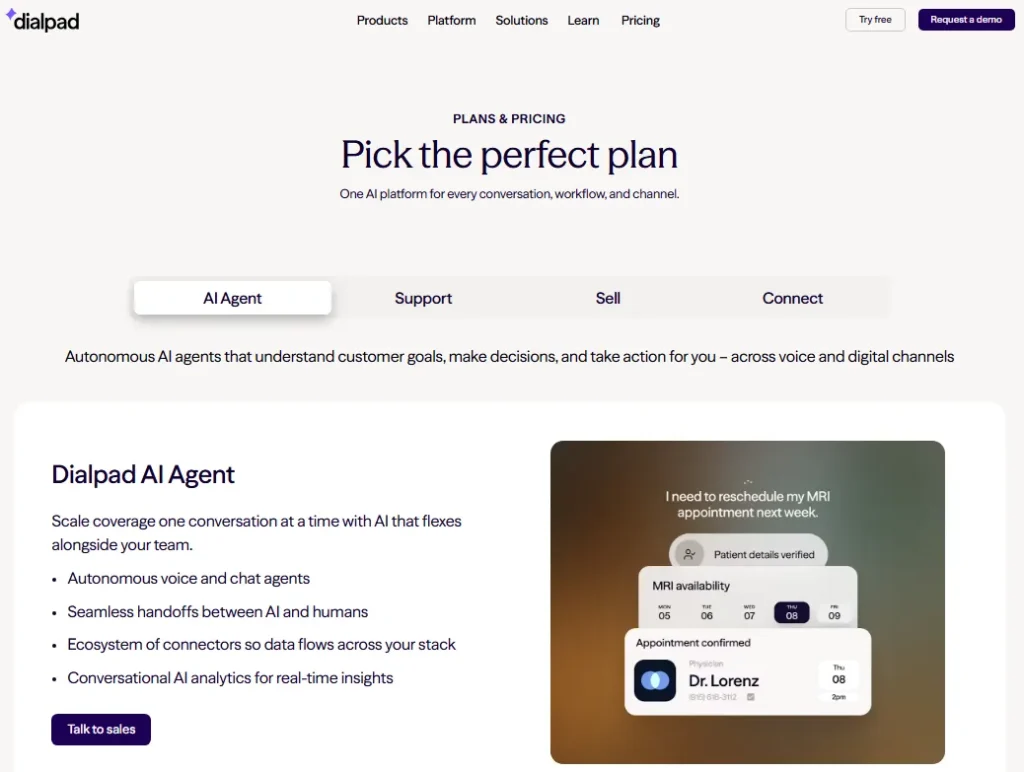
- Dialpad Meetings is free for calls with its main features. The standalone Business amount was not verifiable on a current official page.
- Practical tier:
- Business, which raises capacity to 100 participants and adds live and post-meeting AI outputs. Source: Dialpad paid tier detail.
- Free plan:
- Yes, capped at 10 callers. Source: Dialpad free plan terms.
- First limit that bites:
- The 10-caller free ceiling, which excludes anything larger than a team stand-up.
- Better than Whereby Meetings:
- Post-meeting output, because transcription, Key Moments, and Action Items arrive automatically on Business.
- Worse than Cisco Webex Meetings:
- Reach and capacity, since availability is centered on the US and Canada and capacity stops at 100. Source: Dialpad capability ceiling.
- Setup difficulty:
- Low inside an existing Dialpad account, medium as a standalone rollout.
- Hidden costs:
- The wider Dialpad subscription, since the meeting value depends on the communications platform around it.
- Evidence status:
- Free status, both participant caps, the AI feature gate, and the regional boundary are published in Dialpad’s own FAQ.
The AI positioning is accurate and narrower than the headline suggests. Video is available to all Dialpad Meetings users, while live and post-meeting transcription, Key Moments, and Action Items are Business features, and current availability is centered on the US and Canada.
Source: Dialpad official FAQ page, checked 2026-07-29: Dialpad Meetings FAQ.
The escalation path is the real product. A conversation that starts as a Dialpad call becomes a meeting from the same profile or thread, and the summary lands afterwards without anyone assigning a note-taker, as documented at Dialpad Meetings app workflow.
That workflow is worth a lot to a support or sales team already on Dialpad, and close to nothing to a company shopping for a standalone meeting platform with global coverage.
| Pros | Cons |
|---|---|
| Free for calls with the main meeting features included | Free tier is capped at 10 callers |
| Business adds live and post-meeting transcription and Action Items | Business capacity stops at 100 participants |
| Video is available to every Dialpad Meetings user | Availability is centered on the US and Canada |
| Voice-to-video escalation happens inside one platform | Standalone Business pricing was not publicly verifiable |
- Verdict:
- Dialpad is the stronger fit for an existing Dialpad communications customer in North America, and the wrong shortlist entry for a global standalone meeting deployment.
10. Jitsi Meet: Best open-source and self-hosted option

- Best for:
- Engineering-led teams and privacy-sensitive organizations that want deployment control instead of a license.
- Avoid if:
- The organization needs vendor-managed capacity guarantees, procurement support, and a contractual service level.
- Starting price:
- Free. Jitsi Meet is open source and can be used without an account.
- Practical tier:
- Not applicable in license terms. The equivalent decision is community-hosted usage against a self-hosted deployment.
- Free plan:
- The entire product is free; the cost moves into infrastructure and administration.
- First limit that bites:
- Capacity, because no single universal participant ceiling is published and the real number depends on the deployment.
- Better than Zoho Meeting:
- Control, since the deployment, data path, and customization are owned internally.
- Worse than Cisco Webex Meetings:
- Accountability, because there is no vendor to escalate to when a call degrades.
- Setup difficulty:
- High for self-hosting, low for an accountless call on the community service.
- Hidden costs:
- Servers, bandwidth, monitoring, updates, security review, and the engineering time behind all four.
- Evidence status:
- The free and open-source positioning and the encryption model are published on Jitsi’s own product and security pages; capacity is deployment-dependent and is not published as one number.
Jitsi replaces a license fee with an operating commitment. It is free, open source, and usable without an account, with encryption by default and optional end-to-end encryption on supported Chromium browsers or the Electron client.
Source: Jitsi project and security documentation pages, checked 2026-07-29: About Jitsi Meet and Jitsi security and privacy.
The end-to-end encryption caveat is a client constraint, not a setting. A participant on an unsupported browser is outside that protection, which matters when the reason for choosing Jitsi was privacy in the first place.
Because the official product page does not publish one universal participant cap, capacity, recording, support, and operational ownership must be validated for the chosen deployment before anyone promises a 200-person all-hands on it.
| Pros | Cons |
|---|---|
| Free and open source, and guests join straight from a browser | No published universal participant ceiling to plan against |
| Encryption by default, with optional end-to-end encryption | End-to-end encryption requires supported Chromium or Electron clients |
| Self-hosting keeps the data path and customization internal | Capacity, recording, and uptime become internal responsibilities |
| No per-host or per-user license cost at any scale | No vendor escalation path or contractual service level |
- Verdict:
- Jitsi is the stronger choice for a team that can staff the deployment, and the wrong choice for a buyer who needs a vendor to be accountable for capacity.
Free Plans Compared: Duration Against Participant Cap
Free tiers get compared on one axis at a time, which is how buyers end up on the wrong plan. A 100-person free ceiling means nothing if the meeting stops at 40 minutes, and an unlimited-duration room means nothing if only four people fit.
| Platform | Free plan | Free participant cap | Free duration cap | Free-plan constraint that decides it |
|---|---|---|---|---|
| Zoom Workplace | Yes | 100 participants | About 40 minutes | Duration ends mid-meeting for Basic hosts |
| Google Meet | Yes | 100 participants | 60 minutes for group calls | No stated limit on mobile and one-to-one calls |
| Cisco Webex Meetings | Yes | 100 attendees | 40 minutes | Paid features need a host license |
| Whereby Meetings | Yes | 4 attendees | 30 minutes | One host and one room URL only |
| Dialpad Meetings | Yes | 10 callers | Not publicly disclosed | AI outputs are Business features |
| Zoho Meeting | Yes | Not publicly disclosed | Not publicly disclosed | Unconverted trials fall back to this plan |
| Livestorm | Yes | Not publicly disclosed | Not publicly disclosed | Cancelling a paid plan returns here |
| Jitsi Meet | Yes | No published universal cap | No published universal cap | Capacity depends on the deployment |
| Microsoft Teams | Free tier exists | Not the evaluated entry point | Not the evaluated entry point | Business decision starts at Essentials |
| GoTo Meeting | Not the platform’s model | Not applicable | Not applicable | Public pricing is built on paid organizers |
Source: official free-plan and limit pages for each platform, checked 2026-07-29. Zoom plan and limit page. Google Meet product limits. Webex all-features comparison. Whereby plan and pricing selector. Dialpad FAQ page. Zoho Meeting pricing page. Livestorm credit documentation. Jitsi Meet project page. Microsoft Teams plan limits page. GoTo Meeting pricing page.
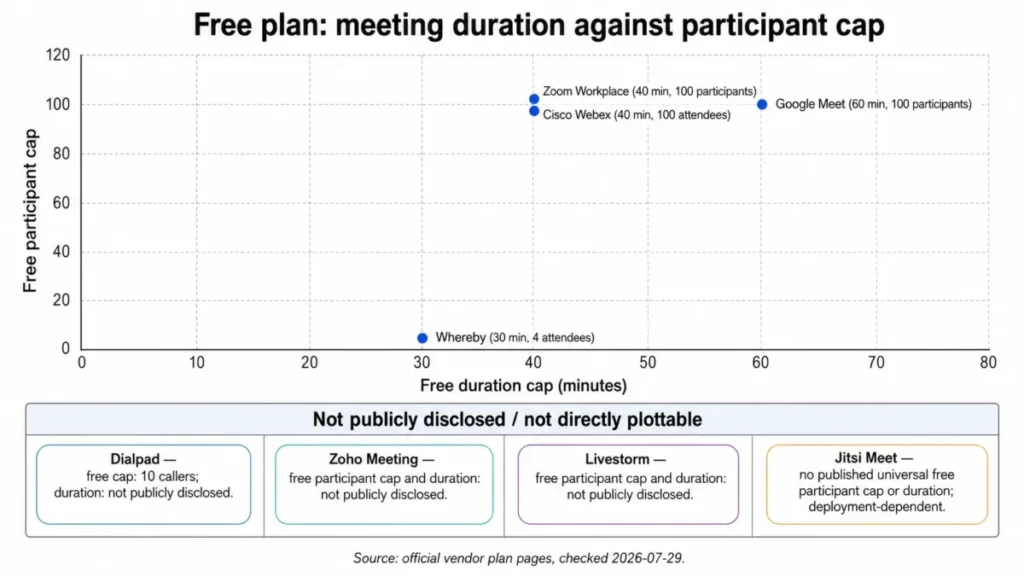
Read the chart as a shortlist filter rather than a scoreboard. Google Meet is the most useful free plan for a one-hour external call, Zoom and Webex are the most useful for a large but short session, and Whereby is a two-person tool at no cost.
The three platforms in the undisclosed band are not weaker, they are simply unmeasurable from public pages at the checked date. Treating an unpublished limit as generous is how teams discover a cap during a customer call.
Pricing: Entry Price, Practical Tier, and the Unit Each Vendor Bills
Four of these ten vendors publish a readable US amount for a self-serve paid plan. The rest publish a free tier and move the paid number behind a checkout, a region selector, or a sales conversation, which is a finding rather than a gap in this analysis.
| Platform | Entry status | Verified paid amount | Billing unit | What the paid tier changes |
|---|---|---|---|---|
| Microsoft Teams | Paid entry | $4.00 per user per month, paid yearly | Per user | 300 interactive participants and tenant-level policy |
| Google Meet | Paid entry via Workspace | $7.00 per user per month, one-year commitment | Per user | 24-hour sessions, recording, streaming, larger meetings |
| GoTo Meeting | Paid entry | $12 and $16 per organizer per month, billed annually | Per organizer | 150 then 250 participants |
| Whereby Meetings | Paid entry | $10.99 per month, and $13.99 per host per month | Per host, three-host minimum on Business | 100 then 200 attendees, branding, recording |
| Zoom Workplace | Free entry | Not publicly readable at the checked date | Per host | 30-hour meetings, then a 300-participant default |
| Cisco Webex Meetings | Free entry at $0 | Not publicly readable at the checked date | Per host license | 24-hour meetings, capacity up to 1,000 |
| Zoho Meeting | Free entry | Not publicly readable at the checked date | Per host | 24-hour meetings, 5 GB recording per host |
| Livestorm | Free entry | Not verifiable in US dollars at the checked date | Attendee credits | Longer sessions and enterprise integrations |
| Dialpad Meetings | Free entry | Not publicly verifiable at the checked date | Per account | 100 participants and AI meeting outputs |
| Jitsi Meet | Free, open source | No license fee | None, infrastructure only | Nothing is licensed, everything is operated |
Source: official pricing pages for each listed plan, checked 2026-07-29. Teams business plan page. Workspace pricing page. GoTo pricing detail. Whereby pricing selector. Zoom virtual meetings page. Webex pricing comparison. Zoho Meeting pricing detail. Livestorm pricing detail. Dialpad pricing FAQ. Jitsi Meet overview.
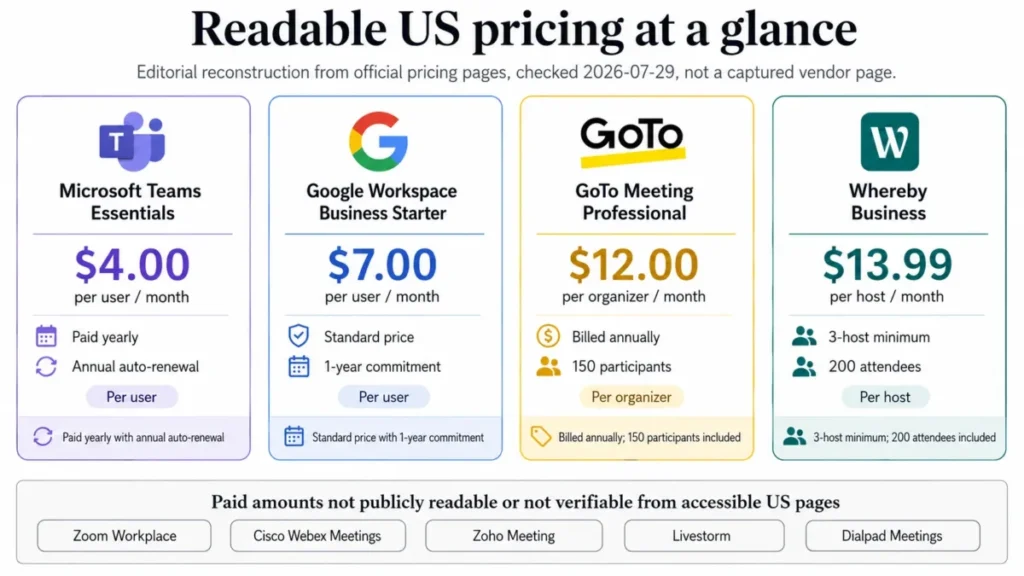
The billing-unit column is the one to read twice. Four different units appear across ten products, and they do not convert into each other.
Per user means everyone who joins from inside the company needs a license. Per host and per organizer mean only the people who schedule do, and attendee credits mean the invoice reacts to how popular the content was.
That difference reverses rankings. GoTo at $12 per organizer is cheaper than Teams at $4.00 per user for a 50-person company with three hosts, and far more expensive for a 10-person company where everyone hosts.
Standard price governs every figure above. Where a vendor page showed an introductory offer, the standard rate was used instead and the temporary offer was excluded from the baseline.
Cost at Scale: What Ten Licensed People Cost per Year
Only the four vendors with readable US amounts can be modelled honestly. The figures below are editorial calculations from published rates, not quoted bundles, and they exclude tax.
| Scenario | Microsoft Teams Essentials | Google Workspace Business Starter | GoTo Meeting Professional | Whereby |
|---|---|---|---|---|
| 1 licensed person, monthly | $4.00 | $7.00 | $12 | $10.99 on Pro |
| 5 licensed people, monthly | $20 | $35 | $60 | $69.95 on Business |
| 10 licensed people, monthly | $40 | $70 | $120 | $139.90 on Business |
| 10 licensed people, annualized | $480 | $840 | $1,440 | $1,678.80 on Business |
| What the licensed unit is | Per user | Per user | Per organizer | Per host, minimum three |
Source: per-unit rates published on the official pricing pages, checked 2026-07-29. Totals are editorial calculations from those rates. Teams per-user rate page. Workspace per-user rate page. GoTo per-organizer rate page. Whereby per-host rate page.
The arithmetic behind the table is deliberately simple so it can be checked. Ten Teams users at 10 x $4.00 x 12 months = $480 for the year, and ten Google Workspace users at 10 x $7.00 x 12 months = $840.
GoTo shifts the same question onto hosts. Ten organizers at 10 x $12 x 12 months = $1,440, while three designated organizers cost 3 x $12 x 12 months = $432 for the identical set of client meetings.
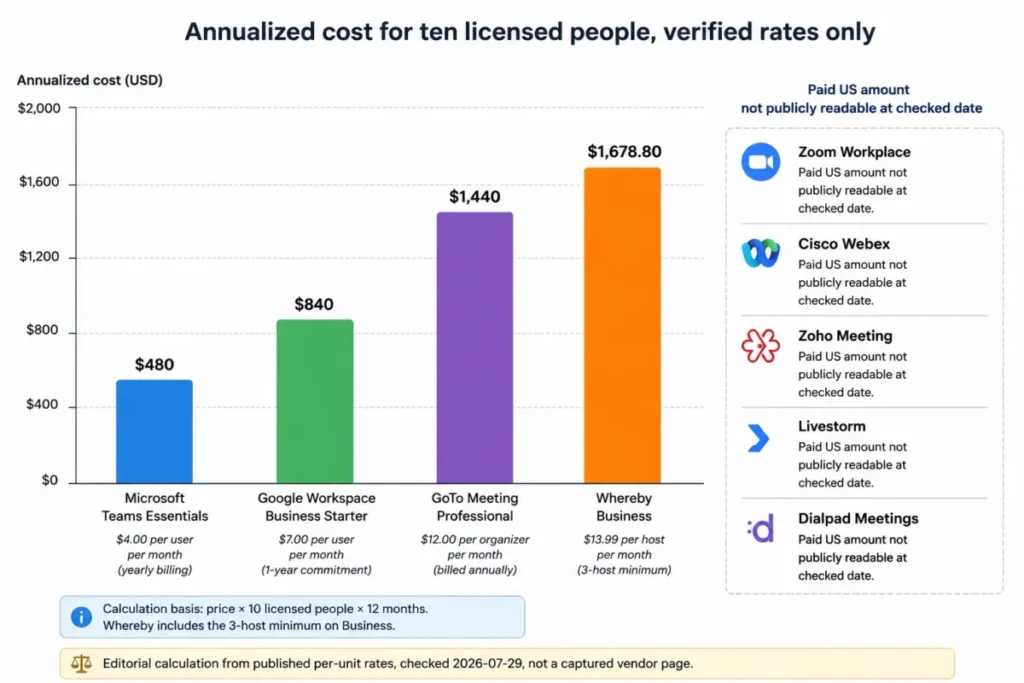
Whereby looks expensive in this table and cheap in real life for the buyer it targets. One consultant on Pro pays $10.99 per month, and the $1,678.80 figure only appears when ten separate people each need to host.
The Whereby minimum is the detail that most starting-price tables omit. Business is $13.99 per host with at least three hosts, so the smallest possible Business commitment is 3 x $13.99 = $41.97 per month before taxes.
Livestorm cannot appear in this table at all, and that is the point. An attendee-credit plan has no per-seat figure to annualize, because a single evergreen webinar with a popular replay can consume more credits after the event than during it.
Feature Gate Comparison: Recording, AI, Breakouts, and Admin
Participant counts get the attention, but the gates below are what send a team back to procurement three weeks after signature.
| Platform | Cloud recording | AI meeting notes | Breakout rooms | Admin and security controls |
|---|---|---|---|---|
| Zoom Workplace | Paid, 10 GB included on Pro | Plan-dependent | Available on paid plans | Plan-dependent |
| Microsoft Teams | Licence-dependent | Licence-dependent | Unsupported above 300 attendees | Inherited from the Microsoft 365 tenant |
| Google Meet | Paid Workspace plans only | Plan-dependent | Plan-dependent | Paid Workspace administration |
| Cisco Webex Meetings | Plan-dependent | Plan-dependent | Plan-dependent | Control Hub and site administration |
| GoTo Meeting | Included with organizer plans | Transcription on organizer plans | Plan-dependent | Organizer-level controls |
| Whereby Meetings | Unlimited recording on Pro | Not a published differentiator | Removed from the free plan | Room-level controls |
| Zoho Meeting | 5 GB per host on Standard | Not a published differentiator | Professional only | Custom domains on Professional |
| Livestorm | Replays included, credits apply | Not a published differentiator | Event-format dependent | Enterprise integrations on Enterprise |
| Dialpad Meetings | Plan-dependent | Business only | Not a published differentiator | Account-level controls |
| Jitsi Meet | Deployment-dependent | Deployment-dependent | Deployment-dependent | Self-managed, including end-to-end encryption |
Source: official plan and documentation pages per row, checked 2026-07-29. A cell reading plan-dependent marks a capability the public page does not resolve. Zoom plan detail. Teams meeting limits. Meet plan features. Webex feature columns. GoTo plan detail. Whereby recording and branding. Zoho feature gates. Livestorm replay documentation. Dialpad AI feature notes. Jitsi encryption documentation.
Four gates matter more than the rest for the buyers this guide is written for. Recording storage, AI output, breakout rooms, and administrative control each have a documented trigger on at least one platform in this list.
Zoho puts breakout rooms on Professional, Whereby removed them from its free plan, and Microsoft documents that they stop working above 300 attendees. A facilitation-heavy team therefore has three different upgrade conversations depending on which platform it picks.
Recording storage behaves the same way. Zoom includes 10 GB of cloud storage on Pro, so a team that records every call is buying expansion rather than discovering the ceiling later.
Zoho includes 5 GB per host on Standard, which is the same purchase wearing a different label.
Undisclosed is not the same as unavailable. Every cell above that reads plan-dependent is a question to put to the vendor in writing before signature, not an assumption to make in a spreadsheet.
Setup and Migration Difficulty
Rollout effort separates platforms that look similar on a feature grid. The ranking below reflects identity, policy, device, and training work rather than how long it takes to start a first call.
| Platform | Setup difficulty | Main driver | First admin task that matters |
|---|---|---|---|
| Whereby Meetings | Low | A room URL is the product | Decide who owns each permanent room |
| Google Meet | Low | Browser joining inside an existing tenant | Set recording and external sharing policy |
| GoTo Meeting | Low | Organizer accounts and calendar links | Decide which people need organizer licenses |
| Dialpad Meetings | Low | Sits inside an existing Dialpad account | Confirm regional availability for every user |
| Zoom Workplace | Low to medium | Meetings are simple, governance is not | Verify the paid license is assigned to every host |
| Zoho Meeting | Low to medium | Simple alone, deeper inside the Zoho suite | Plan recording storage against the 5 GB per-host allowance |
| Microsoft Teams | Medium | Guest access and meeting policy configuration | Set lobby, recording, and external access policy |
| Livestorm | Medium | Registration, branding, and replay publishing | Define which events are allowed to consume credits |
| Cisco Webex Meetings | Medium to high | Control Hub, site administration, room devices | Count concurrent hosts, then license that number |
| Jitsi Meet | High for self-hosting | Servers, scaling, monitoring, and updates | Load-test the deployment before promising a capacity |
This ranking is an editorial assessment of the administration work documented on each vendor’s official pages, checked 2026-07-29. Zoom license assignment guidance. Teams event scale documentation. Meet admin and plan page. Webex Control Hub article. GoTo organizer plan detail. Whereby room and host setup. Zoho suite meeting page. Livestorm event setup pricing. Dialpad app meeting guide. Jitsi deployment overview.
Two rows deserve extra attention during planning. Zoom looks like the easiest rollout on this list and still fails first-week reviews when a paid license is bought but never assigned to the host who needs the longer meeting.
Webex sits at the other end for a structural reason. Because a single host license cannot run two meetings at once, the rollout has to model the busiest hour before anyone counts employees.
Switching, Cancellation, and the Data You Can Lose
Offboarding is the section most rankings skip entirely, and it is where the largest unpriced risk sits. Three of these ten platforms have documented switching consequences that belong in a contract review.
Livestorm carries the sharpest one, and its offboarding boundary is documented rather than implied. The deletion list after Pro cancellation is set out in the product block above, and the flow below shows where it sits in the renewal cycle.
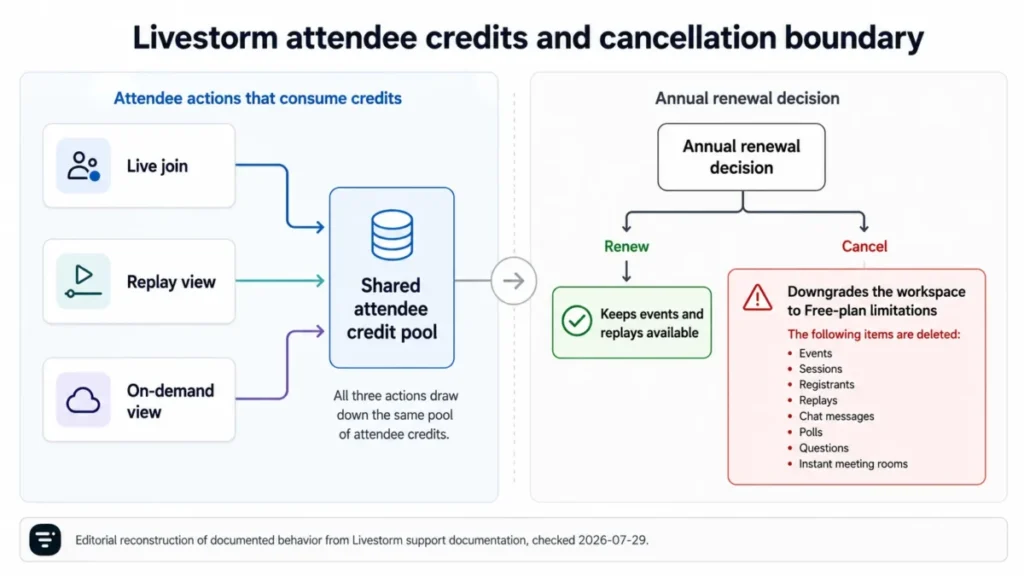
The practical rule is to export before the term ends rather than after the decision is made. Anything treated as the archive of record for customer education needs a copy outside the platform.
Microsoft Teams Essentials carries a quieter version of the same risk. It is billed yearly with automatic renewal, so the moment to decide is eleven months into the term, not at the next monthly invoice.
Zoho’s exit path is gentler and its entry path has a cost most buyers miss. An account that is not upgraded after a trial expires moves to the free plan, while premium support runs at 20% of the total license fee for as long as it is subscribed.
Whereby’s switching cost is structural rather than punitive. Moving a team from Pro to Business means committing to at least three hosts, so a two-person practice pays for a seat it does not use.
Before signing anything on this list, put four items in the migration plan: where recordings live, who can export them, what the notice period is, and which capability disappears if the account downgrades. Teams comparing wider stack consolidation can start from the free collaboration tools roundup and the Slack pricing breakdown.
How to Choose a Video Conferencing Platform in Six Steps
The sequence matters more than the checklist. Running these in order removes most of the shortlist before anyone books a demo.
Step one. Name the suite you already fund. An organization paying for Microsoft 365 has already bought a meeting platform, and so has a Google Workspace tenant, which makes the honest comparison suite value against a second subscription.
Step two. Size the largest recurring meeting, not the largest imaginable one. Buy for the weekly all-hands and the quarterly training day, then treat the once-a-year launch as a separate event decision.
Step three. Identify the billing unit and count the right people. Count users for Teams and Workspace, count hosts for Zoom, Webex, and Whereby, count organizers for GoTo, and model attendance for Livestorm.
Step four. List the features that must exist on day one. Recording, transcription, breakout rooms, dial-in access, and single sign-on each sit behind a different gate on a different platform, and a missing one is an upgrade rather than a setting.
Step five. Test the guest path with an actual outsider. Ask a client to join from a browser on an unmanaged laptop, because guest friction is where external meetings fail and no pricing page reports it.
Step six. Write the exit terms down before signing. Record the renewal date, the notice period, the export path for recordings, and the capability that disappears on downgrade.
Common Mistakes Buyers Make When Choosing Video Meeting Software
Budgeting from the entry price. The entry price answers what a plan costs, not what the team needs, and on six of these ten platforms the paid amount was not publicly readable at the checked date.
Comparing dollar figures across different billing units. A per-user rate and a per-organizer rate are not comparable until both are converted to the same team shape.
Assuming a participant ceiling preserves every feature. Microsoft documents breakout rooms as unsupported above 300 attendees, so a bigger room can be a smaller workshop.
Buying a paid plan without assigning the license. The documented Basic behavior still applies to a host without an assigned license, which is why the 40-minute cap survives the purchase order.
Ignoring replay economics on event platforms. A credit consumed by a replay view costs the same as one consumed by a live attendee, so evergreen content has a running cost.
Treating an undisclosed limit as a generous one. Where a vendor does not publish a cap, the correct action is to ask in writing, not to assume headroom.
Choosing self-hosting without staffing it. Jitsi removes the license fee and adds capacity testing, monitoring, updates, and security review to an internal backlog.
Final Verdict
Each ranking reason below names the micro-cohort it serves, the meeting workflow that cohort runs, and the plan gate that acts as a disqualifier for everyone else. The winner by scenario therefore follows from documented limits rather than from a feature count.
Read every recommendation as conditional, because if the cohort, the workflow, or the disqualifier does not match, the ranking reason does not transfer. Each figure below traces to the official plan pages cited in that platform’s section, checked 2026-07-29, such as the Zoom plan and duration page.
Zoom Workplace takes the top position because it is the least ecosystem-dependent option here, with a free tier guests already know, paid meetings up to 30 hours, and a clear 300-participant threshold on Business. That combination fits the widest range of mixed internal and external meeting programmes, provided license assignment is verified during rollout.
The ranking changes the moment a suite is already funded. An organization under 300 interactive participants that already pays for Microsoft 365 should choose Teams at $4.00 per user per month on Essentials.
A Google Workspace tenant should choose Meet, then compare suite value against a second subscription rather than comparing meeting licenses.
Three picks are decided by shape rather than size. Webex fits regulated, room-heavy enterprises that can model concurrent host licenses.
GoTo fits a small fixed set of designated organizers at $12 or $16 per organizer per month. Whereby fits a solo practitioner at $10.99 per month who wants a permanent browser room.
The last three are specialist choices, and they are the easiest to get wrong. Zoho suits an existing Zoho customer that records selectively, Livestorm suits marketing teams that want cost tied to attendance and have budgeted the replay draw, and Dialpad suits North American Dialpad customers who want AI notes beside their phone system.
Jitsi is the honest outlier. It is free in license terms and not free in operational terms, so the right buyer is a team that can staff capacity testing, recording, monitoring, and updates rather than a team that wants a vendor to be accountable.
If the decision is still open after all of that, the tie-breaker is the guest path. The platform that lets an outside participant join fastest, on an unmanaged device, wins more real meetings than the one with the longer feature grid.
Teams standardizing a wider stack can cross-check the project management software roundup and the knowledge base software picks at the same time.
The next step is short. Shortlist one to three platforms from the quick verdict, then confirm the participant limit and the plan that removes your gate on the vendor’s own page.
Start the free plan, open the trial, or book the sales conversation for the one that survives both checks.
Frequently Asked Questions
These answers repeat the decision-critical numbers from the sections above so a reader arriving from a search result gets the same figures. Every limit and price below carries the same 2026-07-29 checked date.
What is the best video conferencing software for business in 2026?
Zoom Workplace is the strongest general-purpose pick for companies running a mix of internal and external meetings, because Basic is free, paid meetings run up to 30 hours, and Business raises the default cap to 300 participants.
An organization that already funds Microsoft 365 should choose Teams instead, and a Google Workspace tenant should choose Meet, since the meeting capability is already licensed inside a suite the company pays for.
Is Zoom or Microsoft Teams better for meetings?
Teams is better when the organization already pays for Microsoft 365, because Essentials is $4.00 per user per month paid yearly and the meeting sits beside the files and calendars it belongs to.
Zoom is better when meetings are guest-heavy and no single suite is standard, because external attendees join a familiar flow without a tenant account.
Which video conferencing platform has the longest free meeting limit?
Among the platforms with published free limits, Google Meet allows the longest group session at 60 minutes for up to 100 participants.
Zoom Basic and Webex Free both stop at roughly 40 minutes. The free plan from Whereby ends at 30 minutes with four attendees.
What is the cheapest video conferencing software for a small team?
Microsoft Teams Essentials at $4.00 per user per month paid yearly is the lowest published per-person rate in this ranking.
For a team with only one or two hosts, Whereby Pro at $10.99 per month can cost less overall. GoTo Meeting Professional at $12 per organizer per month follows the same logic, because both plans bill the host rather than every participant.
Which platform supports 300 or more meeting participants?
Microsoft Teams supports 300 interactive participants on Essentials and business plans, and 1,000 on eligible enterprise plans.
Zoom Workplace Business raises the default cap to 300 participants. Google Workspace lists 500 participants on Business Plus and 1,000 on Enterprise, and Webex paid columns scale to 1,000.
What is the most secure video conferencing platform?
Security depends on the controls a buyer configures, not on a single ranking. Jitsi Meet documents encryption by default with optional end-to-end encryption on supported Chromium browsers or its Electron client, and Cisco Webex is built around enterprise administration through Control Hub and site administration for organizations with formal review cycles.
Do guests need an account to join a video meeting?
No on every platform in this ranking, though the friction differs sharply. Whereby and Jitsi are the lightest, since a browser and a URL are enough, while Teams guest joining is heavier because the meeting sits inside a tenant with its own access policy.
Which video conferencing software records meetings?
Recording is a paid capability on most of this list rather than a default. Zoom includes 10 GB of cloud storage on Pro, and Whereby includes unlimited recording on Pro.
Zoho includes 5 GB per host on Standard, and Google Meet places recording on paid Workspace plans.
What is the best video conferencing tool for webinars?
Livestorm is the strongest event-focused pick here, because registration, replays, and on-demand delivery run in one workflow and cost follows attendance. The trade-off is that credits are consumed by live joins, replay views, and on-demand views alike, so an evergreen webinar keeps drawing down the pool after the live session ends.
Can video conferencing software be self-hosted?
Jitsi Meet is the self-hosted option in this ranking, and it is free, open source, and joinable straight from a browser. The official product page does not publish one universal participant cap, so capacity, recording, support, and operational ownership must be validated for the chosen deployment before it is promised to a large audience.
What To Do Next
Shortlist one to three platforms from the quick verdict, then validate the required plan and the participant limit on the vendor’s own page before anyone signs.
Once the plan and the participant limit check out, start a free plan, open a trial, or book the sales conversation for the one platform that survives both checks.