Lovable is an AI-powered full-stack app builder that turns natural language prompts into working web applications — complete with frontend, backend, database, and authentication. This Lovable review cuts through the hype to answer the question every founder, product manager, and non-technical builder keeps asking: is Lovable actually worth the money, or does the magic wear off once you hit real-world complexity?
The short version: Lovable is one of the strongest prompt-to-app builders available right now for MVPs, internal tools, and design-forward prototypes. Lovable ships polished first drafts faster than almost anything else in this category. But it is not a blank check. Complex production systems, sensitive data workflows, and projects that demand deep backend logic will push Lovable past its comfort zone — and the credit-based pricing model can surprise you if you aren’t careful.
Bottom Line
Is Lovable worth it? Yes — for MVPs, internal tools, and design-forward prototypes. No — for highly regulated systems, complex multi-service backends, or teams with large existing codebases.
Lovable’s core tradeoff is polish versus control. You get beautiful, functional apps fast. You give up deep backend flexibility and cost predictability.
TL;DR — Lovable Review at a Glance
- Best for: Non-technical founders, product managers, startup teams, designers, and agencies shipping MVPs or internal tools fast
- Not ideal for: Highly regulated industries, complex multi-service backends, teams with existing large codebases, native mobile apps
- Starting price: Free (5 daily credits, up to 30/month) · Pro at $25/month · Business at $50/month · Enterprise custom
- Biggest strength: Speed from prompt to deployable app — including UI, database, auth, and hosting — with genuinely good-looking output
- Biggest drawback: Credit consumption during debugging loops can spike costs; not suited for security-sensitive production without independent review
- Verdict score: 8.2 / 10 for the target audience — drops to ~6 for teams needing deep backend control or strict compliance
Scorecard
| Category | Score (out of 10) | Notes |
|---|---|---|
| Ease of use | 9 | Zero setup, instant onboarding, natural language input |
| UI quality | 9 | Best-in-class default output among AI app builders |
| Backend flexibility | 6 | Supabase covers common cases; complex logic hits limits fast |
| Debugging experience | 5 | Loops burn credits; error messages vary in helpfulness |
| Pricing predictability | 5 | Credit model is hard to forecast for non-trivial projects |
| Security posture | 7 | Real certifications, but not a replacement for independent review |
| SEO friendliness | 5 | CSR architecture requires manual work for indexing and AI discoverability |
| Value for money | 7 | Strong for target users; expensive if you hit debugging spirals |
| Best for beginners | 9 | One of the most accessible full-stack tools available |
| Overall | 8.2 | Outstanding for fast MVPs; limited for production-grade complexity |
Lovable Review Verdict in 30 Seconds
Lovable earns its reputation as one of the best AI app builders for speed-to-output. If you need a working prototype by the end of the week — with real auth, a real database, and a UI that doesn’t look like a hackathon project — Lovable gets you there. The gap between “I have an idea” and “here’s a clickable app with Supabase behind it” has never been smaller.
Where Lovable struggles is on the other side of launch. Debugging complex logic burns credits fast, production-grade security requires work beyond what Lovable provides out of the box, and importing an existing codebase into the platform isn’t supported. For the right use case, Lovable is outstanding. For the wrong one, it’s an expensive detour.
Quick verdict: Lovable is strongest at speed, not backend depth.
What Lovable Is — and Why It Gets So Much Attention
Lovable, GPT Engineer, and the Full-Stack AI Builder Angle
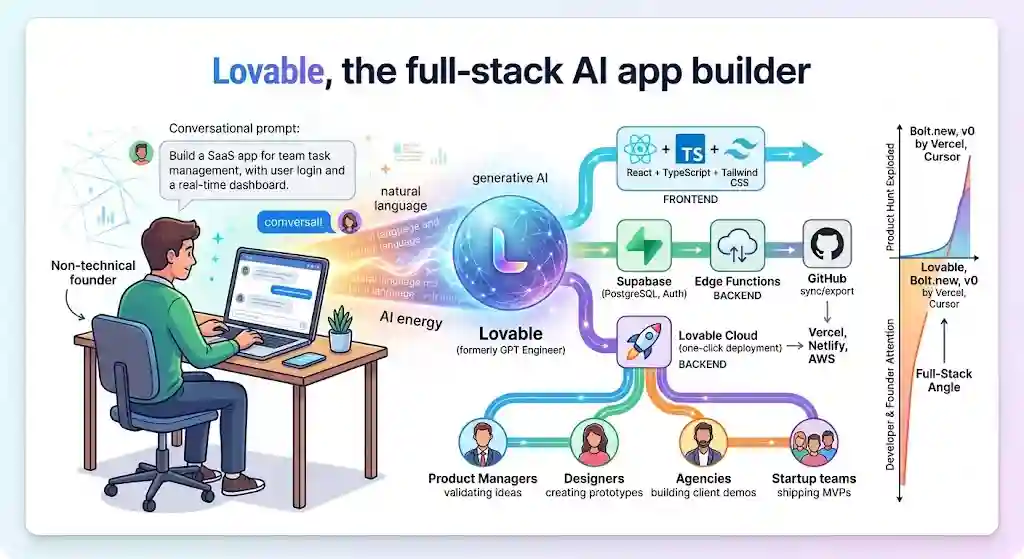
Lovable (formerly known as GPT Engineer) rebranded and relaunched as Lovable.dev with a clear mission: let anyone build full-stack web apps using natural language. Lovable sits in the vibe coding category — AI tools that generate real, editable code from conversational prompts rather than requiring users to write code themselves.
The platform exploded on Product Hunt, attracted significant developer and founder attention, and has positioned itself as a direct competitor to Bolt.new, v0 by Vercel, and (loosely) Cursor. But Lovable’s differentiator is the full-stack package: frontend built with React, TypeScript, and Tailwind CSS, paired with a Supabase backend that handles PostgreSQL databases, authentication, row-level security, and edge functions — all generated from a single prompt session.
Core Stack, Deployment, and Who It Targets
Every Lovable project generates a Vite-based React application. At its core, Lovable uses generative AI to interpret natural language and produce production-style code. The typical stack:
- Frontend: React + TypeScript + Tailwind CSS
- Backend: Supabase (PostgreSQL, Auth, Edge Functions, Storage)
- Deployment: Lovable Cloud (one-click) or export to Vercel, Netlify, AWS, or any custom host
- Version control: GitHub sync (export/push)
The target audience spans non-technical founders, product managers validating ideas, designers who want clickable prototypes, agencies building client demos, and startup teams that need to move before they can hire a full engineering team.
How We Evaluated Lovable
There’s no single axis on which an AI app builder should be judged. A tool that’s incredible for prototyping can be terrible for production. A tool that’s cheap on paper can get expensive in practice. Our approach follows the same structured criteria outlined in our review methodology.
This review evaluates Lovable across eight dimensions:
| Dimension | What It Measures |
|---|---|
| Speed to usable output | How fast can you go from prompt to something a stakeholder or user can actually click through? |
| Code quality | Is the generated code clean, idiomatic, and maintainable if exported? |
| UI quality | Does the output look professional without manual design work? |
| Debugging friction | When things break (and they will), how painful is the fix cycle? |
| Pricing predictability | Can you estimate your monthly bill before you start? |
| Security and privacy risk | What protections exist — and where do they stop? |
| Ownership and lock-in | Can you leave? Easily? With everything? |
| Search visibility | If you’re building a public-facing site, can Google and AI search engines find and index it? |
Test Scenarios Used
To ground this evaluation, Lovable was assessed against five realistic build scenarios — the kinds of projects actual buyers attempt:
- Landing page: A marketing site with 3–5 pages, CTA sections, responsive layout, and contact form
- Internal tool: An admin dashboard for managing team data, with CRUD operations and role-based views
- SaaS dashboard: A multi-page app with user accounts, Supabase auth, data visualization, and Stripe checkout
- Auth + database workflow: A project requiring login, registration, protected routes, database writes, and row-level security
- Public-facing site needing SEO: A content-driven site where organic search traffic and AI discoverability matter
These scenarios surface different strengths and weaknesses. Lovable excels at 1–4. Scenario 5 requires extra manual work that the platform doesn’t handle automatically.
Test Results Summary
| Test Scenario | What Lovable Did Well | Where Lovable Struggled | Best Fit? |
|---|---|---|---|
| Landing page | Fast output, polished UI, responsive layout, custom domain support | SEO metadata needs manual checking; CSR indexing requires prerendering for AI bots | ✅ Yes |
| Internal tool | CRUD scaffolding, role-based views, Supabase tables generated quickly | Complex conditional logic required multiple prompt iterations | ✅ Yes |
| SaaS dashboard | Auth, database, and Stripe integration scaffolded from prompts; strong visual output | Multi-step business logic caused debugging loops; credit cost grew fast | ✅ For MVP |
| Auth + database | Login/registration, protected routes, and RLS configured correctly on first pass | RLS edge cases and server-side validation gaps need manual auditing | ✅ For MVP |
| Public-facing SEO site | Pages render; metadata can be set via prompts | CSR blocks some AI crawlers; sitemap may hallucinate URLs; no SSR option built in | ⚠️ Risky without manual SEO work |
Verdict on testing: Lovable is strongest at generating functional, good-looking apps with standard patterns (auth, CRUD, dashboards). Lovable is weakest when projects require complex backend logic, SEO-critical indexing, or security-sensitive data handling.
Real-World Use Cases (Composite Scenarios)
These are hypothetical but representative — based on the types of buyers who evaluate Lovable.
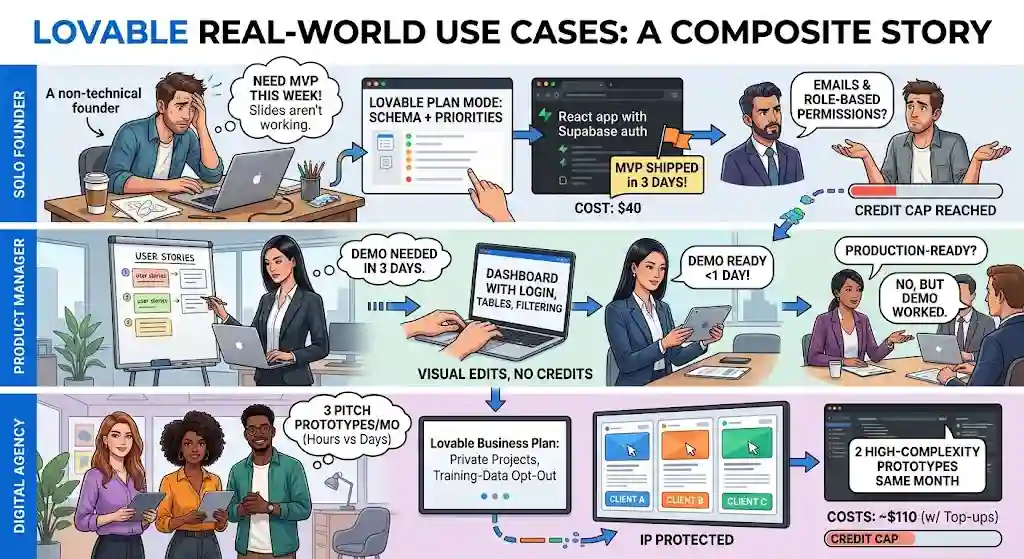
The Solo Founder Who Needs an MVP This Week
Scenario: A non-technical founder has a SaaS idea for a team task-management tool. Investors want to see a working demo, not slides. Budget: $100 total.
How Lovable fits: The founder uses Plan mode to define database schema and feature priorities, then prompts Lovable to generate a multi-page React app with Supabase auth, team workspaces, and task CRUD. Within 2–3 days, a deployable MVP exists on a custom domain. Total cost: $25 (Pro plan) + one $15 credit top-up = $40.
Where it gets tricky: Investor feedback requests notification emails and role-based permissions. Each iteration consumes credits. The founder hits the monthly cap faster than expected.
The PM Who Needs a Stakeholder Demo
Scenario: A product manager at a mid-size company wants to demo a proposed customer portal before engineering commits to building it. Timeline: 3 days.
How Lovable fits: The PM prompts Lovable for a dashboard with login, data tables, filtering, and a settings page. Visual edits polish the look without burning credits. The demo is ready for the stakeholder meeting in under a day.
Where it gets tricky: Stakeholders ask, “Is this production-ready?” The answer is no — but the demo does its job.
The Agency Building a Client Prototype
Scenario: A digital agency pitches three potential clients per month. Each pitch needs a clickable prototype showing the proposed product. Building these used to take a developer 2–3 days each.
How Lovable fits: The agency uses Lovable on a Business plan ($50/month) to generate prototypes in hours instead of days. Training-data opt-out protects client IP. Private projects keep work confidential.
Where it gets tricky: Two high-complexity prototypes in the same month drain credits. The agency needs 1–2 top-ups ($60 extra), pushing the real monthly cost to ~$110.
What Lovable Gets Right (Lovable Pros)
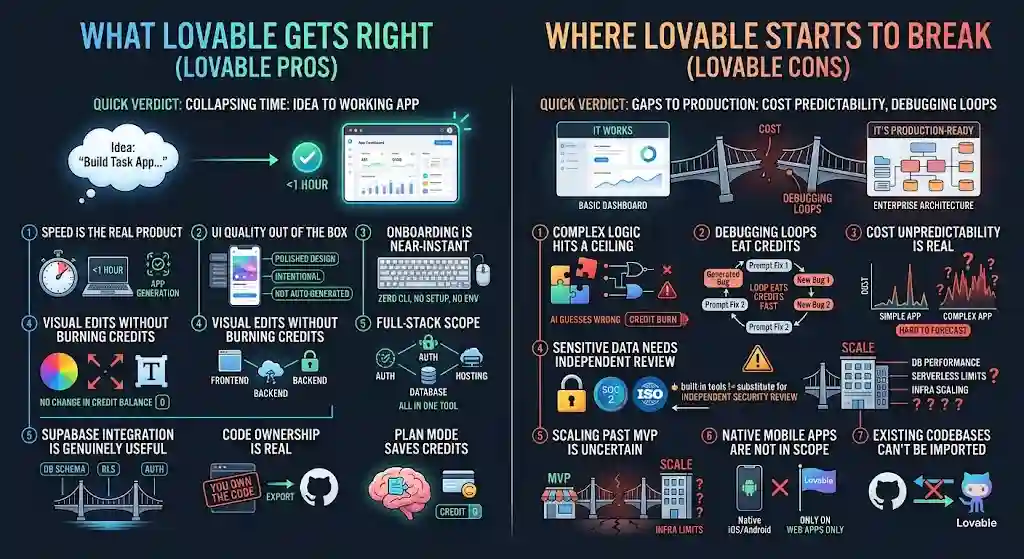
Quick verdict: Lovable’s strongest value is collapsing the time between idea and working app to an absurdly short window.
- Speed is the real product. Going from “I want a task management app with team features and Supabase auth” to a working, styled, deployable app in under an hour is genuinely remarkable.
- UI quality out of the box. The default visual output is better than most competitors. Components look intentional, not auto-generated.
- Onboarding is near-instant. No local dev environment, no CLI setup, no dependency management. You type a prompt and get an app.
- Visual edits without burning credits. Being able to tweak spacing, text, and colors without triggering a new AI generation is a smart design decision.
- Full-stack scope. Frontend, backend, auth, database, hosting — all in one tool. That’s a real advantage for solo builders and small teams who don’t want to glue five services together.
- Supabase integration is genuinely useful. Database schema generation, RLS configuration, and auth scaffolding save hours of boilerplate work.
- Code ownership is real. You own the code. You can export it. You can keep building outside Lovable. This isn’t a black-box page builder.
- Plan mode saves credits. Thinking before generating prevents the costly iterate-and-hope cycle.
Where Lovable Starts to Break (Lovable Cons)
Quick verdict: Lovable’s weakest points are cost predictability, debugging loops, and the gap between “it works” and “it’s production-ready.”
- Complex logic hits a ceiling. Once your app requires multi-step business logic, conditional workflows, or deeply nested state management, the AI starts guessing wrong more often. Each wrong guess costs credits.
- Debugging loops eat credits. The biggest practical complaint across reviewer communities: when Lovable generates a bug, fixing it via prompts can trigger a cycle where each “fix” introduces a new issue. That loop burns through credits fast.
- Cost unpredictability is real. The credit system is hard to forecast. A simple app might cost a handful of credits. A complex one might burn your entire monthly allocation in a day of iteration.
- Sensitive data needs independent review. Lovable has built-in security tools and certifications. But Lovable’s own documentation states these controls do not replace a thorough security review.
- Scaling past MVP is uncertain. Database performance, serverless function limits, and infrastructure scaling are constrained by Supabase and Lovable Cloud defaults.
- Native mobile apps are not in scope. Lovable builds web apps. Period.
- Existing codebases can’t be imported. You can sync to GitHub. You cannot pull from an existing GitHub repository into Lovable.
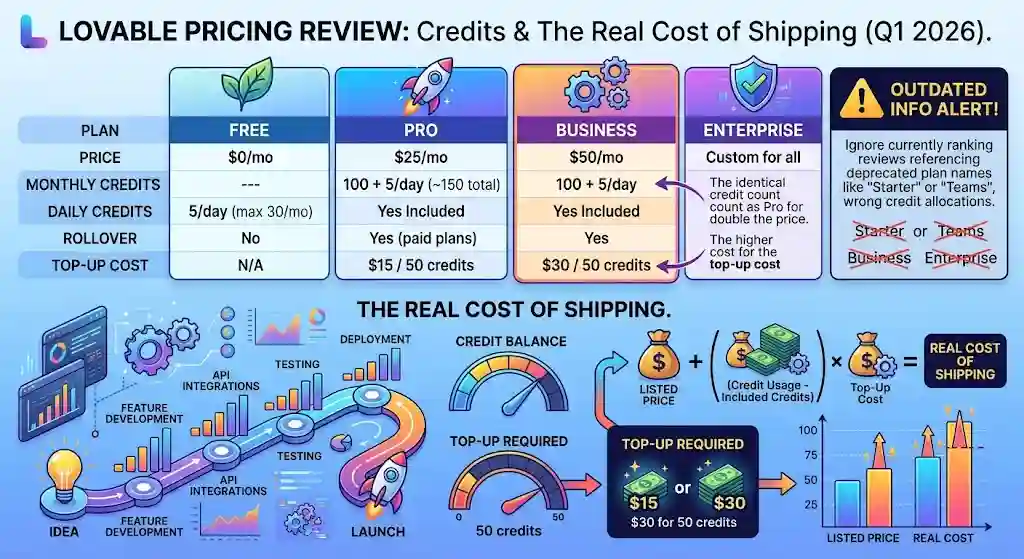
Lovable Pricing Review: Credits and the Real Cost of Shipping
Lovable’s current plan structure (as of Q1 2026, sourced from official pricing):
| Plan | Price | Monthly Credits | Daily Credits | Rollover | Top-Up Cost |
|---|---|---|---|---|---|
| Free | $0/mo | — | 5/day (max 30/mo) | No | N/A |
| Pro | $25/mo | 100 + 5/day (~150 total) | Included | Yes (paid plans) | $15 / 50 credits |
| Business | $50/mo | 100 + 5/day | Included | Yes | $30 / 50 credits |
| Enterprise | Custom | Custom | Custom | Custom | Custom |
⚠️ Watch out: Several currently ranking review pages still reference outdated plan names (“Starter,” “Teams”) or different credit allocations. If a review mentions those tiers, it’s pulling from deprecated information.
Buyer Scenarios: What Lovable Actually Costs
Solo founder building an MVP
Pro plan at $25/month. Budget for 1–2 top-ups ($30–$60 extra) during active build weeks. Real monthly cost during build phase: $55–$85. After launch, cost drops to $25/month baseline.
Agency running client prototypes
Business plan at $50/month. Private projects and training-data opt-out. Expect 1–2 top-ups ($60 extra) if running multiple projects. Real monthly cost: $80–$110.
Startup product team
Business plan for team collaboration and SSO. Budget $100–$150/month including top-ups during sprints.
Enterprise evaluator
Custom pricing. Look for: SCIM, audit logs, publishing controls, dedicated support, and volume credit packages.
Lovable Cloud also bills usage-based fees for data storage, database size, and serverless function runs — with a free monthly allowance. Factor this into long-term cost planning.
Security, Privacy, Ownership, and Lock-In Risk
Quick verdict: Lovable’s security features are real — but they are starting points, not certifications for regulated industries.
Security Posture
Lovable holds SOC 2 Type II and ISO 27001 certifications. The platform includes automated security scanning of generated code and dependencies, WAF controls, network isolation, encrypted storage, and role-based access control. Enterprise plans add SSO via Okta, Azure AD, or Google, plus SCIM provisioning. Lovable uses HackerOne for vulnerability reporting.
See Lovable’s security documentation for full details.
The caveat Lovable themselves state clearly: these features do not replace an independent security review. Generated code may have misconfigured row-level security or lack server-side validation — both real attack surfaces if left unaudited.
⚠️ Skip if: You’re building for healthcare, finance, or any regulated domain and don’t have a security team to audit the generated code independently.
Privacy and Training Data
Customer prompts, code, and workspace data are not used to train Lovable models, per their privacy policy. Data is shared with infrastructure providers (Supabase) and AI providers (such as OpenAI and Google Gemini) under contracts that restrict training and retention. Training-data opt-out is available, though specifics differ by plan tier — Business and Enterprise plans have stronger controls.
Code Ownership and Portability
You own the code. Lovable states there is “no lock-in.” You can export your full codebase at any time.
But portability has nuances. Managed services — authentication, Stripe integration, AI orchestration — do not export as standalone code. API keys and secrets are excluded from exports for security reasons. Moving a non-trivial Lovable project to an independent stack requires re-implementing those integrations manually.
That’s not lock-in in the traditional sense. But it’s not a one-click migration, either.
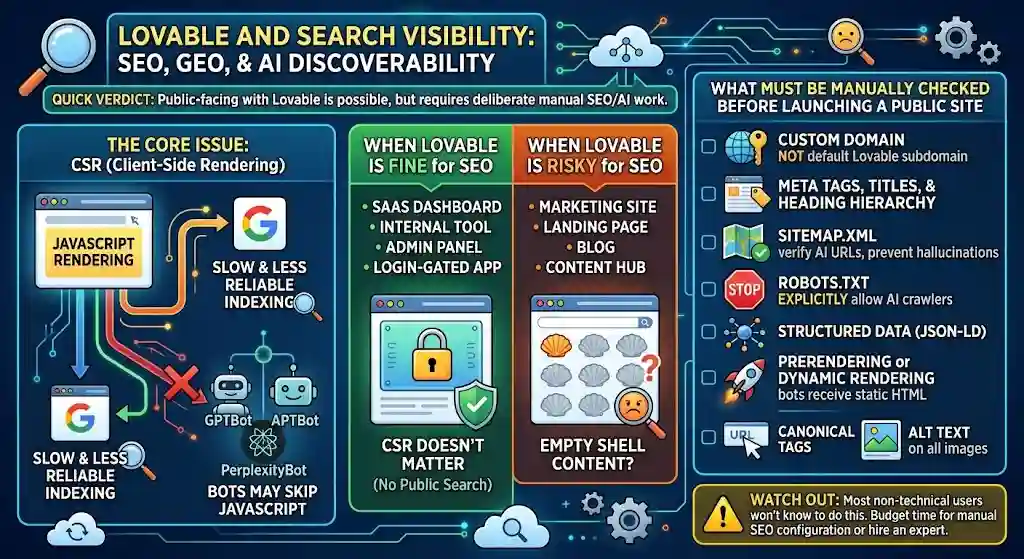
Lovable and Search Visibility: SEO, GEO, and AI Discoverability
Quick verdict: Building a public-facing site with Lovable is possible, but SEO and AI discoverability require deliberate manual work that the platform doesn’t handle automatically.
This is the section most Lovable reviews skip entirely — and it’s a mistake for anyone building something public-facing.
The Core Issue
Lovable generates client-side rendered (CSR) React single-page applications. CSR apps render content in the browser using JavaScript. Google can crawl and index JavaScript-rendered content, but the process is slower and less reliable than server-side rendered HTML. AI crawlers (GPTBot, PerplexityBot, and others) may not execute JavaScript at all.
When Lovable Is Fine for SEO
If you’re building a SaaS dashboard, internal tool, admin panel, or any login-gated application, CSR doesn’t matter. Nobody is searching for your admin panel. Lovable works perfectly for these use cases.
When Lovable Is Risky for SEO
If you’re building a marketing site, landing page, blog, content hub, or any public content you want indexed, CSR is a real risk. AI search engines may see an empty shell instead of your content.
What Must Be Manually Checked Before Launching a Public Site
Lovable has published official SEO and GEO best practices — one of the few AI app builders to address this directly. Before launching, verify:
- Custom domain is configured (not the default Lovable subdomain)
- Meta tags, titles, and heading hierarchy are set correctly on every page
- sitemap.xml is generated — but manually verified, because the AI can hallucinate URLs
- robots.txt explicitly allows AI crawlers (GPTBot, PerplexityBot)
- Structured data (JSON-LD) is added for rich results
- Prerendering or dynamic rendering is configured so bots receive static HTML
- Canonical tags point to the correct URLs
- Alt text is set on all images
⚠️ Watch out: Most non-technical Lovable users won’t know to do any of this. If search traffic matters to your project, budget time for manual SEO configuration or hire someone who can handle it.
Lovable After Handoff: What Happens When You Export
This is the angle most reviews ignore — what happens after you click “Export to GitHub.”
What Exports Cleanly
- Full React + TypeScript + Tailwind CSS source code
- Component structure and page routing
- Styling and layout
- Project configuration files
What Requires Manual Rework
- Auth flows: Authentication is a managed Supabase service. Exporting doesn’t give you a drop-in auth system for a different host.
- Stripe integration: Payment logic relies on Lovable’s managed connection. You’ll need to reconfigure Stripe on your own infrastructure.
- API keys and secrets: Intentionally excluded from exports. You must set up environment variables manually.
- AI orchestration: Any AI-powered features run through Lovable’s infrastructure and won’t transfer.
What Breaks After MVP Stage
- Database performance: Supabase free/starter tiers have connection and row limits. Scaling requires upgrading Supabase independently.
- Edge function limits: Serverless functions have execution time and memory constraints.
- Maintenance: Generated code is functional but may not follow your team’s conventions. A developer will likely want to refactor before extending.
- Testing: Lovable doesn’t generate automated tests. Any production deployment should add unit and integration tests.
The practical takeaway: Export from Lovable when your MVP is validated and you’re ready to invest in engineering. The code is real, the stack is standard (React + Supabase), and a competent developer can pick it up. But budget 1–2 weeks of developer time to clean up, add tests, reconfigure services, and prepare for production.
Best Use Cases for Lovable
Best for: Projects where speed-to-usable-output matters more than long-term scalability.
- MVPs for fundraising or user testing — Get a working product in front of investors or users in days, not months
- Internal tools — Admin panels, data entry apps, team dashboards where polish matters but scale doesn’t
- Client demos and prototypes — Agencies showing proposed products to clients before committing engineering
- Product validation — Test a feature concept or market hypothesis with a real, functional app
- Design-to-functional prototypes — Designers who want clickable, database-backed prototypes instead of static Figma screens
Worst Use Cases for Lovable
Skip if: Your project requires any of the following from day one.
- Regulated industries (healthcare, finance, legal) — Lovable’s security is a starting point, not a compliance certification
- Complex multi-service architecture — Microservices, message queues, event-driven systems, custom infrastructure
- Large existing codebases — Lovable cannot import existing GitHub repositories
- Native mobile apps — Lovable builds web applications only
- High-traffic production at scale — Default Supabase and Lovable Cloud infrastructure has limits
- SEO-critical content sites — CSR indexing issues require significant manual work
What Most Reviews Miss About Lovable
Most Lovable reviews follow the same template: features → pricing → pros/cons → verdict. That covers the surface. Here’s what falls through the cracks:
- GitHub sync is not GitHub import. You can push code from Lovable to GitHub and maintain bidirectional sync from that point. But you cannot bring an existing GitHub repository into Lovable to continue building. This limitation is rarely stated clearly in review articles. See Lovable’s GitHub documentation for details.
- Credit burn during debugging is the real cost driver. The sticker price ($25/month for Pro) is misleading if you’re building anything moderately complex. Debugging loops — where each “fix” introduces new issues — can drain a month of credits in a single session.
- SEO and GEO implications are real and mostly unaddressed. Lovable generates CSR apps. If you’re building a public-facing site and don’t add prerendering, structured data, and proper crawl directives, your content may be invisible to search engines and AI systems.
- Export works, but managed services need manual rework. Code ownership is real — you can leave. But auth, Stripe, and AI features are tied to Lovable’s infrastructure. Exporting means re-implementing those integrations.
- Security tools ≠ production security review. Lovable has SOC 2 Type II, ISO 27001, and automated scanning. Their own docs say this doesn’t replace independent auditing. Most reviews treat “has security features” as “is secure.” Those are different statements.
Common Mistakes When Using Lovable
Avoid these to get better results and spend fewer credits.
- Prompting too broadly. “Build me a CRM” is a bad prompt. “Build a contact management dashboard with a table view, search, and Supabase backend for a 3-person sales team” is a good one. Specificity reduces rework. Understanding prompt engineering basics can save significant credits over the life of a project.
- Skipping Plan mode. Jumping straight to generation wastes credits on code you’ll immediately want to change. Use Plan mode to define scope, architecture, and database schema first.
- Building a public-facing site without checking SEO. Lovable’s default CSR output won’t rank well without manual configuration. If organic traffic matters, address crawlability, metadata, and structured data before launch.
- Using Lovable for regulated use cases too early. Building a prototype for a healthcare or fintech product is fine. Pushing that prototype to production without independent security review is not.
- Not budgeting for credit top-ups. The $25/month Pro plan sounds cheap. But 2–3 top-ups during an active build week push the real cost to $70–$100. Plan accordingly.
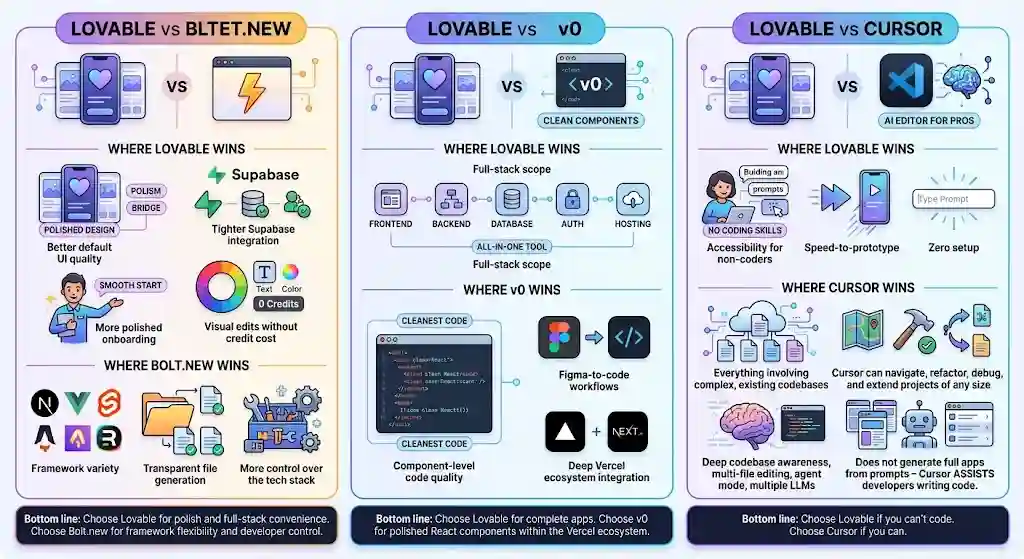
Lovable vs Alternatives
Lovable vs Bolt.new
Bolt.new runs in the browser using WebContainers and supports more frameworks (Next.js, Vue, Svelte, Astro, Remix — not just React). Bolt.new is faster at raw first-draft generation in some cases and gives developers more framework flexibility.
Where Lovable wins: Better default UI quality, tighter Supabase integration, more polished onboarding, and visual edits without credit cost.
Where Bolt.new wins: Framework variety, transparent file generation, and more control over the technology stack.
Bottom line: Choose Lovable for polish and full-stack convenience. Choose Bolt.new for framework flexibility and developer control.
Lovable vs v0
v0 by Vercel generates excellent React components — arguably the cleanest component-level code in this category. But v0 is primarily frontend-focused. Backend, authentication, databases, and deployment require external tools.
Where Lovable wins: Full-stack scope. One tool handles frontend, backend, database, auth, and deployment.
Where v0 wins: Component-level code quality, Figma-to-code workflows, and deep Vercel ecosystem integration.
Bottom line: Choose Lovable for complete apps. Choose v0 for polished React components within the Vercel ecosystem.
Lovable vs Cursor
Cursor is an AI-native code editor (a VS Code fork) for professional developers. Cursor provides deep codebase awareness, multi-file editing, agent mode with test execution, and support for multiple LLMs. Cursor does not generate full apps from prompts — Cursor assists developers writing code.
Where Lovable wins: Accessibility for non-coders, speed-to-prototype, and zero setup.
Where Cursor wins: Everything involving complex, existing codebases. Cursor can navigate, refactor, debug, and extend projects of any size. Lovable can’t import existing code or handle that level of complexity.
Bottom line: Choose Lovable if you can’t code. Choose Cursor if you can.
Comparison Table: Lovable vs Bolt.new vs v0 vs Cursor
| Feature | Lovable | Bolt.new | v0 | Cursor |
|---|---|---|---|---|
| Target user | Non-technical to semi-technical | Developers, technical users | Frontend devs, designers | Professional developers |
| Full-stack generation | Yes (React + Supabase) | Yes (multi-framework) | Primarily frontend | No (code editor) |
| Backend built-in | Supabase | Bolt Cloud / varies | No | No |
| UI quality (default) | High | Medium | High (components) | N/A |
| Codebase import | No | Limited | No | Yes — core strength |
| Free tier | 5 daily credits | Limited free usage | Generous free tier | Free tier available |
| Paid starting price | $25/mo | $20/mo | $20/mo | $20/mo |
| Best for | MVPs, prototypes, internal tools | Framework flexibility, scaffolding | React components, Vercel | Complex dev, large codebases |
Is Lovable Worth It in 2026?
The answer depends entirely on what you’re building and who you are.
Lovable is worth it if you need a working, polished app fast and you don’t have a development team. The gap between idea and deployable product is real, and Lovable closes it better than most.
Lovable is not worth it if you need deep backend control, strict compliance, or you already have a codebase that needs extending. In those cases, Cursor (for developers) or traditional development (for regulated products) are better paths.
Who Should Use Lovable — and Who Should Skip It
Use Lovable if you are:
- A non-technical founder who needs a working MVP for investors or users — and would rather spend $50–$100 than $15,000 on a dev shop
- A product manager who wants to prototype features faster than the engineering backlog allows
- A designer who wants clickable, functional prototypes instead of static mockups
- An agency that needs to spin up client demos and proof-of-concept apps quickly
- A startup team building internal tools where speed matters more than scale
Skip Lovable if you are:
- Building for a regulated industry without a security team to audit the generated code independently
- Working with a large, existing codebase that needs AI-assisted extension
- Needing native mobile apps
- Running a project with complex, multi-service backend architecture
- On a tight budget where credit unpredictability is a dealbreaker
Lovable Review – FAQs
What is Lovable?
Lovable is an AI-powered full-stack web application builder. Lovable generates working React + Supabase apps from natural language prompts — handling frontend, backend, database, authentication, and deployment in one platform.
Is Lovable worth it in 2026?
Yes for MVPs, prototypes, and internal tools. No for highly regulated systems or deeply complex backends. Lovable delivers polished, functional apps faster than most alternatives, but production-readiness depends on manual review — especially for security and backend logic.
How much does Lovable cost?
Free plan: $0 (5 daily credits, max 30/month). Pro: $25/month (~150 credits). Business: $50/month (team features, SSO, training-data opt-out). Enterprise: custom. Top-ups cost $15–$30 per 50 credits depending on plan.
Is Lovable really no-code?
Yes for building. You can create full apps without writing code. Debugging complex issues and fine-tuning logic often benefits from understanding the generated React and TypeScript code.
Can Lovable build production apps?
Lovable can launch usable apps. Production-readiness still depends on manual review, especially for security, backend logic, and performance at scale. Treat Lovable output as a strong first draft, not a finished product.
Can you export code from Lovable?
Yes. You can sync to GitHub or download as a ZIP. You own the code. Managed services (auth, Stripe, AI orchestration) and API secrets require manual reconfiguration after export.
Can Lovable import existing GitHub repos?
No. GitHub integration supports exporting and syncing from Lovable to GitHub. You cannot import an existing repository into Lovable. See Lovable’s GitHub documentation.
Is Lovable secure for sensitive data?
Lovable holds SOC 2 Type II and ISO 27001 certifications, with automated security scanning and training-data opt-out. But Lovable’s own docs state these controls do not replace a thorough security review. For sensitive data, independent auditing is required.
Does Lovable support custom domains?
Yes, on paid plans. You can publish to a custom domain through Lovable Cloud, or export and deploy on your own hosting.
How does Lovable compare with Bolt.new?
Lovable produces higher-quality UI by default and has tighter Supabase integration. Bolt.new offers more framework flexibility and developer control. Both are strong for MVPs; choose based on whether you prioritize polish (Lovable) or framework choice (Bolt.new).
Final Verdict
The strongest case for Lovable is this: Lovable collapses the gap between idea and working app to an absurdly short timeline. For a solo founder validating a SaaS concept, a PM building a demo for stakeholders, or an agency mocking up a client project, Lovable delivers more usable output per dollar than hiring a developer or learning to code yourself.
The biggest caution flag is cost control and the limits of AI-generated code under pressure. Debugging loops will drain your credits. Security features are real but not complete. Complex backend requirements will push you past what the platform handles well. And if you already have a codebase, you can’t bring it in.
From a buyer’s perspective, the practical move is this: use Lovable for what Lovable is great at — fast, design-forward MVPs with Supabase backends — and know exactly when to take the code, export it to GitHub, and hand it to a developer for the next phase. That handoff point is where Lovable shines brightest: the code is yours, the stack is standard, and the foundation is real.
The builders who get the most from Lovable are the ones who treat it as the fastest way to build version one — not as a permanent home for version ten.
Disclosure: This article may contain affiliate links. If you purchase through these links, we may earn a commission at no additional cost to you. All opinions are our own and follow our editorial policy.
About the author

I’m Macedona, an independent reviewer covering SaaS platforms, CRM systems, and AI tools. My work focuses on hands-on testing, structured feature analysis, pricing evaluation, and real-world business use cases.
All reviews are created using transparent comparison criteria and are updated regularly to reflect changes in features, pricing, and performance.