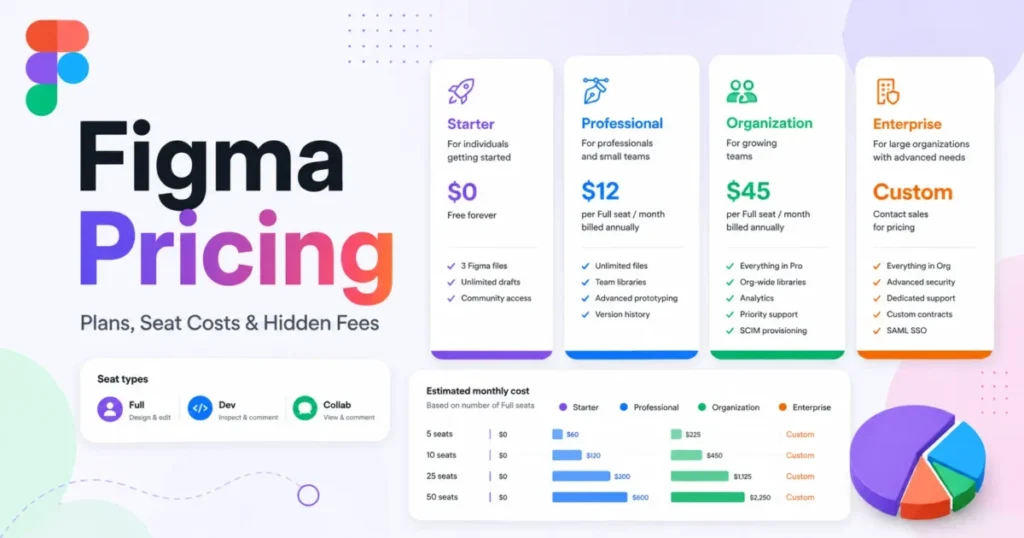
Figma pricing looks simple until you build the invoice. The advertised number is $16 per Full seat per month on Professional annual billing, but no real team pays only that, because Figma bills four seat types, gates governance behind two annual-only tiers, and meters AI usage separately from seats.
I treat this as a seat-mix problem rather than a plan problem. A ten-person product team that assigns Full seats to everyone pays roughly double a team that puts engineers on Dev seats and stakeholders on free View seats, with identical design output.
This guide prices the whole stack: every seat type, the plan gates that force an upgrade, the AI credit meter that can outgrow the subscription itself, and the billing behavior that turns an annual contract into a monthly invoice. If you are shortlisting alongside other AI prototyping tools, the seat model is the part that changes the budget most.
In This Article (19 sections)
Quick Pricing Verdict
| Decision point | Answer |
|---|---|
| Starting price | $16 per Full seat per month, Professional plan, billed annually |
| Free plan | Yes. Starter is free with 3 collaborative files, 3 pages per file, and 30-day version history |
| Best plan for most teams | Professional annual, with a mixed seat roster rather than all Full seats |
| Plan to avoid | Organization, when the group is one team that needs no SSO, Code Connect, or centralized admin |
| Biggest hidden cost | Pay-as-you-go AI credits at $0.03 per credit, which carry no rollover and no included ceiling |
| Second hidden cost | Seats added mid-term on annual Professional are billed on a separate monthly subscription |
| Best cheaper anchor | Penpot at $0 or $7 per user per month, which is a price anchor and not a feature match |
| Pricing checked | July 24, 2026, against the official Figma pricing page |
Source: Figma official pricing, checked July 24, 2026.
How Figma Pricing Was Evaluated
This analysis is built on the official Figma pricing page, Figma help-center billing and seat documentation, the AI credit articles, the developer rate-limit reference, and labeled third-party review evidence. Plan prices, seat prices, AI credit allowances, and plan gates were checked on July 24, 2026.
Every plan was assessed against the same buyer criteria: usable entry price, seat entitlements by role, feature gates that force an upgrade, metered usage, contract behavior, migration friction, support access, and total cost at realistic team sizes.
Greater weight went to the factors that move a purchase order: the cost of a mixed seat roster, the premium each tier charges for governance, and the variable spend that sits outside the subscription. Vendor positioning and affiliate relationships carried no weight in the recommendations.
Figures that Figma does not publish are named as undisclosed rather than estimated, and every calculated total shows its formula so a finance reviewer can reproduce it. The full review methodology covers source hierarchy and claim control across the site.
Executive Summary: What Figma Costs at 1 to 50 Seats
Figma’s list prices are honest about the seat, and quiet about the roster. The gap between a naive roster and a designed one is the single largest controllable line item in this product.
Each total below uses US list prices, excludes sales tax, and excludes AI overage. The seat mixes are my modeled rosters, and the arithmetic uses only published seat prices.
| Team size | Modeled seat mix | Recommended plan | Annual cost | Effective cost per seat per month |
|---|---|---|---|---|
| 1 | 1 Full | Starter, or Professional annual | $0, or $192 | $0, or $16.00 |
| 5 | 2 Full, 2 Dev, 1 Collab | Professional annual | $708 | $11.80 |
| 10 | 4 Full, 4 Dev, 2 Collab | Professional annual | $1,416 | $11.80 |
| 20 | 8 Full, 8 Dev, 4 Collab | Professional annual | $2,832 | $11.80 |
| 50 | 15 Full, 20 Dev, 15 Collab | Organization annual | $16,800 | $28.00 |
| 50 | 15 Full, 20 Dev, 15 Collab | Enterprise annual | $25,500 | $42.50 |
Sources: Figma official pricing and seat documentation, checked July 24, 2026. Totals are my calculations from those published seat prices.
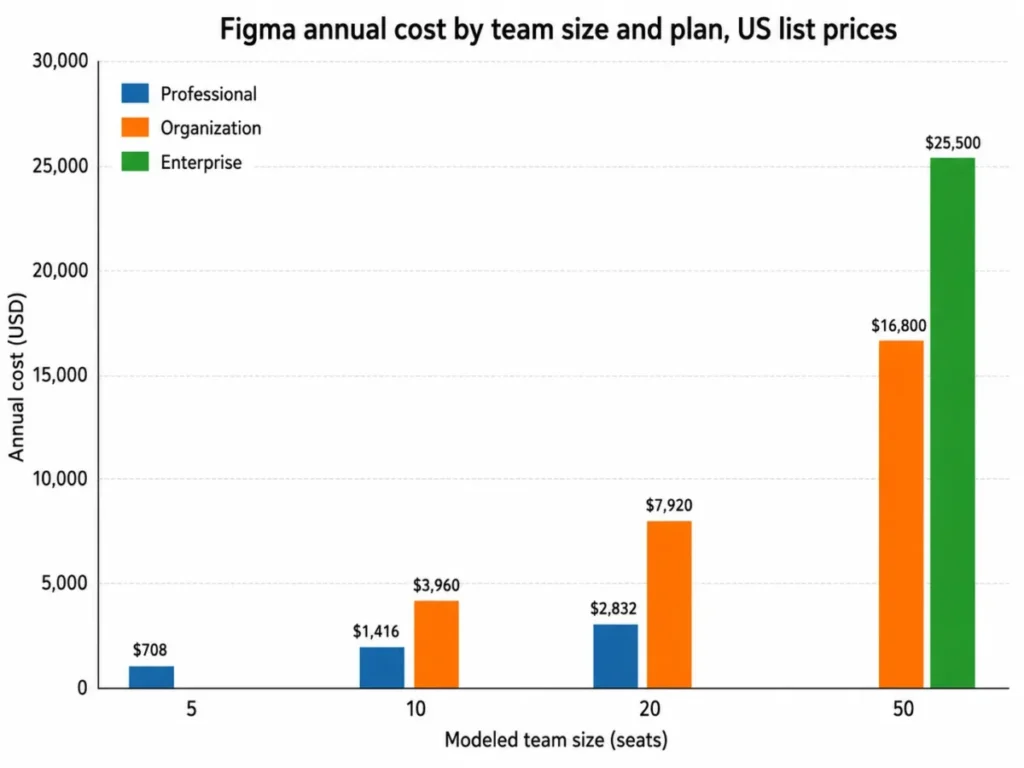
The effective per-seat cost stays flat on Professional because there is no volume discount to earn, which means the plan tier, not the headcount, is what changes the unit economics. Moving the same fifty-person roster from Organization to Enterprise adds $8,700 per year and buys governance controls, not more design capacity.
Figma Pricing Plans Compared
Figma sells four plans, and only the top two carry the admin and identity controls that most security reviews ask for. Starter and Professional are single-team structures, so an organization running several product groups hits a structural wall rather than a capacity wall.
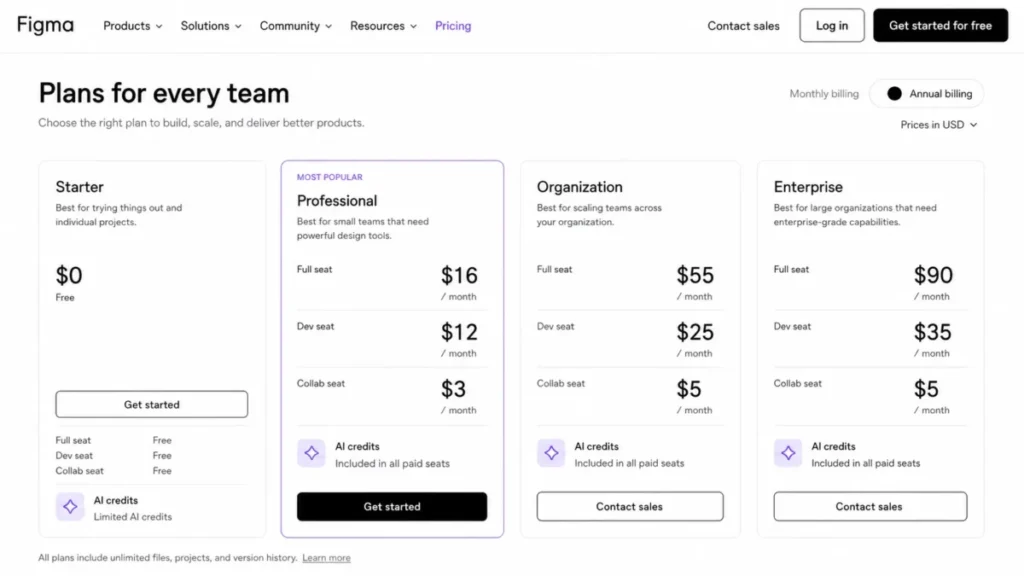
| Plan | Full seat monthly | Full seat annual (effective monthly) | Billing basis | Best for | Key limits |
|---|---|---|---|---|---|
| Starter | Free | Free | Per account | Individual drafts and evaluation | 3 collaborative files, 3 pages per file, 30-day version history, 150 AI credits per day up to 500 per month |
| Professional | $20 | $16 | Per seat, monthly or annual | One product team that needs unlimited files | Single team, 10 variable modes per collection, no SSO, no Code Connect |
| Organization | Not offered | $55 | Per seat, annual only | Multiple teams needing SSO and shared design systems | 20 variable modes per collection, no SCIM, no workspaces |
| Enterprise | Not offered | $90 | Per seat, annual only | Multi-brand organizations needing SCIM and workspaces | Governance+ sold separately, price not published |
Sources: Figma official pricing and the Figma plans and features documentation, checked July 24, 2026. Professional monthly seat prices were confirmed against a current secondary source on the same date because the official page renders monthly values behind an interactive toggle.
Annual is the only billing option Figma publishes for Organization and Enterprise, so the flexibility question is settled before you reach the negotiation. That matters for a team with volatile headcount, because the contract term, not the plan features, becomes the risk.
What Each Figma Plan Includes
Starter: free, and deliberately narrow
Starter gives unlimited personal drafts, but collaboration is capped at 3 files with 3 pages each, and version history stops at 30 days. AI use is capped at 150 credits per day and 500 per month.
Includes: unlimited drafts, UI kits and templates, free viewer access to shared files.
Missing: unlimited team files, extended version history, Dev Mode, any admin control.
Avoid if: two or more people need to edit shared files for longer than a sprint, because the 3-file ceiling is a collaboration ceiling rather than a storage one.
My verdict: Starter is an evaluation tier and a solo-drafting tier, and it is honest about being both.
Professional: the practical default
Professional removes the file and page ceilings for a single team and opens advanced prototyping plus advanced Dev Mode inspection. It is the cheapest plan where a design-to-development handoff works properly.
Includes: unlimited files and projects, team-wide libraries, advanced Dev Mode inspection, 3,000 AI credits per Full seat per month.
Missing: SSO, SCIM, Code Connect, multiple teams, private plugins, org-wide design systems.
Avoid if: a security review requires SAML single sign-on, because no amount of seat spending adds it at this tier.
My verdict: for one product team under about twenty people, this is the plan I would budget for, and the seat mix is where the savings live.
Organization: you are buying governance, not capacity
Organization triples the Full seat price to $55 and adds unlimited teams, SSO, activity logs, Code Connect, shared fonts, branching and merging, org-wide design systems, private plugins, and centralized administration. Variable modes rise from 10 to 20 per collection.
Includes: everything in Professional plus multi-team structure and identity management.
Missing: SCIM role assignment, custom workspaces, the variables REST API, monthly billing.
Avoid if: the only reason for the upgrade is more files or more people, because Professional already has no file ceiling.
My verdict: the $2,544 annual premium at ten seats is defensible when one named control is a purchase blocker, and hard to defend otherwise.
Enterprise: identity automation and multi-brand systems
Enterprise moves Full seats to $90 and adds custom workspaces, unlimited variable modes through extended collections, the variables REST API, SCIM seat assignment, and advanced external-access controls.
Includes: workspace-level administration, design system theming APIs, tighter guest and external content controls.
Missing: a published price for Governance+, which is sold only as an Enterprise add-on and requires contacting Figma.
Avoid if: identity provisioning is still manual and multi-brand theming is not on the roadmap, because those two features carry most of the premium.
My verdict: Enterprise is a provisioning and multi-brand decision, and the $8,700 annual premium at fifty seats should be traced to a named control before anyone signs.
Sources: Figma plans and features, Governance+ documentation, and Figma official pricing, checked July 24, 2026.
Seat Types: Where Most Figma Budgets Leak
Figma does not sell products individually, and the official pricing FAQ states this directly. Design editing requires a Full seat inside a plan, so the roster question replaces the licence question.
| Seat type | What it grants | Professional annual | Organization annual | Enterprise annual |
|---|---|---|---|---|
| Full seat | All Figma products, including Figma Design editing, Figma Make, Figma Draw, Dev Mode, FigJam, Slides, and Buzz | $16 per month | $55 per month | $90 per month |
| Dev seat | Dev Mode, FigJam, Slides, and Buzz, plus view and comment in design files | $12 per month | $25 per month | $35 per month |
| Collab seat | FigJam, Slides, and Buzz, plus view and comment in design files with basic inspection only | $3 per month | $5 per month | $5 per month |
| View seat | View, comment, basic inspection, measurement and property values, CSS and platform code copy, and asset export | Free | Free | Free |
Source: Figma official pricing and Figma seat management documentation, checked July 24, 2026.
Free View seats are the most under-used cost control in this product, because a reviewer who only needs to comment and export assets costs nothing on any paid plan. A ten-person Professional roster of all Full seats costs $1,920 per year, while the 4 Full, 4 Dev, 2 Collab mix costs $1,416 for the same delivery work.
That is a 26 percent difference produced by role mapping alone. This is also the SaaS subscription model trap in miniature: the per-seat headline price is accurate and still misleading, because it assumes a uniform roster that no product team has.
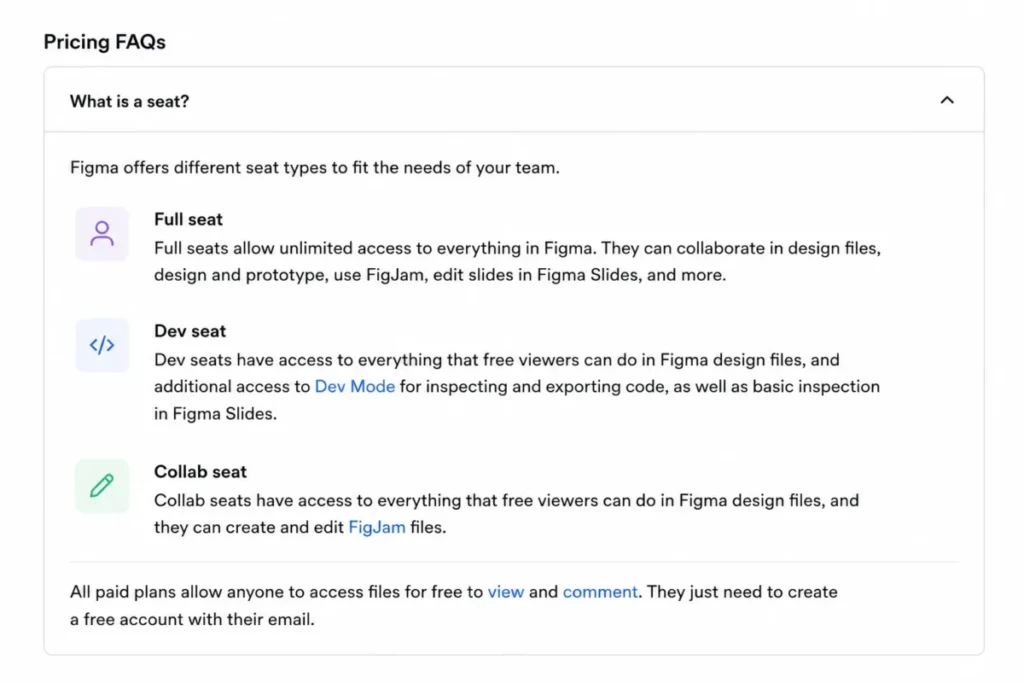
One caution before you downgrade everyone. Collab seats get only basic inspection in Dev Mode, so an engineer moved from Dev to Collab to save $9 per month loses the advanced inspection that makes handoff work.
Feature Gates by Plan: What Forces an Upgrade
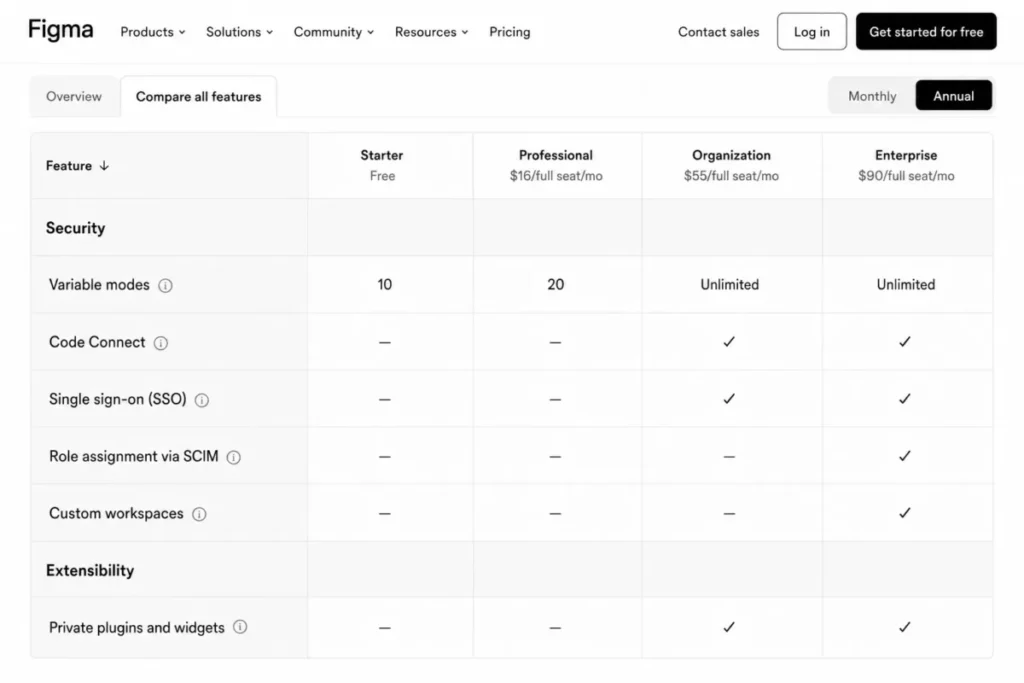
| Capability | Starter | Professional | Organization | Enterprise |
|---|---|---|---|---|
| Figma Design editing | Full seat only | Full seat only | Full seat only | Full seat only |
| Advanced Dev Mode inspection | Not offered | Included on Full and Dev seats | Included on Full and Dev seats | Included on Full and Dev seats |
| Code Connect | Not offered | Not offered | Included | Included |
| Variable modes per collection | Not offered | 10 | 20 | Unlimited via extended collections |
| Multiple teams | Not offered | Not offered | Included | Included |
| SAML single sign-on | Not offered | Not offered | Included | Included |
| SCIM role assignment | Not offered | Not offered | Not offered | Included |
| Custom workspaces | Not offered | Not offered | Not offered | Included |
| Variables REST API | Not offered | Not offered | Not offered | Included |
| Private plugins and widgets | Not offered | Not offered | Included | Included |
| Governance+ | Not offered | Not offered | Not offered | Enterprise add-on, price not published |
| Support channel | Community forum |
Sources: Figma plans and features documentation and Figma support resources, checked July 24, 2026.
Four rows in that table are the real upgrade triggers, and none of them is about volume. SSO and Code Connect pull a team to Organization, while SCIM and workspaces pull it to Enterprise.
The variable-mode ceiling is the quiet one. A design system carrying light, dark, and several brand themes across density and locale variants runs out of the ten modes Professional allows, and that limit lands on the design system team rather than on finance.
Support deserves a line in the budget conversation too. Figma documents email support on all three paid plans, operating Monday through Friday excluding company holidays, with no phone or live chat channel at any tier.
Annual vs Monthly: The Real Savings Math
Monthly billing exists only on Professional. Organization and Enterprise are published as annual plans, so the comparison below is a Professional decision.
| Seat type | Professional monthly | Professional annual, effective monthly | Annual cost per seat | Annual list difference per seat |
|---|---|---|---|---|
| Full seat | $20 | $16 | $192 | $48 |
| Dev seat | $15 | $12 | $144 | $36 |
| Collab seat | $5 | $3 | $36 | $24 |
| View seat | Free | Free | $0 | $0 |
Sources: Figma official pricing, checked July 24, 2026. Monthly values were corroborated against a current secondary source on the same date because the official page renders them behind an interactive toggle, so confirm them at checkout before you commit.
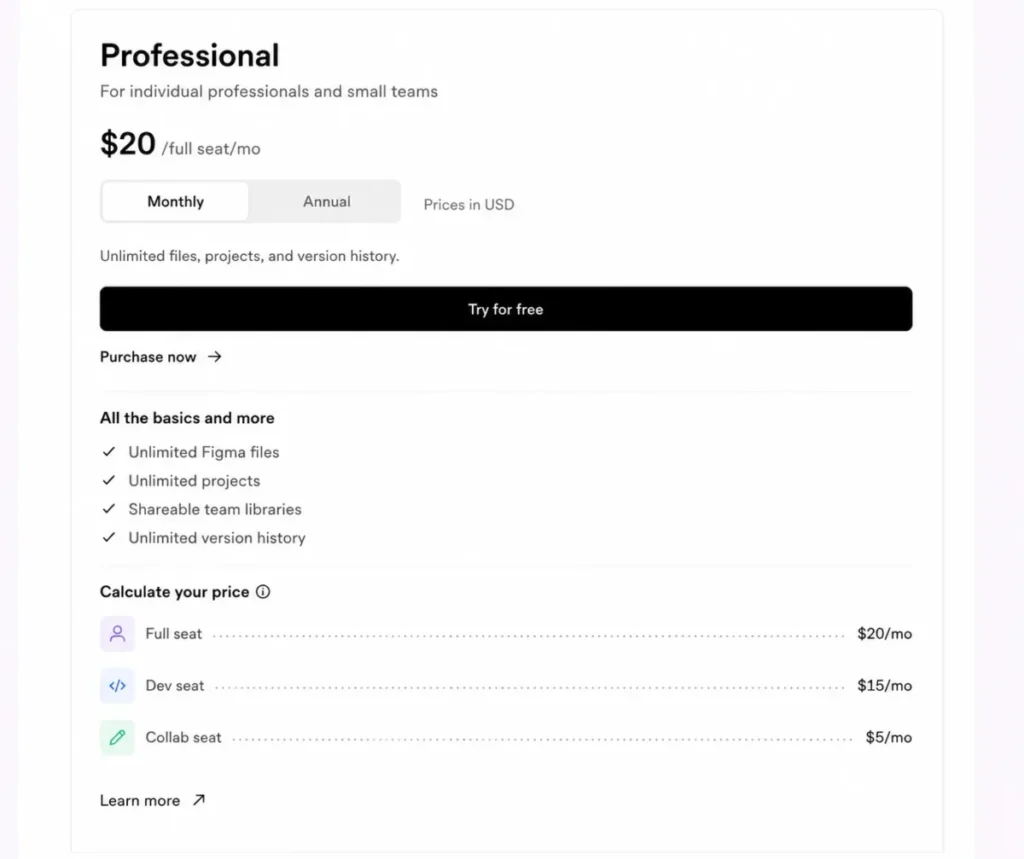
On my modeled five-person roster the annual commitment costs $708 against $900 monthly, a $192 difference for a twelve-month lock. Both are standard list rates, and Figma publishes no promotion on the pricing page checked on July 24, 2026.
The annual rate is also the renewal price, so year two bills at the same $708 unless the roster or the list price changes.
Here is the catch that makes the discount smaller than it looks. Figma states that payments are non-refundable, and a seat purchased for the term stays purchased: downgrading or removing a user leaves the paid seat available for reassignment rather than triggering a refund.
For a team whose roster changes every quarter, monthly Professional buys the right to stop paying for a departed contractor at the next invoice. I would take annual only after the role map has been stable for two quarters.
Add-Ons, Overages, and Surprise Costs
| Cost item | Trigger | Published amount | Billing behavior |
|---|---|---|---|
| Pay-as-you-go AI credits | Usage beyond included and subscription credits, once an admin enables it | $0.03 per credit | Monthly invoice, capped by a spend limit that admins set |
| Ongoing AI credit subscription | Admin buys a shared pooled allowance | Not published | Month-to-month on Professional, aligned to the annual contract on Organization and Enterprise |
| Governance+ | Enterprise buyer needs advanced access, sharing, and compliance tools | Not published, contact sales | Contract-defined |
| Mid-term seats on annual Professional | A new paid seat is approved during the annual term | Charged at the monthly seat price | Separate monthly subscription, prorated from the approval date |
| Mid-term seats on Organization or Enterprise | An admin approves a new paid seat | Charged at the plan’s seat price | Prorated to the end of the annual term, invoiced quarterly |
| Unused paid-seat term exposure | A user is downgraded or removed after the seat is paid for | No prorated refund | Seat stays available for reassignment through the term |
| Sales tax | Taxable transaction | Varies by billing location | Added at invoice |
Sources: Figma pricing FAQ, Figma billing guide, Figma AI credit management, and Figma plan downgrade documentation, checked July 24, 2026.
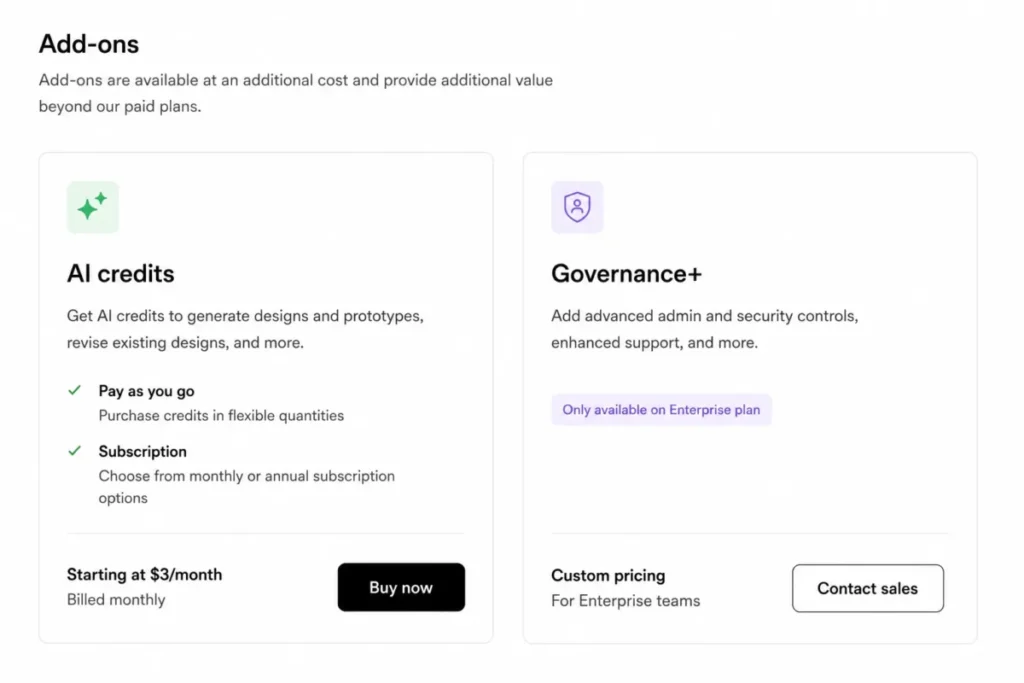
Two of those rows deserve more than a table cell.
The annual plan that sends monthly invoices
Figma’s pricing FAQ is explicit: on a Professional plan, paid seats added during the annual term are charged on a separate monthly subscription at the monthly price. Those monthly invoices continue until an admin either folds the seats into the annual subscription or removes them.
The finance consequence is a split cadence nobody planned. A team that adds four Full seats in month three pays $20 per seat per month instead of the $16 annual rate, then keeps paying it for the rest of the term unless someone reconciles it.
Organization and Enterprise handle this differently, with approved seats prorated to the end of the annual term and invoiced quarterly. Either way, seat approval is the control point, and leaving approvals open is the same as leaving the budget open.
AI credits are the line item that can beat the subscription
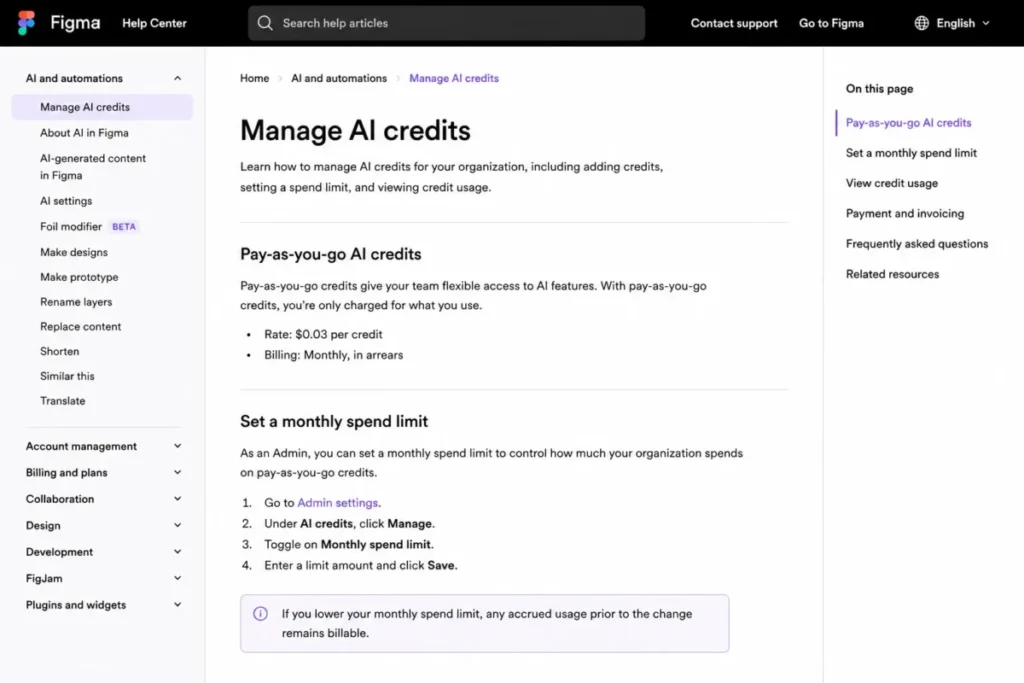
Every seat carries a monthly AI allowance: 3,000 credits per Full seat on Professional, 3,500 on Organization, 4,250 on Enterprise, and 500 credits for Dev, Collab, and View seats. Starter and View users also sit under a 150-credit daily cap.
Credits reset monthly and do not roll over. A user who exhausts the allowance without access to a paid credit pool is blocked from AI features until the reset, which turns a budget decision into a delivery decision.
At the published pay-as-you-go rate of $0.03 per credit, 10,000 extra credits per month costs $300, or $3,600 per year. That single line is more than twice the $1,416 annual subscription of my modeled ten-person Professional roster.
Admins can set a monthly spend limit, and lowering or disabling that limit does not erase charges already accrued. Metered creative tooling behaves the same way elsewhere, which is why the credit meter deserves the same scrutiny as Adobe Firefly pricing or any other credit-based creative subscription.
One timing note from the official pricing FAQ, checked July 24, 2026: the Figma AI agent is free during its beta and consumes no credits, with standard credit usage applying once it becomes generally available. Budget for the post-beta credit consumption rather than for the beta allowance.
Real Cost Scenarios: The Math Behind Each Team Size
Every total below excludes sales tax, AI overage, and any negotiated discount, because Figma does not publish minimums, onboarding fees, or discount terms for Organization and Enterprise.
| Scenario | Formula | Monthly | Annual |
|---|---|---|---|
| Solo designer, Professional annual | 1 x $16 | $16 | $192 |
| 5 seats, Professional annual | (2 x $16) + (2 x $12) + (1 x $3) | $59 | $708 |
| 5 seats, Professional monthly | (2 x $20) + (2 x $15) + (1 x $5) | $75 | $900 |
| 10 seats, Professional annual | (4 x $16) + (4 x $12) + (2 x $3) | $118 | $1,416 |
| 10 seats, Organization annual | (4 x $55) + (4 x $25) + (2 x $5) | $330 | $3,960 |
| 20 seats, Professional annual | (8 x $16) + (8 x $12) + (4 x $3) | $236 | $2,832 |
| 20 seats, Organization annual | (8 x $55) + (8 x $25) + (4 x $5) | $660 | $7,920 |
| 50 seats, Organization annual | (15 x $55) + (20 x $25) + (15 x $5) | $1,400 | $16,800 |
| 50 seats, Enterprise annual | (15 x $90) + (20 x $35) + (15 x $5) | $2,125 | $25,500 |
Inputs are the published Figma seat prices above, checked July 24, 2026. The totals and seat mixes are my calculations and modeled rosters, not vendor quotes.
The governance premium is easier to argue about once it has a number attached. Organization costs $2,544 more per year than Professional at ten seats and $5,088 more at twenty seats, on an identical roster.
At fifty seats the Enterprise premium over Organization is $8,700 per year. Divided across the fifteen Full seats that mostly benefit from multi-brand theming, that is roughly $580 per designer per year for provisioning automation and workspace administration.
Read those numbers as thresholds rather than verdicts. If SCIM removes a manual offboarding step that a security team performs by hand, the premium buys a control; if it does not, the same money buys nothing a designer will notice.
Figma Buyer Risk Ledger
| Risk | Trigger | Buyer consequence | Mitigation |
|---|---|---|---|
| Seat creep | Growth adds Full seats by default rather than by role | Full seats cost 5.3 times a Collab seat on Professional | Require admin seat approval and map every role to the minimum seat that preserves its workflow |
| Split billing cadence | Seats added mid-term on annual Professional | Monthly invoices at the higher monthly rate until reconciled | Reconcile added seats into the annual subscription before renewal |
| Stranded seat capacity | A user leaves after the seat is paid for | No refund, and the seat sits idle for the rest of the term | Reassign the paid seat instead of buying a new one |
| AI credit overage | Heavy Figma Make or image editing use | Metered spend at $0.03 per credit with no rollover | Set a spend limit and restrict paid-credit access to approved roles |
| AI work stoppage | Credits exhausted with no paid pool | Users are blocked from AI features until the monthly reset | Monitor the credit dashboard and schedule heavy generation after the reset |
| Plan-gate surprise | A security review asks for SSO or SCIM late | The upgrade is annual-only and repriced per seat | Confirm identity requirements before signing any Professional annual term |
| Migration cleanup | Importing Sketch files | Styles are not retained and very large files can fail to import | Split large files, inventory styles, and validate components after import |
| API throttling | Automation reads files through the REST API | Limits follow the endpoint tier, the seat, and the plan of the resource being accessed | Check the endpoint tier against the resource plan before building the integration |
Sources: Figma seat, billing, AI credit, import, and developer documentation, checked July 24, 2026.
The one I see underestimated most is the API row. Rate limits depend on the endpoint tier, the seat, and the plan attached to the resource being requested, so a Tier 1 file request against a Starter-plan resource can be limited to as few as 6 requests per month, and real limits for View and Collab seats can fall lower under demand.
An engineer with a Dev seat in a paid organization can still hit that ceiling when the file being read lives under a lower-tier resource. Design-ops automation is where the surprise usually lands.
API Limits, Migration, and Support: Costs That Never Reach the Invoice
Three operational realities shape the true cost of ownership, and none of them appears in a pricing table.
Sketch migration is supported but not lossless. Figma’s import documentation states that styles are not retained and that very large Sketch files can fail, with splitting into smaller files as the recommended workaround, and no maximum file size is published.
Local copies are portability, not recovery. A saved local copy omits version history and comments, and reimporting it creates a new file disconnected from the original with new main components, so treating local copies as a backup strategy overstates what they protect.
Support is asynchronous at every price point. Email support covers Professional, Organization, and Enterprise, with no phone or live chat documented, which matters for a team that treats design tooling as production infrastructure.
Sources: Figma Sketch import documentation, Figma local copy documentation, Figma REST API rate limits, and Figma support documentation, checked July 24, 2026.
On security, Figma’s official materials state SOC 2 Type 2 and ISO/IEC 27001 and 27018 coverage across plans, while the identity and governance controls that auditors usually request are the tier-gated ones in the feature table above. Confirm the exact certification scope in Figma’s security documentation at procurement time rather than relying on a summary.
Which Figma Plan Should You Choose?
Solo designer or freelancer. Start on Starter, and move to a single Professional Full seat at $192 per year when a client needs more than 3 shared files or version history beyond 30 days. Nothing above Professional is priced for one person.
Five-person product team. Professional annual with 2 Full, 2 Dev, and 1 Collab seat costs $708 per year. Add free View seats for every stakeholder who only comments, and keep the roster stable for two quarters before committing to the annual term.
Ten to twenty people, one product. Professional annual still fits at $1,416 to $2,832 per year, because the file ceiling does not exist and the team structure does not need splitting. Move to Organization only when SSO, Code Connect, multi-team structure, or private plugins becomes a purchase blocker.
Twenty-five or more, multiple teams. Organization is the practical tier once several groups need shared libraries and centralized administration, at $16,800 per year on my modeled fifty-seat roster. Ask for the seat minimum, the discount schedule, and the renewal adjustment window in writing, because Figma publishes none of those terms.
Regulated or multi-brand organization. Enterprise is the tier that carries SCIM, workspaces, and the variables REST API, at $25,500 per year on the same roster. Request a Governance+ quote in the same conversation, since it is Enterprise-only and its price is not published.
Which Figma Plan Should You Avoid?
Organization is the plan most teams buy too early. It costs $2,544 more per year than Professional at ten seats, and if the buying reason is headcount growth rather than a named control, the money buys governance that nobody has asked for yet.
The feature gate makes the test simple. If you cannot point at SSO, Code Connect, multiple teams, org-wide design systems, or private plugins as a blocker this quarter, Professional is still the correct plan.
There is one honest exception. A company whose security policy already mandates SAML single sign-on across every SaaS tool has no Professional option at all, and for that buyer Organization is the entry tier rather than an upgrade.
The second thing to avoid is an annual Professional commitment with an unstable roster. Between the non-refundable term and the separate monthly billing for mid-term seats, a team that hires and rotates every quarter loses part of that 21 percent annual gap to seats it can no longer use.
Figma Pricing vs Competitors
| Product | Entry price | Practical tier | Billing basis | Best for |
|---|---|---|---|---|
| Figma | Free on Starter | Professional at $16 per Full seat per month, annual | Per seat, four seat types | Mixed product teams that can assign non-designers to cheaper seats |
| Sketch | Not offered free | Standard at $12 per editor per month, billed yearly | Per editor | macOS-centered design teams comfortable with a single editor role |
| Penpot | $0 Professional tier | Unlimited at $7 per user per month | Per user | Teams prioritizing open-source tooling and lower list price |
| Canva Business | Not offered free at this tier | $20 per person per month with no seat minimum | Per person | Brand and marketing production rather than product interface design |
Sources: Sketch pricing, Penpot pricing, and Canva Business pricing, checked July 24, 2026. These are price anchors, and none is established here as a feature-equivalent replacement.
Sketch’s $12 editor price sits below Figma’s $16 Full seat, and the comparison flatters Sketch only if every collaborator would have been an editor. On the mixed roster above, Figma’s Dev, Collab, and free View seats do more to lower the bill than a cheaper editor price does.
Penpot’s $7 per user tier is the strongest pure list-price anchor, and it is the one I would model against if budget is the binding constraint rather than design-system depth. Canva Business at $20 per person serves a different job, which is why the Canva AI review is the better reference point for brand production work than a seat-by-seat price comparison.
The honest summary is that Figma is not the cheapest list price in this set, and it is frequently the cheapest total once non-designers stop needing editor licences.
Is Figma Worth the Price?
Figma is worth it if your team splits cleanly into creators, engineers, and reviewers, because the seat model then prices each role separately and free View seats absorb the stakeholders. On the mixed ten-person roster that is $11.80 per seat per month, which is competitive against any tool that charges one editor price for everyone.
Figma is not worth it if nearly every collaborator needs to edit design files, since the model’s savings disappear the moment the roster is all Full seats. Verified reviewers on TrustRadius and Capterra describe pricing as restrictive for larger teams, and that sentiment maps precisely onto rosters with a high Full-seat ratio.
It is also a weak fit for two other cases. A team that needs phone or live chat support will not find it at any tier, and a budget-constrained team that requires SSO faces an annual-only jump from $16 to $55 per Full seat.
If the price is the blocker, the alternative I would model first is Penpot at $7 per user per month, understanding that design-system depth, Dev Mode handoff, and the surrounding product suite are not equivalent.
How to Avoid Overpaying for Figma
- Map every person to the minimum seat that preserves their workflow. Reviewers take free View seats, workshop and presentation contributors take $3 Collab seats, and engineers take $12 Dev seats rather than $16 Full seats.
- Turn on seat approval before you grow. Approvals are the control point for both the Professional monthly-invoice behavior and the quarterly true-up on Organization and Enterprise.
- Reconcile mid-term seats before renewal. Seats added during an annual Professional term keep billing monthly at the higher rate until someone folds them into the annual subscription or removes them.
- Reassign paid seats instead of buying new ones. A downgraded or removed user leaves a paid seat available through the term, and payments are non-refundable, so the recovered value is the reassignment.
- Set an AI spend limit on day one, and restrict paid-credit access to named roles. At $0.03 per credit with no rollover, unmanaged usage is the fastest way for the variable line to pass the fixed one.
- Stay monthly until the roster is stable. The annual rate runs 21 percent below monthly list on my five-person model, and a volatile team gives more than that back in stranded seats.
- Upgrade against a named control, not a headcount. Write down which of SSO, Code Connect, SCIM, workspaces, or the variables REST API you are buying, and price the premium against that single control.
- Ask for the undisclosed terms in writing. Seat minimums, discount schedules, onboarding requirements, renewal adjustment windows, AI subscription tier prices, and the Governance+ amount are not published anywhere.
Frequently Asked Questions
Is Figma free to use?
Yes. Figma’s Starter plan is free and includes unlimited personal drafts, UI kits, and templates, plus 150 AI credits per day up to 500 per month.
Collaboration is capped at 3 files with 3 pages each, and version history stops at 30 days. Free View seats on paid plans also let unlimited people view, comment, and inspect without a paid seat.
How much does Figma cost per month?
A Professional Full seat costs $16 per month on annual billing and $20 on monthly billing, checked July 24, 2026. Dev seats are $12 and $15, and Collab seats are $3 and $5.
Organization is $55 per Full seat per month and Enterprise is $90, both billed annually only. Your real monthly cost depends on how many people need a Full seat rather than a cheaper one.
What is the difference between Full, Dev, Collab, and View seats?
Full seats grant every Figma product, including design editing in Figma Design. Dev seats grant Dev Mode, FigJam, Slides, and Buzz, plus view and comment access in design files.
Collab seats cover FigJam, Slides, and Buzz with view, comment, and basic inspection only. View seats are free and allow viewing, commenting, basic inspection, and asset export.
Does Figma charge per user?
Figma charges per seat, and the seat type sets the price rather than the person. That distinction matters because a paid seat purchased for the billing term stays available for reassignment when someone leaves, so the licence belongs to the plan rather than to the individual who first used it.
Can Figma Organization be billed monthly?
No. Figma publishes Organization and Enterprise as annual plans, so monthly billing exists only on Professional.
Seats added to those plans mid-term are prorated to the end of the annual term and invoiced quarterly once an admin approves them.
How much do extra Figma AI credits cost?
Pay-as-you-go credits cost $0.03 per credit, capped by a monthly spend limit that admins set. Ten thousand extra credits per month works out to $300, or $3,600 per year.
Figma also sells an ongoing shared credit subscription, but its tier prices are not published. Lowering or disabling a spend limit does not remove charges already accrued.
Is Dev Mode included in Figma Professional?
Yes, with a seat condition. Advanced Dev Mode inspection is available on Professional for Full and Dev seats, so an engineer needs at least a $12 Dev seat to use it.
Collab and free View seats get basic inspection only. Code Connect, which links design system components to code, requires Organization or Enterprise.
Which Figma plan includes SSO and SCIM?
SAML single sign-on becomes available at Organization, at $55 per Full seat per month billed annually. SCIM role assignment requires Enterprise at $90 per Full seat per month.
That split matters in procurement, because a security policy mandating automated provisioning skips the Organization tier entirely.
Can I cancel Figma and get a refund?
Figma documents that payments are non-refundable. Downgrading a plan or removing a user does not trigger a prorated refund, and the paid seat stays available for reassignment through the rest of the billing term.
Cancelling stops future renewal rather than recovering the current term, which is why annual commitments deserve a stable roster first.
Is Figma cheaper than Sketch?
Per editor, no. Sketch Standard lists at $12 per editor per month billed yearly against Figma’s $16 Full seat.
Per team, Figma is often cheaper, because engineers, workshop participants, and reviewers sit on $12, $3, or free seats instead of editor licences. The answer depends on how many people genuinely need to edit design files.
The Bottom Line on Figma Pricing
Figma pricing rewards teams that treat seat assignment as a budgeting exercise and punishes teams that treat it as an afterthought. Professional annual at $16 per Full seat is the practical tier for one product team, and the mixed roster is what turns the list price into a competitive total.
Upgrade when a named control blocks the work, not when the headcount grows. Watch the two variable lines that sit outside the subscription: mid-term seats billed monthly, and AI credits metered at $0.03 each with no rollover.
Prices and plan limits here were checked on July 24, 2026 against Figma’s official pricing and documentation, and pricing pages change. Re-verify the seat prices and the monthly toggle before you sign, and compare the roster cost against other team collaboration tools if the Full-seat ratio on your team is high.