Most buyers land on this question after a shared inbox stops coping, and they end up shopping for the wrong thing. Some buy a CRM and expect support workflows.
Others buy a chat widget and expect reporting. A few publish an FAQ page and assume the problem is solved.
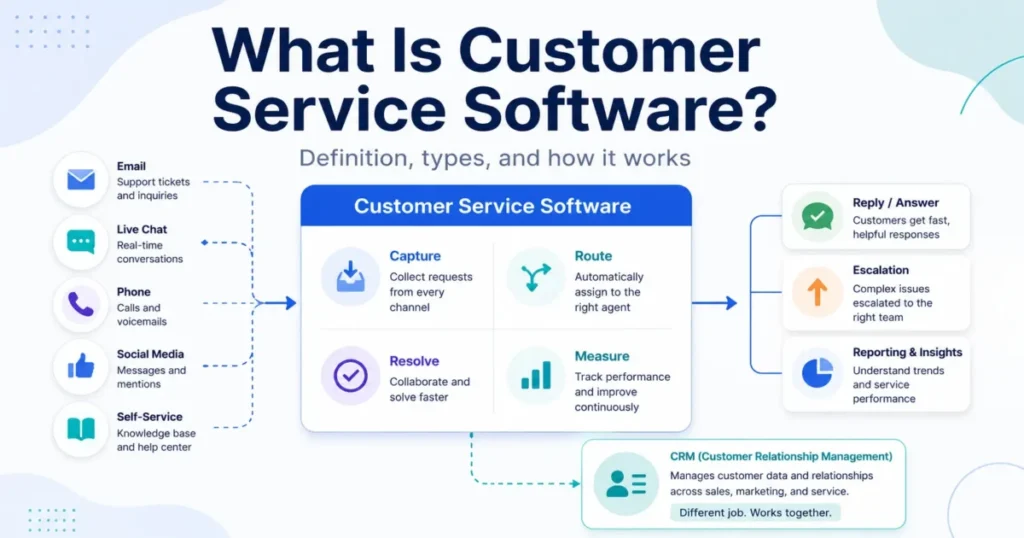
Customer service software is the system a business uses to receive, organize, route, resolve, and measure customer requests across channels like email, chat, phone, social, messaging, and self-service. That definition sounds simple, but the category overlaps with CRM, help desk software options, live chat, chatbots, knowledge bases, contact centers, and customer success tools, and the overlap is where money gets wasted.
This guide is written for the buyer who has to defend a support-tooling decision to finance and a support lead. It explains what the category is, how a request actually moves through it, where it ends and CRM begins, which type fits which team, and what the software will not fix on its own.
It is based on official vendor documentation, category pages from G2 and Capterra, and public buyer discussion, not hands-on testing.
In This Article (13 sections)
Quick Answer: What Customer Service Software Is
Customer service software is a platform, or a suite of connected tools, that turns incoming customer questions and complaints into trackable work items, routes them to the right person or AI, and measures how they get resolved. A CRM stores the customer relationship, while customer service software runs the support conversation and the queue behind it.
You need it once a shared inbox can no longer show who owns what.
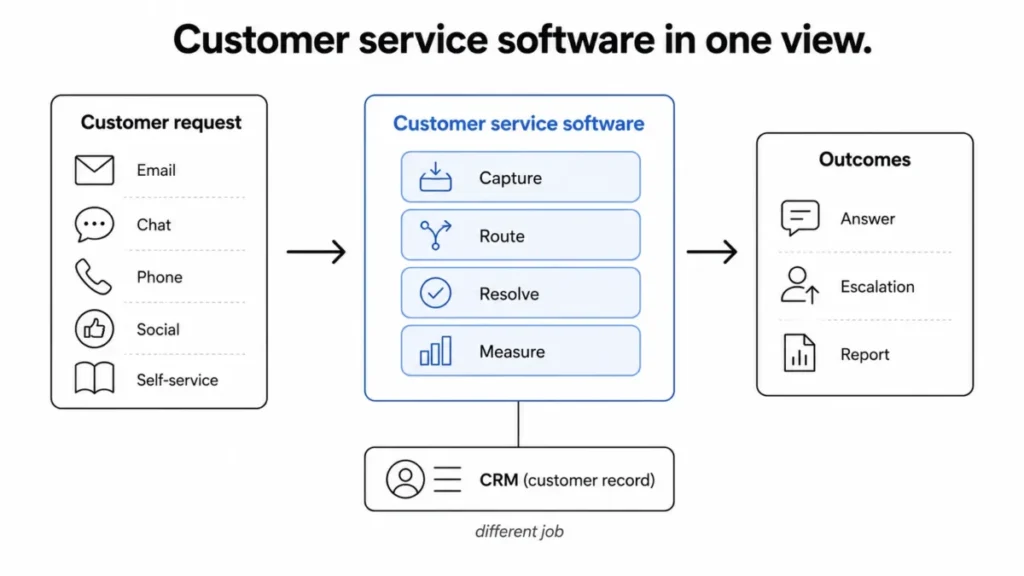
What Customer Service Software Actually Means
The term hides three layers, and buyers usually only hear the first one.
At the simplest level, it is the tool your team opens to see who needs help, what they asked, and whether anyone has replied. It replaces a spreadsheet, a personal inbox, or a group mailbox where messages get lost.
At a technical level, it captures each request as a structured record with an owner, a status, a priority, a history, and a channel of origin. Salesforce describes the category as a tool for handling inquiries across channels, organizing tickets, automating tasks, and equipping both reps and AI agents to respond.
At a business level, it is where support becomes measurable and defensible. Featurebase frames it as managing, responding to, and tracking customer interactions in one place, turning inquiries into organized tasks connected to inbox, chat, knowledge base, automation, and reporting.
One naming point trips people up early. “Customer service software” and “customer support software” are used interchangeably by most vendors and directories, and ServiceNow treats service and support requests as the same operational problem.
Some teams do reserve “support” for technical issue resolution and “service” for the broader customer experience, so read a vendor’s own definition before you assume the scope.
My read: the label matters less than the data model underneath, which is where products genuinely differ.
How Customer Service Software Works
A request moves through seven stages, and most feature lists describe those stages out of order without ever connecting them. Here is the full path from a customer message to a report.
1. Intake. A customer contacts the business through email, live chat, phone, social media, an in-app message, or a self-service portal.
2. Record creation. The system opens or updates a ticket, case, or conversation, and attaches context such as account, order, product, or prior messages when integrations exist.
3. Classification. Rules or AI tag the request by topic, urgency, language, sentiment, customer tier, or the skill needed to handle it.
4. Routing. The request lands in the right queue, with an owner and a priority, so two agents do not reply to the same person.
5. Resolution. An agent or AI answers using templates, knowledge articles, customer context, internal notes, and collaboration with teammates.
6. Escalation. If the issue is complex, sensitive, or cross-functional, it moves to finance, operations, engineering, or account management instead of dying in the queue.
7. Measurement and feedback. The system records status, resolution, response time, and satisfaction, and feeds those learnings back into knowledge content, automation rules, product fixes, and staffing.
This shape shows up in vendor setup docs. The Freshdesk help desk documentation, for one, covers support channels, workflows, SLAs, customer portals, integrations, and reporting as separate but connected setup areas.
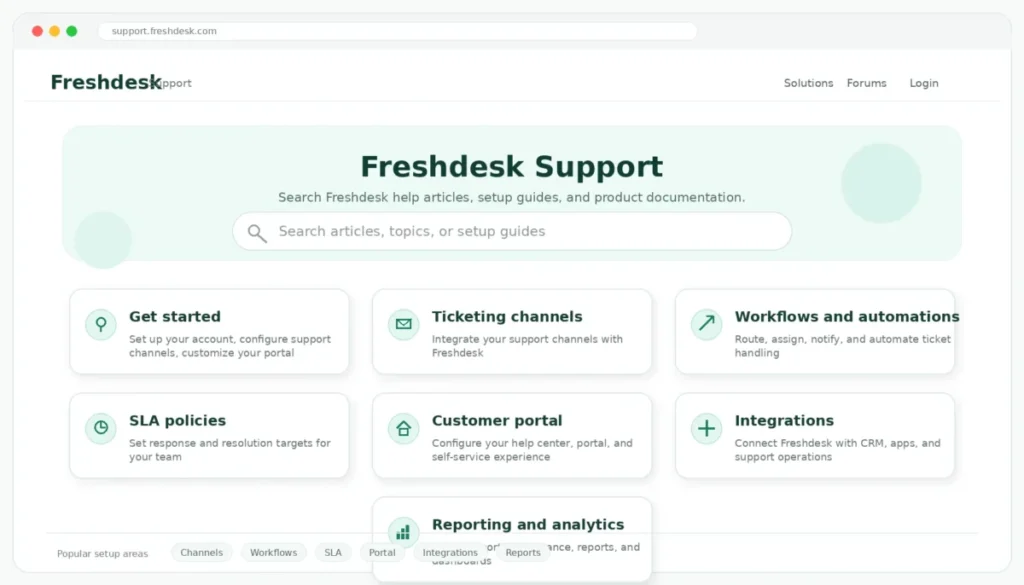
Where the lifecycle breaks
Each stage has a failure point worth knowing before you buy.
Intake breaks when a channel is not connected, so DMs or phone calls never become records. Routing breaks when ownership rules are vague, which is how duplicate replies happen.
Escalation breaks when there is no path to the team that actually owns the fix, so tickets stall for days.
The buyer lesson: the software gives you the stages, but you supply the rules. A tool with no ownership or escalation logic behind it will reproduce your shared-inbox chaos with a nicer interface.
The data objects: ticket, case, conversation, contact, account
Platforms call the same thing by different names, and the name signals how the product is built.
A ticket is a trackable support item with status and owner, common in help-desk tools. A case often implies a more formal service process with stages and cross-team handoffs, the language Salesforce and ServiceNow use.
A conversation emphasizes one continuous customer thread across channels, which is how Gladly frames it. A contact and an account store the customer’s identity and relationship, and usually live in the CRM.
This is not trivia. A ticket-centric tool reports on tickets closed, while a conversation-centric tool reports on customer threads resolved, and those two numbers answer different management questions.
Customer Service Software vs Adjacent Tools
This is the section most competing pages gloss over, and it is where buyers overspend or underbuy. The category sits next to several tools that look similar and do different jobs.
| Tool | Primary job | Core data object | When you need it |
|---|---|---|---|
| Customer service software | Receive, route, resolve, and measure support requests | Ticket, case, or conversation | Support volume and ownership need structure across channels |
| CRM | Track the customer relationship, deals, and account history | Contact and account | Sales, pipeline, and relationship data must be managed |
| Help desk software | Ticket-first request tracking and assignment | Ticket | A single team needs to own and prioritize incoming requests |
| Shared inbox | Collaborative reply to a group mailbox | Email thread | A tiny team answers low volume from one address |
| Live chat / messaging | Real-time website or in-app conversation | Chat session | Customers expect instant help on the site or app |
| Chatbot | Automated first-line answers and deflection | Bot session | Repetitive questions can be answered without a human |
| Knowledge base | Self-service help content for customers and agents | Article | Common questions repeat and can be documented |
| Contact center software | Voice-heavy inbound and outbound support | Call | Phone is a primary support channel with queues and routing |
| Customer success software | Proactive adoption, retention, and renewal work | Account health | Recurring revenue depends on customers reaching outcomes |
The practical takeaway is that most of these are components of customer service software, not competitors to it. A support platform can include a help desk, live chat, a chatbot, and a knowledge base, while CRM and customer success sit beside it and exchange data.
Customer service software vs CRM
A CRM is not automatically customer service software, and buying one expecting queues and SLAs is a common mistake.
Gladly draws the line clearly: a CRM is the commercial relationship system for leads, deals, purchase history, and lifetime value, while customer service software powers the service conversation and support context. HappyFox makes the same split, positioning help-desk tools for resolving incoming requests and CRM for sales and marketing teams managing relationships.
The exception matters. Salesforce notes that a CRM can be considered customer service software when it includes features for handling and resolving support issues, such as case management and support history.
Three axes settle most CRM-versus-service confusion:
- Primary job. A CRM manages the relationship (see what CRM software does), and service software manages the request.
- Core data object. CRM centers on contacts and accounts. Service software centers on tickets, cases, or conversations.
- When you need both. A B2B team needs the CRM record and the service queue to talk to each other, so the agent sees the account owner and open deals before replying.
If your buyers are B2B and revenue-linked, I would insist on two-way data flow between the CRM and the service tool, not just a logo on an integrations page.
Help desk is a subset, not a synonym
Help desk software and customer service software get used as if they mean the same thing, and the imprecision leads to overbuying or underbuying.
Salesforce and Featurebase both treat help desk, or ticketing, as a type or foundation inside the broader service category. A help desk is ticket-first request management.
Customer service software can include that help desk plus chat, phone, self-service, automation, customer data, analytics, and AI.
The buying consequence is direct. If you only need one team to track and prioritize email tickets, a focused help desk is enough, and an all-in-one suite is money spent on channels you will not use for a year.
Omnichannel means continuity, not just many channels
Buyers get sold “omnichannel” and receive “multichannel,” and the difference shows up the first time a customer switches from chat to email.
Multichannel means the tool offers several ways to reach support. Omnichannel means the conversation and customer context follow the customer across those channels, so the agent does not ask them to repeat everything.
Salesforce, Gladly, and RingCentral all emphasize unified customer context, not just channel count. When you evaluate a tool, ask what carries over when a customer moves from chat to phone: the transcript, the history, and the account, or nothing.
Knowledge base and customer success are related, not replacements
A knowledge base helps customers self-serve, but it does not own the requests it fails to answer.
Featurebase is explicit that a knowledge base supports self-service but does not replace ticketing, and Zendesk positions knowledge as powering both self-service and agents. The unresolved question still needs an owner, an escalation path, and a report.
Customer success software is a different neighbor. Service software resolves inbound support, while success software manages adoption, account health, renewals, and expansion, and G2 lists it as a related but distinct category.
They overlap through shared customer data, not through the same daily workflow.
Core Features That Define the Category
Six capabilities separate real customer service software from a chat widget or a group mailbox. Each has a buyer consequence, not just a feature name.
Ticket or case management. Every request becomes a work item with status, priority, owner, and history, which is what makes support auditable. Without it, “we replied” is a claim no one can verify.
Omnichannel customer context. Email, chat, phone, social, and self-service land in one workspace with the customer’s history attached. This is what prevents the “please repeat your order number” experience.
Automation and routing. Rules or AI tag, assign, prioritize, escalate, and follow up on requests. Good routing is the difference between a fair queue and whoever-shouts-loudest support.
Knowledge base and self-service. Knowledge base software lets customers and agents resolve simple issues fast, while unresolved ones still convert to tickets. G2 and Zendesk both treat knowledge as core, not optional.
Analytics and service metrics. First response time, ticket volume, resolution rate, SLA compliance, CSAT, and agent workload turn support into a managed operation.
AI assistance. AI agents, suggestions, summarization, routing, intent detection, and knowledge retrieval speed up routine work, with the harder cases handed to humans.
SLAs and prioritization, explained for beginners
A service level agreement is a promise about how fast a request gets a first response or a resolution, and it is what turns a pile of tickets into a prioritized operation.
Featurebase and Freshdesk both treat SLA and priority rules as a setup step, not a decoration. Here is a concrete example most articles skip.
A billing-outage ticket carries a one-hour first-response SLA and escalates to finance if it breaches. A general how-to question carries a lower priority and can be answered by a knowledge-base link.
Same inbox, very different handling, and the SLA is what encodes that difference.
Without SLAs, urgent and trivial requests compete equally for attention, and the loudest customer wins instead of the most urgent problem.
Metrics that matter change with maturity
Analytics gets listed as a benefit, but which numbers matter depends on where your support operation stands.
| Support maturity | What to track first | Why it drives action |
|---|---|---|
| Early team (1 to 5 agents) | Open tickets, first response time | Confirms nothing is dropping and replies are timely |
| Growing team (5 to 20 agents) | SLA compliance, backlog, resolution time, CSAT | Shows whether promises hold as volume rises |
| Mature org (20+ agents) | Deflection rate, workload balance, customer effort, retention link | Ties support cost and quality to revenue and staffing |
Chasing a mature-org metric like deflection before you can even measure first response time is a common way to buy dashboards you cannot act on yet.
Integrations: ask what data flows, not how many logos
Integration counts sell software. Data flow decides whether agents can actually help.
The useful question is not “does it integrate with our CRM,” but “what does the agent see without leaving the ticket.” Featurebase notes agents need product, CRM, and internal-tool context to resolve issues, and HubSpot and Freshworks both foreground CRM context in their service tools.
A practical integration checklist for evaluation:
- CRM: account owner, contract, open deals, past interactions.
- Ecommerce or orders: order status, returns, shipping.
- Billing: invoices, plan, payment state.
- Product analytics: usage, feature adoption, errors.
- Bug tracker: linked engineering tickets and status.
- Internal chat: fast handoffs to specialists.
- Knowledge base: article suggestions inside the ticket.
If those data points do not reach the agent’s screen, the integration is a logo, not a capability.
Types of Customer Service Software
Accelo groups the category into a handful of primary types, and RingCentral and G2 add voice and automation subtypes. Six types cover almost every buyer.
Help desk software. Ticket-first systems for tracking, assigning, prioritizing, and resolving requests, and the backbone most support teams start with.
Live chat and messaging software. Real-time website, app, or messaging support that can escalate to tickets or humans.
Contact center or call center software. Voice-heavy systems with call routing, IVR, recording, queues, and performance tracking. Call center software is customer service software, just built around phone instead of tickets.
Knowledge base and self-service software. Help centers, FAQs, portals, and communities that deflect repetitive questions.
CRM-based service tools. Service modules connected to a CRM, so support sees account and relationship history.
All-in-one customer service platforms. Suites combining ticketing, chat, phone, self-service, automation, AI, analytics, and customer data in one workspace.
Which type fits which team
Generic “SMB versus enterprise” advice is useless, so here is a fit grid by real cohort.
| Team | Likely best-fit type | Why |
|---|---|---|
| Solo founder or 1 to 2 people | Shared inbox or lightweight help desk | Volume is low, so structure matters more than channels |
| 5-person SaaS support team | Help desk or all-in-one platform | Needs product context, priority, and bug escalation |
| Ecommerce store | Omnichannel service tool with order data | Answers depend on order and shipping status |
| B2B account team | CRM-connected service tool | Agents need account owner, contract, and history |
| Contact center | Contact center platform | Phone volume needs routing, IVR, and queue management |
| Enterprise cross-functional org | Customer service management (CSM) suite | Cases span finance, operations, and engineering |
The pattern to notice: as the team grows, the fit shifts from “organize the inbox” to “coordinate across departments,” and the tool has to grow with it.
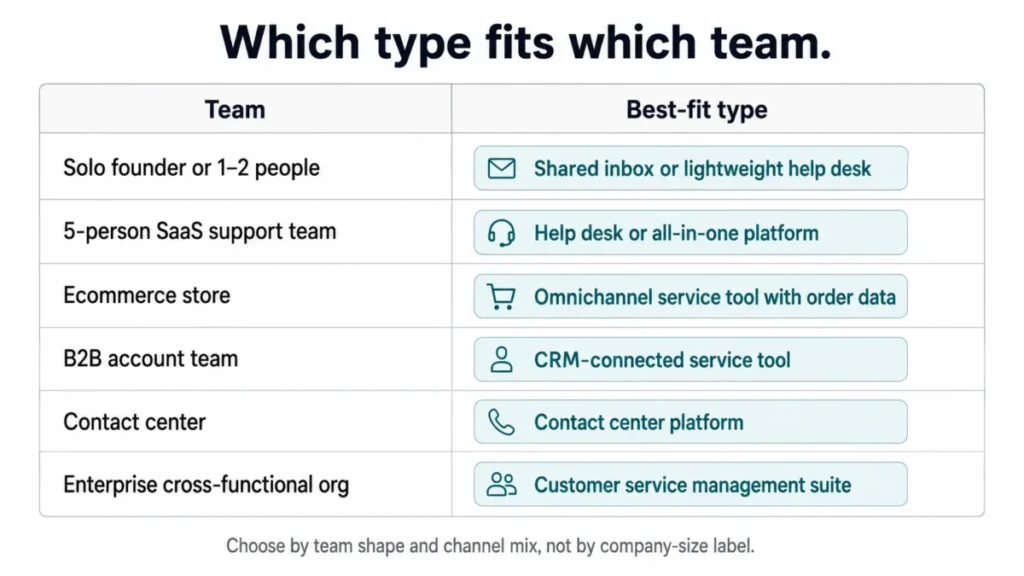
How AI Fits Into Customer Service Software
AI is the loudest feature in 2026 and the least carefully explained. The important distinction is between AI that assists and AI that resolves on its own.
Salesforce separates several AI roles: AI agents, routing, recommendations, and sentiment detection. G2’s automation category describes conversational AI and natural-language understanding that route to a human agent, learn over time, and connect to knowledge bases, help desks, and CRM.
Those are different jobs with different risk levels.
Summarizing a long thread, suggesting an article, or routing a ticket is low risk, because a human still owns the outcome. Letting AI close a billing dispute or a security complaint on its own is high risk, because the cost of a wrong answer is real.
A simple handoff rule
The safest deployments define what AI may finish and what it must hand off. Featurebase is direct that chatbots do not replace complex human support, and G2’s automation criteria include routing to a human agent as a core function.
Reasonable to let AI handle end-to-end: password resets, order-status lookups, store hours, and knowledge-base answers to common questions.
Route to a human quickly: billing disputes, angry or VIP customers, security incidents, legal or compliance issues, and suspected product bugs.
Self-service deflection is not free either. A knowledge base and a bot reduce load only when the content is good and the escalation path is obvious, and a dead end frustrates customers more than a slow human would.
My recommendation: write the handoff rules before you turn on automation, not after the first complaint.
Real-World Examples by Team
The same category looks different depending on who is using it. These examples use real tools as illustrations, not rankings.
A SaaS startup with five support agents uses a help desk or all-in-one platform to turn emails, in-app chat, and Slack-reported bugs into tickets with product context, priority, and an escalation path to engineering. Tools in this space include Zendesk for support teams, Freshdesk, Intercom, and Help Scout.
An ecommerce store connects service software to order and shipping data so agents answer “where is my order” without switching systems. Gorgias for ecommerce support is built around this ecommerce context, and Zendesk and Gladly also serve it.
A B2B account team runs service through a CRM-connected tool so support sees the account owner, contract, and open opportunities before replying. HubSpot Service Hub and Salesforce Service Cloud sit close to the CRM record for this reason.
An enterprise service organization uses customer service management software to coordinate cases across the contact center, finance, operations, billing, field service, and product. ServiceNow explains that service software can connect front, middle, and back-office teams, which is the point at which a simple help desk stops being enough.
Support is not only agent-to-customer
Beginner explainers frame support as one agent answering one customer, and that misses half the work.
Real resolution often crosses departments: a refund goes to finance, a bug goes to engineering, a delivery problem goes to operations, and a warranty visit goes to field service. Case management exists so those handoffs are tracked instead of lost in email.
Internal teams use the same tools too. FocalScope notes IT and HR departments run customer service software where employees are the customers, which is why “customer service” and “IT help desk” can share a platform but serve different audiences.
Support data is a product signal
The best-run teams treat resolved tickets as data, not just closed work.
When “cannot export invoice” shows up fifty times, that is a help-center article to write, a product backlog item to file, and an onboarding email to update. Featurebase connects support with feedback and roadmap for exactly this reason.
Better routing and workload visibility also protect the team. The CX Lead ties routing, AI suggestions, collaboration, and knowledge content to more even ticket load, which reduces the repetitive grind that burns agents out.
When You Need Customer Service Software (and When You Don’t)
The honest answer is that many small teams do not need it yet, and pretending otherwise sells software nobody uses.
You are ready when a shared inbox stops answering basic questions. Watch for these signals, drawn from Featurebase and recurring buyer discussion on Reddit:
- Two people reply to the same customer because ownership is unclear.
- Follow-ups get missed because nothing tracks status.
- You cannot say how fast you respond, because nothing measures it.
- Requests arrive on more than one channel and scatter.
- You have no way to prioritize urgent over trivial.
Meeting two or three of these is the practical trigger to move off a group mailbox.
You are probably not ready when volume is a handful of emails a day, one person handles everything, and a shared or collaborative inbox still shows who is doing what. Buying a full ticketing suite here adds admin overhead you do not need, and a lightweight option like Help Scout for small teams is usually enough.
Who should not buy yet: a solo founder with light volume, a team whose “support” is really sales follow-up (that belongs in a CRM), and any team unwilling to define ownership and escalation rules, because the tool will not invent them.
What Customer Service Software Will Not Fix
This is the part vendors skip, and it is the most useful thing a buyer can hear.
Software supports a process. It does not create one.
Featurebase is explicit that a support tool is not set-and-forget and will not fix broken workflows, and both Salesforce and ServiceNow recommend identifying requirements and pain points before buying.
Four problems survive any purchase:
- Unclear ownership. If no one owns a queue, the tool just displays the confusion.
- Bad knowledge content. A knowledge base full of stale articles deflects nothing.
- Weak escalation rules. Without a path to the fixing team, hard tickets stall.
- Disconnected data. If the tool cannot see the customer, agents still work blind.
The buyer risk here is spending on features while the underlying process stays broken, then blaming the tool. I would fix ownership and escalation on paper first, then buy software to enforce them.
How to Choose Customer Service Software
Choosing well is mostly preparation, and the vendor demo is the last step, not the first.
Before you buy: a readiness checklist
Answer these before you compare products:
- Which channels do customers actually use, and in what order.
- Who owns each type of request.
- What counts as urgent, and what the response promise is.
- Where hard cases escalate, and to whom.
- What knowledge content exists, and who keeps it current.
- What customer data the agent needs on screen.
- Which three metrics you will actually report on.
If you cannot answer these, the software will not answer them for you.
Security questions for support data
Support tools quietly become a store of sensitive data: personal details, conversation history, order and billing information, and sometimes health or payment data. That makes security a buying criterion, not an afterthought.
Zendesk’s Trust Center describes hosting on infrastructure certified to standards such as ISO 27001, PCI DSS, and SOC 2. HubSpot publishes a SOC 2 Type II report, and Freshworks documents ISO 27001 alignment and SOC 2 Type II auditing, with Freshdesk noted as PCI compliant.
Ask each vendor, for the plan you are actually buying:
- Is a SOC 2 or equivalent report available.
- Is GDPR and a data processing agreement supported.
- Are role-based permissions, audit logs, and SSO included on this plan.
- What are the data retention and deletion controls.
- How is payment or health data handled if you touch it.
Security controls like SSO, audit logs, and data residency are often plan-gated, so confirm they are in your tier, not just on the website.
Pricing-model literacy without a pricing table
Exact prices are not the point in a knowledge guide, but the pricing model is, because it decides your real budget.
Salesforce explains that customer service software is usually priced per agent, per month or year, and sometimes flat-rate or usage-based. Capterra’s category view shows a spread from entry tiers to advanced subscriptions.
The budget pressure points to plan for: seats added as the team grows, AI resolutions or credits, extra channels like voice, advanced analytics, and higher support tiers. The advertised entry price rarely survives contact with a growing team, so I would model cost at your expected headcount, not at seat one.
A Beginner Glossary
A few terms recur across every vendor page, and knowing them prevents most confusion.
| Term | Plain meaning |
|---|---|
| Ticket | A trackable support request with status and owner |
| Case | A formal service request, often spanning teams or stages |
| Conversation | One continuous customer thread across channels |
| Contact / account | The customer’s identity and relationship record (usually CRM) |
| SLA | A promise on response or resolution time |
| Deflection | Resolving a question via self-service before it becomes a ticket |
| Omnichannel | Context that follows the customer across channels |
| Routing | Sending a request to the right owner or queue |
Knowing which object a tool centers on (ticket, case, or conversation) tells you how it will report and where it will feel natural.
Frequently Asked Questions
What is customer service software in simple terms?
It is the tool a business uses to catch every customer question, assign it an owner, and track it to resolution, so nothing gets lost and response times can be measured. It replaces scattered inboxes and spreadsheets with one organized queue.
What does customer service software do?
It captures requests from email, chat, phone, and social, turns them into trackable tickets or cases, routes them to the right person or AI, and reports on response and resolution. Most tools add a knowledge base, automation, and customer context.
Is a CRM the same as customer service software?
No, though they overlap: a CRM manages the customer relationship and sales data, while customer service software manages support requests and resolution. A CRM only counts as service software when it adds support features like case management, per Salesforce.
Is help desk software the same as customer service software?
Not exactly, because a help desk is ticket-first request management and is only one type of customer service software. The broader category can also include chat, phone, self-service, automation, analytics, and AI.
What is the difference between a shared inbox and customer service software?
A shared inbox is a group mailbox with no built-in ownership, status, priority, SLA, or reporting. Customer service software adds those controls plus customer context, which is why teams switch once volume and channels grow.
What are the main types of customer service software?
The common types are help desk, live chat and messaging, contact center, knowledge base and self-service, CRM-based service tools, and all-in-one platforms. Most teams start with a help desk and add channels over time.
How does AI fit into customer service software?
AI assists by summarizing threads, suggesting answers, and routing requests, and it can resolve simple issues like password resets or order lookups on its own. Complex, sensitive, or ambiguous cases hand off to a human, which is why handoff rules matter more than the AI itself.
Do small businesses need customer service software?
Not always, because a solo operator or a two-person team with light volume can run a shared inbox effectively. The move to dedicated software makes sense once ownership gets unclear, follow-ups get missed, or requests arrive on more than one channel.
What are examples of customer service software?
Widely used examples include Salesforce Service Cloud, Zendesk, HubSpot Service Hub, Freshdesk, ServiceNow Customer Service Management, Zoho Desk, Intercom, Gladly, Gorgias, and Help Scout. These are illustrations of the category, not a ranking.
What metrics should customer service software track?
Start with first response time and open tickets, add SLA compliance, resolution time, and CSAT as you grow, then layer in deflection, workload balance, and retention links at scale. Track only what you can act on at your current stage.