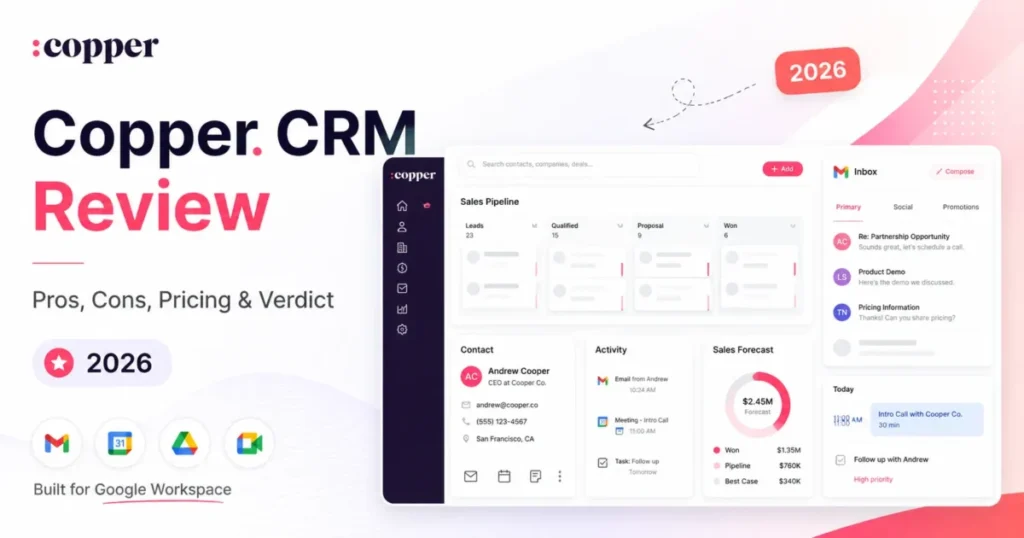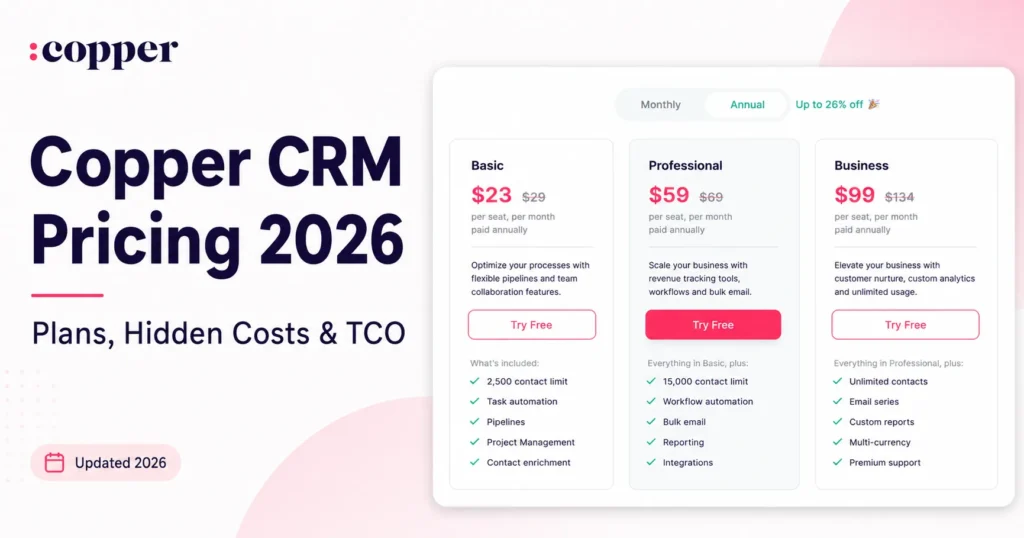
Copper CRM pricing starts at $23 per seat per month on Basic paid annually, but that number sets the wrong budget for most sales teams. Basic does not include Leads or Sales Opportunities in Copper’s own plan comparison, so the practical entry point is Professional at $59 per seat per month paid annually.
The real budget trap is not the sticker price. Against the wider set of CRM software options, Copper’s real cost is driven by contact limits, plan-gated automation, and a Google Workspace dependency, not by the advertised seat.
This guide breaks down every Copper plan, the hidden costs, the annual-versus-monthly math from 3 to 15 seats, and which plan is worth paying for in 2026. Every price here was checked against Copper’s official pricing page on July 3, 2026.
In This Article (16 sections)
Quick Pricing Verdict
| Question | Answer |
|---|---|
| Starting price | $23 per seat/ |
| Free plan | No permanent free plan. 14-day free trial, no credit card |
| Practical plan for most sales teams | Professional, $59 per seat/ |
| Top tier | Business, $99 per seat/ |
| Plan to avoid for sales teams | Basic, because it excludes Leads and Sales Opportunities |
| Biggest hidden cost | Being forced onto Professional or Business by contact limits, sales objects, integrations, or reporting |
| Best alternative if too expensive | Pipedrive for cheaper pipelines, or a mixed-stack CRM if you are not on Google Workspace |
| Pricing verified | July 3, 2026, against Copper’s official pricing page |
Copper is priced like a relationship CRM, not a cheap pipeline tool. The entry price looks light, but the plan that runs a real sales team costs more than double it.
The Advertised Price vs Copper’s Real Cost
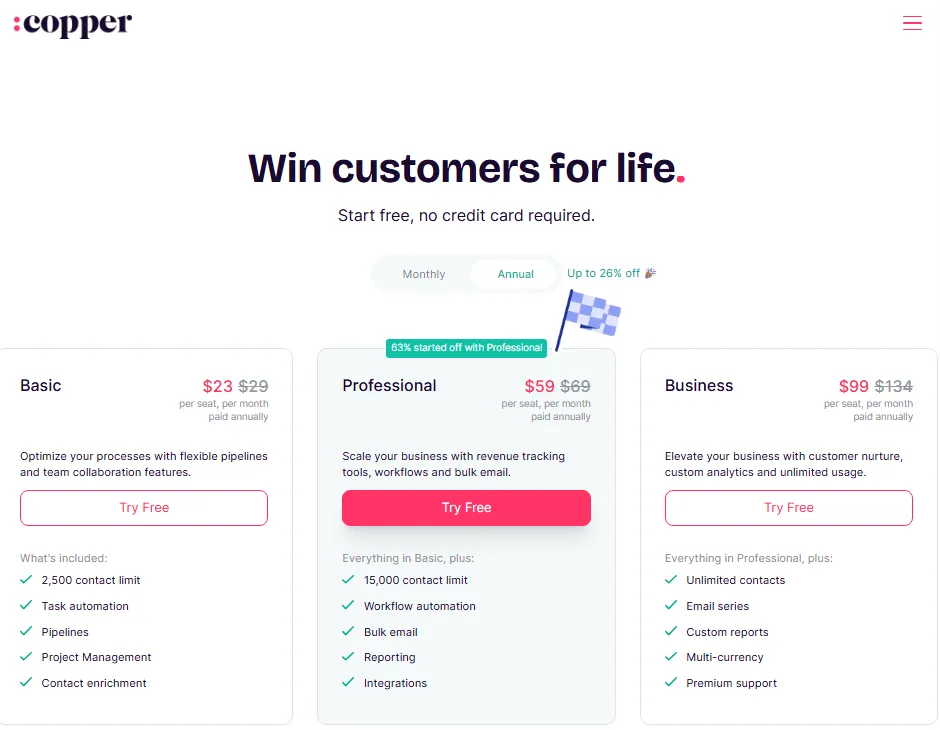
The advertised entry price and the working price are two different numbers. Copper markets a $23 Basic seat, but the plan that carries Leads, Sales Opportunities, automation, and integrations is Professional at $59.
| What you see advertised | What most sales teams pay | Why the gap exists |
|---|---|---|
| $23 per seat/ | $59 per seat/ | Basic has no Leads or Sales Opportunities |
| “Annual pricing” | Monthly billing costs 15% to 26% more per plan | Monthly rates are higher on every tier |
| “2,500 contacts” | $59 seat once you pass 2,500 contacts | Contact ceiling forces a plan jump |
| “Integrations included” | Professional for native apps and API | Basic is limited to Zapier-style access |
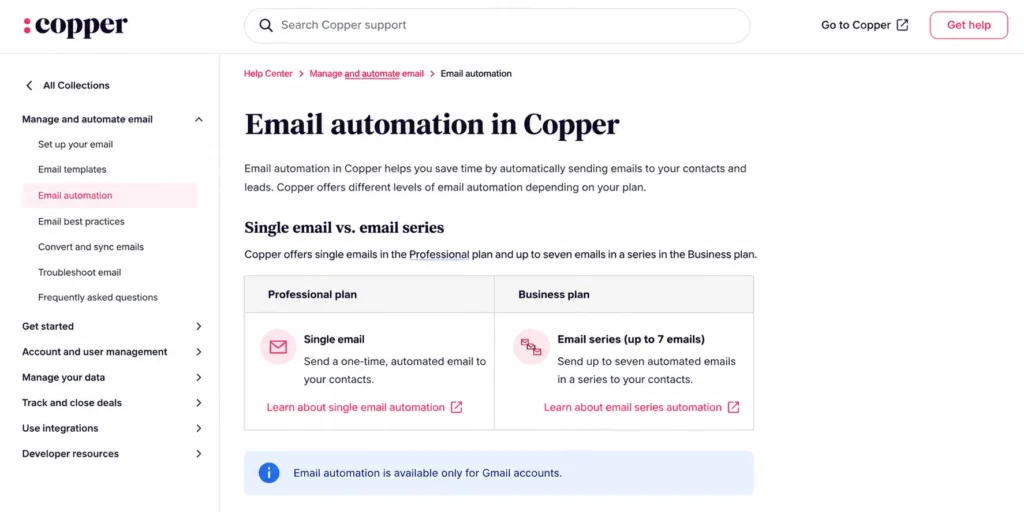
| “Email automation” | Business for multi-email series | Professional automation sends one email |
For a 5-seat sales team, that first row alone is the difference between $1,380 and $3,540 a year before any add-ons. The advertised Basic price is real, but it is the wrong plan to budget from if you run a pipeline.
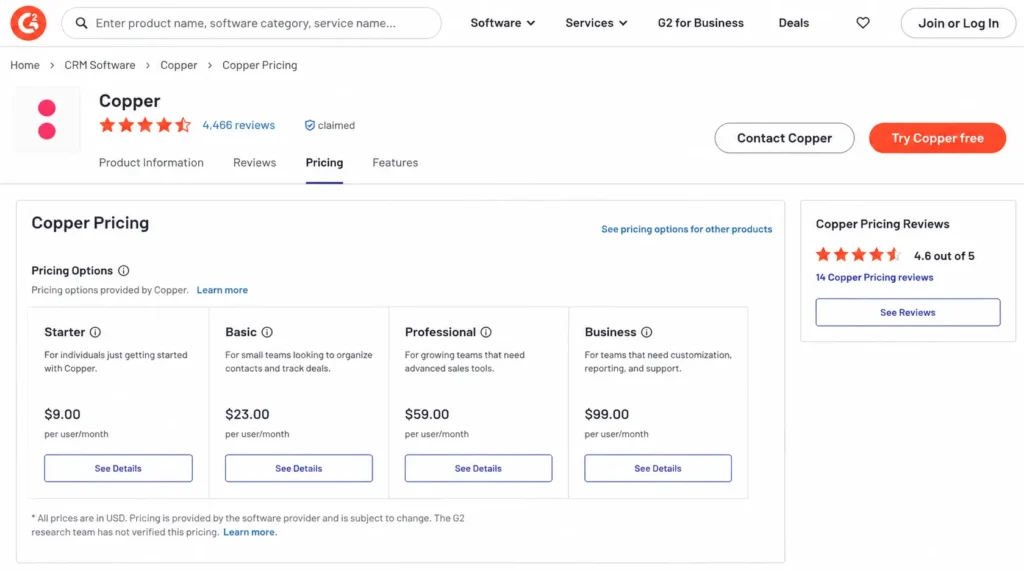
Copper’s public pricing cards on July 3, 2026 showed three paid plans: Basic, Professional, and Business. A fourth plan, Starter, appears in Copper’s support documentation and in G2’s pricing data marked as provided by Copper, but it was not visible on the pricing cards I checked.
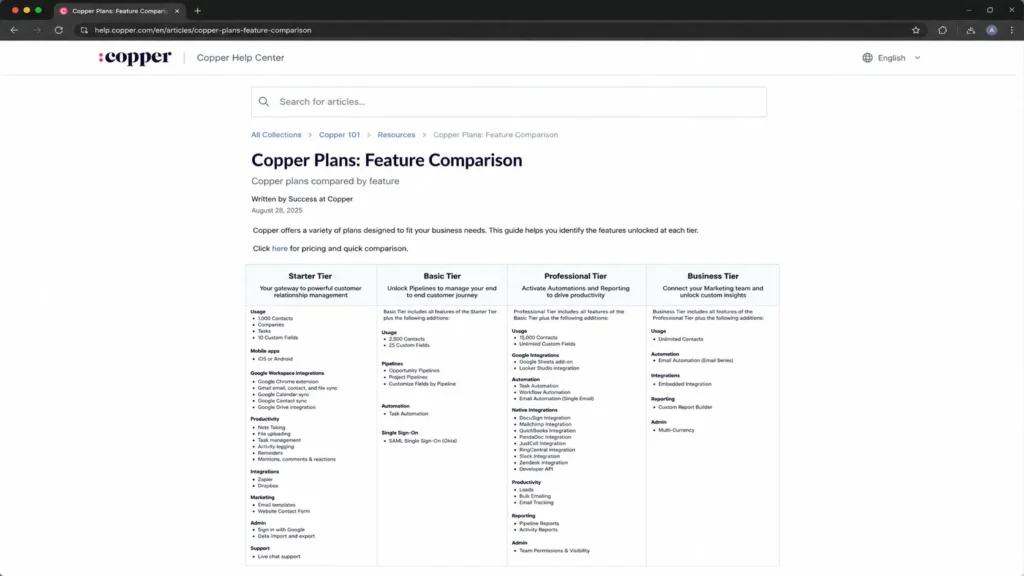
Treat Starter as a caveat, not a confirmed entry price. Do not budget your rollout around a $9 or $12 seat that the public sign-up flow may not surface.
Copper CRM Pricing Plans Compared
Here is every plan Copper prices publicly, with the Starter tier flagged as caveated because it was not on the current pricing cards.
| Plan | Monthly (per seat) | Annual (per seat/ | Billing basis | Best for | Key limits |
|---|---|---|---|---|---|
| Starter (caveat) | $12 (third-party) | $9 (G2, provided by Copper) | Per user/ | Solo Gmail users, if available to you | 1,000 contacts, 10 custom fields, no Leads/ |
| Basic | $29 | $23 | Per user/ | Small relationship or project teams | 2,500 contacts, 25 custom fields, no sales objects or automation |
| Professional | $69 | $59 | Per user/ | Active sales teams needing pipeline and automation | 15,000 contacts, 50 custom fields, API included |
| Business | $134 | $99 | Per user/ | Larger teams needing reporting and unlimited contacts | Unlimited contacts, email series, custom reports, multi-currency |
Prices come from Copper’s official pricing page, checked July 3, 2026, and are in USD before taxes and fees. The jump from Basic to Professional is the one to plan for, because it is where sales functionality starts.
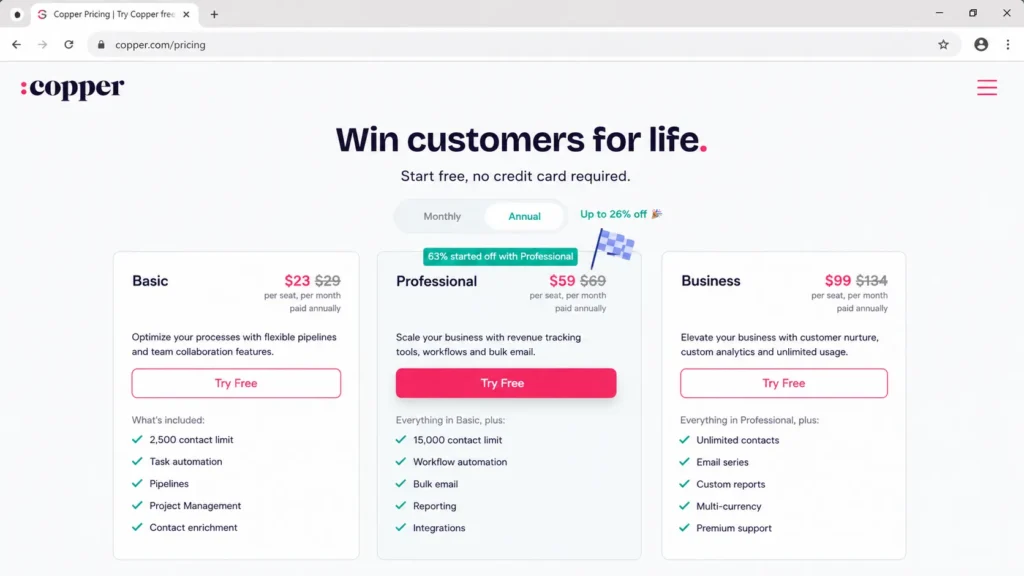
A quick note on why sites disagree on Copper’s price. Some ranking pages still show older Professional or Business figures, so a number that does not match Copper’s own page is likely stale or promotional rather than current.
The Starter tier: real or retired?
Starter is the clearest example of pricing confusion in the Copper SERP. Multiple third-party pages list it at around $9 annually or $12 monthly per seat, and Copper’s support docs describe it with 1,000 contacts, 10 custom fields, Gmail and Calendar sync, Zapier, Dropbox, and live chat.
The problem is availability. Copper’s current public pricing cards showed Basic, Professional, and Business, not Starter, on July 3, 2026.
If you want the lowest-cost Copper seat, ask Copper sales directly whether Starter is still offered to new US accounts. Do not commit a budget or a rollout plan to a tier you cannot see at sign-up.
What Each Copper Plan Includes
Each plan below gets a plain verdict, what it includes, what it is missing, and when to skip it. Pricing decides the plan, but usability and setup decide whether the team adopts it.
Basic ($23 annual, $29 monthly)
Basic includes contact and company management, pipelines, project management, task automation, contact enrichment, 2,500 contacts, 25 custom fields, and the iOS and Android apps. It is a relationship and project tracker with a light CRM shell around it.
What it is missing matters more than what it includes. Basic does not include Leads or Sales Opportunities in Copper’s plan comparison, so any team that needs real lead management will outgrow it, and it also excludes workflow automation, bulk email, most native integrations, and API access.
Avoid Basic if you run an actual sales pipeline. It fits a small consulting or client-services team that tracks relationships and projects, not a team that qualifies leads and forecasts deals.
Professional ($59 annual, $69 monthly)
Professional is the plan most sales teams should price around. It adds Leads, Sales Opportunities, workflow automation, bulk email, reporting, native integrations, and API access, and raises the contact ceiling to 15,000 with 50 custom fields on the current pricing table.
This is where Copper becomes a working sales CRM rather than a contact database. For a team that needs pipeline management and automation, Professional is the real floor, not Basic.
Avoid Professional only if you have outgrown 15,000 contacts, need custom report building, or need multi-email series, because those push you to Business.
Business ($99 annual, $134 monthly)
Business adds unlimited contacts, unlimited custom fields, email series, the custom report builder, multi-currency, and premium support. It is the plan you buy for reporting depth and scale, not just headcount.
The jump from $59 to $99 per seat is significant. At 10 seats, that is $4,800 more per year on annual billing, so Business should be triggered by a specific need, not a vague sense that a bigger team needs a bigger plan.
Avoid Business if your only reason is team size. Buy it when unlimited contacts, custom reports, multi-currency, premium support, or seven-step email series are genuine requirements.
Feature Gates: What You Get on Each Plan
The plan you need is usually decided by one gated feature, not by the price. This table maps the gates that move buyers up a tier.
| Feature | Basic | Professional | Business |
|---|---|---|---|
| Leads and Sales Opportunities | No | Yes | Yes |
| Workflow automation | No | Yes | Yes |
| Bulk email and email tracking | No | Yes | Yes |
| Email automation depth | None | Single automated email | Up to seven emails / series |
| Native integrations and API | Limited | Yes | Yes |
| Custom report builder | No | No | Yes |
| Multi-currency | No | No | Yes |
| Team-level record restrictions | No | Yes | Yes |
| Contacts | 2,500 | 15,000 | Unlimited |
| Premium support | No | Seat minimum applies | Seat minimum applies |
The single biggest surprise here is email automation depth. Copper’s support docs show that Professional automations send one email in the researched saved-filter workflow, while Business supports up to seven, so outbound and onboarding sequences are a Business decision, not a Professional one.
Team-level record restrictions are a second quiet gate. If you need to stop reps from seeing each other’s records, that permission control starts on Professional, so a growing team can hit a permissions wall before it hits a feature wall.
One number Copper’s own sources disagree on
Custom fields are the one place Copper’s sources conflict. The current pricing comparison shows Professional at 50 custom fields, while a Copper support comparison describes Professional custom fields as unlimited.
I use the pricing page figure of 50 in the table above, because it is the current commercial source. If custom-field count is a design blocker for your CRM, confirm the exact number in-app or with Copper sales before you commit.
Integrations and API Costs by Plan
Copper’s integration story is not a single logo wall. It is two layers: broad Zapier-style access, and native integrations plus API that sit behind Professional and Business.
| Integration type | Basic | Professional | Business |
|---|---|---|---|
| Zapier | Yes | Yes | Yes |
| Native apps (Mailchimp, DocuSign, QuickBooks, PandaDoc, Slack, Zendesk) | Limited | Yes | Yes |
| Google Sheets and Looker Studio | No | Yes | Yes |
| REST API and Embedded SDK | No | Yes | Yes |
| AI email template and rewrite tools | No | Yes | Yes |
If you need Mailchimp, QuickBooks, DocuSign, Slack, Zendesk, or a data pipeline into Google Sheets or Looker Studio, that requirement alone forces Professional, even for a three-person team. Integration needs, not seat count, are often the real reason a small team pays $59 a seat.
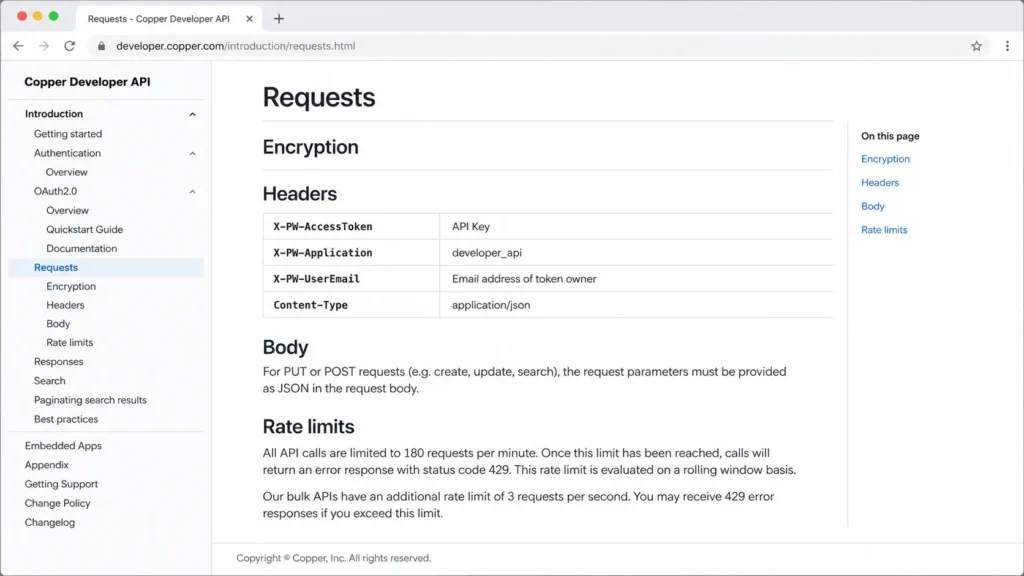
API access is more than a checkbox. Copper’s developer docs limit all API calls to 180 requests per minute and bulk APIs to 3 requests per second, so high-volume syncs need engineering care and there is developer labor to budget for.
There is a matching outreach limit. Copper’s support docs state that automated outreach to cold Leads is not supported in the documented email automation workflow, so Copper is not a cold-outbound sequencing tool.
Buying Copper to replace a cold-email engine is the wrong fit. If your workflow depends on automated cold Lead outreach, budget for a separate sales-engagement platform on top of Copper.
The Hidden Costs Copper’s Price Cards Skip
The per-seat price is only part of the invoice. These are the costs that decide the real total.
| Hidden cost | What it is | When it hits |
|---|---|---|
| Taxes and fees | Not included in listed USD prices | Every invoice, by jurisdiction |
| Contact-limit upgrade | Basic to Pro or Pro to Business | Passing 2,500 or 15,000 contacts |
| Sales-object upgrade | Professional required for Leads/ | The day sales needs a pipeline |
| Native integration and API upgrade | Professional required | Connecting Mailchimp, QuickBooks, API |
| Reporting upgrade | Business required for custom reports | Management asks for custom metrics |
| Email series upgrade | Business required for seven-step series | Multi-step onboarding or nurture |
| Premium support and onboarding | Seat minimums apply, thresholds undisclosed | Larger rollouts requesting help |
| Google Workspace dependence | Workspace subscription not included | Getting full value from Gmail workflows |
| Developer or implementation labor | Not priced by Copper | API syncs, migration, report setup |
The costs that hurt most are the plan jumps, because they are per seat and they compound. A 10-seat team crossing from Professional to Business adds $4,800 a year for features some of the team may never touch.
Two hidden costs are undisclosed rather than large. Copper notes that personal onboarding and premium support carry seat minimums, but the public pricing page I checked did not show the exact threshold or a separate price, so treat those as questions for procurement, not confirmed fees.
The Google Workspace dependency is a real line item too. Copper’s highest value comes from Gmail, Calendar, and Drive workflows, and that Workspace subscription is a separate bill Copper does not include.
Capterra’s profile also notes that upgrades can be done in-app while downgrades usually require contacting support. Confirm the current change process with Copper before you start on a higher plan “just to test it.”
Copper Cost Scenarios: 3, 5, 10, and 15 Seats
Per-seat pricing compounds fast, so here is the annual and monthly-billed total for four realistic team sizes. All figures exclude taxes, Google Workspace, onboarding, and third-party apps.
| Team | Recommended plan | Annual billing (per year) | Monthly billing (per year) | Annual saving |
|---|---|---|---|---|
| 3 seats | Basic | $828 | $1,044 | $216 |
| 5 seats | Professional | $3,540 | $4,140 | $600 |
| 10 seats | Professional | $7,080 | $8,280 | $1,200 |
| 15 seats | Business | $17,820 | $24,120 | $6,300 |
The 15-seat Business line is the one finance will notice. Monthly billing at that size costs $6,300 more a year than annual, which is a strong reason to commit to an annual term once the tool is proven.
Contact limits add a second cost curve on top of seats. This table shows what crossing each ceiling costs for common team sizes.
| Contact ceiling | Plan required | Per-seat annual jump | 5-seat yearly jump | 10-seat yearly jump |
|---|---|---|---|---|
| Up to 2,500 | Basic ($23) | Baseline | Baseline | Baseline |
| Up to 15,000 | Professional ($59) | +$432 | +$2,160 | +$4,320 |
| Unlimited | Business ($99) | +$480 over Pro | +$2,400 | +$4,800 |
A growing contact database can force a plan jump even when the team does not need the advanced features. Import a large list, cross a ceiling, and the bill moves before your workflow does.
Monthly vs Annual Billing
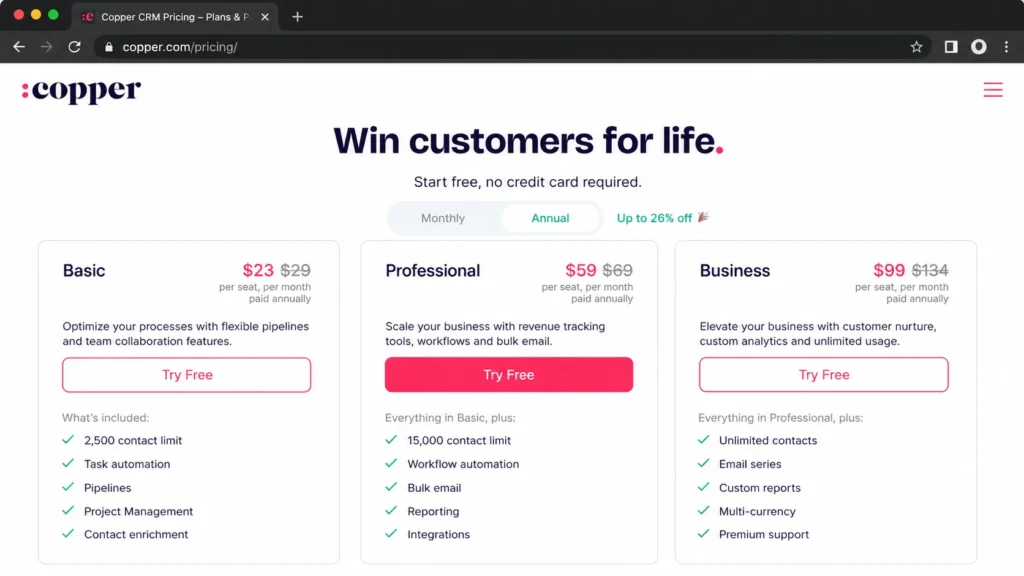
Copper charges more per seat on monthly billing on every plan, so the discount is real but not a single number. It varies by tier.
| Plan | Annual (per seat/ | Monthly (per seat/ | Annual saving per seat/ | Effective discount |
|---|---|---|---|---|
| Basic | $23 | $29 | $72 | About 21% |
| Professional | $59 | $69 | $120 | About 14% |
| Business | $99 | $134 | $420 | About 26% |
Do not trust a blanket “15% off” line. That figure appears in some third-party summaries and deal codes, but Copper’s own annual-versus-monthly gap is roughly 21% on Basic, 14% on Professional, and 26% on Business.
Business rewards the annual commitment the most, at about $420 saved per seat per year. Basic and Professional still save money annually, but the case for locking in a year is strongest on the top tier.
My recommendation is to run the 14-day trial and the first weeks on monthly billing, then switch to annual once adoption is real. Committing annually before the team has adopted the tool is the more common budgeting mistake.
What Breaks First as Your Copper Team Grows
Copper does not fail on day one. It runs into ceilings in a predictable order, and each one is a cost or a workaround.
The first thing to break is usually the sales-object gap. A team that started on Basic to save money hits the missing Leads and Sales Opportunities wall the moment sales wants a real pipeline, and the fix is a jump to Professional.
The second break is contacts. Import history and enrich records, and a Basic team crosses 2,500 contacts, or a Professional team crosses 15,000, forcing an upgrade that has nothing to do with features.
The third break is reporting. Once a manager asks for custom pipeline, activity, or value metrics, Professional’s standard reports are not enough, and the custom report builder only exists on Business.
The fourth break is permissions. As reps multiply, teams want to restrict who sees which records, and team-level record restrictions start on Professional, so a fast-growing Basic team hits a control wall early.
The fifth break is automation depth. A single automated email works until you need a multi-step onboarding or nurture series, and seven-step sequences are a Business feature.
Knowing this order lets you budget the next jump instead of being surprised by it. I would price the most likely break for your team into the first-year plan, not the second.
Which Copper Plan Should You Choose?
The right plan follows the workflow, not the headcount. The full Copper CRM review covers usability and setup, but the plan decision below comes down to buyer type.
Choose Basic if you are a small relationship or client-services team under 2,500 contacts that tracks contacts, companies, and projects and does not run a formal sales pipeline. It is the cheapest honest fit for that narrow use case.
Choose Professional if you are an active sales team of roughly 3 to 20 people that needs Leads, Sales Opportunities, workflow automation, bulk email, native integrations, or API access. This is the plan most Copper buyers need.
Choose Business if you need unlimited contacts, the custom report builder, multi-currency, premium support, or seven-step email series. Buy it for a specific trigger, not because the team crossed some size line.
Copper also has a fit filter that sits above plan choice: Google Workspace. Its strongest value comes from Gmail, Calendar, and Drive, so the tool rewards Google-centric relationship teams and underdelivers for Outlook-heavy or mixed-stack teams.
| Your situation | Copper fit | Better move |
|---|---|---|
| Google Workspace, relationship-led sales | Strong | Professional |
| Outlook or Microsoft 365 shop | Weak | Consider a mixed-stack CRM |
| Cold outbound sequencing is core | Weak | Add or use a sales-engagement tool |
| Need custom reports and multi-currency | Strong on Business | Business, with the cost planned |
If your email backbone is not Google Workspace, Copper’s core advantage mostly disappears, and its price becomes harder to justify against a more email-agnostic CRM.
Which Copper Plan Should You Avoid?
Basic is the plan most sales teams should avoid, despite being the cheapest paid tier. It excludes Leads and Sales Opportunities, so a pipeline team that starts on Basic will hit a wall and pay to move to Professional within the first weeks.
Basic still fits a genuine non-sales use case. A consulting or project team that only tracks relationships and tasks can live on it happily.
Monthly billing is the second thing to avoid once Copper is proven. At 15 seats on Business, monthly costs $6,300 more a year than annual for the same product.
The last mismatch to avoid is buying Copper for cold outbound. The documented automation workflow does not support automated cold Lead outreach, so cold-email teams should not treat Copper as their sequencing engine.
Copper Pricing vs Pipedrive, HubSpot, and Salesforce
Copper’s Professional seat at $59 sits in the mid-range of sales CRMs. Entry prices below are directional anchors, checked July 3, 2026 where official, and are not feature-equivalent to Copper Professional.
| CRM | Entry price (annual) | Practical/ | Notes |
|---|---|---|---|
| Copper | $23 (Basic) | $59 (Professional) | Google Workspace CRM, API on Professional |
| Pipedrive | $14 (Lite) | $49 (Premium) / $69 (Ultimate) | Cheaper pipelines, paid add-ons for extras |
| HubSpot Sales Hub | Free / Starter | ~$90 seat + $1,500 onboarding | Onboarding fee is a real cost gate |
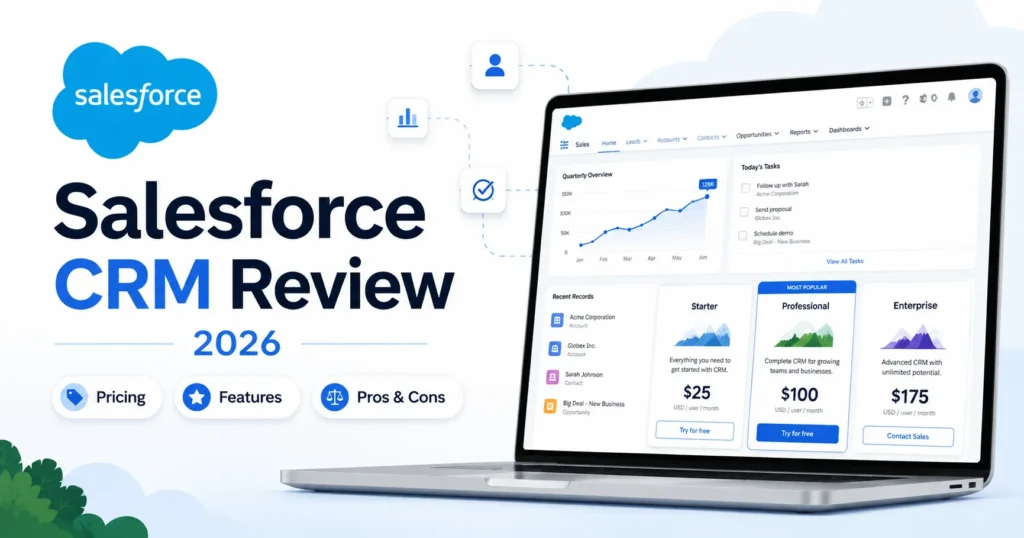
| Salesforce Sales Cloud | $25 (Starter Suite) | Scales up quickly by edition | Verify region and billing before quoting |
| Pipeline CRM | (competitor-sourced) | $49 (Grow) | Positioned against Copper Professional |
Match on the tier that carries the features you need, not on the lowest advertised seat. Pipedrive pricing undercuts Copper for pure pipelines, HubSpot adds an onboarding fee that changes its real entry cost, and Salesforce scales past Copper as you move up editions.
At 10 seats on the practical tier, the annual math is roughly $7,080 for Copper Professional versus about $5,880 for Pipedrive Premium and $10,800 plus onboarding for HubSpot Sales Hub Professional. Copper lands in the middle on price and near the top on Gmail-native fit.
The honest read: Copper is not the cheapest CRM, and it is not trying to be. Its price is defensible only if the Google Workspace fit and relationship features are the reason you are buying.
Is Copper CRM Worth the Price?
Copper is worth it if you live in Gmail and Google Workspace, run a relationship-led sales or client team of roughly 3 to 20 people, and value contact history and pipeline inside your inbox. For that buyer, Professional at $59 a seat is a fair price for the workflow fit.
Copper is not worth it if you are an Outlook or mixed-stack shop, if you need cheap unlimited contacts on a low tier, or if cold outbound sequencing is central to your motion. Those teams pay for a Google-Workspace advantage they will not fully use, and should weigh the cheaper or more email-agnostic Copper CRM alternatives instead.
The price question is an adoption question. A $59 seat that the team ignores is more expensive than a $99 seat the team lives in every day.
Set two checkpoints before you commit. By day 30, reps should be creating deals and logging activity in Copper instead of Gmail threads, and by day 90, your pipeline and contact data should be cleaner and more current than the spreadsheet Copper replaced.
If those checkpoints slip, the fix is onboarding and workflow discipline, not a different plan tier. Buying up to Business will not solve an adoption problem that Professional already exposed.
Before you sign, run this short buyer-risk ledger:
- Adoption risk: after 30 days, is the team logging deals in Copper instead of Gmail threads and spreadsheets? If not, the plan tier is not the problem.
- Budget risk: which gate moves you off Professional first, contacts, reporting, or email series? Price that jump now.
- Stack risk: is your whole team on Google Workspace, or will half the value be lost on Outlook users?
- Security review: Copper runs a Trust Center for security and privacy, so request its current documentation during procurement rather than assuming a certification level.
- Renewal question: at renewal, can you show that Copper’s reporting and pipeline data are cleaner than the spreadsheet you replaced?
If you cannot answer the renewal question after 90 days, the issue is adoption, not the price card. That is the question I would put in front of finance before committing to an annual Business term.
How to Avoid Overpaying for Copper
A few disciplined moves keep the invoice honest.
Start on Professional, not Basic, if you run a pipeline. Buying Basic first and upgrading within weeks wastes the setup and the switch.
Map your contact count before you import. Crossing 2,500 or 15,000 contacts silently moves you up a tier, so know where you sit against those ceilings.
Decide whether email series is a real need before paying for Business. If a single automated email covers your workflow, Professional is enough and saves $40 a seat per month.
Confirm onboarding and premium-support seat minimums with sales, since those thresholds are not published. Ask for the number in writing.
Run the trial and early weeks on monthly billing, then switch to annual once adoption is proven, especially on Business where annual saves about $420 a seat per year.
Price your Google Workspace pricing tier and any third-party tools (Mailchimp, QuickBooks, a calling tool) into your total, because Copper’s per-seat figure is not the whole stack cost.
Copper CRM Pricing FAQ
How much does Copper CRM cost?
Copper costs $23 per seat per month on Basic paid annually ($29 monthly), $59 on Professional ($69 monthly), and $99 on Business ($134 monthly), per Copper’s official pricing page checked July 3, 2026. Prices exclude taxes and fees.
Does Copper CRM have a free plan?
No. Copper offers a 14-day free trial with no credit card required, but the researched official pricing does not include a permanent free plan.
What is included in Copper Basic?
Basic includes contacts, companies, pipelines, project management, task automation, contact enrichment, 2,500 contacts, and the mobile apps. It does not include Leads, Sales Opportunities, workflow automation, or most integrations.
Which Copper plan do sales teams need?
Professional. Leads, Sales Opportunities, workflow automation, bulk email, integrations, and API access all start on Professional at $59 per seat per month annually.
Is Copper billed monthly or annually?
Both. Annual billing is cheaper on every plan, saving about 21% on Basic, 14% on Professional, and 26% on Business versus monthly rates.
Does Copper include email sequences?
Professional automations send a single email in the documented workflow, while Business supports up to seven emails and email series. Buy Business if you need multi-step sequences.
What are Copper’s contact limits?
Basic includes 2,500 contacts, Professional 15,000, and Business unlimited. Crossing a ceiling forces a plan upgrade even if you do not need the other features.
Does Copper have API access, and are there limits?
API and the Embedded SDK are included on Professional and Business, not Basic. Copper’s developer docs cap all API calls at 180 requests per minute and bulk APIs at 3 requests per second.
Is there a Copper Starter plan?
Starter appears in Copper’s support docs and in G2 pricing data provided by Copper at around $9 annually, but it was not shown on Copper’s public pricing cards on July 3, 2026. Confirm availability with Copper before budgeting around it.
Is Copper cheaper than Pipedrive or HubSpot?
Copper Professional ($59) is pricier than Pipedrive’s mid tiers for pure pipelines but avoids HubSpot’s onboarding fee. Match on the tier that carries the features you need, not on the lowest advertised seat.
Does Copper CRM work well with Outlook?
Copper is built around Gmail and Google Workspace, and the researched sources emphasize that fit. Outlook and Microsoft 365 teams lose much of Copper’s core advantage, so a more email-agnostic CRM is often the better value there.
Is Copper CRM worth it for small businesses and freelancers?
For a small Google Workspace relationship team under 2,500 contacts, Basic at $23 a seat can work. A small sales team that needs a real pipeline should budget for Professional at $59, which is where Copper stops being a cheap option for solo users.
Do Copper’s prices include taxes?
No. Copper’s official pricing page states that the listed USD prices do not include taxes and fees, so your final invoice will be higher depending on your jurisdiction.
What is Copper’s biggest hidden cost?
The forced plan jumps. Contact limits, sales objects, integrations, reporting, and email series each push you to a higher per-seat tier, and those increases compound across every seat.