Lovable is worth it for founders and product managers (PMs) who need a running web app this week, not for teams with an existing codebase. For this Lovable review, I ran one Free-plan prompt on October 10, 2026. A four-step onboarding prototype appeared in about 4 minutes and used 2.13 of my 5 daily build credits.
Free costs $0 and is enough to judge the output. Pro, at $25 a month per workspace billed monthly, is the plan for editing code, downloading a .zip or connecting a custom domain.
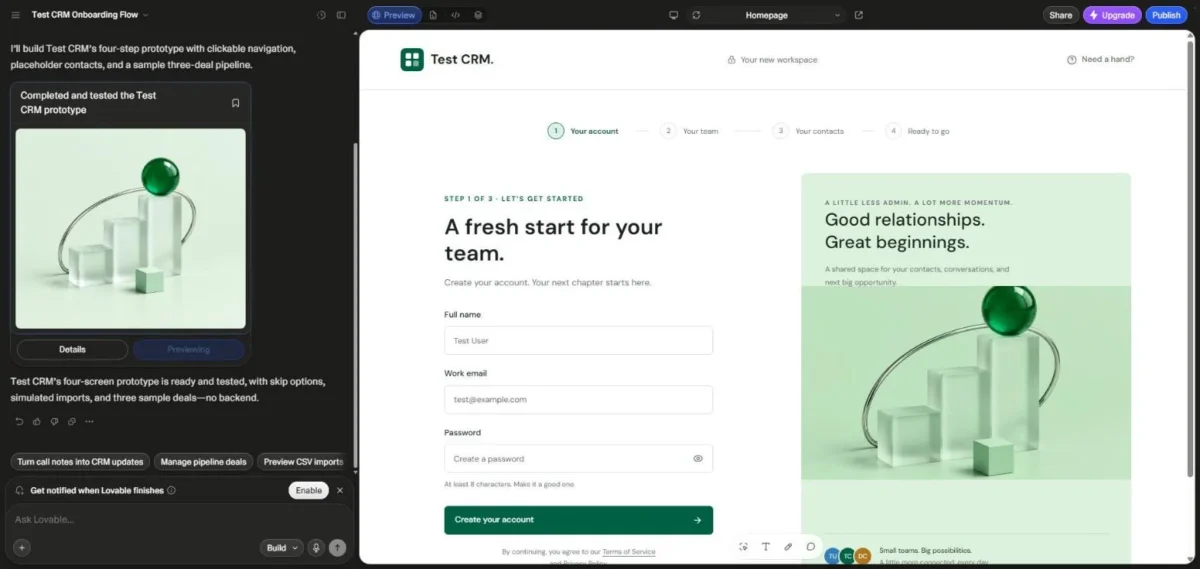
One warning before you build: Lovable reported my prototype as “ready and tested”, but its first screen contradicted its own progress bar.
In This Article (9 sections)
Lovable Review at a Glance
| Decision point | My verdict |
|---|---|
| Best for | Founders and PMs who need a running web app to test an idea with users |
| Skip it if | You have an existing codebase, need a native mobile app, or design in Figma |
| Starting price | $0 on Free, with 5 daily build credits (up to 30 a month) |
| Practical plan | Pro at $25 a month billed monthly, or $21 a month billed annually, per workspace |
| Main strength | A four-step prototype from one prompt in about 4 minutes in my test: step 1 ran and validated, and I read steps 2 to 4 in the code |
| Main limitation | Code is read-only on Free, and a build’s credit cost is not known before you send it |
| Best alternative | Figma Make for teams that design in Figma; Cursor for an existing codebase |
Sources: Lovable pricing page and Lovable FAQ, checked October 2026.
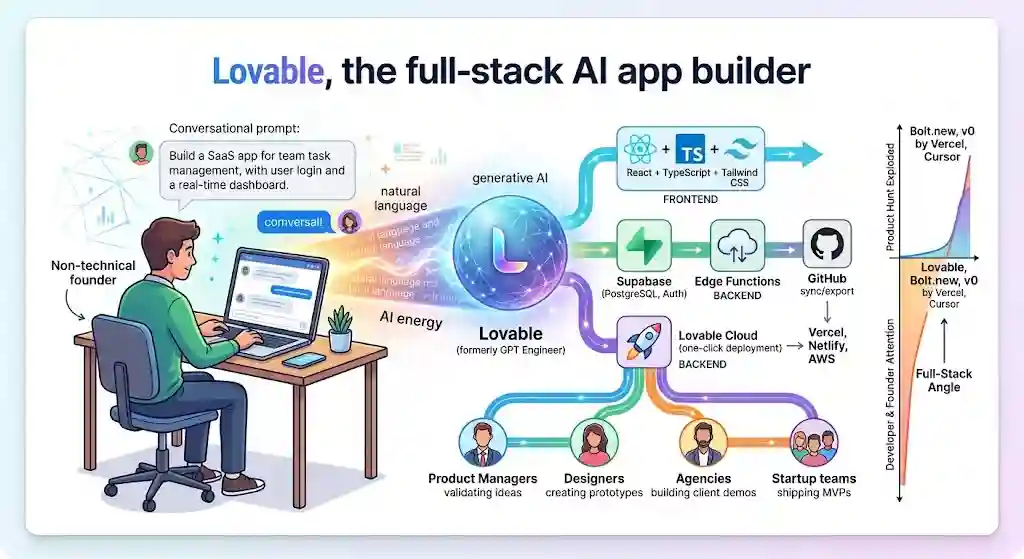
Lovable is an AI app builder that writes a full-stack web app from a chat prompt, hosts it and can sync its code to Git. Most rows lean on one Free-plan build, so the next section shows what it proved and where it stops.
How I Tested Lovable on the Free Plan
On October 10, 2026, I gave Lovable one prompt from my own Free account: a four-screen onboarding prototype for a test CRM. The preview was finished about 4 minutes later, and the build had cost 2.13 of my 5 daily build credits.
The prompt, word for word:
Build a clickable onboarding prototype for a small-team CRM web app called Test CRM. Screens: 1) sign-up with name, work email and password fields, 2) invite teammates step with a skip option, 3) import contacts step offering CSV upload or manual entry, 4) a dashboard showing a sample pipeline with three deals.
Use placeholder data only, such as Test Co and test@example.com. No backend needed.
It names every screen, field and data rule: a specific prompt that leaves little to guess.
I signed in to my own account and ran each step in my browser. I read times and credits from Lovable’s own screens at each step and approved the notes that day.
| Measure | What I saw |
|---|---|
| Time to finished preview | Sent at 19:49:30, preview on screen at 19:53:51 (UTC+7) |
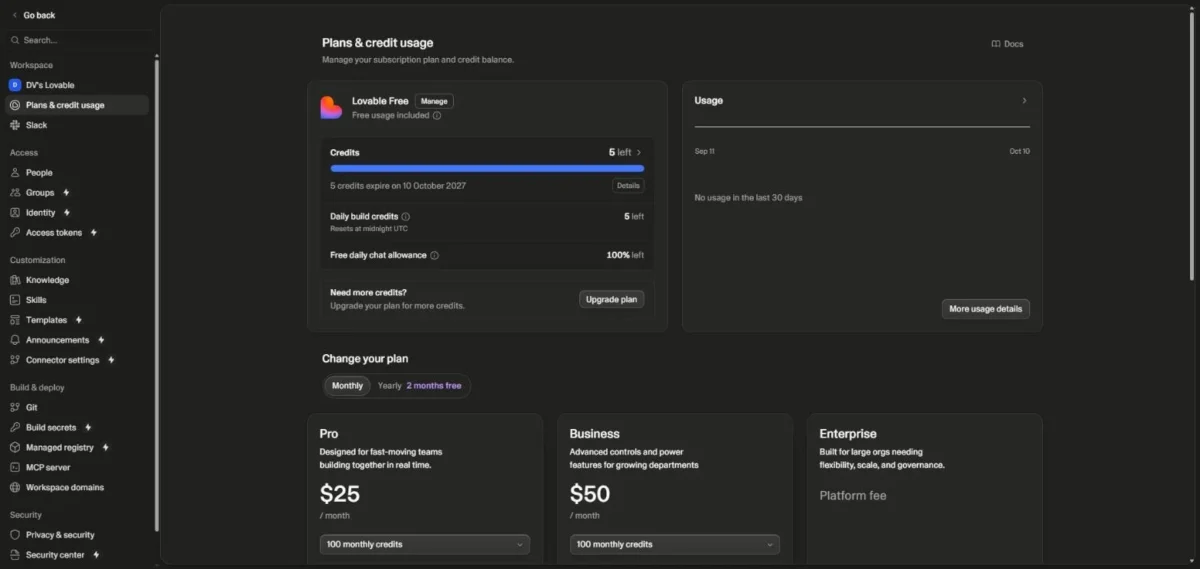
| Daily build credits | 5 before, 2.87 after; the Usage panel listed 2.13 credits for the project |
| Credits expiring Oct 10, 2027 | 5 before and 5 after; the build was charged to the daily build credits instead |
| Lovable’s own report | Project named “Test CRM Onboarding Flow” and called “ready and tested” |
| Preview | A 4-step bar (Your account, Your team, Your contacts, Ready to go) above a sign-up form labelled “STEP 1 OF 3” |
| Code | 3 sample deals, a CSV or manual import mode and invite fields, all in src/ |
| Click-through | Sign-up would not move on without a password; I typed none, so I checked steps 2 to 4 in the code |
| Free-plan gates | Code view marked “Read only” beside an Upgrade button; a Download button showed and was not clicked |
Sources: my Lovable Free account on October 10, 2026; credit rules from Lovable’s credits and usage docs, checked October 2026.
The speed held up: one prompt produced sign-up validation, placeholder deals and two import modes in under five minutes. The self-check did not: a “STEP 1 OF 3” label on a four-step bar is an error a stakeholder spots in seconds.
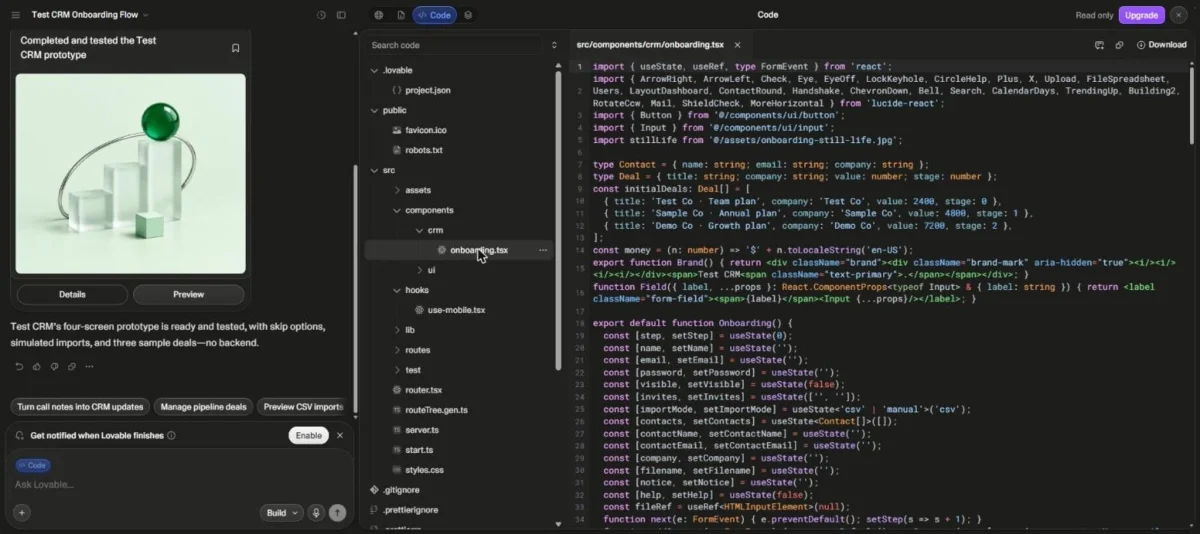
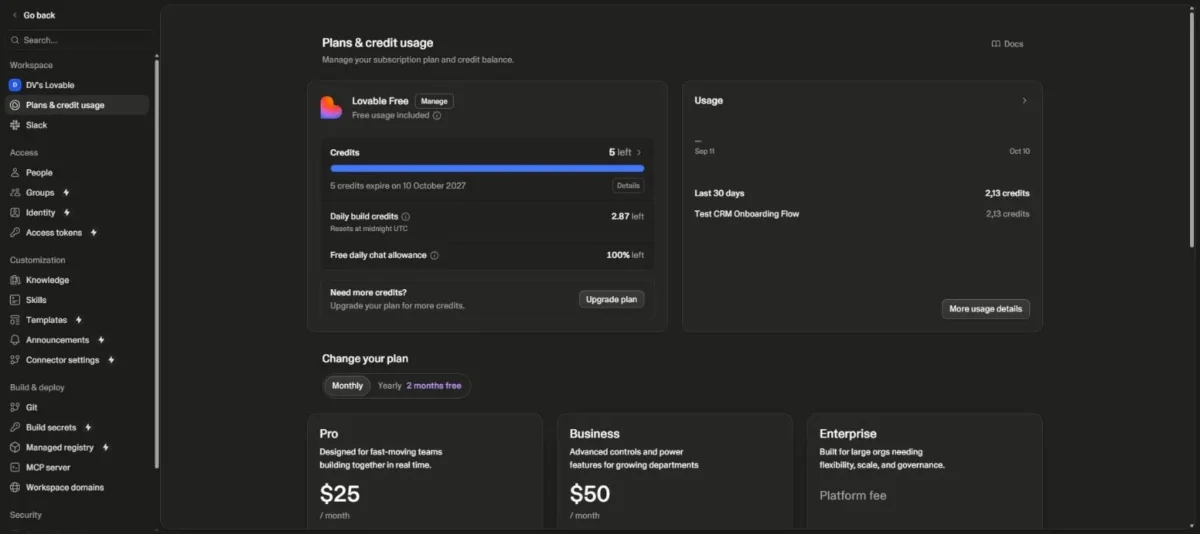
I sent the identical prompt to UX Pilot that day, so you can compare it with UX Pilot’s result on the same prototyping prompt.
What this test does not show
It shows one first build: one prompt, one run, one account, Free plan only. I ran no follow-up edits, publishing, custom domains, GitHub or Figma connections, team features or exports.
Times were read at intervals, so about 4 minutes is an upper bound within about a minute. I checked steps 2 to 4 in the code, not by clicking, and did not check the project’s visibility.
Everything past that first build comes from Lovable’s documentation, not from my account.
What Lovable Does Well
Three jobs justify Lovable: a running app from a prompt, code you can take with you on any plan, and public pages crawlers can read.
A running app from one prompt, not a mockup
You get an app people can use, not a picture of one, though my test ran only its first step. Step 1 refused to move on without a password. I read steps 2 to 4, with their deals, import modes and invite fields, in the project’s code and did not click through them.
In AI prototyping, the category of tools that turn a prompt into a testable product draft, Lovable sits at the running-code end.
You build by describing what you want in the project chat, the practice usually called vibe coding.
Every project runs on one fixed stack: TanStack Start for apps created from May 13, 2026, and PostgreSQL through Lovable Cloud or Supabase. For a non-developer, that removes the framework and database choice before the first prompt.
Code you can take with you on any plan
Yes: Git sync keeps a project in your own GitHub, GitLab or Bitbucket repository, syncing changes both ways once Lovable has created that repository. The hosted versions of all three work on all plans, Free included.
Lovable’s ownership docs say you are “never locked in”: you can export code, migrate data and self-host the stack. That makes Free a safe start, since a developer can take over the synced repository without anyone buying a plan.
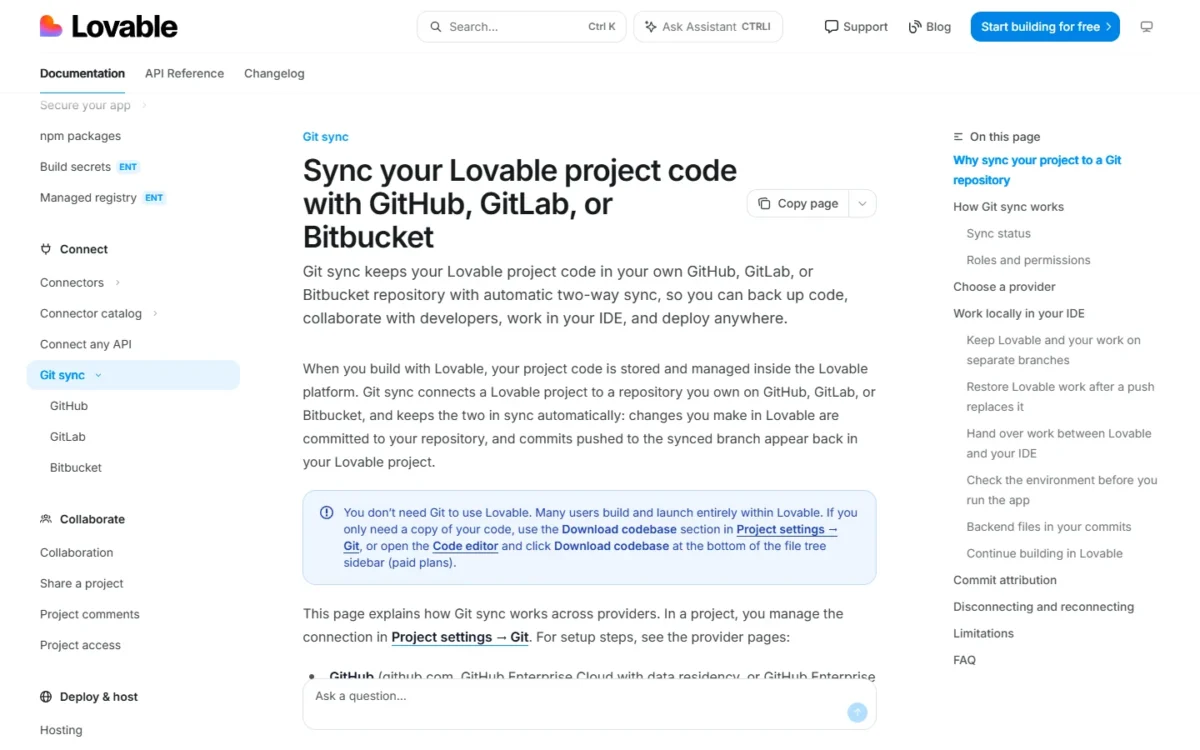
The catch is the starting point. Lovable cannot import an existing repository, and connecting a project always creates a new one. Two-way sync therefore runs only between your project and that new repository, and the database travels separately (the FAQ below covers how).
Public pages search engines can read
A public Lovable site is readable by search engines by default: new apps use TanStack Start, which renders pages on the server. Older React + Vite apps serve pre-rendered copies to verified crawlers, among them Google, Bing, ChatGPT and Perplexity.
That retires the old client-side rendering warning for new apps. On older apps, third-party SEO scanners are not on the verified list and see the plain single-page app, so an outside audit can show less than Google receives.
Rendering is handled, but Lovable’s SEO guide says page quality still matters: metadata, content structure, structured data, internal links and backlinks. Each strength carries a condition; the next section shows where they break, and for whom.
Where Lovable Falls Short
Six limits will frustrate specific buyers, and the first appeared in my own build.
- “Ready and tested” is not QA. My build’s sign-up form read “STEP 1 OF 3” above a four-step bar. A PM who shares an unchecked flow carries that error into the meeting, so click every screen first.
- Free shows the code but locks editing and downloads. My Code view was “Read only” beside an Upgrade button, and code editing and the .zip download need a paid plan. Hand a Free project to a developer through Git sync instead.
- Lovable publishes no fixed price per build. Build mode cost “depends on the complexity of the request and the work completed”, and hosting shares those credits once the monthly Cloud grant runs out. Budget owners should scope in Plan mode first, at 1 credit per message plus any research.
- No repo import and no framework choice. Connecting Git always creates a new repository, and Lovable “does not offer a choice of framework or database”. Teams with an existing codebase should start in a tool that opens it.
- Free and Pro data may train Lovable’s models. As of September 9, 2026, Lovable may train on Free and Pro prompts, code and outputs unless you opt out. Business and Enterprise data is excluded by default, so agencies should opt out in Account settings > Preferences > AI model training, or pay for Business.
- Web apps only, and scans are not an audit. Lovable builds no native or React Native apps, and says its security scans “do not replace a thorough security review”. It is not HIPAA-compliant either, so regulated-data teams need an independent review, and mobile teams a PWA or an outside wrapper.
Several of those limits end in an upgrade, so the next question is whether the price itself is the limit.
Lovable Pricing: Is It Worth Paying For?
Lovable is free to start, with 5 daily build credits capped at 30 a month, or about 14 builds if each costs my test’s 2.13 (30 / 2.13).
Pro costs $25 a month, or $21 billed annually, and Business $50, or $42, per workspace, not per seat; Pro’s 100 monthly credits are shared by everyone in the workspace, so credits, not seats, limit a team.
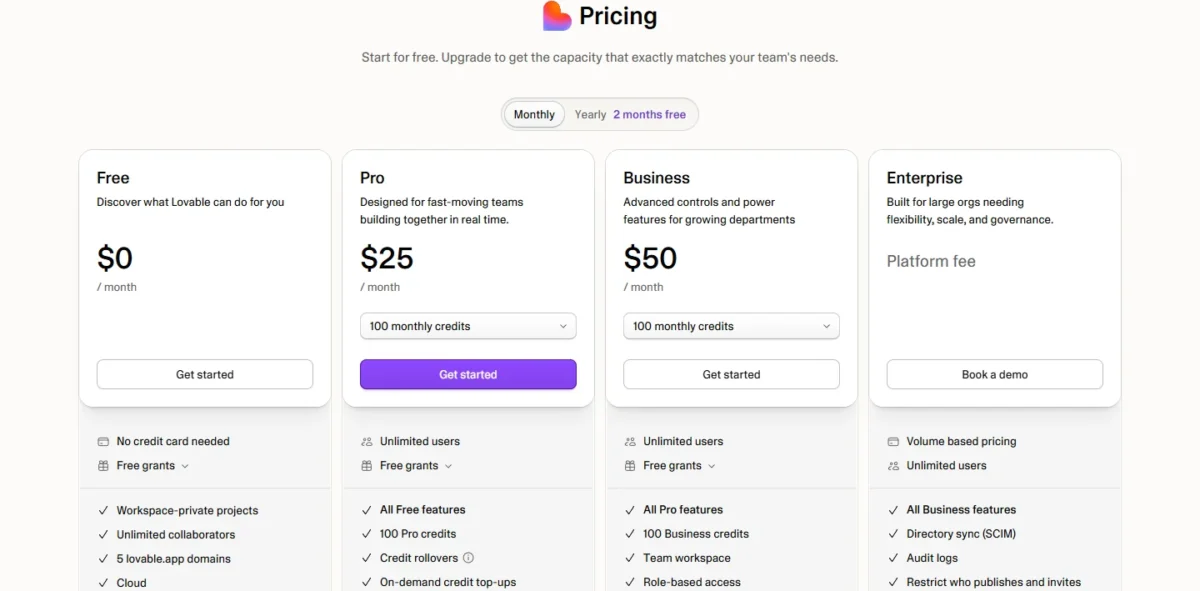
Price is not the limit: Free judges the output, and paying is worth it only for code edits, a custom domain or the .zip download on Pro, or SSO on Business; the next section sorts buyers by plan.
Who Should Use Lovable, and Who Should Skip It
Use Lovable when the job is a running web app to put in front of users this month and no codebase needs protecting.
Use it if you are:
- A founder testing an idea. Start on Free, where publishing to a lovable.app address costs nothing; move to Pro for a custom domain, code edits or the .zip download.
- A PM preparing a demo. Free covers a first build like mine; click every screen before stakeholders do.
- An agency building client prototypes. Business excludes workspace data from training by default; on Pro, each person opts out in their own account settings.
Skip it if you:
- Already have a codebase. Lovable cannot start a project from an existing repository.
- Design in Figma. Figma Make works from Figma frames and design systems.
- Store health, payment card or government ID data. Lovable’s standard terms do not allow it in the apps you build.
- Need an App Store app. Lovable builds web apps; a PWA or an outside wrapper such as Capacitor is the route to a phone.
The existing-codebase and Figma cases each have a better first tool, mapped next; the data and App Store cases end in the routes named above.
Lovable vs Alternatives
My ranking sets Lovable against 10 other AI prototyping tools; for a quick pick, choose the rival by the Lovable limit you hit first.
| Product | Pick it over Lovable when | Stay with Lovable when |
|---|---|---|
| Bolt.new | Your code already lives on GitHub: Bolt imports an existing repository as a new project | You start from an idea, not a repository |
| v0 | Your team ships through GitHub pull requests: v0 imports a repo, builds on branches and publishes by merging | Nobody on the team needs Git: Lovable builds and publishes without it |
| Figma Make | Your design system and frames live in Figma: Make takes them as context and copies results back to the canvas | Your team does not design in Figma |
| Cursor | Developers work in an existing codebase: Cursor is a coding agent for planning features, fixing bugs and reviewing changes | Nobody on the team writes code: Lovable needs no coding experience |
Sources: Bolt GitHub docs, v0 GitHub docs, Figma Make page and Cursor docs, checked October 2026.
The pattern is consistent: each rival wins where work already exists, in a repo, a Git workflow or Figma, while Lovable wins on a blank page.
Design-led teams weighing Figma Make can start with my Figma review. With the exits mapped, the last question is whether Lovable should come first.
Final Verdict
Start in Lovable if you are a founder or PM testing an idea. Build on Free, and pay for Pro only when you need code edits, a custom domain or the .zip download.
Skip it when the work starts from an existing codebase; a tool that opens your repository saves you rebuilding what you have.
My build showed both sides in about four minutes: a usable first draft, and a self-check that missed its own step count. Watch three things from day one: credits per build, any “tested” claim Lovable makes, and the training setting on Free and Pro.
Lovable Review FAQs
Is Lovable legit and trustworthy?
Yes. Anton Osika and Fabian Hedin founded Lovable in 2023 in Stockholm, and the product was first known as GPT Engineer. Lovable holds SOC 2 Type II, ISO 27001:2022 and AIUC-1 certifications, and a Quick scan runs automatically when you open the publish dialog.
What is the difference between Lovable and ChatGPT?
Lovable builds and runs the whole project, while a chat answer leaves the assembly to you. Lovable writes the interface, backend, database, login and integrations, then hosts the app. If pasted code snippets are enough for you, Lovable is more tool than you need.
Is Lovable really no-code?
Yes for building: you describe what you want in the project chat, and Lovable says no coding experience is needed. When a build error appears, Try to fix attempts a repair. Your account includes 10 free fixes, each available again 24 hours after you use it.
Can you export your code and data from Lovable?
Yes, in two parts: the code leaves through Git sync or a paid-plan .zip download. The database exports separately from More > Cloud > Overview > Advanced settings, under Export project data. That export leaves out stored files, Edge Function code and secrets, so move those yourself.
Disclosure: this article may contain affiliate links, and I may earn a commission if you buy through one. I handle them under the site’s editorial policy.