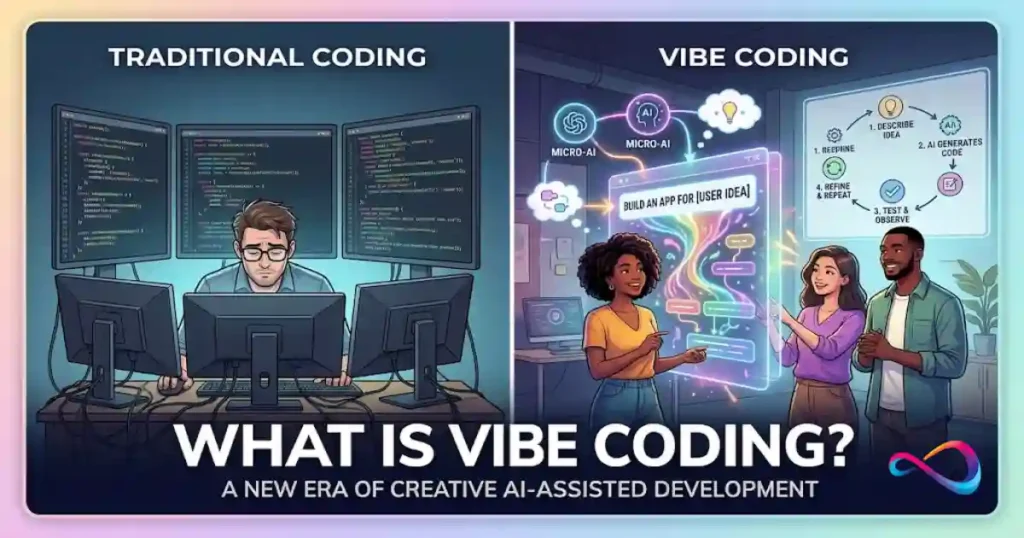
Vibe coding is a way of building software by describing what you want in plain English and letting an AI model write the code for you. You prompt, the AI generates, you test the result—and you iterate from there, often without reading every line the AI produces. The term was coined by AI researcher Andrej Karpathy in February 2025, and it has since been added to the Merriam-Webster dictionary and named Collins Dictionary’s Word of the Year for 2025.
That’s the short version. The longer story—why it matters, where it breaks, and whether you should actually use it—is more interesting, and more nuanced, than most articles let on.
📦 Vibe coding in simple terms
Vibe coding means telling an AI what software you want using everyday language, then accepting or adjusting the code it writes based on whether the result works. You guide the process through conversation, not by writing code yourself.
TL;DR: Vibe coding is a specific workflow where intent replaces syntax, speed replaces ceremony, and human judgment becomes the bottleneck. It’s fast, accessible, and real—but it’s not magic, and it’s not a replacement for engineering discipline. Its real value depends on where it sits on the prototype-to-production spectrum.
In This Article (15 sections)
What Is Vibe Coding in Software Development?
Here’s a one-sentence vibe coding definition: Vibe coding is a software development method where you describe your intent in natural language, an AI model generates the code, and you accept the output based on whether it works—not on whether you’ve read and understood every line.
In plain English? You tell the AI what you want. It writes the code. You run it, see if it does the thing, and adjust your prompt if it doesn’t. The “vibe” is the key word—you’re steering by feel and outcomes rather than by reading syntax. This is closely related to what generative AI does at a broader level—using large language models to produce content (in this case, functional code) from natural language inputs.
But here’s the distinction most articles miss. Not all AI-assisted programming is vibe coding.
Simon Willison—developer, writer, and one of the sharpest voices on AI tooling—draws a bright line here. If you use an LLM to generate code but then carefully review it, test it, and understand what every function does, you’re not really vibe coding. You’re using AI as a typing assistant. Vibe coding, in the strict sense, means you’re trusting the output without deep review. You’re optimizing for speed and results over comprehension.
The vibe coding meaning that Merriam-Webster captured backs this up: “the act or practice of using an artificial intelligence system to generate computer code in a given programming language.” But the cultural connotation goes further—it implies a deliberately casual relationship with the generated code.
Why does this matter? Because conflating vibe coding with all AI coding leads to confused advice. “Is vibe coding safe?” is a completely different question depending on whether you mean “I prompted Cursor to scaffold some React components and then reviewed them” or “I told Replit Agent to build my entire backend and I shipped it without reading the output.”
Where Did Vibe Coding Come From?
The term was coined by Andrej Karpathy—co-founder of OpenAI, former head of AI at Tesla, and one of the most respected researchers in machine learning—in a post on X on February 2, 2025:
“There’s a new kind of coding I call ‘vibe coding,’ where you fully give in to the vibes, embrace exponentials, and forget that the code even exists.”
That single post gave a name to something thousands of developers, founders, and tinkerers were already doing. The term stuck because it was precise and playful. It captured the novelty of the workflow—this wasn’t traditional programming, and it wasn’t quite no-code either. It was something new.
The cultural velocity was remarkable. Within weeks, “vibe coding” appeared in mainstream tech coverage. By March 2025, Merriam-Webster had added it as a tracked “slang & trending” term and later created a full dictionary entry. By the end of the year, Collins Dictionary named it their Word of the Year for 2025, citing a massive surge in usage that reflected how deeply AI tools had embedded themselves in everyday software creation.
That trajectory—from a casual social media post to dictionary legitimacy in under a year—tells you something real about the shift happening in how software gets built.
How Vibe Coding Works in Practice
The vibe coding workflow follows a loop that looks deceptively simple but has real nuance in execution:
- Prompt — Describe what you want in natural language. (“Build me a dashboard that shows monthly revenue by customer segment, with a date range filter and CSV export.”)
- Generate — The AI model produces code—sometimes a complete file, sometimes a diff applied to existing code.
- Test — Run it. Does the UI render? Does the button work? Does the export actually download?
- Refine — If something is wrong, describe the problem in another prompt. (“The date filter isn’t applying to the chart. Fix it.”)
- Review — This is where vibe coding and responsible AI-assisted programming diverge. In strict vibe coding, you might skip this step. In a production context, you shouldn’t.
- Deploy — Push it live. Many vibe coding tools offer one-click deployment to hosting services.
- Monitor — Watch for errors, unexpected behavior, and security issues in production.
The quality of your prompts matters enormously here. If you’re new to working with AI models, understanding prompt engineering fundamentals can meaningfully improve the output you get from any vibe coding tool.
A quick example
A common scenario looks like this: a product manager at a B2B startup needs an internal tool to track partnership leads—nothing complex, just a table with filters, a form to add new entries, and a connection to an existing Supabase database.
In a traditional workflow, this goes into the sprint backlog, gets prioritized against feature work, and ships in two to four weeks. With vibe coding, you open Bolt.new or Lovable, describe the tool in a few sentences, connect Supabase, preview it in the browser, tweak the layout with two more prompts, and deploy it to a subdomain. Total time: maybe ninety minutes.
That’s not unusual. That kind of scenario is happening daily across Y Combinator-backed startups and mid-market SaaS teams right now.
Vibe Coding vs AI-Assisted Programming vs No-Code
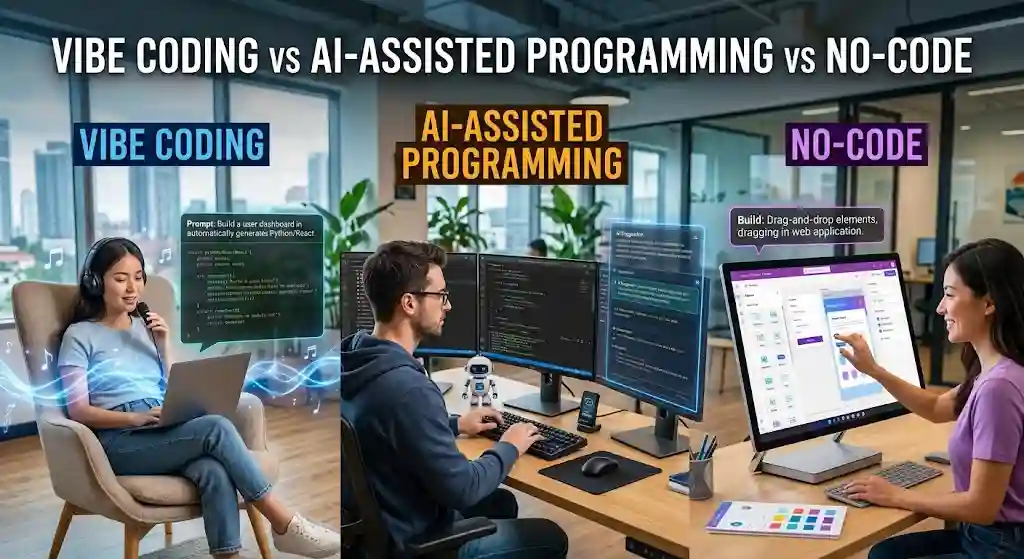
One of the most common questions is: how does vibe coding compare to traditional software development, AI-assisted programming, and no-code platforms? The answer depends on what you’re optimizing for.
| Dimension | Traditional Coding | AI-Assisted Programming | Vibe Coding | No-Code (e.g., Bubble, Webflow) |
|---|---|---|---|---|
| Skill required | High — languages, frameworks, architecture | Medium-high — coding skill + prompt craft | Low to medium — prompt craft, enough to evaluate output | Low — drag-and-drop, visual logic |
| AI code review | N/A | Yes — developer reviews every line | Minimal or none — output trusted if it works | N/A |
| Speed to MVP | Weeks to months | Days to weeks | Hours to days | Days to weeks |
| Control & flexibility | Full | High — developer retains oversight | Moderate — depends on what the AI can generate | Limited — bound by platform features |
| Code ownership | Full | Full | Full (you own the files) | Partial — often locked to the platform |
| Maintainability | High if well-architected | High — reviewed code stays clean | Variable — can degrade fast if unreviewed | Platform-dependent |
| Security posture | Developer-controlled | Developer-controlled with AI speed | Requires manual review; AI output is not secure by default | Platform-managed |
| Best fit | Production systems, regulated industries, complex logic | Teams wanting AI speed with engineering discipline | Prototypes, MVPs, internal tools, boilerplate-heavy work | Marketing sites, simple CRUD apps, non-technical teams |
The key insight: vibe coding sits between AI-assisted programming and no-code. You get code you can actually deploy and modify, but you trade control and reliability for speed. That trade-off is brilliant for some use cases and dangerous for others.
Mini decision matrix
| Best for | Avoid for | Risk level | Human review needed | |
|---|---|---|---|---|
| Vibe coding | Prototypes, MVPs, internal tools, personal projects, boilerplate | Regulated systems, auth-heavy apps, long-lived production code | Medium to high | Yes — before any production deployment |
| AI-assisted programming | All development where speed matters but quality can’t slip | Nothing — it’s the responsible default | Low to medium | Built into the workflow |
| Traditional coding | Complex architecture, security-critical systems, regulated industries | Quick throwaway scripts, hackathon projects | Low (if well-managed) | Standard code review process |
| No-code | Marketing sites, simple apps, non-technical builders | Complex logic, custom integrations, scale-heavy workloads | Platform-dependent | Minimal |
Why Vibe Coding Took Off So Fast
Five forces converged to turn vibe coding from a niche practice to a mainstream trend in record time:
The barrier to entry dropped. Tools like Replit Agent, Bolt.new, and Lovable let anyone with a browser describe software and get working code. You don’t need a local dev environment. You don’t need to understand Git. The entire build-deploy cycle happens in one interface.
Founders wanted speed. In the startup world—especially the Y Combinator ecosystem—the ability to test an idea in hours instead of weeks is a structural advantage. Vibe coding gave non-technical founders a way to build first versions themselves. For startups still evaluating their tech stack, choosing the best CRM for startups is one of many decisions that vibe coding can help prototype faster.
Internal tools were the perfect entry point. Most companies have dozens of manual workflows that should be simple apps but never get prioritized by engineering. Vibe coding made it practical for ops teams, PMs, and analysts to build these tools on their own.
“Software for one” became a real concept. Andrej Karpathy’s original framing hinted at this—software built for a single person’s specific need, where polish and scalability don’t matter. A personal data tracker. A custom workout logger. A one-off migration script. These don’t justify a full dev cycle, but they’re perfect for prompt-based coding.
LLMs got genuinely good at code. The models behind GitHub Copilot, Claude Code, Gemini, and Codex reached a level where they could produce working, functional code for common patterns—not flawless code, but good-enough code for iteration.
Best Use Cases for Vibe Coding
Not everyone should vibe code the same way. Here’s where the method works best, mapped to specific roles and situations:
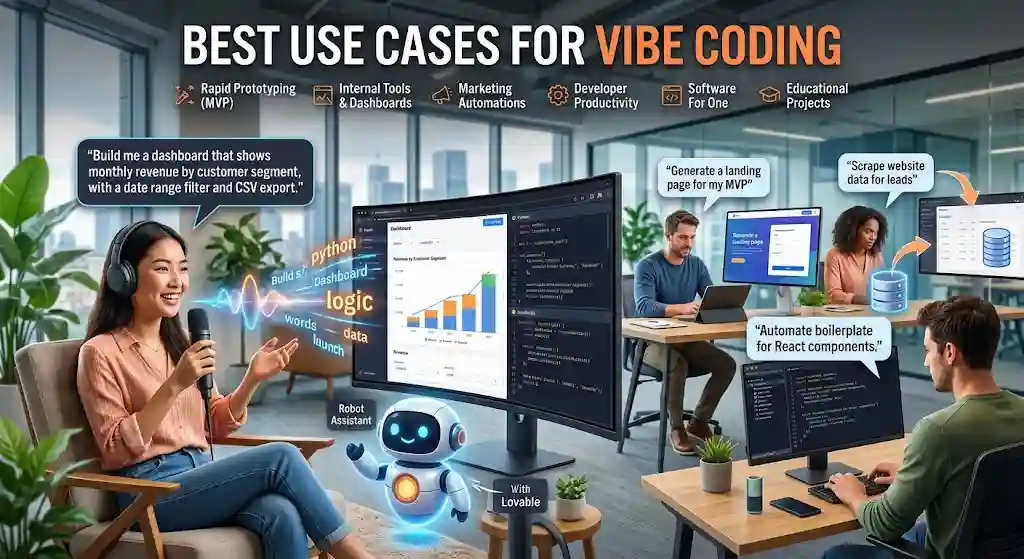
- Founders and solo builders — Ship a landing page with a waitlist form, build a prototype to pitch investors, test a product idea before hiring engineers. This is the sweet spot.
- Product managers — Build quick internal dashboards, mock up features with real data, create proof-of-concept demos that go beyond a Figma file.
- Marketers and growth teams — Generate custom data scrapers, build contest pages, spin up A/B testing tools without waiting on dev resources. Many marketers already use AI tools for content creation—vibe coding extends that same AI-first approach to building functional software.
- Developers — Automate boilerplate generation, scaffold new projects, generate test suites, build throwaway scripts and utilities. Experienced devs can vibe code the boring parts and hand-write the critical ones.
- Operators and support leads — Create internal admin panels, automate reporting workflows, build simple CRM extensions.
The common thread? These are all cases where speed matters more than perfection, and the code probably won’t serve millions of users or handle sensitive financial data.
Where Vibe Coding Breaks
Here’s what most vibe coding articles gloss over. The failure modes are specific, predictable, and worth understanding before you ship anything that matters.
Security is the biggest risk
Databricks’ AI Red Team has documented concrete examples of AI-generated code introducing serious vulnerabilities: arbitrary remote code execution through insecure serialization (like using Python’s pickle module on untrusted input), SQL injection from unsanitized concatenated queries, and cross-site scripting from improperly escaped HTML. AI models also have a tendency to hardcode API keys, passwords, and tokens directly into source files.
Hypothetical scenario — security: Imagine you vibe code a small customer portal. The AI generates a login system, and everything appears to work. But under the hood, the AI concatenated raw user input into a SQL query instead of using parameterized statements. A basic SQLi attack could dump your entire user table. You’d never catch this without a deliberate security review—the app looked fine.
Maintainability degrades fast
Hypothetical scenario — maintainability: You vibe code an internal reporting tool over three sessions, across two days. Each session, you prompt the AI to add features—new charts, new filters, a CSV export. By the end, the codebase has three different approaches to state management, duplicated utility functions, and no consistent naming conventions. A developer asked to add one more feature the following week spends more time understanding the existing code than it would have taken to rebuild it from scratch.
This is what I’d call “prompt debt”—the AI equivalent of technical debt. Each prompting session adds code that works in the moment but doesn’t fit a coherent architecture. After a few dozen iterations, you have a codebase that no one—including the AI—fully understands.
The cost of rewrite debt
Here’s the part most speed-focused articles skip: the cost of fixing messy AI output can exceed the cost of building it properly the first time. When vibe-coded software needs to be refactored, debugged, or hardened for production, engineers must first reverse-engineer code they didn’t write and that follows no consistent design. That reverse-engineering time is expensive—and it’s invisible at the start of the project when everything feels fast and free.
Think of it this way: vibe coding often front-loads speed and back-loads cost. For throwaway prototypes, that’s a great trade. For anything you plan to maintain, it’s a debt that accumulates interest.
Handoff debt compounds the problem
Related to prompt debt is “handoff debt”: the accumulated difficulty of passing vibe-coded software to another person or team. Code built through prompt iteration rarely has comments, documentation, or consistent patterns. There’s no PR history explaining why a decision was made. Handing it to a team of engineers for maintenance is like inheriting a project with no commit messages and no README—it works, but no one knows why it was done that way. The more sessions that touch the codebase, the worse this gets.
Hallucinated dependencies are a real problem
LLMs sometimes suggest libraries that don’t exist. This isn’t just annoying—it’s a supply-chain attack vector. A malicious actor can publish a package with the hallucinated name and wait for someone to install it. The security community has flagged this as a growing concern.
Debugging gets strange
When you didn’t write the code and don’t fully understand it, debugging becomes a game of describing symptoms to the AI and hoping it fixes the right thing. That works for surface-level bugs. For deeper logic errors, race conditions, or performance bottlenecks? You’re stuck.
Privacy and compliance can’t be vibed
If your application handles personal data, health records, financial information, or operates in a regulated industry—HIPAA, SOC 2, GDPR—vibe coding without rigorous human review is a liability. Compliance frameworks require traceability, documentation, and evidence that controls are intentional. “The AI wrote it” is not an acceptable answer in an audit.
When Not to Use Vibe Coding
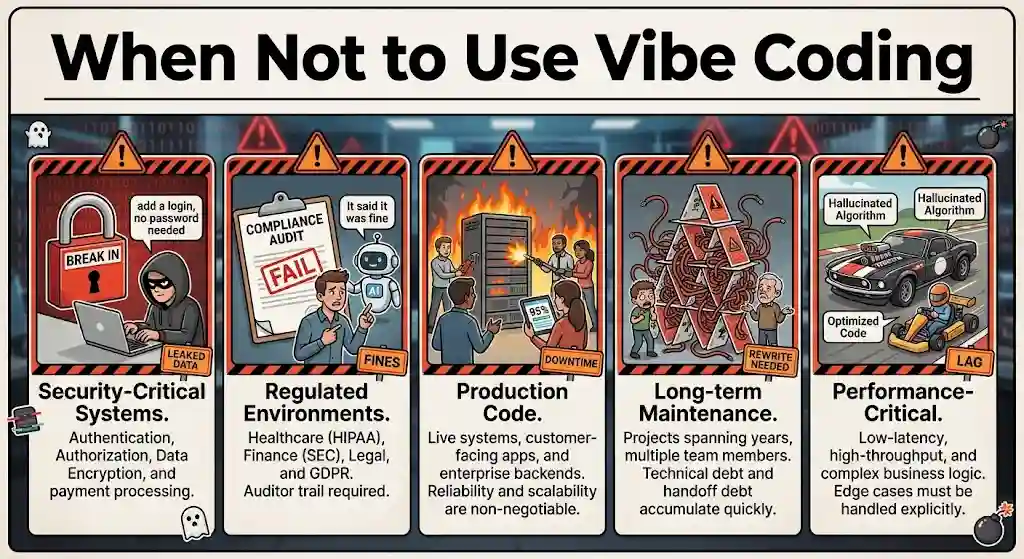
This section is worth reading twice. Knowing when to avoid vibe coding is just as useful as understanding when it works.
Do not rely solely on vibe coding for:
- Healthcare and clinical software — Regulatory requirements (HIPAA, FDA software validation) demand documented, traceable, reviewed code. Vibe coding can’t satisfy those audit trails.
- Financial systems and fintech — Payment processing, accounting logic, and transaction handling need precision, compliance, and deterministic behavior that AI-generated code doesn’t guarantee.
- Regulated data environments — Any system handling PII under GDPR, CCPA, or sector-specific rules needs governance that vibe coding workflows don’t provide by default.
- Authentication-heavy and security-critical systems — Login flows, role-based access control, and encryption implementations require expert review. AI models routinely produce auth code with bypassable role checks or weak session handling.
- Projects where long-term maintainability is critical — If the software will be maintained for years by a rotating team, vibe-coded architecture creates compounding handoff debt that gets more expensive over time.
- Complex distributed architectures — Microservices, event-driven systems, and multi-region deployments require architectural coherence that prompt-by-prompt iteration can’t maintain.
In these cases, use AI tools for acceleration—autocomplete, test generation, boilerplate—but keep human engineers in control of architecture and review.
Is Vibe Coding Safe for Production?
Yes—but with guardrails. The honest answer is that vibe coding’s production readiness depends entirely on what you’re building and how much human review you add back in.
Think of it as a spectrum:
- Prototype → Vibe code freely. Speed matters. Throw it away later if needed.
- Internal pilot → Vibe code the first version, then have a developer review security, error handling, and data access patterns before wider rollout.
- Production for real users → The initial code can start as vibe-coded, but it must pass through the same quality gates as any production software.
- Regulated systems → No, not as a standalone method. Use AI for acceleration, but engineering oversight and formal review processes are non-negotiable.
Production-readiness checklist for vibe-coded projects
Before pushing vibe-coded software to production, run through this:
- [ ] Security review — Has a developer or automated scanner checked for injection vulnerabilities, hardcoded secrets, and insecure dependencies?
- [ ] Authentication and authorization — Are all endpoints properly protected? Are role checks actually enforced?
- [ ] Input validation — Is every user input sanitized on the server side?
- [ ] Error handling — Does the app fail gracefully, or does it expose stack traces and internal state?
- [ ] Dependency audit — Are all imported packages real, maintained, and free of known vulnerabilities?
- [ ] Data privacy — Does the code comply with relevant regulations (GDPR, CCPA, HIPAA)?
- [ ] Logging and monitoring — Can you detect failures and anomalies after deployment?
- [ ] Code review by a human — Has at least one qualified person read the critical paths?
- [ ] Test coverage — Are there automated tests for key functionality, even if the AI wrote them?
- [ ] Backup and rollback plan — Can you revert quickly if something fails in production?
If you skip this checklist and push raw vibe-coded output to users handling real data, you’re accepting risk that most organizations shouldn’t accept.
How to Start Vibe Coding Safely
If you want to try vibe coding without creating problems for yourself, follow these five steps:
- Pick the right tool for your skill level. Non-technical? Start with a browser-based builder like Bolt.new, Lovable, or Replit Agent. Developer? Try Cursor or Claude Code. Don’t fight the tool—match it to how you work.
- Start with a narrow prompt. Don’t ask the AI to build your entire app in one shot. Begin with a single screen, a single feature, or a single data flow. Narrow prompts produce better, more predictable output.
- Test every iteration before prompting again. Run the code. Click every button. Submit every form. Check the browser console for errors. The biggest vibe coding mistake is stacking prompts on top of untested output—each layer compounds potential bugs.
- Review security and dependencies before going live. Even if you don’t read every line, check three things: Are there hardcoded API keys or passwords? Are all imported packages real and up to date? Is user input sanitized before it hits the database? Tools like
npm auditor Snyk can catch dependency issues automatically. - Only deploy after a human check. For personal projects, your own review may be enough. For anything shared with users or connected to real data, have someone with development experience review the critical paths—auth, data access, payment handling—before you push to production.
This won’t eliminate all risk, but it bridges the gap between “vibe coding for fun” and “vibe coding responsibly.”
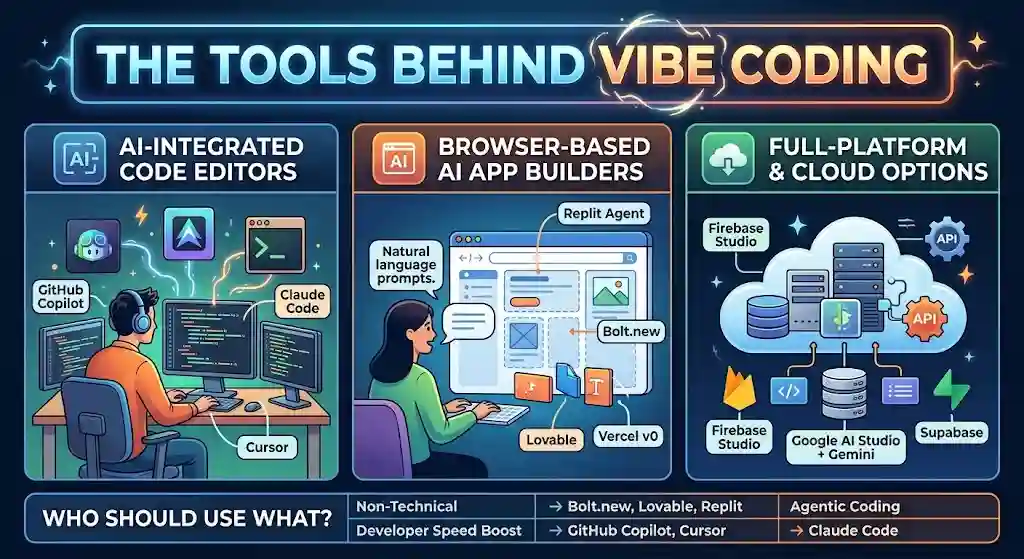
The Tools Behind Vibe Coding
The vibe coding tools ecosystem has matured quickly. Rather than dumping a flat list, here’s how to think about the categories:
AI-integrated code editors
These plug into your existing development workflow and generate or complete code inline.
- GitHub Copilot — The most widely adopted AI coding assistant. Works inside VS Code. Best for developers who want AI suggestions while still writing and reviewing code.
- Cursor — A fork of VS Code built around AI-first editing. Supports multi-file edits, chat-based generation, and context-aware suggestions. Popular with developers who want deeper AI integration than Copilot offers.
- Claude Code (Anthropic) — A terminal-based agentic coding assistant that can plan, execute, and iterate across your entire codebase. Best for experienced developers comfortable with command-line workflows. For a broader look at the Claude platform behind it, Anthropic’s model powers several coding and writing tools.
Browser-based AI app builders
These are where non-developers typically start. No local setup required.
- Replit Agent — Describe your app, and the agent builds, runs, and deploys it in the browser. Strong for quick prototypes and educational projects.
- Bolt.new — Fast browser-based builder focused on full-stack web apps. Generates deployable projects from a single prompt.
- Lovable — Similar to Bolt.new, with a focus on clean UI output and rapid iteration.
- Vercel v0 — Generates front-end components (especially React and Next.js) from natural language prompts. Best for UI prototyping.
Full-platform and cloud-native options
These tie AI generation into larger deployment and infrastructure ecosystems.
- Firebase Studio (Google) — Combines AI-assisted code generation with Google Cloud services, including Cloud Run for deployment. Part of Google’s broader AI Studio and Gemini ecosystem.
- Google AI Studio + Gemini — For working with Google’s models directly, including code generation and multimodal prompting.
- Supabase — Not an AI tool itself, but a common backend target for vibe-coded apps because of its simple API and generous free tier. If you’re unfamiliar with how these services connect, our guide on what an API is and how SaaS integrations work covers the fundamentals.
Who should use what?
| Your situation | Start here |
|---|---|
| Non-technical, want to build an app fast | Bolt.new, Lovable, Replit Agent |
| Developer who wants AI speed boosts | GitHub Copilot, Cursor |
| Developer who wants agentic, multi-step AI coding | Claude Code, Cursor (Composer mode) |
| Building on Google Cloud | Firebase Studio, Gemini |
| Just prototyping UI components | Vercel v0 |
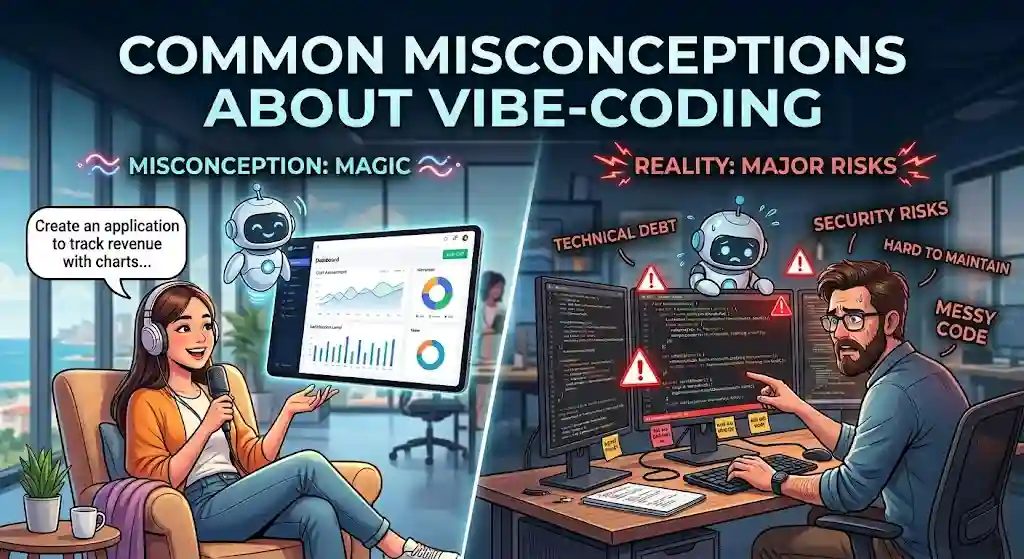
What Most People Get Wrong About Vibe Coding
After spending significant time evaluating these tools and tracking how teams actually use them, a few persistent misconceptions stand out:
“Vibe coding is magic.” It’s not. LLMs are pattern-matching engines trained on massive codebases. They’re excellent at common patterns (CRUD apps, standard UI layouts, API integrations) and unreliable at novel logic, domain-specific algorithms, or anything that requires genuine reasoning about edge cases.
“It’s always cheaper.” The time savings are real for prototypes and simple apps. But if you vibe code something complex, skip review, and then need to debug or rewrite it later, the total cost can exceed what a competent developer would have charged to build it properly the first time. Speed now, cost later is the hidden equation most vibe coding tutorials don’t mention.
“It replaces software engineering.” It replaces some of the typing. It doesn’t replace system design, architecture decisions, security thinking, performance tuning, or the judgment calls that separate working software from reliable software. Personally, I find that the best results come from experienced developers using vibe coding selectively—not from eliminating developers from the loop.
“Vibe coding and AI-assisted programming are the same thing.” They overlap, but they’re distinct. A developer using Copilot to autocomplete functions while reviewing every suggestion is doing AI-assisted programming. A founder prompting Bolt.new to build an entire app without reading the generated code is doing vibe coding. Simon Willison’s distinction is useful here: if you reviewed, tested, and understood the AI’s code, it’s not truly vibe coding—it’s using the LLM as a typing assistant. The risk profiles are completely different.
My Honest Take
I was skeptical at first about vibe coding as a category—it felt like a buzzword masking what developers had already been doing with Copilot and ChatGPT. But after seeing how browser-based tools like Replit Agent and Lovable shifted who builds software and how fast ideas move from concept to deployed product, I changed my mind. The trend is real.
Where I stay cautious: the gap between “it works” and “it’s production-ready” is wider than most vibe coding advocates admit. Vibe-coded apps routinely go live with open database ports, unvalidated form inputs, and hardcoded credentials that any automated scanner would flag. The speed is intoxicating—and that’s exactly why it’s risky. Speed without review is just moving fast and breaking things, except now the “things” might include user data.
Here’s my framework, distilled:
| Scenario | Verdict |
|---|---|
| Prototype or proof of concept | ✅ Yes — vibe code aggressively |
| Internal pilot (small team, limited data) | ✅ Yes — with developer review before rollout |
| Customer-facing production | ⚠️ Yes — but only with full security review, testing, and code audit |
| Regulated systems (healthcare, finance, legal) | ❌ No — not as a standalone method. Use AI for acceleration, keep humans in control. |
The Stack Overflow Developer Survey shows rapid adoption of AI coding tools, but adoption doesn’t equal quality outcomes. I could be wrong, but I believe the teams that thrive will be the ones that treat vibe coding as one workflow in a larger engineering culture—not as a shortcut that replaces the culture itself.
What Is Vibe Coding? – FAQs
What is vibe coding?
Vibe coding is a software development method where you describe what you want in natural language, an AI model generates the code, and you iterate based on whether the output works—often without reading every line. The term was coined by AI researcher Andrej Karpathy in February 2025.
Is vibe coding the same as AI coding?
Not exactly. AI coding (or AI-assisted programming) is a broad category that includes any use of AI in development. Vibe coding is a specific subset where you lean heavily on AI-generated output without deep review. If you carefully read and test every line the AI writes, that’s AI-assisted programming, not vibe coding in the strict sense.
Is vibe coding safe?
It depends on what you build and how much you review. For prototypes and internal tools, the risk is manageable. For production apps handling user data, vibe-coded output needs a full security review. Databricks’ AI Red Team research has documented real vulnerabilities including SQL injection, remote code execution, and hardcoded secrets in AI-generated code.
Can beginners use vibe coding?
Yes. That’s one of its biggest draws. Tools like Replit Agent, Bolt.new, and Lovable are designed so non-developers can build working apps from natural language prompts. The catch: beginners are also the least equipped to spot problems in the generated code, which makes review and testing even more important.
Can vibe coding replace programmers?
No. It replaces some of the output that programmers produce—especially boilerplate, scaffolding, and standard patterns—but it doesn’t replace the judgment, architecture, debugging, and security thinking that experienced engineers provide. The most productive setup is experienced developers using vibe coding to move faster, not organizations replacing developers with vibe coding.
What are the best vibe coding tools?
The top tools include GitHub Copilot and Cursor for developers working in code editors, Claude Code for agentic terminal-based workflows, and Replit Agent, Bolt.new, Lovable, and Vercel v0 for browser-based building. Firebase Studio and Gemini serve users in the Google Cloud ecosystem.
When should you avoid vibe coding?
Avoid relying solely on vibe coding for healthcare software, financial systems, regulated data environments, authentication-heavy applications, and any project where long-term maintainability is more important than initial build speed. In these cases, use AI tools for acceleration but keep human engineers in control of architecture and review.
The Bottom Line
Here’s a prediction: within two years, “vibe coding” will stop being a separate category. It will just be how software gets started. The tools will improve, the guardrails will get built in, and the boundary between prompt-based prototyping and production-grade development will blur until the distinction barely matters.
But right now, the distinction matters a lot. If you’re a founder building a proof of concept, vibe coding might save you $20,000 and three months. If you’re an enterprise team shipping compliance-sensitive software, the same approach could cost you far more than it saves—especially once you factor in the rewrite debt, security remediation, and handoff friction that unreviewed AI code accumulates.
The practical rule of thumb: vibe coding is a starting line, not a finish line. Use it to move fast. Then apply the engineering rigor that makes software trustworthy. That combination—AI speed plus human judgment—is where the real value of vibe coding sits. And that’s the part most people haven’t figured out yet.