This Loom review finds the platform ideal for US teams that need fast, frictionless asynchronous video messaging—especially for product updates, customer support videos, and sales demos. Skip Loom if you need heavy video editing, full LMS capabilities, or strictly on-premise storage. For most async communication use cases, Loom remains the category leader in 2026.
Is Loom Free?
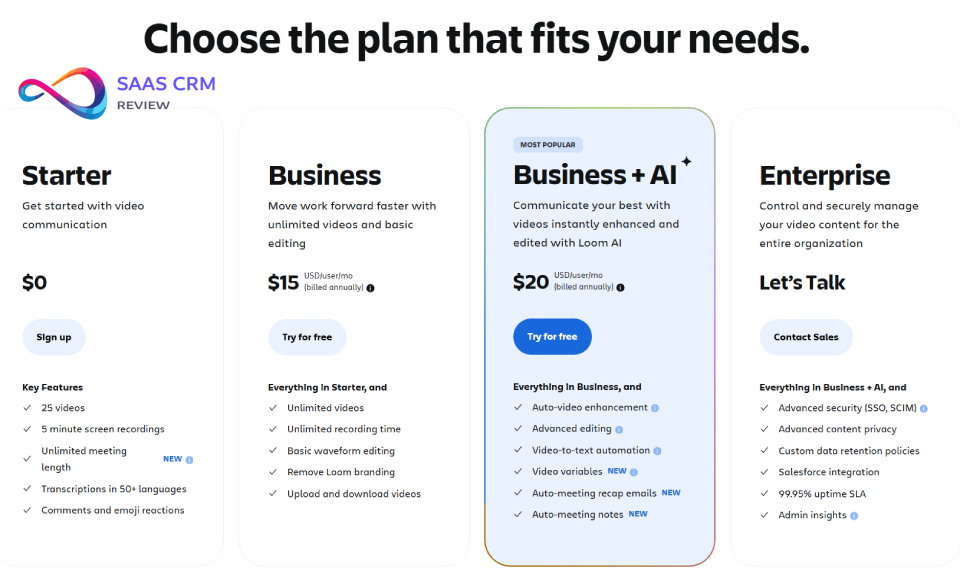
Yes. Loom offers a free Starter plan with 25 videos total, 5-minute max per recording, and 720p resolution. Paid plans start at $15/user/month.How Much Does Loom Cost in 2026?
Starter: $0 | Business: $15/user/mo | Business + AI: $20/user/mo | Enterprise: Custom pricing. Annual billing reduces cost ~20% vs monthly.
In This Article (17 sections)
Loom Review: Key Facts at a Glance
| Attribute | Details |
|---|---|
| Platforms | Loom Chrome Extension, Loom Desktop app (Mac/ |
| Best for | Asynchronous video messaging, screen recording, quick demos, customer support videos |
| Pricing starts at | $0 (Starter); $15/ |
| Loom AI features | Business + AI plan and Enterprise only |
| Enterprise security | SSO, SCIM, custom data retention, advanced access controls |
| Owner | Atlassian (acquired 2023) |
Pricing verified from Loom’s pricing page on Feb 9, 2026. Confirm current prices before purchasing.
Methodology: How We Evaluated
This Atlassian Loom review follows a structured evaluation methodology aligned with E-E-A-T (Experience, Expertise, Authoritativeness, Trustworthiness) standards.
Evaluation Approach
This review combines desk research with structured third-party review analysis. We did not conduct hands-on product testing for this article. Our evaluation is based on:
| Source Type | What We Analyzed |
|---|---|
| Official Documentation | Product pages, help centers, pricing tables from Loom and Atlassian |
| User Reviews | Verified reviews fromG2 and Capterra (500+ reviews analyzed) |
| Competitive Analysis | Feature-by-feature comparison with documented alternatives |
| Integration Documentation | Published API docs and integration guides |
Evaluation Criteria
| Criterion | What We Assessed | Weight |
|---|---|---|
| Core Functionality | Recording, editing, sharing, collaboration | 25% |
| AI Features | Transcription, summaries, automation value | 15% |
| Pricing & Value | Cost per user, tier differences, hidden costs | 20% |
| User Experience | Interface, learning curve, cross-platform consistency | 15% |
| Enterprise Readiness | SSO/ | 10% |
| Ecosystem & Integration | Native integrations, workflow compatibility | 10% |
| Real-World Fit | Use case alignment, buyer persona matching | 5% |
What This Review Does NOT Include
- Hands-on performance benchmarking (we relied on user-reported experiences)
- Lab testing of recording quality or browser resource usage
- Paid placement or sponsored content
Transparency Statement
This review was last verified on February 9, 2026. Pricing, features, and policies may change. We recommend confirming current details on official product pages before purchasing. For our complete evaluation standards, see our Review Methodology.
Atlassian Loom Review: What Loom Is (and What It Isn’t)
Loom is an asynchronous video messaging platform designed to replace unnecessary meetings and lengthy email threads with quick, shareable video content. The core workflow is simple: record your screen (with or without a webcam bubble), stop recording, and instantly get a shareable link. No uploading, no waiting, no scheduling—recipients watch on their own time.
Since Atlassian acquired Loom in late 2023, the product has deepened its integrations with Jira, Confluence, and Slack while adding AI-powered features like auto-generated summaries and meeting recaps. Loom has grown into one of the most widely adopted async video tools, with particularly strong adoption among remote-first teams in the US market.
What makes Loom different from other screen recorders?
The key differentiator is speed to share. Unlike traditional screen recording software that saves files locally and requires manual uploading, Loom streams your recording directly to the cloud. The moment you click “stop,” your video is hosted and ready to share. This workflow optimization sounds minor until you’ve used it—the friction reduction genuinely changes how often people communicate via video.
The second differentiator is collaboration. Loom isn’t just about recording; it’s about conversation. Viewers can leave timestamped comments, react with emojis, and engage with embedded CTAs. The sender gets viewer analytics showing who watched, how much they viewed, and where attention dropped. This turns one-way video into two-way communication—similar to how project management tools transform task assignment into collaborative workflows.
When Loom replaces meetings (3 common scenarios)
- Status update meetings → A 3-minute video covers what a 30-minute synchronous call would. Team members watch when convenient and can revisit details later.
- Written walkthroughs become visual → Bug reports, feature explanations, onboarding steps, and process documentation become dramatically clearer when you show rather than tell. Engineering teams use Loom for customer support videos explaining technical issues; product managers record feature demos; HR creates onboarding materials.
- Repetitive explanations disappear → Record once, share with every new hire, customer, or stakeholder who asks the same question. Build a video library that scales your expertise.
What Loom doesn’t replace
- Full video editing software (Camtasia, DaVinci Resolve, Premiere Pro). Loom’s editing is intentionally minimal—trimming, stitching, and basic cleanup only.
- Live meeting platforms (Zoom, Microsoft Teams, Google Meet). Loom is async-first—no real-time video conferencing.
- Learning management systems (LMS). Loom lacks quizzes, SCORM compliance, course structuring, or progress tracking.
- Professional video production. No multi-track timelines, transitions, overlays, or advanced effects.
Who Is Loom Best For in 2026?
Understanding search intent means acknowledging that different buyers have different needs. Here’s who benefits most from Loom—and who should look elsewhere.
Loom is ideal for
Remote and hybrid teams that struggle with meeting overload. If your calendar is packed with status updates, handoffs, and explanation sessions, Loom provides an escape valve. Async video respects time zones and allows focused work. Teams using project management software often pair it with Loom for visual updates.
Customer support and success teams creating how-to videos, troubleshooting guides, and personalized responses. A 2-minute video explaining how to solve a problem beats a 500-word email every time. For comprehensive support operations, many teams combine Loom with dedicated help desk solutions.
Sales professionals using video for prospecting, demos, and follow-ups. Loom for sales demos lets reps personalize outreach at scale. The viewer analytics reveal who’s engaged, enabling smarter follow-up timing. Sales teams managing complex pipelines often integrate Loom with their CRM software.
Product and engineering teams documenting bugs, sharing feature updates, and onboarding new team members. Visual context eliminates ambiguity in bug reports and reduces back-and-forth clarification. Teams using Linear or Jira often attach Loom recordings directly to tickets.
Educators and trainers creating quick instructional content. While Loom isn’t a full LMS, it excels at producing bite-sized tutorials, explanations, and feedback videos.
Loom is not ideal for
Professional video creators who need advanced editing, effects, transitions, or multi-track timelines. Loom is for communication, not production.
Organizations with strict on-premise requirements. Loom is cloud-only—all videos are hosted on Loom’s (Atlassian’s) infrastructure.
Teams needing LMS features like quizzes, certifications, SCORM compliance, or course progression tracking.
Users who rarely record video. If you send one video per month, the free plan suffices, but Loom might be more tool than you need.
Loom Review: Features (2026 Deep Dive)
This section breaks down what you actually get with Loom—not marketing promises, but functional capabilities that affect daily workflows.
Recording Modes & Quality
Loom offers flexible capture options via the Loom Chrome Extension, Loom Desktop app (Mac and Windows), or mobile apps (iOS, Android):
- Screen + camera bubble: Record your full screen or a specific window with a floating webcam overlay
- Camera only: Face-to-camera messages without screen capture—useful for personal updates
- Screen only: Pure screen recording for tutorials, demos, and technical walkthroughs
- Tab capture: Record a single browser tab without exposing other windows
- System audio capture: Include sounds from your computer
Resolution and quality:
- Paid plans support up to 4K at 30 FPS
- Free Starter plan caps at 720p
- Loom compresses efficiently—files are optimized for fast streaming
Performance notes (based on user reviews):
According to G2 and Capterra reviews, users generally report the Chrome extension runs without noticeable browser slowdown for typical recordings. Some users note the desktop app provides better stability for longer recordings (20+ minutes). Individual experience may vary based on system configuration.
Editing Workflow
Loom’s editing philosophy is good enough, fast. The platform deliberately avoids feature bloat that would slow down the record-to-share workflow.
What’s included:
- Trimming at the start and end of recordings
- Stitching multiple clips into a single video
- Edit by transcript (Business + AI): Delete sentences from the transcript and Loom removes that video segment automatically
- Waveform editing for precise cuts based on audio visualization
- Filler word removal (AI feature): Automatically removes “ums,” “ahs,” and hesitations
- Silence removal (AI feature): Tightens pacing by trimming dead air
- Background blur and replacement: Clean up messy home office backgrounds
- Branding removal: Paid plans let you remove Loom watermarks
What’s missing:
- Transitions between clips
- Text overlays and annotations (beyond drawing during recording)
- Multi-track timelines
- Color correction or visual effects
- Music or audio track mixing
If you need advanced editing, pair Loom with Descript (for transcript-based editing with more power) or Camtasia (for full-featured tutorial production). Design teams working in Figma often use Loom to record prototype walkthroughs before adding final polish elsewhere.
Transcription, Captions, and Chapters
Loom generates transcriptions automatically for all videos:
- 50+ languages supported with varying accuracy
- Closed captions can be displayed for accessibility
- Searchable transcripts help viewers find specific content
- Chapters (AI-generated) break longer videos into navigable sections
Accuracy considerations:
Transcription quality is strong for clear English speech but degrades with heavy accents, technical jargon, or poor audio. AI-generated content should be reviewed before sharing externally—especially for sales or customer-facing videos.
Sharing, Collaboration & Analytics
Once you stop recording, Loom generates an instant shareable link. No upload wait. This is the core workflow advantage.
Sharing options:
- Direct link sharing
- Embed codes for websites, knowledge bases, and documentation
- Password protected videos for sensitive content
- Workspace-only sharing (restricts to team members)
- Email gating (viewers must enter email to watch)
Collaboration features:
- Timestamped comments: Viewers click at any moment to leave contextual feedback
- Emoji reactions: Quick acknowledgment without typing
- Threaded discussions: Conversations happen directly on videos
- CTAs: Embed calls-to-action (buttons, links) within videos
Viewer analytics and engagement insights:
- Who watched your video
- How much of the video they viewed
- Where viewers dropped off (attention heatmap)
- CTA click-through rates
- Aggregate engagement metrics across your video library
Sales teams use this data to prioritize follow-ups—if a prospect watched your entire demo twice, they’re more engaged than someone who bounced after 30 seconds.
Workspaces, Libraries, and Content Organization
Teams organize videos in workspaces with:
- Team library for shared content accessible to all workspace members
- Folders/spaces for categorical organization (by project, team, topic)
- Search across titles, transcripts, and metadata
- Permissions controlling who can view, comment, edit, or share
- Tags for additional categorization
Enterprise considerations:
Larger organizations benefit from multiple workspaces with separate permissions. Domain management controls who can create accounts with company email addresses. Teams using Confluence for documentation often embed Loom videos directly into pages.
Integrations
Loom connects with tools teams already use, reducing context-switching:
Communication:
- Slack: Paste a Loom link and it unfurls with a preview; team members can react without leaving Slack
- Microsoft Teams: Similar embed and notification functionality
- Gmail/Google Workspace: Insert Loom recordings directly into emails
Productivity and project management:
- Jira: Attach Loom recordings to tickets for bug context
- Confluence: Embed videos directly in pages with native preview
- Notion: Embed Loom videos in documents. For a comparison, see Notion vs Confluence
- Asana: Link videos to tasks
CRM and sales:
- Salesforce: Track video engagement alongside deal data
- HubSpot: Video analytics integrated into contact records
Development:
- GitHub: Reference Loom videos in issues and pull requests
The Atlassian ecosystem integration is particularly deep post-acquisition—Jira and Confluence users see the most seamless experience.
Admin & Governance (Enterprise Features)
Enterprise plans add controls that IT and compliance teams require:
- SSO (Single Sign-On): Authenticate via Okta, Azure AD, or other identity providers
- SCIM provisioning: Automate user management and deprovisioning
- Custom data retention: Set policies for how long videos are stored
- Domain management: Control who can create accounts with your company domain
- Advanced access controls: Granular permissions at workspace and video levels
- Audit logs: Track who accessed what content when
Teams evaluating Loom SSO SCIM enterprise features should confirm current capabilities with Atlassian, as these evolve.

Loom AI in 2026: Business + AI Review
Loom AI represents Atlassian’s major investment in the platform post-acquisition. This Loom Business + AI review section explains what you actually get.
What Loom AI does (plain English)
| Feature | What it does |
|---|---|
| Auto titles | Generates a relevant title from your content (saves naming friction) |
| AI summaries | Creates a 2–3 sentence summary viewers see before watching |
| Chapters | Breaks longer videos into navigable sections with auto-generated labels |
| Filler word removal | Cuts “ums,” “ahs,” and verbal tics automatically |
| Silence removal | Tightens pacing by trimming pauses |
| Loom AI meeting notes recap | Summarizes recorded meetings with action items and key points |
| Loom video-to-text automation | Converts video content into Jira tickets, Notion docs, or Slack messages |
How Loom AI maps to real workflows
Scenario 1: Engineering standup
Record a 10-minute standup. Loom AI generates a summary with action items. Team members who missed the meeting scan the summary and watch specific chapters if needed.
Scenario 2: SOP creation
Record yourself explaining a process. Loom AI creates chapters and a summary. Embed in Confluence as documentation. New hires get consistent training. For teams building comprehensive documentation, our guide on knowledge base software covers additional options.
Scenario 3: Sales follow-up
Record a personalized demo. Filler word removal polishes delivery. Auto-summary gives prospects a preview. Video-to-text creates a follow-up email draft.
Practical limitations and risks
- Accuracy isn’t perfect: AI-generated summaries, titles, and transcripts should be reviewed before external sharing. Technical jargon and accents reduce accuracy.
- Privacy considerations: Transcript text is sent to OpenAI for AI processing. Video and audio files are not shared, according to Atlassian’s documentation. Review current policies for sensitive content.
- Review before share: Automated doesn’t mean accurate. Build a habit of quick reviews.
Which plans include Loom AI?
- Starter (free): ❌ No Loom AI
- Business ($15/user/mo): ❌ No Loom AI
- Business + AI ($20/user/mo): ✅ Full Loom AI suite
- Enterprise: ✅ Loom AI included
The $5/user difference between Business and Business + AI is the AI feature set. No other feature differences.
Is Loom AI worth the extra cost?
Ask three questions:
- Volume: Do you record 5+ videos per week? Time savings compound with volume.
- Meeting recaps: Are meeting summaries part of your workflow? AI saves 10–15 minutes per meeting.
- Editing aversion: Do you hate manual editing? Filler/silence removal produces polished videos with zero effort.
ROI calculation:
If Loom AI saves 15 minutes per video and you record 20 videos/month, that’s 5 hours saved. At $50/hour, that’s $250 value for a $20 subscription. The math works for active users.
Loom Review: Pricing and Plans (USD)
Understanding Loom pricing helps match plans to your actual needs. This section covers Loom pricing per user and plan selection guidance.
Pricing Table
| Plan | Price (billed annually) | Video limits | Resolution | Loom AI | Key features |
|---|---|---|---|---|---|
| Starter | $0 | 25 videos, 5 min max | 720p | ❌ | Basic recording, transcription, comments |
| Business | $15/ | Unlimited | 4K | ❌ | Branding removal, download, password protection |
| Business + AI | $20/ | Unlimited | 4K | ✅ | Full AI suite, meeting recaps, filler removal |
| Enterprise | Custom | Unlimited | 4K | ✅ | SSO, SCIM, data retention, Salesforce |
Pricing verified Feb 9, 2026. An Education plan exists for verified educators/students. See Loom’s pricing page for current details.
Loom Free Plan Limits: What You Actually Get
The Loom free plan (Starter) includes:
- 25 videos total (not per month—total library)
- 5-minute maximum per recording
- 720p resolution (no 1080p or 4K)
- Basic transcription in 50+ languages
- Timestamped comments and emoji reactions
- Viewer insights (who watched, engagement)
The Loom free plan limits 25 videos 5 minutes is the most common frustration. Most explanations, tutorials, and demos run longer than 5 minutes. Expect to hit this wall quickly if using Loom regularly.
Plan Selection: How to Decide
Choose Starter if:
- You send fewer than 25 short videos total
- Recordings stay under 5 minutes
- You’re evaluating Loom before team rollout
- Budget is the primary constraint
Choose Business if:
- Your team records frequently
- Videos regularly exceed 5 minutes
- You want 4K quality and branding removal
- You don’t need AI automation features
- You want password protected videos and download capability
Choose Business + AI if:
- You record 5+ videos per week
- Meeting recaps would save significant time
- You value automated polish (filler/silence removal)
- Loom video-to-text automation fits your workflow (Jira tickets, docs, etc.)
- Time savings justify $5/user premium
Choose Enterprise if:
- You require SSO/SCIM for identity management
- Custom data retention policies are mandatory
- Salesforce integration is essential
- You need advanced admin controls and audit logs
- Compliance requirements dictate governance features
Hidden Gotchas
- Starter’s 25-video cap is total, not monthly. Delete old videos to free space.
- Business lacks AI. If you assume “paid = AI,” you’ll be disappointed. AI requires Business + AI.
- Monthly billing premium: Pay ~20% more than annual pricing.
- Viewer seat licensing: Enterprise pricing may vary based on viewer vs. creator seats.

Is Loom Worth It in 2026?
This is the core question behind every review of Loom. The answer depends on your specific situation.
Loom is worth it if
- Meetings dominate your calendar and async video would reclaim hours weekly
- Your team is remote or hybrid across time zones
- You need fast communication, not polished production
- Atlassian tools (Jira, Confluence) are your ecosystem—integration is seamless
- Sales or support workflows benefit from personalized video at scale
- You’ll actually use it—the value compounds with volume
Loom is not worth it if
- You rarely need video communication—occasional users don’t need a subscription
- Advanced editing is essential—choose Camtasia or Descript instead
- On-premise storage is required—Loom is cloud-only
- You need deep CRM analytics—Vidyard serves sales teams better
- Free alternatives suffice—Zoom Clips or built-in OS tools may be enough
Cost-Benefit Reality Check
For individuals: The free plan is sufficient for light use. Upgrade to Business ($15/mo) when you hit limits.
For teams (5-50 people): Business + AI ($20/user/mo) typically provides the best value. At $1,200/year for a 5-person team, the time savings easily justify cost for active users.
For enterprise (100+ users): Custom pricing means negotiation room. Ensure SSO/SCIM requirements are met before committing.

Security, Privacy, and Compliance
US teams increasingly ask about data handling before adopting SaaS tools. Here’s what you need to know.
Sharing & Privacy Options
Loom provides multiple sharing configurations. According to Atlassian’s documentation, available options include:
- Anyone with link: Accessible to anyone who has the URL (not publicly indexed by search engines)
- Workspace-only: Restricted to authenticated team members
- Password protected: Requires a password to view
- Email gating: Viewers must enter their email
- Domain restrictions: Limit access based on email domain
- Link expiration: Set videos to expire after a time period
Important: Default sharing behavior may vary based on workspace settings. Administrators can configure workspace-level defaults. Teams handling sensitive content should verify their workspace settings and consider establishing internal policies for video sharing.
Enterprise Admin Controls
Enterprise plans add governance features:
- SSO and SCIM for identity management integration
- Custom data retention policies (auto-delete after X days)
- Domain management controlling account creation with company emails
- Advanced permissions at workspace, folder, and video levels
- Audit logs tracking access and actions
AI Data Handling
Loom AI features work by sending transcript text (not full audio/video) to OpenAI for processing. According to Atlassian’s documentation, video and audio files are not shared with third-party AI providers.
Practical guidance:
- Review Loom’s current privacy policy before enabling AI for sensitive content
- Consider disabling AI features for confidential recordings
- Use password protection for client-facing or internal-sensitive videos
Configuration Recommendations for Security-Conscious Teams
- ✅ Review and configure workspace-level default sharing settings
- ✅ Use password protection for anything client-facing or confidential
- ✅ Enable SSO if your organization requires it (Enterprise only)
- ✅ Review AI data handling policies before recording sensitive content
- ✅ Set retention policies aligned with compliance requirements
- ✅ Train team members on privacy settings and establish internal guidelines
The Atlassian Factor (2026-Specific)
Since Atlassian acquired Loom, there’s a temporary wrinkle in 2026: you can purchase Loom directly from Loom.com or through Atlassian.com. Pricing and features are currently aligned, but billing and account management may differ.
Buying Considerations
If you’re already an Atlassian customer (Jira, Confluence, Trello):
- Buying through Atlassian may simplify billing consolidation
- Unified admin console potential (check current state)
- Volume discounts may apply across Atlassian products
If you’re a standalone Loom customer:
- Purchase directly from Loom.com for simpler setup
- No practical feature differences currently
- Migration path to Atlassian billing available later
Ecosystem Benefits
Teams already using Atlassian tools see the strongest integration value:
- Confluence: Embed Loom videos directly in pages with native preview and playback
- Jira: Attach Loom recordings to tickets for bug reports, context, and handoffs
- Slack: Automatic unfurling with preview; reactions sync back
- Trello: Attach videos to cards
The Atlassian acquisition means continued investment in these integrations. For teams deep in the Atlassian ecosystem, Loom fits naturally as the video layer.
Loom Review: Pros and Cons
Every Loom review 2026 must address both strengths and weaknesses honestly. Here’s the balanced assessment.
Pros
- Fastest record-to-share workflow in the category. Stop recording, get a link, send it. No waiting, no upload progress bars.
- AI features save real time for teams recording frequently. Filler word removal and meeting recaps justify the Business + AI price for active users.
- Deep Atlassian integration benefits Jira/Confluence/Slack users with native embeds, unfurling, and workflow integration.
- Cross-platform availability: Loom Chrome Extension, Loom Desktop app, iOS, Android—record from anywhere, on any device.
- Viewer analytics help sales and support teams understand engagement. Know who watched, how much, and where attention dropped.
- Minimal learning curve. Anyone can record and share within 5 minutes. No training budget required.
- Strong transcription in 50+ languages with solid accuracy for clear speech. Enables search and accessibility.
- Collaboration features (comments, reactions, CTAs) turn one-way video into two-way conversation.
Cons
- Free plan limits are restrictive: Only 25 videos total with a 5-minute cap. Most users outgrow Starter quickly.
- Basic editing only. Power users need a separate tool for anything beyond trims. No transitions, overlays, or effects.
- Privacy settings require configuration—teams should verify defaults and configure appropriately for sensitive content.
- No Loom AI in Business plan—you pay $20/user to unlock AI automation. The $15 Business tier excludes it.
- Cloud-only storage. No on-premise option for highly regulated industries or strict data residency requirements.
- Occasional processing delays for longer recordings (20+ minutes), based on user reviews. Most videos process instantly.
- Screenshot tool is underwhelming compared to Snagit or dedicated capture tools. Basic functionality only.
- AI transcription needs review. Accuracy is good but not perfect—technical terms and accents require manual correction before external sharing.
Best Loom Alternatives (2026)
Finding the best Loom alternative 2026 depends on your specific use case. Here’s how competitors compare.
Alternative Tools by Fit
| Tool | Best for | Pricing Model | Strength | Weakness |
|---|---|---|---|---|
| Loom | Async video messaging | Per-seat SaaS | Speed, simplicity, Atlassian integration | Limited editing, AI costs extra |
| Vidyard | Sales video + tracking | Per-seat SaaS | Deep CRM integration, detailed analytics | Heavily sales-focused |
| Zight | Quick annotated clips | Per-seat SaaS | Fast capture + annotations, GIF support | Less polished sharing UX |
| Screencastify | Education + Chrome | Freemium | Google Classroom integration | Limited free tier, basic editing |
| ScreenPal | Budget teams | Per-seat SaaS | Low cost, decent features | Dated interface |
| Snagit | Screenshots + short clips | One-time license | Excellent annotation, image editing | Not a video messaging platform |
| Zoom Workplace Clips | Zoom-native teams | Bundled | Tight Zoom integration | Newer product, fewer features |
| Microsoft Clipchamp | Microsoft ecosystem | Bundled with M365 | Included with M365, decent editing | Less async-focused |
| Dropbox Capture | Dropbox users | Bundled | Dropbox integration, simple | Smaller feature set |
Note: Competitor pricing changes frequently. Verify current rates on official websites before purchasing.
When to Switch Away from Loom
Consider alternatives when:
- Deep CRM analytics needed → Vidyard for sales pipeline integration
- Annotation-first workflow → Zight for IT support and bug reports
- LMS features required → Camtasia or dedicated LMS platforms
- On-premise storage mandatory → Self-hosted solutions
- Professional editing needed → Camtasia, Descript, or DaVinci Resolve
Loom vs Competitors: Head-to-Head
Loom vs Vidyard
The Loom vs Vidyard comparison comes down to focus.
Loom is a general-purpose async video tool optimized for speed and simplicity. It serves sales, support, product, and internal communication equally.
Vidyard is purpose-built for sales teams. CRM integrations (Salesforce, HubSpot) are deeper. Video analytics are more granular. Personalization features are more developed.
Choose Loom if: You need async video across multiple use cases (not just sales) and value simplicity.
Choose Vidyard if: Sales pipeline tracking is critical and you want video engagement data in your CRM records. For comprehensive CRM options, see our best CRM software review.
Loom vs Zight
The Loom vs Zight decision depends on annotation needs.
Loom prioritizes polished sharing and viewer experience. Better for external-facing videos.
Zight (formerly CloudApp) emphasizes fast capture with immediate annotation. Better for internal IT support, bug reports, and quick visual communication.
Choose Loom if: Videos go to customers, prospects, or external stakeholders.
Choose Zight if: Videos stay internal and need quick markup/annotation.
Loom vs Screencastify
Loom vs Screencastify matters most for education buyers.
Loom is stronger for business use with better analytics, AI features, and enterprise controls.
Screencastify is built for classrooms with Google Workspace integration, student submission workflows, and education-specific pricing.
Choose Loom if: You’re in a business context.
Choose Screencastify if: You’re in K-12 education with Google Classroom.
Loom vs Zoom Clips
Loom vs Zoom Clips depends on your existing ecosystem.
Loom is a standalone async video platform with the full feature set described in this review.
Zoom Clips is Zoom’s async video feature—newer, less mature, but tightly integrated with Zoom’s meeting platform.
Choose Loom if: You want a dedicated async video tool with proven features.
Choose Zoom Clips if: You’re all-in on Zoom and want everything in one platform.
Common Loom Implementation Mistakes
Based on user reviews and community feedback, here are 5 failure modes that waste Loom investment—and how to avoid them.
Mistake 1: Treating Loom as a “Record and Forget” Tool
The problem: Teams buy Loom, record a few videos, but don’t build it into actual workflows. Videos get scattered across personal libraries. No one knows what exists.
The fix: Designate a “video home” in your team collaboration tools—whether that’s Confluence pages, Notion databases, or organized Loom folders. Create naming conventions. Make video findable.
Mistake 2: Ignoring Privacy Settings
The problem: Sensitive internal videos (compensation discussions, product roadmaps, customer data) get shared with default “anyone with link” settings.
The fix: Configure workspace defaults appropriately. Train team members on when to use password protection and workspace-only sharing. Establish internal guidelines for sensitive content.
Mistake 3: Expecting Loom to Replace Video Editing Software
The problem: Teams try to create polished training content in Loom. Frustration builds when editing features are limited.
The fix: Use Loom for fast communication. Use Camtasia, Descript, or dedicated tools for content that needs polish. Match tool to purpose.
Mistake 4: Not Using AI Features on Business + AI
The problem: Teams pay $20/user for Business + AI but never enable auto-summaries, chapters, or filler word removal.
The fix: During rollout, specifically demo AI features. Make meeting recaps part of team practice. If you’re not using AI, downgrade to Business and save $5/user.
Mistake 5: Recording Everything Instead of The Right Things
The problem: Every 2-minute announcement becomes a Loom. Recipients develop “Loom fatigue” and stop watching.
The fix: Record when visual demonstration adds value. Quick status updates can stay in Slack. Reserve video for explanations, demos, and walkthroughs where showing beats telling.
Loom Review: 7-Day Loom Rollout Playbook
For teams implementing Loom, here’s a structured approach based on common success patterns.
Day 1-2: Foundation
- [ ] Create Loom workspace with appropriate privacy defaults
- [ ] Establish naming convention (e.g.,
[Date] [Team] [Topic]) - [ ] Create folder structure aligned with team/project needs
- [ ] Configure SSO/SCIM if Enterprise (work with IT)
Day 3-4: Training & Templates
- [ ] Demo Loom basics to team (recording, sharing, commenting)
- [ ] Show AI features if on Business + AI
- [ ] Create 2-3 template videos (standup update, bug report, feature demo)
- [ ] Share privacy guidelines for sensitive content
Day 5-6: Integration Setup
- [ ] Connect Slack integration (auto-unfurling)
- [ ] Set up Jira/Confluence embeds if applicable
- [ ] Configure CRM integration if sales team (Salesforce/HubSpot)
- [ ] Test workflow: record → share → comment → action
Day 7: Launch & Feedback
- [ ] Officially roll out to team
- [ ] Collect feedback on friction points
- [ ] Document “good use cases” as they emerge
- [ ] Schedule 30-day check-in to assess usage patterns
Loom Review: FAQs
Is Loom free?
Yes. Loom’s Starter plan costs $0 but limits you to 25 videos total with a 5-minute maximum per recording. Resolution caps at 720p. Paid plans start at $15/user/month for Business.
How much does Loom cost?
Business is $15/user/month and Business + AI is $20/user/month (both billed annually). Enterprise pricing is custom. See Loom’s pricing page for current rates.
What are Loom’s limitations on the free plan?
Starter allows only 25 videos total (not per month), each capped at 5 minutes. Resolution is limited to 720p. Loom AI features, branding removal, password protection, and download capability are not included.
Are Loom videos public by default?
Loom videos are not indexed by search engines, but sharing defaults depend on workspace configuration. Available options include anyone-with-link, workspace-only, and password-protected. Check your workspace settings to verify defaults.
Does Loom have AI meeting notes or recaps?
Yes, but only on Business + AI ($20/user/mo) and Enterprise plans. The Loom AI meeting notes recap feature generates summaries, action items, and key points from recorded meetings.
Can I download Loom videos?
Yes, on paid plans. Business, Business + AI, and Enterprise users can download videos. Starter (free) users cannot download recordings.
Does Loom work on Mac, Windows, and Chrome?
Yes. Loom offers a Chrome extension, desktop apps for Mac and Windows, and mobile apps for iOS and Android. Browser recording works on Chrome, Edge, and other Chromium-based browsers.
Does Loom integrate with Slack, Jira, and Confluence?
Yes. Loom integrates natively with Slack (auto-unfurling links with preview and reactions), Jira (attach recordings to tickets), and Confluence (embed videos in pages). Additional integrations include GitHub, Gmail, Salesforce, Notion, and others.
What are the best Loom alternatives in 2026?
Vidyard for sales tracking and CRM integration. Zight for annotated quick clips and internal IT support. Screencastify for K-12 education. Camtasia or Descript for professional video editing. ScreenPal for budget-conscious teams. Zoom Clips or Microsoft Teams Clipchamp for ecosystem-native options.
Loom vs Vidyard: which is better for sales?
Vidyard is better for dedicated sales use cases. Its CRM integrations with Salesforce and HubSpot are deeper, video analytics are more granular, and the platform is purpose-built for sales pipeline tracking. Loom is simpler and faster for general async messaging but less specialized for sales analytics.
Which Loom plan includes Loom AI?
Business + AI ($20/user/mo) and Enterprise include the full Loom AI suite (auto titles, summaries, chapters, filler/silence removal, meeting recaps, video-to-text automation). The $15 Business plan does not include AI features.
Can Loom record system audio?
Yes. Loom can capture both microphone input and system audio (sounds from your computer). This is configurable when you start a recording—you can include microphone only, system audio only, or both.
How does Loom fit with other collaboration tools?
Loom serves as the video layer in a modern collaboration stack. While tools like ClickUp handle task management, Loom handles async video communication that complements written collaboration.
Is Loom secure for enterprise use?
Enterprise plans include SSO, SCIM provisioning, custom data retention, and audit logs. For teams with strict security requirements, Enterprise provides the governance features needed. Review Atlassian’s Loom documentation for current security certifications.
Final Verdict: Should You Use Loom in 2026?
This Loom review 2026 finds the platform remains the top choice for teams prioritizing fast, frictionless asynchronous video communication. The Atlassian acquisition has strengthened Jira and Confluence integrations without disrupting the core experience that made Loom popular.
Is Loom worth it in 2026? For most remote and hybrid teams—yes. The speed advantage is real. The AI features are genuinely useful for active users. The ecosystem integrations matter if you’re in Atlassian tools.
Decision Checklist
| Requirement | Loom fits? |
|---|---|
| Fast async video messaging | ✅ Yes |
| Basic editing (trim, stitch) | ✅ Yes |
| Advanced editing (transitions, effects) | ❌ No |
| AI summaries + meeting recaps | ✅ Yes (Business + AI) |
| Enterprise SSO/ | ✅ Yes (Enterprise) |
| On-premise storage | ❌ No |
| Deep CRM integration for sales | ⚠️ Partial (Vidyard better) |
| Atlassian ecosystem fit | ✅ Yes |
Recommended Plan by Persona
| User | Recommended Plan | Why |
|---|---|---|
| Solo consultant/ | Starter → Business | Free to start; upgrade when limits hit |
| Small team (5-20 people) | Business + AI | Best value for active video users |
| Mid-market (50-200 people) | Business + AI or Enterprise | AI value + governance needs |
| Enterprise (200+ people) | Enterprise | SSO, SCIM, compliance requirements |
| Sales-heavy teams | Evaluate Vidyard first | Better CRM analytics for sales focus |
Next Steps
- Start with Starter to validate workflow fit.
- Track recording frequency for 2-4 weeks.
- Upgrade to Business + AI if you’re recording 5+ videos weekly and meeting recaps would save time.
- Evaluate Enterprise if SSO/SCIM or compliance controls are required.
The free plan is genuinely useful for evaluation—just expect to upgrade if Loom becomes part of your regular workflow.
Last verified: February 9, 2026
Sources: Loom Pricing, Atlassian Loom Plans, G2 Reviews, Capterra, Atlassian Acquisition