Linear is priced as though the decision were about seats. It is not.
The decision is about team topology. The plan that fits a five-team engineering org breaks the day a sixth team appears, and most of the capabilities buyers shortlist Linear for sit one or two tiers above the price they first saw.
This Linear review walks the 2026 plan gates in the order a buyer meets them: where Free stops being a controlled pilot, what runs out on Basic, what the Business premium buys, and which requirements force a custom Enterprise quote.
I have priced the annual subscription at 5, 10, 25, and 50 billed users, separated AI spend from seat spend, and flagged a contradiction inside Linear’s own API documentation that integration teams need resolved before capacity planning. If the shortlist is still open, the wider project management software roundup is the better starting point.
In This Article (20 sections)
Quick Verdict: Linear at a Glance
| Decision field | Answer |
|---|---|
| Best for | Software product teams of roughly 5 to 100 people who want an opinionated issue and cycle workflow tied to GitHub |
| Not ideal for | Non-software departments needing custom priority scales, portfolio reporting on lower tiers, or a single cross-team cycle view |
| Starting price | $0 on Free; $10 per user/ |
| Practical plan | Business at $16 per user/ |
| Free plan | Unlimited members, 2 teams, 250 issues, 10 MB file uploads, and every user holds administrator rights |
| Setup difficulty | Low for a greenfield workspace; moderate to high when importing from Jira, Asana, or Shortcut |
| Main strength | A tight issue, cycle, project, and GitHub loop that a small team can run without a dedicated administrator |
| Main limitation | Governance and reporting depth sit behind Enterprise, and guests cost the same as full members |
| Best alternative | Jira for deeply customised workflows and mature permission models |
Sources: Linear official pricing page and product documentation, checked August 6, 2026.
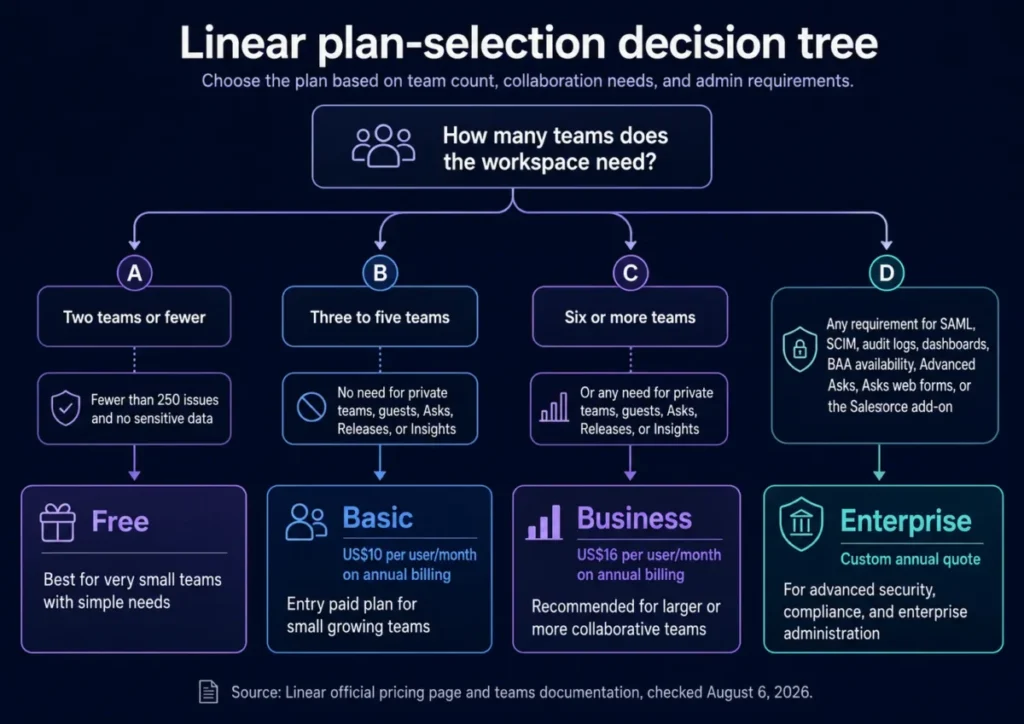
Read that as four routes rather than four price points. Two teams or fewer fits Free, three to five teams fits Basic, a sixth team or any collaboration control moves the answer to Business, and a single governance requirement moves it to Enterprise regardless of headcount.
Methodology: How This Linear Review Was Built
This review draws on Linear’s official pricing page, product and developer documentation, security and terms pages, the public support contact page, and a US search-results audit of the ten ranking review pages. Pricing, plan limits, and feature gates were checked August 6, 2026.
Linear was assessed against the criteria that decide a work-management purchase: team topology limits, access control, request intake, release coordination, reporting depth, migration fidelity, API capacity, billing mechanics, and the total annual cost at realistic team sizes.
Greater weight went to the factors that change a plan choice or a budget: the first limit that forces an upgrade, capabilities that carry a separate charge, and constraints that would require a workflow redesign after purchase.
Claims that the available evidence did not support were left out. Where Linear’s own documentation disagrees with itself, both values are shown and neither is presented as settled.
What Is Linear?
Linear is a work-management platform built around issues, projects, cycles, and roadmaps for software product teams. The company states that it was founded in 2019 and that the product is purpose-built for software product development, according to Linear’s about page.
The legal provider is Linear Orbit, Inc.
The product sits between a lightweight tracker and a full enterprise portfolio suite. It assumes a team already works in cycles, ships through GitHub, and wants opinionated defaults instead of a configuration project.
The Three Problems Linear Solves Well
A delivery cadence that does not need someone to run it
Cycles are the closest thing Linear has to a sprint, and they are deliberately low-maintenance. Linear’s cycles documentation states that a cycle can be configured from one to eight weeks, repeats automatically, and has upcoming cycles created by the system.
That removes the recurring administrative task that eats a project manager’s Monday. A five-person team can set an interval once and never open cycle settings again.
Cycles are available on every plan, including Free. The constraint is scope rather than tier, and it is covered in the next section.
An engineering loop that closes without a second automation tool
The GitHub integration is the reason many engineering teams pick Linear over a general-purpose tracker. Linear’s GitHub documentation states that the integration links pull requests and commits, applies branch-specific rules, automates issue status changes, and synchronises or imports GitHub Issues.
Status movement is the part that matters commercially. A team that would otherwise buy or build an automation layer to keep tickets aligned with branches gets that behaviour from the native integration.
For teams weighing this against Atlassian, the SaaS CRM Review Jira review covers the equivalent workflow on the other side.
Request intake that stops living in Slack threads
Linear Asks turns inbound requests into tracked work. Linear’s Asks documentation states that Asks is available on Business and Enterprise and routes requests from supported channels into Triage with synchronised conversation context.
The synchronisation is the useful half. A requester keeps talking in the channel they already use while the issue and its comments stay current on the Linear side.
This is a Business-tier capability, not a starter feature. Budgeting Linear as an intake system means budgeting at least $16 per user/month on annual billing.
The Three Problems Linear Creates
Cycles stop at the team boundary
Cycles are scoped to a single team, and Linear’s teams documentation shows no single cycle view spanning more than one team.
For a two-team startup that is invisible. For a VP of Engineering with six squads it is the first real reporting gap.
The workaround is to move cross-team visibility into another layer: shared views, Business-tier Insights, or Enterprise dashboards. None of those is a cycle view, and treating them as equivalent is how buyers end up disappointed in month three.
I would validate cross-team reporting during evaluation rather than after rollout. This is the constraint most competing reviews leave out entirely.
Priority is a fixed five-value scale
Linear’s priority documentation states that the product uses a fixed set of no priority, low, medium, high, and urgent, does not support custom priority values, and points to labels or statuses as the documented workarounds.
Teams arriving from a custom severity model (P0 through P4, or a security-weighted scale) have to remap. That is a migration decision, not a preference, and it affects every saved filter, automation, and report the team rebuilds.
Labels do work. They do not sort, roll up, or display the way a native priority field does.
The reporting layer buyers want sits behind Enterprise
Business includes Insights, per Linear’s pricing page. Dashboards are separate, and Linear’s dashboards documentation states they are Enterprise-only.
Blurring those two is the most common error in the current search results. A leadership team that shortlists Linear for executive reporting is shortlisting the Enterprise tier, which carries a custom annual quote rather than a published price.
Linear Pricing and Plans (Checked August 6, 2026)
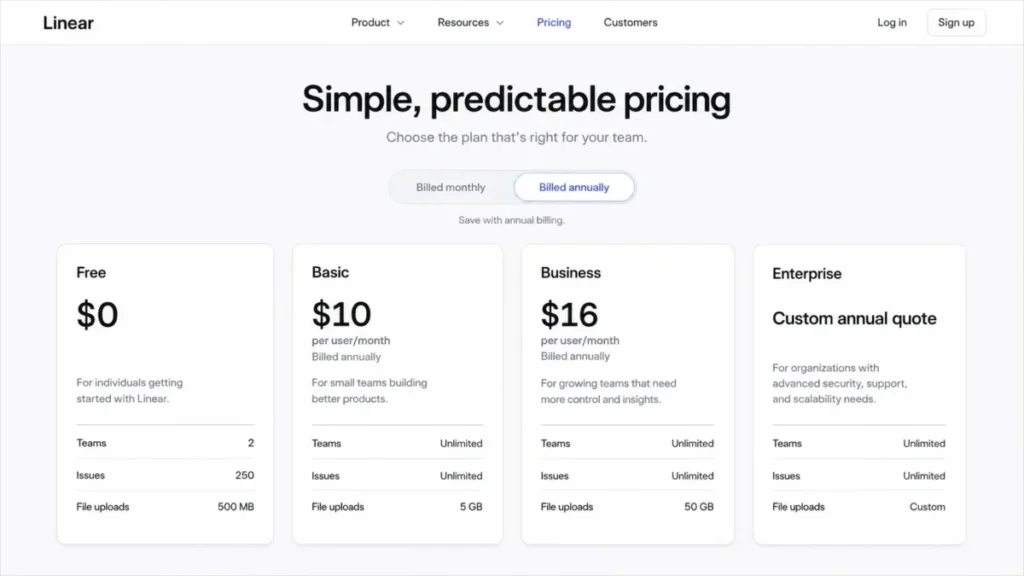
| Plan | Price on annual billing | Teams | Issues | Notable additions |
|---|---|---|---|---|
| Free | $0 | 2 | 250 | Unlimited members, 10 MB file uploads |
| Basic | $10 per user/ | 5 | Unlimited | Unlimited uploads, admin roles |
| Business | $16 per user/ | Unlimited | Unlimited | Private teams, guests, Triage Intelligence, Loops, Code Intelligence beta, Insights, Linear Asks, Zendesk, Intercom |
| Enterprise | Custom annual quote | Unlimited | Unlimited | SAML, SCIM, audit log, dashboards, BAA availability, Advanced Asks, Asks web forms, Salesforce add-on |
Source: Linear official pricing page, checked August 6, 2026. Month-to-month rates were not established from the evidence reviewed and are left out rather than estimated.
Two things in that table decide most purchases. The team count is the first gate a growing org hits, and the Business row holds the capabilities most buyers name as their reason for shortlisting Linear.
What Linear costs at 5, 10, 25, and 50 billed users
| Billed users | Basic per year | Business per year | Business premium |
|---|---|---|---|
| 5 | $600 | $960 | $360 |
| 10 | $1,200 | $1,920 | $720 |
| 25 | $3,000 | $4,800 | $1,800 |
| 50 | $6,000 | $9,600 | $3,600 |
Calculation: billed users multiplied by the annual-effective monthly rate multiplied by 12 months. Inputs from Linear’s official pricing page, checked August 6, 2026.
At 10 users the Business upgrade costs $720 more per year than Basic. That is the number to hold against the alternative, which is running intake in a spreadsheet, releases in a shared doc, and confidential work in a second workspace.
At 50 users the same upgrade costs $3,600 per year. The decision changes shape at that size, because a 50-person org almost certainly needs more than five teams anyway and therefore has no Basic option to compare against.
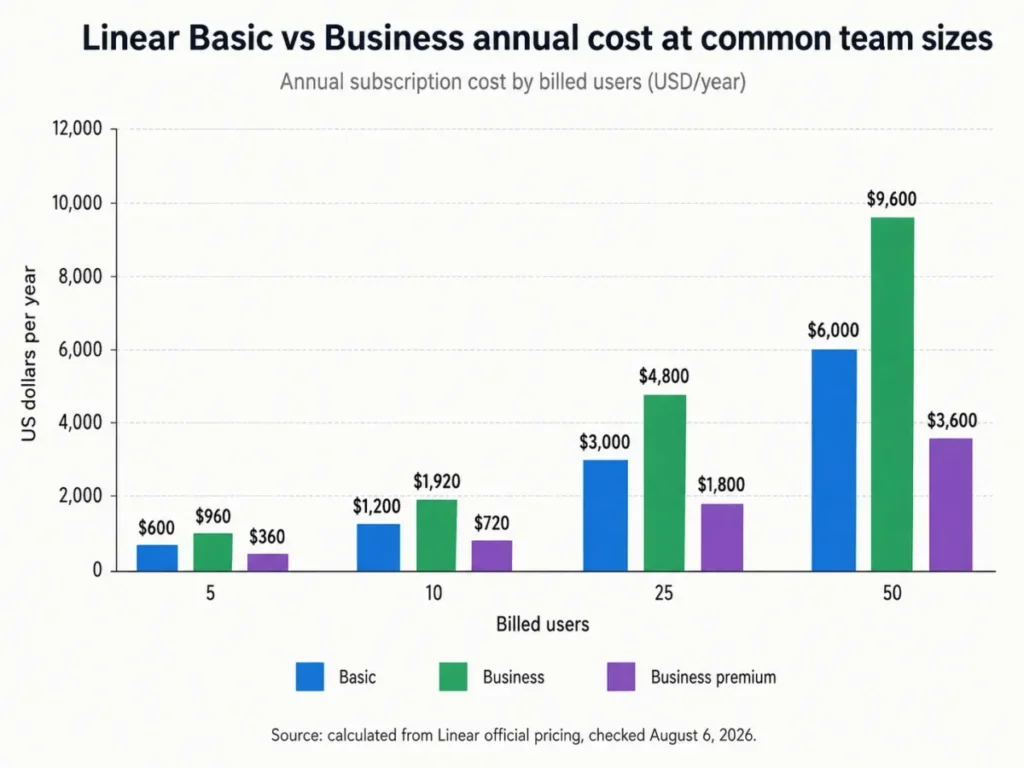
The premium grows in a straight line with headcount, so the upgrade argument gets harder to make on price alone as a team scales. It gets easier to make on process, because the workflows Business adds are the ones that fragment fastest across a larger org.
The costs that do not appear on the plan cards
Guests are billed like members. Linear’s members and roles documentation states that guests are available on Business and Enterprise and are billed as regular members. A contractor with restricted access costs the same $16 per user/month as a staff engineer.
That kills the most common reason buyers move up a tier. Anyone budgeting Linear as a cheap way to bring agencies or clients into the workspace should re-run the seat math before signing.
AI work runs on prepaid credits. Linear’s AI credits documentation states that coding sessions are available on Basic, Business, and Enterprise while Loops are Business and Enterprise, and that usage consumes prepaid workspace AI credits. The same page states that credits require at least a $10 ad-hoc top-up or a $50 auto-reload, expire after 12 months, block new credit-consuming work when depleted, and cover tasks ranging from cents to more than $5 each.
Seat price and AI spend are two separate budget lines. A team running agent work daily can push the variable line past the subscription line, and no seat count predicts it.
The Salesforce connector is a sales-led add-on. Linear’s Salesforce documentation states that the integration is an Enterprise add-on purchased through sales, and no public add-on price was disclosed on the page reviewed. Revenue teams that need product feedback flowing from Salesforce into Linear are looking at two quotes, not one.
Billing mechanics when headcount moves
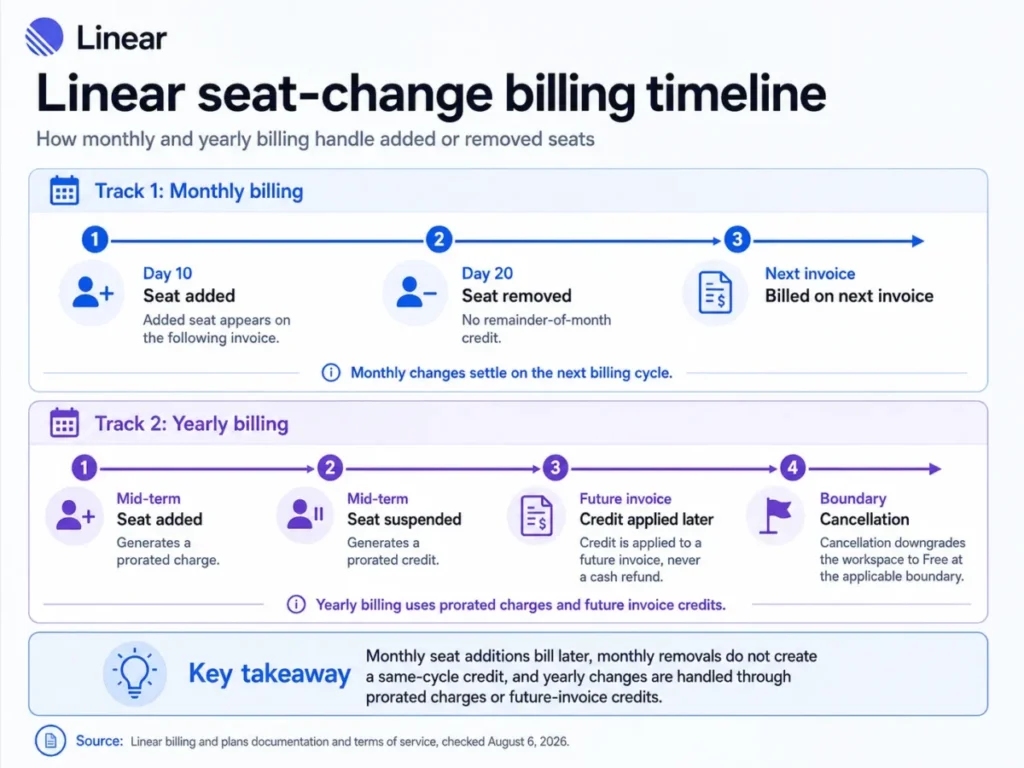
Linear’s billing and plans documentation states that paid workspaces bill unsuspended users and that a subscription applies to one workspace rather than an organisation-wide pool. Companies running several workspaces are running several subscriptions.
On monthly billing, the same page states that added users are charged on the following invoice and that removing a user mid-month does not create a remainder-of-month credit. Monthly billing is elastic upward and sticky downward.
On yearly billing, added users generate prorated charges and suspensions generate prorated credits toward future invoices rather than cash refunds. Linear’s terms of service add that paid obligations are generally non-cancelable and non-refundable, that Linear can change fees, that customers can decline renewal, and that cancellation downgrades a paid workspace to Free at the applicable boundary.
I would model seat volatility before choosing annual billing. A team that expects to shrink recovers credit, not cash.
Feature Gates: What You Get on Each Plan
| Capability | Free | Basic | Business | Enterprise |
|---|---|---|---|---|
| Teams | 2 | 5 | Unlimited | Unlimited |
| Issues | 250 | Unlimited | Unlimited | Unlimited |
| File uploads | 10 MB | Unlimited | Unlimited | Unlimited |
| Admin roles | Every user is an administrator | Included | Included | Included |
| Private teams | Not offered | Not offered | Included | Included |
| Guests | Not offered | Not offered | Billed as regular members | Billed as regular members |
| Linear Asks | Not offered | Not offered | Included | Included |
| Advanced Asks for Slack | Not offered | Not offered | Not offered | Included |
| Asks web forms | Not offered | Not offered | Not offered | Included |
| Releases | Not offered | Not offered | Up to 15 pipelines | Unlimited pipelines |
| Insights | Not offered | Not offered | Included | Included |
| Dashboards | Not offered | Not offered | Not offered | Included |
| AI coding sessions | Not offered | Credit-funded | Credit-funded | Credit-funded |
| Loops | Not offered | Not offered | Credit-funded | Credit-funded |
| Code Intelligence | Not offered | Not offered | Beta, free during beta | Beta, free during beta |
| SAML and SCIM | Not offered | Not offered | Not offered | Included |
| Audit log | Not offered | Not offered | Not offered | 90-day retention |
| BAA availability | Not offered | Not offered | Not offered | Available |
| Salesforce integration | Not offered | Not offered | Not offered | Paid add-on, price not published |
Sources: Linear official pricing page plus the members, teams, releases, Asks, dashboards, audit log, security, Code Intelligence, and Salesforce documentation, checked August 6, 2026.
Read that table as three decisions rather than nineteen rows. Free is a two-team sandbox, Basic is a five-team production plan without collaboration controls, and everything a security or leadership stakeholder asks for lands in the Enterprise column.
Key Features and Where They Stop
Issues, projects, and roadmaps
Issues, projects, and roadmaps are available on every plan, per Linear’s pricing page. This is the layer competing reviews describe well, so I will keep it short.
The relevant constraint is the Free ceiling of 250 issues. The pricing page states the cap without stating what happens at it, so the overflow behaviour is unresolved and should be tested in a disposable workspace before a pilot depends on it.
Cycles
Cycle configuration runs from one to eight weeks with automatic repetition and system-created upcoming cycles. Anything longer than eight weeks belongs in a project or a roadmap rather than a cycle.
The team-scoped limitation described earlier is the practical ceiling here, not the duration range.
Linear Asks and Triage intake
| Intake channel | Minimum plan | Documented behaviour | Constraint to price in |
|---|---|---|---|
| Slack, standard Asks | Business | Creates an issue and routes it to Triage with synchronised conversation | Advanced controls are not included |
| Business | Routes a request into Triage with conversation context | Covered by the same Business gate as Slack | |
| Slack, advanced controls | Enterprise | Private channels, per-channel configuration, multiple Slack workspaces, automatic issue creation from every new message | Requires a custom annual quote |
| Web forms | Enterprise | Creates issues and synchronises follow-up comments by email | Enterprise-only, no lower-tier equivalent |
Sources: Linear Asks, Linear Asks for Slack, and Linear Asks web forms documentation, checked August 6, 2026.
Treating Asks as one feature is the mistake to avoid. An IT or product-operations team that needs private Slack channels, several Slack workspaces, or a public request form is buying Enterprise, not Business.
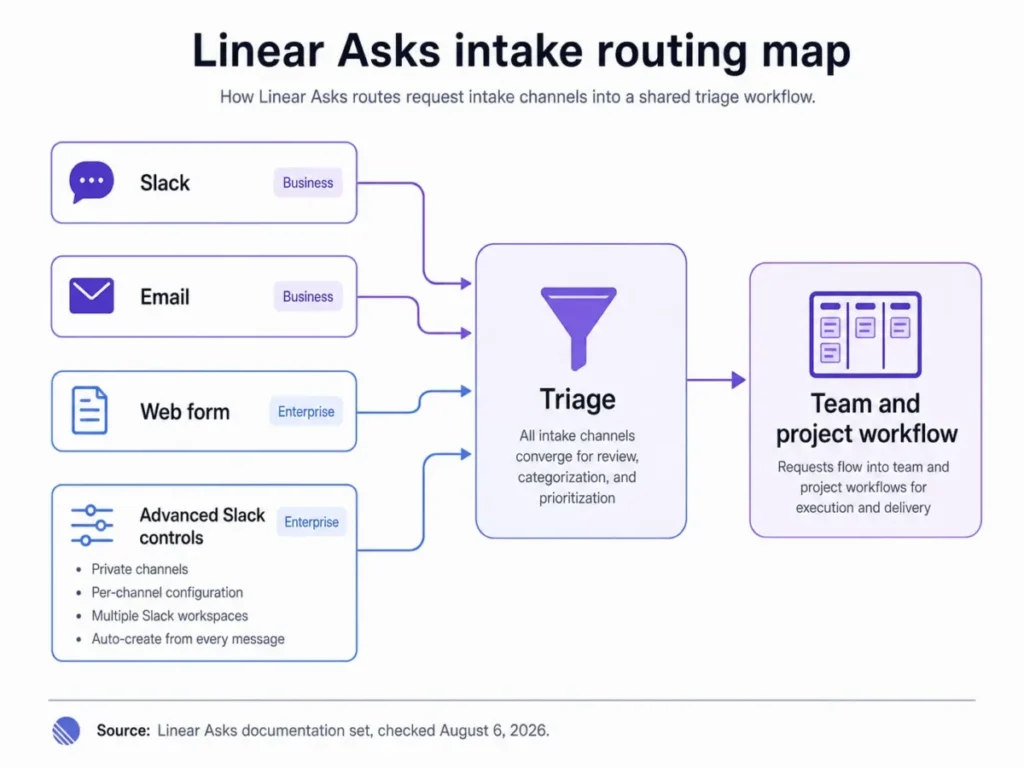
Slack and email intake both arrive with Business, and both stop short of the controls a larger organisation needs. The Enterprise branch is where private channels, several Slack workspaces, and public web forms become available.
Releases
Linear’s releases documentation states that Releases are available on Business and Enterprise, that Business supports up to 15 release pipelines, and that Enterprise supports unlimited pipelines.
Fifteen pipelines covers most single-product companies. A platform org running a pipeline per service, per client, or per regional deployment target will hit that number faster than the seat count suggests.
AI coding sessions, Loops, and Code Intelligence
Coding sessions start at Basic while Loops require Business, and both draw down the same prepaid credit balance. Linear’s Code Intelligence documentation states that the feature is in beta on Business and Enterprise and is free during the beta period.
Free during beta is a temporary state, not a plan feature. I would not build a business case on beta pricing.
Ease of Use and Setup
A greenfield Linear workspace is quick to stand up because the product ships with opinions rather than a configuration wizard. Teams, cycles, statuses, and priorities exist by default, and the fixed priority scale that frustrates migrating teams is the same design choice that removes setup work for new ones.
The friction shows up in three places. Custom severity models need remapping, sub-team structures cannot be targeted directly by an import, and cross-team reporting has to be designed rather than assumed.
Mobile is a companion rather than a second workstation. Linear’s mobile page states that the iOS and Android apps handle issue creation, updates, documents, and notifications.
Migrating to Linear from Jira, Asana, or Shortcut
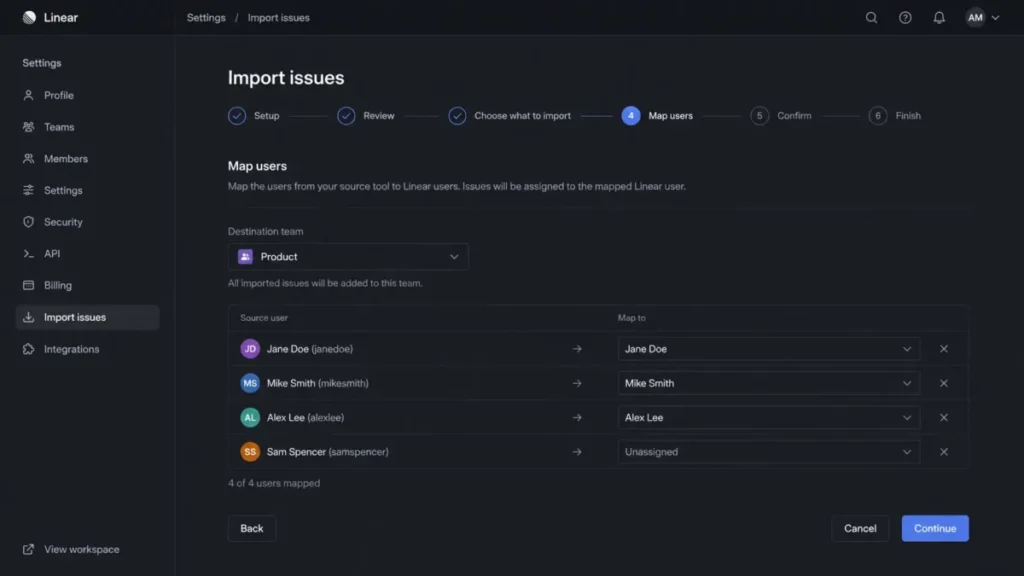
Linear’s import documentation states that issue imports are administrator-only and include native assistants for Jira, GitHub Issues, Asana, Shortcut, and Linear, with CLI or CSV fallback paths. The same page states that imports cannot target a sub-team directly, that some source concepts do not translate one-to-one, and that deletion or rollback is available only for a limited period.
Three of those constraints are project risks rather than inconveniences. Sub-team targeting affects hierarchy, concept translation affects semantics, and the rollback window affects how long the team has to notice a problem.
Export deserves the same attention before cutover. Linear’s export documentation states that administrators can export workspace data, that Enterprise restricts the operation to owners, that emailed export links expire after 12 hours, and that CSV export does not package attachment files.
A migration checklist that reflects those documented limits:
- Confirm administrator access, and owner access on Enterprise, before scheduling the cutover.
- Choose the native assistant for the source system rather than a CSV path where one exists.
- Map users first, then objects, then statuses.
- Remap any custom priority scale to labels or statuses before import, not after.
- Import into the target team directly, because a sub-team cannot be the import destination.
- Reconcile issue counts, project placement, statuses, comments, and links while the rollback window is still open.
- Preserve attachment files separately, since a CSV export will not carry them.
- Download any emailed export within 12 hours or request a new link.
Duplicate handling was not established across every import path in the documentation reviewed, so I would stage the first import in a disposable workspace and reconcile duplicates there. The CRM migration checklist applies the same discipline to revenue systems.
Integrations and Ecosystem
The GitHub integration is the anchor, and Business adds Zendesk and Intercom alongside the Asks intake layer. Salesforce sits outside all of that as an Enterprise add-on bought through sales.
The API is where integration teams need to slow down. Linear’s rate limiting documentation sets out complexity budgets, a maximum single-query complexity of 10,000, and HTTP 400 responses carrying a RATELIMITED code when limits are exceeded.
The same page contradicts itself on the API-key request quota. Its prose states 5,000 requests per hour while its table states 2,500 requests per hour, and nothing on the page resolves which figure governs.
I would not size a production integration against either number until Linear confirms one. Building for 5,000 and receiving 2,500 is a throttling incident on launch day, and if what an API is is a live question for the team, this is not the integration to design without engineering review.
Automation, AI, and Reporting
Automation in Linear is workflow-shaped rather than builder-shaped. Branch rules move issue status, Triage routes intake, and cycles regenerate themselves, which covers a large share of what smaller teams would otherwise automate by hand.
Reporting splits across two tiers, and the split is the single most consequential gate in the product. Insights arrives with Business while dashboards remain Enterprise-only, so a plan chosen for reporting is a plan chosen for a custom quote.
AI capability is gated twice: once by plan and once by balance. Coding sessions need Basic or above, Loops need Business or above, and both stop when the prepaid credit balance reaches zero.
Security, Support, and Admin Controls
Linear’s security documentation states that data is encrypted in transit and at rest and covers GDPR, SOC 2 Type II, and HIPAA support, with a BAA available on Enterprise. Healthcare buyers should read that as an Enterprise requirement rather than a product capability.
Identity controls follow the same pattern. Linear’s SAML and access control documentation places SAML and related access controls on Enterprise.
Linear’s audit log documentation states that audit logs are Enterprise-only and retained for 90 days. Owners reach them through the interface or the API, with webhook and SIEM options.
Ninety days is short for several regulated retention policies. A compliance team that needs a longer window has to export through the API, a webhook, or a SIEM rather than relying on native retention.
Guest permissions carry a subtler risk. The members and roles documentation notes that connected services can expose information beyond a guest’s direct Linear access, which makes integration permissions a separate review step before any external collaborator is invited.
Support is the weakest documented area. Linear’s support contact page offers a contact form and a support email, and the page reviewed publishes no response-time or resolution-time target.
Sentiment about support quality is not a service level. Any buyer whose delivery depends on vendor response should ask for written targets in the order form.
Linear Limitations Buyers Should Price In
No native multi-team cycle view. Cycles are team-scoped, which leaves portfolio-level cadence comparison to another reporting layer. This affects engineering leadership at four or more teams and cannot be resolved by upgrading a plan.
Fixed priority values. The five-value scale has no custom option, and labels or statuses are the documented substitute. Security, support, and compliance teams with an existing severity taxonomy carry the remapping cost.
Guests at full seat price. External collaboration on Business or Enterprise adds full-price seats. A ten-person team working with five agency contractors is a fifteen-seat bill.
Enterprise-gated governance. SAML, SCIM, audit logs, dashboards, BAA availability, Advanced Asks, and Asks web forms all require a custom annual quote. There is no published price to plan against.
AI credits expire and block work. Prepaid credits expire after 12 months and stop new credit-consuming jobs at a zero balance. A team that funds credits once and forgets them can lose unused balance and hit a hard stop mid-sprint.
An unresolved API quota in official documentation. The rate-limit page states 5,000 requests per hour in prose and 2,500 in its table. Integration capacity planning has to wait on vendor confirmation.
Export gaps at cutover. CSV export does not package attachment files and emailed export links expire after 12 hours, so a backup routine built on CSV alone is incomplete.
Linear Pros and Cons
| Pros | Cons |
|---|---|
| Free carries unlimited members rather than a seat cap, so a two-team pilot costs nothing at any headcount | Guests are billed as regular members, so external collaboration carries full seat cost on Business and Enterprise |
| Basic removes the issue and upload ceilings while keeping admin roles, at the cheapest paid step in this category | No native cycle view spans more than one team, which limits portfolio cadence reporting |
| Cycles run from one to eight weeks and regenerate automatically, removing recurring sprint setup | Priority is a fixed five-value scale, with labels or statuses as the only documented workaround |
| The GitHub integration links pull requests and commits, applies branch rules, and moves issue status natively | Dashboards, SAML, SCIM, audit logs, and BAA availability all sit behind a custom Enterprise quote |
| Business adds private teams, guests, Asks, Releases, Insights, and Loops in a single tier step rather than as separate add-ons | AI work runs on prepaid credits that expire after 12 months and block new jobs at a zero balance |
Who Should Use Linear?
Software product teams under five teams that want opinionated defaults. Basic at $10 per user/month on annual billing gives unlimited issues, unlimited uploads, and admin roles, which covers a 5 to 25 person engineering group that ships through GitHub. The roundup of project management tools for developers puts that fit in context.
Cross-functional product organisations that need intake and release structure. Business is the tier where private teams, guests, Asks, Releases, and Insights arrive together, which suits a 20 to 100 person org running requests from support and sales into a product backlog.
Engineering groups already standardised on GitHub. The native branch, commit, and status automation removes a category of glue work that other trackers push into a separate automation tool.
Enterprise software organisations with a governance mandate. SAML, SCIM, audit logs, dashboards, and BAA availability exist, and they exist only on Enterprise, so the requirement and the tier line up cleanly.
Who Should Avoid Linear?
Non-software departments needing configurable forms and custom priority scales. The fixed priority set and the software-shaped object model work against finance, legal, and operations teams that expect general-purpose configuration.
Leadership teams that need portfolio reporting below Enterprise. Dashboards are Enterprise-only, and Insights on Business is a different capability. Anyone shortlisting Linear for executive reporting on a Business budget is shortlisting the wrong tier.
Teams that need one cycle view across several squads. No plan resolves this. It is a product design boundary rather than a gate.
Buyers who need a published support commitment before signing. The public support page carries no response or resolution target, so this has to come from a negotiated agreement or not at all.
Organisations expecting agent usage inside the seat price. Coding sessions and Loops draw down prepaid credits regardless of plan, so heavy AI usage is a separate and variable line item.
Linear Alternatives
| Alternative | Choose it when | Trade-off versus Linear | Pricing status |
|---|---|---|---|
| Jira | Workflows need deep customisation, mature permission models, and a broad reporting ecosystem, or the org is standardised on Atlassian | More configuration overhead and a heavier day-to-day issue experience | Not verified in this review |
| Asana | Work spans marketing, operations, and other non-engineering departments | Weaker native fit for issue, cycle, and GitHub-linked engineering workflows | Not verified in this review |
| Shortcut | A software team prefers a different balance of story hierarchy and product planning | Less integrated intake and release tooling than Linear’s Business tier | Not verified in this review |
| ClickUp | Highly configurable all-department work management and broad native feature breadth matter most | More complexity to configure and govern than Linear’s opinionated model | Not verified in this review |
Pricing for these four sat outside the evidence set for this review, so no figures are quoted here rather than carried over from stale sources.
Current Atlassian numbers sit in the Jira pricing guide.
For the general-purpose options, the Asana review covers cross-department fit and the ClickUp review covers configurability.
Teams weighing a lighter board-first tool should read the Trello review, and teams treating the tracker as part of a docs workspace should read the Notion review.
Jira is the substitute worth taking seriously for a multi-team company with a custom severity model, because it absorbs exactly the two constraints Linear does not bend on. Smaller groups weighing lighter options should look at project management tools for small teams and agile project management tools before defaulting to either.
Final Verdict: Is Linear Worth It in 2026?
Linear is worth it for software product teams that fit its shape, and it is a poor fit for organisations that need to reshape it. That distinction matters more than any feature count.
For a 5 to 25 person engineering group inside five teams, Basic at $600 to $3,000 per year is strong value and I would start there. The upgrade trigger is topology, not headcount: a sixth team, a private workstream, an external collaborator, or a request queue moves the answer to Business.
For a 20 to 100 person product organisation, Business is the honest recommendation rather than the upsell. At 10 users the premium is $720 per year and at 25 users it is $1,800, which is modest against the process fragmentation of running intake and releases outside the tool.
For regulated or centrally managed enterprises, the answer is Enterprise or nothing, because SAML, SCIM, audit logs, dashboards, and BAA availability have no lower-tier equivalent. Those buyers need a written quote, a support commitment in the order form, and a resolution to the API quota discrepancy before integration design starts.
I would skip Linear entirely in three situations: a mandatory custom priority taxonomy, a requirement for one cycle view across several teams, and a general-purpose work-management need spanning non-software departments. In those cases the constraint is structural, and a heavier tool is the cheaper answer.
The decision chain here runs in one line. The official documentation shows a supported feature set that stops at documented plan gates.
Each gate carries a workflow consequence for a named buyer. A sixth team blocks Basic, an external collaborator adds a full-price seat, and an audit requirement blocks everything below Enterprise.
Because each of those trade-offs lands on a different team, I recommend the plan that clears the first gate the buyer will hit rather than the cheapest one, and I would choose Business by default for any org past five teams.
Before renewal, a Linear buyer should be able to state which team crossed the plan gate, what the AI credit spend was over the last three months, and whether the reporting question was solved inside the product or outside it. If those three answers are unclear at month twelve, the plan choice was wrong rather than the product.
Frequently Asked Questions
How much does Linear cost per user?
Linear lists Basic at $10 per user/month and Business at $16 per user/month on annual billing, checked August 6, 2026. Free costs $0 with limits of 2 teams and 250 issues.
Enterprise uses a custom annual quote with no published figure. Month-to-month rates were not established from the official evidence reviewed here.
Is Linear free to use?
Yes, Linear offers a Free plan at $0 with unlimited members, 2 teams, 250 issues, and 10 MB file uploads. Every user on Free holds administrator rights, which makes it a sandbox rather than a governed pilot.
The pricing page does not state what happens once the 250-issue ceiling is reached.
What is the difference between Linear Basic and Business?
Basic caps the workspace at five teams and covers issues, projects, cycles, and admin roles. Business removes the team cap and adds private teams, guests, Linear Asks, Releases, Insights, Loops, Code Intelligence beta, Zendesk, and Intercom.
The gap costs $6 per user/month more on annual billing, which is $720 per year at 10 users.
Does Linear support guests?
Guests are available on Business and Enterprise, and Linear’s members and roles documentation states they are billed as regular members. Guest access is restricted, but connected services can expose information beyond a guest’s direct access, so integration permissions need a separate review before external collaborators are invited into a workspace.
Can Linear import Jira issues?
Yes. Linear provides administrator-only native import assistants for Jira, GitHub Issues, Asana, Shortcut, and Linear, plus CLI and CSV fallback paths.
Imports cannot target a sub-team directly, some source concepts do not translate one-to-one, and rollback is available only for a limited period, so reconcile counts and placement early.
Does Linear have SAML SSO?
SAML and related access controls are Enterprise features, alongside SCIM provisioning. There is no lower-tier equivalent, so any organisation with a mandatory single sign-on policy is buying Enterprise at a custom annual quote.
Audit logs sit in the same tier with 90-day retention available to workspace owners.
What are Linear AI credits?
AI credits are a prepaid workspace balance that funds coding sessions on Basic and above and Loops on Business and above. Credits require at least a $10 ad-hoc top-up or a $50 auto-reload, expire after 12 months, and block new credit-consuming work at a zero balance.
Individual tasks range from cents to more than $5.
What is Linear’s API rate limit?
Linear documents complexity budgets, a maximum single-query complexity of 10,000, and HTTP 400 responses carrying a RATELIMITED code. The API-key request quota is unsettled: the same page states 5,000 requests per hour in prose and 2,500 in its table.
Confirm the governing figure with Linear before production capacity planning.
Does Linear have a mobile app?
Linear offers iOS and Android apps that handle issue creation, updates, documents, and notifications. Treat them as companions to the desktop and web experience rather than replacements, since the planning, reporting, and administration work described throughout this review lives in the full application.
What are the main limitations of Linear?
The recurring ones are a team-scoped cycle view with no native cross-team equivalent, a fixed five-value priority scale, and dashboards and identity controls restricted to Enterprise.
The rest are commercial: guests billed at full member rates, prepaid AI credits that expire and block work, no published support response target, and a CSV export that excludes attachment files.