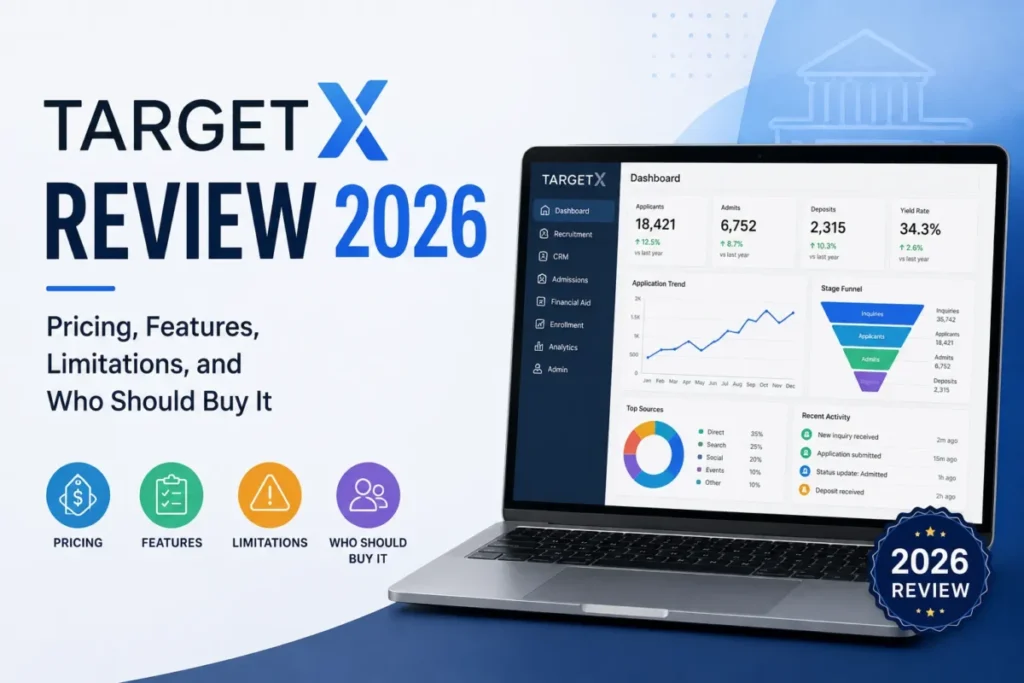
TargetX is a higher-education CRM built on Salesforce, and that architecture settles most of the buying question before the first demo. It is a defensible shortlist candidate for an admissions operation that already governs a Salesforce org and staffs an administrator who can own permissions, package upgrades, and integration sequencing.
It is the wrong purchase for a small office that expects a turnkey product, a published price, or a mobile-first application reader.
Pricing is the first obstacle. TargetX publishes no numeric US list price on its official product page and routes buyers into a demo request, so module cost, the Salesforce license mix, and implementation fees all arrive together inside one custom quote.
This TargetX review maps the license gates by workflow, the operational limits that stop a campaign, the migration sequence that silently drops records, and the security work that stays with the institution. If the category shortlist is still open, start with the higher education CRM roundup, or brush up on what CRM software does before the vendor call.
In This Article (16 sections)
Quick Verdict: TargetX at a Glance
| Category | Verdict |
|---|---|
| Best for | Admissions and enrollment teams of roughly 8 to 25 people already governed on Salesforce with dedicated admin capacity |
| Not ideal for | Small admissions offices with no Salesforce administrator, and buyers who need a published price before vendor contact |
| Starting price | Not publicly disclosed. Custom institutional quote through a demo request |
| Best practical plan | No universal plan exists. The buyable unit is a module and Salesforce license mix built role by role |
| Free plan or trial | Not published on the official product page. The documented buying path is a scoped demo |
| Setup difficulty | High. Portal security, permission sets, ETL sequencing, and package upgrades are institution-owned |
| Main strength | Recruitment, applications, review, events, and retention share one Salesforce data environment |
| Main limitation | A source report above 100,000 rows blocks a communication send outright, even when the recipient count is far lower |
| Best alternative | Slate by Technolutions for institutions that do not want the Salesforce role and package model |
Source: official TargetX product documentation and Liaison help-center pages linked throughout this review. Checked: 2026-08-04.
What Is TargetX?
TargetX is a student-lifecycle CRM for colleges and universities, covering recruitment, admissions, engagement, application review, events, and retention.
It is a Liaison International company. Liaison announced the acquisition on October 5, 2020, which matters because part of the public review record predates that change of ownership.
The product is actively maintained. TargetX publishes 2026 release notes, including May and July updates, and the release page states a triannual cadence on the first Tuesday of February, May, and November beginning in 2025, with additional releases possible.
That cadence correction matters for a maintenance calendar. Older service-level wording describing monthly package updates no longer matches the release page, so administrators should plan three scheduled package reviews a year rather than twelve.
How We Reviewed TargetX
This analysis is based on official TargetX and Liaison product pages, the Liaison help center, the published service-level agreement, release notes, Salesforce licensing documentation, app-store listings, and attributable third-party review evidence. Documentation and pricing status were checked on 2026-08-04.
TargetX was assessed against the same buyer criteria applied to every higher-education CRM covered on this site: workflow fit, license and feature gates, documented operational limits, migration behavior, security configuration ownership, support scope, and cost transparency.
Greater weight went to the factors that change a purchase decision rather than a feature list. Those are the license each workflow requires, the documented limit that stops a live campaign, and the configuration work that stays with the institution after go-live.
Claims that reliable evidence did not support were excluded rather than hedged. Vendor positioning, documented product behavior, and attributable reviewer opinion are labeled separately throughout the article.
The full standard is published in the SaaS CRM Review methodology.
Stage One: Setup, Licensing, and the First Real Cost Decision
Setup difficulty is high, and almost none of that difficulty is the TargetX interface. It is Salesforce governance.
The decisive document is the licensing matrix, because it defines which Salesforce license each TargetX workflow needs. Configuration and administration functions sit on Enterprise, while several operational functions run on the cheaper Platform Starter license.
Source: official TargetX functionality and Salesforce licensing. Checked: 2026-08-04.
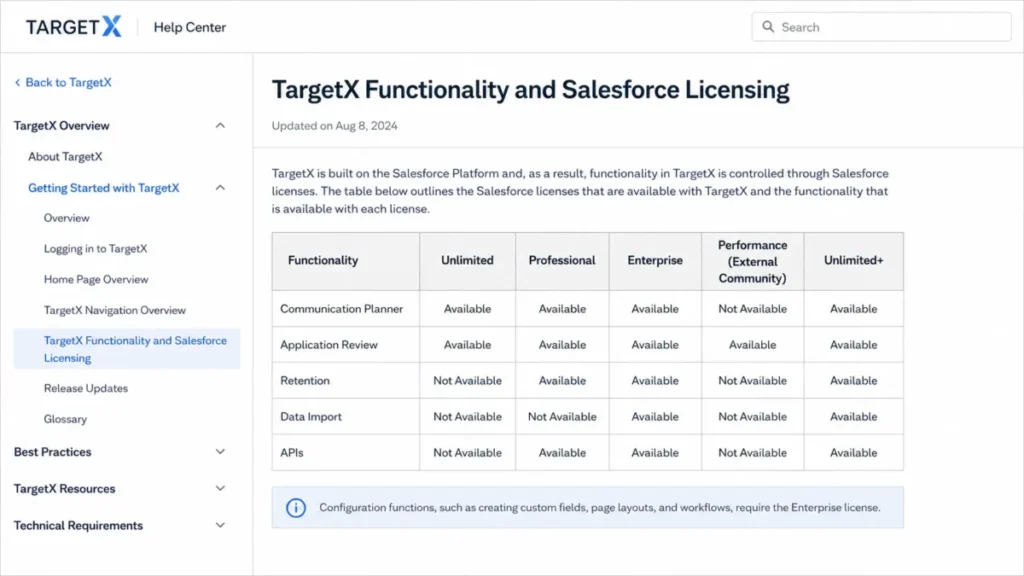
The table below restates that documentation in buyer terms, so the licensing decision can be read without opening the help center.
Feature Gates: What Each Salesforce License Buys
| Workflow | Enterprise or Unlimited | Platform Starter | Customer Community | What a lower license cannot do |
|---|---|---|---|---|
| Communication Planner email and SMS | Documented | Documented | Not applicable | Nothing gated between these two staff licenses |
| Legacy TargetX Email campaign creation | Documented | Not documented | Not applicable | Campaign creation is unavailable on Platform Starter |
| Online Application configuration and checklists | Documented | Documented | Not applicable | Configuration work needs a staff license, not a portal license |
| Applicant submission through the portal | Not applicable | Not applicable | Documented | Applicants cannot submit without the community license |
| Application Review configuration and routing rules | Documented | Not documented | Not applicable | Platform Starter users cannot build or administer routing |
| Reviewing and scoring applications | Documented | Documented | Not applicable | Nothing gated between these two staff licenses |
| Retention and faculty-alert administration | Documented | Not documented | Not applicable | Operational users cannot administer alerts or retention setup |
| Data Import Wizard and Informatica ETL configuration | Documented | Not documented | Not applicable | Migration and SIS integration work is blocked below Enterprise |
| REST, SOAP, Bulk, and Streaming APIs | Documented | Documented | Not applicable | Nothing gated between these two staff licenses |
| Duplicate rules, workflow config, SSO, sandbox, security admin | Documented | Not documented | Not applicable | Platform governance is blocked below Enterprise |
| Letters and mail merge | Limited to purchased TargetX licenses | Limited to purchased TargetX licenses | Not applicable | Access stops at the number of TargetX licenses bought |
Source: official TargetX functionality and Salesforce licensing documentation. Checked: 2026-08-04.
Read that table as an org chart, not a feature list. A five-person office and a twenty-five-person office face the same Enterprise threshold, because the gate follows the administrative task rather than headcount.
The practical consequence is a two-tier staffing model. One or two Enterprise-licensed administrators own routing rules, retention setup, imports, duplicate rules, SSO, sandboxes, and security, while reviewers, recruiters, and student-success staff can work on the cheaper Platform Starter license.
Applicants sit outside both. Portal submission is documented against a Customer Community license, so the applicant experience is a separate purchased line rather than a bundled extra.
Where the Implementation Time Actually Goes
Inquiry forms are the clearest example of institution-owned setup. The documented process requires a public site, guest-user controls, a generated permission set, sharing rules, CAPTCHA, and field mapping before a form can go live.
One detail in that page deserves a change-management rule. Regenerating the permission set overwrites prior modifications, so any custom permission work applied after the first generation is lost on the next regeneration.
I would put permission changes under version control before the first form ships. A before-and-after permission diff, a reapplication step for approved customizations, and a portal access test belong in the launch checklist rather than in a post-incident review.
Application forms carry their own publish discipline. The documented workflow is to open Form Builder, save and publish, preview the result, and use form history to restore a prior version as a draft before republishing, with test records requiring Application Stage set to In Progress.
That restore path is the rollback plan. An institution that documents it before the application cycle opens has a recovery route when a live form change goes wrong at the worst possible moment.
Setup Difficulty, Learning Curve, and Who Finds It Hard
Setup difficulty is high, and the learning curve splits by role rather than by seniority. A recruiter learning campaign steps and a reviewer learning the review tab both face a normal software onboarding.
The administrator faces something else. Public sites, guest-user controls, permission sets, sharing rules, duplicate rules, sandboxes, SSO, and ETL sequencing are all Salesforce disciplines, and the licensing documentation puts every one of them behind Enterprise.
Training resources exist for the first group. On-demand material, consultative support, train-the-trainer options, Liaison Academy, and implementation services are documented on the official support and training page.
Training does not solve the second group. An institution without an administrator is not short of documentation; it is short of a person with the permissions and the time, which is a hiring or partner decision rather than a course.
Two questions predict how the first 90 days go. Who holds the Enterprise seat that owns configuration, and who covers that role when the person is on leave during application season.
Stage Two: Running Recruitment Workflows Day to Day
The module set is broad, and the interesting part is not what each module claims. It is where the documented workflow stops and hands the job back to a Salesforce administrator.
Communication Planner: Campaign Architecture With a Report Dependency
Communication Planner builds email and SMS journeys as campaigns, tracks, and steps. Salesforce holds the campaign data and image assets, while documented campaign execution happens outside the Salesforce scope.
That boundary decides who a team calls when a send misbehaves. Configuration questions route to the Salesforce administrator, while delivery behavior sits with the execution layer, and a support ticket written without that distinction wastes a day.
Two structural rules shape journey design. A track step can hold multiple emails but only one SMS element, and every recipient in the track comes from the same source report.
The single-SMS constraint is a design limit rather than a defect. A two-text sequence needs a second step, so a yield campaign with heavy texting turns into a longer track than most planning documents assume.
Online Application and the Applicant Portal
The application module covers form building, fee and deposit collection, document intake, and applicant checklists, with staff configuration on a standard license and applicant submission on a community license. Source: official TargetX functionality and Salesforce licensing documentation.
An attributable TrustRadius reviewer names the email platform and the online application as the two strongest parts of the product. That is user opinion rather than a product measurement, and it lines up with the depth of the documentation behind both modules.
Application Review: The Role Split That Changes the Quote
Application Review is where the license model gets financially interesting. Configuration and routing rules require Enterprise, while reviewing and scoring are documented for Enterprise and Platform Starter users, so a large reader pool does not need the expensive license.
Source: official TargetX functionality and Salesforce licensing documentation. Checked: 2026-08-04.
Manual assignment runs from the Application Review tab. A manager selects review records and sets an owner, review type, start date, and due date, and automated assignment requires Salesforce Flow.
Source: official assigning application reviews. Checked: 2026-08-04.
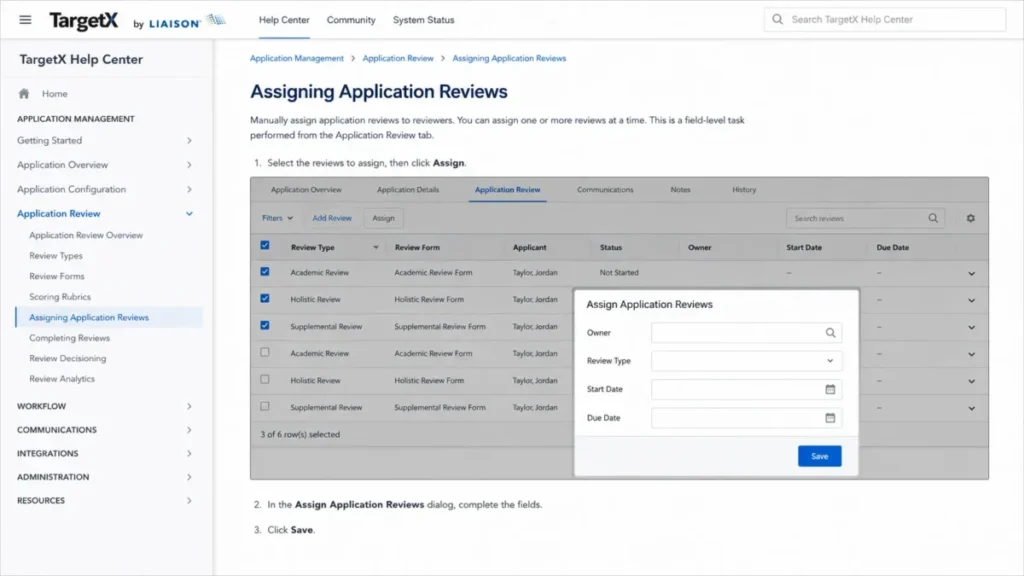
Automated routing is therefore a Salesforce build, not a checkbox. A committee that expects rules-based distribution on day one should budget administrator design time in the implementation plan.
Two documented constraints hit reviewers directly. Application Review is not supported in Salesforce1, and unsupported or invalid attachments can block reading or document download, with remediation that involves identifying or deleting the bad attachment and correcting ordering configuration.
Source: official Application Review tool documentation and the common error resolution page. Checked: 2026-08-04.
Committee throughput depends on both. A file-type validation step before routing, plus an exception queue for broken attachments, prevents a reader from losing an afternoon to a document that will not open.
Events: A Small Sequence Rule Worth Knowing
Event setup collects name, description, type, category, owner, color, dates, timezone, and preferences, and the event-specific registration URL becomes available only after the event is saved and reopened.
That single step causes avoidable panic during a launch week. The URL is not missing; the record has not been reopened yet.
Creating an Event record outside the supported Events interface can produce a null-pointer error, and the documented fix is to create the event through the Salesforce Events UI.
So event creation belongs to one path only. Automation that inserts Event records directly is a documented failure mode rather than a shortcut.
Integrations, APIs, and Automation
Salesforce REST, SOAP, Bulk, and Streaming APIs are documented for Enterprise and Platform Starter users, which keeps integration work available without forcing every developer onto the top license. Source: official TargetX functionality and Salesforce licensing documentation.
Checked: 2026-08-04.
TargetX documents ecosystem data-loading paths from the Common Application, Liaison CAS products, and ApplyTexas into Engage, and SIS exchange runs through Informatica task flows and Salesforce APIs. If the integration vocabulary is new to the committee, the primer on CRM integration basics is a faster briefing than a vendor call.
Automation and reporting follow the same license logic as everything else. Workflow configuration, duplicate rules, SSO, sandbox management, and core security administration are documented as Enterprise-only functions, so the automation roadmap is gated by who holds that license rather than by the module list.
One integration risk comes from user evidence rather than documentation. A TrustRadius reviewer reports that the custom TargetX data model can make some Salesforce AppExchange tools difficult to use, which is an opinion about that reviewer’s stack and not a universal product behavior.
I would treat that as a sandbox question, not a dealbreaker. Testing the institution’s actual AppExchange apps against TargetX objects and relationships before signature is cheaper than discovering the friction during implementation.
Automation and Reporting: Gated by License, Not by Module
Automation in TargetX is Salesforce automation, which is good news and bad news in the same sentence. The good news is depth, because Flow, duplicate rules, and workflow configuration are mature platform tools rather than a thin proprietary rules engine.
The bad news is access. Workflow configuration, duplicate rules, SSO, sandbox management, and core security administration are documented as Enterprise-only functions, so the automation roadmap belongs to whoever holds that license.
Reporting sits in the same place. Reports and dashboards are Salesforce objects, and the source report is also the input that drives campaign recipients, which is why reporting hygiene and communication reliability are the same project here rather than two.
That coupling is the part most feature comparisons miss. A messy report library in a Salesforce-based CRM is not only a reporting problem; it is the thing that fails a send at the ceiling described in the next section.
Stage Three: What Breaks at Scale
Nothing here is exotic. These are documented ceilings that a growing enrollment operation meets on a normal Tuesday.
The 100,000-Row Communication Block
Beginning June 24, 2026, TargetX communication tools block a send when the source report contains more than 100,000 rows, even when the final recipient count is lower, and the documented outcome is a Failed status with error code 7015 plus an administrator alert.
The trap is the unit. A campaign team that suppresses down to 30,000 recipients still fails if the underlying report returns 120,000 rows, because the ceiling applies to the source report rather than the audience.
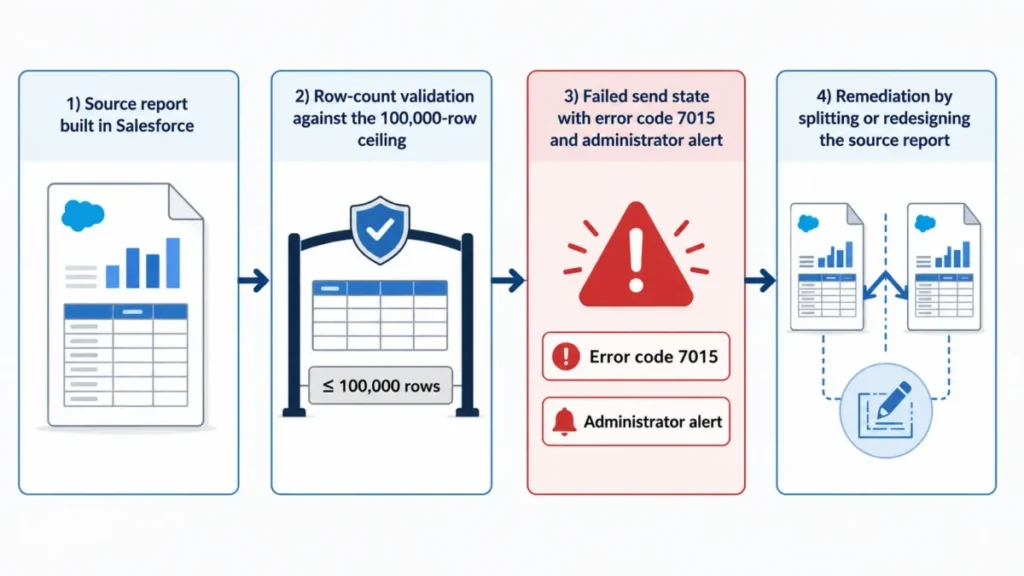
The workaround is report segmentation by term, population, or program, applied to every recurring campaign rather than to one broken send. An institution that cannot split those reports should treat this as a disqualifier and not a configuration inconvenience.
The Limits Table Buyers Should Take Into the Demo
| Limit | Documented value | Scope | Reset | Behavior at the ceiling |
|---|---|---|---|---|
| Communication source-report ceiling | 100,000 rows | TargetX email, Communication Planner email and SMS, TX Apps SMS, TX Print | Per send | Blocked. Failed status, error code 7015, administrator alert |
| Salesforce list-email recipients | 200 contacts or campaign members | Enterprise and Platform Starter | Per list email | Send is prevented above the ceiling |
| Salesforce list-email daily volume | 5,000 emails across users | Enterprise and Platform Starter | Per day | Overflow behavior is not documented on the reviewed page |
| Communication Planner SMS per track step | 1 SMS element | Eligible Communication Planner licenses | Per track step | Add another step or redesign the journey |
| Salesforce API allowance in the vendor example | 40,000 calls | Illustrative example org, not a universal TargetX cap | Rolling 24 hours | Further calls are blocked until usage rolls off |
Source: official TargetX licensing documentation, the send-limit technical alert, the campaign creation page, and the API calls and limits FAQ. Checked: 2026-08-04.
Two rows in that table are routinely misread. Salesforce list email and TargetX communication tools are different channels with different ceilings, and using the wrong one caps a recruitment send at 200 recipients for no good reason.
The API number is the other one. The 40,000-call figure appears in the vendor FAQ as an example of a Salesforce org limit, so an integration architect should size against the institution’s own Salesforce entitlement rather than against that number.
Migration: The Contact-First Rule That Decides Data Completeness
The documented CRM export sequence requires Contact v2 to run first so later objects can resolve Contact IDs, and applications or related records without the required Contact association are not included in the export output.
Read that second clause slowly. Orphaned records do not throw an error that stops the job; they simply do not appear in the file, which is the quietest kind of data loss.
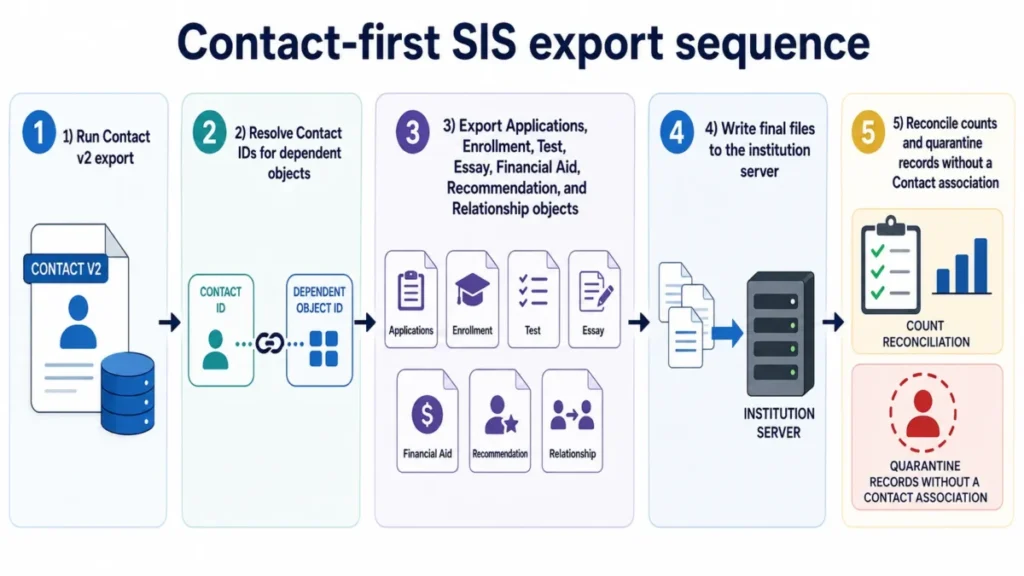
Import and export files remain on the institution’s server, and Informatica stores task metadata rather than the data files. Source: official Informatica FAQ.
Checked: 2026-08-04.
| Data type | Documented export coverage | Institution action before cutover |
|---|---|---|
| Contact records | Documented as the first export in the sequence | Run first and reconcile the count against the source system |
| Applications, Enrollment, Test, Essay | Documented in the configured export set | Verify Contact association on every record |
| Financial Aid, Recommendation, Relationship | Documented in the configured export set | Sample-check dependent lookups after the Contact run |
| Records with no Contact association | Excluded from export output | Quarantine and remediate before cutover, not after |
| Attachments, notes, activity history | Not established in the reviewed documentation | Scope separately with the vendor in a written migration statement |
| Automation and configuration | Rebuilt rather than migrated | Budget administrator time to recreate rules and flows |
A migration proof-of-concept is the only honest way to close the bottom two rows. The CRM migration checklist covers the reconciliation pattern, and the wider sequencing work sits in the CRM implementation guide.
The Pricing Math Nobody Publishes
TargetX does not publish a numeric US list price on its official product page and uses a request-a-demo sales path. The Salesforce AppExchange listing identifies TargetX as a paid app without a public numeric price.
So the honest answer to the cost question is a method, not a number. No defensible total cost of ownership can be calculated for a five, ten, or fifty-user scenario, because module pricing, the Salesforce license mix, implementation fees, integration scope, support options, and renewal terms are all undisclosed in the reviewed official sources.
The Cost Components a Quote Must Break Out
| Cost component | Public price | What it depends on |
|---|---|---|
| TargetX modules | Not disclosed | Which of recruitment, applications, review, events, and retention are in scope |
| Salesforce license mix | Not disclosed | Role-by-role split across Enterprise or Unlimited, Platform Starter, and Customer Community |
| Purchased TargetX licenses | Not disclosed | Letter and mail-merge access is limited to the number of TargetX licenses bought |
| Implementation and services | Not disclosed | Statement of work, responsibilities, acceptance criteria, training, and integrations |
| Maintenance and package upgrades | Not disclosed | Internal administrator or partner labor to keep managed packages in supported versions |
Source: official TargetX functionality and Salesforce licensing documentation, plus the official TargetX description of services page covering implementation responsibilities, acceptance, and training scope.
The Salesforce line is the one finance teams underestimate. Capability changes with the license, so an institution that maps roles late usually discovers the gap after the module price is already agreed, and the Salesforce pricing guide is worth reading before that conversation.
Upgrade Triggers: What Forces the Quote Upward
Five documented requirements push a role onto Enterprise, and each one is a budget event rather than a preference.
- Application Review administration. Building routing rules, rather than only reviewing and scoring, requires Enterprise.
- Retention administration. Administering retention workflows and faculty alerts requires Enterprise, even when operational staff work on Platform Starter.
- Data integration administration. Data Import Wizard and Informatica ETL configuration are documented as Enterprise-only functions.
- Platform governance. Duplicate rules, workflow configuration, SSO, sandbox management, and major security administration require Enterprise.
- Letter and mail-merge scale. Access is capped at the number of purchased TargetX licenses, so adding letter producers means buying licenses.
Source: official TargetX functionality and Salesforce licensing documentation. Checked: 2026-08-04.
The Quote Checklist I Would Send Before the Second Call
A vendor conversation without these line items produces a number that cannot be compared to a competing bid.
- Module scope and the price for each module in the proposed bundle.
- Salesforce license type and count for every named role, including applicants.
- Purchased TargetX license count, tied to who produces letters.
- One-time implementation fee, with responsibilities and acceptance criteria.
- Informatica and integration setup cost, including SIS endpoints in scope.
- Support tier and any services package cost, with what each includes.
- Data migration scope by object, and who pays for the proof-of-concept.
- Renewal uplift terms and the written three-year total.
That list is the decision asset for this purchase. Any institution that receives all eight answers in writing can compare TargetX against a competing bid honestly, and any institution that cannot get them should treat the gap as information about the negotiation ahead.
Security, Support, and Admin Controls
Liaison International states that it completed a SOC 2 Type II review, and the reviewed page does not establish the exact TargetX product-system scope of that report.
A company-level assurance statement is not a product certification. IT should request the current report under NDA and confirm in writing that the TargetX production system is inside its scope, along with the report period and any exceptions.
Portal security is the sharper issue, because the documentation is explicit about institution-side work. Standard Salesforce pages can remain reachable in a community when a user alters the URL, unless the institution applies the documented metadata, layout, list-view, and search-layout restrictions.
That is a configuration responsibility, not a reported breach. It belongs on the pre-launch checklist for any applicant portal, alongside guest-user controls and the documented requirement for phishing-resistant multi-factor authentication for privileged Salesforce users.
| Support area | Documented position | Who owns the work |
|---|---|---|
| Case channels | User community, email, or phone | Institution opens the case |
| Initial response | Targets of 2, 4, 12, or 24 support hours by severity | Vendor, as an initial response rather than a fix |
| Resolution time | Not published in the reviewed service-level agreement | Request the current contract commitment in writing |
| Third-party apps and custom code | Outside normal support scope | Institution or its implementation partner |
| Product versions older than 12 months | Outside normal active support scope | Institution must stay current |
| Code fixes in managed packages | Cannot be pushed to the institution | Institution performs the package upgrade |
Source: official TargetX service level agreement and the support and training page. Checked: 2026-08-04.
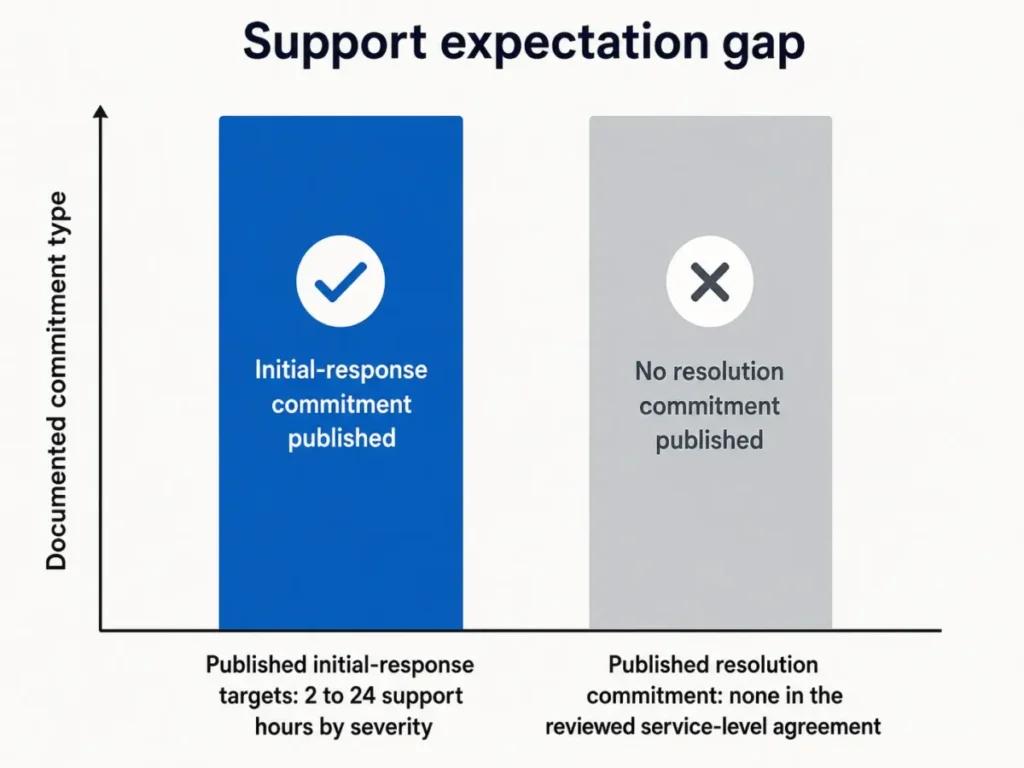
The gap between those two bars is the procurement question. An acknowledgment inside four hours is not service restoration, and the version rule turns package currency into a support prerequisite rather than an optional housekeeping task.
Training is available through on-demand resources, consultative support, train-the-trainer options, Liaison Academy, and implementation services. That answers the resource question but not the staffing question, which is who owns configuration after go-live.
TargetX Pros and Cons
| Pros | Cons |
|---|---|
| Recruitment, applications, review, events, and retention share one Salesforce data environment | No public price, so budget planning cannot start without a vendor conversation |
| Reviewers and student-success staff can work on the cheaper Platform Starter license | Configuration, routing, imports, and security administration all require Enterprise |
| Documented data-loading paths from the Common Application, Liaison CAS products, and ApplyTexas | A source report above 100,000 rows blocks a communication send with error 7015 |
| Actively maintained, with 2026 release notes and a published triannual release cadence | Application Review is not supported in Salesforce1, so reviewers stay on desktop |
| Documented export sequence and file-location boundary for SIS work | Code fixes arrive only when the institution upgrades the managed package |
| Reviewers name the email platform and online application as the strongest modules | Portal page restrictions and permission-set regeneration are institution-owned risks |
Source: official TargetX documentation cited throughout this review, plus attributable TrustRadius reviewer commentary. Checked: 2026-08-04.
TargetX Limitations Worth Naming Before a Demo
Six limitations show up in the documentation rather than in the sales conversation, and each one changes an operating decision.
Opaque total cost. Module price, license mix, services, and renewal terms are all quote-only, which makes early budget approval a negotiation rather than a calculation.
License fragmentation. The same team needs Enterprise for administration, Platform Starter for operations, and Customer Community for applicants, so the purchase is three decisions rather than one.
The 100,000-row send ceiling. The block follows source-report rows, not final recipients, and it fails a send outright rather than trimming it.
Managed-package maintenance. Push updates are not available for managed packages, so a code fix depends on an institution-scheduled upgrade, and versions older than 12 months fall outside normal active support.
Mobile coverage is workflow-specific. TargetX-developed iOS apps exist in the US App Store for student-facing use, while Application Review is documented as unsupported in Salesforce1, and a universal Android staff experience is not established in the reviewed sources.
Institution-owned security configuration. Community page restrictions, guest-user controls, permission sets, and sharing rules stay with the institution, which is normal for Salesforce and still real work.
Source: official TargetX and Liaison documentation cited throughout this review, plus the Schools App and UChat by TargetX listings in the Apple App Store for the United States. Checked: 2026-08-04.
One older criticism deserves a dated qualification. A TrustRadius reviewer reported that support quality declined after the Liaison acquisition and raised interface, native SMS, print, and AppExchange compatibility concerns, while the 2026 release notes include an SMS Inbox update.
I would not call the SMS complaint resolved on release notes alone. I would ask for a scoped demo of the current messaging workflow and judge it against the reviewer’s specific objection.
Who Should Use TargetX
Salesforce-governed admissions teams of roughly 8 to 25 people. An established administrator, documented release management, and integration ownership turn the platform’s demands into routine work rather than emergencies.
Multi-department enrollment organizations. An institution that needs recruitment communications, application collection, structured review, events, and retention inside one data environment gets real value from the shared object model.
Teams that can segment large communications. A campaign operation that already splits source reports by term, program, or population never meets the 100,000-row ceiling in production.
Institutions committed to the Salesforce ecosystem. If the platform strategy is already Salesforce, the prebuilt higher-education workflows are worth more than a generic build, and the Salesforce CRM review covers the underlying platform trade-offs.
Who Should Avoid TargetX
Admissions offices with no Salesforce administrator. Configuration, portal security, migration sequencing, and package upgrades all require skills and permissions the office does not have, and support scope excludes custom work.
Buyers who need published pricing. An institution whose process requires per-seat or package prices before vendor contact cannot start here.
Teams that need a mobile-first application reader. Application Review is documented as unsupported in Salesforce1, so a committee expecting phone-based reading should disqualify the product early.
Campaign teams with unsegmentable report volume. An operation that routinely sends from one source report above 100,000 rows and cannot split it will hit a hard block.
Institutions with no migration proof budget. Contact-first sequencing, object coverage, and orphan reconciliation need a test run, and skipping it moves the risk to cutover week.
The Buyer Risk Ledger
Five risks decide whether this purchase works, and each one has a mitigation that belongs in the contract rather than in the implementation retrospective.
| Risk | Buyer consequence | Mitigation before signature |
|---|---|---|
| Opaque total cost | Budget approval stalls, or the number moves after the module price is agreed | Written quote covering modules, licenses, services, integration, and renewal uplift |
| Salesforce license fragmentation | Staff are licensed for the wrong tasks and configuration stalls | Role-by-role licensing workshop mapped against the workflow table above |
| Communication source-report ceiling | A time-sensitive recruitment send fails outright at the ceiling | Segmentation standard for every recurring campaign, agreed before go-live |
| Managed-package maintenance | A code fix waits for an institution-scheduled upgrade | Named administrator, upgrade calendar, and version currency in the operating plan |
| Institution-owned security configuration | Portal pages or permissions are exposed by misconfiguration | Portal restriction review and a permission diff step in the launch checklist |
Source: official TargetX documentation cited throughout this review. Checked: 2026-08-04.
None of those five is a reason to disqualify TargetX on its own. All five together describe an institution that needs an owner, a calendar, and a written quote before it needs a demo.
TargetX Alternatives
| Alternative | Better for | Why choose it instead |
|---|---|---|
| Slate by Technolutions | Institutions that want a higher-education-native admissions platform | Avoids the Salesforce role, license, and managed-package model entirely |
| Element451 | Teams prioritizing a different implementation and engagement model | Different setup profile for offices without deep platform administration |
| Salesforce Education Cloud | Institutions building a broader Salesforce-native strategy | More architectural freedom when the institution wants to design its own solution |
Comparative pricing and current feature parity for these three were not researched in this review, so treat the table as a direction for the shortlist rather than a scored comparison. Deeper coverage sits in the Slate by Technolutions review and the Element451 review.
Choose TargetX if Salesforce alignment is a strategic requirement and the documented lifecycle workflows justify the administrative load. Choose a higher-education-native platform if the institution wants fewer platform dependencies and less package maintenance.
Final Verdict: Is TargetX Worth It in 2026?
TargetX is worth shortlisting for an institution that already governs Salesforce, staffs an administrator, and needs recruitment, applications, review, events, and retention in one place. The product is active, the documentation is unusually specific about its own limits, and the license model lets a large reader pool work on a cheaper seat.
It is not worth shortlisting for an office without platform administration capacity, because every decisive configuration task lives behind an Enterprise license and an administrator’s calendar.
There is no best-value plan to recommend, and naming one would be invention. The buyable unit is the smallest module and license bundle that survives a role-by-role workflow matrix, which is why the quote checklist above matters more than a plan name.
Five things belong in the process before signature: a licensing workshop that maps every role, a migration proof-of-concept that tests Contact-first sequencing, a portal security review, a sandbox compatibility test for existing AppExchange apps, and a written three-year cost schedule.
After 30 days, the institution should have a working communication segmentation standard and a named administrator with a backup. After 90 days, application review throughput and SIS reconciliation should be routine, and if they are not, the problem is staffing rather than software.
The renewal question is simple. If nobody can name the administrator who owns package upgrades a year from now, the platform will drift out of supported versions before the next admissions cycle ends.
FAQ
How much does TargetX cost?
TargetX does not publish a US list price. The official product page routes buyers to a demo request, and the AppExchange listing confirms it is a paid app without a public number.
Total cost also depends on the Salesforce license mix, implementation, integration work, and support options, so the only real answer comes from a written quote.
Is TargetX built on Salesforce?
Yes. TargetX is a Salesforce-based application, which means Salesforce licensing, permissions, sandboxes, and managed-package upgrades are part of the purchase rather than optional extras.
Access to individual TargetX workflows depends on which Salesforce license each staff member holds.
Who owns TargetX?
Liaison International. The acquisition was announced on October 5, 2020, which is worth knowing because a portion of the public review record was written before that ownership change and may not describe the product as it ships in 2026.
What Salesforce licenses does TargetX require?
It depends on the role. Configuration and administration functions, including Application Review routing, retention administration, data import, workflows, SSO, sandboxes, and security, are documented for Enterprise or Unlimited.
Reviewing, scoring, and many operational workflows also run on Platform Starter, and applicant portal submission uses a Customer Community license.
Does TargetX have a mobile app?
Partly. TargetX-developed iOS apps are listed in the US App Store for student-facing use, but Application Review is documented as unsupported in Salesforce1, and a universal Android staff experience is not established in the reviewed sources.
Treat mobile as workflow-specific rather than as a yes or no answer.
What are TargetX’s email limits?
Two different ceilings apply. Salesforce list email is capped at 200 contacts or campaign members per send and 5,000 emails per day across users, while TargetX communication tools block a send when the source report exceeds 100,000 rows, returning a Failed status with error code 7015.
Why did my TargetX send fail with error 7015?
The source report was too large. Since June 24, 2026, a report above 100,000 rows blocks the send even when the final recipient list is much smaller, because the ceiling counts report rows rather than recipients.
Splitting the report by term, program, or population is the documented path forward.
Can TargetX integrate with an SIS?
Yes, through Informatica task flows and Salesforce APIs, with documented export objects covering Contact, Application, Enrollment, Test, Essay, Financial Aid, Recommendation, and Relationship. The critical rule is sequencing: Contact runs first, and records without a Contact association are left out of the export entirely.
Is TargetX good for a small admissions office?
No, unless that office has Salesforce administration capacity or a funded implementation partner. Team size is not the real threshold.
The Enterprise-only administration functions mean even a five-person office needs someone who can own permissions, routing rules, imports, and package upgrades.
Is TargetX worth it in 2026?
Yes, if the institution is committed to Salesforce, can staff an administrator, and can segment large communication reports. No, if the office needs published pricing, a mobile application reader, or a platform that runs without dedicated administration.
The decision rests on operating model, not on feature count.