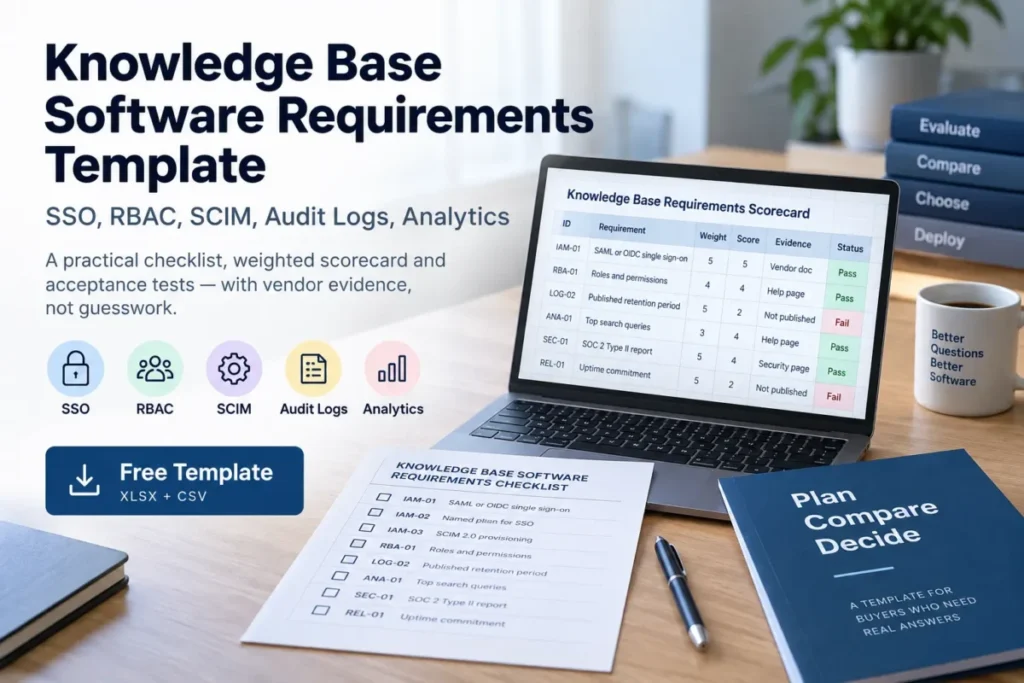
Most knowledge base requirements documents fail in the same place. They demand “99.9% uptime” and “90-day log retention” without checking whether the platforms on the shortlist publish either number.
Several publish neither. Two of the eight platforms checked for this template disclaim availability outright in their own terms.
This page carries the requirement set, the weighted scorecard, the acceptance tests, and the part competing templates leave out: what eight knowledge base platforms actually publish, by plan, with the pages that prove it.
Last verified: 9 September 2026. Every vendor fact below was read from that vendor’s own documentation or legal pages on that date. Evaluation method: documentation-based, following the published review methodology.
In This Article (20 sections)
Quick Copy: The 18-Point Knowledge Base Requirements Checklist
Paste this into your requirements document, your ticket tracker, or the vendor’s response form. Each item carries a stable ID so answers stay traceable through the evaluation.
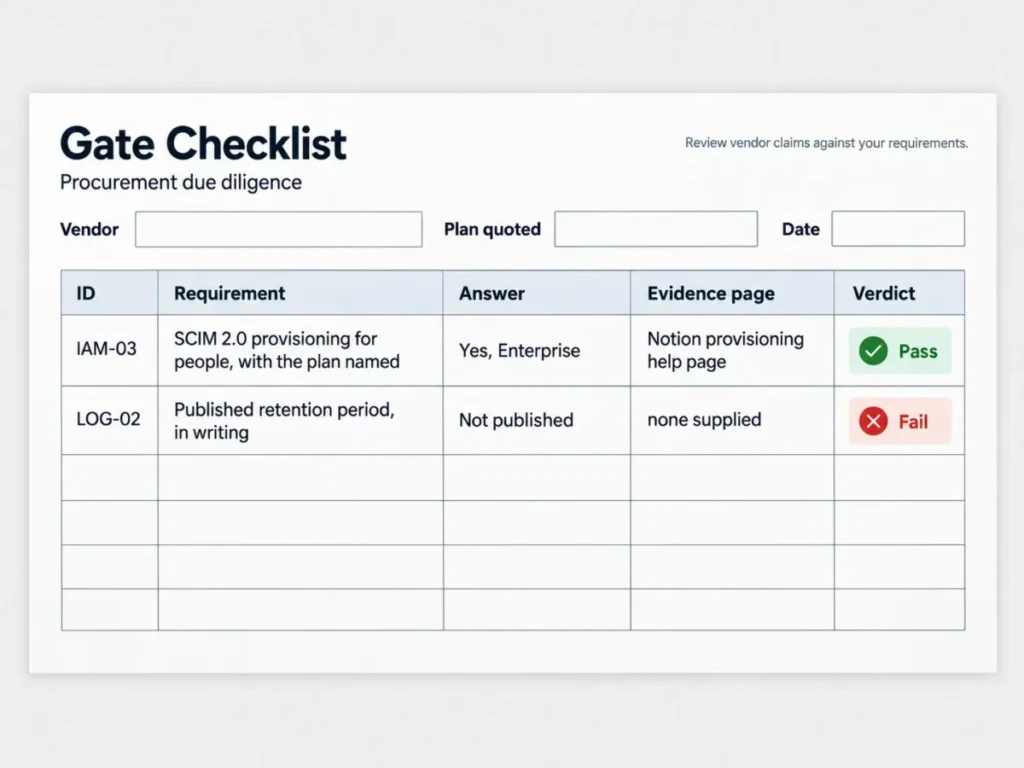
KNOWLEDGE BASE SOFTWARE REQUIREMENTS: GATE CHECKLIST
Vendor: ____________________  Plan quoted: ____________________  Date: __________

IDENTITY AND ACCESS
[ ] IAM-01  SAML or OIDC single sign-on, SP-initiated and IdP-initiated
[ ] IAM-02  Named plan on which SSO is first available (not "enterprise tier, ask us")
[ ] IAM-03  SCIM 2.0 provisioning for people, with the plan named
[ ] IAM-04  SCIM group sync mapped to permission groups
[ ] IAM-05  Automatic deprovisioning on IdP deactivation, with a stated lag

ACCESS CONTROL
[ ] RBA-01  Roles at viewer, editor, publisher and admin granularity
[ ] RBA-02  Content-scoped permissions by space, folder or category
[ ] RBA-03  Content admin separated from system admin

LOGGING AND EVIDENCE
[ ] LOG-01  Login, content change, permission change and admin action all logged
[ ] LOG-02  Published retention period, in writing, not "contact sales"
[ ] LOG-03  Export or API access to the log, format stated
[ ] LOG-04  Logs immutable to tenant admins

INSIGHT
[ ] ANA-01  Top search queries reported
[ ] ANA-02  Zero-result searches reported as a distinct metric
[ ] AIR-01  AI answers cite the source article, and customer content is excluded
            from model training by written contract

ASSURANCE
[ ] SEC-01  Current SOC 2 Type II report, released under NDA
[ ] SEC-02  Data residency region available on the plan being quoted
[ ] REL-01  A numeric uptime commitment in the contract, with service credits

REJECT RULE: any unanswered gate item ends the evaluation for that vendor
until it is answered in writing. "Available on request" is not an answer.
Download the Full Scorecard
The block above is the gate list. The full requirement set runs to 49 items across the same ID families, and both formats below carry all of them, with no form and no email address to hand over.
- Requirements scorecard as a spreadsheet: three sheets with working formulas. Enter a score against each requirement and the gate sheet returns REJECT the moment a Must-have falls below 3, whatever the weighted total says. The second sheet switches between the enterprise and SMB weightings from a single cell.
- Requirements scorecard as a CSV: the same 49 rows in plain text, for import into a ticket tracker, a procurement system or your own sheet.
The spreadsheet is worth opening before the first vendor call for one reason. Fill in a plausible evaluation and it will hand you a 4.15 weighted score sitting next to a REJECT verdict, which is the failure mode this whole document exists to catch.
Requirements Template or Article Template: Which One You Need
Two different documents share the phrase “knowledge base template”, and searching for one returns the other.
A requirements template, which is this page, is a procurement document. You send it to vendors, they answer it, and the answers decide the purchase.
An article template is a content format: the skeleton of a how-to, an FAQ entry or a troubleshooting guide that writers fill in after the platform is bought. If that is what you came for, the platform decision comes first, and how to choose knowledge base software covers that path.
The rest of this page assumes you are buying, not writing.
How to Use This Checklist
The use case is a knowledge base selection where security or compliance holds a veto. The required input is your identity provider, your regulatory driver and your residency obligation, because those three decide which requirements become gates.
The example output is a filled scorecard carrying one of four verdicts, and a worked one sits further down this page.
- Fill in Step 1 before contacting any vendor, since requirements written after a demo describe the demo.
- Mark every requirement Must, Should, Could or Won’t. Only Must items act as gates.
- Send the gate checklist first, as a written question set. Score nothing until answers arrive.
- Score the survivors on the weighted matrix in Step 3, using published evidence only.
- Work through the acceptance tests in Step 5 during the trial. A vendor answer the trial contradicts is overridden by the trial.
- Apply the decision rules in Step 7, and customize the weights first if your team is under fifty people.
- Log the page behind every answer, with the date, because plan gating changes and a scorecard without evidence cannot be defended at renewal.
The common error is treating the weighted average as the decision. A weighted average hides a single fatal gap, and that is why the gate list sits above the score rather than inside it.
This tool workflow behaves the same whether you apply it in the spreadsheet above or in your own procurement system, provided every answer keeps the vendor page it came from.
Step 1: Define the Goal, the Users, and the Reject Conditions
| Field | What to record |
|---|---|
| Business problem | The failure this purchase removes |
| Primary audience | Internal staff, customers, developers or mixed |
| Article count | At launch, and projected after twelve months |
| People | Authors, reviewers and administrators |
| Identity provider | The provider already in use |
| Regulatory driver | Name the standard that applies, or none |
| Data residency | The region your obligation requires |
| Commercials | Budget owner and renewal date |
| Hard reject conditions | The answers that end the evaluation |
The last row does more work than the rest combined. Write the conditions that end an evaluation before you see a demo: no provisioning on the plan you can afford, no published retention, no European region, no export path.
Vendors are good at making a missing capability feel like a roadmap detail. A reject condition written in advance is what stops that conversation.
Step 2: Separate Must-Have From Nice-to-Have Requirements
This is the requirements template itself. Copy the tables, adjust the MoSCoW column to your own risk position, and delete nothing without recording why.
Identity and Access
| Requirement | MoSCoW | Notes |
|---|---|---|
| SSO via SAML or OIDC | Must | Both SP-initiated and IdP-initiated |
| Plan on which SSO first appears | Must | Named in writing before quote |
| MFA enforced at the identity provider | Must | The platform must not bypass it |
| Configurable session timeout | Should | Fifteen minutes to eight hours |
| SCIM user provisioning | Must | Name the plan |
| SCIM group sync | Should | Needed if permissions are group-based |
| Automatic deprovisioning | Must | Record the observed lag, not the target |
SAML and OIDC are not interchangeable in practice, even where both appear on a feature list. The OASIS SAML Core specification defines the layer most enterprise identity providers still use for web SSO.
The OpenID Connect Core specification describes itself differently, as “a simple identity layer on top of the OAuth 2.0 protocol”.
Ask which one the platform implements for your flow, rather than accepting “SSO supported”.
RBAC and Content Permissions
| Requirement | MoSCoW | Notes |
|---|---|---|
| Viewer, editor, publisher and admin roles | Must | |
| Content-scoped permissions | Must | By space, folder or category |
| Content admin separate from system admin | Should | |
| Group-based assignment | Should | Scales; user-based does not |
| Custom roles | Could |
Group-based assignment is the row that decides admin cost at year two. User-based exceptions work as exceptions and collapse as a model.
SCIM Provisioning
| Requirement | MoSCoW | Notes |
|---|---|---|
| Create user on group membership | Must | |
| Revoke access on removal or deactivation | Must | |
| Group membership reflected in permissions | Should | |
| Attribute mapping for department or role | Should | |
| Provisioning failures logged and alerted | Should |
Cite the right document when this reaches an RFP, because SCIM 2.0 is three specifications rather than one. The SCIM core schema RFC defines the user, group and attribute model.
The SCIM protocol RFC defines the HTTP API a vendor implements.
Requirements about attributes belong to the first document, and requirements about endpoints belong to the second.
Audit Logging
| Requirement | MoSCoW | Notes |
|---|---|---|
| Authentication events | Must | Login, logout, failed login |
| Content create, update, delete, publish | Must | |
| Permission and role change events | Must | |
| Admin and settings changes | Must | |
| Published retention period | Must | See the retention note below |
| Export in JSON or CSV | Must | |
| Log streaming to a SIEM | Should | |
| Logs immutable to tenant admins | Must |
The retention row is where most requirements documents state something untrue. Neither of the two assurance frameworks buyers cite prescribes a log retention period.
The AICPA trust services criteria are criteria-based rather than prescriptive. The ISO information security standard’s logging control requires that logs be produced, protected and analysed, without naming a duration.
Source: official standards documentation, read 9 September 2026. The framework that does name a figure is the PCI DSS log retention requirement, at twelve months of history with three months immediately available.
NIST guidance on log management leaves the period to the organisation’s own risk analysis.
Set your number from your own regulatory driver, then test it against what vendors publish. The matrix in Step 6 shows that range running from indefinite to nothing at all.
Analytics and Search Insight
| Requirement | MoSCoW | Notes |
|---|---|---|
| Top search queries | Must | |
| Zero-result searches as a distinct metric | Must | Catches content gaps, not search bugs |
| Article views and performance | Must | |
| Reader feedback or ratings | Should | |
| Deflection measurement | Should | Define the denominator before requiring it |
| API access to analytics | Should | Needed if it feeds a BI dashboard |
Zero-result reporting deserves gate status rather than preference status. It is the only metric that reveals what readers wanted and did not get, and three of the eight platforms checked document no failed-search view at all.
AI and Retrieval Requirements
| Requirement | MoSCoW | Notes |
|---|---|---|
| AI answers cite the source article | Must | With a link the reader can open |
| Answers restricted to your content | Must | No open-web fallback without disclosure |
| Customer content excluded from model training | Must | In the contract, not the FAQ |
| Behaviour when confidence is low | Should | Decline or hand off rather than guess |
| AI answer volume and outcome reported | Should | Separate from article views |
| Human review before publish | Should |
Every knowledge base now ships an answer layer, and almost no requirements template has caught up. Settle the training-rights question in writing first, because it is a contract term rather than a settings toggle and it is close to impossible to renegotiate after migration.
Compliance and Governance
| Requirement | MoSCoW | Notes |
|---|---|---|
| Current SOC 2 Type II report | Must | A report, not a certificate |
| ISO information security certificate, with scope | Should | Ask for the statement of applicability |
| Data processing agreement | Must | |
| Data residency region | Must or Should | Per your obligation |
| Subprocessor list with change notice | Should | |
| Breach notification window | Must | Contractual, see below |
Source: official standards and regulatory pages, read 9 September 2026. Two corrections belong in this section before it reaches a vendor.
A Type II examination is an attestation report produced by a CPA firm, covering a period of operating effectiveness. The correct request is therefore the report itself under NDA rather than a certificate, per AICPA guidance on service organisation reports.
The seventy-two hour figure copied into most templates is also not a vendor obligation. Under the European breach notification article, a controller notifies the supervisory authority “not later than 72 hours after having become aware of it”.
A processor notifies the controller “without undue delay”, with no hour count attached.
Your vendor is the processor. A fixed window has to be written into the contract, because the regulation does not supply one, and the same regulation is what makes the data processing agreement mandatory in the first place.
Integrations and API
| Requirement | MoSCoW | Notes |
|---|---|---|
| REST API with published reference | Must | |
| Documented rate limits | Must | Ask before designing against it |
| Webhooks for content and user events | Should | |
| Ticketing integration | Should | Zendesk, Freshdesk, ServiceNow |
| Chat or in-product widget | Could | |
| SIEM log streaming | Should | Splunk, Datadog, Sentinel |
| Sandbox environment | Should |
Content Lifecycle, Accessibility and UX
| Requirement | MoSCoW | Notes |
|---|---|---|
| Version history with restore | Must | |
| Draft, review, publish workflow | Should | |
| Localisation and translation workflow | Should or Could | |
| Accessibility conformance | Must | Name two versions, see below |
| Accessibility conformance report | Must | Naming the version actually assessed |
| Search quality: typo tolerance, synonyms | Must | |
| Scheduled publish and unpublish | Could |
Name two accessibility versions rather than one. Source: the W3C Recommendation and the federal rule, both read 9 September 2026.
WCAG 2.2 became a W3C Recommendation in December 2024 and is the current target, and the W3C states that its publication “does not deprecate or supersede WCAG 2.0 or WCAG 2.1”. The 2024 Department of Justice rule for public entities requires the earlier version specifically, so bound organisations need it named in the contract.
The safe language asks for the current WCAG Recommendation as the target, and for the version named in the federal accessibility rule as the floor.
Ask for a conformance report stating which one was assessed.
Performance, Reliability and SLA
| Requirement | MoSCoW | Notes |
|---|---|---|
| Numeric uptime commitment | Must | With service credits |
| Public status page and incident history | Should | |
| Search latency target | Should | |
| Geographic redundancy | Could | |
| Documented incident response process | Must |
Translate the percentage before requiring it. Buyers routinely treat the common tiers as equivalent, and they are not.
| Uptime commitment | Allowed downtime per 30-day month | Allowed downtime per year |
|---|---|---|
| 99.9% | 43.2 minutes | 8.76 hours |
| 99.95% | 21.6 minutes | 4.38 hours |
| 99.99% | 4.32 minutes | 52.56 minutes |
Source: the commitment this table is calibrated against, read 9 September 2026. See the Atlassian cloud service level agreement, which publishes a separate figure for two tiers. The minutes are derived by multiplying the unavailable fraction by 43,200 minutes in a 30-day month and 525,600 in a 365-day year.
Step 3: Score Vendors With the Weighted Matrix
Score every surviving vendor on the same seven categories, using published evidence rather than demo impressions. The scale runs 0 to 5: 0 not supported, 1 roadmap only, 2 partial, 3 meets the requirement, 4 exceeds it, 5 strongest on the shortlist.
| Category | Enterprise weight | SMB weight | Score 0-5 | Weighted |
|---|---|---|---|---|
| Identity and access | 25% | 15% | ||
| Audit logging and evidence | 20% | 10% | ||
| Compliance and residency | 20% | 10% | ||
| Analytics and AI insight | 10% | 15% | ||
| Integrations and API | 10% | 15% | ||
| Content lifecycle and UX | 10% | 25% | ||
| Performance and reliability | 5% | 10% |
Two rules make the total mean something. A Must-have failure rejects the vendor whatever the weighted score says, and a category scored on a vendor’s word rather than a published page is capped at 3.
Thresholds: 4.2 and above proceeds to contract, 3.5 to 4.1 proceeds to a second trial round on the weak category, below 3.0 is rejected.
These tables run to six columns. On a narrow screen the sensible mobile strategy is horizontal scroll with the first column pinned, so the requirement stays visible while the answer columns move.
Step 4: Compare Pricing, Plan Gates, and Hidden Costs
Knowledge base budgets rarely break through the seat price. They break through the plan gate, where a capability you already marked Must-have turns out to sit two tiers above the plan you were quoted, or behind a separately priced add-on.
| Cost line | What to ask for | Why it moves the number |
|---|---|---|
| Seat price on the qualifying plan | Written quote naming the plan | The entry plan is rarely the qualifying plan |
| Add-on subscriptions | Are identity features sold separately | An add-on prices separately from the tier |
| Reader seats | Are read-only users billed | Customer-facing bases scale here |
| Storage and attachments | Overage rate | |
| AI answer usage | Unit and included allowance | The least predictable line |
| Sandbox environment | Included or extra | |
| Renewal uplift cap | A percentage in the contract | Absent by default |
| Exit cost | Export format and assistance | Decides whether the next migration is possible |
Two of the eight platforms in Step 6 gate identity capabilities in a way a per-seat comparison hides. One sells single sign-on, provisioning and audit logging through a separately priced security subscription rather than through its own plan ladder.
Another opens single sign-on one tier below provisioning, audit logs, analytics and residency. A company that qualifies on sign-on alone is still one tier short of everything else on the gate list.
Step 5: Run the Acceptance Tests in a Trial
Each test below is pass or fail, executed inside your own trial tenant against your own identity provider. A result here overrides any answer on a vendor response form.
SSO and Session Tests
- SP-initiated login redirects, authenticates and returns a working session.
- IdP-initiated login from the provider portal reaches the knowledge base directly.
- MFA enforced at the provider is not bypassed by the platform.
- Session timeout triggers re-authentication at the configured interval.
- An invalid or expired assertion produces a clear error rather than a blank page.
RBAC Tests
- A viewer assigned to one space cannot edit inside it.
- An editor can edit and cannot publish.
- A user scoped to one space cannot reach another by direct URL. Check the URL, not the navigation menu.
- A content admin cannot change system settings.
SCIM Tests
- Adding a user to the mapped group creates the account, and the lag is recorded.
- Removing the user revokes access, and the lag is recorded.
- Changing an attribute updates the profile.
- A new group appears with its permissions attached.
- A deliberately malformed attribute produces a logged, alerted failure rather than silence.
Audit Log Tests
- Login, article creation, edit, deletion and a permission change each appear as distinct entries.
- The export contains the same events the interface shows, in the stated format.
- A tenant admin attempting to delete an entry is refused, and the attempt is itself logged.
- The oldest available entry matches the published retention period.
Analytics and AI Tests
- A trial search appears in the query report.
- A search for a term with no matching article appears in the zero-result report.
- An AI answer cites the article behind it, and the citation opens the right page.
- A question your content cannot answer produces a decline or a handoff rather than an invented answer.
- The analytics export matches the interface figures for the same period.
Step 6: What Eight Knowledge Base Platforms Actually Publish
Every value below was read from the vendor’s own help centre, documentation or legal pages on 9 September 2026. “Not published” means the vendor’s own pages state no figure, which is a finding rather than a gap in research.
“Not stated” means the capability is documented but its plan gating is not.
Identity, Provisioning and Audit Logs
| Platform | SSO first available on | SCIM 2.0 | Audit log available on | Published retention | Log export |
|---|---|---|---|---|---|
| Zendesk | All Suite plans | Yes, plan not stated | Enterprise only | Saved indefinitely | API |
| Freshworks | Not stated | Via provisioning apps, plan not stated | Enterprise or Forest only | Not published | API on Freshservice |
| Intercom | Expert plan | Yes, group sync and deprovisioning | All plans | One year in interface, older via API | API and CSV |
| Document360 | Not stated | Yes, group sync and deprovisioning | Not stated | Not published | CSV |
| Guru | Not stated, role-gated | Yes, group sync and deprovisioning | Asserted on the pricing page only | Not published | Not documented |
| Confluence Cloud | Security add-on required | Yes, add-on required | Security add-on or an Enterprise plan | 180 days | API and CSV |
| Notion | Business plan | Enterprise plan | Enterprise plan | 365 days | CSV and SIEM webhook |
| Help Scout | Pro plan | Not supported | Not documented | Not published | Not documented |
Source: official vendor documentation, read 9 September 2026. See Zendesk SSO options and the Zendesk audit log API reference.
Also Freshservice audit log documentation and Freshdesk audit log documentation.
Also Intercom SAML documentation and Intercom activity log documentation.
Also Document360 provisioning documentation and Guru SSO and provisioning setup.
Also Atlassian audit log documentation and Atlassian user provisioning documentation.
Also Notion audit log documentation and Notion provisioning documentation.
Also Help Scout SSO documentation, which states that “Service Provider (Help Scout) provisioning is not supported” and mentions the provisioning standard nowhere.
Search Insight, Compliance, Residency and Uptime
| Platform | Zero-result search report | Data residency | Published uptime commitment |
|---|---|---|---|
| Zendesk | Yes | US, EEA, UK, Japan, Australia, free from Suite Professional | Not published |
| Freshworks | Not documented | US, EEA, UAE, India, Australia, chosen at signup | Not published |
| Intercom | Yes | US, EU, Australia, on Advanced and Expert, new workspaces only | 99.8% per calendar month |
| Document360 | Yes | Western Europe, Canada Central, Central US | Not published |
| Guru | Yes | None offered | Not published |
| Confluence Cloud | Not documented | Twelve locations, from the Standard plan | 99.90% Premium, 99.95% Enterprise |
| Notion | Not documented | US, EU, Japan, South Korea, Enterprise only | Not determined |
| Help Scout | Yes, as failed searches | United States only | Not published |
Source: vendor help centres and legal pages, read 9 September 2026. See Zendesk help centre search analytics and the Zendesk data centre location add-on.
Also Freshdesk knowledge base reports and Freshworks data centre locations.
Also the Intercom service level agreement and Intercom regional data hosting.
Also Document360 search analytics and Guru knowledge usage analytics.
Also the Atlassian cloud service level agreement and Atlassian data residency documentation.
Also Notion data residency and Help Scout reporting documentation.
What the Matrix Changes About Your Requirements
A numeric uptime commitment is the exception, not the default. Two of eight publish one. Requiring “99.9% or higher” as a published figure eliminates six platforms before capability is assessed, so the workable requirement is a numeric commitment with service credits in the contract, which is a negotiation rather than a search.
Retention spans everything from indefinite to unpublished. The four vendors that state a figure each state a different kind of figure:
- Zendesk saves audit records indefinitely, through the API, on Enterprise.
- Notion publishes a 365-day window.
- Atlassian publishes 180 days and states that older activity cannot be recovered.
- Intercom keeps one year in the interface, and older events through its API, on every plan.
Four vendors publish nothing at all. A blanket “90 days minimum” requirement is satisfied by every one of them, which is exactly how an unpublished retention period reaches contract.
Plan gating is where budgets break. Confluence sells sign-on, provisioning and audit logging through a separately priced security subscription rather than a Confluence tier, so a comparison built on plan prices understates the qualifying cost.
Notion opens sign-on at Business but holds provisioning, audit logs, workspace analytics and residency for Enterprise. Guru’s help centre documents its identity features as role-gated and states no plan for any field, which makes every Guru tier answer a sales conversation rather than a fact.
None of these platforms is disqualified by the matrix. The narrower point is that three requirements which read as reasonable in a template are unanswerable for most of the market as written.
audit logs included
subscription path
audit logs priced separately
Step 7: Make the Final Decision
| Outcome | Condition | Action |
|---|---|---|
| Buy | All gates pass, weighted score 4.2 or above, contract carries the uptime and breach terms | Proceed to contract |
| Retest | All gates pass, weighted score 3.5 to 4.1 | Second trial round on the weak category only |
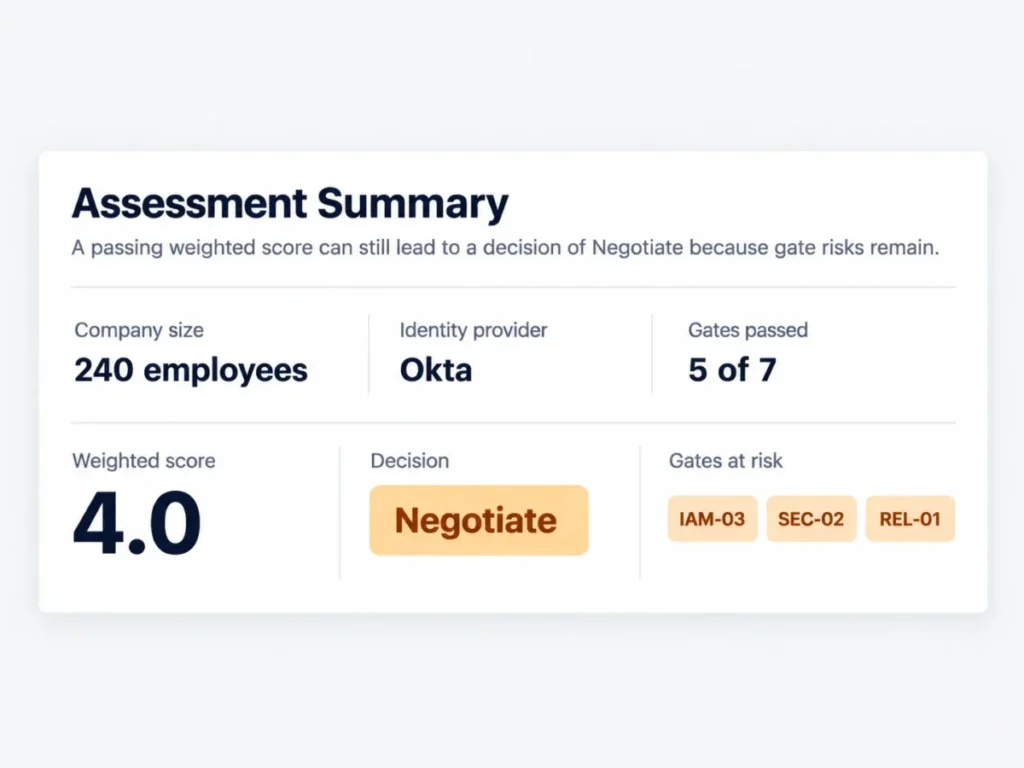
| Negotiate | Gates pass, but retention, residency or uptime exists only as a vendor statement | Move it into the contract, then re-score |
| Reject | Any Must-have fails, or an answer stays “available on request” | End the evaluation and record the reason |
Record the reject reason as a requirement ID rather than a sentence. When the same vendor returns in eighteen months with a new plan sheet, the ID says exactly what to re-check.
Example Filled-In Checklist
A software company of 240 employees moving an internal knowledge base off a wiki. Okta is the identity provider, the security team requires 180 days of exportable history, and a European region is mandatory because the support team handles European customer records.
| ID | Requirement | Vendor A answer | Evidence | Verdict |
|---|---|---|---|---|
| IAM-01 | SAML or OIDC sign-on | Yes, SAML | Help centre page | Pass |
| IAM-02 | Plan sign-on appears on | Business | Help centre page | Pass |
| IAM-03 | Provisioning support | Yes, Enterprise only | Help centre page | Gate risk |
| LOG-02 | Published retention | 365 days | Help centre page | Pass |
| LOG-03 | Export path | CSV and SIEM webhook | Help centre page | Pass |
| SEC-02 | European region | Yes, Enterprise only | Residency page | Gate risk |
| REL-01 | Numeric uptime commitment | Not published | None supplied | Fail, negotiate |
The weighted score landed at 4.0, which reads like a pass. The gate list says otherwise: two capabilities sit one tier above the quoted plan, and the uptime commitment does not exist as a published figure.
The decision was Negotiate rather than Buy, and the negotiation had a defined shape. Quote the tier that clears both gate risks, and add a contractual uptime term with credits.
That is the whole reason gates sit outside the score. A single weighted average would have sent this vendor to contract on the wrong plan.
RFP Question Bank: What to Send Vendors
Ask these in writing before the demo. Each has a wrong answer that a demo conceals.
- Name the plan on which sign-on first becomes available, and the plan for provisioning. If they differ, say so.
- Is any identity capability sold as a separate add-on rather than included in a plan tier?
- State the audit log retention period in days, and the page where it is published.
- Can a tenant administrator delete or edit a log entry, and what happens to the attempt?
- Give the export format for logs and the endpoint, if one exists.
- Does search analytics distinguish searches that returned no results?
- Which data regions are available on the plan being quoted, and can an existing workspace be moved?
- Provide the current Type II examination report under NDA, and state the period it covers.
- What contractual window applies for notifying a customer of a personal data breach?
- Do AI answers cite the source article, and is customer content excluded from model training?
- State the uptime commitment and service credit schedule, or confirm that none is offered.
- Describe the export provided on termination, in what format, and the collection window.
Question 11 is the one worth insisting on. Six of the eight platforms checked publish nothing, and a written “none is offered” is a usable procurement answer where silence is not.
Migration Checklist
- [ ] Export articles, categories, attachments and version history from the current system
- [ ] Confirm in writing what the export does not include, before the cutover date
- [ ] Map the existing category structure to the new permission model
- [ ] Migrate in batches and validate formatting, tables, images and internal links
- [ ] Preserve URLs, or map every old URL to a redirect
- [ ] Export the user list and map users to the new roles and groups
- [ ] Configure provisioning before the cutover, not after
- [ ] Test permissions afterwards with a user in each role
- [ ] Audit for over-permissioned users carried over from the old model
- [ ] Keep the old system readable for one review cycle after cutover
Version history is the item most often lost. It rarely survives an export, and its absence surfaces during the first compliance review after migration.
Security Checklist
- [ ] Logging enabled for authentication, content, permission and admin events
- [ ] Retention configured to your regulatory driver, not the vendor default
- [ ] Export or SIEM streaming configured and tested
- [ ] Logs immutable to tenant administrators
- [ ] Encryption at rest and in transit confirmed in writing
- [ ] Residency region set and verified on the plan purchased
- [ ] Data processing agreement signed
- [ ] Subprocessor list received, with a change notification term
- [ ] Type II report reviewed, including exceptions and the period covered
- [ ] Breach notification window written into the contract
On encryption, “AES-256 at rest and TLS 1.2 or above in transit” is common vendor practice rather than a universal standard requirement. Source: the NIST transport-security guideline, read 9 September 2026. NIST TLS configuration guidance sets the version floor for federal systems, and the payment card standard requires strong cryptography without naming a version.
Red Flags to Watch For
| Red flag | What it usually means |
|---|---|
| “Available on enterprise” with no plan name | The price has not been decided yet |
| Retention discussed only in a sales call | There is no published policy to hold them to |
| A tenant admin can delete log entries | The log cannot support an incident investigation |
| No zero-result search report | You will never learn what readers failed to find |
| AI answers with no source citation | Nobody can audit what the assistant told a customer |
| Silence on model training rights | The answer is in the terms, and it is not the one you want |
| A compliance badge with no report offered | The distinction between report and badge is being avoided |
| Residency described without naming the plan | The region is usually one tier above the quote |
| No published uptime figure and no credits | Availability carries no commercial consequence |
| Export described but never demonstrated | Exit cost stays unknown until you need it |
| Rate limits undocumented | Any integration you build is unplanned capacity |
| No sandbox environment | Every configuration change is tested in production |
Common Mistakes
Writing requirements after the first demo. The document then describes the product that was demonstrated, and every later vendor scores badly against a competitor’s feature list.
Treating the weighted average as the decision. A 4.1 with a failed gate is worse than a 3.6 that clears everything, because gates and scores answer different questions.
Citing frameworks that do not say what the template claims. A requirements document attributing a 90-day retention rule to an assurance framework loses credibility with the first security reviewer who checks.
Accepting capability answers without a plan name. Almost every platform supports single sign-on. The buying question is which plan, and whether it is an add-on.
Requiring published figures the market does not publish. Uptime is the clearest case: written as a published-page requirement, it removes most of the field before evaluation begins.
Skipping the deprovisioning test. Provisioning is demonstrated in every demo, while deprovisioning lag is what leaves a former employee with access, and only a trial measures it.
Knowledge Base, Wiki, Help Center or Doc Portal
| Platform type | Best for | What actually differs |
|---|---|---|
| Knowledge base | Customer self-service and internal support | Structured articles, search analytics, permissions |
| Wiki | Collaborative internal documentation | Open editing, lighter governance, page history |
| Help center | Ticket deflection | Bundled with ticketing, deflection reporting |
| Doc portal | Developer and API documentation | Versioned docs, code samples, often source-controlled |
Buy rather than build unless documentation is your product. A built system starts cheaper and inherits every requirement on this page as engineering work, including provisioning, retention, residency and accessibility conformance.
Open source shifts the same obligations to your operations team. That works when the team exists and gets expensive when it does not.
What to Do After Completing the Checklist
If the shortlist survived the gates, move to platform research and price the qualifying tier rather than the entry tier.
The best knowledge base software roundup covers the field.
Deeper reading on each platform sits in its own review:
- Zendesk review
- Intercom review
- Document360 review
- Confluence review
- Notion review
- Guru review
- Freshdesk review
- Help Scout review
If the shortlist collapsed, the usual cause is a residency or retention requirement most of the field cannot meet. Re-read Step 1, decide whether the requirement is regulatory or preferred, and re-run the gates.
For a decision between two support-led platforms, Zendesk vs Intercom covers that pair, and Notion vs Confluence covers the internal documentation pair.
FAQ
These are the questions buyers still ask after the requirements are written, and each answer changes a line in the document rather than restating one.
What Security Features Should a Knowledge Base Have?
Single sign-on through SAML or OIDC, role-based access control with content-scoped permissions, automated provisioning with deprovisioning, and audit logging with a published retention period and an export path.
Add encryption in transit and at rest, and a current Type II examination report available under NDA.
How Long Should Knowledge Base Audit Logs Be Retained?
Set the period from your own regulatory driver rather than from an assurance framework, because neither of the two most often cited prescribes one.
Among the platforms checked here, published retention runs from 180 days to indefinite, and four vendors publish no period at all.
Is a Type II Report a Certification?
No. It is an attestation report produced by a CPA firm, covering operating effectiveness across a period rather than a point in time.
Ask for the report and the period it covers. A vendor calling itself “certified” is using the wrong word, which is a reasonable prompt to ask what the report actually says.
What Uptime Commitment Should the Requirements Ask For?
Ask for a numeric commitment with service credits in the contract, rather than a published percentage, because only two of the eight platforms checked publish a figure.
Convert the percentage before accepting it. The reliability section above translates each common tier into allowed downtime per month and per year.
Which Provisioning Specification Should an RFP Cite?
Cite the core schema document for the user, group and attribute model, and the protocol document for endpoints and behaviour.
Requirements that mix the two are harder for a vendor to answer precisely, and vague answers are what a gate list is meant to catch.
Which Accessibility Version Should the Requirements Name?
Name both. The current W3C Recommendation is the right target, and the 2024 federal rule for public entities requires the earlier version specifically, so bound organisations need it in the contract.
Ask for a conformance report stating which version was assessed.
Is Zero-Result Search Reporting Standard?
No. Of the eight platforms checked, five document a distinct zero-result or failed-search view and three do not document one.
If content gaps drive your roadmap, treat it as a gate rather than a preference.
Your Next Step
Copy the 18-point gate checklist into your vendor question set, or open the scorecard spreadsheet linked near the top of this page and work from all 49 rows. Send it in writing before any demo is scheduled, and score nothing until the answers come back.
Rewrite three requirements before sending it: audit log retention, breach notification and uptime. Each is commonly stated as a framework obligation when it is actually a contract term you have to negotiate.
Then price the plan that clears every gate, not the plan on the quote.