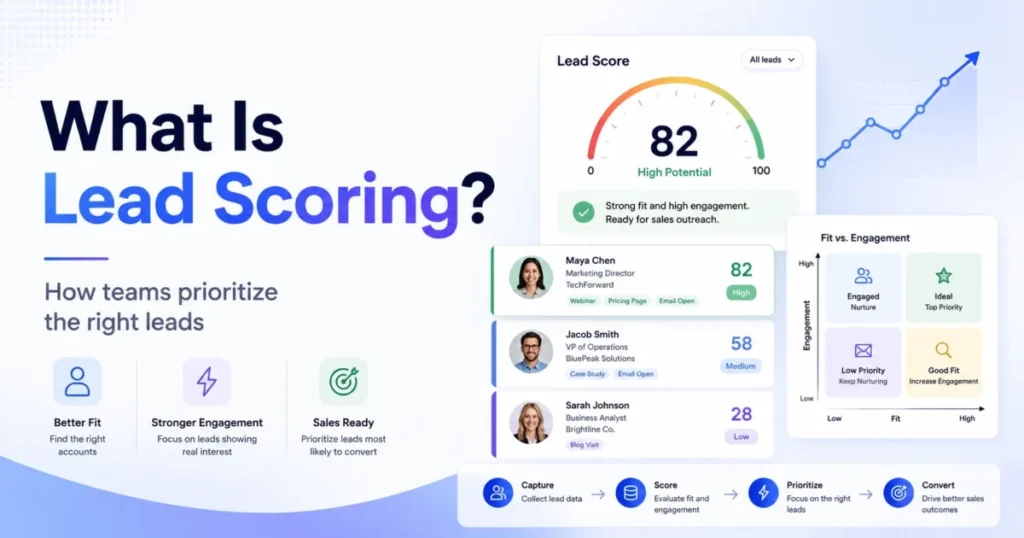
A single number next to a lead’s name feels like clarity. It is usually hiding two very different things: whether the lead can buy, and whether the lead is paying attention right now.
Treat those as one score, and a curious student can land in the same sales queue as a VP with budget. That is the problem this guide fixes.
Lead scoring is the process of assigning a value to a sales or marketing lead based on fit and behavior, so a team can decide who to contact, nurture, route, or set aside first. This guide explains what lead scoring is, how it works inside a CRM, the model types, real examples, and the mistakes that quietly break a model.
It is written for B2B sales, marketing, and revenue-operations readers who want a working mental model, not a tool roundup. Everything here is based on official product documentation and vendor pages, not hands-on testing, and it sits next to the same lens we use to explain what a CRM actually is.
Quick answer: what is lead scoring? Lead scoring ranks leads by combining fit (how well they match your ideal customer) and engagement (what they have done). Those signals become points, grades, or a predictive score inside a CRM or marketing platform, so sales and marketing can prioritize the right follow-up. A good model also defines what each score triggers, when it should decay, and which signals subtract points.
In This Article (19 sections)
The 60-Second Explanation of Lead Scoring
Lead scoring answers one question: of all the leads in the database, who deserves attention first? It replaces gut feel and first-in-first-out follow-up with a ranked list tied to real signals.
At the simplest layer, scoring assigns points. A lead earns points for matching your target profile and for taking actions that suggest interest, and the total moves them up or down a priority list.
At a technical layer, those points come from two data types. Explicit data is what the lead tells you or what enrichment fills in, such as job title, company size, industry, or revenue.
Implicit data is what the lead does, such as visiting the pricing page, opening emails, attending a webinar, or requesting a demo. Strong models weight those actions differently.
At a business layer, scoring exists to protect the scarcest resource in revenue teams: rep time. Salesforce frames lead scoring as ranking prospects using behavior, demographics, and engagement so sales effort lands where it converts.
The payoff is not a magic conversion lift. It is fewer wasted calls and faster response to leads that actually match the business.
A better mental model: fit score plus engagement score
Most beginner guides teach one number, often 0 to 100. That is convenient, and it is also where teams get burned.
A cleaner model keeps two scores side by side. Fit score measures who the lead is, and engagement score measures what the lead is doing.
HubSpot’s lead scoring supports engagement, fit, and combined scores rather than forcing everything into one figure, and Oracle splits an explicit profile score from an implicit activity score. The reason matters for a buyer.
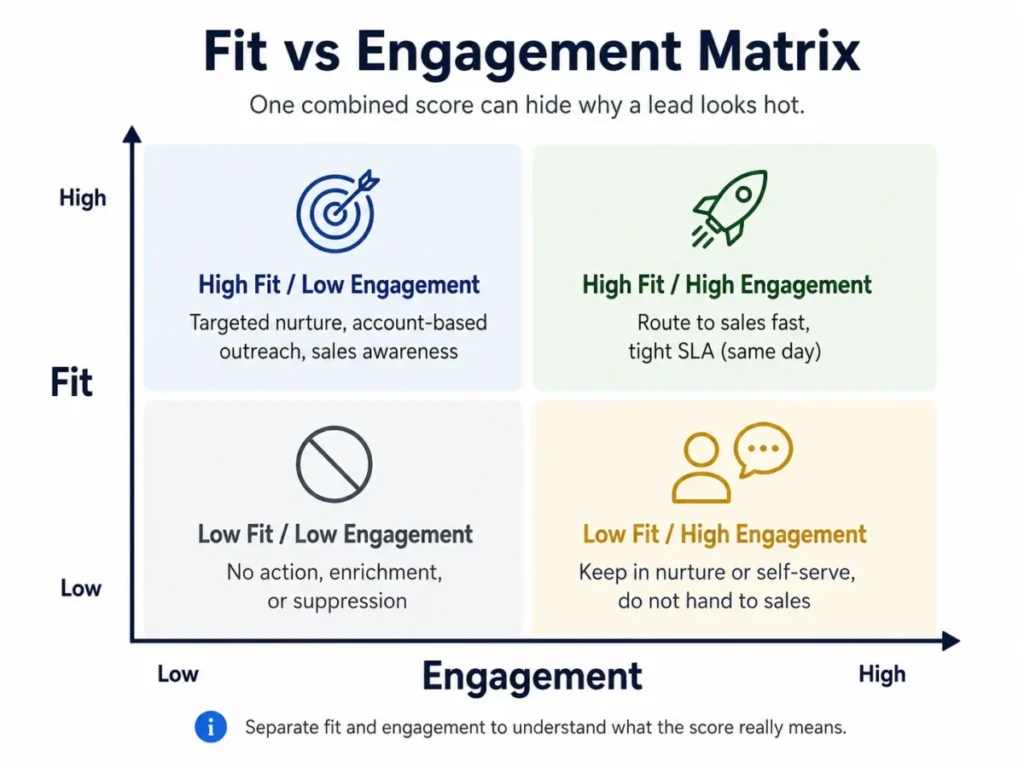
A combined score of 70 could mean a perfect-fit account that barely engages, or a low-fit contact clicking every email. Those two leads need opposite treatment, and one number hides which one you have.
What Lead Scoring Actually Changes in Your Workflow
A score that does not trigger an action is just a label. The point of scoring is to route each lead to the correct next step, and that is the layer most competing explainers skip.
The fit-plus-engagement view gives you four quadrants, and each one deserves a different response. Oracle’s approach maps score tiers to follow-up service levels, such as a 24-hour touch for the strongest leads and a slower cadence for weaker ones.
| Fit | Engagement | What it usually means | Recommended action |
|---|---|---|---|
| High | High | Right buyer, actively looking | Route to sales fast, tight SLA (same day) |
| High | Low | Right buyer, not paying attention yet | Targeted nurture, account-based outreach, sales awareness |
| Low | High | Active but wrong profile (student, competitor, researcher) | Keep in nurture or self-serve, do not hand to sales |
| Low | Low | Neither fit nor intent | No action, enrichment, or suppression |
The low-fit high-engagement box is where most teams leak effort. A busy contact who fails the fit test should not reach a rep just because activity pushed the combined score up.
Follow-up speed should scale with the tier, not sit at one blanket rule. A same-day response for high-fit high-engagement leads and a 48-hour touch for weaker tiers gives reps a defensible priority order.
How Lead Scoring Actually Works
The mechanism is a loop, not a one-time setup. A model is defined, applied to records, updated as signals change, and audited against outcomes.
The first decision is scope: which records should be scored at all. Scoring every record pollutes the queue with customers, partners, competitors, and job seekers, so teams use inclusion and exclusion lists to limit scoring to genuine prospects.
Next comes activation behavior, which surprises new users. HubSpot’s documentation notes that when a score is first turned on, records are evaluated retroactively, then updated continuously as properties or actions change.
That means the model reacts to a webinar signup or a title change without manual recalculation. The score stays current on its own.
Then the score has to point somewhere. A score band or a fit-engagement quadrant should map to a defined action, with a threshold that says exactly when a lead crosses into “sales should look.”
Lead scoring works on more than “leads”
Most guides talk about scoring “leads” as if a lead is one object. Real CRMs disagree, and this matters for B2B teams with buying committees.
HubSpot supports scoring on contacts, companies, and deals depending on the subscription, not only a generic lead record. An account-based team often needs a company-level score, because a single contact’s activity says little about whether the whole buying group is moving.
What Data Feeds a Lead Score
A scoring model is only as good as the data behind it. Before assigning a single point, map where each signal comes from and how reliable it is.
The signals fall into a few families, and each has a home system and a failure mode. Firmographic and demographic data describes the account and person, behavioral data describes engagement, and product data describes in-app activity for SaaS motions.
| Data type | Example signal | Source system | What it measures | Main risk |
|---|---|---|---|---|
| Firmographic | Company size, industry, revenue | Enrichment, CRM fields | Account fit | Stale or missing on inbound leads |
| Demographic | Job title, seniority, role | Forms, enrichment | Buyer authority | Self-reported and easy to fake |
| Behavioral (web/ | Pricing visit, email click, webinar | Marketing automation, analytics | Interest and intent | Rewards activity over fit |
| Sales interaction | Meetings, replies, call outcomes | CRM activity | Sales-stage intent | Logged inconsistently by reps |
| Product usage | Feature use, invites, integrations | Product analytics | Activation and readiness | Only exists in trial/ |
The practical rule is to weight fit data and high-intent actions above easy, low-cost clicks. An email open is a weaker signal than a demo request.
Product usage deserves its own note for SaaS teams. In a product-led motion, a product-qualified lead (PQL) is scored on in-app behavior such as reaching an activation milestone, inviting teammates, connecting an integration, or crossing a usage threshold.
Ortto describes PQL scoring exactly this way, and it changes which signals matter for freemium and trial products. This is the difference we keep in mind when weighing a CRM built for sales teams against a product-led setup.
Positive, Negative, and Decay Scoring
Adding points is the easy half. Keeping a score honest over time is the half that separates a working model from a noisy one.
Negative scoring subtracts points for signals that suggest poor fit or low intent. HubSpot’s lead scoring can assign negative point values, and Ortto defines negative scoring as deductions for weak-fit or low-value behavior.
Common negative-scoring examples include a personal email domain instead of a work address, a student or job-seeker title, a competitor’s domain, an unsubscribe, or a long stretch of inactivity. Treat these as illustrations, not universal rules, because the right deductions depend on your ideal customer.
Score decay handles the other silent problem: old activity that keeps a lead artificially hot. HubSpot’s product page describes score decay reducing a lead’s score after inactivity, so engagement from months ago stops outranking fresh intent.
A webinar attendee from six months ago with no activity since should not sit above a lead who requested a demo yesterday. Without decay, that is exactly what happens, and reps lose trust in the score the first time they call a “hot” lead who has gone cold.
Lead Scoring Models: Rules-Based vs Predictive
There are two broad ways to produce a score, and the right one depends on your data maturity, not on which is newer. Rules-based scoring uses human-defined points, and predictive scoring uses machine learning trained on historical conversions.
Rules-based scoring is transparent and controllable. You decide that a demo request is worth 20 points and a competitor domain subtracts 30, and anyone can read the logic.
Predictive scoring works differently. Salesforce’s Einstein Lead Scoring analyzes historical Lead field data and past conversion patterns to rank current leads by resemblance to those that converted, and it refreshes as new data arrives.
The trap is treating predictive as automatically better. A 2026 research paper on sales lead scoring notes that machine-learning and rule-based models both struggle with sparse supervision and semantic gaps in unstructured CRM logs, which means messy or thin data can make an AI model weaker than a simple rules model.
Predictive scoring needs enough clean, converted history to learn from. Without it, the output looks confident and means little.
| Model | Best for | Data needed | Setup effort | Main risk |
|---|---|---|---|---|
| Rules-based | Early teams, clear ICP, low volume | Agreed ICP + point logic | Low to medium | Human bias, manual upkeep |
| Predictive (ML) | High volume, clean conversion history | Many past converted/ | Medium (vendor-managed model) | False confidence on sparse or biased data |
If you cannot yet describe your ideal customer in plain rules, buying a predictive model will not fix that. Start with rules, get the ICP and thresholds right, then consider predictive once you have real conversion history to train on.
One more distinction protects you from over-trusting a number. A score value is not the same as score confidence, because a predictive model can output 85 for a lead it has very little reliable data on.
Audit scores against actual outcomes, and keep rep judgment in the loop. The score is an input to the decision, not the decision.
Lead Scoring vs Grading, Qualification, MQL, and SQL
These terms get used interchangeably, and the confusion causes teams to send active-but-wrong-fit leads to sales. Here is the clean boundary.
Scoring and grading are the pair most often blurred. In practice, grading tends to measure fit, scoring tends to measure behavior or overall readiness, and many teams run both.
| Concept | Measures | Typical data | Output | Who acts on it |
|---|---|---|---|---|
| Lead grading | Fit to ICP | Firmographic, demographic | A grade (A to D) | Marketing, sales |
| Lead scoring | Engagement or combined readiness | Behavior, sometimes fit too | A number | Marketing, sales |
| Lead qualification | Need, budget, authority, timeline | Human conversation | Qualified or not | Sales |
Salesforce’s Account Engagement materials treat scoring (behavior) and grading (fit) as separate concepts, and ZoomInfo similarly distinguishes a score from a grade. A high score with a poor grade is the classic “active but wrong” lead.
Qualification is a different step again, and it is where humans re-enter. Adobe frames qualification through criteria like budget, authority, need, and timeline (BANT), which a rep usually validates in conversation rather than a system inferring it from clicks.
That gives a lifecycle, not a single event. A lead is captured, scored, and if it crosses the marketing-qualified lead (MQL) threshold it goes to sales, who then confirm whether it is a sales-qualified lead (SQL).
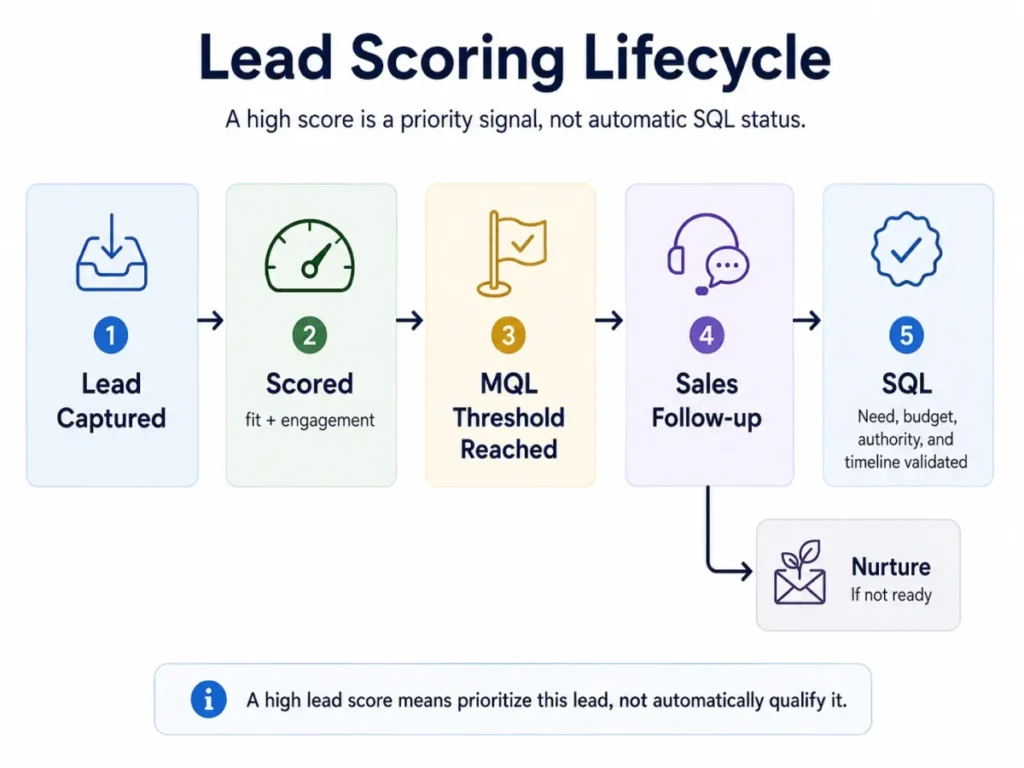
A high lead score means “look at this one sooner,” not “this deal is qualified.” Teams that skip the human validation step hand reps a list that looks qualified and is not.
Where lead nurturing fits
Nurturing is not scoring, and merging them is a common error. Scoring decides priority, and nurturing builds the relationship until readiness changes.
Adobe defines lead nurturing as developing relationships with buyers at every stage of the funnel. Leads that score below the sales threshold do not vanish, because they enter nurture until their fit or engagement improves enough to re-cross the line.
Advanced Concepts: Score Velocity and Relative Score
Total score is not the only thing that matters. Sometimes how fast a score is moving, or how a lead ranks against everyone else, is the stronger outreach signal.
Adobe Marketo’s documentation separates urgency, relative score, and Best Bets from the raw score. Urgency reflects recent score change, and relative score compares a person against others in the database.
A lead that jumped from 10 to 50 today can be a better call than a static 80 that has not moved in a month. The recent spike suggests something changed, while the static high score may be old engagement that decay has not yet corrected.
Marketo’s docs also flag a setup dependency worth knowing. With too few scoring campaigns, the priority, urgency, and relative score fields stop being useful, so a velocity signal only works once enough scoring rules are running.
Step-by-Step: Building a Basic Lead Scoring Model
You do not need a data team to start. You need agreement on who you sell to and a disciplined first pass, following the mechanics official CRM docs describe.
- Decide what the score should predict. Pick one outcome, such as sales-handoff readiness or demo intent, so the model has a clear target instead of a vague “quality” number.
- Agree on the ICP and disqualifiers with sales. Both teams must define what a good-fit lead looks like and which attributes should subtract points, or they will argue about every handoff.
- Set eligibility with inclusion and exclusion lists. Decide which objects and segments get scored at all, and keep customers, partners, and competitors out of the scoring pool.
- Assign fit and engagement rules. Weight high-intent actions and strong fit attributes above cheap clicks, and add negative rules for weak-fit signals.
- Add decay. Reduce scores after a defined period of inactivity so stale engagement does not inflate priority.
- Test before you trust it. HubSpot’s documentation lets you test records and preview score distribution before activation, which catches a model that scores almost everyone above the threshold.
- Map scores to actions. Connect score bands or quadrants to sales handoff, nurture, enrichment, or no action, with the exact threshold written down.
- Set an audit cadence. Plan to review the model on a schedule rather than treating it as finished.
Before flipping the model on, run a short sanity check. Pull a sample of records, preview the distribution, look at the top-scored records, and compare them against leads you already know converted.
If nearly everything lands above the sales threshold, the model gives reps no real priority. Tighten the thresholds until the top of the list is genuinely short.
The Mistakes That Waste Your First Month
Most failed scoring models do not fail because the math was wrong. They fail on data hygiene, unrealistic customization expectations, and models nobody maintains.
Data structure breaks scores before model quality even matters. Salesforce’s documentation notes that duplicate prospects are not combined and that some records linked to multiple prospects across business units cannot be scored, so duplicates and messy account mapping can leave leads with missing or misleading scores.
Tool limits also surprise teams that assume everything is editable. In Salesforce Account Engagement, baseline scoring rule point values can be modified, but the rule names and criteria cannot, so “just customize the rules” is not always fully true.
Over-complication is the next trap. Oracle advises keeping scoring simple at first, because scoring too many criteria makes it hard to tell which values are actually driving the score.
Pipedrive’s guidance adds a human failure mode. Reps can fixate on the score and stop reading the individual lead’s context, timeline, and needs, so a score is a starting point for the conversation, not a replacement for it.
There is also an incentive risk buyers rarely plan for. Oracle notes that scoring can distort behavior when marketing is measured only on inquiry volume, because the team optimizes for raw lead count instead of lead quality.
Tie marketing metrics to qualified pipeline, not just volume, and the scoring model stays honest. Volume targets quietly push the model toward noise.
Common Misconceptions About Lead Scoring
Even teams that run scoring for years carry a few myths that quietly cost them. Here are the ones worth correcting.
Misconception: a high score guarantees conversion. Reality: a score is a prioritization signal, not a prediction of the sale, and Pipedrive is blunt that scores are helpful but not foolproof.
Misconception: lead scoring and lead grading are the same. Reality: grading usually measures fit and scoring usually measures behavior, so many teams need both to avoid sending active-but-wrong leads to sales.
Misconception: every engaged lead should go to sales. Reality: engagement without fit often means a student, competitor, or researcher, which is why negative scoring and fit checks exist.
Misconception: predictive scoring always beats manual scoring. Reality: predictive models depend on clean, sufficient conversion history, and can underperform simple rules when data is sparse or biased.
Misconception: scoring is a one-time setup. Reality: ICP, campaigns, and buyer behavior change, so a model that is never revisited slowly drifts out of alignment.
Lead Scoring Examples
Abstract point tables are easy to nod along to and hard to apply. These scenarios show scoring making an actual routing decision.
- B2B demo routing. A VP at a 200-person company in your target industry visits the pricing page, downloads a buyer guide, and requests a demo. High fit plus high engagement should trigger a same-day sales touch, not a spot in a chronological queue.
- High engagement, poor fit. A student opens every email and downloads three ebooks using a school address, with no buying authority. Negative fit rules keep that contact in education-oriented nurture instead of a rep’s call list.
- Product-led PQL. A free-trial user invites teammates, connects an integration, and crosses a usage threshold. That in-product activity can signal readiness even without a form fill, which is why PQL scoring matters for SaaS.
- Small-team capacity triage. A small SaaS team with roughly 800 monthly signups cannot call everyone, and a public B2B marketing discussion describes exactly this problem of picking the top leads from hundreds of signups.
For that small team, the goal is not a perfect statistical model. It is a daily or weekly queue of the top 50 leads worth personal outreach, built from fit filters, a few high-intent events, and score recency.
Treat this as an illustrative approach, not a benchmark. Adjust the cutoff to whatever the reps can actually work, and leave the rest in automated nurture.
When to Use and When to Avoid Lead Scoring
Scoring is not free to run, and it is not always the right first move. Match it to your volume and your data.
Use lead scoring when inbound volume exceeds rep capacity, when leads vary widely in fit, when marketing and sales disagree on which leads are “good,” or when you have enough signal to separate strong leads from noise. At that point, a ranked queue saves real time.
Hold off, or keep it minimal, when lead volume is low enough that reps can work every lead well, when you have not defined your ICP, or when your CRM data is too incomplete to score reliably. A scoring model built on empty fields produces confident-looking noise.
How to Measure Success
A scoring model earns its keep only if it improves prioritization, and you have to check that on a schedule. Watch a handful of signals, not a vanity number.
| Metric | What it tells you | Why it matters |
|---|---|---|
| MQL-to-SQL rate | Whether high scores become real opportunities | Low rate means the threshold or fit rules are off |
| Top-scored closed-lost reasons | Why “great” leads still fail | Reveals a fit signal the model is missing |
| Stale high scores | Leads scoring high with no recent activity | Signals weak or missing decay |
| Score distribution | How many leads clear the threshold | If most do, the score gives no priority |
| Rep feedback | Whether reps trust the queue | Lost trust means reps ignore the score |
On cadence, Oracle recommends adjusting scoring roughly quarterly, and ZoomInfo suggests quarterly or semi-annual audits. A model reviewed on that rhythm keeps pace with changes in ICP, campaigns, and buyer behavior.
The audit itself is just walking the metrics above and fixing what drifted. Nothing here needs a data scientist.
Lead Scoring Tools and What They Actually Do
The concept is tool-neutral, but implementation details differ enough to affect expectations. These examples come from official documentation, and none of them imply a ranking or a price.
HubSpot offers CRM-native scoring across fit, engagement, and combined scores, with support for contacts, companies, and deals depending on the subscription, plus negative points and score decay. You can dig into how it fits a buyer in our HubSpot CRM review.
Salesforce runs both configurable rules in Account Engagement and predictive Einstein Lead Scoring trained on historical conversions, with the baseline-rule and duplicate caveats noted earlier. Our Salesforce CRM review covers where those limits bite.
Adobe Marketo Engage adds urgency, relative score, and Best Bets on top of a base score, which helps teams that care about score movement, not just totals. It expects enough scoring campaigns running to make those fields meaningful.
Zoho CRM lets teams build scoring models manually or let its Zia assistant score leads, and Freshsales offers rule-based scoring where, per its support docs, only an admin can configure the rules. That admin-only governance and Zoho’s manual-or-AI split are worth checking against your team structure in our Zoho CRM review and Freshsales review.
The pattern across all of them is the same. Feature availability, scored objects, and update frequency depend on the product, subscription, and configuration, so confirm the specifics for your plan before you design a model around them.
If your scoring lives inside a marketing motion, check how the tool handles automation, which we cover in our roundup of CRM with marketing automation.
When You Need Lead Scoring Software
You do not always need a dedicated scoring engine. A few signals tell you when manual triage has run out.
Signals that you have outgrown manual triage include inbound volume reps cannot personally cover, leads from several channels with very different quality, a growing gap between marketing and sales on lead quality, an account-based motion that needs company-level prioritization, and a product-led trial where in-app behavior should drive follow-up.
Signals that you are not there yet include low lead volume a rep can work end to end, an undefined ideal customer profile, and CRM data too sparse to score. Fix the ICP and the data first, then add scoring.
How to Choose a Lead Scoring Approach
Pick the approach that matches your data and team, not the flashiest option. A few criteria decide most cases.
Start with data maturity. Enough clean conversion history points toward predictive, while a clear ICP and low volume point toward rules.
Check which objects you need to score. Account-based teams need company scoring, not only contact scoring.
Then weigh governance and control. Some platforms limit which rules you can edit, and some restrict configuration to admins, both of which affect how fast you can iterate.
Finally, confirm the scoring lives where your data already does. That way the model reads real signals instead of a thin, disconnected copy.
Beginner Lead Scoring Checklist
Use this as a copy-ready starting point for a first model.
- Write down the one outcome the score should predict.
- Define the ideal customer profile with sales, in plain language.
- List disqualifiers that should subtract points.
- Set inclusion and exclusion lists so only prospects are scored.
- Choose fit signals and weight strong-fit attributes higher.
- Choose engagement signals and weight high-intent actions above cheap clicks.
- Add negative scoring for weak-fit and low-intent behavior.
- Add decay so stale activity loses value.
- Set the threshold that triggers sales handoff.
- Test sample records and preview the score distribution before activation.
- Map each score band or quadrant to a specific action.
- Schedule a quarterly review of the metrics that show whether the model still works.
FAQ
What is lead scoring in CRM?
In a CRM, lead scoring assigns a value to each lead based on fit and behavior, then uses that value to prioritize follow-up. The CRM turns signals like job title, company size, page visits, and email clicks into points, grades, or a predictive score, and can trigger routing, tasks, or nurture when a lead crosses a threshold. Supported objects and features vary by product and plan.
What is the difference between lead scoring and lead grading?
Grading usually measures fit, how well a lead matches your ideal customer, often as a letter grade. Scoring usually measures behavior or overall readiness, often as a number. Many teams run both, because a lead can be highly active (high score) but a poor fit (low grade). Treating them as one value is a common cause of sending wrong-fit leads to sales.
What is the difference between lead scoring and lead qualification?
Scoring is an automated priority signal based on data. Qualification is a human validation step, usually a rep confirming budget, authority, need, and timeline in conversation. A high score means “look at this lead sooner,” not “this lead is qualified.” Qualification decides whether a scored lead becomes a real sales opportunity.
What is predictive lead scoring?
Predictive lead scoring uses machine learning trained on historical conversion data to rank current leads by how closely they resemble past converters. Salesforce Einstein Lead Scoring works this way and refreshes as data changes. It can help at higher volume with clean history, but it depends on sufficient, tidy data and should be audited rather than trusted blindly.
What data is used for lead scoring?
Two broad types. Explicit data describes who the lead is, such as job title, company size, industry, and revenue. Implicit data describes what the lead does, such as page visits, email clicks, webinar attendance, demo requests, and product usage. Strong models weight fit data and high-intent actions above easy, low-cost signals like a single email open.
What is negative lead scoring?
Negative lead scoring subtracts points for signals that suggest poor fit or low intent. Common examples include a personal email domain, a student or job-seeker title, a competitor’s domain, an unsubscribe, or a long period of inactivity. It protects sales from high-activity, low-value records that would otherwise climb the priority list on engagement alone.
What is score decay?
Score decay reduces a lead’s score after a period of inactivity, so old engagement stops inflating current priority. A webinar attendee from six months ago with no recent activity should not outrank a lead who requested a demo yesterday. HubSpot’s lead scoring supports decay, and it keeps the score closer to a lead’s present intent.
How often should a lead scoring model be updated?
Review it on a schedule rather than treating it as finished. Oracle suggests roughly quarterly adjustments and ZoomInfo suggests quarterly or semi-annual audits. Each review should check the MQL-to-SQL rate, stale high scores, score distribution, closed-lost reasons among top-scored leads, and rep feedback, then adjust rules and thresholds to match current buyer behavior.
Can lead scoring work for small sales teams?
Yes, and for small teams the goal is capacity triage, not statistical perfection. A team with hundreds of monthly signups can use fit filters, a few high-intent events, and score recency to build a short daily or weekly queue of leads worth personal outreach, leaving the rest in automated nurture. Keep the model simple and adjust the cutoff to what reps can realistically work.
Which CRM tools support lead scoring?
Many CRMs and marketing platforms do, including HubSpot, Salesforce, Adobe Marketo Engage, Zoho CRM, and Freshsales, based on their official documentation. Capabilities differ: some offer rules-based scoring, some add predictive AI, and scored objects and update frequency depend on the product, subscription, and configuration. Confirm the specifics for your plan before designing a model around a given tool.