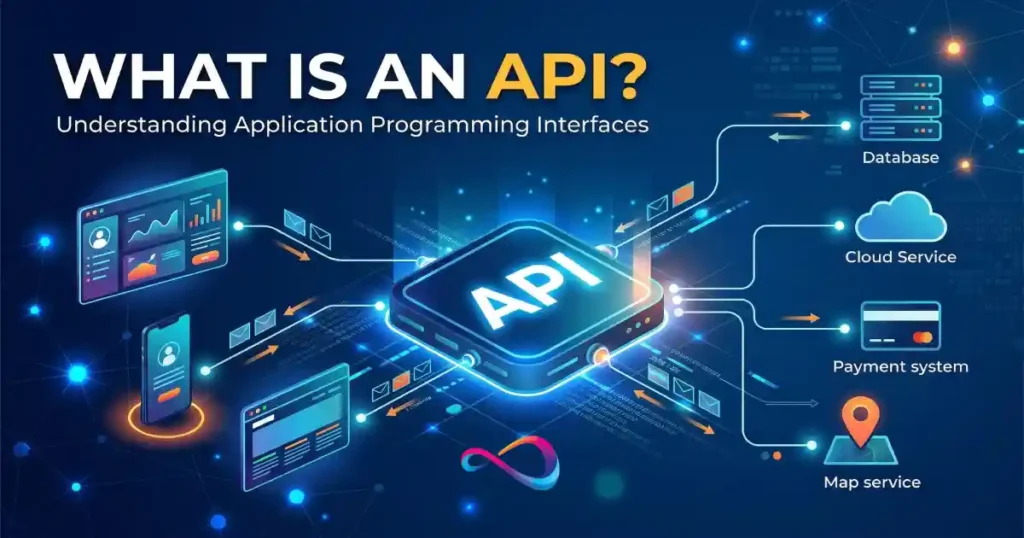
API definition in one sentence: An API (Application Programming Interface) is a controlled interface that lets one software system request data or actions from another software system — without exposing how either system works internally.
An API (Application Programming Interface) is a set of rules that lets two pieces of software talk to each other and exchange data. Every time you log in with Google, pay with Stripe, or see a map inside an app, an API is doing the work behind the scenes.
If you have heard the term API in meetings, vendor calls, or product documentation and nodded along without fully understanding it, this guide is written specifically for you. Below, you will get a clear, jargon-free explanation of what an API is, how it works, why it matters for your business, and what to look for when evaluating SaaS tools that depend on one.
Key Takeaways
- An API is a messenger that carries requests between two software systems and delivers the response back.
- You already use APIs daily — Google Maps embeds, PayPal checkouts, Slack notifications, and “Sign in with Google” buttons all rely on them.
- APIs are not just for developers. Founders, marketers, product managers, and operations leaders need to understand APIs to make better software-buying and integration decisions.
- A good API should have clear documentation, fair rate limits, transparent pricing, strong security, and reliable uptime.
- APIs are different from integrations, webhooks, and SDKs — each solves a different problem.
- Not every problem requires direct API access. Native integrations and no-code automation tools often handle common workflows without any coding.
In This Article (23 sections)
What Does API Stand For?
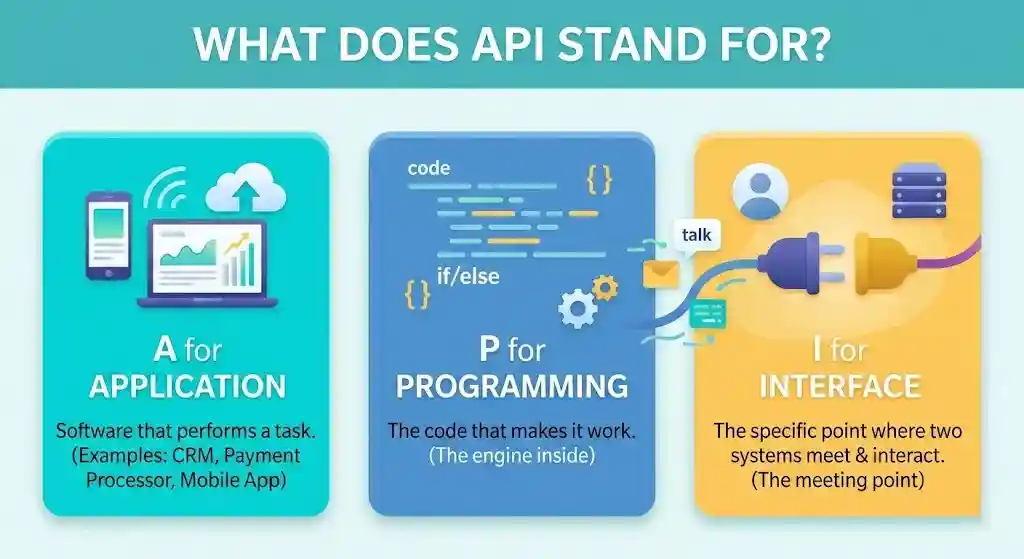
API stands for Application Programming Interface.
- Application — any software that performs a task (a mobile app, a website, a CRM, a payment processor).
- Programming — the code that makes it work.
- Interface — the specific point where two systems meet and interact.
In everyday language, an API is the agreed-upon meeting point between two pieces of software. One system asks a question; the other answers it. The API defines exactly how to ask and exactly how the answer will look.
What Is an API in Simple Terms?
Think of an API as a waiter in a restaurant. You (the customer) sit at a table and order from a menu. The waiter carries your order to the kitchen, the kitchen prepares the food, and the waiter brings it back to you. You never walk into the kitchen yourself — the waiter handles the communication.
In software:
- You (or your app) = the client.
- The menu = the API’s documentation, which lists everything you can request.
- The waiter = the API, carrying your request and bringing back the response.
- The kitchen = the server, where the data lives and the work happens.
The key idea: an API lets software systems exchange data without exposing how they work internally. You do not need to know how Stripe processes payments to charge a customer — you just send a request through Stripe’s API and get a confirmation back.
How APIs Work in Real Life, Step by Step
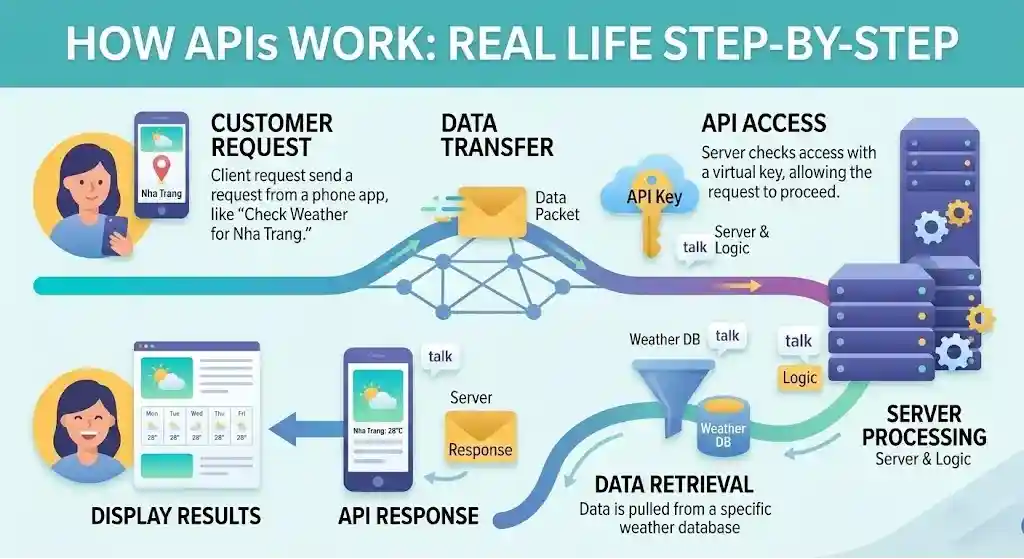
Here is the basic flow every time an API is used:
- The client sends a request. Your software (or browser, or app) sends a structured message to another system. That message says what it wants: “Give me today’s weather for Austin, TX” or “Charge this credit card $49.”
- The request hits an endpoint. An endpoint is a specific URL that accepts a certain type of request. Think of it as a department inside a company — you call the billing department for invoices, not the front desk.
- The server processes the request. The receiving system looks at the request, checks permissions, does the work (retrieves data, runs a calculation, processes a payment), and prepares a response.
- The API returns a response. The response travels back to the client, usually in a structured format called JSON (JavaScript Object Notation) — a lightweight, human-readable text format that both systems understand.
- The client uses the response. Your app displays the weather forecast, confirms the payment, populates a dashboard, or triggers the next step in a workflow.
This entire cycle — request → endpoint → server → response — typically happens in milliseconds.
Real Examples of APIs You Already Use Every Day
APIs are not abstract. You interact with them constantly, even if you have never written a line of code.
- Google Maps embeds. When a restaurant website shows an interactive map, it uses the Google Maps Platform API to pull in map data without building a map from scratch.
- “Sign in with Google” or “Log in with Facebook.” These buttons use OAuth-based authentication APIs that let you log in to a third-party site using your existing Google or Facebook account — no new password needed.
- Stripe and PayPal payments. Online stores do not build their own payment systems. They send transaction data through Stripe’s API or PayPal’s API, which handles card processing, fraud detection, and compliance.
- Weather apps. Your phone’s weather widget calls a weather-data API (such as OpenWeatherMap) to fetch the forecast for your location.
- Slack notifications. When your project-management tool sends an alert to a Slack channel, it uses Slack’s API to post messages automatically.
- Shopify storefronts. Third-party apps that sync inventory, calculate shipping, or automate email all communicate with Shopify through its Shopify API.
- Uber and Lyft. These apps combine multiple APIs — maps, payments, SMS notifications, and real-time location — into a single ride-hailing experience.
- AI tools. Products built on top of OpenAI’s models (like custom chatbots or writing assistants) call OpenAI’s API to send prompts and receive generated text.
In each case, the API is the invisible bridge that connects two systems.
Why APIs Matter for Non-Developers and Businesses
If you do not write code, you might wonder why APIs should be on your radar at all. Here is why:
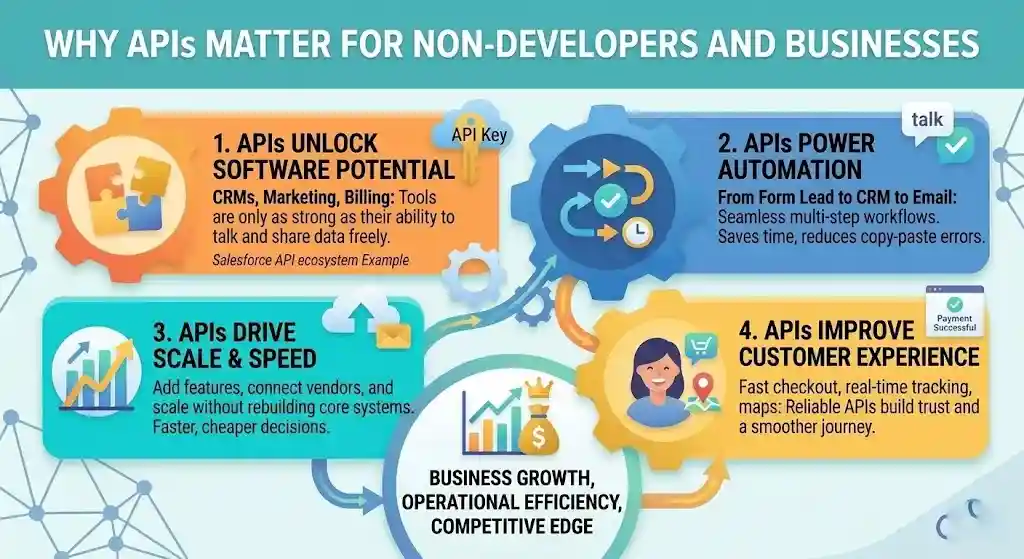
1. APIs determine what your software can (and cannot) do
The tools you buy — your CRM, marketing platform, accounting software, helpdesk — are only as powerful as their ability to connect with other tools. A product with a robust API can share data freely. One without an API (or with a weak one) traps your data in a silo. For example, Salesforce is widely adopted in part because its API ecosystem lets businesses connect it to virtually any other system.
2. APIs power automation
When a new lead fills out a form and the data automatically appears in your CRM, triggers a welcome email, and creates a task in Asana — that chain runs on APIs. Without them, someone would have to copy-paste data between systems manually.
3. APIs affect speed and scalability
A strong API ecosystem means you can add features, connect new vendors, and scale workflows without rebuilding your core systems. Businesses that understand this make faster, cheaper technology decisions.
4. APIs shape your vendor decisions
Two CRMs may look identical on a features page, but one may offer a well-documented, rate-limit-friendly API while the other locks you into its own walled garden. That difference matters when you need to migrate data, build custom reports, or integrate with niche tools. See our best CRM software comparison for how API quality varies across platforms.
5. APIs impact the customer experience
Fast checkout, real-time shipping updates, instant identity verification, and embedded maps all rely on APIs performing reliably. When an API is slow or down, the customer experience suffers — even if the customer never hears the word “API.”
6. APIs create new business models
APIs are not just a technical feature — they can be the product itself. Stripe’s entire business was built around a payment API. Twilio sells messaging and voice capabilities through its API.
OpenAI monetizes its language models primarily through API access. In each case, the API is not an add-on — it is the core revenue engine. When evaluating a vendor, it is worth understanding whether the company treats its API as a core product (well-maintained, well-documented, actively invested in) or as an afterthought.
What APIs Are Used For
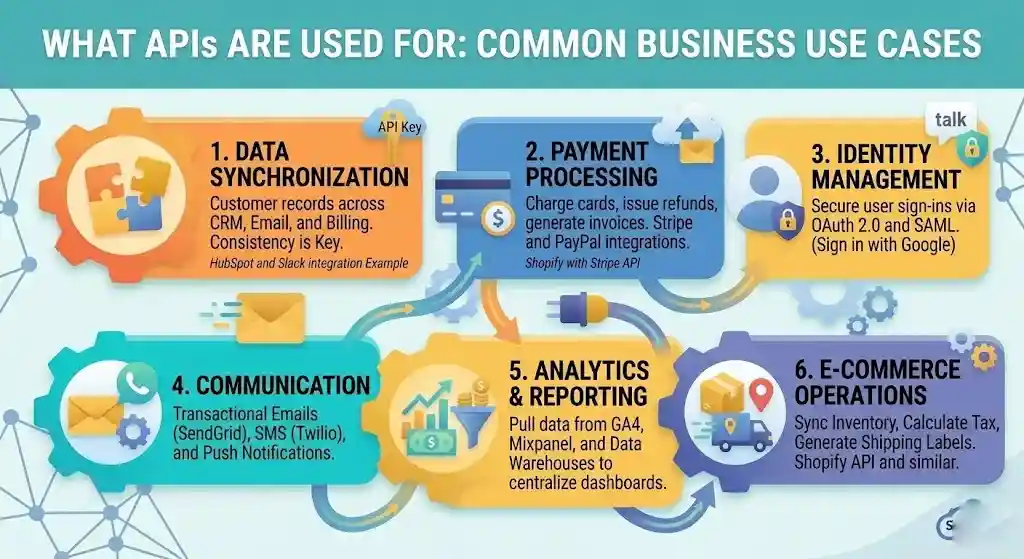
Beyond the everyday examples above, here are specific business jobs-to-be-done that APIs handle:
- Data synchronization — keeping customer records consistent across your CRM, email platform, and billing system.
- Payment processing — charging cards, issuing refunds, and generating invoices through Stripe, PayPal, or Square.
- Identity and access management — letting users sign in securely with existing accounts via OAuth 2.0.
- Communication — sending transactional emails (SendGrid, Mailgun), SMS messages (Twilio), or push notifications.
- Analytics and reporting — pulling data from Google Analytics, Mixpanel, or your data warehouse into dashboards.
- E-commerce operations — syncing inventory, calculating tax, generating shipping labels, and updating order status.
- AI and machine learning — sending text, images, or data to AI models and receiving predictions, summaries, or generated content. Tools like ChatGPT expose their capabilities through APIs that third-party developers use to build custom solutions.
- Cloud infrastructure — provisioning servers, managing storage, and monitoring uptime on Amazon Web Services or Microsoft Azure.
- Customer support — platforms like Zendesk and Freshdesk use APIs to connect ticketing systems with live chat, knowledge bases, and CRM records.
The pattern: whenever one system needs data or functionality that lives in another system, an API is typically the mechanism that makes it happen.
Types of APIs Explained Simply
APIs can be sorted by who can access them and by how they are built. Here is a quick breakdown.
By Access Level
| Type | Who can use it | Example |
|---|---|---|
| Public (open) API | Anyone who registers for an API key | Google Maps API, OpenWeatherMap |
| Private (internal) API | Only the company’s own teams | A bank’s internal data API |
| Partner API | Selected external partners under agreement | A hotel chain’s API shared with booking sites |
| Composite API | Bundles multiple API calls into one | A checkout API that handles inventory, payment, and shipping in a single request |
By Architecture Style
- REST (Representational State Transfer) — the most common style on the web. REST APIs use standard HTTP methods (GET, POST, PUT, DELETE) and return data in JSON. Most APIs you encounter — Stripe, Slack, Shopify — are REST APIs.
- SOAP (Simple Object Access Protocol) — an older, more rigid standard that uses XML. Still found in enterprise banking, healthcare, and government systems where strict contracts and built-in security matter.
- GraphQL — a newer approach (created by Facebook) that lets the client ask for exactly the data it needs, nothing more. Useful when bandwidth matters or when the data model is complex. Shopify offers a GraphQL API alongside its REST API.
For most business evaluations, knowing whether an API is REST-based and returns JSON is enough. REST is widely supported, well-documented, and easy for developers to work with — which means faster (and usually cheaper) integrations.
API Protocols and Communication Styles in Plain English
Beyond the three main architectural styles above, you may hear about other protocols and patterns when evaluating technology platforms. Here is what each one means — and when it matters to you.
| Protocol / Style | What it does | Data format | When you might encounter it |
|---|---|---|---|
| REST | Request-response over HTTP using standard methods | JSON (most common) | Almost every modern web API — Stripe, Slack, Shopify, Google Maps |
| SOAP | Strict, contract-based messaging with built-in security | XML | Enterprise systems — banking, healthcare, government, legacy ERPs |
| GraphQL | Client specifies exactly what data it needs in one request | JSON | Complex front-end apps, mobile apps with bandwidth constraints |
| RPC (Remote Procedure Call) | Calls a specific function on a remote server as if it were local | Varies | Older enterprise systems, internal service-to-service calls |
| gRPC | High-performance RPC framework (created by Google) using HTTP/2 | Protocol Buffers | Microservices architectures, real-time data-heavy systems |
| WebSocket | Opens a persistent, two-way connection for real-time data exchange | JSON or binary | Live chat, stock tickers, collaborative editing, real-time dashboards |
What this means for non-developers: You do not need to choose a protocol — your development team or vendor handles that. But knowing the terminology helps you ask better questions. For example, if a vendor says their API is “REST-based,” you know it uses standard web technology and will be compatible with most integration tools. If they mention “gRPC only,” you know it is optimized for speed but may require more specialized development work.
REST vs SOAP vs GraphQL: Which One Matters for Your Business?
These three are the styles you will hear about most often. Here is how they compare from a business perspective.
| REST | SOAP | GraphQL | |
|---|---|---|---|
| Data format | JSON (lightweight, human-readable) | XML (verbose, strict) | JSON |
| Ease of integration | High — widely supported by most tools and platforms | Moderate — requires more setup and tooling | Moderate — flexible but needs client-side query logic |
| Speed / performance | Fast for most use cases | Slower due to XML overhead | Fast — retrieves only what you request, reducing data transfer |
| Security | Relies on HTTPS, OAuth, API keys | Built-in WS-Security standard, stricter compliance | Relies on HTTPS, OAuth, API keys (same as REST) |
| Flexibility | Fixed endpoints return fixed data | Rigid contracts between client and server | Highly flexible — client defines exactly what data to return |
| Best for | General-purpose web APIs, public APIs, mobile apps | Banking, healthcare, government, legacy enterprise systems | Complex data models, mobile apps, bandwidth-sensitive environments |
| Common examples | Stripe, Slack, Shopify REST API, Google Maps | PayPal (legacy), bank core systems, enterprise ERPs | Shopify GraphQL API, GitHub GraphQL API, Facebook |
| No-code tool support | Excellent — Zapier, Make, and most connectors default to REST | Limited — few no-code tools work with SOAP | Growing but still limited |
Bottom line for business leaders: If you are evaluating a SaaS product, a REST API is the safest default — it works with the widest range of tools. SOAP matters if your industry has strict compliance requirements (banking, healthcare). GraphQL matters if your product team is building a custom front-end that needs precise data control.
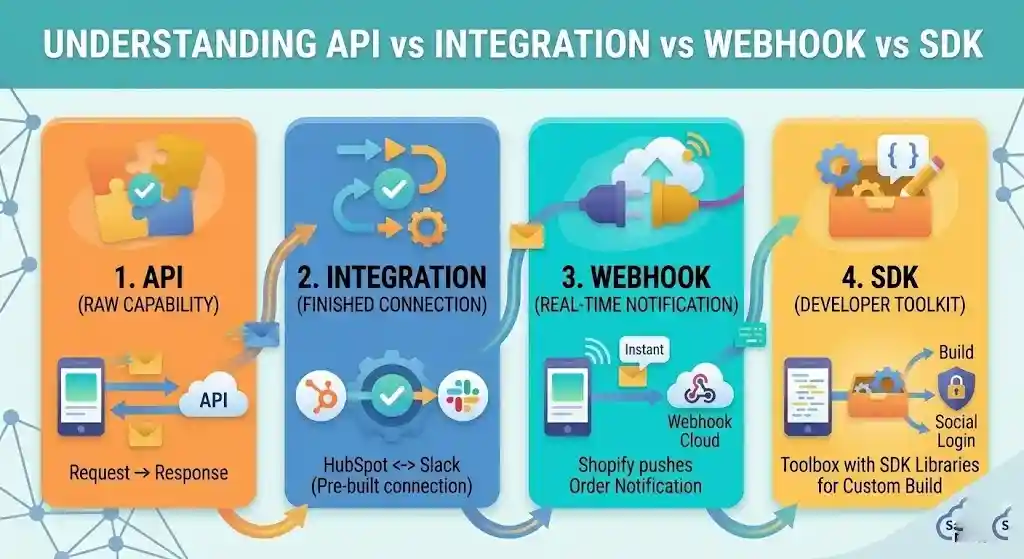
API vs Integration vs Webhook vs SDK
These four terms come up together constantly, and they are not interchangeable.
Quick summary: An API is the raw capability. An integration is a finished connection built on top of APIs. A webhook is a real-time push notification from one system to another. An SDK is a developer toolkit for building on a platform.
| API | Integration | Webhook | SDK | |
|---|---|---|---|---|
| What it is | A set of rules for two systems to exchange data | A finished connection between two products | A real-time notification pushed from one system to another when an event happens | A toolkit with pre-built code, libraries, and documentation for building on a platform |
| Direction | Request-response (you ask, it answers) | Usually bidirectional, pre-configured | One-way push (the server pushes data to you) | N/A — it is a development toolkit, not a data flow |
| Who builds it | The platform provider | Either the vendor, a third-party connector (Zapier, Make), or your dev team | The platform provider; you configure where to send it | The platform provider |
| Effort to use | Requires some development unless a connector exists | Minimal — often plug-and-play in the product’s UI | Low — usually just providing a URL to receive data | Moderate to high — designed for developers building apps |
| Example | Calling Stripe’s API to charge a card | Connecting HubSpot and Slack through HubSpot’s built-in integration | Shopify sends your server an instant notification when an order is placed | Using Facebook’s SDK to build a social login into your mobile app |
| Best for | Custom data exchange, automation, flexibility | Quick, standard connections between popular tools | Real-time event notifications without constant polling | Building apps or deep features on top of a platform |
When to Choose What
- Pick a native integration or a no-code connector (like Zapier or Make) when the connection you need already exists and the pre-built version meets your requirements.
- Rely on the API directly when you need custom logic, unusual data transformations, or connections that no off-the-shelf integration covers.
- Use webhooks when you need instant, event-driven updates (e.g., “notify me the second a payment fails”).
- Use an SDK only when you are building a custom application on top of a platform.
When You Do Not Need Direct API Access
Not every workflow requires calling an API directly. In many cases, simpler options work just as well — or better.
- Native integrations already exist. If your CRM already has a built-in Slack or Mailchimp connector, use it. Native integrations are maintained by the vendor, require no code, and are less likely to break during version updates.
- No-code automation tools cover your use case. Platforms like Zapier, Make, or Monday.com automations let you build multi-step workflows between apps without writing code. If your need is “when X happens in Tool A, do Y in Tool B,” a no-code tool is probably faster and cheaper than a custom API integration.
- The data volume is low. If you are syncing a few dozen records per week, a manual CSV export/import or a basic Zapier zap may be perfectly sufficient. API integrations add overhead — development time, testing, monitoring — that may not be justified for small-scale needs.
- Your team does not have developer capacity. Building and maintaining an API integration requires ongoing attention: monitoring for errors, handling version changes, managing authentication. If no one on your team can own this, a native integration or no-code tool is safer.
The rule of thumb: use direct API access only when off-the-shelf integrations cannot do what you need, when you need full control over data transformations, or when the scale of your operations demands it. And when the target system has no API at all? That’s where AI browser-agent platforms come in — they use AI agents to browse websites directly, interact with page elements, and extract data as if a human were doing it.
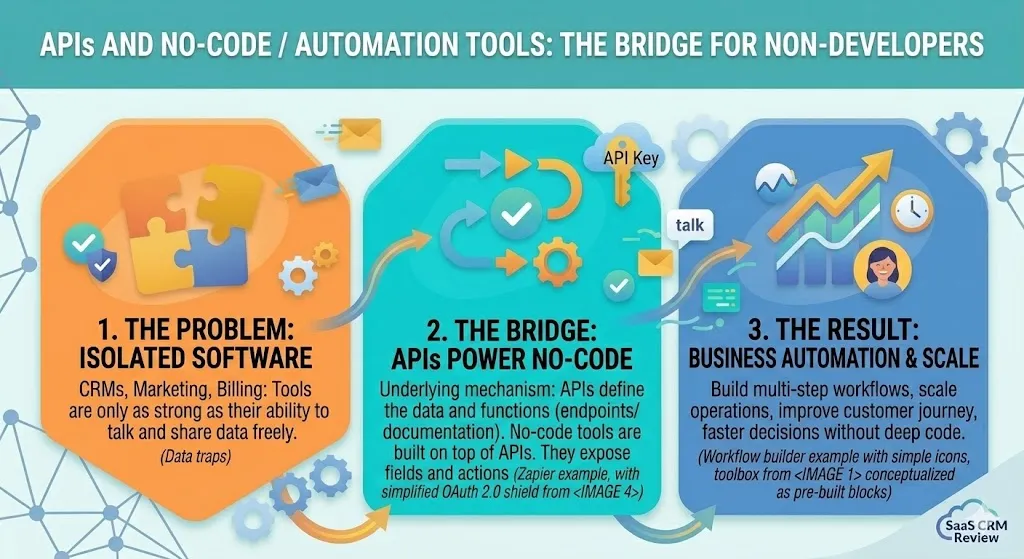
APIs and No-Code / Automation Tools: The Bridge for Non-Developers
If no-code platforms are so capable, where do APIs fit in for non-technical teams?
APIs are the engine that no-code tools run on. When you set up a Zapier automation that creates a Salesforce contact from a Typeform submission, Zapier is calling the Salesforce API and the Typeform API behind the scenes. You just do not see it.
Understanding this matters because:
- No-code tools have limits. They may not expose every field, action, or filter that the underlying API supports. If your workflow requires something the connector does not offer, you will hit a wall — and knowing it’s an API limitation (not a platform limitation) helps you troubleshoot.
- API quality affects no-code reliability. A vendor with a poorly documented or unstable API will produce flaky Zapier integrations too. When evaluating software, the API matters even if your team plans to use it through a no-code connector.
- Some workflows outgrow no-code. As volume increases or logic gets complex, you may need to switch from a no-code connector to a direct API integration for performance, cost, or reliability reasons.
Common API Terms in Plain English
| Term | Plain-English Definition |
|---|---|
| Endpoint | A specific URL (web address) that accepts a specific type of request. Think of it as a department phone number inside a company. |
| Request | The message your software sends to an API asking for data or an action. |
| Response | The message the API sends back — usually data formatted in JSON. |
| JSON | JavaScript Object Notation. A lightweight, human-readable text format used to structure data. It looks like labeled pairs: "name": "Jane". |
| API key | A unique string of characters that identifies your application when it calls an API. Like a building access badge — it tells the server who you are. |
| Token | A temporary credential (often short-lived) that proves you are authorized to access certain data or actions. |
| Authentication | The process of proving who you are to an API — usually via an API key, token, or OAuth flow. |
| Authorization | The process of determining what you are allowed to do once your identity is confirmed. Authentication says “you are Jane”; authorization says “Jane can read invoices but not delete users.” |
| OAuth 2.0 | An industry-standard protocol that lets users grant limited access to their account on one service (say, Google) without sharing their password with a third-party app. |
| Rate limit | A cap on how many requests you can make in a given time window (e.g., 100 requests per minute). Prevents abuse and protects server stability. |
| Payload | The body of data sent in a request or returned in a response. |
| HTTP | HyperText Transfer Protocol — the foundational communication protocol of the web. REST APIs use HTTP methods like GET (retrieve), POST (create), PUT (update), and DELETE (remove). |
| Webhook | A mechanism where a server automatically sends data to your specified URL when a particular event occurs. |
| SDK | Software Development Kit — a bundle of tools, code libraries, and documentation that helps developers build on a platform more quickly. |
| API documentation (API docs) | The reference manual for an API. It lists every endpoint, required inputs, expected outputs, authentication methods, and error codes. |
| Developer portal | A dedicated website (often at developers.example.com) where a company publishes its API documentation, guides, and access credentials. |
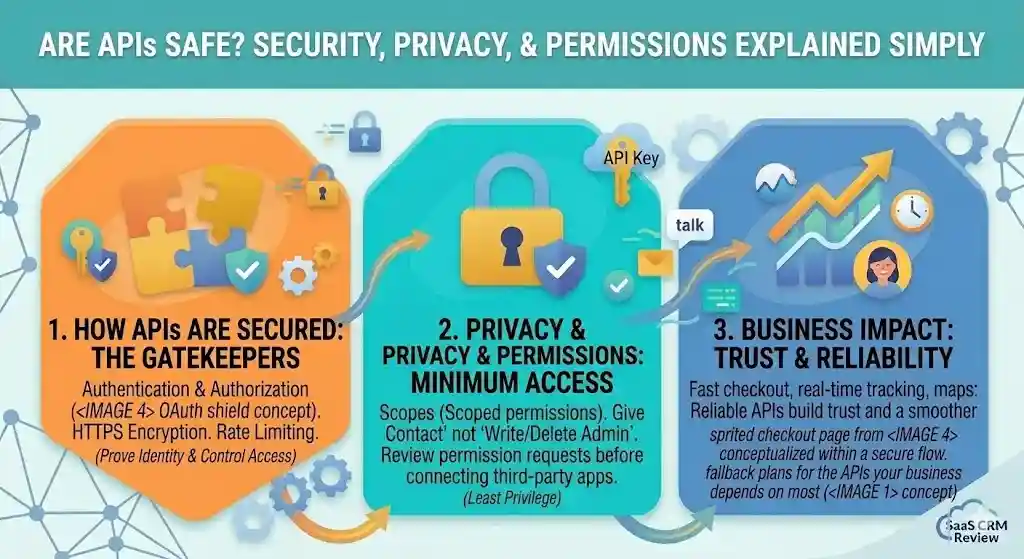
Are APIs Safe? Security, Privacy, and Permissions Explained Simply
APIs handle sensitive data — customer records, payment information, login credentials — so security is essential. Here is what non-developers need to understand.
How APIs are secured
- Authentication and authorization. Every legitimate API requires callers to prove who they are (authentication) and checks what they are allowed to do (authorization). Common methods include API keys, OAuth 2.0 tokens, and mutual TLS certificates.
- HTTPS encryption. Reputable APIs transmit data over HTTPS, which encrypts information in transit. If a vendor’s API does not use HTTPS, that is a red flag.
- Rate limiting. By capping the number of requests per minute or hour, APIs prevent abuse, brute-force attacks, and accidental overloading.
- Scoped permissions. Good APIs let you grant the minimum access necessary. For example, an integration with your CRM might only need read access to contacts, not write or delete access.
What non-developers should watch for
- Never share API keys publicly. An API key is like a password. If it ends up in a public repository or a shared document, anyone can use it — and you may be billed or held liable for the traffic.
- Review permission scopes. When connecting a third-party app that asks for API access, check exactly what permissions it requests. If a simple reporting tool asks for full admin access, push back.
- Ask about data residency. If your business operates under GDPR, HIPAA, CCPA, or other regulations, ask the vendor where API data is processed and stored.
- Monitor usage. Most API dashboards show request volume and error rates. Spikes in usage can indicate a misconfigured integration or unauthorized access.
- Understand breach responsibility. If a third-party integration exposes customer data through an API you authorized, your organization may still bear responsibility. Clarify liability in your vendor agreements.
API Pricing, Rate Limits, and Hidden Constraints
Most articles about APIs skip the money part. Here is what actually affects your costs and operational limits.
Free tiers are not free forever
Many APIs offer a free tier with limited monthly requests. Once your usage grows, costs can escalate quickly. Some vendors charge per API call, per data record, or per active user. Others bundle API access into enterprise-only plans.
Rate limits affect automation at scale
A rate limit of 100 requests per minute might be fine for a small team. But if you are syncing 50,000 customer records nightly, that same limit turns a 5-minute job into a multi-hour crawl. Always check published rate limits before building a workflow around an API.
API access may be locked behind pricing tiers
Some platforms include API access on all plans. Others restrict it to mid-tier or enterprise plans. A few gate specific endpoints or data objects by plan level. Ask explicitly: “Is full API access included in the plan we are considering?”
Per-call pricing adds up
If an API charges $0.01 per call, that sounds trivial — until your automation runs 100,000 calls per month and your bill is $1,000. Model your expected API volume before committing.
Version changes can break integrations
When a vendor releases a new API version and deprecates the old one, your existing integration may stop working unless someone updates it. Ask about deprecation timelines, backward compatibility, and migration support.
What Happens When an API Fails?
APIs are reliable most of the time. But when they fail, the business impact can be immediate and visible.
- Checkout breaks. If a payment API goes down, customers cannot complete purchases. Revenue stops.
- Data sync breaks. If the API connecting your CRM and email platform errors out, new leads may not receive onboarding emails for hours — or days.
- Reports show wrong data. If an analytics API returns stale or partial data, dashboards display inaccurate numbers, leading to bad decisions.
- Webhooks do not arrive. If an event-driven notification fails silently, your system may not know a refund was issued or an order was canceled.
- Customer experience degrades. Slow API responses make checkout sluggish, search results delayed, or notifications late. Users blame your product, not the API behind it.
What to do about it: Choose vendors with published uptime SLAs, status pages, and incident-response processes. Build monitoring into critical API-dependent workflows. Have fallback plans for the APIs your business depends on most.
API Lifecycle in Plain English
APIs are not static. They evolve over time, and understanding the lifecycle helps you evaluate long-term vendor risk.
- Versioning. Vendors release new API versions (v1, v2, v3) to add features, fix bugs, or change data structures. Well-managed APIs keep multiple versions running in parallel so existing integrations do not break overnight.
- Deprecation. When a vendor decides to retire an old version, they “deprecate” it — announcing a timeline for shutdown. Good vendors give 6–12 months of notice; bad vendors give weeks.
- Breaking changes. A “breaking change” is any update that makes existing integrations stop working. This might be a renamed field, a removed endpoint, or a changed authentication method. Well-managed APIs minimize breaking changes and flag them clearly.
- Changelog. A changelog is a public log of every update to the API. Active, detailed changelogs signal a well-maintained API. If there is no changelog, treat that as a warning sign.
- Backward compatibility. The best APIs maintain backward compatibility — meaning older integrations continue to work even after new versions are released. Ask vendors about their backward-compatibility policy before building critical workflows on their API.
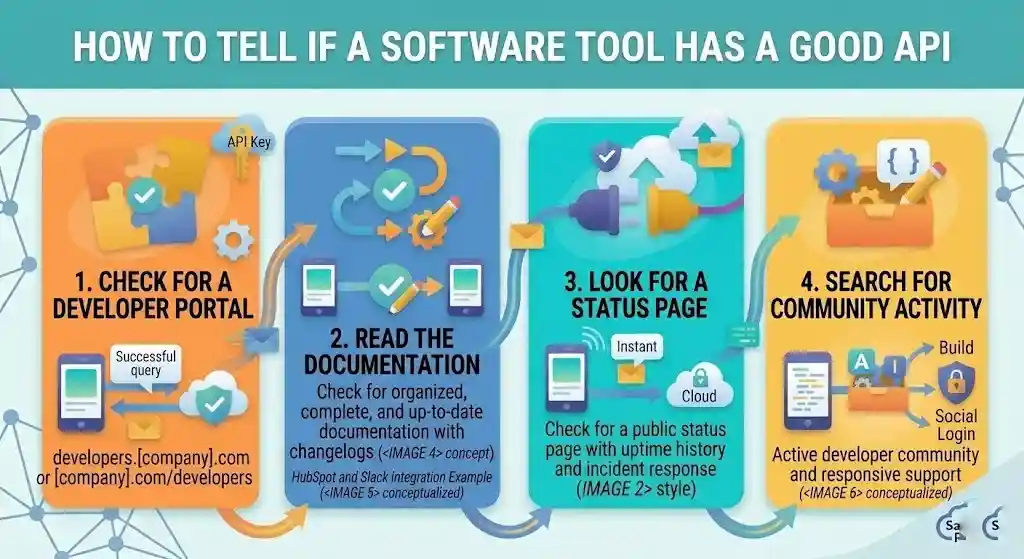
How to Tell Whether a Software Tool Has a Good API
Not all APIs are created equal. Here is how to evaluate one before committing to a platform.
Where to look
- Check for a developer portal. Companies with serious APIs publish a dedicated section — usually at
developers.[company].comor[company].com/developers. Look for clear documentation, quick-start guides, and code examples. - Read the documentation. Good API docs are organized, complete, and kept up to date. If the docs are sparse, outdated, or hard to navigate, that is a warning sign — the API may be poorly maintained.
- Look for a status page. Reliable platforms publish a public status page (e.g.,
status.stripe.com) showing real-time and historical uptime. - Search for community activity. An active community (Stack Overflow questions, GitHub repositories, forum threads) suggests the API is widely used and supported.
Signs of a strong API
- Clear, versioned documentation with changelogs.
- Sandbox or test environment for experimentation.
- Transparent rate limits and error messages.
- Published uptime history and incident response.
- Active developer community and responsive support.
- Stable versioning with clear deprecation policies.
Signs of a weak API
- Incomplete, outdated, or missing documentation.
- No sandbox or test mode.
- Sudden breaking changes without notice.
- No public status page or uptime data.
- Vague error messages.
- Unanswered community questions.
Common API Red Flags When Evaluating Vendors
Beyond documentation quality, watch for these warning signs during the sales or evaluation process:
- “Our API can do anything” — but documentation is vague or missing for key endpoints. If a vendor claims full API coverage but cannot show you the endpoint that handles your specific use case, that is a problem.
- No sandbox or test environment. You should be able to test API calls without affecting production data. If a vendor requires a paid account before you can explore the API, you are flying blind.
- API access only on enterprise plans. Some vendors use API access as an upsell lever. If the plan you need does not include the API, factor the real cost into your evaluation.
- No changelog or status page. This suggests the API is not actively maintained or monitored. It also means you will not be warned when breaking changes are coming.
- Vendor cannot explain rate limits. If the sales team does not know the rate limits, your team will discover them the hard way — in production.
- Authentication feels outdated. If the API only supports basic API keys (no OAuth, no token rotation, no scoped permissions), the security model may not meet your compliance requirements.
Questions to Ask Before Buying or Relying on an API
Before your organization commits to a vendor whose product depends on an API — or before you build a workflow on top of one — run through this checklist.
Vendor API Checklist
- Coverage: Does the API expose the data and actions we actually need, or only a subset?
- Documentation: Is the API documentation complete, current, and understandable?
- Authentication: What authentication method is used? Is OAuth 2.0 supported?
- Rate limits: What are the request limits? Are they sufficient for our expected volume?
- Pricing: Is API access included in our plan, or is it billed separately? Is pricing per-call, per-seat, or tiered?
- Uptime and SLA: Does the vendor publish uptime data? Is there a service-level agreement?
- Versioning: How does the vendor handle breaking changes? How much notice is given before deprecated endpoints are removed?
- Security: Does the API use HTTPS? What data-encryption and access-control standards are in place?
- Data residency: Where is data processed and stored? Does this comply with our regulatory requirements?
- Support: Is there dedicated API support? What are the response-time expectations?
- Sandbox: Is there a test environment so we can experiment without affecting production data?
- Webhooks: Does the API support webhooks for real-time event notifications?
- Community: Is there an active developer community, forum, or knowledge base?
Common Myths About APIs
“APIs require custom coding.” Not always. Many platforms offer pre-built integrations, no-code connectors (Zapier, Make), or plug-and-play SDKs. You may never need to write a line of code.
“APIs are only for developers.” Developers implement APIs, but business stakeholders decide which APIs matter, negotiate terms, evaluate documentation quality, and set requirements. Understanding APIs makes you a better buyer and decision-maker.
“API = integration.” An API is the capability. An integration is the finished connection. A product can have a powerful API but no pre-built integrations, or many integrations but a weak underlying API.
“If it has an API, it can do anything.” APIs only expose what the vendor chooses to expose. Just because a product has an API does not mean every feature or data point is accessible through it. Always check the documentation for coverage.
“Free APIs are free forever.” Many APIs offer a free tier with limited usage, then charge based on volume. Pricing models, rate limits, and terms of service can change. Read the fine print.
“All APIs work the same way.” REST, SOAP, and GraphQL have meaningfully different designs, strengths, and requirements. Even within REST, every vendor structures its endpoints and authentication differently.
Frequently Asked Questions
What is an API in simple words?
An API is a set of rules that lets one app request data or actions from another app. Think of it as a structured messenger between two software systems — it carries the request and delivers the response.
What does API stand for?
API stands for Application Programming Interface. It is the interface through which software applications communicate with each other.
How does an API work?
A client sends a request to a specific URL called an endpoint. The server processes the request and returns a response, usually in JSON format. The whole cycle typically completes in milliseconds.
What is an example of an API?
When you click “Sign in with Google,” the website uses Google’s authentication API to verify your identity without seeing your Google password. Stripe payments, Google Maps embeds, and Slack notifications are other everyday examples.
Why are APIs used?
APIs let software systems share data and functionality without rebuilding features from scratch. They power automation, enable integrations between tools, speed up development, and improve the customer experience.
What is the difference between an API and an integration?
An API is the underlying mechanism — the set of rules for exchanging data. An integration is a pre-built connection built on top of an API that end users can set up without coding.
What is the difference between an API and a webhook?
An API uses a request-response model: your system asks, and the server answers. A webhook is event-driven: the server pushes data to your system automatically the moment something happens.
What is an API endpoint?
An endpoint is a specific URL that accepts requests for a specific type of data or action. Each endpoint handles a different function, like a department inside a company.
What is an API key?
An API key is a unique string that identifies your application when it calls an API. It acts like an access badge, telling the server who is making the request.
Are APIs secure?
Well-built APIs use authentication, HTTPS encryption, rate limiting, and scoped permissions to protect data. Security depends on both the provider and the organization using the API.
Do non-developers need to understand APIs?
Yes. Business leaders, product managers, and operations teams make decisions about which tools to buy, which integrations to prioritize, and how data flows across systems. Understanding APIs leads to smarter vendor evaluations and technology investments.
What are the main types of APIs?
By access level: public, private, partner, and composite. By architecture: REST (most common, uses JSON), SOAP (older, XML-based), and GraphQL (client specifies exact data needed).
Is an API the same as a web service?
Not exactly. A web service is a type of API that operates over a network (usually the internet). Every web service is an API, but not every API is a web service — some APIs operate locally within a single device or system without using a network.
What is the difference between REST, SOAP, and GraphQL?
REST is lightweight, uses JSON, and works with almost every modern tool — it is the most common choice. SOAP is older and more rigid but has built-in security standards required by banking and healthcare. GraphQL lets the client request only the exact data it needs, reducing wasted bandwidth.
What are microservices and how do they relate to APIs?
Microservices is an architectural approach where an application is built as a collection of small, independent services rather than one large system. These services communicate with each other through APIs — typically REST APIs. If a vendor mentions “microservices architecture,” it usually means their platform is designed to be modular and easier to update without breaking everything.
Conclusion
An API — Application Programming Interface — is the invisible plumbing that connects the software you use every day. It lets your CRM talk to your email platform, your checkout page process payments, your weather app pull forecasts, and your AI tools generate content.
Understanding what an API is does not require you to become a developer. It requires you to know enough to ask the right questions: Does this tool have a well-documented API? What are the rate limits? Is the pricing transparent? How will breaking changes be communicated? Can a no-code tool handle this, or do we need direct API access?
Whether you are evaluating a new SaaS vendor, planning an automation workflow, or simply trying to understand why your product team keeps talking about endpoints, the concepts in this guide give you the vocabulary and the judgment to participate in those conversations with confidence.
APIs are not magic. They are structured, predictable agreements between software systems — and the better you understand those agreements, the better technology decisions you will make.