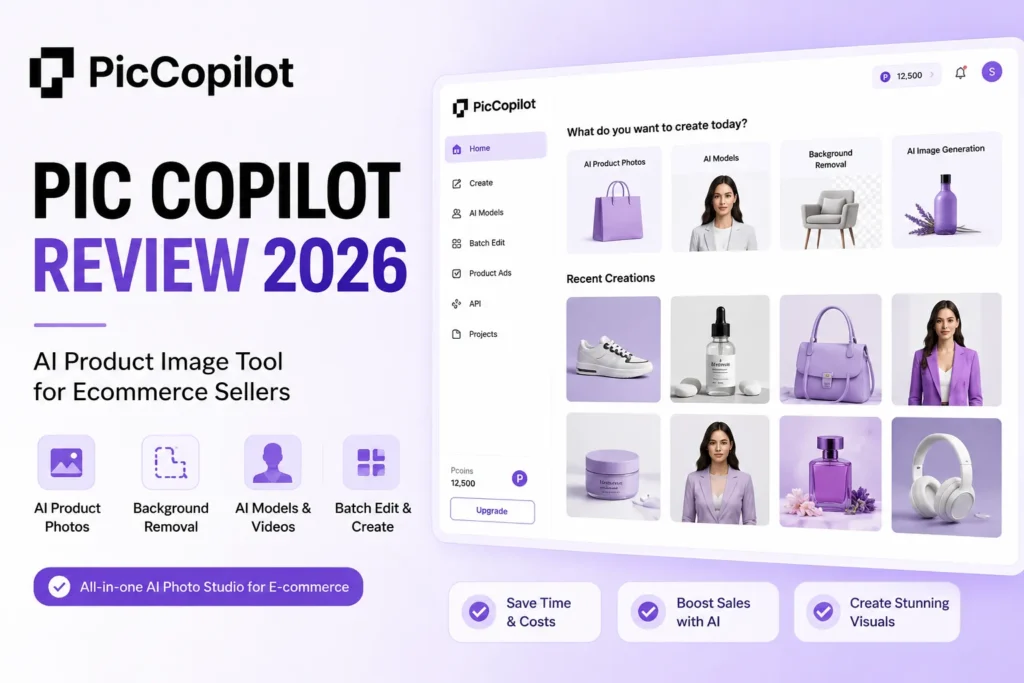
PicCopilot looks like an easy yes for ecommerce sellers who want AI model shots and product visuals without a studio, and for a solo apparel seller it often is. The harder question this Pic Copilot review answers is what the public pricing page will not tell you cleanly: how Pcoins expire, what the free plan blocks, whether there is a real API, and who ends up paying twice for retries.
Short answer up front. PicCopilot is worth a paid plan for solo-to-small fashion and marketplace sellers who need fast on-model photos and templated creatives.
It is a weak fit for catalog-scale teams that need a stable API, deterministic brand-perfect output, or named enterprise compliance. Pricing structure is confirmed as of July 5, 2026, but exact checkout prices should be verified inside the app because the official page renders paid tiers inconsistently in its crawlable text.
In This Article (18 sections)
Pic Copilot Review – Quick Verdict
| Category | Verdict |
|---|---|
| Best for | Solo to 5-person apparel, fashion, and marketplace sellers who need on-model photos and templated creatives |
| Not ideal for | Catalog-scale teams needing a public API, deterministic output, or SOC 2 / ISO / HIPAA compliance |
| Starting price | Free plan at $0; paid Pro and Pro Plus tiers with exact checkout price to verify in-app |
| Best practical plan | Pro Plus for fashion sellers who run virtual try-on and custom model uploads at real volume |
| Free plan / trial | Yes to both; free plan plus a 7-day Pro free trial for first-time subscribers |
| Setup difficulty | Low for single images and templates; medium for batch and fashion workflows |
| Main strength | Fast AI fashion model photos, virtual try-on, and marketing templates from existing product shots |
| Main limitation | Pcoins are distributed monthly and expire monthly, so unused credits do not roll over |
| Best alternative | Photoroom for mobile-first product editing, or Claid.ai when an API-driven pipeline is the requirement |
The verdict table gives away the tension in this tool. PicCopilot is generous on features and stingy on the two things scaling sellers care about most: credit rollover and automation, both of which change the real cost per usable image.
How I Reviewed PicCopilot
This review is based on official research, not a hands-on trial. I did not sign up, click through the editor, or generate images, so I do not make any “we tested” or “in our testing” claims about output quality.
The sources are PicCopilot’s official homepage, pricing page, help center, terms of use, and privacy policy, plus the Alibaba International launch release, Product Hunt, Reddit, and Trustpilot. Pricing and plan structure were checked on July 5, 2026, and are framed with caveats because the public pricing page renders paid tiers inconsistently.
Where numbers come from vendor marketing or customer stories, I label them as vendor-reported rather than independent benchmarks. That disclosure line matters more here than usual, because most competing pages repeat PicCopilot’s performance claims as if they were tested facts.
My full approach follows the same review methodology I apply to any AI tool: verify against official pages first, separate confirmed data from opinion, and flag what could not be checked.
What PicCopilot Is and Who It’s Built For
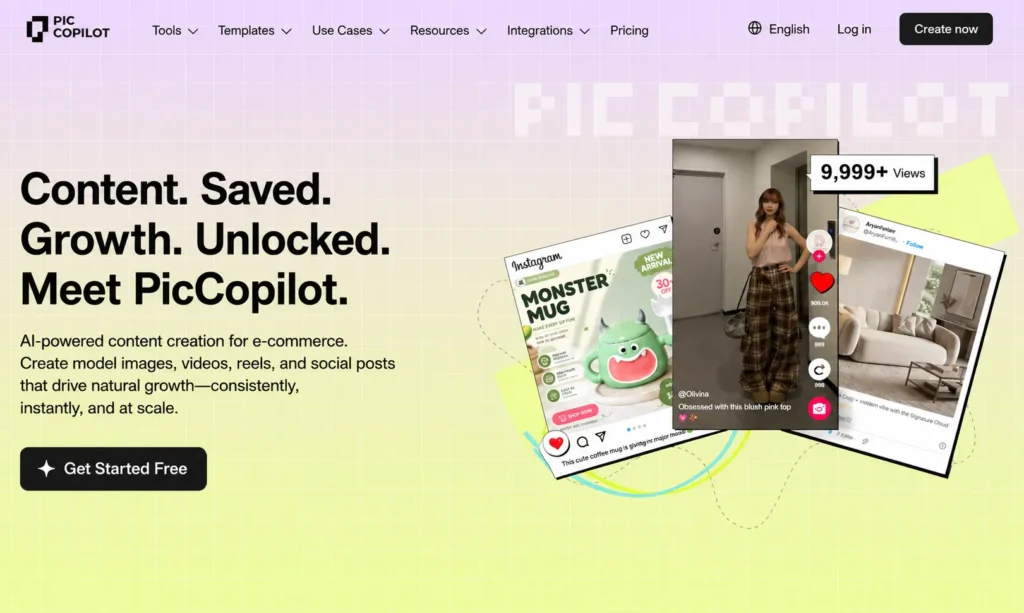
PicCopilot is an AI ecommerce content platform that turns existing product photos into model shots, videos, reels, backgrounds, templates, and social posts. It is built by NEURALNETICS PTE. LTD. and launched and promoted by Alibaba International Digital Commerce Group, and PicCopilot’s homepage claims 1.5 million sellers as a vendor-reported figure.
First, a disambiguation that trips up buyers. This is not a Microsoft Copilot or GitHub Copilot product, and it has no connection to those tools despite the shared word in the name.
The feature set leans hard into apparel. Virtual try-on, AI model swap, fashion reels, shoe and accessory shots, and more than 160 models across four major skin tones are all vendor-reported launch details, and they point to a tool that is stronger for fashion than for generic hard goods.
General product sellers still get value from background removal, generative AI backgrounds, AI shadows, templates, upscaling, and image translation. But the deepest, most differentiated features are the ones aimed at people who sell things worn on a body.
For US buyers, the regional fit is real. The Alibaba International launch release positions PicCopilot for American SMEs, includes US holiday templates, and (per the release) offered free credits to newly registered US small businesses, which is a vendor-reported launch promotion rather than a permanent guarantee.
If you are shortlisting tools in this category, it belongs in the same evaluation set as the best AI photo editors rather than any CRM or general design suite. Treat it as production software for listing and ad creative, not a full brand studio.
PicCopilot Pros and Cons
| Pros | Cons |
|---|---|
| AI virtual try-on and model swap generate on-model photos from flat product shots | Pcoins are distributed monthly and expire monthly, so light or seasonal users lose value |
| Background removal, AI shadows, and templates cover fast listing and ad creative | Exact paid checkout price is not cleanly exposed on the official English pricing page |
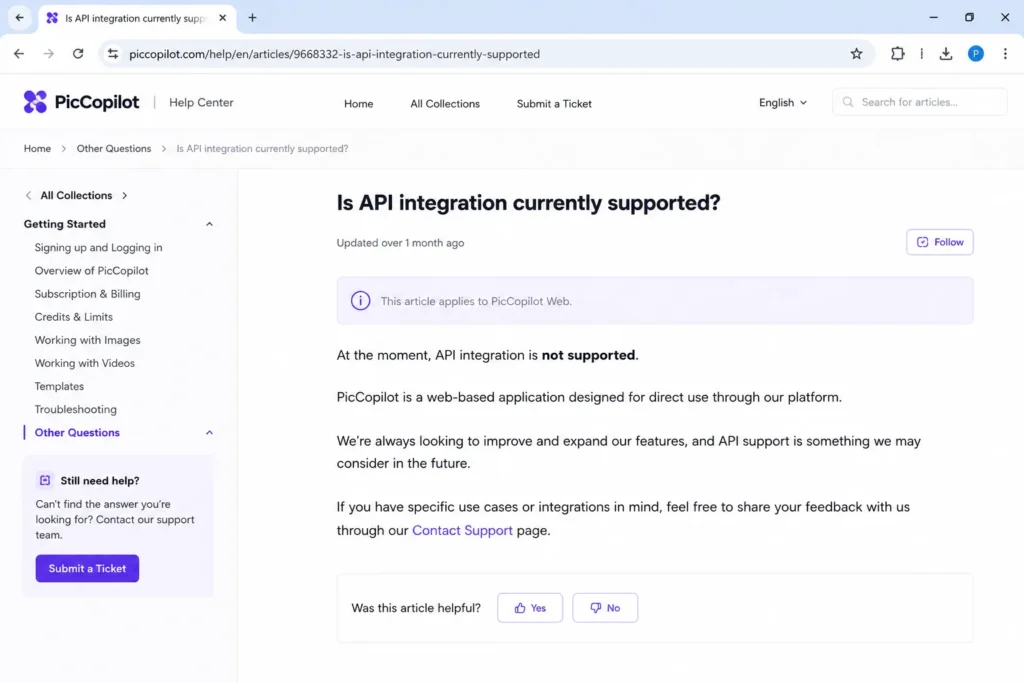
| Image translation supports multi-market listings without redesigning creatives | Help center says there is currently no API, which blocks true automation |
| US holiday templates and US-market positioning fit American sellers | Terms disclaim warranties on outputs, so human QA stays mandatory |
| Free plan plus a 7-day Pro trial lets buyers validate fit before paying | Pro Plus credit refunds apply only within 24 hours and only to some tools during rollout |
These are specific tradeoffs, not softened praise. The pattern is consistent: PicCopilot wins on creative breadth and loses on the operational guarantees a growing team needs, which is exactly the split that should drive your plan choice later in this review.
What PicCopilot Does Well
PicCopilot solves three problems that otherwise cost sellers time, studio budget, or agency fees. Each one is strong, and each one carries a caveat a buyer should price in.
AI Fashion Models and Virtual Try-On
The headline capability is turning a flat or mannequin apparel shot into an on-model photo. For a fashion or accessories seller, this removes the recurring cost of booking models and shoots for every new SKU or colorway.
The evidence here is vendor-reported. A named fashion brand owner in PicCopilot’s customer stories says virtual try-on lets him generate realistic model photos in seconds and cut costs, and a Reddit seller in r/ecommerce called it useful for ad visuals and try-ons while noting it is not perfect.
I treat that Reddit note as the honest ceiling. On-model AI output is good enough for ads and secondary listing images, but fit, drape, and fine garment detail still need a human check before anything becomes a primary listing photo.
Background Removal, Shadows, and Templates at Speed
The second win is volume creative. Background removal, AI shadows, upscaling, and a large template library let a solo seller produce marketplace-ready and social-ready images without a designer.
This is where the free plan is most usable, because basic background removal and the image enhancer sit inside the free tier. The limitation shows up at scale, since batch processing and the newest tools are gated to Pro, which I cover in the feature-gate section.
Image Translation and Localization
The third win matters for sellers expanding across markets. Image translation edits text inside an image so a creative can carry into another language without a full redesign.
For a US seller selling into Latin America or Europe, that turns a redesign job into an edit job. The caveat is the same no-warranty caveat that applies to every output: translated marketplace claims still need a native check before they go live under platform advertising rules.
A note on the performance numbers you will see quoted elsewhere. PicCopilot’s homepage and launch materials report figures like a 50 percent higher click-through rate, 40 percent better ROAS, and three-day tasks dropping to ten minutes, all from vendor customer stories rather than independent tests, so I would use them as directional marketing rather than proof.
PicCopilot Pricing and Pcoin Economics
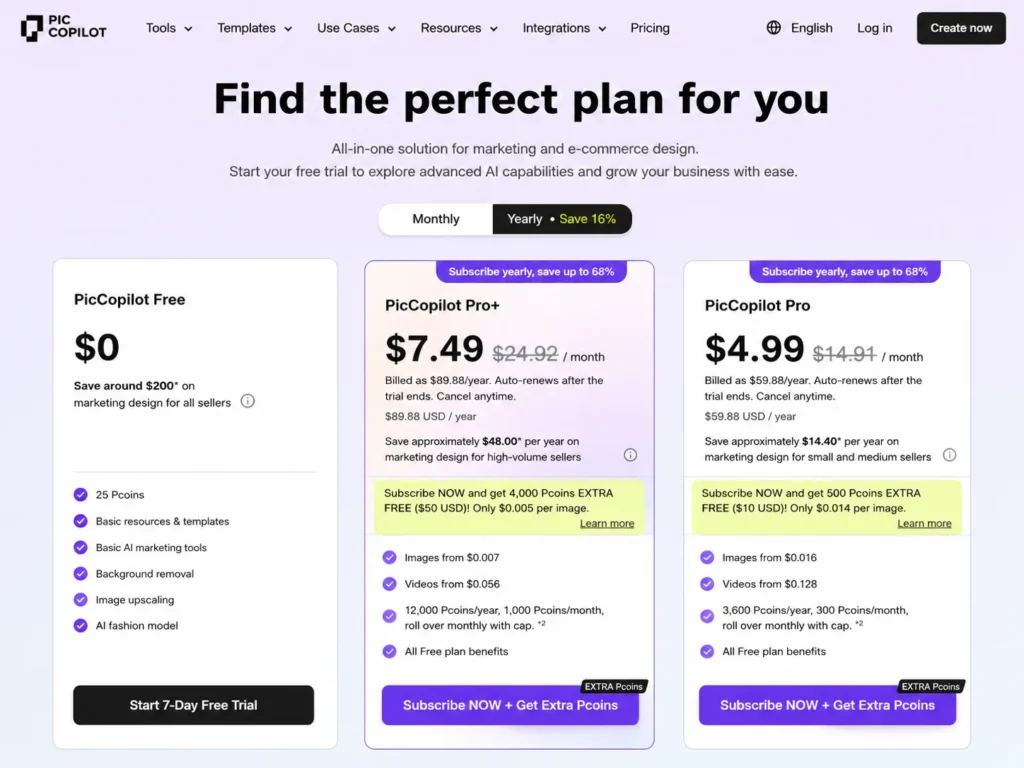
Pricing is where PicCopilot’s public information gets slippery, and where most competing reviews quote a single confident number they should not. As of July 5, 2026, the official pricing page confirms the plan structure, annual discount, free trial, Pcoin mechanics, and billing notes, but the crawlable English pricing table renders paid tiers inconsistently, sometimes showing $0 for tiers that are not free.
Because of that, treat any public paid price as needing checkout verification rather than a fixed quote. The structure below comes from the official PicCopilot pricing page, checked July 5, 2026.
| Plan | Public price status (checked Jul 5, 2026) | Pcoin allocation (official snippets) | Best for | Key limits |
|---|---|---|---|---|
| Free | $0 | Basic allowance for member-function trials | Testing and occasional single images | Basic AI features, background removal, image enhancer; limited member functions |
| Pro | Listed publicly; verify exact checkout price in-app (a localized official snippet showed about $7.99/ | About 6,000 Pcoins per year, about 500 per month | Solo sellers and small catalogs | Custom uploads, batch, larger templates, and latest tools open up here |
| Pro Plus | Listed publicly; verify exact checkout price in-app (a localized official snippet showed about $14.90/ | About 24,000 Pcoins per year, about 2,000 per month | Fashion sellers running try-on and custom models | Credit refund only within 24 hours and only for some tools during rollout |
| Top-up Pcoins | Usage-based; exact packages not reliably extracted | Add-on credits | Usage spikes without upgrading | Buy extra Pcoins mid-cycle |
| Business / large-scale | Custom, sales-led; contradictory public evidence | Not published | High-volume or API requests | Assume no self-serve API without sales confirmation |
The buyer consequence is trust, not just price. If a public pricing table can display $0 for a paid tier, no seller should budget from the crawlable page alone, and finance should expect the payable number to be confirmed at checkout before approval.
The Pcoin Trap Most Reviews Skip
Pcoins are the real cost lever, and the official pricing FAQ is blunt about how they behave. Credits are distributed monthly and expire monthly, so a Pro Plus allocation of about 2,000 monthly Pcoins does not accumulate into the yearly 24,000 if you use the tool in bursts.
For a seasonal or sporadic seller, that changes the math. Buying an annual plan for a Q4 push means paying for monthly credits you may never touch in the quiet months.
There is also a per-generation view worth knowing. Official crawlable snippets show Pro image generations from about $0.013 and videos from about $0.104, and Pro Plus images from about $0.006 and videos from about $0.048, which describes cost per asset rather than the subscription price.
My budget read: if your catalog work is steady month to month, higher-tier annual pricing lowers cost per image; if it spikes seasonally, monthly billing plus top-up Pcoins protects you from paying for expired credits. I would not budget from the advertised price alone until I knew my monthly generation volume.
Billing Notes That Bite Later
Two billing rules deserve a flag before you subscribe. First-time Pro subscribers get a 7-day free trial, yearly subscriptions carry an annual discount, and accepted payment methods include UnionPay, Visa, Mastercard, American Express, JCB, and Alipay.
The one that surprises people is downgrade timing. Upgrades take effect immediately, but downgrades only apply after the current billing period ends, so a seller who upgrades for a launch cannot instantly scale back down the same day.
Pro vs Pro Plus: Feature Gates and the Refund Catch
The gap between free, Pro, and Pro Plus is not cosmetic, and it maps directly to whether a real seller can work at volume. The free tier is a genuine trial layer, Pro is the working plan, and Pro Plus is the fashion-and-certainty plan.
| Capability | Free | Pro | Pro Plus |
|---|---|---|---|
| Basic AI tools, background removal, image enhancer | Yes | Yes | Yes |
| Batch processing and custom uploads | No | Yes | Yes |
| Larger template library and latest tools | Limited | Yes | Yes |
| Custom fashion model upload | No | No | Yes |
| Pro-exclusive assets and templates | No | Partial | Yes |
| Priority / no-queue processing | No | No | Yes |
| Functions Lab (newest, experimental tools) | No | No | Yes |
| Pcoin refund for weak generations | No | No | Within 24 hours, some tools only |
The gate that decides the plan is custom fashion model uploads, which the pricing page places in Pro Plus. A fashion seller who wants consistent, brand-specific models rather than stock ones is effectively pushed to Pro Plus, not Pro.
The refund line is the one to read carefully. Pro Plus includes a Pcoin refund mechanism for unsatisfactory outputs, but it is limited to content generated within the last 24 hours and only covers some tools during rollout, so it is a useful safeguard rather than a blanket “bad output is free” promise.
One more caution on Functions Lab. The pricing page notes that Functions Lab features may be unstable, so I would use them for experiments and never as the only pipeline for a time-sensitive launch.
Where the Free Plan Stops Working
The free plan is real, but it stops working at the exact point a hobby becomes a business. The wall is batch processing and custom uploads, not a hard image cap you notice on day one.
| Seller stage | Free plan verdict | Real trigger to upgrade |
|---|---|---|
| Casual testing, a handful of images | Fine | None yet; validate fit here |
| Solo seller batching a small catalog | Breaks | Batch processing is gated to Pro |
| Fashion catalog with brand-specific models | Breaks | Custom model upload requires Pro Plus |
| Small agency producing weekly client content | Breaks early | Volume, custom uploads, and queue priority all sit above free |
The practical reading is that free is for validation, not production. If your work involves more than a few images at a time or any custom model, plan on Pro at minimum and Pro Plus if fashion models are central.
API and Automation: The Contradiction to Resolve Before You Scale
This is the section most competitor reviews skip, and it is the one catalog-scale buyers should read first. PicCopilot’s official documentation contradicts itself on whether an API exists.
The official help center states plainly that Pic Copilot currently does not offer API access and that the service is primarily web-based. The pricing FAQ, in the same official domain, points large-scale customers to a business API/SDK path where specialists explain terms and pricing.
Those two statements cannot both be casually true for a self-serve buyer. The safe interpretation is to assume there is no self-serve public API you can build against today unless PicCopilot sales confirms a specific business API or SDK arrangement for your account.
For high-volume operators, the help center’s own guidance is telling. For large-scale usage it suggests a higher plan, topping up Pcoins, or contacting the team, none of which is the same as programmatic automation.
There is a related overclaim to avoid. Some directory pages imply native Shopify or WooCommerce integrations, but the official evidence supports exporting or formatting content for channels, not verified one-click publishing into your store.
| Workflow need | What PicCopilot supports (per official pages) | What it does not confirm |
|---|---|---|
| Post to social and marketplaces | Content formatted for or exportable to Instagram, TikTok, Shopify, Amazon, Etsy, Pinterest | Direct native publishing into each platform |
| Bulk generation | Batch processing inside the web app on Pro and above | A public API to script generation |
| Store sync | Manual export and upload | Verified native Shopify or WooCommerce app |
The catalog-scale consequence is time. Manual export and upload can quietly erase the time savings at 5,000-SKU volume, so an agency or enterprise catalog team should confirm the automation path with sales before committing, and should not assume the tool scales the way a true API product would.
Privacy, Data Use, and Output Rights
Fashion sellers and agencies upload identifiable images, so the privacy and terms detail here is a buyer-decision fact, not legal trivia. PicCopilot’s own documents are more revealing than any competitor review discusses.
The privacy policy states that its generative AI products may collect photos, videos, voice, text, and facial and body geometry as inputs. For a tool built around virtual try-on, that is not a footnote, because it means model, influencer, or customer images carry real consent questions.
The reassuring counterweight is also official. The privacy policy says personal information and inputs are not used to train or improve its AI models, and that generated photos or videos are retained until you delete them, which puts deletion hygiene on your team.
Two more items round out the risk picture. Personal data processed through the sites is stored in Singapore with international-transfer protections, and the terms grant PicCopilot broad rights to use user content to operate and improve the service, which is worth a careful read before an agency uploads unreleased client or IP-sensitive assets.
A safe-upload checklist for teams:
- Get written consent before uploading any real person’s face or body for try-on, and never upload images of minors.
- Delete generated assets you no longer need, since retention runs until deletion.
- Keep unreleased client campaigns and licensed IP off the platform until your legal team reviews the content license.
- Do not treat the no-training claim as blanket permission to upload sensitive third-party imagery.
The terms add one hard limit on trust. PicCopilot makes no representations or warranties about outputs, so a generated image is not guaranteed to be accurate, compliant, or safe to publish.
Human QA on product accuracy, likeness rights, and marketplace advertising rules stays mandatory before anything goes live.

Ease of Use, Setup, and Getting Good Output
For single images and templates, setup is low friction and matches the web-based, no-design-skills promise. The complexity climbs with the workflow: batch jobs, fashion models, localization, and client approval loops all add steps and QA overhead.
The variable that decides output quality is your input photo, a point Reddit and workflow-focused reviews raise that vendor pages gloss over. AI product photography rewards high-resolution, well-lit source shots and punishes soft or cluttered ones with retries that burn Pcoins.
A workflow that protects your credits:
- Start with clean, high-resolution, evenly lit product photos before any generation.
- Run small batches first and inspect results before scaling a job.
- QA every output for product accuracy, garment fit, and text errors, especially on translated creatives.
- Reserve Functions Lab for experiments, not deadline work.
No standalone mobile app was verified in this research run, though the terms reference mobile-optimized web. If a native app matters to your workflow, confirm it before you rely on it.
Support, Security, and User Sentiment
Support is email-centric, which is normal for this price band but worth setting expectations around. The help center plus support@piccopilot.com and PicCopilot@aliexpress.com are the documented channels, and no public SLA was found.
On security, PicCopilot publishes general technical and organizational measures, breach notification per law, and the Singapore storage note. No named SOC 2, ISO 27001, or HIPAA certification was found in this research run, so a compliance-bound buyer should not assume enterprise attestations exist.
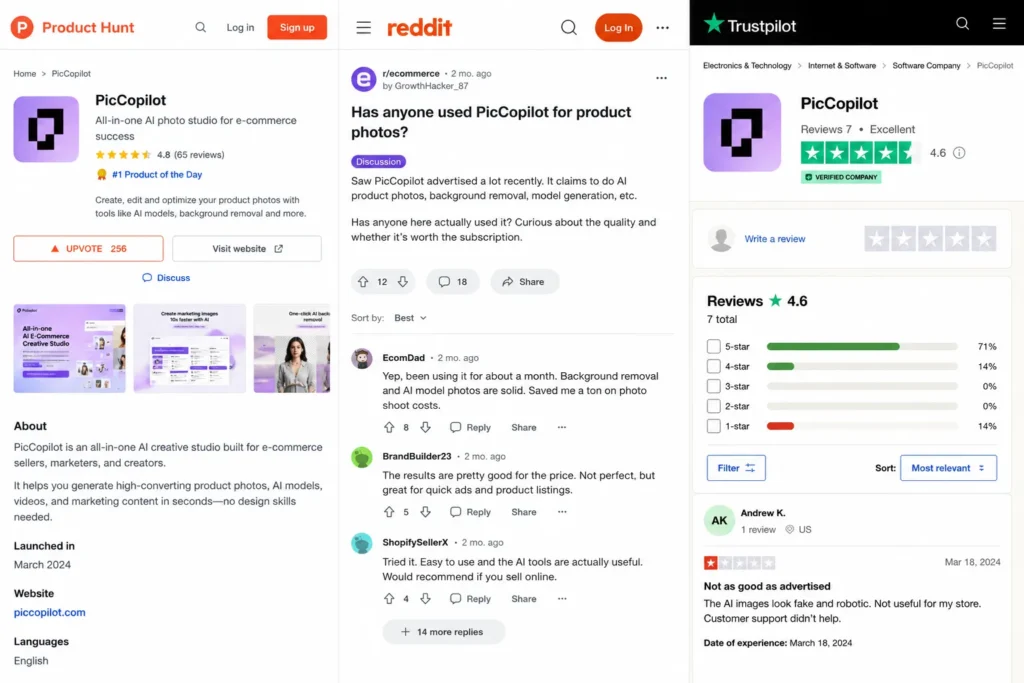
User sentiment is positive but thin, and honest sourcing matters more than a fake rating. The table below is my read on where the evidence actually comes from.
| Review source | Signal | How much weight |
|---|---|---|
| Official customer stories | Named, positive, vendor-published | Directional marketing, not proof |
| Product Hunt | Broadly positive, limited depth | Light peer signal |
| Reddit (r/ecommerce) | One useful “good but not perfect” note | Practitioner sentiment only |
| Trustpilot | A single critical affiliate-account complaint | Low-sample, do not generalize |
| G2 / Capterra / TrustRadius | No solid product-review profile found | Not usable authority in this run |
The buyer consequence is caution on both ends. Do not treat the single critical Trustpilot complaint as evidence of a broad support problem, and do not treat thin positive sentiment as validated proof the way some competitor pages imply.
PicCopilot Limitations That Matter Before You Commit
These are the limitations I would put in a buyer risk ledger before approving spend. Each one ties to a consequence, not a vibe.
| Limitation | Buyer consequence | What I would do |
|---|---|---|
| Paid prices render inconsistently on the official page | You cannot budget from the public table alone | Confirm the payable price at checkout before finance signs off |
| Pcoins expire monthly | Seasonal sellers pay for credits they never use | Match billing cadence to real monthly volume; top up instead of over-buying |
| No confirmed public API | True automation and store sync are not self-serve | Confirm the business API/ |
| Outputs carry no warranty | Bad or non-compliant creatives are your risk | Keep human QA on accuracy, likeness, and marketplace rules |
| Broad user-content license | Client IP and unreleased assets carry exposure | Legal-review the terms before uploading sensitive work |
| Functions Lab may be unstable | Newest tools can fail on deadline | Use Lab features for tests, not launch-critical pipelines |
The through-line is that PicCopilot’s risks are operational and contractual, not creative. The tool makes good images; the exposure is in credits, automation, compliance, and rights.
Who Should Use PicCopilot
- Solo apparel and accessories sellers who need on-model photos and cannot justify recurring photoshoots, because virtual try-on and model swap remove that cost.
- Small marketplace and Shopify or Amazon sellers who want templated listing and ad creative fast, since backgrounds, shadows, and templates cover most listing needs on Pro.
- US small businesses targeting American shoppers who benefit from US holiday templates and US-market positioning.
- Sellers expanding across languages who need image translation to reuse creatives without a redesign.
Each of these cohorts shares a trait: modest volume, tolerance for human QA, and no hard dependency on automation or enterprise compliance. That is PicCopilot’s sweet spot.
Who Should Avoid PicCopilot
- Catalog-scale teams and agencies processing thousands of SKUs that need a public API and predictable throughput, because manual export and no confirmed API break the workflow.
- Compliance-bound buyers who require SOC 2, ISO 27001, or HIPAA attestations, since none were found in this research run.
- Brands that need deterministic, pixel-consistent output every time, because AI generation still requires retries and QA.
- Agencies handling sensitive client IP or unreleased campaigns, given the broad content license and output no-warranty terms.
- Seasonal or sporadic sellers tempted by annual plans, because monthly Pcoin expiry erodes the value of credits bought ahead of demand.
For these buyers, the honest move is to either wait for a confirmed API path or choose a tool built around the constraint they cannot compromise on.
PicCopilot Alternatives by Workflow
The right alternative depends on the reason you would leave, not on a generic ranking. The XML-supported competitor set maps cleanly to specific switching reasons.
| Alternative | Better for | Why choose it instead |
|---|---|---|
| Photoroom | Mobile-first product editing | Fast phone-based background and scene editing for solo sellers |
| Claid.ai | API-driven pipelines | Built for programmatic, high-volume image processing |
| Pebblely | Simple lifestyle scenes | Quick background scenes without a fashion focus |
| SellerPic / Botika | Fashion model workflows | Dedicated on-model and try-on alternatives to compare against |
| ZMO.ai | AI fashion models | Another model-generation option worth benchmarking on output |
| Shopify native AI | Shopify-only merchants | Image editing inside the store you already run |
If your only unmet need is clean background removal at volume, a narrow tool like remove.bg or Cutout.Pro can be cheaper and simpler than a full creative suite. If you mainly need templated marketing graphics rather than model photos, Canva AI covers design breadth that PicCopilot does not.
For a wider shortlist across the category, compare PicCopilot against the current AI image generators and broader AI content creation tools before you commit budget. The switching logic is simple: leave PicCopilot for an API when automation is the blocker, and leave it for a narrow tool when you only need one job done cheaply.
Final Verdict: Is PicCopilot Worth It in 2026?
PicCopilot is worth it for solo-to-small fashion, apparel, and marketplace sellers who want AI model photos, virtual try-on, and templated creatives without a studio. For that buyer, Pro Plus is the plan that opens up custom model uploads and the 24-hour credit refund that softens retry costs.
It is not worth it for catalog-scale teams, compliance-bound buyers, or agencies that need a public API, deterministic output, or airtight IP handling, because the API story is unresolved and the terms disclaim output warranties.
Choose PicCopilot if you are a fashion-leaning seller with steady monthly volume and tolerance for human QA. Choose Photoroom if mobile-first editing is your real need, or Claid.ai if an automated, API-driven pipeline is non-negotiable.
My one renewal question for any buyer: before you renew, can you show that the Pcoins you paid for were actually used and that the output cleared QA without doubling your retries? If the answer is no, downgrade to monthly billing or move the automation-heavy work to a tool with a confirmed API.
PicCopilot FAQ
What is Pic Copilot used for?
PicCopilot is used to turn product photos into AI model shots, virtual try-on images, videos, reels, backgrounds, templates, and translated marketing creatives for ecommerce. It is aimed at sellers who want listing and ad visuals without booking a studio, and it is strongest for apparel and fashion.
Is PicCopilot free?
Yes, there is a free plan at $0 that includes basic AI tools, background removal, and the image enhancer, plus limited trials of member-only functions. First-time Pro subscribers also get a 7-day free trial, but batch processing and custom uploads require a paid plan.
How much does PicCopilot cost?
As of July 5, 2026, PicCopilot has a free plan and paid Pro and Pro Plus tiers, but the exact checkout price should be verified in-app because the official pricing page renders paid tiers inconsistently. Localized official snippets showed roughly $7.99 per month for Pro and $14.90 per month for Pro Plus, which you should confirm at checkout.
What are Pcoins in PicCopilot?
Pcoins are PicCopilot’s usage credits, spent when you generate images and videos. The key catch is that Pcoins are distributed monthly and expire monthly, so unused credits do not roll over, which matters for seasonal or inconsistent sellers.
Does PicCopilot have an API?
The official evidence is contradictory. The help center says PicCopilot currently does not offer API access, while the pricing FAQ points large customers to a business API/SDK path, so assume there is no self-serve public API unless PicCopilot sales confirms one for your account.
Can PicCopilot create AI fashion model photos?
Yes, virtual try-on and AI model swap generate on-model photos from flat or mannequin product shots, and the launch release cites more than 160 models across four skin tones as vendor-reported. Custom fashion model uploads are gated to the Pro Plus plan.
Does PicCopilot work for Shopify or Amazon sellers?
Yes for creating listing and ad images that you export to those channels, but not as a verified one-click native integration. Official pages support content formatted for Shopify, Amazon, Etsy, and social platforms, so plan on manual export and upload rather than automated publishing.
Can PicCopilot translate text inside images?
Yes, image translation edits text inside a creative so you can reuse it across languages and markets without a full redesign. Translated marketplace claims still need a native and compliance check, because the terms disclaim any warranty on outputs.
Is PicCopilot better than Photoroom?
It depends on the job, not on an overall score. PicCopilot is stronger for AI fashion models and virtual try-on, while Photoroom is better for fast mobile-first background and scene editing, so fashion sellers lean PicCopilot and general product sellers who edit on a phone lean Photoroom.
Who should not use PicCopilot?
Catalog-scale teams needing a public API, compliance-bound buyers needing SOC 2 or ISO 27001, brands needing deterministic output, and agencies handling sensitive client IP should avoid it. Seasonal sellers should also be cautious with annual plans because monthly Pcoin expiry erodes prepaid credits.
Pricing and plan details checked July 5, 2026. Exact paid checkout prices should be verified in the PicCopilot app because the official pricing page renders paid tiers inconsistently. This review is based on official documentation and public sources, not a hands-on trial.