The dangerous part of a Copy.ai purchase in 2026 is not the entry price. It is the gap between the two products sold under one brand.
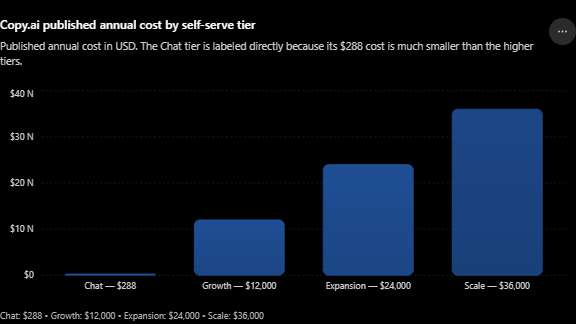
Chat is a five-seat subscription at $288 per year. Growth is a go-to-market automation platform at $12,000 per year, and almost nothing on the published plan cards prepares a buyer for the distance between them.
Copy.ai is also no longer the company most search results describe. Fullcast acquired it in an acquisition announced October 15, 2025, and the product now positions itself as a GTM AI platform rather than an AI copywriter.
In This Article (21 sections)
Quick Verdict
| Quick verdict | Assessment |
|---|---|
| Best for | Sales, marketing, and RevOps teams turning repeated GTM processes into managed Workflows |
| Not ideal for | Solo creators buying long-form SEO drafting, and finance-sensitive teams needing fixed cost per run |
| Chat plan price | $29 per month, or $288 per year, covering five seats |
| Growth plan price | $12,000 per year, the first card listing a Workflow Credit pool |
| Main strength | Workflows, Tables, and Actions managed centrally instead of scattered prompting |
| Main limitation | Credit consumption per run varies, so included credits do not convert into a fixed number of runs |
| Source: official pricing page, checked August 12, 2026. |
Copy.ai Review 2026
Copy.ai in 2026 is a credible GTM automation platform with an awkward commercial ladder and a documentation estate that has fallen behind the product. No free plan appears on the current pricing page.
Setup difficulty splits along the same line as the pricing. Chat is easy from day one, while multi-step Workflows are a light systems-design job, and the best alternative depends on whether the buyer needs conversation or connectors.
The platform layer is genuine. Workflows chain modular Actions, Tables hold operational data, Infobase supplies governed context, and Brand Voice constrains tone, all of which Copy.ai names as platform components.
The commercial layer is where buyers get hurt. Five seats on Chat jump to 75 seats on Growth with no published tier in between, and the annual commitment moves from $288 to $12,000 in a single step on the same pricing page.
Who should buy it
Teams with a repeatable, high-value GTM process and enough volume to justify five figures. Prospecting research, inbound lead processing, CRM enrichment, and localization all fit the Workflow model well.
Small teams that only want governed chat should buy Chat and stop there. The official pricing card make it a defensible $288 per year.
Who should not buy it
Anyone who needs a defensible cost per completed workflow before purchase. Copy.ai’s pricing FAQ states plainly that run cost varies with complexity, and no public overage price exists.
Anyone who needs confirmed API access on a self-serve plan. The pricing page assigns API access to the Enterprise tier, and I would not design an integration around an assumption here.
Copy.ai Pros and Cons
| Pros | Cons |
|---|---|
| Workflows, Actions, and Tables give central management instead of scattered prompts | Credits consumed per run vary, so a monthly pool is not a run count |
| Chat includes five seats, unlimited words, and OpenAI, Anthropic, and Gemini models | Seat packaging jumps from 5 to 75 with nothing published in between |
| Test runs consume no Workflow Credits, which makes iteration safe | Additional credit pricing is not published anywhere |
| Run Workflow (Inline) returns child outputs to the parent, enabling real modular design | Official help articles carry a stale marker and contradict each other on Run Inline |
| Enterprise advertises SOC 2, GDPR, SSO, audit logs, and DLP | Only Chat and Growth expose a self-serve checkout; higher tiers route to sales |
| API keys support user-scoped permissions and expiry dates | The five-day refund window is void if the account was used in the same calendar month |
What Copy.ai Is in 2026
Copy.ai is a workflow platform that happens to generate text, not a text generator that happens to have workflows. That inversion is the single most important thing legacy reviews get wrong.
The product surface breaks into two halves. Chat handles ad-hoc conversational work with model switching and Brand Voice, while Workflows handle repeatable processes, a split the Chat documentation draws explicitly.
Underneath sits an operational data layer. Copy.ai describes Workflows as centrally managed sequences of modular actions, with Tables consolidating inputs and triggering runs when data changes.
Ownership matters here too. Support content, API documentation, and product guides now sit on Fullcast domains, and Fullcast publishes its own Copy.ai resource hub.
If your mental model of Copy.ai is a template library for cold email subject lines, that model is roughly three years out of date and will produce a bad purchase decision.
Methodology: How This Copy.ai Review Was Built
This analysis draws on the live Copy.ai pricing page, official product and platform pages, Fullcast-hosted help documentation, and the published API key management guide. Pricing, seat allowances, and credit allocations were verified on August 12, 2026.
Copy.ai was assessed against the criteria that decide a real purchase: total annual commitment, seat and credit thresholds, plan-gated capability, workflow architecture limits, knowledge and governance boundaries, integration entitlement, and switching cost.
Greater weight went to factors that change the budget or the architecture after signature. Published tier prices, credit mechanics, feature gates, and documented workflow constraints outranked marketing positioning and vendor customer counts.
Claims that could not be resolved from reliable evidence were excluded or marked unresolved rather than estimated. Where official documentation contradicts itself, both positions are reported with their dates instead of one being silently chosen.
Copy.ai Pricing in 2026
Five plans appear on the current pricing page. Chat, Growth, Expansion, and Scale carry published figures, and Enterprise is sales-led.
| Plan | Published price | Seats | Workflow Credits per month |
|---|---|---|---|
| Chat | $29 per month, or $24 per month billed $288 per year | 5 | Not listed |
| Growth | $1,000 per month, billed $12,000 per year | 75 | 20,000 |
| Expansion | $2,000 per month, billed $24,000 per year | 150 | 45,000 |
| Scale | $3,000 per month, billed $36,000 per year | 200 | 75,000 |
| Enterprise | Custom, not publicly disclosed | Not listed | Not listed |
| Source: official pricing page, United States list rates checked August 12, 2026. |
What the pricing page shows
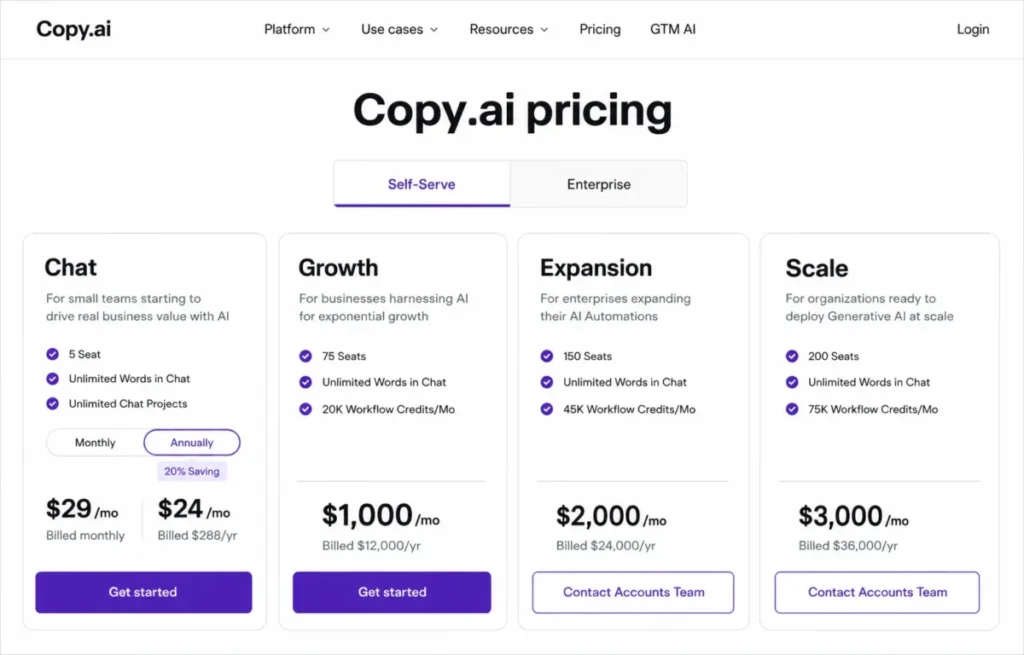
One detail the cards do not advertise: only Chat and Growth link to a self-serve checkout on the pricing page. Expansion and Scale display a price but route the buyer to a Contact Accounts Team action, which makes them published rates rather than genuinely self-serve tiers.
The automation cliff between Chat and Growth
Growth is the first card that lists a recurring Workflow Credit allocation. That single line separates the Chat subscription at $288 per year from the Growth commitment at $12,000 per year.
I would not treat this as a normal upgrade path. It is a different purchase with a different approver, because Growth is the first pricing card carrying a recurring credit pool and the business case has to be built on automation value rather than seat convenience.
What a ten-seat team pays
The standard ten-user question has an awkward answer here. Chat caps at five seats in official pricing, so a ten-person team has no published self-serve option below Growth.
That puts the practical ten-user cost at the official Growth rate of $12,000 per year, for a team that may only need chat access. Teams in the six to seventy-four seat range should ask Copy.ai directly what commercial packaging exists, because the public page does not show one.
The annual saving is smaller than advertised
The pricing page labels annual Chat billing as a twenty percent saving. The arithmetic does not support that figure.
Twelve monthly payments at the listed Chat rate of $29 per month come to 348 dollars a year, against $288 per year when billed annually. The gap is 60 dollars, which is 17.2 percent rather than twenty.
The saving is still real and still worth taking. It is smaller than the badge suggests, which is a useful reminder to check vendor percentages against the underlying numbers.
The refund window has a catch
Copy.ai publishes a five-day refund policy from the date of initial purchase. The condition attached to it matters more than the window itself.
Refunds are not available if the account was used in the same calendar month as the request, and cancelling does not itself trigger a refund. A buyer who signs up and genuinely exercises the product has, in practice, spent the guarantee.
Workflow Credit Economics
Credits are the real pricing mechanism above Chat, and they behave differently from seats. Copy.ai’s help documentation confirms credits are held at workspace level rather than per user, reset monthly, and do not roll over.
Nominal cost per allocated credit
Normalizing each tier by its official pricing allocation gives the only defensible unit comparison available from public pricing.
Credit economics improve as commitment rises, which is unsurprising. Scale buys the cheapest nominal credit at four cents, but it also carries triple the annual obligation, so this is a value ratio and not a recommendation.
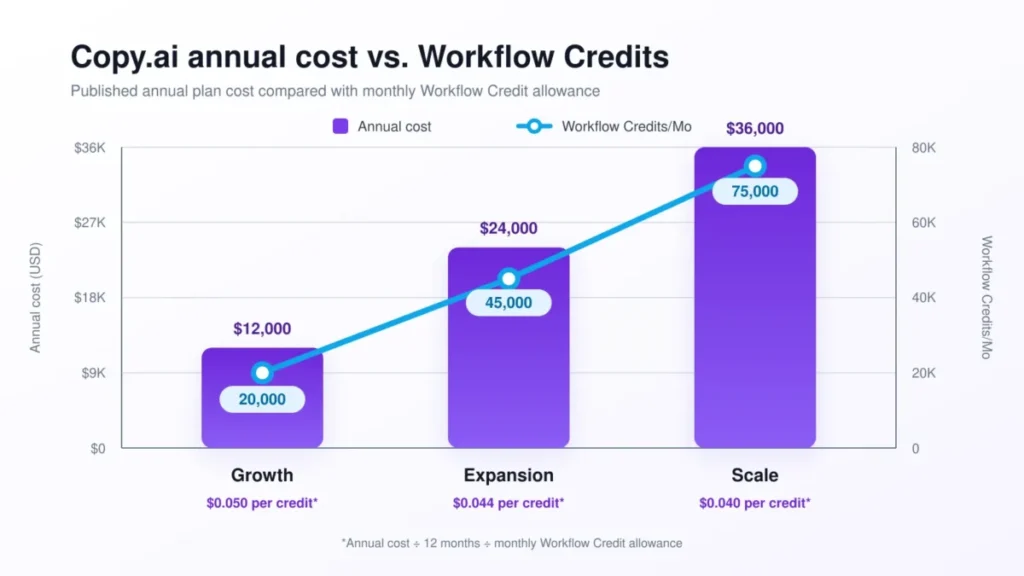
| Tier | Annual cost | Annual credits allocated | Nominal cost per credit, USD |
|---|---|---|---|
| Growth | $12,000 per year | 240,000 | 0.050 |
| Expansion | $24,000 per year | 540,000 | 0.044 |
| Scale | $36,000 per year | 900,000 | 0.040 |
| Source: calculated from official pricing allocations on the Copy.ai plan cards, checked August 12, 2026. |
Why credits cannot be converted into workflow runs
This is the number buyers most want and the one no honest reviewer can supply. Copy.ai states directly that credit consumption depends on the complexity of the workflow, the steps involved, and the content generated.
Two workflows with identical business value can therefore cost different amounts. A three-step generation flow and a fifteen-step research, scrape, enrich, and translate flow are not comparable units.
The practical consequence is a purchasing sequence, not a spreadsheet. Build two or three representative workflows, run them on real inputs, read the credits used figure in official pricing guidance that Copy.ai exposes per run, and only then convert a monthly pool into a capacity forecast.
The credit cost drivers behind a monthly pool
Platinum Actions are the clearest example. Copy.ai designates certain premium actions with a distinct badge, and its own credit documentation states these consume more credits because the background work is heavier.
Forms are a second driver. A published Workflow can be exposed as a form, and the workflow documentation confirms submissions consume workspace credits while the form carries its own configurable rate limit and custom error message.
Testing is the one genuinely free lever. Official credit documentation states that test runs do not consume Workflow Credits, which makes iteration during development safe and makes credit burn a production-only concern.
What remains unresolved is the behavior at full exhaustion. No inspected documentation explains whether runs queue, fail, or degrade when a workspace empties its monthly pool, and I would get that answer in writing before exposing a public form.
Feature Gates: What You Get on Each Plan
Read the middle column carefully. Not established means the pricing page does not settle the question, which is a different and more honest statement than not available.
| Capability | Chat | Growth and above | Enterprise |
|---|---|---|---|
| Unlimited Chat words and projects | Listed | Listed | Listed |
| OpenAI, Anthropic, and Gemini models | Listed | Listed | Listed |
| Recurring Workflow Credit pool | Not listed | 20,000 to 75,000 per month | Custom |
| API access and bulk Workflow runs | Not established | Not established | Explicitly listed |
| Guided jumpstart implementation | Not listed | Not listed | Explicitly listed |
| Designated account and support team | Not listed | Not listed | Explicitly listed |
| Source: official pricing page and Enterprise documentation, checked August 12, 2026. |
Feature Deep-Dive
Workflows
Workflows are the reason to buy Copy.ai above Chat. The documented path runs from Add Workflow, through configuration or a described process, to a test run, publication, and then execution through a Table, the API, or a Form.
The workflow building documentation describes a no-code canvas where generation, scraping, research, and search actions chain together with reusable components and event triggers. Trigger types include schedules and changes in connected systems.
The limitation is architectural rather than functional, and it appears in the section below on workflow complexity.
Tables
Tables act as the operational data layer and the bulk execution surface. Table view supports manual entry, CSV or Excel upload for batch input, and export of completed runs.
For a RevOps team, this is the practical difference between a demo and a deployment. A long account list becomes a single upload rather than one form submission per row.
Chat, Brand Voice, and Infobase
Chat supports switching between model providers and grounding output in Brand Voice and Infobase context. It is positioned for flexible work, with Workflows reserved for anything repeatable.
Infobase is the governed knowledge store, and it has firm boundaries. The Infobase documentation sets a 10 MB maximum file size and supports PDF, TXT, DOC, and DOCX, with a text-entry option for content that needs later editing.
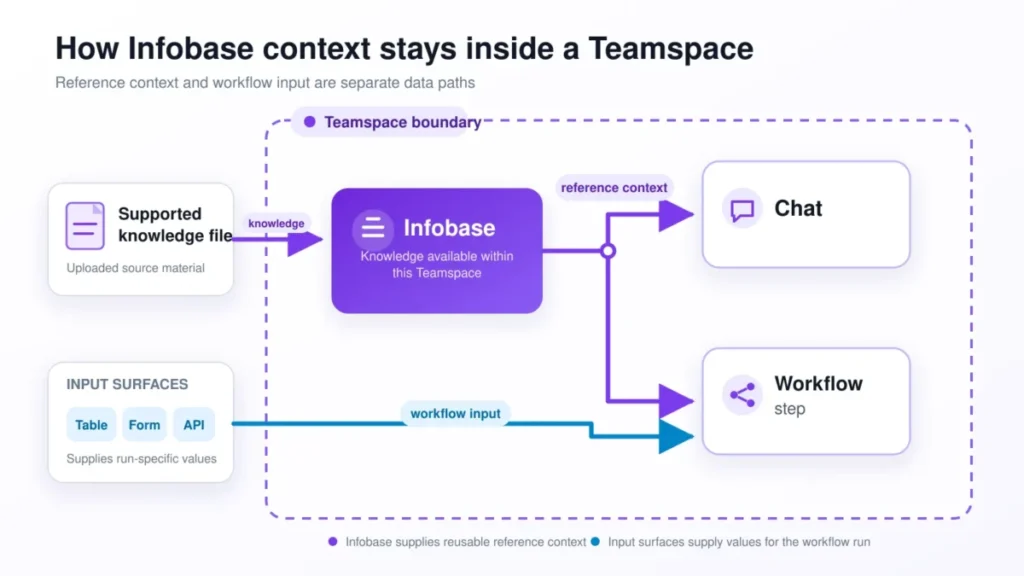
The scope rule catches teams out. Infobase assets uploaded to a Teamspace are private to that Teamspace and cannot be referenced outside it, so a knowledge library shared across five departments needs a deliberate information architecture rather than one upload.
Actions and Agents
Actions are the building blocks, and the published catalog is genuinely broad. It spans contact enrichment, email discovery and verification, LinkedIn profile lookup, SEC filing search, earnings call analysis, job posting analysis, Google Search Console queries, plagiarism checking, DeepL translation, and Google Doc creation.
That range is what separates Copy.ai from a writing tool. Enrichment and research actions turn a content platform into a prospecting and account-intelligence layer.
Where Copy.ai Workflows Get Harder
This is the section almost no competing review contains, and it comes from Copy.ai’s own guidance rather than from user complaints.
The fifteen-step maintainability threshold
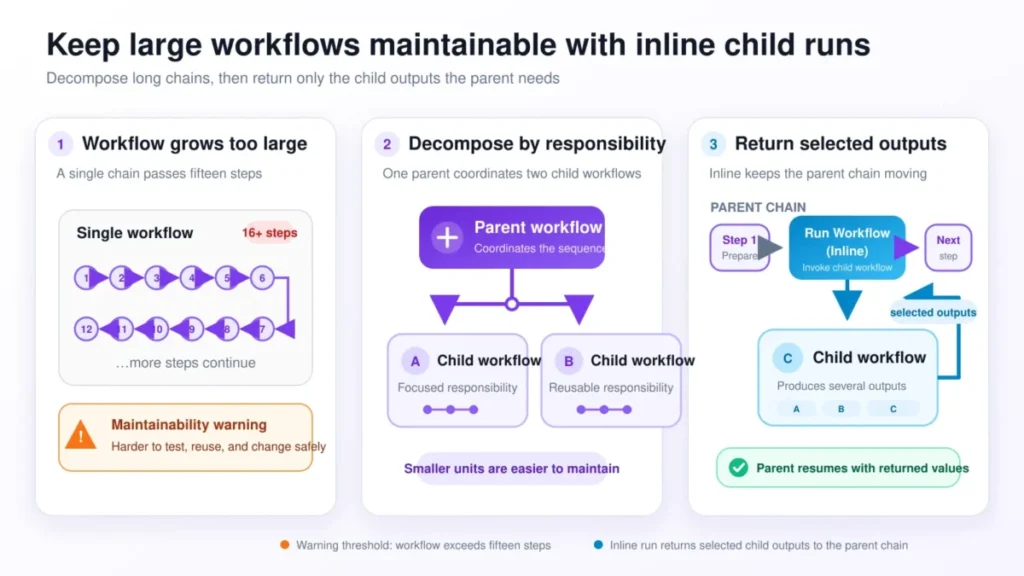
Copy.ai’s workflow splitting guidance warns that a Workflow exceeding fifteen steps becomes increasingly challenging to maintain and understand. The document frames this as a signal to abstract components rather than as a hard ceiling.
Treat the fifteen-step documentation guidance as an architecture constraint, not an execution limit. A twenty-step workflow will run, but the person who inherits it in six months will struggle.
The Run Inline correction
Here Copy.ai’s documentation contradicts itself, and buyers reading only one page will get the wrong answer.
The splitting article still tells readers that the standard Run Workflow option does not track child outputs, and describes Run Inline as a planned future release rather than an available action. That article is dated February 2026.
The Run Workflow (Inline) action documentation describes a shipped capability. It maps parent inputs into a child workflow, lets the builder select which child outputs return to the parent, supports conditional execution, and offers an Array Mode that loops the child once per item in a list.
So modular workflow design works as of the August 12, 2026 documentation check, and the output-passing tradeoff that older analysis describes has largely been solved. The real caution is different: Array Mode blocks the parent until every item completes, and the documentation warns that long child runs can exceed the maximum allotted time for a single workflow run and fail.
That timeout is a genuine constraint on batch design. Large arrays should be broken into smaller increments or routed to faster models.
The documentation freshness problem
Every Copy.ai help article inspected for this review carries a stale marker in its published metadata, including the credit, API, Infobase, and workflow-splitting pages. The vendor is flagging its own documentation as out of date.
The credit article is the sharpest example. It still describes credits as built into an Advanced Plan with 2,000 credits per month, a plan that does not appear anywhere on the current pricing page, and the Enterprise card still references all Advanced features.
I would treat the help center as directionally useful and commercially unreliable. Anything that touches budget should be confirmed against the pricing page or with a sales representative.
Ease of Use and Setup
Chat is close to zero-friction. A five-person team can be productive on day one because the interaction model is a conversation with model selection and optional brand context.
Workflows are a different discipline. Building a reliable multi-step automation requires thinking about input schemas, action chaining, output references, and conditional logic, which is closer to light systems design than to writing prompts.
The credit-free test mode meaningfully lowers the risk of that learning curve. A builder can iterate a workflow dozens of times before a single production credit is spent.
My adoption check for this purchase is specific. By the end of the first month, at least two workflows should be published and running on real data with measured credit consumption per run.
By the end of the first quarter, the monthly credit burn should be predictable within a reasonable band, and at least one workflow should have replaced a named manual process.
If the first-month condition fails, the problem is usually ownership rather than the product. Workflow platforms need a named builder, and teams that treat this as everyone’s side task tend to end up with an expensive chat subscription.
Integrations and Ecosystem
Two integration numbers circulate, and they are not the same claim.
The Copy.ai homepage advertises more than 2,000 integrations, which is an ecosystem-scale marketing figure. The Enterprise pricing card separately lists 20 or more tech integrations alongside API access, which reads as a curated set of supported connections.
I would not merge those into a single sentence about native integrations. Copy.ai does not publish a catalog showing which connections are native, which are partner-built, and which run through a general automation layer, so a buyer with a specific system in mind should ask for that classification by name.
The directional capability is well supported. Copy.ai markets GTM systems integrations as moving data and generated output in both directions between Copy.ai and existing systems, and a dedicated Salesforce integration guide exists in the help center.
For buyers who need a broad connector catalog above all else, a dedicated automation platform such as Zapier automation platform still covers more ground, and the practical pattern is often to use both.
The API and Its Plan-Gate Problem
The API itself is well documented. Published endpoints cover starting a workflow run, retrieving a run, listing all runs, and registering, retrieving, and removing webhooks, with a polling recipe included.
Key management is more mature than most reviews acknowledge. The API key management guide restricts key administration to Workspace Owners and Admins, and each key inherits the permissions of the user it is assigned to.
That last mechanism is genuinely useful for scoping. Assigning a key to a user with access to only two Teamspaces produces a key limited to those Teamspaces, which is a cleaner control than most mid-market tools offer.
The key management guide documents either no expiry or a twelve-month expiry, with email notification before expiration, and the key value is shown exactly once with no recovery path. Store it in a password manager at creation or plan to rotate.
The commercial question is the unresolved one. Public API documentation explains how the API works, while the pricing page lists API access and bulk Workflow runs only under Enterprise, and nothing inspected establishes entitlement on Growth, Expansion, or Scale.
No published rate limit appears in the API reference either. For any team designing a production integration, I would put both questions in writing before purchase rather than inferring access from the existence of documentation.
Security, Support, and Admin Controls
Governance is genuinely structured at the workspace level. Copy.ai documents distinct roles across Workspace Owner, Admin, and User, alongside Teamspace Admin, Editor, and Collaborator permissions, plus Public, Private, Personal, and General Teamspace types.
The compliance claims sit at Enterprise. The Enterprise page advertises SOC 2 certification, GDPR compliance, SSO, audit logs, DLP controls, and a statement that customer data is not used to train AI models.
Those are vendor claims presented in an Enterprise context, and I would not assume they extend downward. No inspected source publishes a control matrix showing which governance features exist on Chat, Growth, Expansion, or Scale.
Support follows the same shape. Enterprise buys a designated account and support team plus guided jumpstart implementation, while no published response commitment was found for self-serve plans.
Security-sensitive organizations should request a current entitlement matrix mapped to the exact plan under negotiation, because the Enterprise page is the only source that names these controls. The existence of a capability somewhere in the product is not evidence of it in a contract.
Migration and Switching Cost
Batch input is well covered and full migration is not. Those are different things, and conflating them creates unpleasant surprises during implementation.
CSV and Excel upload into Workflow Table view handles operational data cleanly. Infobase upload handles knowledge documents within the supported formats and the 10 MB per file ceiling.
What no inspected documentation covers is the rest of a real migration. Historical chat threads, saved projects, prompt libraries, Brand Voice assets, automation logic, permission structures, deduplication behavior, and failure recovery all appear to be manual work.
Plan the switch as a rebuild rather than a transfer. Budget builder time for recreating workflows, and treat the knowledge library as an information-architecture project that respects the Teamspace boundaries in Infobase documentation from the start.
Copy.ai Limitations
Credit consumption is non-deterministic. Run cost varies with complexity, steps, and generated content, so no monthly allocation converts into a fixed number of completed workflows.
Overage pricing is not public. The pricing FAQ directs customers to work with the Copy.ai team to add credits, and no rate is published, which prevents a complete worst-case budget model.
Seat packaging has a visible hole. Nothing published serves a team of six to seventy-four seats that wants chat access without a five-figure automation commitment.
Documentation is self-flagged as stale. Help articles carry a stale marker, contradict the current pricing page on plan names, and contradict each other on whether the Run Inline action exists.
Infobase is Teamspace-scoped with a 10 MB file ceiling. Cross-department knowledge sharing and large document libraries both require preprocessing and deliberate structure.
Workflow runs have a maximum duration. Array Mode loops and heavy child workflows can exceed it and fail, which constrains how large a single batch can be.
Who Should Use Copy.ai
Five-person marketing or sales teams wanting governed chat. The Chat pricing card delivers five seats, unlimited words, and three model providers for $288 per year, which is defensible against most per-seat assistant pricing.
RevOps and GTM operations teams with repeatable processes. Prospecting research, inbound lead processing, CRM enrichment, and localization map directly onto the Workflow and Actions model, and the enrichment action catalog is unusually deep for a platform in this category.
Organizations already committed to Fullcast. Shared ownership makes the planning and execution story more coherent than a standalone tool would be.
Enterprise teams needing governed AI deployment. SSO, audit logs, DLP, designated support, and guided implementation are all marketed in Enterprise security documentation, which suits organizations that need a procurement-ready answer.
Who Should Avoid Copy.ai
Solo creators buying long-form SEO drafting. The platform’s center of gravity is GTM automation, and dedicated content tools give a more specialized workflow for that narrow job. My Jasper AI review covers a closer fit for that use case, and the Jasper and Copy.ai comparison sets them side by side.
Finance-sensitive teams needing fixed cost per run. Without deterministic credit consumption or published overage rates, a defensible unit-cost model cannot be built before purchase.
Teams that require confirmed self-serve API access. Entitlement below the Enterprise tier is unresolved, and building an integration on that assumption is an avoidable risk.
Buyers expecting a document-driven automation pipeline. Infobase supplies context inside its Teamspace scope, and a document library is not the same thing as an ingestion layer.
Mobile-first teams. Official native iOS or Android availability was not verified from Copy.ai sources during this review, so anyone whose workflow depends on it should confirm before committing.
Copy.ai Alternatives
| Alternative | Choose it if | Pricing signal |
|---|---|---|
| ChatGPT | The work is mostly conversational and no managed workflow layer is needed | Published per-seat plans |
| Jasper AI | Marketing content production with brand governance is the primary job | Per-seat with a separate credit layer |
| Writesonic | SEO-oriented content production matters more than GTM automation | Lower entry pricing than the Copy.ai automation tiers |
| Claude | Long-context reasoning and document analysis lead the requirement | Published per-seat plans |
| Zapier | Connector breadth and predictable task-based pricing outrank AI depth | Task-based tiers |
The honest framing is that Copy.ai competes in two markets at once. Against assistants it wins on managed repeatability, and against automation platforms it wins on built-in generation and research while losing on connector breadth and cost predictability.
For conversational work, the ChatGPT assistant review covers the closest substitute for Copy.ai Chat. Where SEO production is the real job, the Writesonic content platform review is the better starting point.
Long-context analysis is a different requirement again, and the Claude assistant review sets out where that fits. Teams weighting connector breadth over generation depth should read the Zapier automation alternatives guide instead.
Copy.ai rates above reflect official pricing cards checked August 12, 2026.
For teams whose real problem is pipeline rather than content, a marketing automation focused CRM may address the underlying workflow more directly. Understanding lead management fundamentals usually clarifies which layer needs the investment.
Final Verdict: Is Copy.ai Worth It?
For a five-person team, yes, at the official $288 annual rate. Unlimited chat words, five seats, three model providers, and brand context at that price is straightforward value, and the decision does not need a committee.
For a GTM organization, it is worth a paid pilot rather than a signature. The Workflow and Actions layer is real and the enrichment catalog is deeper than most competitors acknowledge, but the $12,000 Growth commitment deserves measured credit consumption first.
For anyone requiring cost certainty or confirmed API access, not yet. Both gaps are answerable by Copy.ai in a sales conversation, and both should be answered in writing before money moves.
Neither gap is a guess. The official documentation records how credits behave, and the pricing page records the plan gate, so this is a documented limitation rather than an unknown.
I recommend a plan path that follows the same split. Choose Chat if the team fits in five seats, move to Growth only when a specific automation has a measured return, and go to Enterprise when governance or API access becomes contractual.
The workflow consequence of getting this wrong is concrete. A team that buys Growth before measuring credit burn ends up with an expensive chat subscription, and a team that stays on Chat too long keeps paying people to run a process the platform could own.
The renewal question to keep on file is simple. Twelve months from now, can the team name the manual processes that Copy.ai replaced, and does the credit consumption on those workflows still justify the tier?
Frequently Asked Questions
How much does Copy.ai cost in 2026?
The Copy.ai pricing page lists Chat at $29 per month, or $24 per month billed as $288 per year, including five seats. Growth is $1,000 per month billed $12,000 annually, Expansion is $2,000 per month billed $24,000 annually, and Scale is $3,000 per month billed $36,000 annually.
Enterprise pricing is custom and not published.
Is Copy.ai free?
The current pricing page does not display a free plan. Older Copy.ai marketing material still advertises a legacy free-word offer, so the two sources conflict, and anyone relying on a free tier should confirm availability with Copy.ai directly before planning around it.
What are Copy.ai Workflow Credits?
Credits are the consumption unit for running published Workflows. The credit documentation states they are held at workspace level rather than per user, reset monthly, and do not roll over.
Copy.ai adds that the number of credits a run consumes depends on the workflow’s complexity, its steps, and the content it generates.
How many workflows can 20,000 credits run?
No fixed answer exists from public pricing. Because consumption varies with workflow complexity, the only reliable method is to build representative workflows, run them on real inputs, and read the credits used figure Copy.ai exposes for each run before forecasting monthly capacity.
Does testing a workflow use credits?
No. Copy.ai’s credit documentation states that credits are not spent during Workflow test runs, which makes iteration during development free.
Production runs, including submissions through a published Form, do consume workspace credits.
Does Copy.ai have an API?
Yes. The API reference documents endpoints for starting a workflow run, retrieving run details, listing runs, and managing webhooks, with keys created under Configuration by Workspace Owners or Admins.
The commercial side is less clear. The pricing page lists API access and bulk Workflow runs specifically under Enterprise, and entitlement on lower self-serve tiers is not established publicly.
Can Copy.ai write long-form SEO articles?
It can generate long-form content, and a workflow can chain research, outlining, and drafting steps. That said, the platform’s current design center is GTM automation rather than SEO production, so teams whose main job is ranking content will usually get a more specialized workflow from a dedicated content platform.
Is Copy.ai safe for enterprise data?
Copy.ai’s Enterprise security page advertises SOC 2 certification, GDPR compliance, SSO, audit logs, DLP controls, and a statement that customer data is not used to train AI models.
These are vendor claims presented in an Enterprise context, and no public matrix confirms which controls apply to the self-serve plans. Request a plan-specific entitlement list during procurement.
Who owns Copy.ai now?
Fullcast acquired Copy.ai in a deal announced on October 15, 2025. Copy.ai’s help documentation and API references are now hosted on Fullcast domains, and Fullcast publishes its own Copy.ai resource material.
What are the main Copy.ai limitations?
The most consequential are non-deterministic credit consumption, unpublished overage pricing, and a seat gap between five and seventy-five. Help documentation also carries a stale marker and contradicts the current pricing page.
Two operational limits complete the list. Infobase files are capped at 10 MB and scoped to a single Teamspace, and a single workflow run has a maximum duration that constrains large batch loops.
None of these is fatal on its own. Taken together they decide whether the current Chat plan is sufficient, whether recurring automation justifies Growth or a higher tier, whether Enterprise controls require a sales conversation, or whether another tool is the better fit for your team.