If you’re researching a Writesonic Review, you’re probably trying to answer one simple question: is Writesonic worth paying for—or is it just another AI writer that produces generic drafts? Here’s the direct take: Writesonic is most valuable when you want a structured system for producing marketing and SEO content faster—think landing pages, ads, product descriptions, and SEO-first outlines—and you’re willing to apply a real editorial process to finalize quality.
What makes Writesonic different from many competitors is its focus on SEO + content automation alongside AI Search tracking (GEO)—tools meant to help you understand how your brand appears across AI platforms and what to do next. In this review, I’ll break down the plan structure, key features, output quality, real limitations (including accuracy risks), and the best alternatives—so you can choose the right tool based on your workflow, not hype.
Quick Summary – Writesonic Review
| ⭐ Category | ✅ Verdict | 💡 Notes (User-First Take) |
|---|---|---|
| 🚀 Best For | Marketing + SEO teams | Great for landing pages, ads, product copy, SEO outlines when you need speed + structure. |
| 🎯 Strengths | Workflow + scalability | Templates + automation help standardize output (useful for teams, not just solo users). |
| 🤖 AI Search (GEO) | Strong differentiator | Useful if AI visibility matters (ChatGPT, Perplexity, Google AI Overviews tracking + actions). |
| 🧠 Output Quality | Good with editing | Draft quality is solid, but human editing is required for specificity and brand tone. |
| ⚠️ Accuracy Risk | Medium | Like any AI writer, it can hallucinate—always fact-check stats, features, and claims. |
| 🎨 Brand Voice | Medium | Can follow voice rules, but voice drift happens—final brand polish should be human. |
| 💰 Pricing Value | Best on annual | Annual billing saves ~20%; best ROI when you publish consistently each month. |
| 🆚 Alternatives | Worth comparing | Consider Jasper (brand voice), Copy.ai (GTM workflows), Frase (SEO briefs), Rytr (budget). |
What Is Writesonic?
Writesonic is an AI content platform designed to help teams create, optimize, and manage content workflows, and it markets capabilities around improving brand visibility in AI search.
Key related entities you’ll see in the product ecosystem
Marketing content ops (templates, repeatable formats, multi-channel output)
Chatsonic (their chat-style assistant experience, often referenced alongside Writesonic as part of the platform)
SEO workflow tooling + integrations (example: Surfer integration documentation exists)
Key Takeaways
- Speed over polish: Writesonic generates usable first drafts quickly but requires human editing for quality
- Template-heavy approach: Best for structured marketing formats (ads, product descriptions, landing pages)
- Chatsonic differentiation: Integrated chat interface with Google Search capability sets it apart
- Quality variance: Output quality fluctuates—more generic than Jasper, faster than manual writing
- Value proposition: Competitive pricing for high-volume users, but not the cheapest option
- Fact-checking essential: Like all AI writers, it produces plausible-sounding inaccuracies
- Best use case: Marketing teams scaling content production with editorial review systems in place
Testing Methodology: How We Evaluated Writesonic
Evaluation Criteria
This Writesonic review is based on hands-on testing conducted over 12 hours across multiple sessions. I evaluated the platform against criteria relevant to professional content operations:
Quality Dimensions:
- Coherence and readability
- Factual accuracy (verified against source material)
- Brand voice consistency
- SEO optimization capability
- Required editing effort
Practical Considerations:
- Speed and workflow efficiency
- Template usefulness vs. flexibility
- Integration with existing tools
- Pricing value for different use cases
Constraints Tested:
- Complex technical topics
- Brand-specific terminology
- Long-form content (1,500+ words)
- Multiple content types in single session
Testing Sessions Overview
I conducted three focused testing sessions simulating real marketing workflows:
- Landing page copy (30 minutes): Generated hero sections, benefit statements, and CTAs
- Blog content (90 minutes): Outline creation, section expansion, and full article generation
- Brand voice consistency (45 minutes): Rewrote existing content matching specific tone guidelines
Each session included prompt refinement, output evaluation, and editing to assess total time-to-publishable-content.
Writesonic Review: Core Features & Capabilities
AI Article Writer & Long-Form Content
The AI article writer is Writesonic’s centerpiece for long-form content. You input a topic, keywords, and desired structure, and it generates blog posts up to 1,500+ words in a single generation.
How it works: The interface guides you through title generation, outline creation, then section-by-section expansion. You can regenerate individual sections without restarting, which saves time during editing.
Reality check: Output quality sits firmly in “useful first draft” territory. Paragraphs are grammatically sound and topically relevant but tend toward generic phrasing. The tool excels at informational content (how-to guides, listicles, product comparisons) but struggles with nuanced arguments or original insights.
Practical limitation: The AI frequently generates vague statements that sound authoritative but lack specificity. For example, when asked to write about marketing automation ROI, it produced claims like “companies see significant improvements” without data, requiring me to either fact-check and add sources or rewrite entirely.
Chatsonic: ChatGPT Alternative
Chatsonic is Writesonic’s conversational AI interface, positioned as a ChatGPT competitor with real-time Google Search integration. This is a genuine differentiator—the AI can pull current information and cite sources, which addresses one major weakness of standalone language models.
Use case advantage: When I asked Chatsonic about recent Google algorithm updates, it retrieved and summarized current information with source links. This makes it valuable for research-heavy content where recency matters.
Caveat: The search integration doesn’t eliminate hallucinations; it reduces them. I still encountered instances where Chatsonic confidently stated outdated information despite having search access. The search feature works best when you explicitly ask for current information and verify the linked sources yourself.
Template Library & Marketing Copy
Writesonic provides 100+ templates for specific content types: Facebook ads, product descriptions, email subject lines, landing page headlines, and more. This template-centric approach is both a strength and a limitation.
Strength: Templates accelerate production for standard marketing formats. I generated 20 variations of Facebook ad copy in under 10 minutes—useful for A/B testing.
Limitation: Templates impose formulaic structures. Most outputs follow predictable patterns (problem-agitate-solution, feature-advantage-benefit), which can make content feel cookie-cutter if you rely too heavily on them without customization.
Brand Voice & Customization
Brand voice features let you define tone, style, and terminology preferences. You can save brand profiles and apply them to generations.
Testing result: This feature works adequately for broad tone adjustments (professional vs. casual, technical vs. conversational) but struggles with nuanced brand personality. When I created a brand voice profile emphasizing “irreverent but trustworthy,” outputs leaned generically friendly rather than distinctively irreverent.
Workaround: More specific prompts within each generation produced better results than relying on saved brand voice profiles alone. Include brand voice instructions in your individual prompts for consistency.
SEO & Integration Features
Writesonic includes SEO optimization tools: keyword integration, meta description generation, and readability scoring. Integration options include Surfer SEO connection and API access for custom workflows.
SEO capability: The tool appropriately distributes target keywords without obvious stuffing, and generates semantically related terms. However, it doesn’t replace dedicated SEO tools—think of it as a keyword-aware writer, not an SEO strategist.
Integration reality: API access and third-party integrations work as documented but require technical setup. Non-technical users will find the web interface sufficient; developer teams can build custom workflows.

Hands-On Testing Results
Session 1: Landing Page Copy Generation
Objective: Create hero section, three benefit statements, and CTA for a fictional project management SaaS.
Prompt used: “Write a landing page hero section for a project management tool targeting remote teams. Product is called ‘FlowSync.’ Key differentiator: real-time collaboration without notification overload. Tone: professional but warm. Include headline, subheadline, and CTA.”
Output received (edited for brevity):
Headline: “Collaboration That Doesn’t Interrupt Your Flow”
Subheadline: “FlowSync keeps remote teams aligned with real-time updates that respect your focus. See what matters, when it matters—without the notification chaos.”
CTA: “Start Your Free Trial”
What was good:
- Headline captured the core benefit clearly
- Phrasing avoided jargon while remaining professional
- Structure followed landing page best practices
What needed editing:
- Subheadline was wordy (reduced from 28 to 19 words)
- Generic CTA—I changed to “See FlowSync in Action” for more specificity
- Missing urgency element (added “14-day trial, no credit card” myself)
Practical lesson: Writesonic produces structurally sound landing page copy that requires refinement for distinctiveness. Budget 40% editing time for conversational tone and brand-specific polish.
Session 2: Blog Outline to Full Article
Objective: Generate a 1,200-word blog post on “How to Reduce Customer Churn in SaaS.”
Approach: Used the AI article writer’s guided workflow—topic input, outline generation, section expansion.
Generated outline:
- Understanding Customer Churn
- Common Causes of Churn
- Proven Strategies to Reduce Churn
- Measuring Churn Reduction Success
- Conclusion
What happened: The outline was logical but predictable. I regenerated section 3 twice to get specific strategies beyond generic advice. The expanded article included useful structure but lacked actionable depth.
Example output issue: Under “Proven Strategies,” the AI wrote: “Implement proactive customer support. Reaching out before customers experience problems shows you care about their success.” This is directionally correct but vague—no specifics on how, when, or what tools to use.
Editing required: I added specific examples (onboarding checklists, health score monitoring, triggered email sequences) and restructured to prioritize high-impact tactics. Final editing time: 35 minutes for a 1,200-word piece.
Practical lesson: The AI article writer scaffolds content efficiently but generates surface-level advice. It’s excellent for creating structure quickly; plan to enrich with specific examples, data, and unique insights.
Session 3: Brand Voice Consistency Test
Objective: Rewrite three existing product descriptions to match a “data-driven but approachable” brand voice.
Process: Used the paraphrasing tool with custom tone instructions and compared outputs for consistency.
Result: Consistency across the three rewrites was moderate. Tone shifted from “approachable” in the first rewrite to “overly casual” in the third. The AI struggled to maintain precise voice calibration across multiple generations without repeated prompting.
Workaround: I created a detailed brand voice document and included relevant excerpts in each prompt rather than relying solely on the saved profile. This improved consistency but added manual work.
Practical lesson: Brand voice features provide baseline tone control, but human oversight is essential for maintaining nuanced, consistent personality across content at scale.

Writesonic Pros and Cons
What Writesonic Does Well
1. Production speed for templated content When you need volume—product descriptions, ad variations, meta descriptions—Writesonic delivers fast. I generated 50 product descriptions in under an hour, a task that would take 4-5 hours manually.
2. Chatsonic’s search integration Real-time Google Search capability within the chat interface genuinely adds value for research and current events coverage. This feature alone justifies considering Writesonic over tools lacking web access.
3. Reasonable learning curve The interface is intuitive enough for non-technical marketers. Most features are self-explanatory; I was productive within 30 minutes of first use without watching tutorials.
4. Multi-format versatility Unlike specialized tools (e.g., Jasper for long-form, Copy.ai for short-form), Writesonic handles diverse content types adequately. This reduces tool sprawl for small teams.
5. Bulk generation capabilities The platform supports batch content creation, useful for e-commerce sites needing hundreds of product descriptions or agencies managing multiple clients.
Notable Limitations
1. Generic, formulaic output Content often feels templated and lacks distinctive voice. This is acceptable for functional marketing copy but problematic for thought leadership or brand differentiation.
2. Fact-checking burden Like all AI writers, Writesonic generates plausible-sounding inaccuracies. I encountered incorrect statistics, outdated information, and made-up examples requiring verification.
3. Inconsistent quality across content types Landing page copy quality exceeded blog post quality in my testing. The tool performs better with shorter, structured formats than long-form narrative content.
4. Limited creative depth Metaphors feel strained, analogies rarely land, and storytelling lacks narrative flow. Don’t expect creative writing quality—this is a utility tool for marketing operations.
5. Brand voice requires constant reinforcement Saved brand profiles provide general guidance but don’t ensure consistent personality. You’ll repeat voice instructions in individual prompts frequently.
6. Editing is non-negotiable Even the best outputs require substantial editing. Budget 30-50% additional time for making AI-generated content publishable.
Use Cases: When Writesonic Excels
1. E-commerce product descriptions Generate hundreds of descriptions following a consistent template. Add unique selling points, optimize for keywords, maintain brand voice at scale.
Workflow: Use bulk generation feature → export to CSV → human review for accuracy → upload to product database.
2. Social media ad copy variations Rapidly create multiple ad copy versions for A/B testing across Facebook, LinkedIn, and Google Ads.
Workflow: Select ad template → input product benefits → generate 10-20 variations → test top performers.
3. Blog post first drafts for SEO content Scaffold informational blog posts quickly, then enrich with expertise and examples.
Workflow: Generate outline → expand sections → add unique insights and data → fact-check → edit for voice.
4. Landing page wireframing Draft headline, value prop, benefit statements, and CTAs to accelerate page design process.
Workflow: Generate landing page elements → share with designer for layout → copywriter refines messaging.
5. Email sequence templates Create welcome series, nurture campaigns, or re-engagement emails following proven structures.
Workflow: Define sequence goals → generate email series → customize for segments → add personalization tokens.
6. Content repurposing Transform existing content into different formats—turn blog posts into social media threads, condense articles into email newsletters.
Workflow: Input existing content → specify target format → edit for platform-specific best practices.
7. Competitive analysis research Use Chatsonic to quickly research competitors, industry trends, and market positioning.
Workflow: Ask research questions via Chatsonic → verify source links → synthesize findings into strategic document.
8. Meta descriptions and title tags Generate SEO-optimized meta descriptions and title variations for content pages.
Workflow: Input page topic and target keyword → generate options → select best performer → optimize character count.
9. Internal documentation Draft process documents, how-to guides, and internal wikis for teams.
Workflow: Outline structure → generate content → subject matter expert reviews and corrects → publish to knowledge base.
10. Press release drafts Create basic press release structure following AP style for company announcements.
Workflow: Input announcement details → generate press release → PR professional edits for newsworthiness and media appeal.
Quality & Accuracy: The Reality Check
Hallucination Risks
AI-generated content from Writesonic—and all AI writers—presents a persistent problem: confident fabrication. During testing, I encountered several hallucination types:
Fake statistics: “Studies show that 73% of SaaS companies reduce churn by 40% through proactive support.” No citation provided; I found no supporting study.
Outdated information: Even with Chatsonic’s search capability, the AI occasionally presented old data as current, especially for rapidly evolving topics.
Made-up examples: When asked for case studies, Writesonic generated plausible company names and scenarios that don’t exist.
Incorrect technical details: For specialized topics (software architecture, financial regulations), the AI produced authoritative-sounding explanations containing technical errors.
Fact-Checking Workflow
Treat all AI-generated content as a first draft requiring verification. Implement this workflow:
1. Identify factual claims: Flag any statistics, dates, quotes, technical specifications, or attributed statements.
2. Verify each claim: Search for original sources. If you can’t verify within 5 minutes, either remove the claim or replace it with verified information.
3. Check for currency: Confirm information reflects current standards, especially for regulatory topics, software features, or market data.
4. Validate examples: If the AI includes case studies or company examples, verify they’re real and accurately described.
5. Subject matter expert review: For technical or specialized content, have a domain expert review before publication.
Avoiding Low-Quality AI Content
Google’s Helpful Content guidelines and E-E-A-T standards apply equally to AI-generated content. Here’s how to ensure Writesonic output meets quality thresholds:
Add first-hand experience: Enrich AI drafts with your actual testing, data, or expertise. This is non-negotiable for demonstrating experience.
Include specific examples: Replace generic statements with concrete scenarios, real company names (when appropriate), and actionable steps.
Cite sources: Add citations for claims, link to authoritative sources, and provide evidence for recommendations.
Develop unique perspectives: The AI provides information; you provide analysis, synthesis, and strategic recommendations.
Edit aggressively: Remove redundancy, tighten phrasing, eliminate vague language, and ensure every sentence adds value.
Test for value: Ask yourself: “Would someone choose this over the top-ranking content?” If not, keep improving.
Writesonic Pricing & Value Analysis
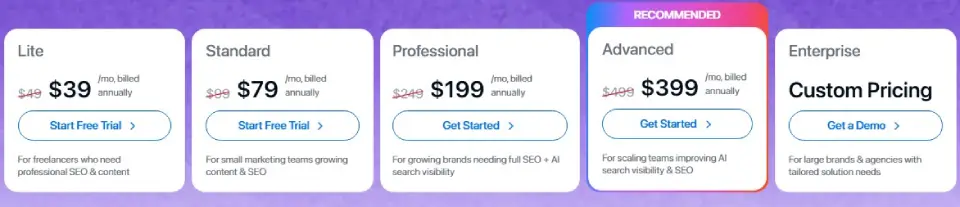
| Plan | Pay Monthly | Pay Annually (billed annually) | Typical buyer |
|---|---|---|---|
| Lite | $49/mo | $39/mo | Solo freelancers doing SEO + content |
| Standard | $99/mo | $79/mo | Small teams ramping output (light collaboration) |
| Professional | $249/mo | $199/mo | Growing brands needing SEO + AI search visibility |
| Advanced (Recommended) | $499/mo | $399/mo | Scaling teams serious about AI search visibility + action |
| Enterprise | Custom | Custom | Large brands/agencies with custom needs |
Important note: SaaS pricing changes frequently. Verify current Writesonic plans on their official website before purchasing. This analysis focuses on value logic rather than specific prices.
Plan Structure Overview
Writesonic pricing is organized into five tiers that scale from solo use to enterprise, with two billing options (Monthly or Annual, ~20% savings on annual).
1) Plan Tiers (from entry to enterprise)
- Lite — Best for freelancers starting with SEO + content automation
- Standard — Built for small teams scaling content output + SEO workflows
- Professional — For growing brands needing SEO + AI Search visibility (GEO)
- Advanced (Recommended) — For scaling teams improving AI Search visibility + SEO at higher volume
- Enterprise — Custom plan for large brands/agencies with tailored limits and support
2) What Scales as You Upgrade
As you move up plans, you typically get more of:
- Articles per month (content production capacity)
- SEO audits + pages analyzed (site optimization scale)
- Users + projects/domains (team collaboration)
- AI Search Tracking (GEO) (more AI platforms + more prompts tracked)
- Optimization actions (content refresh, gap coverage, technical fixes, citation opportunities)
3) Quick SEO-Friendly Decision Rule
- Choose Lite/Standard if your goal is publish more SEO content faster.
- Choose Professional/Advanced if your goal includes AI Search visibility (e.g., ChatGPT, Perplexity, Google AI Overviews).
- Choose Enterprise if you need custom scale, governance, or enterprise support.
Value comparison logic:
- Writesonic costs less than Jasper but more than Rytr
- For teams needing both chat (research) and content generation, the combined Chatsonic + templates provide better value than subscribing to separate tools
- Calculate value by dividing monthly cost by pieces of publishable content (after editing), not raw word count generated
ROI consideration: If Writesonic saves 10 hours per month and your time is worth $50/hour, plans under $500/month provide positive ROI. Adjust this calculation for your actual productivity gains and hourly value.
Writesonic vs Competitors
If you’re evaluating Writesonic vs competitors, the fastest way to decide is to match each tool to its core strength. Writesonic is positioning itself beyond “AI writer” into SEO + GEO (AI Search visibility tracking and optimization)—while most competitors lean either brand voice, GTM workflow automation, or SEO brief/optimization.
At-a-glance comparison table
| Tool | Best for | Core strength | Biggest trade-off |
|---|---|---|---|
| Writesonic | SEO teams + marketers who care about AI search visibility | SEO + content automation + AI Search/GEO tracking & actions (e.g., visibility across AI platforms, optimization workflows) | You still need editorial QA for accuracy and brand specificity |
| Jasper | Brand-led marketing teams | Brand Voice controls and consistency tooling for scaling brand content | Often a higher-cost, premium positioning; best value when brand control is the KPI |
| Copy.ai | Sales/RevOps + GTM teams | GTM workflow automation (repeatable outbound/ABM/content workflows) | Less “SEO + GEO” centric; strongest when tied to revenue motion |
| Rytr | Budget-focused creators | Simple, fast drafting + rewriting features | Not the deepest for SEO ops, brand governance, or multi-step workflows |
| Frase | SEO content briefs + optimization | Briefs + optimization aimed at ranking and getting cited in AI search | More “research/brief/optimize” than full multi-channel marketing ops |
| Semrush ContentShake | Small teams already using Semrush | AI writing tool built by SEO experts, leveraging Semrush ecosystem | Best value when you’re already committed to Semrush tooling |
When to Choose Alternatives
Choose Jasper if:
- Content quality and brand voice consistency are your top priorities
- You’re producing thought leadership or high-stakes marketing content
- Budget accommodates premium pricing
- You need extensive team collaboration features
- You primarily need short-form marketing copy (ads, emails, social)
- Speed and brainstorming are more important than depth
- You want the simplest possible interface
- Long-form content isn’t a priority
Choose Rytr if:
- Budget is your primary constraint
- Content needs are occasional and straightforward
- You’re testing AI writing for the first time
- You need basic functionality without complexity
Choose ChatGPT Plus or Claude if:
- You prioritize conversational flexibility over templates
- You’re willing to craft detailed prompts for each piece
- You want a general-purpose AI tool beyond content generation
- You prefer chat-based interaction to template workflows
Copy.ai vs Writesonic 2026: Best AI Tool for Marketing Content?
Decision Guide: Is Writesonic Right for You?
Choose Writesonic If…
✅ You need multi-format content production across blogs, ads, landing pages, and product descriptions
✅ Your team publishes 15+ pieces of content monthly and speed matters
✅ You have editorial review systems in place to fact-check and refine AI output
✅ You value the ChatGPT-plus-search combination (Chatsonic) for research alongside content creation
✅ Template-based workflows align with your processes and you don’t need highly customized outputs
✅ You’re optimizing for efficiency gains rather than Pulitzer-quality writing
✅ Budget allows for moderate-tier AI writing tools (mid-range between premium and budget options)
Choose Alternatives If…
❌ Brand voice distinctiveness is non-negotiable and generic output won’t pass your standards (→ consider Jasper or dedicated copywriters)
❌ You primarily need long-form thought leadership requiring deep expertise (→ AI assists, but human writing is better)
❌ Technical accuracy is critical and hallucination risk is unacceptable (→ human writers with subject matter expertise)
❌ Content volume is low (1-4 pieces per month) and doesn’t justify subscription costs (→ ChatGPT free tier or occasional use tools)
❌ You need extensive creative writing (narrative storytelling, fiction, poetry) (→ AI isn’t ready for this)
❌ Budget requires the absolute lowest cost (→ Rytr or free AI tools)
❌ Your content strategy depends on original research and unique data (→ AI generates summaries, not original insights)
Final Verdict & Recommendations
This Writesonic review reveals a capable, if imperfect, AI writing tool that delivers on its core promise: accelerating marketing content production. It won’t replace skilled writers, but it can multiply their output when used strategically.
Writesonic works best as a first-draft engine within a content operation that includes human expertise, editorial oversight, and fact-checking discipline. Teams that recognize these constraints and build appropriate workflows will find significant value. Users expecting publish-ready content without editing will be disappointed.
My recommendation:
- For marketing teams and agencies: Try Writesonic for 30 days on templated content (product descriptions, landing pages, ad copy) where it performs strongest. Measure time savings against output quality to assess ROI.
- For bloggers and content creators: Test whether the AI article writer genuinely accelerates your process or creates more editing work than it saves. Results vary by writing style and quality standards.
- For enterprise content operations: Consider Writesonic for high-volume, lower-stakes content while using premium tools or human writers for strategic assets.
Next steps:
- Sign up for Writesonic’s free trial (if available) to test with your actual content needs
- Run the three-session test I outlined: landing page, blog post, brand voice consistency
- Calculate your editing time percentage—if it exceeds 50%, reconsider
- Compare against one alternative (Jasper or Copy.ai) to determine which interface and output style you prefer
- Verify current pricing and evaluate against your monthly content volume
The question isn’t whether Writesonic is objectively “good” or “bad”—it’s whether its capabilities align with your specific content workflows, quality standards, and budget constraints. For many marketing teams prioritizing velocity and volume, it’s a worthwhile addition to the content stack. For creators prioritizing distinctive voice and creative depth, it’s a more limited utility.
Frequently Asked Questions
Is Writesonic better than ChatGPT?
Writesonic and ChatGPT serve different purposes. Writesonic provides structured templates and workflows optimized for specific marketing formats (ads, landing pages, product descriptions), making it faster for templated content. ChatGPT offers more conversational flexibility and better reasoning for complex tasks but requires more detailed prompting. Chatsonic (Writesonic’s chat feature) adds real-time search to the ChatGPT experience. Choose Writesonic if you want marketing-specific templates; choose ChatGPT if you prefer open-ended conversation and already know how to craft effective prompts.
Does Writesonic produce plagiarism-free content?
Writesonic generates original text rather than copying existing content, so outputs are technically plagiarism-free. However, AI-generated content can closely resemble common phrasing patterns found across the web, especially for generic topics. Always run outputs through plagiarism checkers (Copyscape, Grammarly) before publishing, add your own unique insights, and cite sources when including factual claims. The risk isn’t plagiarism so much as undifferentiated content that mirrors thousands of similar articles.
How accurate is Writesonic’s content?
Writesonic, like all AI writers, produces confident-sounding inaccuracies regularly. During testing, I found fake statistics, outdated information, and incorrect technical details. The tool is best for generating structure and phrasing, not facts. Always fact-check claims, verify data, and have subject matter experts review technical content. Chatsonic’s search integration reduces but doesn’t eliminate accuracy problems. Treat all output as requiring verification.
Can Writesonic write long-form content?
Yes, Writesonic’s AI article writer handles long-form content up to 1,500+ words per generation. However, quality decreases as length increases. The tool excels at creating outlines and expanding individual sections, making it useful for scaffolding long-form pieces. Expect to add depth, examples, and unique insights yourself. For articles over 2,000 words, consider using Writesonic for structure and first drafts, then enriching substantially with your expertise.
Is Writesonic worth the cost?
Value depends on your content volume and time savings. Calculate ROI by dividing monthly cost by hours saved, then comparing to your hourly rate or freelancer costs. Writesonic offers good value for teams producing 20+ pieces monthly who can efficiently edit AI drafts. It’s less valuable for occasional users or those requiring minimal editing time from human writers. Test the free trial against your actual workflows before committing to a paid plan.
Does Writesonic integrate with other tools?
Writesonic offers API access (on higher-tier plans), browser extensions for Chrome, and integrations with platforms like WordPress, Semrush, and Surfer SEO. Integration depth varies—some are native, others require setup. For most users, the web interface suffices. Developer teams building custom content workflows will find the API useful. Check current integration capabilities on Writesonic’s website, as these evolve frequently.
Can I use Writesonic for SEO content?
Yes, with important caveats. Writesonic appropriately distributes target keywords and generates semantically related terms, making it useful for SEO-friendly first drafts. However, it doesn’t replace SEO strategy, keyword research, or link building. The tool helps you write keyword-optimized content faster but doesn’t ensure rankings. Combine Writesonic with dedicated SEO tools (Semrush, Ahrefs, Surfer SEO) for comprehensive optimization. Remember that Google’s Helpful Content guidelines prioritize experience and expertise over keyword optimization alone.
How does Writesonic handle brand voice?
Writesonic allows you to save brand voice profiles defining tone, style, and terminology preferences. In practice, this feature provides baseline tone control (professional vs. casual, technical vs. simple) but struggles with nuanced personality. Consistency across multiple generations requires reinforcing voice instructions in individual prompts, not just relying on saved profiles. For distinctive brand voices, expect to edit aggressively. Generic, “professional friendly” voices are easier for the AI to maintain.
Is Writesonic good for beginners?
Yes. Writesonic’s interface is intuitive, templates are self-explanatory, and the learning curve is gentle. Most users are productive within 30 minutes without tutorials. This makes it accessible for small business owners, marketers new to AI tools, and solopreneurs. However, beginners should understand that AI writing requires editing—don’t expect to publish raw outputs. Budget time to learn effective prompting and develop your editing process.
What types of content does Writesonic create best?
Writesonic performs strongest on structured, templated marketing formats: product descriptions, landing page copy, ad variations, email subject lines, and meta descriptions. It’s adequate for informational blog posts (how-to guides, listicles) but weaker at narrative storytelling, creative writing, and highly technical content. The tool works best when content follows predictable patterns and doesn’t require deep originality or specialized expertise. Complex thought leadership and creative work still need human writers.
How does Chatsonic compare to ChatGPT?
Chatsonic is Writesonic’s conversational AI, functionally similar to ChatGPT with one key advantage: real-time Google Search integration. This means Chatsonic can pull current information and cite sources, addressing ChatGPT’s knowledge cutoff limitation. However, Chatsonic still produces hallucinations and requires fact-checking. For research requiring recent data, Chatsonic provides value. For reasoning, analysis, and general tasks, performance is comparable to ChatGPT. Having both chat and templates in one platform reduces tool sprawl for marketing teams.
Can multiple team members use Writesonic?
Yes, team plans support multiple users with separate logins, shared brand voice profiles, and collaboration features. This is useful for agencies managing multiple clients or in-house teams with several content creators. Check current team plan capabilities on Writesonic’s website, as features and user limits vary by tier. For solopreneurs, individual plans suffice.
About the author

I’m Macedona, an independent reviewer covering SaaS platforms, CRM systems, and AI tools. My work focuses on hands-on testing, structured feature analysis, pricing evaluation, and real-world business use cases.
All reviews are created using transparent comparison criteria and are updated regularly to reflect changes in features, pricing, and performance.