Plan states, limits, and policy language were checked against Rytr’s official pages on the same date.
Rytr is the cheapest serious AI writing assistant still standing in 2026. The risk for a buyer is not the sticker.
It is everything the pricing page does not put next to the sticker. A one-language ceiling sits on the plan most people buy, the plagiarism allowance behaves like a monthly asset budget, cancellation runs through email rather than a settings toggle, and a content licence in the Terms governs whatever gets generated inside the tool.
This review works through those gates in the order that decides a purchase.
In This Article (25 sections)
Quick Verdict on Rytr in 2026
Rytr fits one person producing frequent short-form copy in a single language, on a budget that cannot absorb a mainstream AI writing subscription. It does not fit source-grounded long-form publishing, regulated or client-confidential content, or a team that needs shared administration.
The practical plan for most buyers is Unlimited. Premium earns its price only when a specific trigger fires: output in more than one language, more than one saved tone of voice, custom use cases, or more than fifty plagiarism checks in a month.
| Decision | Verified position |
|---|---|
| Best fit | Solo, single-language, high-frequency short-form drafting |
| Practical plan | Unlimited, which removes the character cap but keeps the one-language limit |
| Premium trigger | Multiple languages, multiple saved tones, custom use cases, or a higher check allowance |
| Hard disqualifier | Research-grounded long-form, governed team workflows, regulated content |
Source: official pricing page.
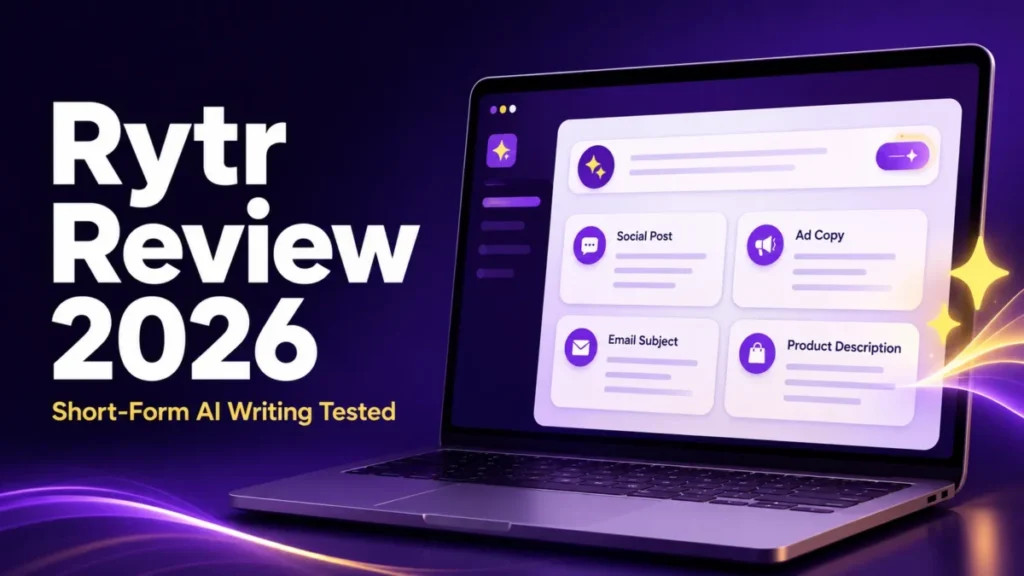
Rytr Review 2026: Is It Worth It for Short-Form Content?
For short-form content, yes, with conditions that a buyer should price in before subscribing.
Rytr sells a template-led editor. A user picks a language, picks a tone or a saved voice, picks a use case, supplies short context, and receives draft variants to edit.
That loop is fast and cheap, and for ad copy, product descriptions, subject lines, captions, and reply drafts it removes the blank-page cost without requiring any prompt craft. The same trade appears in a ChatGPT review: templates reduce prompting effort and cap how far output can be steered.
The conditions are the part most reviews skip. The verified state of the pricing matrix in August 2026 shows Free and Unlimited each restricted to a single language, with plagiarism checking absent from Free entirely. Custom use cases are reserved for Premium, and the character input limit is expressed only as a multiplier of an undisclosed base.
None of those appear in the headline price.
What Rytr Is, and What It Is Not
Rytr is an AI writing assistant and short-form content generator operated by Rytr LLC, which lists a Sheridan, Wyoming mailing address in its Terms of Use and names the United States as the governing country.
Rytr is not a research tool, and no official page claims retrieval, citation, or source grounding.
That distinction separates it cleanly from the answer engines examined in a Perplexity review, where sourcing is the product. Buyers who need traceable claims should treat Rytr as a drafting layer on top of research done elsewhere.
The background on how these systems produce text is covered in the primer on generative AI.
Rytr is also not a workflow automation platform. The Chrome extension puts generation inside other web applications, and a separately metered API puts generation inside another product.
Neither is a no-code automation layer.
Rytr Pros and Cons
The balance sheet below separates what the published material supports from what it leaves exposed. Nothing in the cons column is a complaint about price.
| Pros | Cons |
|---|---|
| Lowest serious entry price in the category, with a Free tier that includes the extension and the full template set | Free and Unlimited are each capped at one language, which is invisible in the headline price |
| Template-led loop removes prompt craft for ad copy, product descriptions, subject lines, and replies | Long-form depth and coherence are the documented weak point across independent evaluations |
| Copyscape-backed plagiarism checking built into paid plans in more than thirty languages | Plagiarism allowances are fixed monthly counts with no published overflow or carryover behaviour |
| Documented API with published price bands and no contract or idle charge | API rate limits, retries, timeouts, and error handling are undocumented |
| Content ownership stated plainly, and the Chrome extension works inside other web applications | Renewal is automatic, the prepaid period is non-refundable by default, and cancellation runs through support email |
Source: official pricing page and official terms of use.
Rytr Pricing and Plan Gates in 2026
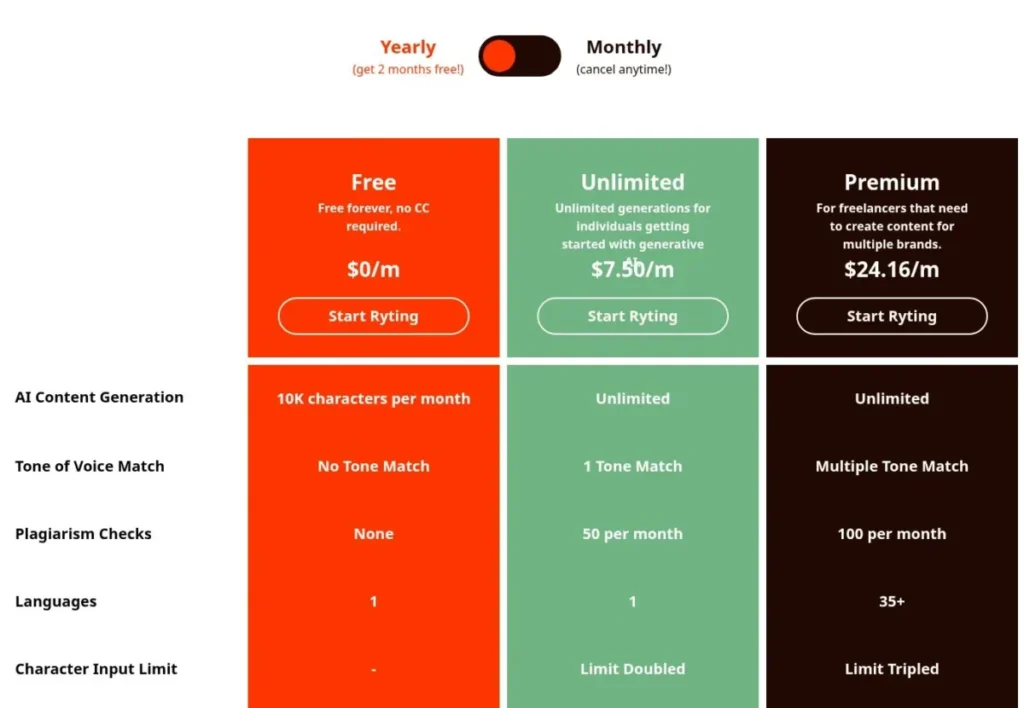
Three plans are live: Free, Unlimited, and Premium. The yearly view of the official pricing page displays $7.50 per month for Unlimited and $24.16 per month for Premium, with Free at zero and described as free forever with no credit card required.
Monthly billing displays $9 for Unlimited and $29 for Premium.
The interesting part is the feature matrix, not the price row. Free ships the Chrome extension, more than forty use cases, and more than twenty preset tones, so it is a real evaluation tier rather than a crippled demo.
What Free does not ship is any plagiarism checking and any saved tone of voice.
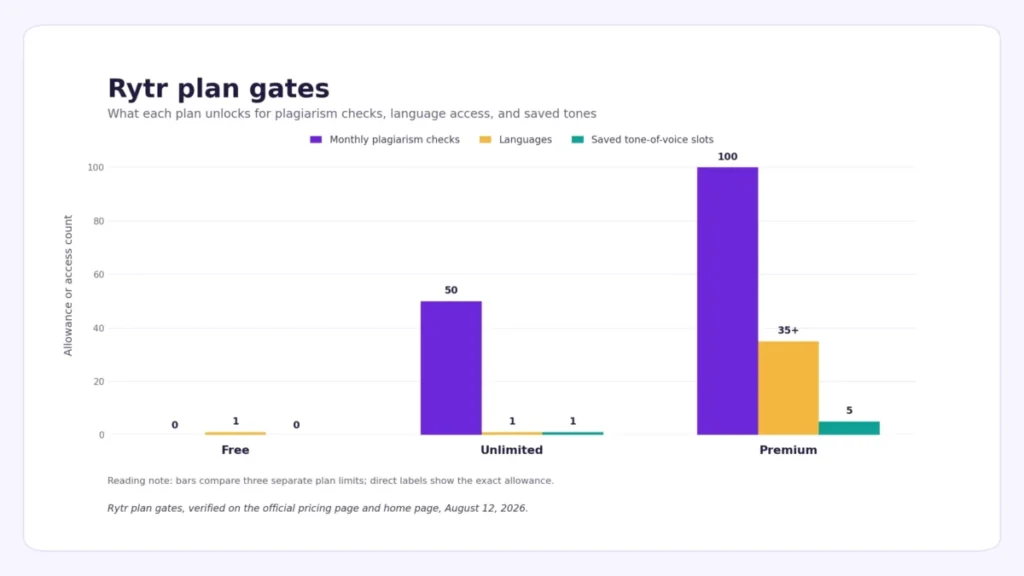
The table below states each gate at its verified value. Where Rytr publishes a multiplier rather than a number, the multiplier is what appears, because the base input limit is not disclosed on any public page.
| Gate | Free | Unlimited | Premium |
|---|---|---|---|
| AI content generation | 10,000 characters per month | Unlimited | Unlimited |
| Tone of voice match | None | 1 tone match | Multiple, listed as 5 on the home page |
| Plagiarism checks | None | 50 per month | 100 per month |
| Languages | 1 | 1 | 35 or more |
| Character input limit | Not listed | Limit doubled | Limit tripled |
Plan gates above were read from the official pricing page and the official home page.
What the Annual Discount Really Saves
The yearly toggle is labelled as two months free, and the pricing FAQ separately states that the annual plan saves twenty percent of the total price with a twelve-month commitment. Those two statements do not describe the same discount.
Twelve monthly payments on Unlimited total $108 on the official pricing page. The displayed annual-effective rate of $7.50 across twelve months totals $90 for Unlimited.
The difference on Unlimited is $18, which is 16.67 percent, exactly two months out of twelve. On Premium, twelve monthly payments total $348 against $289.92 at the displayed annual-effective rate, a difference of $58.08, or 16.69 percent.
The rounded monthly display means the Premium annual invoice is best described by the displayed total rather than by an exact rounded figure.
The gap between sixteen and twenty percent is small in dollars and large in what it signals. A buyer reading twenty percent and committing twelve months is accepting a longer lock-in than the arithmetic supports, and the Terms make that commitment one-directional: fees already paid for the current period are not refunded on cancellation.
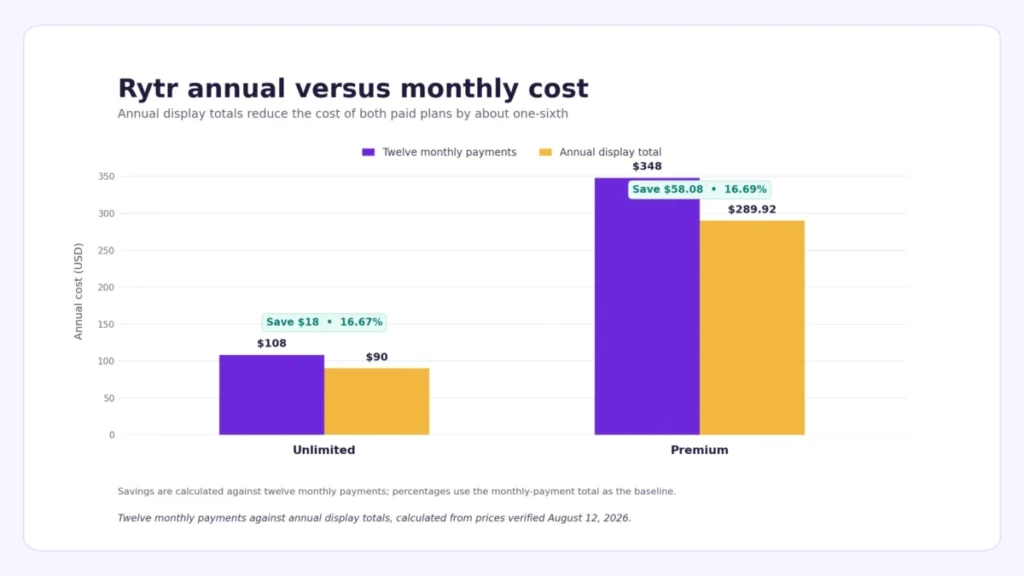
Both totals above were calculated from the rates on the official pricing page.
What Unlimited Does Not Include
The plan name is the most misleading thing on the pricing page.
Unlimited removes the monthly character cap on generation. It does not remove the language restriction, which stays at one.
It does not grant more than one saved tone of voice. It does not open access to custom use cases.
It does not include the API, which is billed separately on usage.
And it does not exempt the account from the Terms, which permit only one account per user and reserve the right to remove data and restrict access where the fair usage policy is violated.
For a solo English-language operator producing captions and product copy, none of those exclusions bite. For a freelancer who picks up one Spanish-language client, the relevant price stops being the Unlimited rate of $7.50 and becomes the Premium rate of $24.16 on the official pricing page. That switch is invisible until the work arrives.
The Plan Decision Tree
The decision is a short chain of yes-or-no questions, and every branch resolves to a plan or an exit.
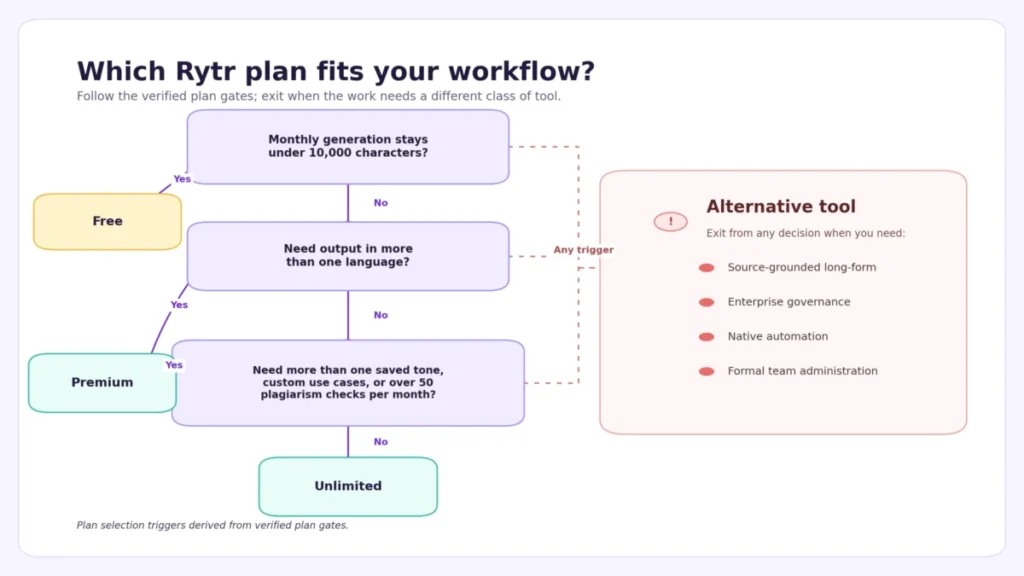
Two exits matter more than the plan choice. Anyone needing research-grounded long-form or governed team administration should leave the tree entirely, because no Rytr plan resolves those requirements.
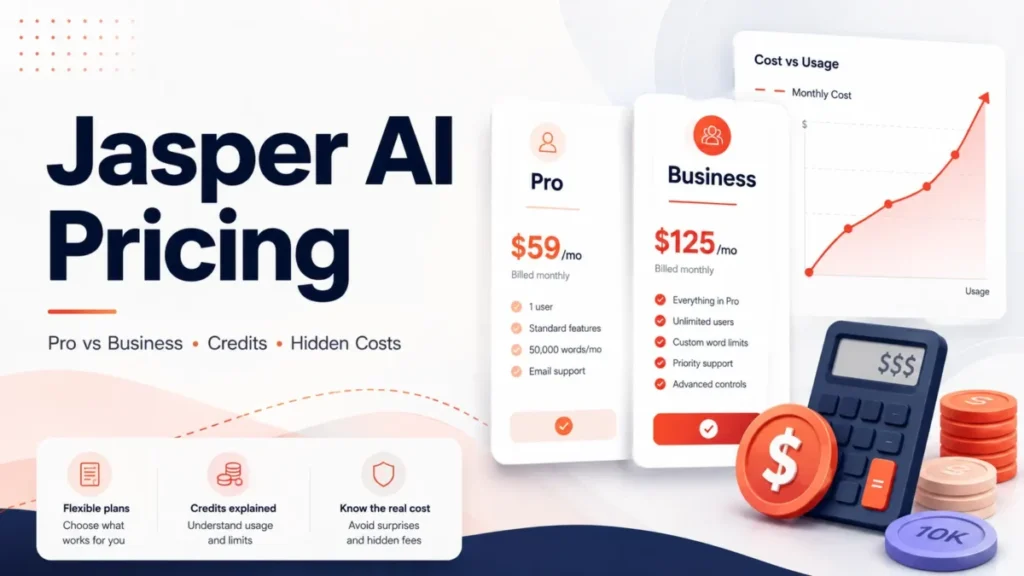
The comparison set for that buyer starts with a Jasper AI review and a Writesonic review, both of which sit at a different price tier for a reason.
Where Rytr’s Own Pages Disagree
Three documentation conflicts are live on the site as of August 2026, and each changes a purchase decision.
Language counts do not reconcile. The pricing matrix lists 35 or more languages for Premium.
The home page plan card for the same Premium plan says 40 or more languages. The API product page advertises content creation in 30 or more languages.
A buyer purchasing Premium for a specific language should confirm support before committing, because the published counts differ by ten across three official pages.
The My Voice product page markets what the pricing page gates. That page invites users to create separate tones for each of their clients, with no plan qualifier anywhere on it.
The pricing page caps Unlimited at one tone match. A freelancer who reads the product page, buys Unlimited, and then tries to build a second client voice has hit a gate the marketing page never mentions.
The pricing page speaks in credits while the plans are sold in characters. Its cancellation answer says monthly subscribers keep access to remaining credits for that month, and its upgrade answer directs users to the credits section of the account.
No plan is priced or described in credits anywhere else on the site. Legacy interface language is the likely explanation, but a buyer cannot verify that publicly.
Source: official pricing page, official product page for My Voice, and official API documentation page.
Plagiarism Checks Are a Monthly Asset Budget
The checker is powered by Copyscape and described as working in more than thirty languages. It is invoked by highlighting text, and results return in seconds.
The allowance is the constraint. Free gets none, Unlimited gets fifty per month, Premium gets one hundred.
Rytr does not publish what happens when an allowance runs out, whether extra checks can be purchased, whether unused checks carry over, or precisely what counts as one check. Given that, the safe model is to treat the allowance as a budget of final assets per month rather than a safety net that runs during drafting.
That budgeting matters most for the audience the plagiarism page courts, which includes students. The page markets the checker without stating that the Free plan includes zero checks.
Anyone arriving from that page expecting free plagiarism checking will not find it.
The practical allocation for a paid user is simple: draft freely, check only what ships, and keep a separately contracted checker if the monthly volume of publishable assets exceeds the allowance.
Source: official product page for the plagiarism checker.
Tone of Voice Match and Custom Use Cases
My Voice analyses a sample of a user’s writing and mirrors that tone during generation, and guidelines can be added to teach brand-specific requirements. The documented workflow is to supply a representative sample, add guidelines, save the voice, apply it, and review the result for consistency.
What is not documented is the minimum viable sample size, how the match is scored, or how consistent it stays across use cases. There is no published accuracy statement, so the only realistic validation is a human brand checklist run against the output.
If the generated draft still sounds machine-like after that brand review, AI writing humanizers are a separate category to compare before the final meaning check.
Custom use cases sit behind the Premium gate in the current matrix. The API documentation adds a detail the marketing pages omit: a custom use case created through the API is submitted for approval rather than activated immediately.
Anyone planning a workflow around a bespoke template should factor in an approval step of unpublished duration.
Extension, Editor, and API Are Three Different Products
Conflating these three is the most common way buyers overpay.
The web editor is where the template loop lives. The Chrome extension, which is available even on Free, carries generation and editing into other web applications so that drafting happens inside the destination field rather than in a separate tab.
It reduces tab switching, but it does not schedule, trigger, or route anything, and treating it as automation is a category error.
The API is a separate commercial product with its own meter. It begins with 10,000 free credits and then charges by character band, with no contract and no charge while unused.
The mechanics are explained in the primer on what an API is.
| Layer | What it does | How it is billed |
|---|---|---|
| Web editor | Template-led generation and inline editing | Included in the plan |
| Chrome extension | Generation and editing inside other web apps | Included, available on Free |
| API | Generation inside another product | Separate usage billing |
Source: official product page for the browser extension and official API documentation page.
Rytr API Pricing and the Production Gaps
The bands published in the official API documentation are unambiguous, and the billing trigger is unusual enough to plan around. The API card is billed for every $25 of accrued usage rather than at a fixed calendar interval.
The generation endpoint accepts one to three variants per request, returns HTML or text, and exposes six creativity levels from none through max. A request supplies either a tone identifier or a voice identifier, never both.
Translation can run in a standard or an AI mode. The API also requires a unique user identifier drawn from the caller’s own database on every generation request, which means an integration cannot be built as an anonymous service call and needs a user mapping from day one.
The documentation stops short of what an engineering review would ask before a production launch. Missing items include rate limits, concurrency ceilings, timeout behaviour, retry guidance, an error schema, whether the free credit allowance renews, and how bands are applied across a billing period.
The endpoints are documented; the operating envelope is not. A prototype is reasonable, and a production dependency needs written answers from the vendor first.
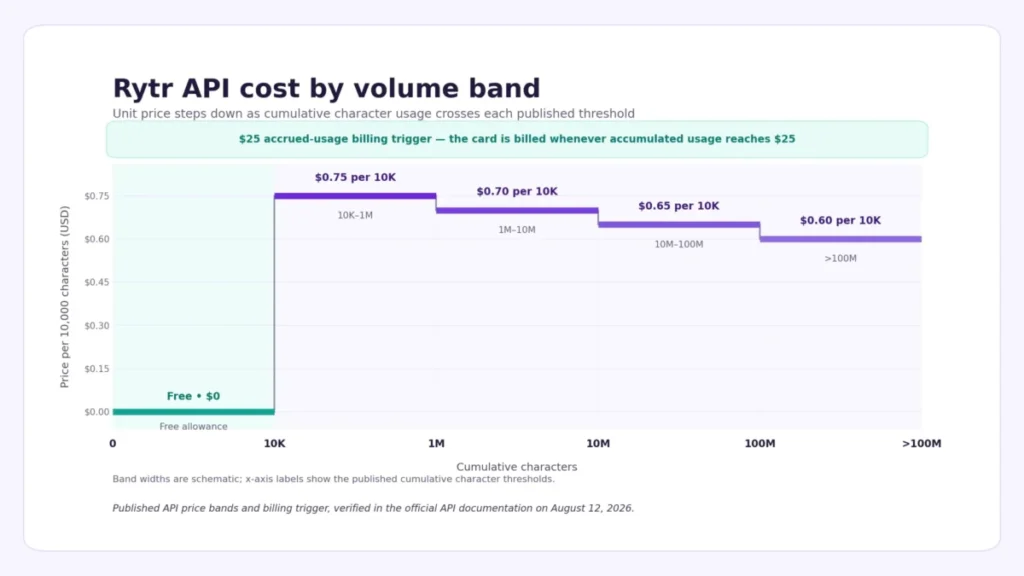
| Volume band | Price per 10,000 characters |
|---|---|
| API, first 10,000 characters | Free |
| API, 10,000 to 1 million | $0.75 |
| API, 1 million to 10 million | $0.70 |
| API, 10 million to 100 million | $0.65 |
| API, above 100 million | $0.60 |
Band pricing and the billing trigger above were read from the official API documentation.
Rytr Limitations: Long-Form Output Is the Documented Weak Point
Independent evaluations converge on the same limitation. DIY AI rated speed and cost efficiency above factual accuracy and described long-form depth as weak.
Blogging Wizard reported repetitive or incoherent results when extending long-form content. Rytr’s own product surface points the same way, since the use cases that carry the most detail are short-form and editing operations rather than full-article production.
That does not make Rytr useless for longer pieces, but it makes one-pass generation the wrong method.
The workflow that survives publication keeps structure under human control.
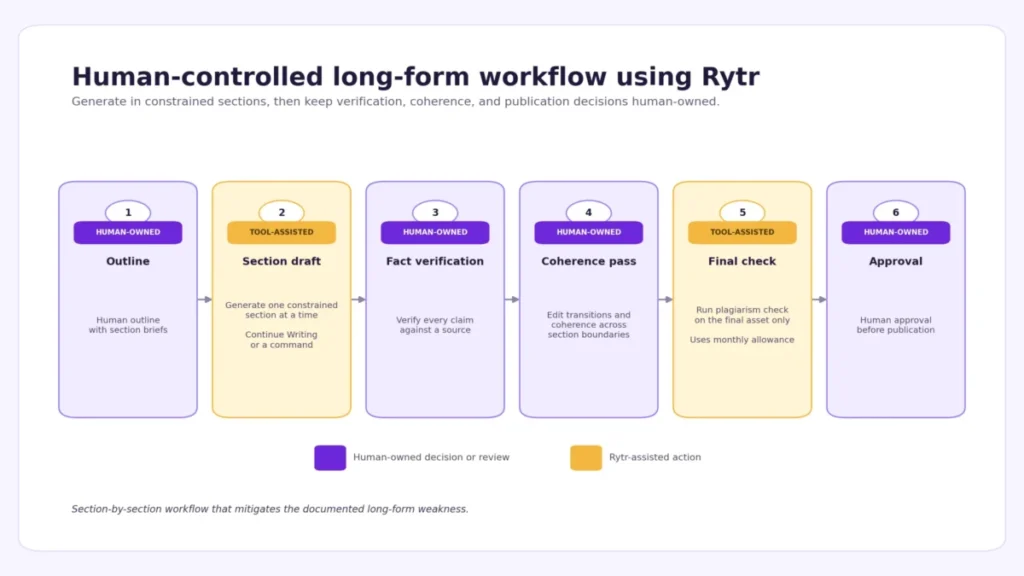
Two things in that diagram are not optional. Fact verification is mandatory because no official page claims source grounding, and the editing features that continue text will extend an unsupported statement into a paragraph of them.
The coherence pass is mandatory because the reported failure mode is repetition across boundaries, which is what section-by-section generation creates. Writers wanting more control over the drafting step will find the fundamentals in the guide to prompt engineering.
Buyer Risk: Renewal, Cancellation, and Refunds
This is where a $9 Unlimited subscription can cost more than its price in attention.
Subscriptions are billed in advance and renew automatically at the end of each period under the same conditions unless cancelled. Cancellation is not described as a settings action.
The Terms state that a subscriber cancels renewal by contacting support by email, and that no refund is issued for fees already paid for the current period, with access continuing until that period ends. Refunds are stated as unavailable under the refund policy, with case-by-case exceptions granted at the company’s sole discretion.
Stack those clauses against an annual purchase. A prepaid twelve-month commitment, non-refundable by default and cancelled through a support ticket, is materially different from a $7.50 Unlimited line item.
Anyone comparing the annual saving against that friction should note that $18 is the entire prize on Unlimited, according to the official pricing page.
Two further clauses belong in a purchase decision. Liability is capped at the lesser of one hundred dollars or the fees paid in the preceding twelve months.
On account termination, the company reserves the right to hold funds for 180 days before release.
The defensible sequence is to start on Free, confirm the output fits the actual work, subscribe monthly, and only move to annual billing after a full month of real use, with a calendar reminder set before the renewal date.
Source: official terms of use.
The Content Licence and Backup Clauses
Rytr’s pricing FAQ states that content created with the tool is owned by the user or the entity using it, subject to the Terms. That is the ownership answer most reviews stop at.
The Terms then grant Rytr a separate licence over content generated and posted to the service: a right to use, modify, publicly perform, publicly display, reproduce, and distribute it, including the right to make it available to other users of the service. Ownership and licence are different concepts, and both are in force at once.
How the licence applies to a specific engagement is a question for a lawyer.
For an agency handling client copy under confidentiality terms, that clause matters more than the price. The same applies to the backup language. Regular backups are performed, but the Terms disclaim any assurance against loss or corruption, and users are instructed to maintain a complete and accurate copy of content in a location independent of the service.
No official bulk export, import, or migration path was found on any public page, so copy and paste is the safe assumption. That is the reason to keep the canonical version of anything valuable outside Rytr.
One more clause deserves attention from the audience that buys cheap AI writers: the content restrictions prohibit automated article spinning and bot-like content generation. A buyer planning high-volume programmatic output should read it alongside the fair usage policy.
Licence and backup clauses above were read from the official terms of use.
Privacy and Governance: Documented Versus Unresolved
The privacy policy is specific about what is collected. Personally identifiable information includes email address, name, address details, and usage and content generation data.
Information may be shared with third-party vendors, companies within the corporate family, business partners for optional services, affiliated referring websites, government bodies on legal request, and an acquiring party in a business transfer. The policy also states that information may be used to develop and display tailored content and advertising, working with third-party vendors.
On security, the policy describes firewalls, encryption technologies, and intrusion detection systems, with retention limited to the purposes set out in the policy. Data may be transferred, stored, or processed in the United States.
GDPR legal bases and rights are described, as are CCPA rights for California residents. Payment card details are not stored by Rytr, with processing handled by Stripe.
What is absent is the entire enterprise procurement layer. No public page documents single sign-on, SCIM provisioning, audit logs, a data processing agreement, data residency options, a zero-retention mode, or a Rytr-specific certification scope.
The parent company’s certification posture, whatever it is, does not transfer to Rytr without product-specific evidence, and none was found.
The consequence is clean: a governance-heavy buyer cannot complete procurement from Rytr’s self-serve material. Until written answers on those six items arrive, the correct assumption is that the tool is not cleared for confidential or regulated content.
Source: official privacy policy.
The FTC Order Status Entering 2026
Reviews written before 2026 describe an active FTC order against Rytr, and that description is out of date.
In September 2024, the FTC brought an administrative complaint as part of its Operation AI Comply sweep, alleging that Rytr’s Testimonial and Review feature let subscribers generate false and deceptive reviews. The resulting consent order barred the company from providing any AI-enabled service generating consumer reviews or testimonials.
On December 22, 2025, the Commission issued an order reopening and setting aside that 2024 final consent order. It determined that the complaint failed to satisfy the legal requirements of the FTC Act and that the order unduly burdened AI innovation under the administration’s AI policy. The vote was 2-0.
Rytr consented to vacating the order and waived its further rights under the Commission’s Rules of Practice.
The buyer-relevant reading is narrow, because the order that constrained Rytr’s product no longer stands.
The underlying law on deceptive reviews still applies to whoever publishes them, so a user generating testimonial-style content carries that exposure directly.
Source: official FTC press release.
Who Should Buy Rytr
Four profiles get real value at this price.
An English-language ecommerce operator producing product descriptions, ad variants, and email blocks at daily volume, where the template set covers the exact artefacts.
A freelance copywriter serving one primary brand voice. Unlimited’s single tone match is sufficient, and the saving against mainstream AI writers is the entire point of the purchase.
A small social team working from separately licensed accounts with human approval before publication, since the one-account-per-user rule makes shared logins a Terms violation.
A developer prototyping embedded generation, provided the application supplies its own rate limiting, budget alerts, and user identifier mapping, and the prototype does not become a production dependency first.
Who Should Skip Rytr
Five profiles should not buy at any price.
Publishers producing source-grounded long-form with citations, because the documented weakness is depth past a few paragraphs and there is no research layer. That points toward the tools compared in the roundup of AI tools for content creation.
Regulated teams needing verified single sign-on, SCIM, audit logs, a data processing agreement, residency control, or product-specific certification, none of which are publicly documented.
Teams expecting the Chrome extension to deliver workflow automation, which it does not do.
Organisations requiring published seat pricing, shared workspaces, roles, and centralised administration. None exist in public material, and the one-account-per-user rule makes an informal workaround a Terms problem.
Buyers unwilling to accept automatic renewal, an email-based cancellation route, and a prepaid period that is non-refundable by default.
Rytr Alternatives and When to Switch
The switch triggers are specific.
Research-heavy long-form with citations points toward an answer engine or a long-form platform rather than a template editor. Brand governance across multiple client voices at agency scale points toward a higher tier, where the cost of entry is set out in the Jasper AI pricing guide.
Workflow-first content operations, where generation is a step inside a larger pipeline, point toward the platform assessed in the Copy.ai review.
The head-to-head between the two best-known paid alternatives is set out in the Jasper and Copy.ai comparison.
Buyers weighing an AI search platform instead should read the Copy.ai and Writesonic comparison.
General-purpose assistants are the other alternative, and for many solo buyers they are the real competitor. The relevant assessments are the Claude review and the Gemini review.
They require prompting effort that Rytr’s templates remove, and in exchange impose no language gate and no single-tone ceiling.
What Rytr Does Not Publish
Seven gaps sit between the public material and a complete purchase decision. Treat each as an open question.
The base character input limit is undisclosed, so the doubled and tripled multipliers on the paid plans describe a ratio to an unknown number.
Behaviour at the ceiling is undocumented on both meters. Nothing states whether the Free cap produces a warning or a hard block, when it resets, or whether unused plagiarism checks carry over.
API operating limits are absent. Rate limits, concurrency, timeouts, retry guidance, the error schema, and whether the free credit allowance renews are all missing from the documentation.
Bulk export, import, and migration support could not be found on any official page, which is why the backup clause carries so much weight.
A first-party mobile application is unconfirmed. The Terms reference a mobile app in their opening scope, and no application is linked from the site, so no claim is made in either direction.
Priority support is a plan gate with no published response time, escalation path, or service commitment attached.
Rytr-specific enterprise controls, including single sign-on, SCIM, audit logs, a data processing agreement, residency, and certification scope, are not documented publicly and must be requested in writing.
Methodology: How This Rytr Review Was Built
This review is documentation-based, and it ranks evidence in a fixed order. Official Rytr pricing, product, and policy pages come first, followed by the public API documentation, then the current regulatory record, then published third-party evaluations.
Every price, allowance, gate, and policy statement traces to one of those sources and was read from it on August 12, 2026 rather than carried forward from earlier coverage.
The criteria are the ones that decide a purchase at this price point. They are what each plan gates, what annual billing costs against monthly, what the contract says about renewal, refunds, licensing, and backups, what the privacy policy documents, and where the product stops being suitable.
Where official pages disagree, the disagreement is reported and the more conservative figure carries into the buyer guidance. Claims about output quality are attributed to the independent evaluations that produced them.
Final Verdict
Rytr in 2026 is a well-priced tool with an honest core and a marketing surface that runs ahead of its gates.
The decision chain runs like this. If monthly output stays under ten thousand characters, Free answers the question and costs nothing.
If output exceeds that in one language, Unlimited is correct at $9 monthly on the official pricing page, and annual billing saves $18 on that plan. That saving is worth taking only after a month of real use has confirmed the fit. If a second language, a second saved voice, a custom use case, or a fifty-first plagiarism check enters the workflow, Premium becomes correct and the effective price roughly triples.
If research-grounded long-form, enterprise governance, native automation, or formal team administration enters the requirement list, no Rytr plan resolves it and the correct move is a different tool.
The risks that deserve pricing in are not about output quality. They are the automatic renewal on a non-refundable prepaid period and the cancellation route that runs through support email. They are also the content licence that sits alongside user ownership, the backup disclaimer that makes independent copies a requirement, and the absence of any documented enterprise control layer.
A solo operator can accept all five. An agency handling confidential client work cannot accept them without written answers first.
Each stage of that chain rests on a documented capability read from official documentation, and that is what makes the operating consequence predictable. Because the language gate and the plagiarism allowance are published plan gates, a buyer can price them before subscribing rather than discovering them mid-project.
The strongest advantage is cost per short-form draft, and the largest limitation is long-form coherence. Rytr is a poor fit for a team that needs governance, and buyers in that position should skip it and compare higher tiers instead.
So the recommendation is narrow. Choose Rytr for exactly the job it advertises, which is fast short-form drafting for one person, and avoid it for everything past that boundary.
Frequently Asked Questions
Is Rytr worth it in 2026?
For frequent short-form drafting by one person in one language, yes. Unlimited at $9 monthly on the official pricing page is the lowest serious price in the category.
For source-grounded long-form, multi-seat teams, or regulated content, no plan resolves the requirement.
Is the Rytr free plan genuinely free?
Yes, with a cap. The Free plan costs nothing, requires no credit card, and includes more than forty use cases, more than twenty preset tones, and the Chrome extension.
It is limited to 10,000 generated characters per month, one language, and zero plagiarism checks.
How much does Rytr cost?
Unlimited is $9 per month billed monthly or $7.50 per month on the yearly display, and Premium is $29 per month billed monthly or $24.16 per month, according to the official pricing page.
The API is billed separately on usage.
What is the difference between Unlimited and Premium?
Both remove the character cap. Premium adds output in 35 or more languages, multiple saved tones of voice instead of one, custom use cases, one hundred plagiarism checks instead of fifty, and a tripled rather than doubled character input limit.
Is Rytr good for long-form content?
It is the documented weak point. Independent evaluations report repetitive or incoherent output when extending long-form passages and rate depth below speed and cost.
Long-form work needs a human outline, section-by-section generation, fact verification, and a coherence pass.
Does Rytr include plagiarism checking?
On paid plans only. The checker is powered by Copyscape and covers more than thirty languages.
Free includes none, Unlimited includes fifty checks per month, and Premium includes one hundred. Overflow behaviour and carryover are not published.
Can Rytr write in multiple languages?
Only on Premium. Free and Unlimited are each limited to one language.
Published counts differ across official pages, listing 35 or more on the pricing table, 40 or more on the home page plan card, and 30 or more on the API page, so the specific language should be confirmed before purchase.
Does Rytr have an API?
Yes, and it is a separate commercial product. The API starts with 10,000 free credits, then charges $0.75 per 10,000 characters up to one million, dropping to $0.60 above one hundred million, as published in the official API documentation.
The API card is billed for every $25 of accrued usage, and each request accepts a maximum of three variants.
Is Rytr safe for client content?
The privacy policy documents firewalls, encryption, intrusion detection, and GDPR and CCPA rights, and states that usage and content generation data are collected. It does not document single sign-on, SCIM, audit logs, a data processing agreement, residency options, or a Rytr-specific certification scope.
Confidential client work needs written answers on those points first.
How is a Rytr subscription cancelled?
The Terms of Use state that subscription renewal is cancelled by contacting support by email. Access continues to the end of the current period, and fees already paid for that period are not refunded, with exceptions granted only at the company’s discretion.
Because that route is slower than a settings toggle, the plan decision is best made before the renewal date: choose Free, Unlimited, Premium, or a more capable alternative based on language, voice, plagiarism, long-form, automation, and governance requirements.